Newest Audio Codecs: Unlocking the Future of Sound
Newest Audio CodecsNewest Audio Codecs
As an audio expert, I’m excited to delve into the world of the newest audio codecs, which are transforming how we experience sound. These cutting-edge technologies have the power to shape the audio landscape, and I’m here to share my insights and experiences.
Audio Compression Techniques
Let’s start by discussing the backbone of these newest audio codecs – audio compression techniques. Imagine audio compression as the art of creating a perfectly crafted miniature sculpture of a grand masterpiece. In the world of audio codecs, this process involves reducing the size of audio files while preserving exceptional sound quality.
One of the most prominent techniques used in these codecs is Perceptual Audio Coding, which is similar to how our brain focuses on essential details in a complex image. Perceptual audio coding identifies and retains the most crucial elements of an audio signal while discarding less perceptible information. This allows for significant file size reduction without compromising the listening experience.
Another fascinating approach is Audio Spatial Coding, which can be likened to creating a 3D model of a real-world object. Audio spatial coding focuses on reproducing sound in a three-dimensional space, offering a more immersive listening experience. It’s often used in applications like virtual reality and gaming to provide users with an unparalleled sense of presence.
These techniques are pivotal in the development of the newest audio codecs. By employing innovative compression methods, these codecs can deliver audio that is not only compact but also stunningly clear, making them ideal for a wide range of applications, from streaming high-fidelity music to enhancing the realism of virtual environments.
Bitrate in Audio Streaming
Another crucial aspect of the newest audio codecs is the management of bitrate, which plays a pivotal role in delivering high-quality audio during streaming. Picture bitrate as the flow rate of a pristine river. In the context of audio streaming, it represents the rate at which audio data is transmitted from the source to your device. The higher the bitrate, the more data can be transmitted per second, resulting in superior audio quality.
Consider a scenario where you’re streaming your favorite song online. If the codec employs a low bitrate, it’s akin to a narrow river with a sluggish flow. You receive the audio data slowly, leading to a compromised listening experience. In contrast, a high bitrate is like a wide river with a swift current, delivering an abundance of data per second and ensuring that every note and nuance reaches your ears in exceptional detail.
The newest audio codecs excel in optimizing bitrate dynamically. It’s as if they have a smart water flow controller, adjusting the flow rate based on your internet connection’s capabilities. This dynamic management ensures that you enjoy a seamless audio streaming experience, even on limited bandwidth, without sacrificing audio quality.
Understanding Audio Masking in Psychoacoustics
Now, let’s shift our focus to the intriguing world of audio masking in psychoacoustics. This area of study is like deciphering the mysteries of the mind’s inner workings when it comes to sound perception. Understanding audio masking is fundamental for the newest audio codecs as it helps them allocate resources effectively.
Psychoacoustic Principles
Psychoacoustic principles are the cornerstone of audio masking. Think of it as understanding how our brain prioritizes and filters sounds, much like how we pay attention to a conversation in a noisy room. Auditory masking is a central concept in this field, similar to how a louder conversation can drown out a quieter one in a crowded space. This phenomenon occurs when a louder sound, known as the “masker,” makes it challenging to perceive a quieter sound, known as the “masked” sound.
Frequency masking is another key concept. It’s akin to trying to distinguish one instrument in a symphony when they are all playing together. Certain frequencies can mask or conceal others, making it crucial to allocate resources wisely when encoding audio. The newest audio codecs leverage psychoacoustic principles to ensure that the most critical audio information remains perceptible while optimizing file size by discarding less crucial data.
Audio Compression Algorithms
To truly grasp the capabilities of the newest audio codecs, we must delve into the intricate world of audio compression algorithms. These algorithms are like the secret recipes behind our favorite dishes, combining mathematical prowess and encoding techniques to achieve the perfect balance of quality and file size reduction.
One such algorithm is the Modified Discrete Cosine Transform (MDCT), which breaks down audio signals into smaller, manageable components, much like solving a complex puzzle piece by piece. The MDCT is the foundation of codecs like AAC and Opus, known for their exceptional audio quality and efficiency.
Additionally, variable bitrate (VBR) encoding is a crucial technique, like adjusting your car’s speed to navigate varying road conditions. VBR encoding allocates more bits to complex audio segments and fewer bits to simpler ones, ensuring consistent audio quality across the entire file. This approach is instrumental in preserving high-quality audio, even in the presence of psychoacoustic masking effects.
In conclusion, the newest audio codecs are a testament to the remarkable progress in the field of audio technology. With advanced compression techniques, dynamic bitrate management, and a deep understanding of psychoacoustic principles, these codecs are shaping the future of how we experience sound. Whether you’re a music enthusiast, a gamer, or a professional in the audio industry, these codecs are set to provide you with audio experiences that are nothing short of extraordinary. So, as we journey into this exciting soundscape, remember that the newest audio codecs are your gateway to a world of unparalleled sonic delight.
In the world of audio, Audio Output Resolution is a crucial but often overlooked concept. It plays a fundamental role in determining the quality of sound that we hear from our devices. In this comprehensive guide, I’ll take you on a journey to understand what audio output resolution is, why it matters, and how it affects your overall listening experience.
Explaining Audio Output Resolution
Let’s begin by unraveling the term “Audio Output Resolution.” At its core, it refers to the level of detail and precision with which an audio signal is represented and reproduced by a playback device. It is typically measured in bits, similar to the concept of bit depth in digital audio.
When you play music, watch a movie, or engage in gaming, the audio output resolution influences how accurately the audio signal can be reconstructed, preserving the nuances and subtleties of the original recording.
How Does Audio Output Resolution Affect Sound Quality?
The impact of Audio Output Resolution on sound quality is significant. Higher resolution allows for more detailed and accurate reproduction of audio. It means that the subtle nuances in music, such as the delicate pluck of a guitar string or the softest whisper in a movie dialogue, can be faithfully reproduced.
Choosing the Right Audio Output Resolution
When it comes to choosing the right Audio Output Resolution for your needs, several factors come into play. Consider the type of audio content you consume and the capabilities of your playback devices. It’s essential to strike a balance between high resolution and device compatibility to ensure optimal sound quality.
Audio Output Resolution vs. Bit Depth
Audio Output Resolution is closely related to another important concept, which is bit depth. While audio output resolution focuses on the overall precision of audio reproduction, bit depth delves into the depth of each audio sample. Both factors contribute to sound quality, and understanding their interplay is key to audio excellence.
Audio Output Resolution and Sampling Rate
The sampling rate is another critical element tied to Audio Output Resolution. Together, they determine the accuracy of audio playback. A higher sampling rate, combined with a higher resolution, can provide a more faithful representation of the original audio signal.
Does Audio Output Resolution Impact File Size?
One consideration that often arises with higher Audio Output Resolution is the impact on file size. It’s true that audio files with greater resolution can be larger in size. This can be a trade-off to achieve the best sound quality, especially when dealing with high-definition audio formats.
Audio Output Resolution in High-Definition Audio
High-definition audio formats demand higher Audio Output Resolution to deliver the full audio experience. Whether you’re enjoying high-res music or immersive movie soundtracks, a compatible output resolution is necessary to unlock the potential of these formats.
Audio Output Resolution for Home Theater Systems
For home theater enthusiasts, Audio Output Resolution holds immense importance. It’s a key factor in recreating cinematic audio experiences at home. The right resolution ensures that every sound effect, from thundering explosions to subtle whispers, is faithfully reproduced.
The Role of Audio Output Resolution in Gaming
Gamers understand the significance of Audio Output Resolution all too well. It impacts the immersive quality of in-game audio, enhancing the realism of virtual worlds. Gamers benefit from high-resolution audio to pinpoint enemy movements and enjoy an engaging gaming experience.
Audio Output Resolution for Audiophiles
For audiophiles, the pursuit of audio perfection is a lifelong journey. Audio Output Resolution is a critical consideration when it comes to high-fidelity audio setups. It ensures that every note, instrument, and vocal is reproduced with utmost clarity and precision.
Benefits of Upgrading Audio Output Resolution
Finally, let’s explore the benefits of upgrading your Audio Output Resolution. Upgrading can lead to a more immersive, lifelike audio experience. Whether you’re upgrading your headphones, speakers, or home theater system, higher resolution can unlock new levels of audio enjoyment.
In today’s digital age, where music and audio are an integral part of our lives, it’s crucial to ensure that our MP3 files sound their best. Whether you’re a casual listener or an audiophile seeking perfection, this comprehensive guide is here to help you master the art of enhancing MP3 sound quality. I’m an audio expert, and I’ll take you on a journey through various techniques and strategies to elevate your MP3 listening experience.
The Importance of Quality MP3 Sound
Before we dive into the nitty-gritty details of improving MP3 sound, let’s first understand why it matters. MP3 is one of the most popular audio formats, known for its compatibility and convenience. However, the sound quality of MP3 files can vary widely, depending on factors like compression, source material, and encoding settings.
Factors Affecting MP3 Sound Quality
To achieve the best MP3 sound quality, you need to consider several key factors:
Bitrate
The bitrate determines the amount of data used to represent audio. Higher bitrates generally result in better sound quality but larger file sizes.
Compression
MP3 files are compressed to reduce their size. Understanding the balance between compression and quality is essential.
Source Material
The quality of the original audio source greatly influences the final MP3 sound. Starting with high-quality recordings is crucial.
Encoding Settings
Adjusting parameters during encoding, such as sample rate and stereo mode, can impact sound quality significantly.
Techniques for Enhancing MP3 Sound Quality
Now that we’ve established the importance of quality MP3 sound, let’s explore various techniques and strategies to enhance it. Whether you’re dealing with older low-bitrate MP3s or you want to optimize your new downloads, these methods will help you achieve the best possible sound.
1. Bitrate Selection
The choice of bitrate plays a fundamental role in MP3 sound quality. Higher bitrates, such as 320 kbps, preserve more audio details, resulting in clearer and more immersive sound. However, they also lead to larger file sizes, so you should strike a balance based on your storage capacity and listening preferences.
2. Source Material Enhancement
Improving MP3 sound quality starts with the source material. If you have control over the recording process, use high-quality microphones, eliminate background noise, and ensure proper mixing and mastering techniques are employed. Starting with a pristine source will yield better MP3s.
3. Proper Encoding Settings
When converting audio to MP3 format, it’s crucial to choose the right encoding settings. Opt for a higher sample rate (e.g., 44.1 kHz or 48 kHz) and stereo mode for richer sound. Experiment with different settings to find the sweet spot for your audio.
4. Noise Reduction
If your MP3s suffer from background noise or artifacts, consider using noise reduction software. This can help eliminate unwanted hisses, clicks, and pops, resulting in a cleaner listening experience.
5. Equalization (EQ)
Using an equalizer allows you to adjust the balance of frequencies in your MP3s. You can enhance bass, boost treble, or make other custom adjustments to tailor the sound to your preferences.
6. Volume Normalization
Normalization ensures consistent volume levels across your MP3 library. This prevents sudden volume jumps between tracks, providing a more enjoyable listening experience.
7. High-Quality Playback Devices
Investing in high-quality headphones or speakers can make a significant difference in how you perceive MP3 sound. Look for devices with accurate sound reproduction and comfortable fit for extended listening sessions.
8. Room Acoustics
If you primarily listen to MP3s in a room, consider optimizing the acoustics. Simple changes like adding acoustic panels or rearranging furniture can reduce reflections and enhance sound quality.
9. Lossless Formats
Consider archiving your favorite music in lossless formats like FLAC or WAV for the utmost audio fidelity. While these formats result in larger file sizes, they preserve audio quality without compression.
10. Regular Maintenance
Maintaining your MP3 library is essential. Periodically check for corrupted files, update metadata, and back up your collection to prevent data loss.
Final Words
Enhancing the sound quality of your MP3 files is a rewarding endeavor for any music lover. By understanding the factors influencing sound quality and employing the right techniques, you can elevate your MP3 listening experience to new heights. Whether you’re a casual listener or an audiophile, these strategies will help you make the most of your digital music collection. Remember, the quest for perfect sound is a journey, so enjoy every moment of it. Happy listening!
Why is important bitrate in audio quality?Why is important bitrate in audio quality?
Bitrate
Bitrate is a crucial factor when it comes to audio quality. It refers to the amount of data processed per unit of time in an audio file.
Audio Quality
Audio quality is directly influenced by the bitrate of an audio file. Higher bitrates result in better sound reproduction and a more accurate representation of the original sound.
Sound Reproduction
The level of detail and accuracy in sound reproduction is determined by the bitrate of an audio file. A higher bitrate allows for more information to be captured and preserved, resulting in a clearer and more immersive listening experience.
Data Compression
Bitrate and data compression go hand in hand. Lower bitrates often involve more aggressive compression techniques, which can lead to a loss of audio data and a reduction in audio quality.
File Size
The bitrate of an audio file directly affects its file size. Higher bitrates require more data to be stored, resulting in larger file sizes. It’s important to strike a balance between audio quality and file size, especially when considering storage limitations or bandwidth constraints.
Streaming Services
Streaming services rely on efficient compression techniques to deliver audio files over the internet. Bitrate plays a crucial role in determining the streaming quality. Higher bitrates result in better audio fidelity but require more bandwidth.
Internet Bandwidth
The choice of bitrate for streaming or downloading audio files depends on the available internet bandwidth. Higher bitrates require more bandwidth to ensure a smooth streaming experience without interruptions or buffering.
Audio Formats
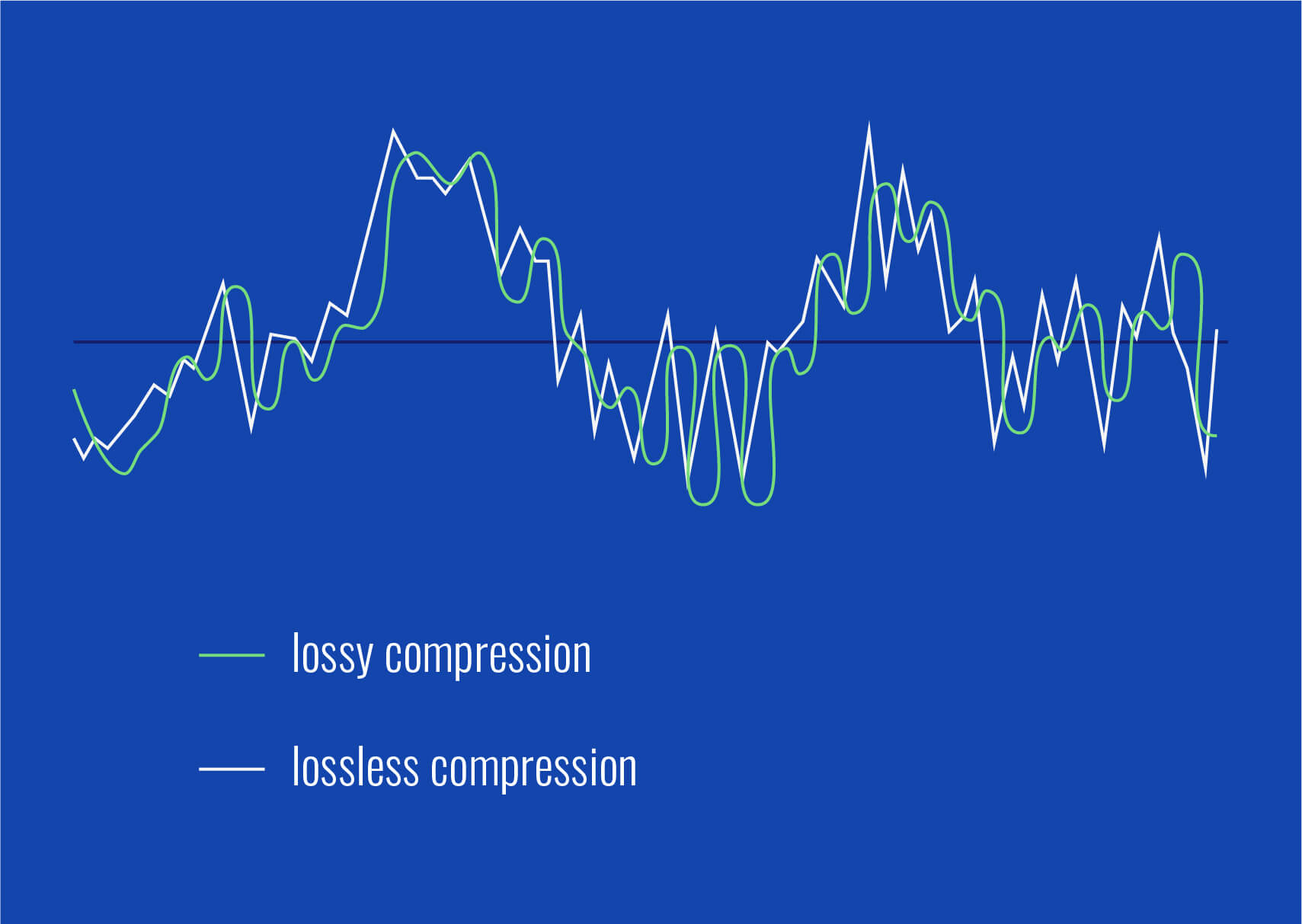
Different audio formats support varying levels of bitrate and, consequently, audio quality. Lossless formats like FLAC and WAV offer the highest audio fidelity as they preserve all the original data. Lossy formats like MP3 and AAC sacrifice some audio data to reduce file size.
Lossless
Lossless audio formats preserve all the original data, resulting in the highest audio fidelity. They are ideal for audiophiles and professionals who require the utmost accuracy in sound reproduction.
Lossy
Lossy audio formats use compression algorithms to reduce file size by sacrificing some audio data. They offer a good balance between audio quality and file size, making them suitable for everyday listening and storage purposes.
Listening Environment
The listening environment can significantly impact the perception of audio quality. Factors such as background noise, acoustics, and speaker quality can affect our ability to discern subtle differences in bitrate.
Background Noise
In a noisy environment, a lower bitrate may be sufficient as the background noise masks some of the audio details. However, in a quiet and controlled environment, a higher bitrate becomes more noticeable, providing a more immersive and enjoyable listening experience.
Acoustics
The acoustics of a room or space can influence the way audio is perceived. Proper acoustic treatment can enhance the overall audio quality, allowing for better sound reproduction and minimizing unwanted reflections or distortions.
Speaker Quality
The quality of speakers or headphones used for audio playback also plays a significant role in the overall audio experience. Higher quality speakers can better reproduce the nuances and details captured in high-bitrate audio files.
Music
Bitrate is particularly important when it comes to music. Higher bitrates allow for a more accurate representation of the original recording, resulting in a richer and more immersive musical experience.
Podcasts
Podcasts, like music, can greatly benefit from higher bitrates. Clearer and more detailed audio reproduction enhances the listening experience, making it easier to follow conversations and understand the content being discussed.
Audio Content
Whether it’s music, podcasts, audiobooks, or other forms of audio content, bitrate plays a crucial role in delivering a high-quality listening experience. Choosing the right bitrate ensures that the audio is faithfully reproduced and enjoyed to its fullest potential.
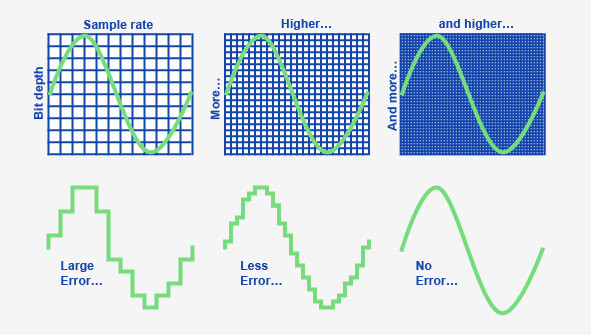
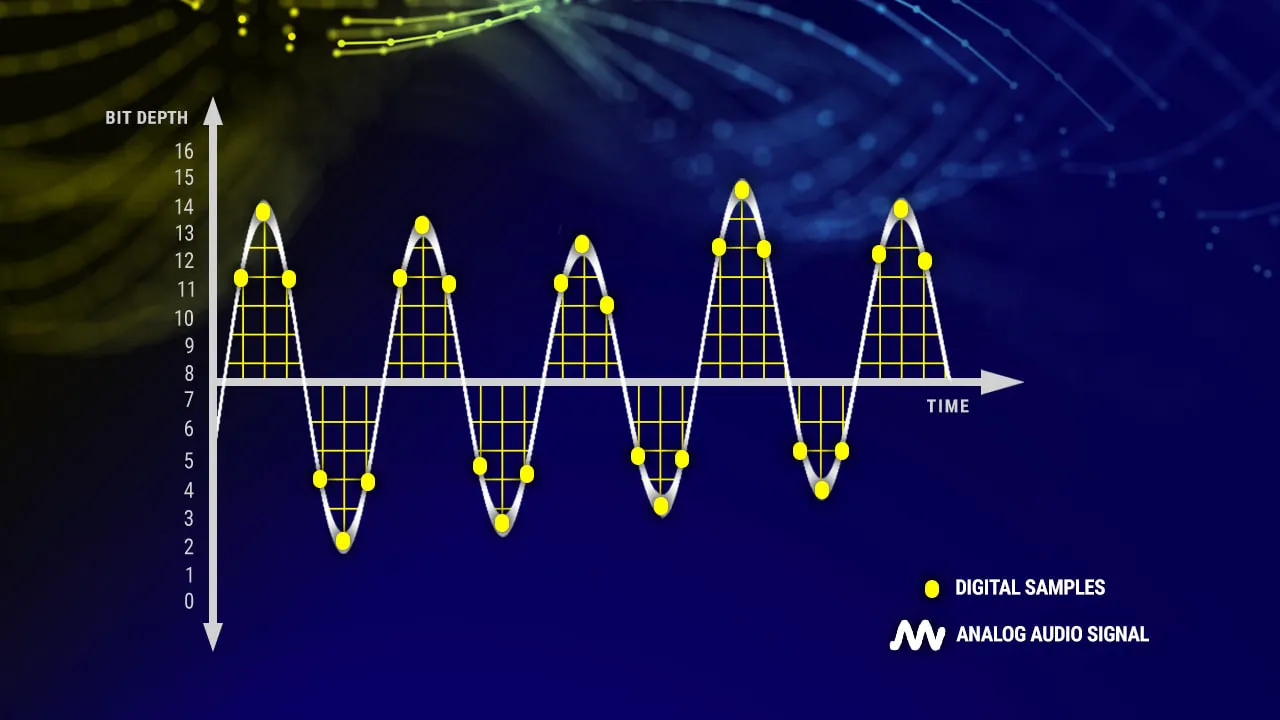
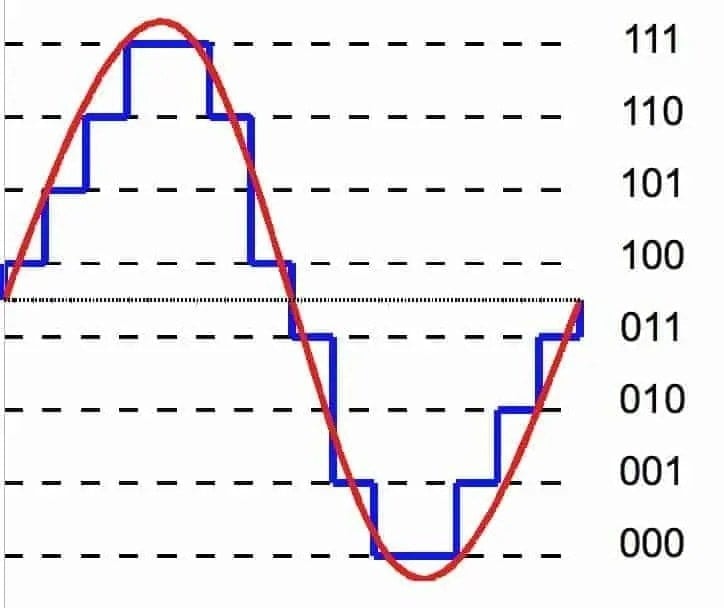
Audio bit depth refers to the number of bits used to represent the amplitude of an audio signal at each sample point. In simpler terms, it determines the dynamic range of digital audio. A higher bit depth allows for a more detailed representation of sound, capturing subtle nuances and minimizing quantization noise.
Imagine bit depth as a measurement of how finely audio is divided into individual steps. For instance, a 16-bit audio recording has 65,536 possible amplitude levels, while a 24-bit recording offers a staggering 16,777,216 levels. This increased granularity results in smoother, more accurate sound reproduction.
Understanding Bit Depth in Audio
To grasp the significance of bit depth, consider it as the shades of color in a painting. A higher bit depth provides a broader palette of colors, allowing for a more accurate depiction of the original image. Similarly, in audio, a greater bit depth captures a wider range of volume levels, preserving the subtleties of a musical performance or the nuances of a voice.
In practical terms, when you listen to music or a podcast, a higher bit depth ensures that you can hear the softest whispers and the loudest drum hits without distortion or loss of detail. It’s like having a more precise lens to view the sonic landscape.
Audio Resolution and Bit Depth
Bit depth and audio resolution are closely linked. Audio resolution refers to the level of detail and accuracy in an audio recording. Bit depth plays a pivotal role in determining this resolution. Think of it as the difference between watching a video in standard definition versus high definition. A higher bit depth offers a more lifelike and faithful representation of sound.
When recording or listening to music, you’ll often encounter terms like “16-bit” or “24-bit.” These numbers indicate the bit depth of the audio, with 24-bit audio being the gold standard for high-quality recordings. It’s akin to having a sharper, more detailed image in photography.
Now, let’s explore more facets of bit depth in audio.
Importance of Bit Depth in Sound
Bit depth is paramount in the world of sound because it directly impacts audio fidelity and the ability to reproduce music or voice accurately. It ensures that every subtle nuance, from the softest piano notes to the powerful guitar riffs, is faithfully captured and played back with precision.
Consider this: when recording a classical piano performance, the pianist’s delicate touch on the keys is as vital as the thunderous crescendos. A higher bit depth preserves the intricate dynamics, making you feel as if you are sitting in the concert hall, immersed in the music.
Bit depth is the foundation of audio quality, and understanding its role can help you appreciate the importance of using higher bit depths in audio production and playback.
How Bit Depth Affects Audio Quality
The impact of bit depth on audio quality is akin to the role of paint quality in a masterpiece. Just as a skilled artist requires high-quality pigments for a vivid painting, audio engineers rely on a greater bit depth for lifelike and rich audio recordings.
A lower bit depth might result in noticeable “stepping” or quantization noise, especially in quiet passages of a recording. This noise can be distracting and diminish the overall listening experience. On the other hand, a higher bit depth provides a smooth, natural curve to the audio waveform, minimizing these artifacts and delivering pristine sound.
Consider your favorite music track—the artist’s emotions, the resonance of instruments, and the atmosphere of the recording venue. All these subtleties are better preserved and conveyed through higher bit depth, elevating your listening experience to a new level.
Bit Depth in Digital Audio
In the digital realm, bit depth plays a pivotal role in the accuracy of audio representation. Think of it as pixels in a high-resolution photograph; more pixels mean finer details. Similarly, a higher bit depth translates to a more accurate depiction of sound.
In applications like digital audio workstations (DAWs) and music players, you often have the option to choose between different bit depths for your audio projects. Opting for a higher bit depth can lead to more professional-sounding results, particularly in the realms of music production, film scoring, and sound design.
Bit Depth vs. Sample Rate
While bit depth and sample rate are both critical aspects of digital audio, they serve different purposes. Bit depth determines the accuracy of amplitude representation, while sample rate governs how often the audio waveform is sampled per second.
Picture bit depth as the color depth in a photograph and sample rate as the frames per second in a video. A higher bit depth allows for greater tonal accuracy, while a higher sample rate captures more audio snapshots per second, preserving high-frequency content.
In many scenarios, a balanced approach between bit depth and sample rate is essential to achieve optimal audio quality. The synergy between these two factors ensures that audio recordings faithfully capture the richness and subtleties of the original source.
Bit Depth in Music Production
For music producers, bit depth is a critical consideration when working on audio projects. It influences the quality of sound recordings and the ability to manipulate audio during the production process.
When mixing and mastering music, a higher bit depth provides ample headroom for processing audio without introducing artifacts or degrading quality. This allows producers to apply effects, equalization, and compression with greater precision.
Additionally, when releasing music, opting for a higher bit depth ensures that your audience experiences the full depth and nuance of your compositions, whether they’re listening through high-end headphones or a powerful sound system.
16-Bit vs. 24-Bit Audio
The choice between 16-bit and 24-bit audio often arises when considering audio quality and storage requirements. A 16-bit audio file occupies less space compared to a 24-bit file, but it also has limitations in capturing subtle audio details.
16-bit audio is akin to a compact camera with limited resolution, suitable for casual snapshots. In contrast, 24-bit audio offers the quality of a professional DSLR camera, capturing a broader dynamic range and preserving the finer nuances of sound.
When deciding between the two, it’s essential to consider the specific use case. For audiophiles, professional audio production, and high-end sound systems, 24-bit audio is the preferred choice for its ability to deliver an immersive and faithful listening experience.
Bit Depth for Audio Recording
In the realm of audio recording, selecting the appropriate bit depth is a pivotal decision. It directly affects the quality and flexibility of the recorded material, whether you’re tracking vocals, instruments, or ambient sounds.
Recording at a higher bit depth, such as 24-bit, provides audio engineers with a safety net during the recording process. It allows them to capture a wide dynamic range without the risk of clipping or distortion. This is particularly valuable when dealing with unpredictable elements in live recordings or capturing the subtleties of acoustic instruments.
In essence, bit depth choice during audio recording is like choosing the canvas size for a painting. A larger canvas provides more room for creativity and detail, and a higher bit depth offers greater sonic canvas for audio professionals.
Final Words
In the realm of audio, bit depth serves as the bedrock of quality and fidelity. It determines how faithfully sound is captured, preserved, and reproduced. Understanding the importance of bit depth allows you to appreciate the nuances in your favorite music, the clarity in podcasts, and the immersive soundscapes in movies.
Whether you’re an aspiring musician, an audio engineer, or simply a passionate listener, recognizing the role of bit depth in audio enriches your experience. It’s the difference between seeing the world in black and white and experiencing it in full color.
So, the next time you enjoy your favorite song or immerse yourself in a cinematic adventure, remember that bit depth is the silent hero behind the scenes, ensuring that every sonic detail reaches your ears with precision and clarity.
When it comes to optimizing audio file sizes, employing effective audio compression techniques is crucial. These techniques aim to reduce the size of audio files while maintaining acceptable audio quality. Here are some key audio compression methods:
Lossless Compression: Lossless compression algorithms, such as FLAC (Free Lossless Audio Codec), reduce file sizes without compromising audio quality. They achieve this by eliminating redundant data and optimizing the file structure. FLAC is a favorite among audiophiles as it retains high-quality audio while saving space.
Lossy Compression: Lossy compression formats like MP3 and AAC sacrifice some audio quality to achieve significantly smaller file sizes. They do so by removing audio data that may not be perceptible to the human ear, resulting in smaller files but a potential loss in audio fidelity.
Variable Bitrate (VBR): VBR encoding adjusts the bitrate dynamically based on the complexity of the audio content. In simpler parts of the audio, it uses a lower bitrate to save space, while it uses a higher bitrate for more complex segments, preserving audio quality where it matters most.
Reducing audio file size
Reducing the size of audio files can be essential for various reasons, such as conserving storage space or improving the efficiency of data transmission. Here are some strategies to effectively reduce audio file sizes:
Bitrate Adjustment: Lowering the bitrate of an audio file decreases its size but can lead to a noticeable loss in audio quality. Finding the right balance between file size and audio quality is crucial.
Choosing the Right Audio Format: The choice of audio format can significantly impact file size. Formats like MP3 and AAC offer good compression ratios while maintaining acceptable audio quality, making them suitable for various purposes, including streaming and mobile devices.
Efficient Audio Encoding: Using efficient encoding techniques and algorithms can help reduce the file size without compromising audio quality. Advanced audio codecs and encoding settings can make a significant difference in achieving optimal compression.
Minimizing audio file size
Minimizing audio file size is essential for optimizing storage and ensuring smooth audio streaming. Here are some additional tips to achieve this:
Removing Unnecessary Data: Eliminating metadata and unused audio tracks can trim down the file size without affecting the core audio content. This is particularly useful for audio files with extensive metadata.
Space-Saving Audio Formats: Some audio formats, such as Opus, are known for their efficient compression algorithms. Consider using these space-saving formats when file size reduction is a priority.
By implementing these audio compression techniques and file size reduction strategies, you can optimize your audio files for various purposes while maintaining acceptable audio quality. Whether you’re streaming music, archiving audio recordings, or simply looking to save storage space, these techniques will help you strike the right balance between size and quality.
Final Words
Optimizing audio file sizes is a valuable skill in today’s digital age. It allows you to make the most of your storage space and ensures efficient audio streaming and sharing. Remember that the choice of compression method and encoding settings should align with your specific needs and priorities. Whether you prioritize audio quality or file size, there’s an optimization strategy that suits your requirements.
Are your favorite songs or podcasts sounding a bit lackluster? It happens to the best of us. Sometimes, you just need that extra oomph in your audio. That’s where a “Wav Volume Booster” comes into play.
Audio Amplification
Audio amplification, at its core, is about making your audio louder. It’s like giving your music or recordings a power-up, ensuring that every sound reaches your ears with greater intensity. Imagine listening to your favorite song, and every beat and note hits you with a more pronounced impact. That’s the magic of audio amplification.
Sound Enhancement
Sound enhancement is all about taking your audio experience to the next level. It’s like adding a touch of magic to your sound files. With a Wav Volume Booster, you can enhance the clarity and richness of your audio, making it more enjoyable to listen to. Whether you’re a music enthusiast, a podcaster, or a gamer, sound enhancement tools are your ticket to a more immersive experience. Mp4Gain is the best option.
Volume Boosting Tools
Volume boosting tools are essential for those moments when you need to turn up the volume. They allow you to increase the sound levels of your audio files without distorting them. It’s like having a control panel for your audio, where you can fine-tune the volume to your liking. These tools are especially handy when you’re dealing with soft-spoken dialogues in movies or videos.
Mp4Gain is the most advacend Volume Boosting tool.
Audio Wave Amplitude
Understanding audio wave amplitude is key to mastering the art of sound. When you boost the volume, you’re essentially making the audio waves taller. This increase in amplitude results in a louder sound. Think of it as stretching a rubber band – the more you stretch it, the louder the snap. It’s a fundamental concept in audio engineering, and it’s what powers the Wav Volume Booster.
Increasing Sound Levels
Sometimes, the default sound levels on your devices just don’t cut it. That’s when you need to take matters into your own hands and increase the sound levels. A Wav Volume Booster gives you the freedom to crank up the volume on your favorite music or videos, ensuring that nothing gets lost in the background noise.
Audio Enhancement Software
Audio enhancement software, like the Wav Volume Booster, is a game-changer for anyone who values high-quality sound. These tools are designed to refine and optimize audio, making it sound better than ever. Whether you’re an audiophile or just someone who enjoys good music, audio enhancement software Mp4Gain is a must-have in your toolkit.
Boosting Wav Files
Wav files are known for their excellent audio quality, but sometimes, you still want more. Boosting Wav files with a dedicated tool can take your audio to new heights. You’ll be amazed at how much clarity and depth you can add to your audio recordings, making them sound like they were professionally mastered.
Improving Audio Clarity
Clarity is the hallmark of great audio. No one wants to strain their ears trying to catch every word or note. With a Wav Volume Booster, you can improve the clarity of your audio, making it crystal clear even in noisy environments. It’s like having a personal audio engineer at your disposal.
Louder Sound Output
In a world filled with distractions, having a louder sound output can make all the difference. Whether you’re watching a movie with friends, gaming online, or simply enjoying your favorite tunes, a Wav Volume Booster ensures that your audio stands out. Say goodbye to constantly adjusting the volume – with a boost, your sound will be loud and clear.
Final Words:
So, there you have it – the world of Wav Volume Boosters and audio enhancement. These tools have the power to transform your audio experience, making it more immersive, enjoyable, and crystal clear. Whether you’re an audio enthusiast or just someone who loves a good beat, consider adding a Wav Volume Booster to your arsenal of audio gadgets.
Boost the Volume of Lossy Audio FilesBoost the Volume of Lossy Audio Files
Amplify Sound in Lossy Audio Files
When it comes to enhancing the audio quality of your favorite songs or podcasts, you might find yourself dealing with lossy audio files. These files, while space-efficient, often suffer from reduced sound quality. Fortunately, there are ways to amplify the sound in lossy audio files, giving your listening experience a significant boost.
Lossy audio formats, such as MP3, AAC, or OGG, are designed to compress audio data to save storage space. However, this compression can lead to a loss of audio detail and a decrease in overall volume. To address this, you can use audio editing software to amplify the sound. By carefully adjusting the volume levels, you can make the audio more prominent and enjoyable. Just be cautious not to overdo it, as excessive amplification can lead to distortion.
Another effective way to amplify sound in lossy audio files is to use specialized audio processing tools. These tools often come with built-in volume normalization features that can help you increase the loudness while maintaining the audio’s quality. Whether you’re an aspiring musician, a podcast enthusiast, or simply looking to improve your music collection, amplifying sound in lossy audio files can breathe new life into your audio content.
Increase Volume of Compressed Audio
Compressed audio files have become the norm in today’s digital world due to their convenience and storage efficiency. However, one common drawback of these files is that they often lack the volume and punch of their uncompressed counterparts. If you’re wondering how to increase the volume of compressed audio, you’re in the right place.
To boost the volume of compressed audio files, you can start by using audio editing software. Most audio editing programs allow you to adjust the volume levels of individual tracks or sections of a file. Simply open your desired audio file in the software, locate the volume control, and gradually increase it until you achieve the desired loudness. Be cautious not to push the volume too high, as this can result in distortion and a loss of audio quality.
Additionally, consider using dynamic range compression (DRC) techniques. DRC helps balance the loud and quiet parts of an audio file, making it sound more consistent in volume. This technique is particularly useful when dealing with audio files that have uneven loudness levels. With the right adjustments, you can bring out the nuances in your compressed audio while maintaining clarity and preventing clipping.
By employing these techniques, you can effectively increase the volume of your compressed audio files, making them sound more vibrant and engaging.
Audio Volume Enhancement Techniques
Audio volume enhancement techniques are essential tools for anyone looking to improve the sound quality of their audio files, especially those in lossy formats. These techniques involve various methods to make audio files sound louder and more impactful.
One common technique is equalization, which allows you to adjust the balance of frequencies in your audio. By boosting certain frequency ranges, you can make your audio files sound fuller and more vibrant. This is particularly helpful for restoring lost detail in lossy audio files.
Another technique is the use of audio limiters and compressors. These tools help control the dynamic range of your audio, ensuring that loud parts aren’t too overpowering and quiet parts are audible. They can help you achieve a consistent and balanced volume throughout your audio file.
Additionally, you can explore mastering techniques. Mastering involves fine-tuning the overall sound of an audio file, including volume optimization. Professional mastering engineers use specialized software and hardware to enhance the loudness, clarity, and overall quality of audio recordings.
Enhance Audio Loudness in Lossy Formats
Enhancing audio loudness in lossy formats requires a combination of technical expertise and the right tools. Lossy formats like MP3 or AAC often sacrifice audio quality for smaller file sizes, which can result in lower volume levels. Here’s how you can address this issue effectively.
First, consider using audio editing software with volume normalization features. These features analyze the audio file and adjust the volume levels to ensure consistent loudness. This is particularly useful when dealing with a collection of lossy audio files with varying loudness levels.
Furthermore, explore dynamic range compression (DRC) to balance the audio’s dynamics. DRC reduces the difference between the loudest and quietest parts of an audio file, making it sound more uniform in volume. However, be cautious not to apply excessive compression, as it can lead to an unnatural and compressed sound.
Lastly, if you have a specific audio file that needs a volume boost, you can manually adjust the volume using your preferred audio editing software. Keep in mind that raising the volume too much may introduce distortion, so it’s crucial to find the right balance to enhance the loudness while preserving audio quality.
By utilizing these techniques, you can effectively enhance the audio loudness of your lossy format files and enjoy a more immersive listening experience.
Raise the Volume of Low-Quality Audio
Dealing with low-quality audio can be frustrating, especially when the volume is barely audible. Whether it’s an old recording or a poorly encoded audio file, there are ways to raise the volume and salvage the listening experience.
One approach is to use audio restoration software. These tools are designed to improve the quality of audio recordings, including boosting the volume. They often come with noise reduction features, which can help reduce background noise and further enhance the clarity of your audio.
Another option is to employ audio equalization. By adjusting the equalizer settings, you can emphasize the frequencies that are most critical for clarity and volume. Boosting the mid-range frequencies, for example, can make the vocals and instruments more prominent, resulting in a perceptible increase in volume.
If you have access to the original source of the audio, consider re-recording it or obtaining a higher-quality version. This approach eliminates the limitations of the existing low-quality audio file and ensures a better listening experience.
In summary, raising the volume of low-quality audio involves a combination of software tools and, when possible, improving the source material. These steps can help you enjoy clearer and louder audio, even from initially subpar recordings.
Boosting Sound Levels in Lossy Files
Boosting sound levels in lossy audio files is a common requirement for those looking to enhance their audio experience. Lossy formats, while efficient, often compromise on audio quality, resulting in lower volume levels. Here’s how you can effectively increase the sound levels in such files.
One of the simplest methods is to use audio editing software. Most audio editors provide volume adjustment controls that allow you to raise the volume of your lossy audio files. When doing this, be cautious not to push the volume too high, as it can lead to distortion and a loss of audio fidelity.
Additionally, you can explore the use of audio amplification plugins or tools. These specialized software options are designed to boost the loudness of audio files while minimizing the risk of distortion. They often come with presets and fine-tuning options to ensure optimal results.
When boosting sound levels, it’s essential to consider the intended playback environment. Different platforms and devices may have varying volume levels, so aim for a balance that ensures your audio remains clear and enjoyable across different systems.
By following these techniques and experimenting with volume adjustments, you can effectively boost sound levels in your lossy audio files and enjoy an improved listening experience.
Improving Audio Clarity in Compressed Formats
Improving audio clarity in compressed formats, such as MP3 or AAC, is a pursuit for audiophiles and music enthusiasts alike. While these formats offer excellent compression, they can sometimes sacrifice audio quality. Let’s explore how to enhance audio clarity in such files.
One approach is to use high-quality audio conversion tools. These tools can help you convert your compressed audio files into a lossless format, such as FLAC. Once in a lossless format, you can make edits and enhancements without further loss of audio quality. After the improvements, you can convert the file back to a compressed format with improved clarity.
Another technique involves applying equalization to your audio files. By fine-tuning the frequency balance, you can emphasize certain audio elements, such as vocals or instruments, and reduce any muddiness. This can result in clearer and more defined audio, even in compressed formats.
Furthermore, consider using noise reduction software to eliminate background noise and artifacts that may be present in your compressed audio. Reducing these unwanted elements can significantly enhance audio clarity.
Finally, if you have access to the original, uncompressed source of the audio, consider re-encoding it into a higher-quality compressed format. This can provide better clarity while still maintaining a smaller file size compared to lossless formats.
Enhancing audio clarity in compressed formats requires a combination of technical tools and careful adjustments. By experimenting with these techniques, you can achieve remarkable improvements in audio quality.
Loudness Enhancement for Lossy Audio
Loudness enhancement for lossy audio files can make a world of difference in your listening experience. Lossy formats, known for their space-saving benefits, often suffer from lower perceived volume levels. Here’s how you can effectively enhance the loudness of your lossy audio files.
One of the simplest methods is to use an audio player with built-in equalization settings. These settings allow you to boost specific frequency ranges, making the audio sound louder and more impactful. Experiment with different equalizer presets until you find the one that works best for your audio.
Another technique is to employ audio normalization. Many audio editing software tools provide normalization features that adjust the volume of your audio files to a consistent level. This ensures that all tracks play back at a similar loudness, enhancing the overall listening experience.
If you’re looking for a more advanced solution, consider using audio mastering techniques. Mastering involves fine-tuning the audio’s overall quality, including loudness optimization. Professional mastering engineers use specialized equipment and software to achieve the perfect balance of loudness and clarity.
Lastly, be mindful of the playback device you’re using. Some devices have built-in sound enhancements or equalization settings that can further enhance loudness. Experiment with these settings to find the right balance for your preferences.
By implementing these loudness enhancement techniques, you can breathe new life into your lossy audio files and enjoy them at a higher volume without sacrificing quality.
How to Make Quiet Audio Louder
Have you ever encountered audio that’s so quiet you strain to hear it even when you max out your volume controls? Learning how to make quiet audio louder is a valuable skill that can transform your listening experience.
One straightforward method is to use audio editing software. Open the quiet audio file in your chosen software and locate the volume adjustment controls. Gradually increase the volume until it reaches a comfortable level. Keep an eye on the audio waveform to ensure it doesn’t clip, which can result in distortion.
Another technique involves the use of audio normalization. This process analyzes the audio file and adjusts its volume to a consistent level, making quiet parts more audible without causing loud parts to become overly aggressive. Audio normalization is especially useful when you have multiple audio files with varying loudness levels.
Consider employing dynamic range compression (DRC) as well. DRC helps balance the dynamics of your audio, ensuring that the quietest parts are audible without overpowering the louder segments. However, use DRC judiciously to maintain natural audio quality.
Additionally, explore specialized audio enhancement software or plugins designed specifically for increasing the loudness of quiet audio. These tools often offer advanced algorithms to maximize loudness while minimizing distortion.
By mastering these techniques, you can effectively make quiet audio louder, bringing back the enjoyment in your audio content.
Audio Volume Optimization for Lossy Formats
Audio volume optimization for lossy formats is a crucial step to enhance the quality of your compressed audio files. These formats, while convenient, can suffer from reduced loudness. Let’s delve into the strategies for achieving audio volume optimization.
One method is to use audio editing software with volume adjustment capabilities. Open your lossy audio file in the software and increase the volume to your preferred level. Ensure that you maintain a balance between loudness and audio quality to prevent distortion.
Additionally, explore the use of volume normalization tools available in audio editing software. These tools analyze the audio and automatically adjust the volume to a consistent level. This is particularly useful when you have a collection of lossy audio files with varying loudness levels.
Dynamic range compression (DRC) is another technique to consider. DRC helps level out the loud and quiet parts of an audio file, resulting in a more uniform volume. However, exercise caution to avoid over-compression, which can lead to an unnatural sound.
Lastly, when exporting your audio, choose a higher bit rate if possible. This can improve the overall audio quality and contribute to better volume levels in lossy formats.
By applying these strategies for audio volume optimization, you can enjoy your favorite music and podcasts in lossy formats at a higher volume with improved clarity.
Final Words
In conclusion, whether you’re dealing with lossy audio files, compressed formats, or quiet audio, there are various techniques to boost volume and enhance your listening experience. Experiment with different methods, and remember to strike a balance between loudness and audio quality to achieve the best results. By mastering these techniques, you can enjoy your audio content at its fullest potential.
Boost the volume of lossless audio filesBoost the volume of lossless audio files
There are a few different approaches toing the volume of lossless audio files. One simple method is to use an audio editor to adjust the overall gain or amplitude of the tracks. Most audio software allows you to increaseibel for an entire file or selection. Raising it a few is usually sufficient for a subtle boost without risking clipping or distortion.
Amplify sound
Another option isify specific frequency ranges give the perception of increased volume without pushing the levels into the red example boosting low mids highs a couple dB can make quiet passages seem louder while keeping peak levels in check. You’ll want to be judicious to avoid unwanted harshness or fuzziness. Test any adjustments by switching between the original and files.
Louder audio</2>
Whetherizing an entire album oring a few choice tracks’s to listen critically and make incremental changes. Jumping the gain by 6 dB right off the bat may end up distorting the signal in certain sections. Take your time tweaking levels up or down just 1- dB a time listen closely for any clipping artifacts. You can always go additional amplification later if needed you’ve dialed it in.
Normalize volume
Many digital audio workstations include normalization features that can automatically increase or decrease the overall volume to target a level, like -1 dB FS. This helps ensure consistent loudness different tracks or albums. However, normalization alone may not enough of a volume boost for some listeners. In those cases combination of normalization followed by manual gain adjustments tends to work well.
Adjust gain
Fine- the gain structure is art and part science. As an audio engineer, I’ve found helpful over the years to visualize the waveform on the screen making level adjustments. how close certain transients are approaching 0 dB gives a visual cue for how much headroom remains.’s a process of trial and error to find the optimal balance of loudness versus potential clipping.
2>Enhance dynamics</2>
For a more sophisticated volume boost, you can use dynamic range compression to subtly enhance the perceived loudness without resorting to gain increases. A gentle mix of compression on peaks combined with upward on valleys brings up the average level while retaining the original dynamic signature. This to sound more natural than a simple amplification.
Optimize levels
Whether you’re prepping audio for streaming services or want your music collection to sound its best, taking the time to levels pays off like to an initial pass followed by rounds of selective gain adjustments, checking for clipping or distortions each step. Proper staging is key – you don’t to-process and damage the fidelity of yourless files in the process.
Balance levels
Especially when working with full album releases or multi-track recordings, maintaining a balanced mix paramount Boosting some elements too much can throw off the overall cohesion. I find it useful to A/B between the and processed versions, toggling back and forth to compare. This helps identify where adjustments may bewing the tonal balance or drawing attention away important parts of the.Loudness matching
For playlists, compilations or broadcast content, loudness matching a consistent volume between tracks without jarring changes. production tools let you analyze the integrated loudLUFS) of different files and apply normalization, compression or make-up gain to closely target a playback loudness like -16 LUFS. This results in a seamless, fatiguing-free listening experience from start to finish.
Equalize volume
Subtle EQ can also play a supporting role in optimizing levels. For example, a slight high-frequency boost bring up noise or sibilance without pushing other elements over the top. Or a touch more low-end fullness could enhance the perception of volume. It’s all about finding complementary techniques that work together harmoniously. With some trial and error, you can coax that last bit loudness from lossless files while preserving their pristine quality.
Final Words
In the end there’s right or wrong way to volume – it depends on your goals and source material. The most important things are to listen carefully, make incremental adjustments, and avoid damaging clipping at all costs lossless. Have patience and trust your ears. With some practice, you a good feel for optimizing in a natural, transparent way.
Audio normalization is a crucial process in the world of audio production. It involves adjusting the volume levels of audio tracks to ensure a consistent and balanced listening experience. Whether you’re a music producer, a filmmaker, or a podcaster, the need to normalize audio tracks frequently arises to deliver high-quality content.
Normalize audio files
When you normalize audio files, you’re essentially making sure that the loudest and softest parts of your track are brought to a consistent level. This means that no part of your audio will be too quiet or too loud, allowing your listeners to enjoy a seamless experience without constantly adjusting the volume.
Audio track leveling
Audio track leveling is the process of ensuring that all the individual tracks in your audio project have a similar volume level. This is particularly important in music production, where you want all instruments and vocals to blend harmoniously without any one element overpowering the others.
Audio track equalization
Equalization (EQ) is another aspect of audio track optimization. While normalization focuses on overall volume levels, EQ allows you to fine-tune the frequency balance of your tracks. By adjusting the EQ settings, you can enhance the clarity and presence of different elements in your audio, such as vocals, instruments, or ambient sounds.
Soundtrack volume adjustment
In the world of film and video production, soundtrack volume adjustment plays a vital role. You want the dialogue, background music, and sound effects to be well-balanced to create an immersive cinematic experience. Normalizing the audio tracks ensures that viewers won’t have to constantly adjust their volume settings to hear the dialogue clearly.
Audio track enhancement
Audio track enhancement goes beyond normalization. It involves using various audio processing techniques to improve the overall quality of your tracks. This can include reducing background noise, adding special effects, or applying dynamic processing to make the audio more engaging.
Audio track optimization
Optimizing audio tracks is a comprehensive approach to ensuring the best possible sound quality. It combines normalization, equalization, and other audio processing techniques to create audio that sounds professional and polished.
Normalize sound in tracks
Normalizing sound in tracks is particularly useful when working with multiple audio sources or recordings that have inconsistent volume levels. It guarantees that all tracks will blend seamlessly and sound cohesive when played together.
Track audio balancing
Track audio balancing is an essential skill for mixing and mastering engineers. It involves adjusting the volume levels of individual tracks within a multitrack recording to achieve a well-balanced and harmonious final mix.
Track audio improvement
Audio improvement is the ultimate goal when working with audio tracks. It’s about taking the raw audio material and transforming it into something that sounds exceptional. This may involve not only normalization but also editing, effects, and creativity to make the audio truly stand out.
Final Words
Normalizing audio tracks is just one step in the journey of audio production and enhancement. Whether you’re an aspiring musician, a filmmaker, or a content creator, understanding how to effectively normalize and optimize audio tracks is essential for delivering a top-notch listening experience to your audience.