Newest Audio Codecs


Free Download Mp4Gain
picture

Newest Audio Codecs: Unlocking the Future of Sound

Newest Audio Codecs
Newest Audio Codecs
Newest Audio Codecs
Newest Audio Codecs

As an audio expert, I’m excited to delve into the world of the newest audio codecs, which are transforming how we experience sound. These cutting-edge technologies have the power to shape the audio landscape, and I’m here to share my insights and experiences.

Audio Compression Techniques

Let’s start by discussing the backbone of these newest audio codecs – audio compression techniques. Imagine audio compression as the art of creating a perfectly crafted miniature sculpture of a grand masterpiece. In the world of audio codecs, this process involves reducing the size of audio files while preserving exceptional sound quality.

One of the most prominent techniques used in these codecs is Perceptual Audio Coding, which is similar to how our brain focuses on essential details in a complex image. Perceptual audio coding identifies and retains the most crucial elements of an audio signal while discarding less perceptible information. This allows for significant file size reduction without compromising the listening experience.

Another fascinating approach is Audio Spatial Coding, which can be likened to creating a 3D model of a real-world object. Audio spatial coding focuses on reproducing sound in a three-dimensional space, offering a more immersive listening experience. It’s often used in applications like virtual reality and gaming to provide users with an unparalleled sense of presence.

These techniques are pivotal in the development of the newest audio codecs. By employing innovative compression methods, these codecs can deliver audio that is not only compact but also stunningly clear, making them ideal for a wide range of applications, from streaming high-fidelity music to enhancing the realism of virtual environments.

Bitrate in Audio Streaming

Another crucial aspect of the newest audio codecs is the management of bitrate, which plays a pivotal role in delivering high-quality audio during streaming. Picture bitrate as the flow rate of a pristine river. In the context of audio streaming, it represents the rate at which audio data is transmitted from the source to your device. The higher the bitrate, the more data can be transmitted per second, resulting in superior audio quality.

Consider a scenario where you’re streaming your favorite song online. If the codec employs a low bitrate, it’s akin to a narrow river with a sluggish flow. You receive the audio data slowly, leading to a compromised listening experience. In contrast, a high bitrate is like a wide river with a swift current, delivering an abundance of data per second and ensuring that every note and nuance reaches your ears in exceptional detail.

The newest audio codecs excel in optimizing bitrate dynamically. It’s as if they have a smart water flow controller, adjusting the flow rate based on your internet connection’s capabilities. This dynamic management ensures that you enjoy a seamless audio streaming experience, even on limited bandwidth, without sacrificing audio quality.

Understanding Audio Masking in Psychoacoustics

Now, let’s shift our focus to the intriguing world of audio masking in psychoacoustics. This area of study is like deciphering the mysteries of the mind’s inner workings when it comes to sound perception. Understanding audio masking is fundamental for the newest audio codecs as it helps them allocate resources effectively.

Psychoacoustic Principles

Psychoacoustic principles are the cornerstone of audio masking. Think of it as understanding how our brain prioritizes and filters sounds, much like how we pay attention to a conversation in a noisy room. Auditory masking is a central concept in this field, similar to how a louder conversation can drown out a quieter one in a crowded space. This phenomenon occurs when a louder sound, known as the “masker,” makes it challenging to perceive a quieter sound, known as the “masked” sound.

Frequency masking is another key concept. It’s akin to trying to distinguish one instrument in a symphony when they are all playing together. Certain frequencies can mask or conceal others, making it crucial to allocate resources wisely when encoding audio. The newest audio codecs leverage psychoacoustic principles to ensure that the most critical audio information remains perceptible while optimizing file size by discarding less crucial data.

Audio Compression Algorithms

To truly grasp the capabilities of the newest audio codecs, we must delve into the intricate world of audio compression algorithms. These algorithms are like the secret recipes behind our favorite dishes, combining mathematical prowess and encoding techniques to achieve the perfect balance of quality and file size reduction.

One such algorithm is the Modified Discrete Cosine Transform (MDCT), which breaks down audio signals into smaller, manageable components, much like solving a complex puzzle piece by piece. The MDCT is the foundation of codecs like AAC and Opus, known for their exceptional audio quality and efficiency.

Additionally, variable bitrate (VBR) encoding is a crucial technique, like adjusting your car’s speed to navigate varying road conditions. VBR encoding allocates more bits to complex audio segments and fewer bits to simpler ones, ensuring consistent audio quality across the entire file. This approach is instrumental in preserving high-quality audio, even in the presence of psychoacoustic masking effects.

In conclusion, the newest audio codecs are a testament to the remarkable progress in the field of audio technology. With advanced compression techniques, dynamic bitrate management, and a deep understanding of psychoacoustic principles, these codecs are shaping the future of how we experience sound. Whether you’re a music enthusiast, a gamer, or a professional in the audio industry, these codecs are set to provide you with audio experiences that are nothing short of extraordinary. So, as we journey into this exciting soundscape, remember that the newest audio codecs are your gateway to a world of unparalleled sonic delight.


Free Download Mp4Gain
picture


Mp4Gain Main Window
picture


Mp4Gain Features
picture


Free Download Mp4Gain
picture

Best Audio Codecs

Best Audio Codecs

Best Audio Codecs
Best Audio Codecs
Best Audio Codecs
Best Audio Codecs

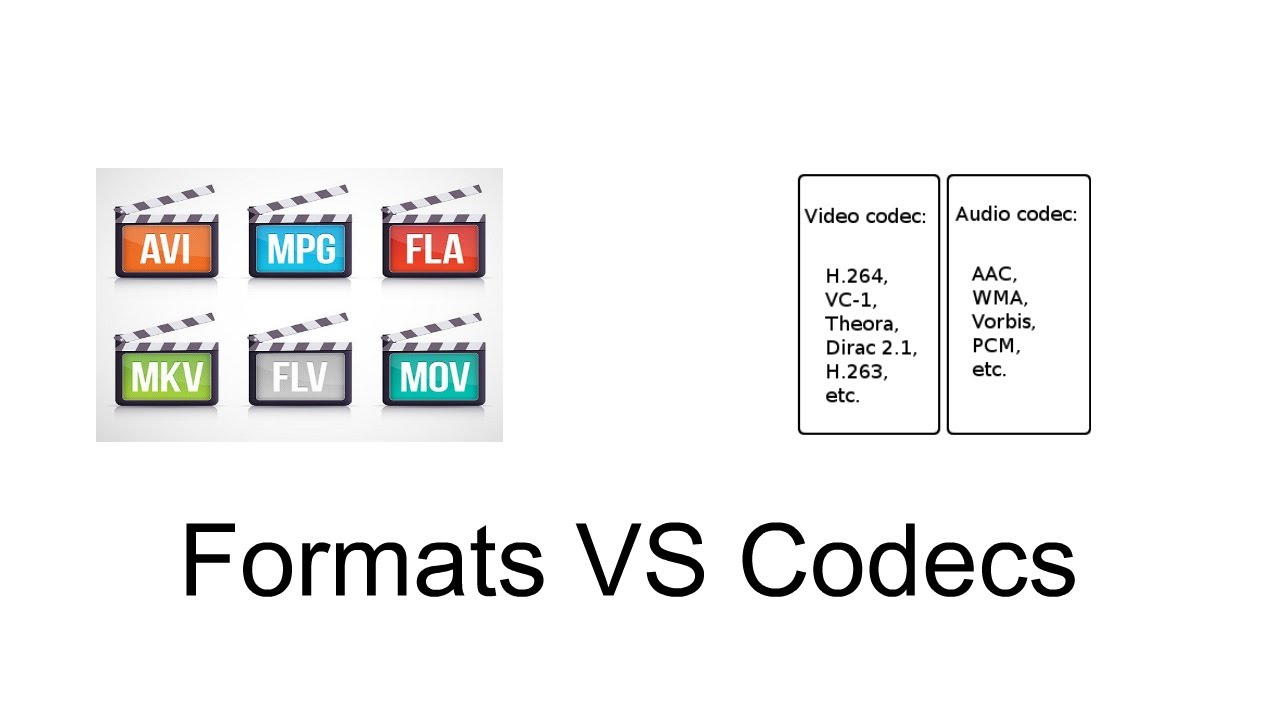
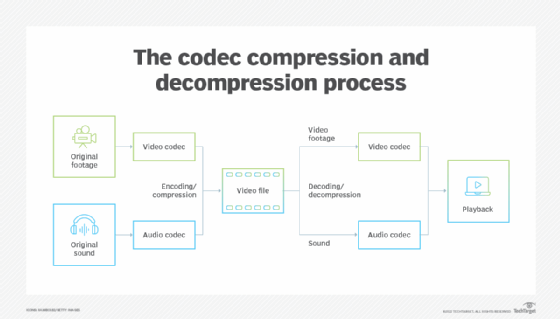
Audio codecs, short for compression-decompression algorithms, are essential tools in the world of digital audio. Think of them as translators that help digital audio files communicate efficiently while conserving storage space and maintaining sound quality. They achieve this by encoding audio data during compression and decoding it during playback.

Imagine you’re packing for a trip, and you want to save space in your suitcase. You decide to use vacuum-sealed bags for your clothes. Similarly, an audio codec compresses audio data into a more compact format for efficient storage or transmission. When you unpack your suitcase at your destination, you release the air from the bags to restore your clothes to their original form—this is akin to an audio codec decoding compressed audio data for playback.

There’s a wide range of audio codecs available, each with its own strengths and weaknesses. Some prioritize small file sizes, making them ideal for streaming, while others emphasize preserving audio quality, a must for audiophiles. Understanding these differences helps you choose the right codec for your specific needs.

What Are Lossless Audio Codecs?

Lossless audio codecs are like the archivists of the audio world. They compress audio data without sacrificing any of the original quality. This is akin to zipping a file on your computer; when you unzip it, you get back an identical copy of the original.

Imagine you have a precious handwritten letter. You want to make a copy for safekeeping, but you don’t want to lose any detail or quality. A lossless audio codec accomplishes this by finding patterns in the audio data and encoding them more efficiently. When you want to listen to the music or sound stored with a lossless codec, it’s like opening the envelope of your preserved letter—you get the same experience as the original.

Lossless audio codecs are favored by audiophiles and professionals who prioritize audio quality over file size. They are ideal for archiving music collections and audio recordings where every nuance matters.

Popular Audio Codecs

When it comes to audio codecs, several popular options are commonly used in various applications. One of the most recognizable is MP3, which revolutionized digital music. MP3, short for MPEG-1 Audio Layer 3, achieves significant compression while maintaining decent audio quality, making it suitable for music streaming and portable devices.

AAC (Advanced Audio Coding) is another well-known codec, commonly used by Apple devices. It offers superior sound quality compared to MP3 at similar bitrates, making it a popular choice for iTunes and other Apple platforms.

For lossless audio, FLAC (Free Lossless Audio Codec) stands out. It’s widely adopted by audiophiles and music enthusiasts for its ability to compress audio without any loss in quality. FLAC files are perfect for preserving high-fidelity audio.

As an expert in audio technology, I can confidently say that understanding audio codecs is crucial for anyone working with digital audio. Whether you’re a music lover, a content creator, or a tech enthusiast, the right knowledge about audio codecs can significantly enhance your experience and the quality of your audio content.


Advanced Audio Codec Rate Control Methods

Advanced Audio Codec Rate Control Methods

Advanced Audio Codec Rate Control Methods

Advanced Audio Codec Rate Control Methods

Advanced Audio Codec Rate Control Methods

Latest Advancements in Audio Codec Rate Control

Audio codec rate control plays a crucial role in determining the balance between audio quality and file size. Over the years, significant advancements have been made in rate control methods, enabling more efficient compression and higher audio fidelity. One such innovation is the use of machine learning algorithms to optimize rate control parameters.
By employing machine learning models, audio codecs can analyze audio content and adapt their rate control strategies dynamically. This approach allows codecs to adjust bitrate allocation based on the complexity of the audio signal, resulting in improved audio quality with reduced file sizes.

“Incorporating machine learning into rate control empowers audio codecs to make smarter decisions, delivering exceptional audio quality while efficiently utilizing available bitrate.” – Audio Compression Trends: The Rise of Machine Learning

Another notable advancement is the implementation of psychoacoustic models in rate control algorithms. These models simulate human hearing perception to identify irrelevant audio components that can be discarded without compromising perceptual audio quality. By leveraging psychoacoustic principles, codecs can allocate bitrates more effectively, focusing on preserving the most critical audio elements.

“Psychoacoustic rate control techniques revolutionize audio compression by optimizing the allocation of bits to retain the essential components that shape the listener’s auditory experience.” – The Art of Audio Rate Control: Psychoacoustic Innovations

Impact of Rate Control Methods on Audio Quality

Rate control methods significantly influence the audio quality of compressed files. In constant bitrate (CBR) control, a fixed amount of bits is allocated per audio frame, ensuring a consistent bitrate throughout the file. While CBR guarantees a predictable file size, it may lead to audio artifacts and inefficiencies in bitrate allocation.
On the other hand, variable bitrate (VBR) control dynamically adjusts the bitrate based on the complexity of the audio content. VBR allows higher bitrates for more intricate audio segments, resulting in better audio quality compared to CBR. However, VBR may lead to larger file sizes, which can be a concern in bandwidth-constrained scenarios.

“Choosing the right rate control method is a trade-off between audio quality and file size. While CBR offers predictability, VBR excels in preserving audio fidelity by allocating more bits to intricate audio segments.” – Rate Control Strategies: Balancing Quality and Efficiency

Improving Audio Compression Efficiency with Rate Control Techniques

Rate control techniques play a vital role in improving audio compression efficiency. By optimizing the allocation of bits, codecs can achieve higher compression ratios without compromising audio quality. One of the key techniques is adaptive rate control, where the codec continuously monitors the audio signal and adjusts the bitrate allocation on the fly.
Adaptive rate control is particularly valuable in real-time communication applications, such as VoIP calls and video conferencing. These applications require low-latency audio transmission, and adaptive rate control ensures efficient utilization of available bandwidth while maintaining high-quality voice communication.

“Adaptive rate control ensures efficient audio compression in real-time communication, providing users with crystal-clear voice quality even in bandwidth-constrained environments.” – The Power of Adaptation: Efficient Rate Control for Real-Time Communication

Additionally, hybrid rate control methods combine the advantages of both CBR and VBR. By employing adaptive elements alongside a predetermined bitrate for certain segments, hybrid rate control strikes a balance between consistency and efficiency.

“Hybrid rate control methods merge the strengths of CBR and VBR, offering a flexible approach to audio compression that optimizes bitrate allocation based on audio content complexity.” – Hybrid Rate Control: The Best of Both Worlds

Trade-offs between Rate Control and Encoding Time

Rate control methods may also impact encoding time, which is a crucial consideration in various applications. In general, CBR encoding requires less computation, as the bitrate allocation remains constant throughout the encoding process. This results in faster encoding times compared to VBR, where the bitrate allocation varies frame by frame.
However, the encoding time can vary depending on the complexity of the rate control algorithm used. Some advanced rate control methods, like machine learning-based models, may require additional computational resources but can achieve better compression efficiency.

“Developers must strike a balance between encoding time and compression efficiency when selecting rate control methods, considering the specific needs of their applications.” – Rate Control Trade-offs: Balancing Speed and Efficiency

In real-time communication applications, low encoding time is crucial to ensure minimal latency during audio transmission. Adaptive rate control, which adjusts bitrate allocation on the fly, allows for efficient compression without significant delays.

“Real-time communication demands low encoding time, making adaptive rate control a valuable choice for ensuring real-time voice transmission with minimal latency.” – Low Latency Encoding: Enabling Real-Time Communication

Rate Control and Audio Codec Decoding Requirements

The choice of rate control method also affects the decoding requirements of audio codecs. In CBR-encoded files, the decoding process is straightforward, as the bitrate remains constant throughout the file, requiring a relatively simple decoding algorithm.
In contrast, VBR-encoded files require more sophisticated decoding algorithms to adapt to the varying bitrates. Decoders must analyze the bitrate information within each frame to accurately reconstruct the audio signal.

“VBR-encoded files demand more robust decoding algorithms, as decoders must dynamically adjust to the varying bitrates to ensure faithful audio reproduction.” – VBR Decoding: Adapting to Bitrate Variability

The complexity of adaptive rate control methods may also impact decoding requirements. In adaptive rate control, both the encoder and decoder must share information to adjust the bitrate allocation effectively. This interaction between the encoder and decoder may require higher computational resources for decoding.

“Adaptive rate control introduces a level of complexity in decoding, as the encoder and decoder must collaborate to ensure efficient bitrate allocation and high-quality audio reconstruction.” – Adaptive Rate Control: Coordinating Encoder and Decoder

Rate Control Methods for Low-Latency Applications

In low-latency applications like real-time communication, rate control methods must strike a balance between audio quality and transmission speed. Adaptive rate control stands out as an excellent choice for such scenarios, as it allows codecs to adapt to varying network conditions while prioritizing audio clarity.
Another effective strategy for low-latency applications is the use of scalable rate control. Scalable codecs produce multiple layers of audio data, enabling receivers to decode the appropriate layer depending on the available bandwidth. This approach ensures seamless audio transmission even in bandwidth-constrained environments.

“Scalable rate control enables low-latency audio transmission by offering multiple layers of data, allowing receivers to select the optimal layer for their available bandwidth.” – Scalable Codecs: Adapting to Bandwidth Constraints

Low-latency rate control techniques also play a crucial role in gaming applications, where real-time voice chat and audio cues are essential for player coordination and immersion. Adaptive bitrate allocation in these contexts ensures that critical audio information is transmitted with minimal delay.

“Low-latency rate control techniques are fundamental in gaming applications, delivering real-time voice communication and audio cues that enhance player experiences.” – Real-Time

The Impact of Audio Codec on Voice Quality

The Impact of Audio Codec on Voice Quality

The Impact of Audio Codec on Voice Quality

How Does the Choice of Audio Codec Affect Voice Quality?

The choice of an audio codec can significantly influence the quality of voice reproduction in various applications. While some codecs prioritize efficiency and smaller file sizes, others focus on preserving audio fidelity. For voice-centric applications like voice calls, video conferencing, and voice-over work, the balance between compression and audio quality becomes crucial.
High-compression audio codecs, commonly used for online streaming and communication, may sacrifice some voice clarity to achieve smaller file sizes. On the other hand, lossless codecs prioritize audio fidelity, ensuring a true representation of the original voice recording.

Finding the right audio codec for voice-related applications involves striking a balance between compression efficiency and voice clarity. It’s essential to understand the specific requirements of each use case and choose an appropriate codec that delivers the desired voice quality.

“In the world of audio codecs, the choice between compression and voice quality becomes a delicate dance. A careful balance is required to ensure efficient data transmission while preserving the essence of the human voice.” – The Art of Voice Quality in Audio Codecs

What is the Impact of Audio Compression on Voice Clarity?

Audio compression is a fundamental process in audio codecs, aiming to reduce file sizes without significantly compromising audio quality. However, the level of compression directly affects voice clarity, especially in lossy codecs.
In lossy codecs, the compression process discards some audio data deemed less essential to human hearing. While this can achieve considerable compression ratios, it may result in a loss of subtle nuances in the human voice, affecting overall clarity.

On the other hand, lossless codecs retain all audio data, ensuring pristine voice clarity at the cost of larger file sizes.

The impact of audio compression on voice clarity is a delicate balance, and striking the right compromise is essential to maintain the intelligibility and naturalness of voice recordings.

“Audio compression is a double-edged sword. While it empowers efficient data transmission, its impact on voice clarity demands careful consideration in audio codec design.” – The Voice Clarity Conundrum: Balancing Compression and Fidelity

Which Audio Codecs Offer the Best Voice Quality?

When it comes to voice quality, lossless audio codecs are known for their ability to preserve audio fidelity faithfully. Formats like FLAC and PCM are renowned for their pristine reproduction of voice recordings, making them ideal choices for applications where audio quality is paramount.
However, lossless codecs come with the trade-off of larger file sizes, which may not be practical for certain applications with bandwidth and storage constraints.

On the other end of the spectrum, high-quality lossy codecs like Opus have garnered recognition for their impressive voice reproduction capabilities at lower bitrates. Opus excels in real-time communication applications, providing clear and natural voice quality even with reduced data transfer.

Ultimately, the best audio codec for voice quality depends on the specific requirements of each application, considering factors like available bandwidth, storage limitations, and the desired level of audio fidelity.

“Voice quality enthusiasts lean towards lossless codecs, while real-time applications find solace in high-quality lossy codecs, proving that there’s no one-size-fits-all solution in the quest for perfect voice reproduction.” – Unraveling the Quest for the Ultimate Voice Codec

Can a High-Compression Audio Codec Maintain Voice Fidelity?

The pursuit of higher compression ratios in audio codecs is often at odds with the preservation of voice fidelity. High-compression audio codecs, designed to reduce file sizes significantly, inevitably introduce some degree of data loss.
While modern high-compression codecs have made significant advancements in audio quality preservation, it remains challenging to achieve near-lossless voice reproduction at ultra-low bitrates.

However, certain advanced codecs like Opus have managed to strike a remarkable balance between compression efficiency and voice fidelity. Opus’s hybrid approach, combining both lossy and lossless techniques, allows it to deliver exceptional voice quality even at lower bitrates.

While the compromise between compression and voice fidelity is inevitable, the development of more efficient codecs continues to push the boundaries of what’s achievable in audio compression.

“The holy grail of high-compression audio codecs lies in the delicate dance between efficiency and fidelity, with Opus leading the charge in delivering impressive voice quality at low bitrates.” – The Quest for Voice Fidelity: Navigating the Compression Maze

How Does the Bitrate of an Audio Codec Affect Voice Reproduction?

The bitrate of an audio codec plays a pivotal role in voice reproduction, directly impacting the level of audio detail and clarity. Higher bitrates allocate more data to represent audio nuances, resulting in improved voice fidelity and overall sound quality.
On the other hand, lower bitrates reduce the amount of data allocated to voice reproduction, leading to a trade-off between reduced file sizes and a potential loss of voice clarity.

The selection of the appropriate bitrate for voice-related applications depends on various factors, including the target platform, available bandwidth, and the desired level of voice quality.

“The bitrate of an audio codec acts as a master puppeteer, orchestrating the balance between file size and voice quality, ultimately defining the audio experience.” – The Bitrate Dilemma: Striking the Perfect Balance in Voice Reproduction

Is Voice Quality Compromised in Lossy Audio Codecs?

Lossy audio codecs are designed to achieve high compression ratios by discarding audio data that is deemed less critical to human hearing. While this approach enables efficient data transmission, it inevitably results in some loss of audio fidelity.
The impact of voice quality compromise in lossy codecs depends on the specific bitrate used and the complexity of the audio content. At higher bitrates, the loss of voice clarity is minimal, while lower bitrates may exhibit more noticeable artifacts in voice reproduction.

Despite the inherent trade-off, modern lossy codecs like Opus excel in voice-centric applications, striking a balance between compression and voice quality, especially in real-time communication scenarios.

“Lossy codecs present a delicate challenge, but with modern advancements, they’ve proven capable of delivering impressive voice quality, redefining the boundaries of audio compression.” – Embracing the Nuances: Unraveling Voice Quality in Lossy Codecs

What Are the Factors that Influence Voice Quality in Audio Codecs?

Voice quality in audio codecs is influenced by several critical factors:
Bitrate: The bitrate directly affects the amount of data allocated to voice reproduction, impacting overall voice clarity and sound fidelity.

Compression Algorithm: The compression algorithm determines the balance between data reduction and audio fidelity, affecting the level of voice quality preservation.

Latency: Low latency in real-time communication applications contributes to a more natural and seamless voice experience3. Keywords (related to “The Impact of Audio Codec on Voice Quality”):

audio codec, voice quality, audio compression, voice clarity, bitrate, lossless codecs, lossy codecs, Opus codec, real-time communication, voice reproduction, compression algorithm, latency, complexity of audio content, codec settings, voice-over applications, FLAC, PCM.

Audio Codec Converter

Audio Codec Converter: An Essential Tool for Any Audiophile

Audio Codec Converter

If you’re a music enthusiast, you know how important it is to have your music in the best quality possible. However, not all devices and media players support the same audio formats, which can be frustrating. This is where an audio codec converter comes in handy. In this article, we’ll explore what an audio codec converter is, how it works, and its benefits for any audiophile.

What is an Audio Codec Converter?

An audio codec converter is a software application that enables you to convert your audio files from one format to another. Audio codecs are algorithms that compress and decompress audio data, allowing it to be stored and transmitted efficiently. Different devices and media players use different codecs to support different audio formats. For instance, an MP3 player might only support the MP3 format, while a CD player might support WAV and AIFF formats.

With an audio codec converter, you can easily convert your audio files from one format to another, making them compatible with your desired device or media player. This tool can also help you compress your files to save space or improve their quality by changing the bitrate, sample rate, and other parameters.

How Does an Audio Codec Converter Work?

Most audio codec converters operate by decoding the original audio file and then encoding it into the desired format. The software uses a codec library that contains all the codecs needed to decode and encode various audio formats. The converter then applies the necessary compression algorithms to reduce the file size or improve the quality, depending on the user’s preferences.

Some audio codec converters also support batch conversion, which allows you to convert multiple files at once. This feature is especially useful when you have a large music collection that you want to convert to a new format or compress to save storage space.

Benefits of an Audio Codec Converter

Here are some of the benefits of using an audio codec converter:

  • Compatibility: An audio codec converter enables you to play your music on any device or media player that supports different formats.
  • Quality: You can improve the quality of your music by converting it to a higher bitrate or changing other parameters.
  • Compression: You can compress your files to save storage space on your device or media player without compromising the quality.
  • Organization: You can easily organize your music collection by converting all your files to a single format.

Frequently Asked Questions (FAQs)

What are the most common audio codecs?

The most common audio codecs are MP3, AAC, WAV, and FLAC. MP3 is the most widely used codec for music, while AAC is used by Apple devices. WAV is a lossless codec that is often used for professional audio recordings, while FLAC is a lossless codec that provides higher quality than MP3 or AAC.

Can I convert DRM-protected audio files using an audio codec converter?

No, most audio codec converters cannot convert DRM-protected files due to copyright laws. However, there are some software applications that can remove DRM protection, allowing you to convert the files to your desired format.

Do I need a special software to play my converted audio files?

Most devices and media players support the most common audio formats, so you shouldn’t need any special software to play your converted files. However, some specialized formats may require specific software or codecs. For instance, if you want to play high-resolution audio files, you might need a media player that supports FLAC or DSD formats.

Is an audio codec converter difficult to use?

No, most audio codec converters are designed to be user-friendly and intuitive. You don’t need any technical knowledge to use them. Simply select the files you want to convert, choose the output format and parameters, and start the conversion process. The software will guide you through the process and provide you with feedback on the progress.

Conclusion

An audio codec converter is an essential tool for any music lover who wants to enjoy their music in different formats and on different devices. It enables you to convert your audio files easily and quickly, improving their quality and compatibility. With the right audio codec converter, you can organize your music collection, save storage space, and enjoy your favorite tunes in the best quality possible.

Audio Codec Comparison: A Comprehensive Guide for Audio Geeks

Audio Codec Comparison: A Comprehensive Guide for Audio Geeks

Audio Codec Comparison

Introduction

Audio codecs play a significant role in digital audio technology, as they are responsible for compressing and decompressing digital audio files. The use of audio codecs is essential to reduce the file size of audio files, making them easier to store, share, and transfer over the internet.

However, with the numerous audio codecs available in the market, it can be challenging to choose the right one for your needs. In this article, we will provide a comprehensive guide on the most popular audio codecs available today, their features, and their pros and cons.

What is an Audio Codec?

An audio codec is a software program or algorithm that compresses and decompresses digital audio data. The term codec stands for coder-decoder, and it is responsible for reducing the file size of digital audio files by removing redundant and irrelevant information from the file while retaining the original sound quality as much as possible.

Without an audio codec, digital audio files would be too large to store or transfer over the internet, which would be impractical. Therefore, audio codecs are essential for digital audio technology to function effectively.

Types of Audio Codecs

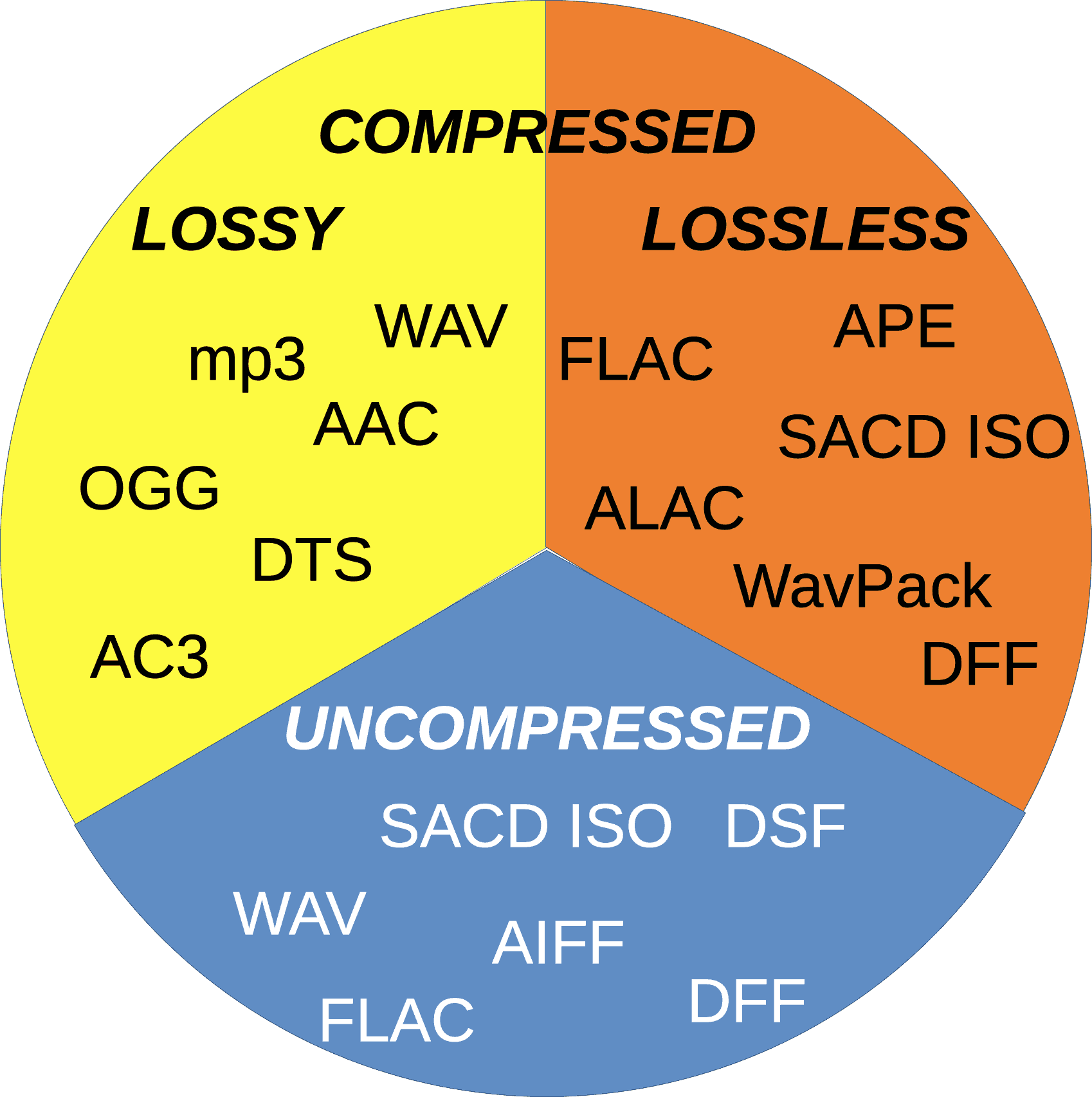
  • Lossy Audio Codecs

    Lossy audio codecs are designed to reduce the file size of digital audio files by discarding information that is considered irrelevant or redundant for human hearing. Lossy codecs achieve compression by applying psychoacoustic models that analyze the human auditory system’s limitations and remove sounds that are inaudible or less audible to the human ear. The most popular lossy audio codecs are:

    • MP3
    • AAC
    • OGG
    • WMA
  • Lossless Audio Codecs

    Lossless audio codecs compress digital audio files without discarding any information. Lossless codecs achieve compression by using sophisticated algorithms that analyze and encode the original audio data without affecting its quality. Lossless codecs are preferred for archiving or storing audio files that require the highest possible sound quality. The most popular lossless audio codecs are:

    • FLAC
    • ALAC
    • WAV
    • AIFF

Popular Audio Codecs

MP3

MP3 is the most popular audio codec in the world, and it has been around since the 1990s. MP3 stands for MPEG Audio Layer III, and it is a lossy audio codec that compresses digital audio files by removing sounds that are less audible to the human ear. MP3 is compatible with almost all audio players and devices and is widely used for music streaming, downloading, and sharing over the internet.

The main advantage of MP3 is its small file size, which makes it easy to store and transfer over the internet. However, MP3’s main drawback is its reduced sound quality, especially for audio files that contain a wide range of frequencies or dynamic range. MP3 files are prone to audio artifacts, such as compression artifacts, and they can sound flat or distorted compared to the original audio file.

AAC

AAC stands for Advanced Audio Coding, and it is a lossy audio codec that is widely used for music streaming and downloading. AAC is the default audio codec for Apple devices and is used by popular streaming services such as Spotify, Tidal, and YouTube. AAC is also used for high-definition digital television and radio broadcasting, as well as in various video formats such as MP4 and M4V.

FLAC

FLAC stands for Free Lossless Audio Codec, and as the name suggests, it is a lossless audio codec. FLAC is designed to compress audio files without losing any data or quality. It is an open-source codec that can be used on any platform and supports metadata, tagging, and album cover art. FLAC is a popular codec for archiving audio files and for audiophiles who want to preserve the original quality of their music. However, because FLAC files are larger than compressed audio files, they are less suitable for streaming and downloading over the internet.

ALAC

ALAC stands for Apple Lossless Audio Codec, and it is a lossless audio codec that is similar to FLAC. ALAC is the default audio codec for Apple devices and is supported by iTunes and other Apple software. Like FLAC, ALAC is designed to compress audio files without losing any data or quality. However, because ALAC is only supported by Apple devices and software, it is less widely used than FLAC.

Opus

Opus is a relatively new audio codec that was standardized by the Internet Engineering Task Force (IETF) in 2012. Opus is a versatile codec that can be used for a wide range of audio applications, including music streaming, voice chat, and video conferencing. It is designed to provide high-quality audio at low bitrates and can adapt to changing network conditions. Opus is an open-source codec that is supported by most modern web browsers and operating systems.

DSD

DSD stands for Direct Stream Digital, and it is a high-resolution audio codec that is used for digital recordings of analog audio sources. DSD uses a 1-bit sampling method that is different from traditional PCM-based codecs. DSD recordings have a high sampling rate and a wide frequency response, which allows them to capture more of the original sound than other codecs. DSD is used primarily by audiophiles and is supported by high-end audio equipment and software.

Conclusion

Choosing the right audio codec depends on your specific needs and preferences. If you want to compress your audio files for streaming or downloading, then lossy codecs such as MP3 or AAC are a good choice. If you want to preserve the original quality of your music, then lossless codecs such as FLAC or ALAC are a better option. Opus is a versatile codec that can be used for a wide range of audio applications, and DSD is a high-resolution codec that is ideal for audiophiles. Ultimately, the choice of codec depends on your personal preferences and the specific requirements of your project or application.

One tool that can be useful for managing and adjusting audio files is MP4Gain. MP4Gain is a software that allows you to normalize and adjust the volume of MP3, MP4, FLAC, and other audio files. It can be used to ensure that all of your audio files have the same volume level, which can be particularly useful for creating playlists or for streaming audio files. MP4Gain is available for Windows and it is a simple and effective tool for managing your audio files.