The Benefits of Lossless Audio Compression


Free Download Mp4Gain
picture

The Benefits of Lossless Audio Compression
Lossless Audio Compression

Introduction

Lossless Audio Compression

The digital representation of audio is based on a series of binary digits (bits) that capture the amplitude of the sound wave at regular intervals. These bits are usually stored in a file format such as WAV, AIFF or FLAC. Despite being represented as a series of zeros and ones, digital audio has revolutionized the music industry and changed the way we consume and produce music.

Digital Audio Compression

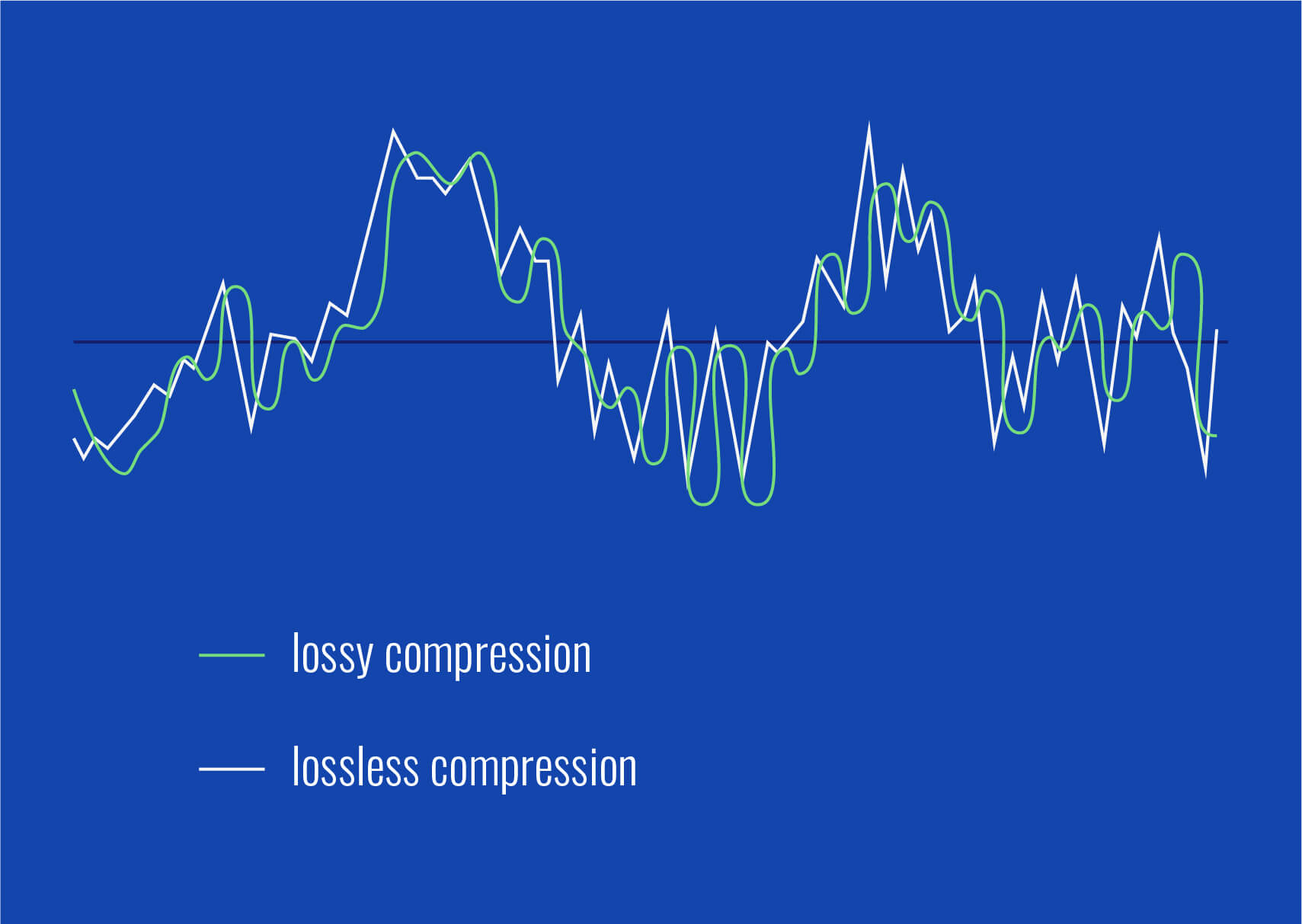
One of the most significant advantages of digital audio is the ability to compress audio files without compromising quality. Compression reduces the amount of data required to represent an audio file by discarding some of the redundant or less important information. There are two types of audio compression: lossless and lossy.

Lossless Audio Compression

Lossless compression algorithms reduce the size of an audio file without losing any of the original data. These algorithms work by identifying and eliminating redundant information while preserving the remaining data. The most common lossless audio compression formats are FLAC, ALAC, and WAVPACK. These formats are preferred by audiophiles and music professionals because they offer the same audio quality as the original uncompressed file.

Lossy Audio Compression

Lossy compression algorithms, on the other hand, permanently discard some of the data in the original audio file to achieve a smaller file size. The most popular lossy audio formats are MP3, AAC, and OGG. Although lossy formats achieve significantly smaller file sizes than lossless formats, they sacrifice some of the audio quality. The extent of the audio quality loss depends on the compression settings and the original file’s quality.

The Impact of Compression on Audio Quality

The impact of compression on audio quality depends on the compression algorithm and the original audio file’s quality. Lossless compression algorithms have no impact on audio quality because they preserve all the original data. Lossy compression algorithms, on the other hand, can significantly affect audio quality, particularly at low bitrates or with complex audio signals.

In general, higher bitrates and less aggressive compression settings result in better audio quality, while lower bitrates and aggressive compression settings result in lower quality audio.

The Evolution of Digital Audio Technology

The quality of digital audio has improved significantly over the past few decades due to advancements in technology. In the early 1990s, computers had limited processing power, and audio quality was limited by the hardware’s capabilities. Today, modern devices such as laptops, tablets, and smartphones are capable of playing high-quality audio files with ease.

Streaming services such as Spotify and Apple Music have also contributed to the evolution of digital audio technology. These services use lossy compression algorithms such as OGG to optimize the transmission of audio files over the internet while minimizing data usage. Despite the compression, the audio quality is still high enough to satisfy most listeners.

Conclusion

Digital audio compression has revolutionized the music industry by enabling the storage and transmission of high-quality audio files while minimizing file sizes. Lossless compression algorithms such as FLAC and ALAC offer the same audio quality as the original uncompressed file, while lossy algorithms such as MP3 and AAC achieve significantly smaller file sizes but sacrifice some audio quality. The evolution of digital audio technology has improved audio quality and made it possible to enjoy high-quality audio on a wide range of devices.


Free Download Mp4Gain
picture


Mp4Gain Main Window
picture


Mp4Gain Features
picture


Free Download Mp4Gain
picture

What does the quality of an mp3 or audio file depend on?

What does the quality of an mp3 or audio file depend on?

mp3 audio gain
mp3 audio gain

How to improve audio quality?

mp3 audio gain
mp3 audio gain

In essence and in a very synthetic way we could say that there are two basic factors, always assuming that the original had quality.

We also assume that high quality software such as Mp4Gain is used.

The first thing is to understand that music or sound is generated by a vibration in the air, which draws waves or can be represented by waves with different curvatures.

Quality would be, strictly speaking, being able to capture those waves with the greatest detail in order to reproduce them basically identical.

If we understand that as the most simplified, but descriptive, definition of quality of an mp3 or audio, then we can begin to understand where the issue is going.

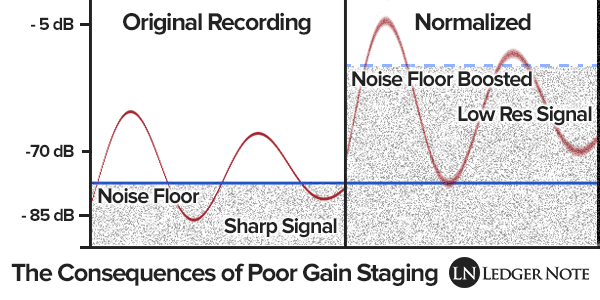
If we have a file using 8-bit values ​​we have the possibility of having a maximum value of 255 (which is 0 dBfs), anything above those 255 (0 db) would be clipping, distortion, saturation.

Any sound that clips or saturates would be poor quality.

We can have two combinations, made up of many different options, if we talk about gain/volume.

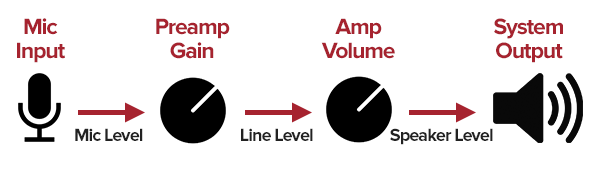
Gain, to put it more simply, is the power of a sound input. If the sound has a weak input power, we increase the gain… we increase the input.

Volume would be, again simplifying, the output power of that signal or sound and for this we adjust the output, the amplification.

Again, Mp4Gain can handle all of this in a very advanced way.

Increase mp3 volume

Increase mp3 volume

Increase MP3 Volume

Increasing the volume of an mp3 is something that we need frequently. Currently it is also necessary to increase the volume of videos and other audio formats such as FLAC, OGG, etc.

Increase mp3 volume

Since Alba Edison invented the way to record sound, more than a hundred years ago, there has been no need for anyone who has a snora recording to have a constant need to increase the volume of the mp3 or in any way that audio was stored.

Only until recently, when the audio is digital and therefore you can exchange it, have we seen this need arise in a big way.

And it is that this possibility of exchanging songs generated the urgent need to be able to compress them, so that they would not use a percentage of a computer’s hard drive in a single song.

The mp3 meant to be able to store it in a 11 part of its original size, based mainly on models of human perception of sound. That is, based on the principles of how humans capture sound, we can learn what information to discard without the human ear noticing it.

But this compression came at a price: the resulting mp3s had different qualities and therefore different volume levels.

Mp4Gain is the most efficient software to normalize not only mp3s but almost any audio format, such as video.

Increase mp3 volume – Mp3 volume increaser

Increase mp3 volume – Mp3 volume increaser

Increase mp3 volume - Mp3 volume increaser

There is without hesitation the need to increase the volume of the mp3. And nowadays it is not only about increasing the volume of mp3s, but there are many other formats, both lossless and lossy.

Increase mp3 volume - Mp3 volume increaser

What are audio formats for?

On this site we have a broader article explaining and detailing this point, but as a summary we will explain that in order to easily handle music in modern devices, it is best to make them more compact: compress them, so that they use less disk space.

The format that made a boom of success years ago was mp3, which through various mechanisms that we will mention later, managed to reduce its size by 11:1. That is to say, it occupied an eleventh part of the original WAV.

A good part of his methodology and technique was based on the way in which humans listen and based on those principles he was able to codify music without the human ear perceiving much of the difference and instead, as we pointed out before, its size was eleven times smaller.

But all this treatment and the fact that the encoding is done by inexperienced hands has caused us to have a problem with volume levels: each person who copies mp3 makes their result have a different volume level.

Now new audio and video formats have appeared, such as FLAC, ogg, opus, m4a, etc. and in video we have mp4, mpeg, webm, etc.

Mp4Gain is the software that offers the possibility of normalizing the volume of all your music files and videos. It is very easy to use and has a very affordable price and you don’t need to “know how to use it”, you just press a button and that’s it.

Increase mp3 volume

Increase mp3 volume

Increase MP3 Volume

One of the most common searches and the most frequently asked questions is: how do I increase the volume of an mp3?

Increase mp3 Volume

Increase audio and video volume

Today Mp4Gain has reached the stage where it is not only able to increase mp3 volume, but also icrease flac volume, increase ogg volume, increase mp4 volume, etc.

In other words, we are talking about an INCREASE IN VOLUME in general, about the different audio and video formats, at least those that are very popular and widely used.

Why Increase mp3 volume?

Perhaps someone who is not very involved in the subject would wonder why people want to increase the volume of an mp3, mp4, avi, flv, m4a, etc?

We can give a more technical answer or one that is very easy to understand, the easy one: Why is it that the user, when he plays his audio or mvideo files, one after the other, notices or perceives a difference in the volume level and wants to be able to pass all his audio or video files by software that offers you to level the volume level, so that they all sound at the same level.

It is unpleasant to the ear that one or several of our mp3s sound at a lower volume level than the rest and that this forced us to manually adjust the volume control.

But as almost always we have gotten our videos, mp3s, mp4s, etc. from very different sources, these belong to different years or even decades… have been encoded by different software, using different bit rates, etc. what we have come to is precisely to have a mismatch in the matter of volume levels and we want to correct it.

The ideal software for this is Mp4Gain, which does it extremely simply, but is the most efficient, with professional results.

Increase mp3 volume

How to increase mp3 volume?

Mp43Gain is the best method to increase the volume of mp3s and many other audio and video formats. Its use is extremely simple, it is usually enough to give it a single click.

What does increase mp3 volume mean?

The most common thing is that those who have several mp3 files or other audio or video formats notice an imbalance or imbalance between the volume of each of these. Using Mp4Gain it is possible to unify the volume level.

Increase mp3 volume

Increase MP3 Volume

When vinyl records existed, no one thought of the need to give them a “treatment” to achieve, at each listener’s house, improve the volume level of each mp3.

Increase MP3 Volume

Although today there is the option of Mp4Gain that is no longer limited to increasing the volume of mp3s, but can do it with most audio and video files.

But, we said that this was unthinkable in the vinyl era. why?

First of all, because changing from one vinyl to another took long enough that we didn’t have in our heads the reference of the volume level of the previous vinyl.

Nor were these encoded by the users themselves, introducing differences that directly affected quality and/or volume, such as modifying the reat bit, for example.

Neither did what we call the “volume war” exist because in the 70s and early 80s, it was discovered that the same recording, listened to at different volume levels, based on the perception of the human ear, generates that that with a higher volume level, within certain parameters, it causes the listener to perceive that the one with a higher volume has better quality.

This discovery generated that each time the recordings had greater volume, generating a great imbalance of volume in recordings of different years or times.

How is it possible to achieve that despite all these phenomena, and others, all our audio files (of any popular format) and video files (also of the most popular formats), sound at the same volume level?

There is Mp4Gain, which achieves this. I normalized the volume level in order to solve this problem, and even improve the overall sound quality.

Mp4Gain is the most modern method to increase mp3 volume.