Color Space: RGB, YUV, and Chroma Subsampling

Color Space: RGB, YUV, and Chroma Subsampling

Color Space
Color Space
Color Space
Color Space

What is the difference between RGB, YUV, and chroma subsampling?

Understanding the concepts of color space, such as RGB, YUV, and chroma subsampling, is crucial in the world of digital imaging and video processing. Each of these terms represents different ways of representing and encoding colors, and they play a significant role in the quality and efficiency of image and video reproduction.

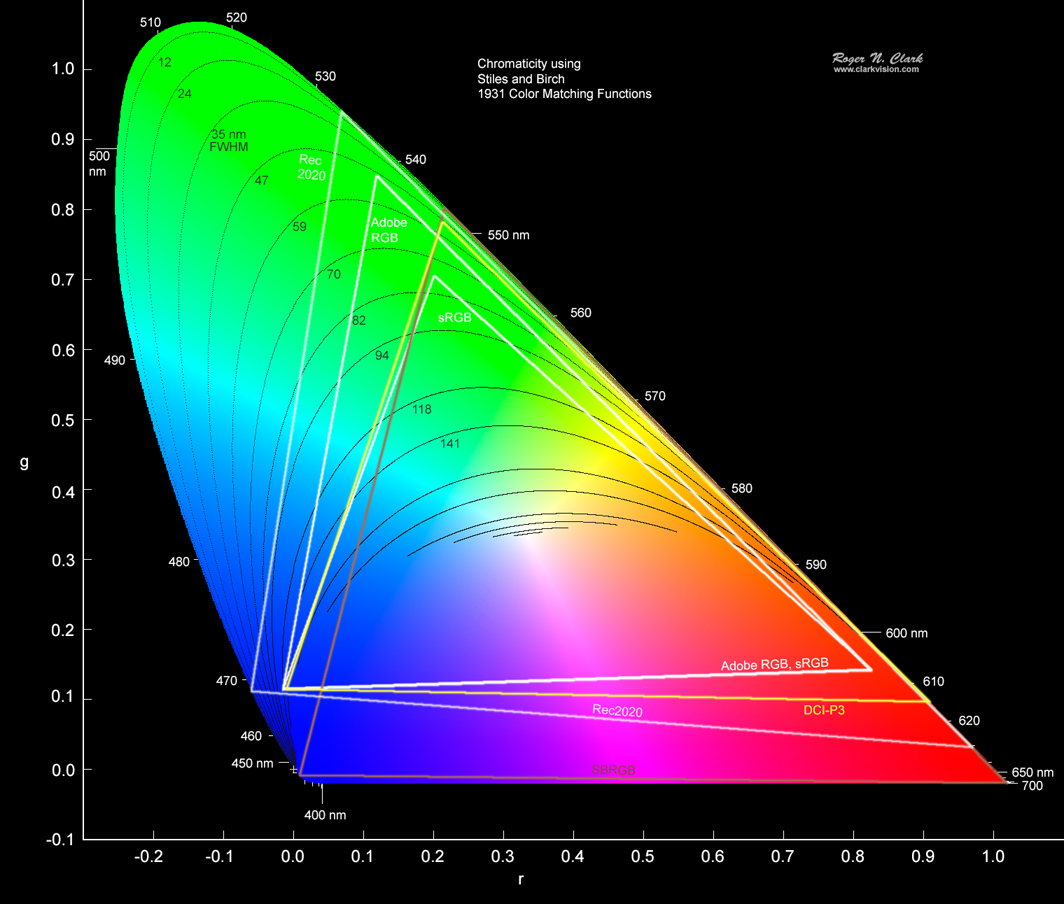
RGB (Red, Green, Blue) is an additive color model widely used for displaying images and videos on electronic devices. In this model, each pixel is represented by three color channels: red, green, and blue. The combination of different intensity values in these channels creates a wide range of colors. RGB color space is commonly used in computer graphics, digital cameras, and display technologies.

On the other hand, YUV (luma, chroma) is a color space that separates the luminance (Y) and chrominance (U, V) information of an image or video. The Y channel represents the brightness or grayscale component of the image, while the U and V channels contain color difference information. YUV is used primarily in video compression and transmission systems, as it allows for efficient representation of color information while reducing bandwidth requirements.

Why is chroma subsampling important in video compression?

Chroma subsampling is a technique used in video compression to reduce the amount of data required to represent color information accurately. It takes advantage of the human visual system’s lower sensitivity to color compared to brightness.

Chroma subsampling works by reducing the resolution of the chrominance (color) information while preserving the full resolution of the luminance (brightness) information. This process involves averaging color values across multiple pixels, resulting in a lower amount of color data compared to the original image or video. The subsampling is expressed as a ratio, such as 4:2:2 or 4:2:0, where the first number represents the full resolution of the luminance component, and the subsequent numbers represent the reduced resolution of the chrominance components.

The choice of chroma subsampling ratio depends on the specific requirements of the application. For example, in professional video production, a 4:4:4 chroma subsampling ratio is often preferred to maintain the highest possible color fidelity. However, in consumer video formats and broadcasting, lower subsampling ratios like 4:2:2 or 4:2:0 are commonly used to reduce file sizes and transmission bandwidth while still maintaining acceptable visual quality.

The impact of color space and chroma subsampling on image and video quality

The choice of color space and chroma subsampling can significantly affect the quality of images and videos, particularly in scenarios involving compression, transmission, and display. Let’s explore their impact:

1. Color accuracy and reproduction: RGB color space offers a wide gamut of colors and is well-suited for applications that require precise color representation, such as photo editing and computer graphics. YUV color space, with its separation of luminance and chrominance, allows for efficient representation of color information while maintaining good perceptual quality.

2. Bandwidth and storage efficiency: Chroma subsampling reduces the amount of data required to represent color information, resulting in smaller file sizes and lower bandwidth requirements. However, more aggressive subsampling ratios can lead to a loss of fine color details, especially in areas with rapid color transitions or fine textures.

3. Compression artifacts: In video compression, excessive chroma subsampling or inappropriate color space conversions can introduce compression artifacts, such as color bleeding, color banding, or loss of detail. These artifacts may become more noticeable when working with highly compressed video formats or when repeatedly compressing and decompressing the content.

4. Compatibility and display capabilities: Different devices and systems have varying support for color spaces and chroma subsampling ratios. It is essential to ensure compatibility between the color space used in content creation and the capabilities of the playback or display devices to avoid color inaccuracies or limited color reproduction.

Final Words

Understanding color space, chroma subsampling, and their impact on image and video quality is crucial for professionals working in the field of digital imaging and video processing. By choosing the appropriate color space and subsampling ratio, one can achieve accurate color reproduction, efficient data compression, and optimal visual quality in various applications. It is important to consider the specific requirements of each project and ensure compatibility between the chosen color space and the capabilities of the target devices.

Keywords (LSI): digital imaging, video processing, color representation, additive color model, color difference information, video compression, transmission bandwidth, color fidelity, perceptual quality, compression artifacts, file sizes, compatibility, display devices, visual quality.

Why Video Encoding Profiles Matter

Why Video Encoding Profiles Matter

Why Video Encoding Profiles Matter

In the world of video encoding, understanding the different profiles and their significance is crucial. These profiles determine the available encoding tools and greatly impact the quality and compatibility of your video output. By delving into the intricacies of video encoding profiles, you can optimize your video files for various playback devices and ensure an optimal viewing experience.

The Basics: Profiles and Levels Explained

To comprehend video encoding profiles, it’s essential to grasp the distinction between profiles and levels. Profiles define the encoding tools at your disposal, while levels establish the maximum resolutions, frame rates, and bitrates that can be achieved during the encoding process.

For H.264 encoding, three primary profiles exist: Baseline, Main, and High. Baseline is the most compatible profile, but it sacrifices quality. Main strikes a balance between quality and compatibility. High profile delivers superior quality but may encounter compatibility issues on certain devices.

Each profile also encompasses multiple levels. Higher levels support greater resolutions, frame rates, and bitrates. However, higher levels necessitate more processing power for decoding purposes.

Selecting the Ideal Profile and Level

Choosing the appropriate profile and level for your video encoding depends on several factors:

Target Devices: Consider the devices on which your encoded video will be played. If broad compatibility is your goal, the Baseline profile is a safe bet. However, if you’re targeting high-end devices, the High profile may deliver the best results.

Desired Quality: Determine the desired quality level for your video. If you prioritize excellent quality, the High profile is an attractive option. For a balance between quality and compatibility, the Main profile is a solid choice.

Processing Power: Evaluate the processing capabilities of the playback devices. Lower-level profiles may be necessary for devices with limited processing power to ensure smooth playback.

To illustrate these considerations, let’s explore some examples:

For smartphone playback, selecting the Baseline profile and Level 3 is suitable, offering compatibility and efficient performance.
If your video is destined for a 4K TV, opt for the Main profile and Level 5 to achieve high-quality visuals while maintaining compatibility.
Encoding videos for Blu-ray Discs necessitates the High profile and Level 6, enabling exceptional quality for an immersive viewing experience.

Mastering Video Encoding Profiles and Levels

Understanding video encoding profiles and levels is paramount for optimizing video files. By selecting the appropriate profile and level, you can ensure compatibility with target devices while meeting your desired quality standards. Remember to consider the target devices, prioritize quality, and assess processing power to make informed decisions during the encoding process.

In conclusion, video encoding profiles and levels may appear complex at first, but with a solid grasp of these concepts, you can confidently navigate the intricacies of video encoding and produce high-quality videos that cater to various playback devices.

These final words emphasize the importance of mastering video encoding profiles and levels, providing users with a comprehensive overview of the topic and inspiring confidence in their video encoding endeavors.

The Magic of Keyframes in Video Encoding

The Magic of Keyframes in Video Encoding

Keyframes in Video Encoding

How do keyframes work in video encoding?

Keyframes play a crucial role in video encoding, providing a foundation for efficient compression and smooth playback. To understand the magic behind keyframes, let’s delve into the inner workings of video encoding and explore how this fundamental concept revolutionizes the world of digital video.

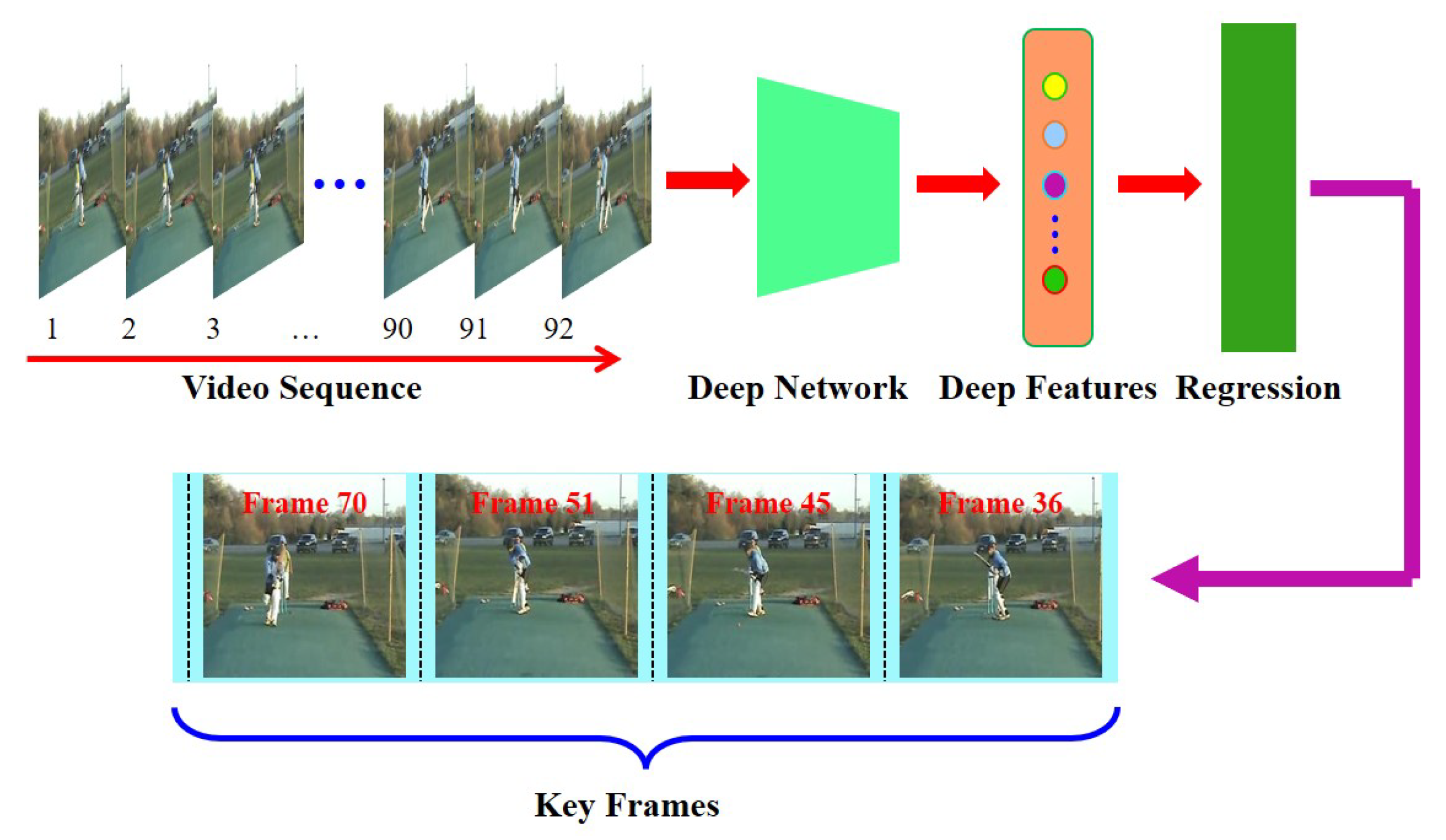
When encoding a video, the entire content is not stored frame by frame. Instead, keyframes are strategically placed at regular intervals to represent complete frames. These keyframes serve as reference points, storing the complete image information. The frames between keyframes, known as delta frames or interframes, only store the differences from the previous keyframe.

The significance of interframes in video compression

Interframes, also referred to as predicted frames, are an essential part of video compression. By storing only the differences from the previous keyframe, the file size can be significantly reduced without compromising video quality. This compression technique is known as temporal compression, and it relies on the concept of motion estimation.

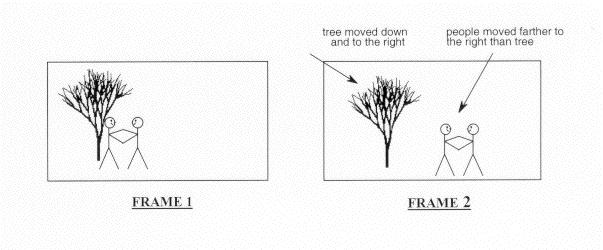
During the encoding process, the video codec analyzes the motion between frames and calculates the motion vectors. These motion vectors represent the movement of objects within the video. By utilizing these motion vectors, the codec can accurately predict the appearance of the interframes based on the previous keyframe and the calculated motion vectors.

The role of keyframes in video editing

Keyframes are not only essential in video encoding but also play a vital role in video editing. When editing a video, keyframes allow for precise control over various video parameters, such as position, scale, rotation, opacity, and effects. By setting keyframes at specific points in time, editors can create smooth transitions, animations, and visual effects.

For example, imagine a video clip where a small object moves across the screen. By setting keyframes at the beginning and end of the object’s movement, and adjusting its position accordingly, the video editing software automatically interpolates the object’s position for the frames in between. This interpolation ensures that the object moves smoothly and seamlessly throughout the video.

What are the benefits of keyframes in video encoding?

Now that we understand the basic concept of keyframes, let’s explore the numerous benefits they offer in video encoding. From efficient compression to enhanced video editing capabilities, keyframes have a profound impact on the quality and versatility of digital video.

Improved compression efficiency

Keyframes enable video codecs to achieve higher compression ratios by storing complete frame information at regular intervals. This allows for more effective compression of the interframes, as only the differences need to be encoded. As a result, video files become smaller in size without sacrificing quality, making them easier to store, transfer, and stream.

Enhanced seeking and fast-forwarding

Keyframes also play a crucial role in seeking and fast-forwarding through video content. Since keyframes represent complete frames, they serve as anchor points for seeking and provide accurate reference frames for fast-forwarding. Without keyframes, it would be challenging to navigate through a video quickly and accurately.

Increased editing flexibility

As mentioned earlier, keyframes are essential in video editing, allowing for precise control over various video parameters. Editors can manipulate keyframes to create dynamic effects, transitions, and animations. This flexibility empowers content creators to bring their creative visions to life and deliver engaging videos.

Optimized video playback

Keyframes ensure smooth and optimized video playback. Since the keyframes store complete frames, each keyframe serves as a synchronization point for the video decoder. This synchronization allows for efficient decoding and playback, reducing the likelihood of video artifacts or playback issues.

Seamless video streaming

In the realm of video streaming, keyframes are vital for delivering high-quality videos with minimal buffering. By strategically placing keyframes, video streaming platforms can optimize the streaming experience. Keyframes allow for quick video startup and minimize the impact of network fluctuations, ensuring a seamless viewing experience for users.

Final Words

Keyframes are the unsung heroes of video encoding, enabling efficient compression, enhancing editing capabilities, and ensuring smooth playback. Understanding the magic of keyframes empowers content creators, video editors, and streaming platforms to deliver exceptional video experiences. Whether you’re compressing videos for storage, editing cinematic masterpieces, or streaming content online, keyframes are the foundation that brings your digital videos to life.

Video Codec Profiles and Levels: A Guide for Video Creators

Video Codec Profiles and Levels: A Guide for Video Creators

Video Codec Profiles and Levels: A Guide for Video Creators

When you’re creating a video, one of the most important decisions you’ll make is the video codec you’ll use. The codec will determine the quality and size of your video, as well as the compatibility with different devices.

Video codecs are divided into profiles and levels. Profiles define the features that are supported by a codec, while levels define the maximum quality and size of a video encoded with that profile.

What are Video Codec Profiles?

Video codec profiles define the features that are supported by a codec. This includes things like the type of frames that are supported, the resolution of the video, and the chroma subsampling.

There are a number of different video codec profiles available, each with its own strengths and weaknesses. Some of the most common profiles include:

Main Profile: This is the most common profile and is supported by most devices. It supports a wide range of resolutions and chroma subsamplings.
High Profile: This profile offers higher quality than the Main Profile, but it is not supported by as many devices.
High 10 Profile: This profile supports 10-bit color, which can provide even higher quality than the High Profile.

What are Video Codec Levels?

Video codec levels define the maximum quality and size of a video encoded with a particular profile. This is determined by factors such as the maximum bitrate and the maximum frame rate.

There are a number of different video codec levels available, each with its own quality and size requirements. Some of the most common levels include:

Level 3: This is the lowest level and supports a maximum bitrate of 10,000 kbps.
Level 4: This level supports a maximum bitrate of 20,000 kbps.
Level 5: This level supports a maximum bitrate of 40,000 kbps.
**

Choosing the Right Profile and Level

The best way to choose the right profile and level for your video depends on a number of factors, including:

The desired quality of the video.
The target audience.
The devices that the video will be played on.
If you’re creating a video for a wide audience, then you’ll want to choose a profile and level that is supported by most devices. If you’re creating a video for a specific audience, then you may be able to choose a higher quality profile and level.

**

Final Words about Video Codec Profiles and Levels

Video codec profiles and levels are an important part of video encoding. By understanding the different profiles and levels, you can choose the right settings for your video, ensuring that it is both high quality and compatible with the devices that you want to play it on.

I hope this article has helped you to understand video codec profiles and levels.

What is Motion Estimation in Video Compression?

What is Motion Estimation in Video Compression?

Motion Estimation in Video


Motion Estimation and Compensation

Motion estimation and compensation are fundamental techniques used in video compression. Motion estimation refers to the process of analyzing consecutive video frames to identify the motion vectors between them. Motion compensation, on the other hand, involves using these motion vectors to predict the pixel values of the current frame based on the previous frame. By utilizing motion estimation and compensation, video compression algorithms can efficiently remove temporal redundancies, resulting in smaller file sizes without significant quality loss.
I first encountered the concept of motion estimation during my undergraduate studies in computer science. We were tasked with implementing a simple video compression algorithm, and I quickly learned that motion estimation was a crucial component. As I delved deeper into the topic, I came across the book “Video Coding for Mobile Communications: Efficiency, Complexity, and Resilience” by K.R. Rao et al., which provided a comprehensive overview of motion estimation algorithms and their applications.

Motion Estimation Algorithms

There are several motion estimation algorithms used in video compression, each with its strengths and weaknesses. One of the most popular methods is block matching, which divides the frame into small blocks and compares them with corresponding blocks in the previous frame to find the best match. Another commonly used technique is optical flow, which estimates the motion vectors by analyzing the brightness patterns between frames.
In my experience with video compression software, I have found that the choice of motion estimation algorithm can significantly impact the compression efficiency and visual quality of the output. For example, block matching algorithms tend to perform well on videos with simple, uniform motion, while optical flow methods excel in more complex scenes with dynamic motion.

Video Coding Standards

Video compression standards are crucial for ensuring interoperability and compatibility between different devices and software. Some of the most widely used standards include H.264/AVC, HEVC, and MPEG-4. These standards define the encoding process, including the motion estimation and compensation techniques used, and specify the parameters required for decoding.
As someone who has worked extensively with video coding standards, I can attest to the importance of following these guidelines to ensure compatibility and optimal performance. However, it is worth noting that some proprietary codecs, such as Apple’s ProRes and Google’s VP9, may offer superior performance in certain scenarios.

In conclusion, motion estimation is a critical component of video compression, allowing for efficient removal of temporal redundancies. By utilizing motion estimation and compensation techniques, video compression algorithms can significantly reduce file sizes without compromising quality. As I have learned through my experiences with video compression, the choice of motion estimation algorithm and adherence to video coding standards are crucial factors in achieving optimal compression efficiency and visual quality.

video compression, motion estimation, motion compensation, block matching, optical flow, video coding standards, H.264/AVC, HEVC, MPEG-4, video coding research, video compression techniques, video compression software, video quality, compression efficiency, temporal redundancies, compatibility, proprietary codecs, ProRes, VP9, K.R. Rao, video coding for mobile communications, file size reduction, video frames, motion vectors, pixel values, previous frame, brightness patterns.