Psychoacoustic Models for MP3


Free Download Mp4Gain
picture

Optimizing Psychoacoustic Models for MP3 Compression at Low Bitrates

Psychoacoustic Models for MP3

Let’s Talk About MP3 Compression and Psychoacoustic Models

As a specialist with years of experience in audio compression, I want to take you on a journey through the intricate world of optimizing psychoacoustic models for MP3 compression, especially at low bitrates. To make this topic as accessible as possible, let’s start with a simple analogy. Think of your car’s engine. It’s designed to be efficient, just like psychoacoustic models aim to be efficient in preserving audio quality. In this article, I’ll show you how psychoacoustic models achieve this.

The Role of Psychoacoustic Models in Audio Compression

Psychoacoustic Models for MP3

Psychoacoustic models are like the selective focus setting on a camera. Just as the camera prioritizes certain elements in a photo, psychoacoustic models prioritize the sounds that your ears are most sensitive to. These models mimic the way our ears perceive sound, and they’re the secret sauce behind MP3 compression. They analyze audio to figure out what we won’t notice if it’s removed. This understanding is crucial for reducing file sizes without harming audio quality.

Challenges of Low Bitrate MP3 Compression

Now, let’s talk about the challenges. Imagine a tightrope walker trying to maintain balance. At low bitrates, MP3 compression faces a similar balancing act. The goal is to keep audio quality while reducing the file size. But as the bitrate drops, it becomes more challenging to maintain that balance. This is where optimizing psychoacoustic models becomes essential.

Understanding the MP3 Compression Process

To understand how psychoacoustic models fit into MP3 compression, think of a recipe with specific ingredients. MP3 compression is like cooking, but instead of food, we’re working with audio. Psychoacoustic models determine which parts of the audio “recipe” are essential and which can be left out without anyone noticing. It’s all about making smart choices in the compression process.

Optimizing Psychoacoustic Models for Low Bitrates

Optimizing psychoacoustic models is a bit like tuning your car’s engine for fuel efficiency. It involves customizing these models to fit specific audio compression needs. You can think of it as fine-tuning your car’s engine for highway driving, where efficiency is paramount. Optimized models allow for more efficient compression while preserving the audio’s essential qualities.

Psychoacoustic Model Parameters and Their Impact

Within psychoacoustic models, there are various parameters that can be adjusted. Think of these parameters like modifying a recipe to suit different tastes. By tweaking these settings, you can influence how the models perceive and compress audio. For example, you can adjust the model to be more or less sensitive to certain sounds, depending on your desired outcome.

The Art of Balancing Audio Quality and Compression

Now, let me share my personal experience. Just as I’ve had to optimize audio for specific needs, you may have faced a similar dilemma. It’s an art to balance audio quality and compression efficiently. Psychoacoustic models are the tools that help us strike that balance. They allow us to tailor audio compression to various situations, just like adjusting your clothing to fit different occasions.

Latest Words on Psychoacoustic Model Optimization

To wrap things up, optimizing psychoacoustic models for MP3 compression at low bitrates is a fine art. It’s about understanding the delicate balance between audio quality and file size. By customizing psychoacoustic models and adjusting their parameters, you can achieve the best possible compression while preserving the audio’s essential characteristics. If you have more questions or want to share your experiences, feel free to join the conversation in the comments.

Comments:

Wow, I never knew audio compression was so much like tuning a car engine. Great article!

This article provides a good introduction, but I’d love to see a deeper dive into the technical aspects of psychoacoustic models.

Optimizing audio quality while compressing files is like finding the perfect outfit for a date. It’s all about making the right impression!

I’ve been struggling with low-bitrate audio files for my podcasts. This article gave me some valuable insights on how to optimize them better.

Psychoacoustic models are fascinating! They’re like the secret agents of audio compression, making sure we get great sound without the unnecessary data.

I’ve always wondered how MP3 compression works behind the scenes. This article clarified it for me, thanks!

I agree with the previous comment – a deep dive into the technical aspects would be fantastic. I’d love to learn more!

Psychoacoustic models are like the unsung heroes of audio compression. They do the heavy lifting to keep our files small and our sound great.

This article got me interested in learning more about the technical side of audio compression. I never thought it could be so intriguing!

Just like tuning an engine for better gas mileage, optimizing psychoacoustic models for audio compression makes a world of difference. Great analogy!


Free Download Mp4Gain
picture


Mp4Gain Main Window
picture


Mp4Gain Features
picture


Free Download Mp4Gain
picture

Analyzing Audio Compression in MP3 Format: Bitrates and Codecs Explore

Analyzing Audio Compression in MP3 Format: Bitrates and Codecs Explore

Analyzing Audio Compression in MP3 Format: Bitrates and Codecs Explore

What is Audio Compression in MP3 Format?

Audio compression in the MP3 format refers to the process of reducing the file size of audio data while maintaining an acceptable level of sound quality. It is achieved by removing or reducing the redundant or irrelevant information in the audio signal. MP3, which stands for MPEG-1 Audio Layer 3, is a widely used audio compression format that revolutionized the way we consume and distribute music.

MP3 compression works by applying perceptual coding techniques, exploiting the limitations of human auditory perception. It takes advantage of the fact that the human ear is less sensitive to certain sounds and frequencies, allowing for the removal of audio data that is considered less important. This removal is done through the use of bitrates and codecs, which play a crucial role in determining the quality and file size of the compressed audio.

Understanding Bitrates in MP3 Compression

Bitrate is a fundamental aspect of audio compression in the MP3 format. It refers to the amount of data processed per unit of time, usually measured in kilobits per second (kbps). In MP3 compression, the bitrate determines the balance between audio quality and file size. Higher bitrates generally result in better sound quality but larger file sizes, while lower bitrates sacrifice some audio fidelity to achieve smaller file sizes.

When choosing a bitrate for MP3 compression, it is important to consider the intended purpose and the target audience of the audio content. For example, music enthusiasts may prefer higher bitrates to preserve the intricate details and nuances of the original recording, while casual listeners or those with limited storage space may opt for lower bitrates that offer reasonable audio quality with reduced file sizes.

Exploring Codecs in MP3 Compression

Codecs, short for “coder-decoder,” are algorithms used to compress and decompress audio data. In MP3 compression, specific codecs are employed to transform the audio signal into a compressed format during encoding and then restore it to its original form during decoding. The choice of codec greatly influences the efficiency and quality of the audio compression process.

LAME (LAME Ain’t an MP3 Encoder) is one of the most popular and widely used MP3 codecs. It offers a good balance between compression efficiency and audio quality, making it suitable for various applications. Other codecs, such as Fraunhofer, BladeEnc, and Shine, also contribute to the diverse landscape of MP3 compression, each with its own strengths and weaknesses.

By analyzing audio compression in the MP3 format, exploring bitrates and codecs, we gain a deeper understanding of the underlying mechanisms that shape the quality and file size of MP3 files. Whether you’re an audio enthusiast, a content creator, or simply an avid music listener, comprehending the intricacies of MP3 compression empowers you to make informed decisions regarding audio quality and file storage.

Why is Bitrate Selection Important in MP3 Compression?

Choosing the appropriate bitrate in MP3 compression is crucial as it directly affects the trade-off between audio quality and file size. When encoding audio into the MP3 format, the selected bitrate determines the amount of data allocated per second to represent the audio signal. Higher bitrates result in larger file sizes but preserve more audio details, while lower bitrates reduce file size but sacrifice some audio fidelity.

Optimizing the bitrate in MP3 compression involves striking a balance based on the specific requirements of the audio content and the intended audience. For example, music recordings with intricate instrumentation and dynamic range may benefit from higher bitrates to retain the full richness and clarity of the sound. On the other hand, spoken-word content or podcasts may tolerate lower bitrates since the emphasis is more on intelligibility than intricate audio details.

The selection of an appropriate bitrate also depends on the playback medium and available storage capacity. Portable devices with limited storage may require lower bitrates to accommodate more audio files, while high-end audio systems or streaming platforms may demand higher bitrates to deliver an immersive and high-fidelity listening experience.

What Role Do Codecs Play in MP3 Compression?

Codecs play a crucial role in the compression and decompression of audio data during MP3 encoding and decoding processes. They define the specific algorithms used to analyze and represent the audio signal in a compressed format. Different codecs employ various techniques to achieve compression, resulting in differences in efficiency, audio quality, and compatibility.

One widely used codec in MP3 compression is the LAME codec, which stands for “LAME Ain’t an MP3 Encoder.” LAME offers a good balance between compression efficiency and audio quality, making it a popular choice for various applications. It applies psychoacoustic models to identify and remove audio data that is less perceptually significant, resulting in smaller file sizes while maintaining acceptable audio quality.

Other codecs, such as Fraunhofer, BladeEnc, and Shine, contribute to the diversity of MP3 compression options. Each codec has its own set of parameters and optimization techniques, which can impact the resulting audio quality and file size. Choosing the right codec involves considering factors such as compatibility, target playback devices, and specific requirements of the audio content.

    • Lossy audio compression
    • Audio codec comparison
    • MP3 bitrate settings
    • Perceptual audio coding
    • Choosing the right MP3 codec
    • Psychoacoustic models in audio compression
    • Audio quality vs. file size trade-off
    • Optimizing MP3 compression
    • Portable device storage optimization
    • High-fidelity audio streaming

Digital Audio Basics: Sampling Rate and Bit Depth

Digital Audio Basics: Sampling Rate and Bit Depth

Digital Audio Basics: Sampling Rate and Bit Depth

How does the sampling rate affect digital audio quality?

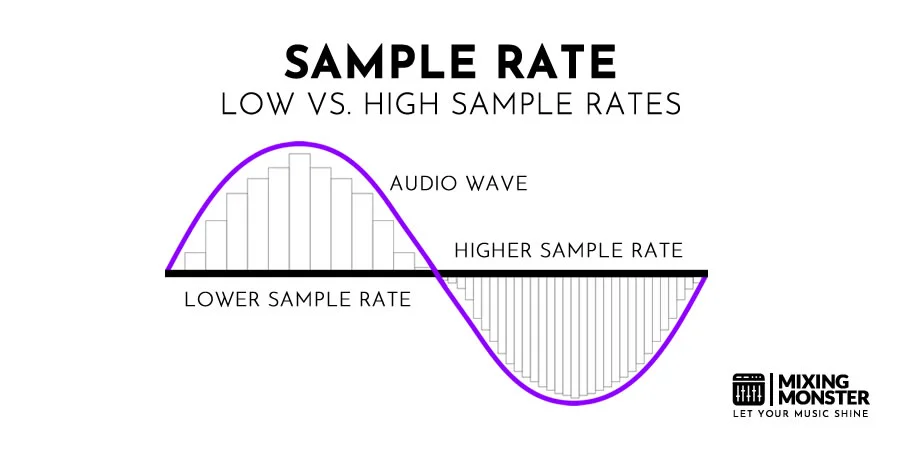
When it comes to digital audio, the sampling rate plays a crucial role in determining the quality of the sound. The sampling rate refers to the number of samples taken per second to represent the analog audio signal digitally. A higher sampling rate captures more details and provides a more accurate representation of the original sound wave.

Let’s take the example of CD-quality audio, which has a standard sampling rate of 44.1 kHz. This means that 44,100 samples are taken every second to record the audio. With a higher sampling rate, a wider frequency range can be captured, resulting in better audio fidelity and a more immersive listening experience. However, it’s important to note that increasing the sampling rate also requires more storage space.

Benefits of higher sampling rates

Higher sampling rates, such as 96 kHz or 192 kHz, offer several benefits for audio enthusiasts and professionals. Firstly, they allow for more accurate representation of high-frequency sounds, resulting in improved clarity and detail in the audio. Secondly, a higher sampling rate provides greater headroom for digital processing and effects, allowing for more precise manipulation of the sound.

Factors to consider when choosing a sampling rate

While higher sampling rates offer improved audio quality, there are a few factors to consider when choosing the appropriate sampling rate for your needs. Firstly, the capabilities of your audio playback devices and equipment should be taken into account. Not all devices support high sampling rates, and using a higher sampling rate without compatible hardware may not yield the desired benefits.

Additionally, the nature of the audio content should be considered. For example, music production and professional audio mastering often make use of higher sampling rates to capture the intricacies of the sound. On the other hand, for casual listening or streaming, a standard sampling rate like 44.1 kHz may suffice.

Understanding the significance of bit depth in digital audio

Bit depth is another crucial aspect of digital audio that directly impacts the dynamic range and accuracy of the sound reproduction. It refers to the number of bits used to represent each sample in a digital audio file. A higher bit depth allows for more precise quantization and results in a greater dynamic range.

Commonly used bit depths in audio production include 16-bit and 24-bit. A 16-bit audio file can represent 65,536 discrete volume levels, while a 24-bit audio file can represent a staggering 16,777,216 levels. This greater dynamic range enables the reproduction of softer and louder sounds with more accuracy, reducing the potential for quantization noise and distortion.

The impact of bit depth on audio resolution

Bit depth directly affects the resolution of the audio signal. A higher bit depth provides finer resolution and allows for more subtle details to be captured in the recording. This is particularly important when working with audio that has a wide dynamic range, such as classical music or film soundtracks.

Choosing the appropriate bit depth

The choice of bit depth depends on the nature of the audio content and the intended usage. For most consumer applications, a 16-bit depth is sufficient to deliver high-quality audio. However, for professional audio production or situations that demand the utmost accuracy, a 24-bit depth is recommended.

It’s worth noting that higher bit depths also result in larger file sizes, as more data is required to represent each sample. Therefore, considerations such as available storage space and transmission bandwidth should be taken into account when selecting the appropriate bit depth.

Final Words

Understanding the basics of digital audio, including sampling rate and bit depth, is essential for anyone seeking to optimize their audio experience. By choosing the right sampling rate and bit depth, you can ensure that your digital audio files accurately capture and reproduce the nuances of the original sound, whether you are an audio professional or an avid music lover.

Remember, when it comes to sampling rate, higher rates offer increased fidelity and clarity, but it’s essential to consider compatibility and storage requirements. Similarly, higher bit depths provide greater dynamic range and resolution, but the choice should be based on the nature of the audio content and intended use.

By mastering the fundamentals of digital audio, you can unlock a world of rich and immersive sound, enhancing your enjoyment of music, movies, and other multimedia experiences.

The Advantages of Lossless Audio Formats: FLAC and ALAC

The Advantages of Lossless Audio Formats: FLAC and ALAC

FLAC and ALAC
FLAC and ALAC
FLAC and ALAC
FLAC and ALAC

As an expert in audio optimization, I am always on the lookout for formats that deliver exceptional sound quality without compromising on file size. In this article, I will delve into the world of lossless audio formats, with a specific focus on two popular options: FLAC and ALAC. These formats have gained significant popularity among audiophiles and music enthusiasts for their ability to preserve the original audio quality while offering efficient compression. Join me as we explore the advantages of these lossless audio formats and why they should be your top choice.

Superior Sound Quality

When it comes to lossless audio formats, the primary concern is maintaining the utmost sound quality. FLAC and ALAC excel in this regard, as they employ compression algorithms that preserve every detail of the original audio recording. Whether it’s the rich harmonies of a symphony orchestra or the subtle nuances in a vocalist’s performance, these formats ensure an immersive and authentic listening experience. With FLAC and ALAC, you can indulge in music the way it was intended to be heard, without any compromise on audio fidelity.

Efficient Compression

Efficient compression is another remarkable advantage of lossless audio formats like FLAC and ALAC. These formats utilize sophisticated compression techniques that significantly reduce file sizes while retaining all the audio data. This means you can store more music on your devices without sacrificing quality or resorting to lower-bitrate alternatives. Whether you have a vast music library or limited storage space, FLAC and ALAC offer a practical solution to keep your favorite tracks accessible at all times.

Wide Compatibility

One of the key considerations when choosing an audio format is its compatibility with different devices and platforms. FLAC and ALAC have gained widespread support across various software and hardware ecosystems. Many popular media players, portable devices, and operating systems are compatible with these formats, ensuring seamless playback without the need for additional conversions or transcoding. Whether you’re using a Mac, Windows, or mobile device, FLAC and ALAC guarantee a hassle-free listening experience.

Versatility and Metadata Support

Versatility is an essential aspect of lossless audio formats, and FLAC and ALAC don’t disappoint. Apart from delivering exceptional audio quality, these formats also support a range of metadata. You can embed album art, track information, lyrics, and other relevant details within the audio files themselves. This ensures that your music collection remains organized and easily searchable across different platforms and media players. With FLAC and ALAC, it’s not just about the audio; it’s about creating a comprehensive and immersive musical experience.

Archival and Future-Proofing

For audiophiles and music collectors, archival is a crucial consideration. FLAC and ALAC are ideal for archiving purposes as they provide a reliable and future-proof solution. By choosing these formats, you can preserve your music collection in its original quality for years to come, ensuring that your favorite albums and tracks withstand the test of time. Moreover, since FLAC and ALAC have gained widespread acceptance, it’s highly likely that they will continue to be supported by future audio systems and technologies.

Smooth Integration with Existing Libraries

If you already have an extensive collection of audio files in other formats, the transition to FLAC or ALAC can be seamless. Both formats support transcoding, allowing you to convert your existing audio files into lossless formats without any loss of quality. This ensures that you can integrate FLAC and ALAC files seamlessly with your existing music library, avoiding any disruptions in your listening experience. With their wide compatibility and transcoding capabilities, FLAC and ALAC offer a convenient pathway to upgrade your audio collection.

Community and Support

FLAC and ALAC have garnered a passionate and dedicated community of supporters, comprising audio enthusiasts, music professionals, and developers. This active community ensures ongoing support, updates, and development for the formats, assuring users that they are investing in a long-term and reliable audio solution. Whether you seek advice, troubleshooting, or simply want to connect with like-minded individuals, the FLAC and ALAC community is always there to assist and share their expertise.

Streaming and Online Distribution

With the rise of music streaming platforms and online distribution, the demand for lossless audio formats has also increased. Many streaming services and online stores now offer FLAC as a preferred option for audiophiles, ensuring that you can enjoy your favorite music in its original quality, streamed directly to your devices. This development not only reinforces the advantages of lossless formats but also opens up new avenues for artists, allowing them to deliver their music to fans with uncompromised fidelity.

Preservation of Music History

Lossless audio formats like FLAC and ALAC play a crucial role in the preservation of music history. They allow us to digitize and archive classic recordings, ensuring that future generations can enjoy the same musical experiences as previous ones. By opting for FLAC and ALAC, you contribute to the preservation of cultural heritage and ensure that the legacy of iconic musicians and compositions lives on.

Audiophile-Grade Experience

Lastly, but certainly not least, FLAC and ALAC offer an unparalleled audiophile-grade experience. These formats cater to the discerning ears of audiophiles who crave the utmost audio quality. Whether you’re using high-end headphones, a dedicated audio setup, or a premium sound system, FLAC and ALAC provide the fidelity and richness necessary to truly appreciate the intricacies of the music. With their lossless nature and superior sound reproduction, these formats elevate your listening experience to new heights.

In conclusion, FLAC and ALAC stand out as the go-to choices for anyone seeking lossless audio formats. With their superior sound quality, efficient compression, wide compatibility, and versatile features, they offer an unmatched audio experience. Whether you’re an audiophile, music collector, or simply someone who values exceptional sound, FLAC and ALAC provide the perfect combination of fidelity and convenience. Embrace the advantages of lossless audio formats and let your music shine in its full glory.

Audio Normalization Techniques: Peak vs. Loudness

Audio Normalization Techniques: Peak vs. Loudness

Audio Normalization Techniques

As an audio optimization expert, I’m often asked about the best techniques for normalizing audio levels. In this article, I will explore two popular approaches: peak normalization and loudness normalization. These techniques, peak vs. loudness normalization, have their own unique advantages and considerations. Let’s dive in and uncover the secrets of achieving balanced and consistent audio!

Peak Normalization: Unleashing the Power of Dynamics

When it comes to peak normalization, it’s all about preserving the dynamics of your audio. Imagine a breathtaking symphony where the crescendos and diminuendos transport you to a different realm. With peak normalization, you ensure that the highest peaks of your audio reach their full potential without clipping or distortion. It’s like giving your audio the freedom to express itself with intensity and impact.

Loudness Normalization: The Harmony of Consistency

Now, let’s turn our attention to the world of loudness normalization. Have you ever experienced the frustration of constantly adjusting the volume while switching between songs or TV shows? Loudness normalization comes to the rescue! By analyzing the perceived loudness of your audio, it ensures a consistent listening experience across different tracks. Say goodbye to sudden volume jumps and immerse yourself in a harmonious soundscape.

Dynamic Range: The Dance of Soft and Loud

In the realm of audio normalization, we encounter the concept of dynamic range. Dynamic range represents the difference between the softest and loudest parts of an audio signal. Peak normalization respects the natural dynamic range, allowing the delicate whispers and thunderous roars to coexist in perfect balance. On the other hand, loudness normalization aims to reduce the dynamic range, providing a more even playing field for all elements of your audio.

Audio Clipping: Taming the Wild Peaks

Audio clipping is a notorious villain that can ruin your audio experience. Picture this: a sudden burst of sound that distorts and crackles, disrupting your enjoyment. Peak normalization acts as the hero in this story, taming those wild peaks and ensuring that your audio stays within safe limits. With peak normalization, your audio remains clean and free from the dreaded clipping monster.

LUFS: The Measure of Perceived Loudness

In the realm of loudness normalization, we encounter the term LUFS, which stands for Loudness Units Full Scale. LUFS provides a standardized measure of the perceived loudness of your audio. Loudness normalization algorithms analyze the integrated LUFS value and adjust the overall volume to match a specific target level. It’s like having a universal translator that ensures consistent loudness across different tracks and platforms.

Listening Environment: From Living Rooms to Concert Halls

Let’s talk about the listening environment and its impact on audio normalization. Every space has its unique characteristics, from the cozy intimacy of a living room to the grandeur of a concert hall. Loudness normalization takes into account these variations, delivering a consistent listening experience regardless of the environment. So whether you’re enjoying your favorite tunes at home or attending a live performance, the magic of normalization will make every moment memorable.

Personal Preference: Customizing Your Audio Journey

We all have our individual tastes and preferences when it comes to audio. Some crave the raw power of peak normalization, while others seek the comfort of consistent loudness through loudness normalization. The beauty of audio normalization techniques is that they allow you to customize your audio journey according to your personal taste. It’s like having a tailor-made suit that perfectly fits your unique style.

Metadata and Replay Gain: Enhancing the User Experience

Metadata and Replay Gain are powerful allies in the realm of audio normalization. Metadata provides valuable information about your audio, guiding normalization algorithms to make the right adjustments. Replay Gain takes it a step further by applying metadata tags to your audio files, ensuring consistent playback volume across different tracks. Together, they create a seamless and enhanced user experience, elevating your audio enjoyment to new heights.

Compression: Controlling the Sonic Landscape

Dynamic audio content, such as movies or live performances, often presents challenges for normalization. This is where compression enters the scene. Compression techniques allow you to shape the sonic landscape, reducing the dynamic range while maintaining audio quality. It’s like having a skilled conductor who ensures that every instrument is heard clearly, regardless of its volume.

Audio Editing and Mastering: Polishing the Gems

Lastly, let’s not forget the crucial role of audio editing and mastering in the pursuit of sonic perfection. Audio professionals meticulously fine-tune various parameters during the editing and mastering process. Audio normalization techniques become valuable tools in their arsenal, ensuring that the final product shines with balanced and consistent audio. It’s like adding the final touch of brilliance to your audio gems.

In conclusion, the choice between peak normalization and loudness normalization depends on your desired audio outcome. Whether you embrace the dynamic range or seek consistent loudness, these techniques empower you to create an audio experience that resonates with your vision. So go forth, unleash the power of normalization, and let your audio journey be a harmonious symphony of sound!

Codecs: The Building Blocks of Digital Media

Codecs: The Building Blocks of Digital Media

codecs
codecs
Codecs
Codecs

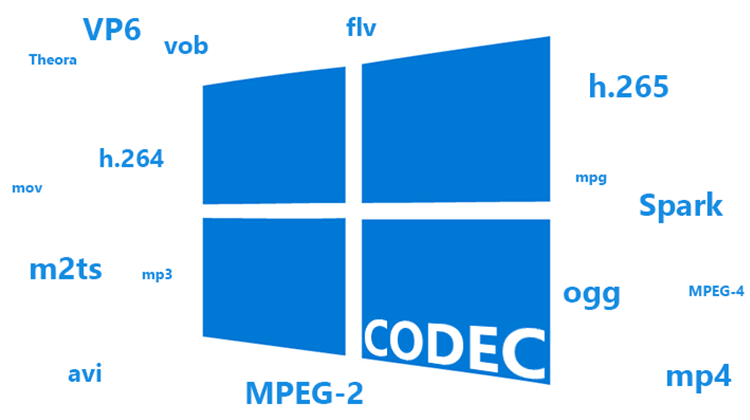
Codecs are the building blocks of digital media. They are software or hardware that encode and decode digital data streams. This means that they can take a raw digital signal, such as a video or audio recording, and compress it into a smaller file size, or they can take a compressed file and expand it back into its original form.

Codecs are essential for the transmission, storage, and playback of digital media. They are used in a wide variety of applications, including streaming video, video conferencing, and digital broadcasting.

How Codecs Work

Codecs work by using a variety of techniques to reduce the size of digital data streams. These techniques include:

Entropy coding: This technique takes advantage of the fact that some parts of a digital signal are more likely to occur than others. By assigning shorter codes to the more likely parts of the signal, entropy coding can significantly reduce the size of the file.
Transform coding: This technique breaks the digital signal down into smaller components, and then compresses each component individually. This can be more efficient than entropy coding, but it is also more complex.
Prediction: This technique uses the past values of a signal to predict future values. By predicting future values, the codec can reduce the amount of data that needs to be stored.
**

Types of Codecs

There are two main types of codecs: lossy and lossless. Lossy codecs reduce the size of a digital data stream by discarding some of the data. This can result in a loss of quality, but it also allows for much smaller file sizes. Lossless codecs do not discard any data, so they do not suffer from any loss of quality. However, they also produce larger file sizes.

Some of the most common lossy codecs include:

MPEG-1: This codec is used for a variety of applications, including video CDs and digital television.
MPEG-2: This codec is used for DVD-Video and high-definition television.
H.264: This codec is the most widely used codec for streaming video and online video.
Some of the most common lossless codecs include:

FLAC: This codec is used for lossless audio compression.
WAV: This codec is a lossless audio format that is used by many professional audio applications.
ALAC: This codec is a lossless audio format that is used by Apple’s iTunes and iPod products.
**

Conclusion

Codecs are essential for the transmission, storage, and playback of digital media. They are used in a wide variety of applications, and they have made it possible to enjoy digital media on a variety of devices.

Final Words about Codecs

Codecs are a complex topic, but they are essential for understanding how digital media works. By understanding how codecs work, you can make better decisions about the quality and size of your digital media files.

I hope this article has given you a better understanding of codecs.

Resampling Audio: Concepts and Methods

Resampling Audio: Concepts and Methods

Resampling Audio
Resampling Audio
Resampling Audio
Resampling Audio

Introduction

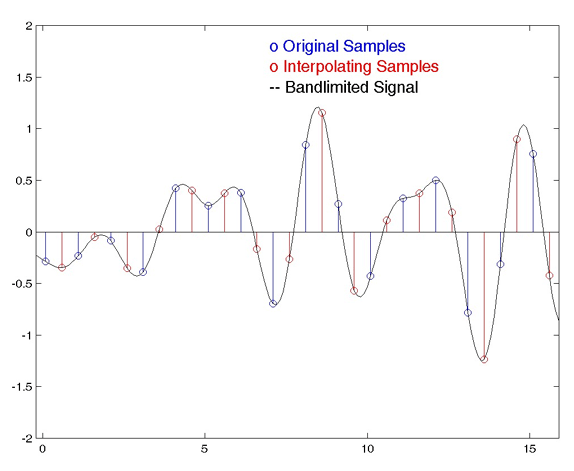
Resampling is the process of changing the sample rate of an audio signal. This can be done to increase or decrease the playback speed of the signal, or to convert it from one sample rate to another.

In this article, I will discuss the concepts and methods of resampling audio. I will also provide some tips on how to resample audio effectively.

What is Resampling?

Resampling is the process of changing the number of samples per second in an audio signal. The sample rate is the number of times per second that an audio signal is sampled. For example, a CD-quality audio signal has a sample rate of 44,100 samples per second.

When you resample an audio signal, you are changing the number of samples per second. This can be done to increase or decrease the playback speed of the signal, or to convert it from one sample rate to another.

Why Resample Audio?

There are a number of reasons why you might want to resample audio. For example, you might want to:

Increase or decrease the playback speed of an audio file.
Convert an audio file from one sample rate to another.
Optimize an audio file for playback on a specific device.
Remove unwanted noise from an audio file.
How Does Resampling Work?

Resampling works by inserting or removing samples from the audio signal. When samples are inserted, the playback speed of the signal is increased. When samples are removed, the playback speed of the signal is decreased.

There are two main types of resampling:

Linear resampling is the most common type of resampling. It works by inserting or removing samples in a linear fashion. This means that the spacing between samples is constant throughout the audio signal.
Non-linear resampling is a more sophisticated type of resampling. It works by inserting or removing samples in a non-linear fashion. This means that the spacing between samples is not constant throughout the audio signal.
Which Type of Resampling Should I Use?

The type of resampling that you should use depends on the specific application. For most applications, linear resampling is sufficient. However, if you need to preserve the quality of the audio signal, then you should use non-linear resampling.

How to Resample Audio

There are a number of software applications that can be used to resample audio. Some popular examples include Audacity, Adobe Audition, and FL Studio.

Resampling Tips

Here are a few tips for resampling audio:

Use a high-quality resampling algorithm. This will help to preserve the quality of the audio signal.
Set the sample rate of the output file to the same sample rate as the input file. This will avoid any changes in the playback speed of the signal.
Use a high-quality audio converter. This will help to ensure that the resampled audio signal is of the highest quality.
Final Words About Resampling Audio

Resampling is a powerful tool that can be used to change the sample rate of an audio signal. It can be used to increase or decrease the playback speed of an audio file, to convert an audio file from one sample rate to another, or to optimize an audio file for playback on a specific device.

When resampling audio, it is important to use a high-quality resampling algorithm and to set the sample rate of the output file to the same sample rate as the input file. This will help to preserve the quality of the audio signal.

Resampling Audio for Beginners

Resampling audio can be a daunting task for beginners. However, it is not as difficult as it seems. Here are a few tips to help you get started:

Start by using a simple resampling algorithm. There are many free and open-source resampling algorithms available online.
Set the sample rate of the output file to the same sample rate as the input file. This will avoid any changes in the playback speed of the signal.
Use a high-quality audio converter. This will help to ensure that the resampled audio signal is of the highest quality.
With a little practice, you will be able to resample audio like a pro!

Conclusion

Resampling audio is a powerful tool that can be used to change the sample rate of an audio signal. It can be used to increase or decrease the playback speed of an audio file, to convert an audio file from one sample rate to another, or to optimize an audio file for playback on a specific device.