Codecs: The Building Blocks of Digital Media


Free Download Mp4Gain
picture

Codecs: The Building Blocks of Digital Media

codecs
codecs
Codecs
Codecs

Codecs are the building blocks of digital media. They are software or hardware that encode and decode digital data streams. This means that they can take a raw digital signal, such as a video or audio recording, and compress it into a smaller file size, or they can take a compressed file and expand it back into its original form.

Codecs are essential for the transmission, storage, and playback of digital media. They are used in a wide variety of applications, including streaming video, video conferencing, and digital broadcasting.

How Codecs Work

Codecs work by using a variety of techniques to reduce the size of digital data streams. These techniques include:

Entropy coding: This technique takes advantage of the fact that some parts of a digital signal are more likely to occur than others. By assigning shorter codes to the more likely parts of the signal, entropy coding can significantly reduce the size of the file.
Transform coding: This technique breaks the digital signal down into smaller components, and then compresses each component individually. This can be more efficient than entropy coding, but it is also more complex.
Prediction: This technique uses the past values of a signal to predict future values. By predicting future values, the codec can reduce the amount of data that needs to be stored.
**

Types of Codecs

There are two main types of codecs: lossy and lossless. Lossy codecs reduce the size of a digital data stream by discarding some of the data. This can result in a loss of quality, but it also allows for much smaller file sizes. Lossless codecs do not discard any data, so they do not suffer from any loss of quality. However, they also produce larger file sizes.

Some of the most common lossy codecs include:

MPEG-1: This codec is used for a variety of applications, including video CDs and digital television.
MPEG-2: This codec is used for DVD-Video and high-definition television.
H.264: This codec is the most widely used codec for streaming video and online video.
Some of the most common lossless codecs include:

FLAC: This codec is used for lossless audio compression.
WAV: This codec is a lossless audio format that is used by many professional audio applications.
ALAC: This codec is a lossless audio format that is used by Apple’s iTunes and iPod products.
**

Conclusion

Codecs are essential for the transmission, storage, and playback of digital media. They are used in a wide variety of applications, and they have made it possible to enjoy digital media on a variety of devices.

Final Words about Codecs

Codecs are a complex topic, but they are essential for understanding how digital media works. By understanding how codecs work, you can make better decisions about the quality and size of your digital media files.

I hope this article has given you a better understanding of codecs.


Free Download Mp4Gain
picture


Mp4Gain Main Window
picture


Mp4Gain Features
picture


Free Download Mp4Gain
picture

Codecs and media containers.

Codecs and media containers.

Codecs and Containers

Bitrate. Recommendations for video encoding.

Video Container and Video Codecs

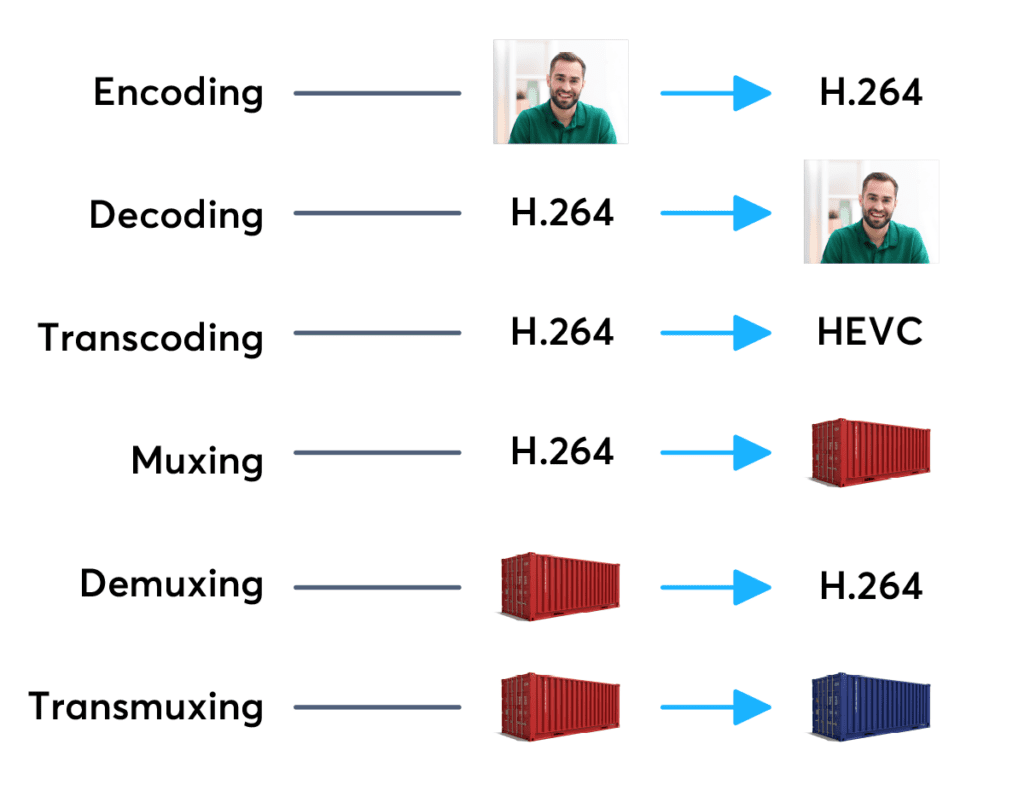
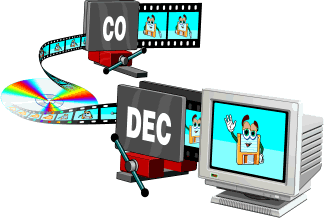
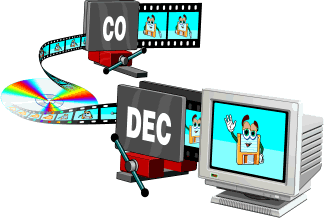
To compress digital media files, special programs are used – codecs (encoders). This is a kind of “formula” that determines how audio and video content can be packaged. Codecs also perform the reverse decoding operation, in this case they are called decoders.

Encoder (encoder, encoder in English): a program and / or device used to convert information from one type to another (encoding).
A decoder is essentially the same as an encoder, but it converts in the opposite direction.

Codec (English codec): encoder and decoder in one block.
Compression ratio is the ratio of the size of the input file (not encoded) to the size of the output file (encoded). For example, a compression ratio of 11: 1 means that the encoded file is 12 times smaller than the original.
Bit rate: the number of bits allocated to record a unit of time of audio information. They are generally measured in kb / s, that is, kilobits per second (kb / s or kbps in English).
Most codecs for audio and visual data use lossy compression to obtain an acceptable final (compressed) file size. There are also lossless codecs. But for most applications, lossy codecs are more beneficial, as the subtle degradation in quality is justified by a significant reduction in data volume. Almost the only exception is when the data will undergo post-processing: in this case, repeated encoding / decoding losses will have a serious impact on quality.

The most popular are the following codecs:

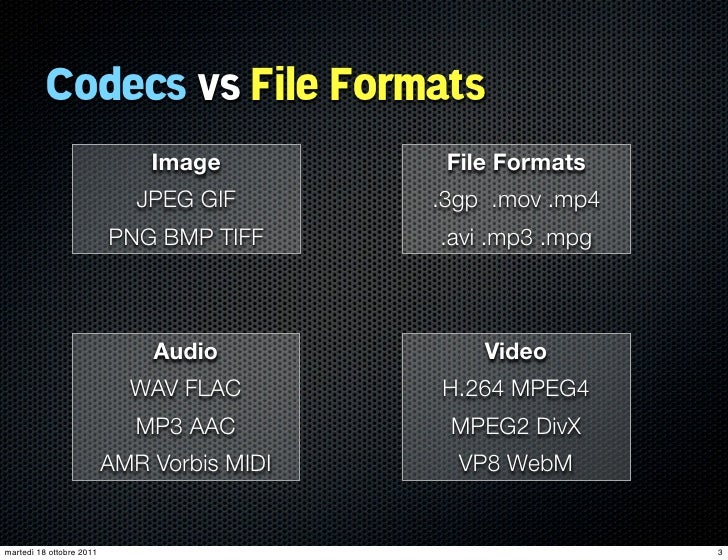
psd, bmp, rle, dib, gif, eps, jpg, pcx, raw, png, tif, etc. – images.
flag, ogg, opus, wav, pcm, wma, mp3, aac, as3, dts, flac, etc. – Audio;
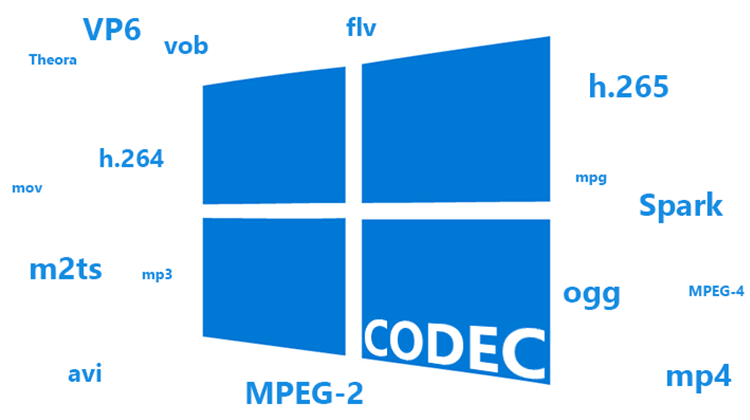
ffdshow, indeo, mjpeg, mpeg-1, mpeg-2, mpeg-4 (h.261, h.263, h.264), wmv – video.

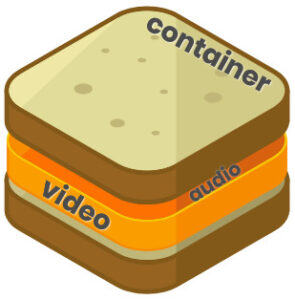
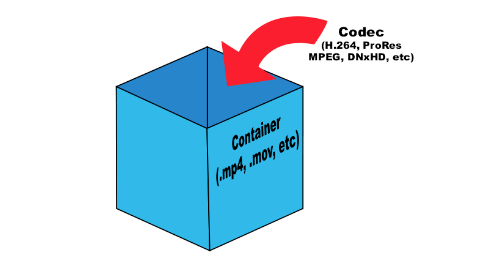
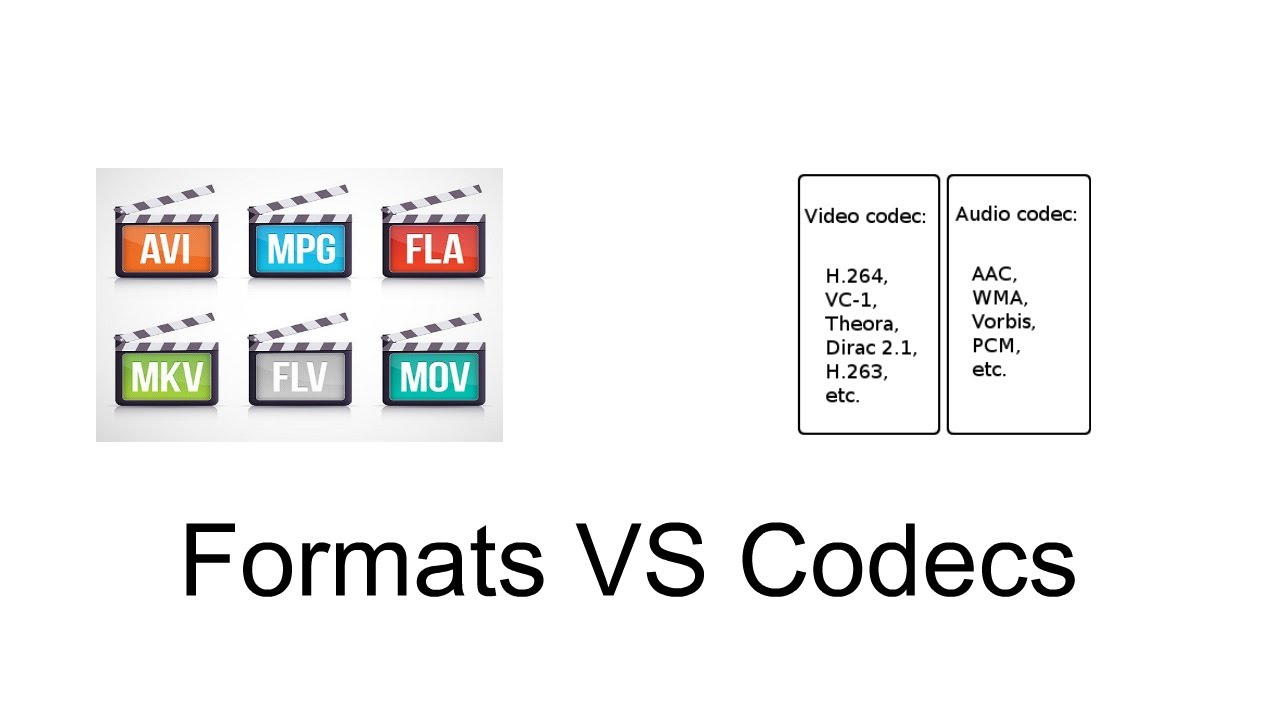
Any operating system initially contains a certain set of codecs, but these are generally not sufficient to play certain video file formats. The codecs convert the data into a special file called a container. A container is a special shell that stores information encrypted by codecs. Basically, media containers are video file formats that contain data about their internal structure. The container can store various information, in particular, images, audio, video and subtitles. Different types of containers determine the quantity and quality of information that can be stored in them, but they do not affect the way the data is encoded.

The most popular are the following containers:

ogg, mp3, mka, wav, wma, mp3, aac, dts, flac, etc. – Audio;
DivX, XviD, AVI, MP4, MPEG, WMV, MOV, VOB, MKV, FLV, MPG, dv, flv, ts, m2ts, mp4, etc. – video.
To determine which format to convert a video into, you must proceed from the task set. Imagine this situation: you have a beautiful video clip of the wedding photos and you want to play it on your TV screen (without HD). To do this, you can burn video in DVD format (as3 – audio, vob – video).

Next, let’s look at the most famous video file formats:
AVI (Audio-Video Interleaved) is one of the most common media containers for Windows operating systems. This format can contain four types of information: video, audio, text and midi. This container can contain video of various formats from MPEG-1 to MPEG-4. AVI has a large number of varieties in terms of internal structure and can be played on smartphones, communicators and other devices. The AVI media container does not impose any restrictions on the type of codec used.
WMV (Windows Media Video) is a digital video format created and controlled by Microsoft. WMV files can contain audio and video data packed with Windows Media Audio (WMA) and Windows Media Video (WMV) codecs.
MOV is a format developed by Apple for the QuickTime media player. To play such files, you must have a QuickTime player or players with MOV codecs already installed. The format can contain video, animation, graphics, 3D. This format supports any audio and video codecs.
ASF (Advanced Streaming Format) is a Microsoft streaming format. Based on MPEG-4 and used to transfer low and medium bit rate videos to the Internet. ASF is a multimedia container that supports almost all video codecs.
MPG or MPEG (Moving Picture Experts Group) – A video file containing video encoded with codecs:
mpeg1 – The standard was developed in 1992 with the capabilities of 2-speed CD-ROMs and 486 computers in mind
The mpeg2 standard was adopted in

CODECS AND CONTAINERS

CODECS AND CONTAINERS

I.CODEC

Codecs are components (circuits, modules) or computer programs that create a stream of data to encode and / or can decode. The term “Codec” is a made-up word that consists of parts of the English terms CO der and DEC o. (En) Encoders are used to encode data streams for transmission (eg Reed-Solomon contributes to DVB error protection), Encrypt (eg AACS as content protection for Blu-ray Disc) or to reduce the amount of data (compression method, for example, MP3 for audio). The decoder (decoder) retrieves the encoder’s original input information from the encoded data stream.

codecs and containers

2. CODECS FOR COMPRESSING DATA STREAMS

No medium of storage or transmission is infinitely large. Therefore, the available resources must be budgeted. Therefore, it is very important to reduce the amount of data that must be transmitted or stored. There are different compression methods adapted to the information to be compressed.

Codecs and containers
Each compression method has its advantages and disadvantages. There is a trade-off between compression factor (= ratio of source file size to target file size), compression quality (= lossless / lossy -> type and number of artifacts), speed, usability , decoder distribution and finally also costs. Compression processes and their implementation in the market play an extremely important economic role, since compression algorithms can be patented and their use must be compensated by the payment of licenses by device manufacturers or software users. Some kind of content encryption can also be achieved through proprietary and undisclosed compression algorithms, allowing distribution control.

Operating principle

Compressing a digital signal means that parts of the information must be suppressed without changing the content of the information. These ‘superfluous’ data, the so-called redundancies and irrelevancies are components of information, for example an image, that are present several times (redundant) or cannot be perceived by humans (irrelevant). Furthermore, redundancies can also occur in the digital data describing the image, for example. All compression methods are based on the principle of eliminating redundant information. In most compression processes, several different algorithms are used one after the other to eliminate redundancies in content and data. Algorithms that discover and avoid redundancies on a purely mathematical basis usually work lossless without loss), that is, no information is lost. After compression and subsequent decompression the information then corresponds 1: 1 to the original. Compression algorithms that evaluate information components based on physiological models (for example, MP3) for their importance and then discard unimportant information (irrelevance reduction), function lossy with loss), since information it is lost during compression.

3. FILES WITH COMPRESSED CONTENT

If the data is compressed through a certain process, it must be put into a format in which it can be distributed. These can be streams that are streamed like DVB, for example, or files that are stored on a storage medium. The compressed “raw data” thus creates a structure that allows the data as in a container (transport container). The way this container or container format is made depends on the transmission medium, the operating system and the specific application.

II. CONTAINER FORMATS

Container files are file structures that simplify external (multimedia) data and allow exchange, even across platform boundaries. Container formats describe how this user data is stored (not how it is encoded!). In principle, cabinet files can contain all kinds of data, but they are generally restricted to specific data. Specialized in data types. For example, PDF files are ideal for reproducing documents that are true to the original, consisting of font information and raster or vector graphics, whereas an AVI file generally contains movie and sound information.

Container formats for multimedia applications always use already encoded data streams, i.e. compressed

Formats and codecs

As a result of the process of sampling an analog audio signal we obtain a sequence of binary numbers (numerical streams) that can be written to particular types of files (audio files or sound files) stored on various types of digital media (CD, DVD, HD or other).

Codecs and formats

These files can have three different encoding formats:

Uncompressed – All data derived from the sampling process is written to the stored file.
Lossy: the information contained in the stored file is less than that contained in the source data (information loss).
Lossless – The information contained in the stored file is identical to that contained in the source data, but the data is still compressed.

Formats & Codecs
In fact, these different possibilities arise from the need that when we want to store all the information related to a signal in a digital medium, we may need to reduce the storage space occupied in order to benefit from the portability or transmissivity of the encoded stream. We must resort to compression of the information itself in such a way that it also allows the reverse operation.

This operation is performed using codecs that are programs (or devices) that deal with both the digitization of signals (typically audio or video) and their digital encoding and / or decoding.

There are several types of codecs, different from each other by the type of signal on which they must operate and by the encoding / compression algorithm implemented in them. Each encoding format can be derived from several different codecs. In fact, these allow you to listen to proprietary formats opened by any file reader, keeping the physical layer separate from the logical format of its representation.

The advantages of compression are:

takes up less space on the target media.
spend less time during data transfer (bit rate).
The cost (disadvantages) is the increase in read / write times linked to decompression / compression times and, in the case of audio files, also in terms of audio quality.

Bitrate

Before delving into the different types of audio formats, let’s focus on concepts related to data transmission speed, since audio files are intrinsically linked to the time that passes: each second is associated with a certain information content and therefore both to a certain subsequence of figures. binary. The number of binary digits that make up these subsequences is called the bit rate.

Bit rate is the number of binary digits used to store one second of information.

CDs, for example, have a sampling frequency equal to 44,100Hz as standard, which therefore generates 44,100 values ​​per second for each channel. In the case of a stereo file, they are multiplied by 2, and since sampling is done at 16 bits (exactly equal to 2 bytes), they must be multiplied by 2:

44,100 * 2 * 2 * 60 (seconds) = 10,584,000 bytes (~ 10MB) every minute

Bitrate is expressed in kilobits per second (kbps) and can range from 32 to 320 kbps. For example, if we wanted to calculate the bit rate of the previous file we would have to calculate:

44,100 * 2 * 2 * 8 (bytes to bit) = 1,411,200 bits / second (1,411 kbs)

The calculations we have just carried out refer to an uncompressed format, whereas in the case of compressed formats, as the total length of the file decreases, the average length of the subsequences also decreases, and consequently the bit rate. mean that will correspond to the compression factor.

In fact, if a file with a 1411 Kbps bit rate like the one in the previous example were compressed at an average bit rate of 320 Kbps, we would have reduced the original file size by a factor of approximately 4.5 (1411/320).

Currently in the most advanced codecs there are three types of bitrate implementation:

CBR (BitRate from Costant). The simplest, most used and now least effective method. The bit rate remains constant in each frame and this means that the encoder will always use the same number of bits to encode each musical passage. In practice, the more complex passages will have a lower quality than those with little dynamics or silence since they will be encoded with an always equal number of bits, while more would be needed for the former and less for the latter. A great advantage of this mode is that the size of the resulting file is always proportional to the length of the part and is easily evaluated.

ABR (Average Bit Rate). Average bit rate is a mode that outperforms CBR and consists of a kind of variable bit rate. The encoder encodes the regions that need it with more bits and the simpler ones with less.

Codecs and bit rates, how much do they influence the quality of MP3s?


The importance of codecs

Everything that has been written about the bit rate is valid
“with the same codec”, ie with the same algorithm
Coding, but the quality of the algorithms is very variable,
since the perception model, fundamental control of the levels of
compression.

codec

Those who are best able to mimic natural perception will get it
the best results since the cutoff frequencies will be
least audible and significant, while a codec with a perceptual model
Unrealistic creates flat and empty passages of important frequencies.

video container

In addition, a bad codec easily introduces “artifacts”; or
Sounds that are not available in the original originate from poor quantization
of some frequencies, especially if the original is not perfect.

Like most things in the computer world, codecs are evolving
In addition to the codec type, it is important that it is current and updated
for increasingly powerful algorithms.

Codecs fall into two categories: “fast”
and slow “. The most important fast codecs include blade,
QDesign and Xing, fast compression, but low to medium quality,
among the slow but high quality Fraunhofer and Lame are these
latest free and especially valid for high bit rates.

You can achieve good results with Fraunhofer coding
Most listeners cannot do this even at 128 Kbit / s and 320 Kbit / s
Distinguish MP3 from the original while compressing with Xing
o Blade with 128 Kbit / s can detect obvious artifacts and only with 256 Kbit / s
Audio reaches the quality of an MP3 compressed with 128 Kbit / s
Fraunhofer.

The just released Xing algorithm had the advantage of lower costs
Rights compared to Fraunhofer and faster coding speed
(It was also the first to implement variable bit rate VBR coding), but
Today’s processor performance is like that. for this
Factor is less important.

The lame algorithm has the advantage that no fees have to be paid
and of remarkable quality, especially at high bit rates – an MP3 from
128 Kbit / s encoded with Lame are less than one compressed with Fraunhofer.
but significantly better than Xing, and 256 Kbit / s Lame has the same quality
Fraunhofer.

At the moment, Lame is the best option for those who
You can afford larger files, while those that need to be careful
about the size, maybe because they have to offer files on an amateur website
or because they have an MP3 player with limited memory, they can pay well
Get a Fraunhofer encoder.

Xing, Blade, and other faster algorithms are not recommended, though
Pay attention to quality.

General quality and bit rate considerations
So that most listeners are of acceptable quality,
using a quality codec like Fraunhofer the bit rate that is normally used
(128 kbps, 1 MB per minute) is usually sufficient, especially if
Songs have a limited frequency range.

For some traces or for more sensitive ears a
highest bit rate, e.g. B. 256 Kbit / s (2 MB per minute, 1/5 of
Corresponding WAV).

64 kbit / s bit rates are always insufficient and with low quality codecs
like Xing or Blade are practically unknown.

Finally, we have to dispel a false myth: it is not possible to point it out
Music genres that need a higher bit rate, classical music too
Sometimes it can be made acceptable at 128 kbps because
Use restricted frequencies, while some rock or pop songs can
suffer because synthesizer tones and human voices are
easily exposed to the “artifact” effect.

Only lyrical music that has always been the most difficult
play and jazz (with cymbals,
Artifacts easy to suffer) certainly not suitable for MP3 and require bit rates
higher.

However, the results vary from song to song and are not
possible to give a general rule. It must be remembered that the audiophile,
The hi-fi musician or hobbyist can almost always
Distinguish an MP3 file with 320 Kbit / s from the original on the audio CD.
So if you have storage space, WAV files or codecs without loss of information
like WMA9 Lossless or FLAC (Free Lossless Audio Codec) always have a quality
Consider MP3, even if they are two to four times larger than
an MP3 with 320 Kbit / s.

What are codecs and why do I have to use them?

It seems incredible, but even today there are many people who still have the so-called codecs, as something virtually unknown. It is not very well known how they work and many people do not even know what they are for. In a basic way, the word codecs can be translated into a compressor – decompressor, and it is used to describe anything that converts data into another form of storage or transmission, and can convert it into something that can be used.

codec

In broadcasted or broadcasting technologies, a codec is a physical device that converts analog video and audio data, into a digital form so that it can be sent over the air. It is also capable of converting the digital information received back to an analog format. In the world of computers, codecs are used as a means of compressing video, images and audio to more manageable size. Most codecs use a lossy compression method, but there are some without losses.

Lossless codecs, such as MSU and Huffyuv, reproduce the original video exactly, without subsequent losses if the video is re-encoded. The most common loss codecs lose several parts of the information, but can save large amounts of space. A codec with losses can act in different ways, such as cutting the original image or sound, and readjusting it in a much more efficient space, then coding it. Another method is to compare a piece of data known to other adjacent data and eliminate excess information to save space. The truth is that there are a lot of codecs available, each of them trying to find the perfect balance between the lost information and the file size. Other factors such as process power also have to be taken into account.

How the video codecs works

The MPEG-1 codec is used in VCDs, and contains the MP3 standard, one of the most used audio codecs. The support for this type of codec is very high, especially among computers, and consumers of devices for watching movies. The quality is very high, although it is not as high as MPEG-2, and the sizes of the files that contain the video are quite large. The MP3 audio standard has good compression through a number of codecs, and is one of the most popular for listening to music online.

The MPEG-2 codec is an incredible high quality standard used primarily for DVDs. While the MPEG-1 codec only allows progressive scanning, MPEG-2 also supports interlacing, allowing greater control over size. Although it is not one of the most advanced codecs, it is widely used for its continued use as a standard for commercial DVDs.

The MPEG-4 goes one step beyond the MPEG-2. It has a number of significant technical advances and better compression methods. It is also widely used, and supports progressive scanning and interlacing. There are a good number of online codecs derived from this format, which includes DivX, 3ivx and Xvid. Each of these codecs has small differences from the original MPEG-4, to give better compression and functionality in certain situations. In fact, there are literally hundreds of codecs on the network, and everyone has their own tastes regarding the application they will use. Many programs, especially players, have their own functionalities to automatically search and download codecs that you may need for a movie or sound file. This eliminates the need for the user to have to search for them on their own. There are so-called codec packages, which bring a good selection of the best and those that are guaranteed to work. Some of the most popular are the ELISOFT Codec Pack 14. 0 and the K-Lite Codec Pack 3.7.0, which usually make almost any multimedia file work.

What is a Codec? Why we need codecs so much?

Nowadays, with so much multimedia information that we consume, whether in the form of video, audio or images, it is impossible to think of a simpler way to enjoy all these contents without the use of a codec. However, this small piece of software, so valuable for digital media playback, goes almost unnoticed for most users.

So important is the function of the codec in our system, that without them it would be impossible, for example, to watch a movie or listen to a song, since they fulfill the function of converting digital data to a way in which we humans can understand it. There are dozens of different codecs for each type of multimedia file, and each of them has been developed for a specific task.

codecs

If you want to know more about the fascinating technology of codecs, don’t hesitate to continue reading the rest of the article.

Most common types of codecs

Uncompressed audio or video take up a lot of storage space, and that is why codecs are one of the most viable alternatives when reducing their size for easy handling and storage.

However, the task is not so simple, since most codecs, when reducing the size of a file lose some of the original quality, and it is very important to know what codecs to use when compressing to avoid that problem.

codec

One of the most famous codecs today is the MP3, which allows us a great capacity to reduce the size of a music file, but that offers a considerable loss of quality, even at the lowest compression rates.

In this sense, another codec that allows us to compress a music file in a good way is FLAC, which is considered a lossless codec, but with a compression rate lower than MP3, that is, the files in FLAC are larger, but also the quality that can be obtained from the original source. Other codecs widely used for compression in the musical field are Ogg Theora and Ogg Vorbis, just to name a couple.

In the field of video files, exactly the same happens with audio codecs, there are codecs that allow a high compression rate but that lose a lot of quality in the process, and lossless codecs such as MSU or Huffyuv, but which are practically unmanageable due to the resulting size of the video.

The codec name comes from the contraction of CO-code and DE-code.

And as we said before, we encode and decode to reduce the size, losing the minimum possible quality. Today we want everything to happen without cuts, without interruptions. Watching a movie without taking hours to download or load, or listen to a song equally without interruptions … that means that the video or audio (increasingly high quality and therefore of greater weight in the discussion and that would take longer time to be transmitted over the internet) should be reduced as much as possible by convincing as much as possible the same quality.

It was already understood that without codeces we would be lost and this audiovisual era of streaming we would not be possible?

Jua many audio and video formats, each one was made with a series of specifications in mind. They compete against each other and it is good that we know them and know that it is better to listen to quality music … an mp3, a FLAC, ogg, etc. The same for videos … a webp, mp4, avi, wmv, etc. is better.

That’s why codecs shouldn’t seem strange things to us, just weird names. But we must understand that without its ability to reduce the size of the files, we would not have been able to live this multimedia revolution that we are living today.

Differences between Codec and container

Confusion between codec and container is very common. And even more if we add file extensions, such as .flv, .mp3, .mp4, etc.

codecs and containers

What is a codec?

The codec term comes from the concatenation of the initials of two words: encoder and decoder. Strictly speaking, a codec is a specification on how to code a type of information and then be able to decode it. For example, a codec determines how video and audio information is compressed and decompressed. Remember that compression is a specific case of coding in which space is reduced, eliminating redundant or low perceptual impact information.

Coding means something like compressing. That is, it seeks to reduce the amount of bits that an audio file occupies. The idea is to reduce the amount of bits while maintaining the highest possible audio quality.

Obviously, once the files have been compressed, they need the counterpart, which becomes the decoder that is the one that can interpret and reconvert in sound what was written in the file.

Then, a codec is one that serves to compress and decompress (encode and decode) an audio or video file.

What is a container?

Within the multimedia scope, a container is a specification on how different types of encoded multimedia content are sorted within a file. These different contents are usually, mainly, video, audio and text.

Consider the case of a movie in digital format. This movie is in a file. When we open that file, a player runs and we can enjoy the movie. Notice that a movie has video, has audio, subtitles, information about its author, information about its duration, etc. For the convenience of the user, all these elements are grouped into a single file. The order in which they are saved in that file is the container specification.

Connection

The video information that is inside a container is usually compressed, that is, it usually follows the specification of a specific codec. The same goes for audio information. The confusion appears when there are containers and codecs with very similar or even equal names.

The most popular

The most popular video codecs currently are Theora, VP8, MPEG-2, h.264, Xvid and Divx. Regarding audio codecs: AAC, FLAC, MP3, Vorbis (ogg) and WMA are the most abundant.

The most commonly used containers are AVI, Divx, Matroska, Flash video, MP4, MPEG, Ogg, Quicktime, MXF and WebM. Since the containers are intrinsically linked to the files, each of them also specifies one or several possible file extensions:

AVI -> .avi
Divx -> .divx
Matroska -> .mkv, .mk3d, .mka, .mks
Flash video -> .flv, .f4v
MP4 -> .mp4
MPEG -> .mpg, .mpeg
Ogg -> .ogg
Quicktime -> .mov, .qt
MXF -> .mxf
WebM -> .webm

And to open a container and see its contents?

The containers are interpreted through a media player application, such as Windows Media Player, Quicktime (application with the same name as a container), VLC, Plex, RealPlayer or Winamp, to name a few .

A good option is the VLC player, as it offers compatibility with all formats under almost any platform and even allows you to play incomplete files (useful feature if you want to start playing an audiovisual content that has not yet finished downloading, provided that this be progressive). In addition, it is freely distributed.