Codecs: The Building Blocks of Digital Media


Free Download Mp4Gain
picture

Codecs: The Building Blocks of Digital Media

codecs
codecs
Codecs
Codecs

Codecs are the building blocks of digital media. They are software or hardware that encode and decode digital data streams. This means that they can take a raw digital signal, such as a video or audio recording, and compress it into a smaller file size, or they can take a compressed file and expand it back into its original form.

Codecs are essential for the transmission, storage, and playback of digital media. They are used in a wide variety of applications, including streaming video, video conferencing, and digital broadcasting.

How Codecs Work

Codecs work by using a variety of techniques to reduce the size of digital data streams. These techniques include:

Entropy coding: This technique takes advantage of the fact that some parts of a digital signal are more likely to occur than others. By assigning shorter codes to the more likely parts of the signal, entropy coding can significantly reduce the size of the file.
Transform coding: This technique breaks the digital signal down into smaller components, and then compresses each component individually. This can be more efficient than entropy coding, but it is also more complex.
Prediction: This technique uses the past values of a signal to predict future values. By predicting future values, the codec can reduce the amount of data that needs to be stored.
**

Types of Codecs

There are two main types of codecs: lossy and lossless. Lossy codecs reduce the size of a digital data stream by discarding some of the data. This can result in a loss of quality, but it also allows for much smaller file sizes. Lossless codecs do not discard any data, so they do not suffer from any loss of quality. However, they also produce larger file sizes.

Some of the most common lossy codecs include:

MPEG-1: This codec is used for a variety of applications, including video CDs and digital television.
MPEG-2: This codec is used for DVD-Video and high-definition television.
H.264: This codec is the most widely used codec for streaming video and online video.
Some of the most common lossless codecs include:

FLAC: This codec is used for lossless audio compression.
WAV: This codec is a lossless audio format that is used by many professional audio applications.
ALAC: This codec is a lossless audio format that is used by Apple’s iTunes and iPod products.
**

Conclusion

Codecs are essential for the transmission, storage, and playback of digital media. They are used in a wide variety of applications, and they have made it possible to enjoy digital media on a variety of devices.

Final Words about Codecs

Codecs are a complex topic, but they are essential for understanding how digital media works. By understanding how codecs work, you can make better decisions about the quality and size of your digital media files.

I hope this article has given you a better understanding of codecs.


Free Download Mp4Gain
picture


Mp4Gain Main Window
picture


Mp4Gain Features
picture


Free Download Mp4Gain
picture

What are codecs and why do I have to use them?

It seems incredible, but even today there are many people who still have the so-called codecs, as something virtually unknown. It is not very well known how they work and many people do not even know what they are for. In a basic way, the word codecs can be translated into a compressor – decompressor, and it is used to describe anything that converts data into another form of storage or transmission, and can convert it into something that can be used.

codec

In broadcasted or broadcasting technologies, a codec is a physical device that converts analog video and audio data, into a digital form so that it can be sent over the air. It is also capable of converting the digital information received back to an analog format. In the world of computers, codecs are used as a means of compressing video, images and audio to more manageable size. Most codecs use a lossy compression method, but there are some without losses.

Lossless codecs, such as MSU and Huffyuv, reproduce the original video exactly, without subsequent losses if the video is re-encoded. The most common loss codecs lose several parts of the information, but can save large amounts of space. A codec with losses can act in different ways, such as cutting the original image or sound, and readjusting it in a much more efficient space, then coding it. Another method is to compare a piece of data known to other adjacent data and eliminate excess information to save space. The truth is that there are a lot of codecs available, each of them trying to find the perfect balance between the lost information and the file size. Other factors such as process power also have to be taken into account.

How the video codecs works

The MPEG-1 codec is used in VCDs, and contains the MP3 standard, one of the most used audio codecs. The support for this type of codec is very high, especially among computers, and consumers of devices for watching movies. The quality is very high, although it is not as high as MPEG-2, and the sizes of the files that contain the video are quite large. The MP3 audio standard has good compression through a number of codecs, and is one of the most popular for listening to music online.

The MPEG-2 codec is an incredible high quality standard used primarily for DVDs. While the MPEG-1 codec only allows progressive scanning, MPEG-2 also supports interlacing, allowing greater control over size. Although it is not one of the most advanced codecs, it is widely used for its continued use as a standard for commercial DVDs.

The MPEG-4 goes one step beyond the MPEG-2. It has a number of significant technical advances and better compression methods. It is also widely used, and supports progressive scanning and interlacing. There are a good number of online codecs derived from this format, which includes DivX, 3ivx and Xvid. Each of these codecs has small differences from the original MPEG-4, to give better compression and functionality in certain situations. In fact, there are literally hundreds of codecs on the network, and everyone has their own tastes regarding the application they will use. Many programs, especially players, have their own functionalities to automatically search and download codecs that you may need for a movie or sound file. This eliminates the need for the user to have to search for them on their own. There are so-called codec packages, which bring a good selection of the best and those that are guaranteed to work. Some of the most popular are the ELISOFT Codec Pack 14. 0 and the K-Lite Codec Pack 3.7.0, which usually make almost any multimedia file work.

What is a Codec? Why we need codecs so much?

Nowadays, with so much multimedia information that we consume, whether in the form of video, audio or images, it is impossible to think of a simpler way to enjoy all these contents without the use of a codec. However, this small piece of software, so valuable for digital media playback, goes almost unnoticed for most users.

So important is the function of the codec in our system, that without them it would be impossible, for example, to watch a movie or listen to a song, since they fulfill the function of converting digital data to a way in which we humans can understand it. There are dozens of different codecs for each type of multimedia file, and each of them has been developed for a specific task.

codecs

If you want to know more about the fascinating technology of codecs, don’t hesitate to continue reading the rest of the article.

Most common types of codecs

Uncompressed audio or video take up a lot of storage space, and that is why codecs are one of the most viable alternatives when reducing their size for easy handling and storage.

However, the task is not so simple, since most codecs, when reducing the size of a file lose some of the original quality, and it is very important to know what codecs to use when compressing to avoid that problem.

codec

One of the most famous codecs today is the MP3, which allows us a great capacity to reduce the size of a music file, but that offers a considerable loss of quality, even at the lowest compression rates.

In this sense, another codec that allows us to compress a music file in a good way is FLAC, which is considered a lossless codec, but with a compression rate lower than MP3, that is, the files in FLAC are larger, but also the quality that can be obtained from the original source. Other codecs widely used for compression in the musical field are Ogg Theora and Ogg Vorbis, just to name a couple.

In the field of video files, exactly the same happens with audio codecs, there are codecs that allow a high compression rate but that lose a lot of quality in the process, and lossless codecs such as MSU or Huffyuv, but which are practically unmanageable due to the resulting size of the video.

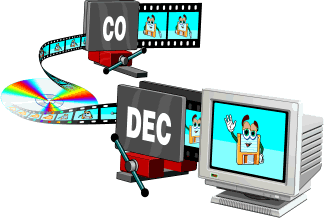
The codec name comes from the contraction of CO-code and DE-code.

And as we said before, we encode and decode to reduce the size, losing the minimum possible quality. Today we want everything to happen without cuts, without interruptions. Watching a movie without taking hours to download or load, or listen to a song equally without interruptions … that means that the video or audio (increasingly high quality and therefore of greater weight in the discussion and that would take longer time to be transmitted over the internet) should be reduced as much as possible by convincing as much as possible the same quality.

It was already understood that without codeces we would be lost and this audiovisual era of streaming we would not be possible?

Jua many audio and video formats, each one was made with a series of specifications in mind. They compete against each other and it is good that we know them and know that it is better to listen to quality music … an mp3, a FLAC, ogg, etc. The same for videos … a webp, mp4, avi, wmv, etc. is better.

That’s why codecs shouldn’t seem strange things to us, just weird names. But we must understand that without its ability to reduce the size of the files, we would not have been able to live this multimedia revolution that we are living today.