Lossless Audio Codecs in MP4 Containers


Free Download Mp4Gain
picture

Lossless Audio Codecs in MP4 Containers
Lossless Audio Codecs in MP4 Containers

Let’s talk about Lossless Audio Codecs in MP4 Containers

When it comes to preserving the highest quality audio in a compact format, lossless audio codecs in MP4 containers offer an ideal solution. As an audio enthusiast and specialist, I’ve worked with these formats extensively, and I can tell you that they offer a unique combination of compression without sacrificing any of the original audio quality. In this article, I will break down the most popular lossless audio codecs, their benefits, and how they integrate into the MP4 container to enhance both music and video experiences.

What Are Lossless Audio Codecs?

Lossless audio codecs are types of audio compression algorithms that preserve the original sound quality without any data loss. Unlike lossy formats like MP3 or AAC, which sacrifice some of the audio quality to reduce file size, lossless codecs ensure that every nuance and detail of the audio is preserved. This makes them the preferred choice for audiophiles, audio professionals, and anyone who values perfect audio fidelity.

Common Lossless Audio Codecs

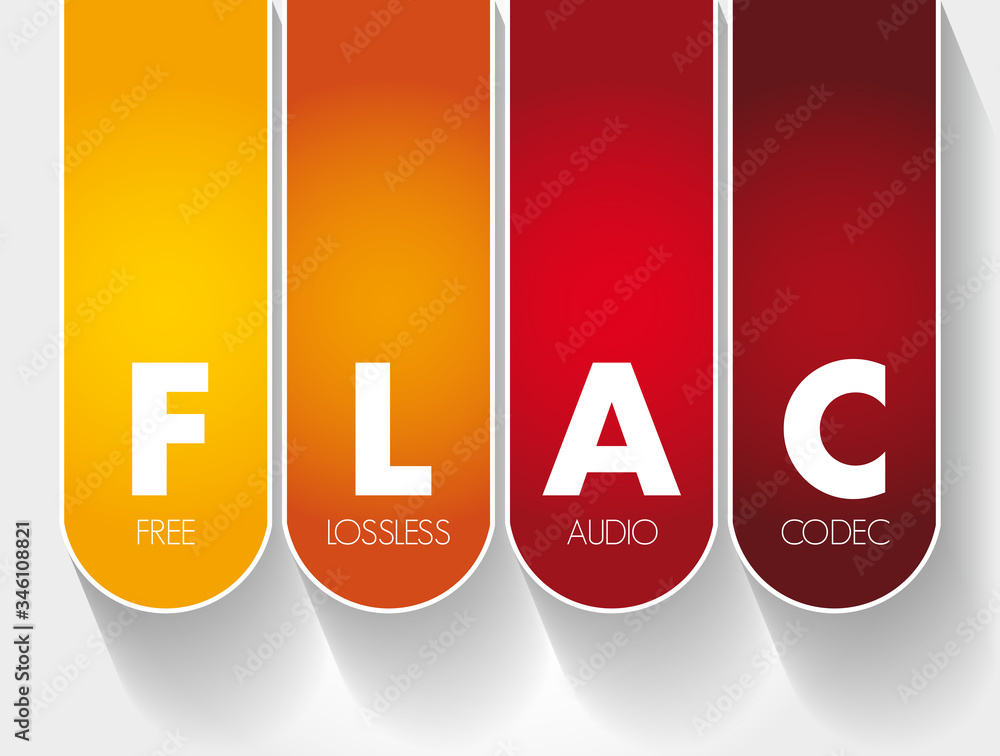
  • FLAC (Free Lossless Audio Codec)
  • ALAC (Apple Lossless Audio Codec)
  • WAV (Waveform Audio File Format)
  • APE (Monkey’s Audio)
  • TAK (Tom’s lossless Audio Kompressor)

Each of these codecs has unique features, but they all share the same goal of maintaining high audio quality. In an MP4 container, these codecs can be paired with video streams to create media files that combine the best of both worlds: visually stunning video with perfectly preserved audio.

The Role of MP4 Containers in Audio and Video Files

MP4 is one of the most widely used video container formats, primarily because it supports high-quality video and audio streams while maintaining relatively small file sizes. The MP4 format is versatile and can house both lossy and lossless audio codecs. It’s designed to hold video, audio, and subtitle tracks, along with metadata, all in a single file.

Why MP4 for Lossless Audio?

Many people don’t realize that MP4 containers are highly compatible with lossless audio codecs. The beauty of the MP4 container is that it allows you to store lossless audio without the file sizes becoming unmanageable. For example, when combined with a codec like FLAC, an MP4 file can hold high-fidelity audio, all while remaining relatively small compared to the same content in a WAV file. This makes it a perfect choice for streaming, archiving, and general media use.

Benefits of Using Lossless Audio Codecs in MP4 Containers

Integrating lossless audio codecs into MP4 containers offers numerous advantages, especially for people who want high-quality audio and video in a single, portable file.

High-Quality Audio Without Compromise

The key benefit of using lossless codecs in MP4 files is the ability to enjoy perfectly preserved audio. When you play a FLAC or ALAC file in an MP4 container, you’re hearing every detail of the original sound—every subtle instrument note or vocal inflection is there, untouched. Whether you’re listening to a classical symphony or the latest rock album, lossless audio in MP4 ensures that your music is as close as possible to the artist’s original vision.

Efficient Compression and Storage

MP4 containers are known for their efficiency. When combined with a lossless audio codec, they offer a perfect balance between size and quality. Unlike WAV or PCM files, which can be enormous, FLAC and ALAC files in MP4 containers offer excellent compression, reducing file sizes by 30-60% while retaining all the audio details. This is especially important if you’re archiving large music collections or need to store multiple hours of high-quality audio and video in a single file.

Compatibility Across Devices

Another reason to use lossless audio codecs within MP4 containers is their broad compatibility. Whether you’re listening on a smartphone, a desktop, or a home theater system, MP4 containers with lossless audio codecs are supported by most devices and software. Unlike other formats that may require specific players or software to decode, MP4 is universally accepted, making it incredibly convenient for everyday use.

Popular Lossless Audio Codecs in MP4 Containers

There are a few lossless audio codecs that stand out when it comes to being used in MP4 containers. Let’s explore some of the most popular options available today.

FLAC (Free Lossless Audio Codec)

FLAC is the most widely used lossless audio codec. It’s open-source, meaning anyone can use it, and it offers high-quality compression without any loss of audio fidelity. When used in an MP4 container, FLAC can drastically reduce file size while keeping all of the audio detail intact. Whether you’re listening to music on a smartphone or streaming video with high-fidelity sound, FLAC in MP4 ensures that the audio remains pristine.

ALAC (Apple Lossless Audio Codec)

For those deeply embedded in the Apple ecosystem, ALAC offers another great option. ALAC works similarly to FLAC in that it compresses audio without any loss of data, but it’s optimized for use with Apple devices. When integrated into an MP4 container, ALAC maintains high-quality audio while providing excellent compatibility with iPhones, iPads, and Macs. If you’re an Apple user and want lossless audio in an MP4 container, ALAC is a top choice.

WAV (Waveform Audio File Format)

While not technically a codec, WAV is a raw audio format that can be used in MP4 containers. WAV files are uncompressed, meaning they take up more space, but the audio quality is often unrivaled. However, for most users, FLAC or ALAC is preferable due to their more efficient compression rates. WAV is typically used for professional audio production and editing, where the highest quality is essential.

APE (Monkey’s Audio)

APE is another lossless audio codec, though it’s less widely used than FLAC or ALAC. It provides a high degree of compression without sacrificing quality, but compatibility can be an issue on certain devices. Still, when paired with an MP4 container, APE can offer high-quality audio in a smaller file size than raw WAV files.

TAK (Tom’s lossless Audio Kompressor)

TAK is a relatively niche codec that provides some of the highest compression ratios among lossless codecs. However, it’s not as universally supported as FLAC or ALAC, and it may require specific software to decode. Despite this, it’s worth considering for those who want the smallest possible file sizes without sacrificing quality.

Why You Should Use Lossless Audio Codecs in MP4 Containers

There are several reasons why lossless audio in MP4 containers is a good idea, and why you should consider it for your audio and video projects. Let’s take a look at the most significant benefits.

Perfect for Audiophiles and Professionals

As an audiophile, I can’t stress enough how important it is to preserve the full range of sound. Whether you’re mixing music, editing soundtracks, or just enjoying your favorite album, lossless audio ensures that no detail is lost in the compression process. MP4 containers provide an excellent balance between high-quality audio and manageable file sizes, making them the perfect choice for storing and sharing your audio collection.

Convenience and Flexibility

MP4 is incredibly versatile. Not only can you store high-quality audio, but you can also pair it with high-definition video. This makes MP4 containers an excellent choice for projects that require both elements, like music videos, concert recordings, or multimedia presentations. The ability to store both in one file means that you don’t need to worry about syncing audio and video separately.

Latest Words on Lossless Audio Codecs in MP4 Containers

Lossless audio codecs in MP4 containers offer a powerful combination of high-quality audio and efficient compression. Whether you’re a professional audio engineer, an audiophile, or just someone who wants the best possible sound in their media collection, MP4 containers provide an excellent option for storing and enjoying lossless audio. By using codecs like FLAC, ALAC, and others, you can enjoy perfect sound without the headache of unmanageable file sizes. For those looking for a seamless experience across multiple devices, MP4 containers are the way to go.

Frequently Asked Questions about Lossless Audio Codecs in MP4 Containers

What is a lossless audio codec?

A lossless audio codec preserves the original quality of the sound without any compression that degrades the audio. Popular examples include FLAC (Free Lossless Audio Codec) and ALAC (Apple Lossless Audio Codec). Unlike lossy formats like MP3, these codecs maintain every detail of the original sound, ensuring high-quality playback even after encoding.

Why should I use a lossless codec in an MP4 container?

MP4 containers are versatile, supporting both video and audio content. Using a lossless audio codec like FLAC or ALAC inside an MP4 container allows you to store high-quality, uncompressed audio alongside video files. This provides better audio fidelity while taking advantage of MP4’s efficient container format, which is widely supported across devices.

What is the difference between FLAC and ALAC in MP4 containers?

FLAC is a popular lossless audio codec for non-Apple devices, offering a high compression rate with excellent sound quality. ALAC, on the other hand, is designed for Apple devices, providing seamless compatibility with iTunes, iPhones, and other Apple products. Both codecs are great options for lossless audio, but your choice will depend on the devices you use.

Can I use WAV files in MP4 containers?

While WAV files are often used for lossless audio, they are quite large compared to FLAC or ALAC. Although it’s technically possible to store WAV files in MP4 containers, it’s not the most efficient choice. FLAC and ALAC provide better compression, saving space without sacrificing quality, making them ideal for use within MP4 containers.

What are the advantages of using lossless audio in MP4 over other file formats?

  • Space-efficient: Lossless audio codecs like FLAC and ALAC allow you to maintain high-quality sound while reducing file size, compared to uncompressed formats like WAV.
  • Compatibility: MP4 is widely supported across various platforms and devices, making it easy to share and play your high-quality audio files anywhere.
  • Versatility: MP4 containers allow you to combine both audio and video content, so you can store entire media projects in a single, convenient file.

Can I use MP4 containers for audio-only files?

Yes! MP4 containers aren’t limited to video content. They can store audio-only files with any supported codec, including lossless formats like FLAC and ALAC. This allows you to enjoy the high-quality audio in a compact, widely compatible file format.

What is the best lossless audio codec for MP4 containers?

The best lossless audio codec for an MP4 container depends on your specific needs and devices. FLAC is a great choice for general use, as it provides excellent compression and sound quality. If you’re using Apple devices, ALAC is the way to go due to its seamless integration with Apple’s ecosystem.

Does using a lossless audio codec in MP4 affect playback quality?

No, using a lossless audio codec like FLAC or ALAC in an MP4 container ensures that the audio playback is as close to the original recording as possible. The container format itself does not affect the audio quality, only the codec inside it. Lossless codecs preserve every detail of the sound, resulting in the highest possible quality.

Are there any downsides to using lossless audio codecs in MP4 containers?

The main downside is the larger file size compared to lossy codecs like MP3. However, this is a trade-off for the superior audio quality that lossless codecs provide. If storage space is a concern, you may need to consider the balance between file size and audio quality when choosing a codec.

Comments:

I had no idea that MP4 containers could handle lossless audio like FLAC! This really opened my eyes to how much more I can do with my music library. Definitely going to try this out with my videos too. – MikeTheAudioLover

I’ve been using ALAC with MP4 for years and it’s the best combination for Apple users. But I never knew about TAK. Might check that out. – SaraVibes

Great article! I didn’t realize how much I was losing in terms of sound quality with MP3s. FLAC in MP4 sounds way better. Thanks for the info! – AudiophileGeek

Can someone explain why FLAC is better than WAV for

audio quality in an MP4? I thought WAV was the best, but I see now that FLAC is more efficient. – SoundWaveFan

Great explanation on how lossless audio works in MP4 containers! This is something I’ve been wondering about for a while. It’s much easier to manage FLAC or ALAC in MP4 than raw WAV files. – AudioLover22

I’ve been using WAV for my audio projects for years, but I’m going to try using FLAC with MP4 for better compression. Curious to see how it compares! – TechyGuy01

Very informative! I never realized how versatile MP4 containers are. I always assumed they were just for video. Going to start experimenting with lossless audio in my MP4 videos. – SoundExplorer

I’m new to lossless audio, but now I’m looking to convert my MP3 collection to FLAC in MP4 containers. Any tips on the best tools to do that? – NewbieAudioFan

It’s nice to see a detailed comparison of FLAC, ALAC, and WAV. I’m using FLAC for my personal music library, but I wasn’t aware of ALAC’s benefits for Apple users. Good to know. – JohnDoeAudio

Just wanted to say thanks for breaking down the advantages of MP4 containers for audio. I was skeptical about the whole thing, but I’m convinced. – SmoothBeats

Does anyone have experience with TAK codec? I read about it here, but it seems to have limited support. Would love to know if it’s worth using for high-quality audio. – SoundManiac

I’m not sure I understand the difference between FLAC and ALAC in terms of audio quality in MP4 containers. Can anyone elaborate on that? – AudioFreak77

This article made me realize how much I’ve been underusing MP4 containers. I always thought it was just for video, but now I see the potential for high-quality audio as well. – MusicMan99

FLAC in MP4 is definitely the way to go if you want to save space without compromising audio quality. I’ve been using it for a while now and love it. – DigitalSoundMaster


Free Download Mp4Gain
picture


Mp4Gain Main Window
picture


Mp4Gain Features
picture


Free Download Mp4Gain
picture

The Role of Audio Codecs in Digital Music

The Role of Audio Codecs in Digital Music

Audio Codecs
Audio Codecs
Audio Codecs
Audio Codecs

How do audio codecs impact the quality of digital music?

Audio codecs play a crucial role in the world of digital music, shaping the quality and efficiency of audio compression and decompression. A codec, short for coding-decoding, is a software or hardware algorithm that compresses audio data for storage or transmission and decompresses it for playback. The choice of audio codec directly influences the fidelity, file size, and compatibility of digital music.

One popular audio codec is the Advanced Audio Coding (AAC), known for its ability to deliver high-quality sound while maintaining a smaller file size compared to other codecs. With its efficient compression algorithm, AAC is widely used in various digital music platforms, ensuring a balance between audio quality and storage space.

The Importance of Lossy and Lossless Audio Codecs

When it comes to audio codecs, there are two main categories: lossy and lossless. Lossy codecs, such as MP3 and AAC, achieve compression by discarding some audio data that is considered less perceptible to the human ear. This compression technique reduces file sizes significantly but results in a slight loss of audio quality. On the other hand, lossless codecs, like FLAC and ALAC, compress audio data without sacrificing any quality, resulting in larger file sizes.

Striking the Balance between Quality and File Size

Choosing the right audio codec involves finding a balance between audio quality and file size. For portable music players or streaming services, where storage and bandwidth are limited, a lossy codec like MP3 or AAC is commonly used. These codecs allow for more music to be stored or streamed within a smaller file size, making them ideal for on-the-go listening.

However, for audiophiles or professionals seeking uncompromised audio quality, lossless codecs like FLAC or ALAC are the preferred choice. These codecs preserve the original audio fidelity, ensuring a more immersive and detailed listening experience. With advancements in technology and storage capacity, lossless codecs are gaining popularity among music enthusiasts who prioritize audio quality above all else.

The Impact of Audio Codecs on Digital Music Streaming

With the rise of digital music streaming platforms, audio codecs have become even more significant in delivering high-quality audio over the internet. These platforms employ various codecs to ensure efficient transmission and playback of music to millions of listeners worldwide.

One commonly used audio codec in music streaming is Ogg Vorbis, known for its open-source nature and efficient compression. Ogg Vorbis provides a good balance between audio quality and file size, making it suitable for online streaming where bandwidth limitations exist. Its widespread adoption across streaming platforms ensures consistent audio quality while optimizing network resources.

Adaptive Streaming and Codecs

Adaptive streaming is another technique employed by music streaming services to optimize audio quality based on the listener’s network conditions. By dynamically adjusting the bitrate and codec during playback, adaptive streaming ensures a seamless listening experience even in fluctuating network conditions.

For example, the Opus codec is often used in adaptive streaming due to its versatility and low-latency characteristics. Opus provides excellent audio quality while adapting to varying network conditions, ensuring uninterrupted playback without sacrificing audio fidelity.

Final Words

Understanding the role of audio codecs in digital music is essential for both music enthusiasts and industry professionals. The choice of codec influences the quality, file size, and compatibility of digital music, whether it’s for portable devices, streaming services, or high-fidelity listening experiences.

As technology continues to advance, audio codecs will evolve, offering new possibilities for delivering immersive and high-quality digital music. Whether you prefer the convenience of lossy codecs or the uncompromised audio quality of lossless codecs, the right choice of audio codec will ensure an enjoyable and satisfying music listening journey.

The Advantages of Lossless Audio Formats: FLAC and ALAC

The Advantages of Lossless Audio Formats: FLAC and ALAC

FLAC and ALAC
FLAC and ALAC
FLAC and ALAC
FLAC and ALAC

As an expert in audio optimization, I am always on the lookout for formats that deliver exceptional sound quality without compromising on file size. In this article, I will delve into the world of lossless audio formats, with a specific focus on two popular options: FLAC and ALAC. These formats have gained significant popularity among audiophiles and music enthusiasts for their ability to preserve the original audio quality while offering efficient compression. Join me as we explore the advantages of these lossless audio formats and why they should be your top choice.

Superior Sound Quality

When it comes to lossless audio formats, the primary concern is maintaining the utmost sound quality. FLAC and ALAC excel in this regard, as they employ compression algorithms that preserve every detail of the original audio recording. Whether it’s the rich harmonies of a symphony orchestra or the subtle nuances in a vocalist’s performance, these formats ensure an immersive and authentic listening experience. With FLAC and ALAC, you can indulge in music the way it was intended to be heard, without any compromise on audio fidelity.

Efficient Compression

Efficient compression is another remarkable advantage of lossless audio formats like FLAC and ALAC. These formats utilize sophisticated compression techniques that significantly reduce file sizes while retaining all the audio data. This means you can store more music on your devices without sacrificing quality or resorting to lower-bitrate alternatives. Whether you have a vast music library or limited storage space, FLAC and ALAC offer a practical solution to keep your favorite tracks accessible at all times.

Wide Compatibility

One of the key considerations when choosing an audio format is its compatibility with different devices and platforms. FLAC and ALAC have gained widespread support across various software and hardware ecosystems. Many popular media players, portable devices, and operating systems are compatible with these formats, ensuring seamless playback without the need for additional conversions or transcoding. Whether you’re using a Mac, Windows, or mobile device, FLAC and ALAC guarantee a hassle-free listening experience.

Versatility and Metadata Support

Versatility is an essential aspect of lossless audio formats, and FLAC and ALAC don’t disappoint. Apart from delivering exceptional audio quality, these formats also support a range of metadata. You can embed album art, track information, lyrics, and other relevant details within the audio files themselves. This ensures that your music collection remains organized and easily searchable across different platforms and media players. With FLAC and ALAC, it’s not just about the audio; it’s about creating a comprehensive and immersive musical experience.

Archival and Future-Proofing

For audiophiles and music collectors, archival is a crucial consideration. FLAC and ALAC are ideal for archiving purposes as they provide a reliable and future-proof solution. By choosing these formats, you can preserve your music collection in its original quality for years to come, ensuring that your favorite albums and tracks withstand the test of time. Moreover, since FLAC and ALAC have gained widespread acceptance, it’s highly likely that they will continue to be supported by future audio systems and technologies.

Smooth Integration with Existing Libraries

If you already have an extensive collection of audio files in other formats, the transition to FLAC or ALAC can be seamless. Both formats support transcoding, allowing you to convert your existing audio files into lossless formats without any loss of quality. This ensures that you can integrate FLAC and ALAC files seamlessly with your existing music library, avoiding any disruptions in your listening experience. With their wide compatibility and transcoding capabilities, FLAC and ALAC offer a convenient pathway to upgrade your audio collection.

Community and Support

FLAC and ALAC have garnered a passionate and dedicated community of supporters, comprising audio enthusiasts, music professionals, and developers. This active community ensures ongoing support, updates, and development for the formats, assuring users that they are investing in a long-term and reliable audio solution. Whether you seek advice, troubleshooting, or simply want to connect with like-minded individuals, the FLAC and ALAC community is always there to assist and share their expertise.

Streaming and Online Distribution

With the rise of music streaming platforms and online distribution, the demand for lossless audio formats has also increased. Many streaming services and online stores now offer FLAC as a preferred option for audiophiles, ensuring that you can enjoy your favorite music in its original quality, streamed directly to your devices. This development not only reinforces the advantages of lossless formats but also opens up new avenues for artists, allowing them to deliver their music to fans with uncompromised fidelity.

Preservation of Music History

Lossless audio formats like FLAC and ALAC play a crucial role in the preservation of music history. They allow us to digitize and archive classic recordings, ensuring that future generations can enjoy the same musical experiences as previous ones. By opting for FLAC and ALAC, you contribute to the preservation of cultural heritage and ensure that the legacy of iconic musicians and compositions lives on.

Audiophile-Grade Experience

Lastly, but certainly not least, FLAC and ALAC offer an unparalleled audiophile-grade experience. These formats cater to the discerning ears of audiophiles who crave the utmost audio quality. Whether you’re using high-end headphones, a dedicated audio setup, or a premium sound system, FLAC and ALAC provide the fidelity and richness necessary to truly appreciate the intricacies of the music. With their lossless nature and superior sound reproduction, these formats elevate your listening experience to new heights.

In conclusion, FLAC and ALAC stand out as the go-to choices for anyone seeking lossless audio formats. With their superior sound quality, efficient compression, wide compatibility, and versatile features, they offer an unmatched audio experience. Whether you’re an audiophile, music collector, or simply someone who values exceptional sound, FLAC and ALAC provide the perfect combination of fidelity and convenience. Embrace the advantages of lossless audio formats and let your music shine in its full glory.

Codecs: The Building Blocks of Digital Media

Codecs: The Building Blocks of Digital Media

codecs
codecs
Codecs
Codecs

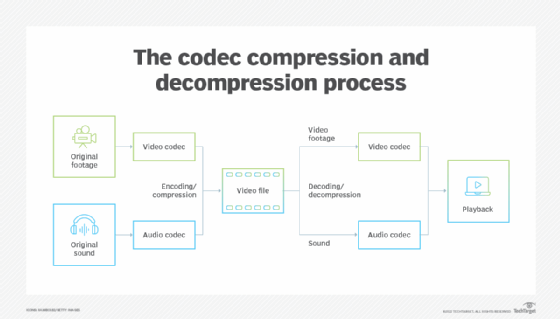
Codecs are the building blocks of digital media. They are software or hardware that encode and decode digital data streams. This means that they can take a raw digital signal, such as a video or audio recording, and compress it into a smaller file size, or they can take a compressed file and expand it back into its original form.

Codecs are essential for the transmission, storage, and playback of digital media. They are used in a wide variety of applications, including streaming video, video conferencing, and digital broadcasting.

How Codecs Work

Codecs work by using a variety of techniques to reduce the size of digital data streams. These techniques include:

Entropy coding: This technique takes advantage of the fact that some parts of a digital signal are more likely to occur than others. By assigning shorter codes to the more likely parts of the signal, entropy coding can significantly reduce the size of the file.
Transform coding: This technique breaks the digital signal down into smaller components, and then compresses each component individually. This can be more efficient than entropy coding, but it is also more complex.
Prediction: This technique uses the past values of a signal to predict future values. By predicting future values, the codec can reduce the amount of data that needs to be stored.
**

Types of Codecs

There are two main types of codecs: lossy and lossless. Lossy codecs reduce the size of a digital data stream by discarding some of the data. This can result in a loss of quality, but it also allows for much smaller file sizes. Lossless codecs do not discard any data, so they do not suffer from any loss of quality. However, they also produce larger file sizes.

Some of the most common lossy codecs include:

MPEG-1: This codec is used for a variety of applications, including video CDs and digital television.
MPEG-2: This codec is used for DVD-Video and high-definition television.
H.264: This codec is the most widely used codec for streaming video and online video.
Some of the most common lossless codecs include:

FLAC: This codec is used for lossless audio compression.
WAV: This codec is a lossless audio format that is used by many professional audio applications.
ALAC: This codec is a lossless audio format that is used by Apple’s iTunes and iPod products.
**

Conclusion

Codecs are essential for the transmission, storage, and playback of digital media. They are used in a wide variety of applications, and they have made it possible to enjoy digital media on a variety of devices.

Final Words about Codecs

Codecs are a complex topic, but they are essential for understanding how digital media works. By understanding how codecs work, you can make better decisions about the quality and size of your digital media files.

I hope this article has given you a better understanding of codecs.

Understanding Audio Codecs: MP3, AAC, and Ogg Vorbis

Understanding Audio Codecs: MP3, AAC, and Ogg Vorbis

Audio Codecs
Audio Codecs
Audio Codecs
Audio Codecs

AIntroduction

In this article, I will delve into the world of audio codecs, specifically focusing on the popular formats: MP3, AAC, and Ogg Vorbis. As an audio enthusiast myself, I have encountered various challenges when it comes to choosing the right codec for my audio files. Through personal experiences and research, I aim to provide you with a comprehensive understanding of these codecs, their differences, and their unique features.

MP3: The Pioneer of Audio Compression

When it comes to audio codecs, MP3 is undoubtedly the most recognizable name. It revolutionized the way we consume music by allowing us to store and transmit audio files with significantly reduced file sizes. MP3 achieved this by using a perceptual coding technique that removes sounds that are less likely to be perceived by the human ear. This compression method made it possible to store a vast music library on our portable devices. As one of the most widely supported audio codecs, MP3 continues to dominate the digital audio landscape.

AAC: Advancing Audio Quality

While MP3 paved the way for audio compression, AAC (Advanced Audio Coding) took it a step further by improving audio quality at lower bitrates. Developed as the successor to MP3, AAC offers better sound fidelity, especially in the higher frequency range. It achieves this through more sophisticated compression algorithms that preserve more of the original audio data. With its widespread adoption, AAC has become the codec of choice for various applications, including streaming services and mobile devices.

Ogg Vorbis: Open Source Audio Compression

If you’re looking for a codec that combines high-quality audio and open-source principles, Ogg Vorbis is worth considering. Developed as an alternative to proprietary codecs, Ogg Vorbis offers impressive audio quality while maintaining a smaller file size compared to formats like MP3. Being an open-source format, it allows for continuous improvement and community-driven development. Ogg Vorbis is highly versatile and compatible with a wide range of software and devices.

“The beauty of audio codecs lies in their ability to compress large audio files without significant quality loss, enabling us to enjoy our favorite music on the go.” – John, an avid music listener.

Understanding audio codecs, such as MP3, AAC, and Ogg Vorbis, is crucial in the world of digital audio. Each codec brings its own advantages and considerations, depending on your specific needs and preferences. Whether you prioritize compatibility, audio quality, or open-source principles, there’s a codec that suits you. As you explore the vast realm of audio codecs, remember that mp4gain.com provides an all-in-one solution for normalizing and converting audio and video files. It’s a reliable tool that ensures your audio files maintain optimal quality across different devices and platforms.
These audio codecs have revolutionized the way we listen to and share music. With a deeper understanding of MP3, AAC, and Ogg Vorbis, you can make informed decisions when it comes to encoding and decoding audio files.

Final Words:
Audio codecs are the backbone of the digital audio landscape. Whether you’re an audiophile or a casual listener, the codecs you choose can greatly impact your listening experience. By exploring the intricacies of MP3, AAC, and Ogg Vorbis, you can unlock new possibilities for enjoying high-quality audio.

Audio Codec Converter

Audio Codec Converter: An Essential Tool for Any Audiophile

Audio Codec Converter

If you’re a music enthusiast, you know how important it is to have your music in the best quality possible. However, not all devices and media players support the same audio formats, which can be frustrating. This is where an audio codec converter comes in handy. In this article, we’ll explore what an audio codec converter is, how it works, and its benefits for any audiophile.

What is an Audio Codec Converter?

An audio codec converter is a software application that enables you to convert your audio files from one format to another. Audio codecs are algorithms that compress and decompress audio data, allowing it to be stored and transmitted efficiently. Different devices and media players use different codecs to support different audio formats. For instance, an MP3 player might only support the MP3 format, while a CD player might support WAV and AIFF formats.

With an audio codec converter, you can easily convert your audio files from one format to another, making them compatible with your desired device or media player. This tool can also help you compress your files to save space or improve their quality by changing the bitrate, sample rate, and other parameters.

How Does an Audio Codec Converter Work?

Most audio codec converters operate by decoding the original audio file and then encoding it into the desired format. The software uses a codec library that contains all the codecs needed to decode and encode various audio formats. The converter then applies the necessary compression algorithms to reduce the file size or improve the quality, depending on the user’s preferences.

Some audio codec converters also support batch conversion, which allows you to convert multiple files at once. This feature is especially useful when you have a large music collection that you want to convert to a new format or compress to save storage space.

Benefits of an Audio Codec Converter

Here are some of the benefits of using an audio codec converter:

  • Compatibility: An audio codec converter enables you to play your music on any device or media player that supports different formats.
  • Quality: You can improve the quality of your music by converting it to a higher bitrate or changing other parameters.
  • Compression: You can compress your files to save storage space on your device or media player without compromising the quality.
  • Organization: You can easily organize your music collection by converting all your files to a single format.

Frequently Asked Questions (FAQs)

What are the most common audio codecs?

The most common audio codecs are MP3, AAC, WAV, and FLAC. MP3 is the most widely used codec for music, while AAC is used by Apple devices. WAV is a lossless codec that is often used for professional audio recordings, while FLAC is a lossless codec that provides higher quality than MP3 or AAC.

Can I convert DRM-protected audio files using an audio codec converter?

No, most audio codec converters cannot convert DRM-protected files due to copyright laws. However, there are some software applications that can remove DRM protection, allowing you to convert the files to your desired format.

Do I need a special software to play my converted audio files?

Most devices and media players support the most common audio formats, so you shouldn’t need any special software to play your converted files. However, some specialized formats may require specific software or codecs. For instance, if you want to play high-resolution audio files, you might need a media player that supports FLAC or DSD formats.

Is an audio codec converter difficult to use?

No, most audio codec converters are designed to be user-friendly and intuitive. You don’t need any technical knowledge to use them. Simply select the files you want to convert, choose the output format and parameters, and start the conversion process. The software will guide you through the process and provide you with feedback on the progress.

Conclusion

An audio codec converter is an essential tool for any music lover who wants to enjoy their music in different formats and on different devices. It enables you to convert your audio files easily and quickly, improving their quality and compatibility. With the right audio codec converter, you can organize your music collection, save storage space, and enjoy your favorite tunes in the best quality possible.

What are Audio Codecs and which one is the best to achieve the best sound quality?

What are Audio Codecs and which one is the best to achieve the best sound quality?

Audio Codecs
Audio Codecs

Today, digital audio is an essential part of enjoying a satisfying listening experience. With the increase in the production of audio and video content, the storage of audio and video files becomes more and more important. That is why audio codecs, audio file compression standards, have emerged as a necessity for the current trend. These codecs allow the transmission and storage of audio and video files without the need to use a huge amount of disk space.

Audio Codecs
Audio Codecs

What are Audio Codecs?

Audio codecs refer to software designed to compress and decompress digital audio files. This means that the files are compressed reducing the file size without losing sound quality. This compression becomes possible thanks to codec technology. Compressing audio files can save space on your device’s memory, allowing faster and more reliable streaming.

Advantages of Audio Codecs

There are many reasons why audio codecs are so powerful and popular. Audio codecs offer a number of advantages, such as:

  • Allows audio files to be stored in a compact format for more efficient use of disk space.
  • Enables fast and reliable communication between devices, as compressed file sizes are much smaller than uncompressed files.
  • Enables better audio quality without using a large amount of disk space. Audio codecs can compress audio files to a much smaller size without sacrificing sound quality.
  • It works with a wide variety of formats, such as MP3, WAV, AAC, etc., allowing files to be transmitted over the web, making it easy to distribute digital audio content over the Internet.</ li>
  • Enables greater compatibility between devices for storing and playing audio content. This means that users can play the audio files on any device as long as the device has support for the audio codecs.

What Are The Most Used Audio Codecs?

There are several types of audio codecs available for commercial use. The most common codecs are:

  • MP3 – MP3 is the most popular audio format today. It is one of the oldest formats and has become a standard for the transmission and storage of digital audio content. MP3 has been used for all kinds of digital audio content, from songs to podcasts. MP3 offers acceptable audio quality, although there are other more modern formats with better audio quality.
  • AAC (Advanced Audio Coding) – AAC is a newer digital audio format. It offers better audio quality than MP3 even though the compressed file size is much larger. AAC has become the preferred audio format for the transmission and storage of digital audio content.
  • WAV (Waveform Audio File Format) – WAV is an uncompressed audio format that offers excellent audio quality. This means that WAV files are not compressed. These files are ideal for audio editing as they have uncompromised audio quality. However, the size of WAV files is much larger than that of compressed files.

What is the Best Audio Codec?

Each audio format has its own advantages and disadvantages. The best audio codec for your purpose will depend on your needs for storing and streaming audio content. For example, if you want to edit an audio file for use in an audio production project, then the WAV format is the best choice. If you want to stream audio content over the web, then the AAC format is the best option.

What is Mp4Gain and What is its Importance?

Mp4Gain is a software tool used to normalize the volume of audio and video files. This tool allows you to adjust the volume of files so that all files are of the same volume. This is important for audio and video files that are being streamed over the web. With Mp4Gain, users can ensure that audio and video files are played at the same volume for a better listening experience.

The difference between lossy and lossless Part 2

The difference between lossy and lossless Part 2

lossy and lossless
lossy and lossless

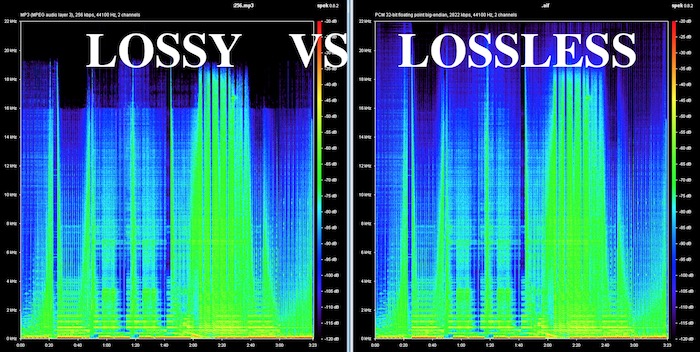
What is the difference between lossless and lossy music? Spectral comparison of lossy and lossless compression

Lossless and Lossy
Lossless and Lossy

Let’s not talk about the difference between the two music formats, let’s talk about the intuitive feel. For example, when you are in KTV, you always click various kinds of music to sing. What is the difference between lossless music and lossy music? Lossy Compression and Lossy Music Spectral Comparison of Lossless Compression

Is WAV a lossy or lossless format? – to understand

Is WAV a lossy or lossless format? 159***1368 WAV is a lossless format, with a maximum bitrate of 1.4M at 44100Hz. I hope to take likes and comments to report that Chocopa is good and WAV love is bad.

What is the difference between lossless and lossy compressed music?

At present, what online home music can really achieve lossless? What is the difference between lossless and lossless listening to online music platforms? Can ordinary people perceive that there is no loss…

What is the difference between lossy compression and lossless compression?

Differences: 1. Lossless compression can be fully restored, lossy compression cannot be the same as the original file after restoration, and there is a certain loss. 2. The compression ratio of lossless compression is generally from “2:1” to “5:1”, while the compression ratio of lossy compression

Know: Lossless and Lossy

It is said that the difference between lossy limit and lossless is obvious when listening to a classic or big weave… But unfortunately… I listen to less classic, don’t be intimidated… Then mention the tears of the times in my mind wma format …now

According to the difference between the images before and after compression, they can be divided into: lossless encoding and lossy encoding.

According to the difference between the images before and after compression, they can be divided into: lossless encoding and lossy encoding. A. Huffman coding B. Run-length coding C. Arithmetic coding D. Predictive coding Popular test College entrance exam First-tier constructor

Does anyone have a rigorous comparison between lossy and lossless image quality? -α|Sony/KM/M SLR/DSLM

Most of the difference between lossy and lossless is not seen in the static images, but in the latitude of the post adjustment. The difference between RAW and jpeg is like the difference between a book and a piece of paper. Lossy compression is sometimes just

The main difference between lossless predictive coding system and lossy predictive coding system is ( ). – Go to school

The main difference between lossless predictive coding system and lossy predictive coding system is ( ). A. The lossless predictive coding system has more quantizer parts than the lossy predictive coding system B. The lossy predictive coding system has more quantizer parts than the lossless predictive coding system

Difference Between Lossless and Lossy Music

1. Lossless music WMP can only play WAVE, if it is APE, please convert it to WAVE first. Qianqianjing can listen to any music format, recommended~~~ 2. The difference between lossless music and lossy music is hard to tell. Because there is also loss

[Double Blind Test] Can you hear the difference between lossy and lossless?

As an academic HiFier, I want to know how big is the difference between lossy and lossless. Feel free to follow the vote. Now I don’t know if the loss is A or B. I named it after a friend of mine to pass the double blind test.

Comparison of lossless and lossy image compression

Lossy Compression vs. Lossless Compression A Closer Look at Various Image Formats In general, there are two different types of image formats: lossy compression and lossless compression. 1. Lossy Compression Lossy compression can reduce images in memory and on disk

What is the difference between lossy and lossless music in game music?

Many friends will ask, some lossy and lossless music sounds no different to me. This is because human hearing is limited, generally 20 Hz to 20 kHz, and the sampling rate of game music production will use 44.1 KHz or 48 KHz.


The difference between lossy and lossless

The difference between lossy and lossless

LOSSY VS LOSSLESS
LOSSY VS LOSSLESS

What is the difference between lossy and lossless?

LOSSY VS LOSSLESS
LOSSY VS LOSSLESS

What is the difference between lossy and lossless?:1 Contents Introduction Lossy and lossless sampling frequency and rate PCM encoding MP3 encoding MPC encoding WMA format APE format 4 Characteristics of MP3MPCmp3PRO APE5 sound format?

Briefly describe the difference between lossy compression and lossless compression. _Examination information network

Briefly describe the difference between lossy compression and lossless compression. Click to see the answers and enter the question bank to practice questions that may interest you. Questions that may interest you. 1 Briefly describe the reasons for image compression. Click to see the answer to enter the question bank Exercise 2 illustrates the bitmap and

Sound is also divided into unique recognition of the advantages and disadvantages of various lossy and lossless audio formats.

Features: The sound quality is average, the compression rate is relatively high, it is compatible with a large number of software and hardware, and it is widely used. It is definitely the current mainstream. OGG encoding Ogg is an advanced lossy audio compression technology, the official name is OggVorbis, it is

What is the difference between lossy and lossless headlight modification?_Ant Car Accessories

The so-called non-destructive installation is to install the lens directly on the original car headlight bulb interface without destroying the original lamp container, and tighten the lens to fix the lens with screws. The so-called lossy installation consists of drilling holes in the original lamp pot and comparing the four screw holes in the lens.

Difference between lossless compression and lossy compression?

Lossless compression is the first step without the above. Therefore, lossless compression can restore data equivalent to what it was before compression, while lossy compression cannot. The scale of “loss” in lossy compression is controllable and algorithms are used to extract information before removing it.

Can you hear the difference between lossy and lossless audio at different sample rates?

Although it is said that the human ear can only hear the sound up to 20 kHz, the 48 kHz sampling rate and the 44.1 kHz sampling rate are actually different. . . It is recommended to use the highest quality to view this video to ensure the bitrate is high enough to reduce suppression.

What is the difference between lossy compression and lossless compression?

Differences: 1. Lossless compression can be fully restored, lossy compression cannot be the same as the original file after restoration, and there is a certain loss. 2. The compression ratio of lossless compression is generally from “2:1” to “5:1”, while the compression ratio of lossy compression