How to make an mp3 sound great? Part 2


Free Download Mp4Gain
picture

How to make an mp3 sound great? Part 2

mp3 quality
mp3 quality

If you want to know how an mp3 works, this article is for you.

mp3 quality
mp3 quality

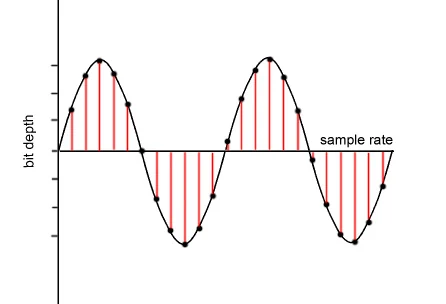
As we pointed out in the previous article, talking about a digital audio file refers to the ability to take 44,100 samples per second and thus be able to draw as precisely as possible the wave, with its curvature, that describes the sound.

or that the sound is produced by the fluctuating pressure that produces a movement in the air. Like the string of a guitar or a piano that vibrates X times per second, depending on the pitch, and these vibrations produce waves in the air similar to those produced in water if an object falls.

Then those waves propagate, reach our ears and produce a wave with a certain curvature.

Digitizing this implies, as we have already said, taking 44100 (or more) samples per second and capturing its position in order to later be able to reproduce that wave as close as possible to the original.

But this implies an enormous flow of information, which must be compressed and, if possible, even discarded, to reduce its size to a point that today, with this technology, is manageable.

This is based on these principles:

– There are certain sounds that the human ear cannot hear.
– There are certain sounds that the human ear hears better than others.
– If there are two sounds playing at the same time, we can hear the one that is higher, and not the lower one.

These principles of human hearing allow us to discard sounds without a considerable loss of quality.


Free Download Mp4Gain
picture


Mp4Gain Main Window
picture


Mp4Gain Features
picture


Free Download Mp4Gain
picture

How to make an mp3 sound great?

How to make an mp3 sound great?

MP3 QUALITY
MP3 QUALITY

If you want to know how an mp3 works, this article is for you.

MP3 QUALITY
MP3 QUALITY

An mp3 stores information digitally. The music is captured 44100 times per second, each of these parts has a size of 16 or 24 bits. The usual is 16 bits.

The sound has a curved shape, what is sought is that each frame captures an instant of that curve or bell.

If 16 bits are used, we have a little more than 65 points that form a kind of grid where each point will be located to form the curvature. It is enough information to achieve a very good definition. In 24 buts we have several million possible points on the grid to place each point on the curve.

To understand the size of a file, the following formula will be useful:

frames*bits*channels= x bits per second

In a good quality mp3 we speak of 44100 multiplied by 16 bits multiplied by 2 channels (stereo) which gives us 1,411,200 bits per second, that is, 176,000 bytes per second.

If the song lasts an average of 3 minutes, each one will occupy 32 million bytes.

Using Mp3 that 32 million bit song can be compressed to about 3 million bits.

We will need to be able to transmit 16,666 per second to be able to transmit the 3 million bits of the total song.

We will see that the more information it contains, the more transmission capacity per second we will need.

Mp4Gain is the ideal program to get these mp3s that have a sound practically identical to a CD.

What do lossy and lossless mean and which is better? Part 2

What do lossy and lossless mean and which is better? Part 2

Lossy vs Lossless audio

How are audio files encrypted?

Lossy vs Lossless audio

In the first part of this article we saw why it was necessary to compress the audio files, since the original formats like WAV or AIFF were unmanageable if you think about sending them by mp3 and storing many on the hard drives that existed at the beginning.

In fact, even today, despite the fact that internet transmission and storage capacity have improved, wab bi el aiff is not used for this purpose, for the same reason: they take up too much space both in transmission and in storage. .

So he had to find ways to compress these files without this meaning a very notorious loss of quality.

The mp3 emerged and revolutionized the world and is still the most important format.

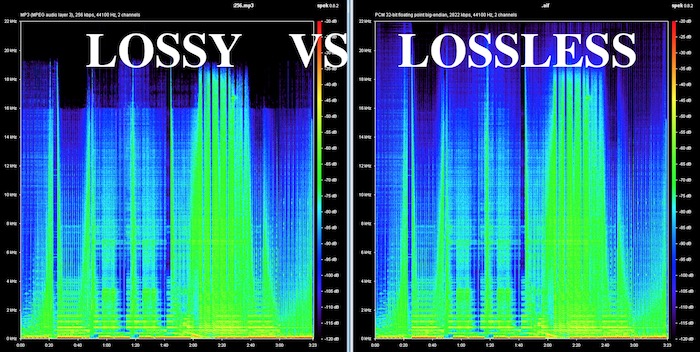
On the one hand, it obviously used some compression, but since it was not efficient enough, it must have begun to understand how human hearing works, in order to eliminate frequencies and sounds that are inaudible to humans and that, however, were stored, occupying space in WAV and AIFF formats.

Over time, better compression methods were developed and then formats emerged that could greatly reduce the size of the file, without losing or discarding any information. This is what is known as lossless, that is, without loss of information.

It is said that the FLAC will end up taking over the market, because it compresses the file and does not need to discard information, achieving that when decompressing the FLAC file we have an original WAV file without having deleted anything.

Mp4Gain can convert mp3 to flac and also normalize its volume or it can just normalize an mp3 or flac, without converting it. You can even extract from a video, just the audio, and record it as any popular audio format like mp3, m4a, flac, ogg, etc.

What do lossy and lossless mean and which is better?

What do lossy and lossless mean and which is better?

Lossy vs Lossless
Lossy vs Lossless

How are audio files encrypted?

Lossy vs Lossless
Lossy vs Lossless

Initially, audio was recorded on a computer in WAV or AIFF format and these took up too much space.
They took up so much space that few audio files could fit on the first hard drives, because they had only a few megabytes of available space.

This still happens today in portable devices in general.

Nobody would think that a service like spotify could transmit and store wavs or files without compression.

It could not have the transmission speed, it would spend too much bandwidth and occupy the disk or storage space right away.

If we talk about videos, the same would happen with Youtube or Ntflix.

So, initially almost desperately, they looked for ways to save space, even if this had some impact on quality.

Over time, the Internet’s transmission capacity improved and different compression methods made significant progress.

Lossy

Initially, the hearing capacity of the human being was used to, in addition to compressing the files, also discard non-audible information.

Many people wonder why 44100 was chosen as the samplerate for CD discs and the first more or less obvious answer is that if the human ear is capable of hearing sounds between 20hz and 20khz then more or less twice as much was needed to be able to manage and store audio with good quality.

What determines the quality of an mp3?

What determines the quality of an mp3?

mp3 quality
mp3 quality

How do you get a high quality mp3?

mp3 quality
mp3 quality

This question could have two different approaches:

1.- An existing mp3 has a certain quality and one could wonder what determined that quality

2.- We are going to encode an mp3 from a video from which we will extract the audio and how will we get that new mp3 to have the highest possible audio quality?

In this case we will focus on option 2, how to create a video from original audio and make it have good audio quality.

The first step, inevitably, comes from getting original audio that is of high quality. If we do not start from that point, we will no longer achieve our goal.

The quality of the audio is very difficult to “restore” if you do not have as a starting point an original audio that will have a high quality.

But even if you do have that high quality original source, it’s important against using advanced software like Mp4Gain and taking the right steps to make sure you don’t lose that quality by making a bad decision when extracting and encoding the audio a long time ago. mp3, a flac, etc.

In order to convert or extract an audio from a video, it is important to understand what points are decisive:

-Bit rate. No, to save space, we will use a bitrate lower than 192 and if possible we will use 320.

Nor does it mean that if we have a 128 mp3 and convert it to 320 we will be able to restore its quality.

What it means is that if we originally convert to a 320 mp3, we will discard very little information and thus we will get a very high quality mp3. Virtually indistinguishable from a CD.

-The following will be to use a samplerate of 48000 or at least 44100, not a smaller one.

In order to capture the full range audible by the human ear, it is necessary to use at least 44100.

Mp4Gain is the right normalizer/converter for the job and to give you a high quality output.

How to make an mp3 sound as good as possible?

How to make an mp3 sound as good as possible?

Mp3 Quality
Mp3 Quality

Achieve the best quality in an mp3

Mp3 Quality
Mp3 Quality

Everything we talk about mp3 in this article actually applies to other formats like FLACC, ogg, etc.

But how do you make it sound as good as possible?

In the first place we start from a source file, which is the one that you have obtained. The more quality it has, the better.

And besto wants to say that it must have a good birate and a good samplerate, that it be stereo and that it sound as good as possible.

If we start from that, we will be able to normalize the volume and give a consistent quality with Mp4Gain.

Because we will be able to use a high quality bitrate, an adequate samplerate, make the “color” of the audio clear, bright, but with powerful and defined bass, etc.

Mp4Gain can extract audio tracks from videos. Nowadays it is one of the best options since it is relatively easy to obtain good audio with the music we are looking for and Mp4Gain can extract the audio and convert it into an mp3, a FLAC, etc.

Mp4Gain is the best prepared normalizer for these times where every time we have devices with better hardware for music and video playback quality.

Because we are living in a time where devices and computers are rapidly improving their capacity for audio and video and only Mp4Gain is prepared for it.

Today, with Mp4Gain you have the perfect tool to get your audio and video with the best quality and volume.

Which is better, an mp3 or a lossless music file like FLAC?

Which is better, an mp3 or a lossless music file like FLAC?

lossless maudio quality mp3 flac

Lossless vs lossy

lossless maudio quality mp3 flac

The evolution of devices or equipment that reproduce audio, as well as that of headphones or speakers, have made people wonder more and more if the time has come to resort to lossless music, for example FLAC.

Before, a few years ago, it was a bit absurd to talk about lossless formats when we used equipment that had low audio capabilities on a daily basis.

But now, as many phones and computers contain DACS that have high capacity, one can already think about it without it being nonsense.

And it is not so obvious nor is the question trivial.

For one, there is a lot of bloof in this area. Where many people repeat slogans that take for granted the automatic superiority of lossless. On the other hand, we are entering a stage where true high audio quality is being achieved, including the audio that accompanies videos.

Mp4Gain, it should be noted, is perfectly compatible with this world of high quality audio and video (including video audio).

And Mp4Gain can not only normalize the volume of audio and videos perfectly, but can easily convert to lossless formats with great ease and great results.

It may be worthwhile to try and convert some files to formats such as FLAC and, incidentally, normalizing the volume and listening to them on our computer or device.

Undoubtedly sooner rather than later we will find ourselves fully in the world of high fidelity audio, if not you are already there. It is quite possible that your phone or your computer can already handle this high level of audio perfectly.

The perfect partner is Mp4Gain.

FLAC, WAV, MP3, DSD, ALAC … What audio format should I use?

You probably know the famous MP3 audio format. There’s even a good chance that you only use it on a daily basis. But did you know that it is possible to take your music to the next level thanks to other audio formats? If the terms FLAC, DSD, sample rate, or even lossless don’t mean anything to you, then you’ve come to the right place. Designed specifically for newbies, this guide tells you everything you need to know about the basics of digital audio.
soundwave

FLAC, DSD, ALAC … Listening to a debate between audiophiles can seem difficult when you do not know this universe and the many acronyms that refer to it. But if you try the adventure, you will not regret it. Say goodbye to your boring and lifeless MP3s and hello to quality music. Trust us, your ears will thank you!

Sample Rate and Bit Depth: The Basics of Digital Music

Before knocking you out (we promise we won’t hit too hard) with barbaric acronyms in every way, let’s first focus on two essential notions of modern audio, namely sampling rate and bit depth. These two elements give an idea of ​​the recording precision of a song.

but depth

As you know, computers run on bits, which are sets of 0 and 1. During a passage in the studio, music produced by an artist must be digitized, therefore transformed into 0 and 1 in order to be recorded on CD or transmitted to through transmission services. This is where the sampling rate and bit depth come into play.

Take the example of a CD. Our beloved empanadas are recorded in 16-bit / 44.1 kHz. The 44.1 kHz sampling rate means that the music produced by our musician is analyzed 44,100 times per second by studio recording devices. As for the bit depth, it gives an indication of the number of information recorded during this same period. The greater the depth, the more information will be encoded at the end.

However, CD quality is not the best in the world, even if it far exceeds MP3. Thus, we find 24-bit / 192 kHz recordings. The DSD goes even further with a frequency that rises to several MHz. But for simplicity, just remember that the higher the values ​​described above, the more accurate the recording will be in your sound reproduction.

Lossy formats: MP3, AAC, OGG

In general, there are two types of formats in the audio world: lossy, lossy in English, and lossy, or lossless. If you want the best audio quality, stay away from compressed formats.

The best known of all is MP3. True dinosaur in the audio world, this type of file was developed at a time when the capacities of our hard drives were determined in MB and not in TB. Therefore, we had to compress the recordings as much as possible, even if that meant putting quality aside.

It is true that MP3 encoded music weighs only a few megabytes. But the applied algorithm is very aggressive, it simply cuts the frequencies considered inaudible by the human ear. In fact, MP3 loses many audible parts. To get an idea, click the link below, you will hear these famous truncated parts. The pieces seem flat, devoid of life. Listening can even become unpleasant after several tens of minutes. Suffice it to say that, apart from its small size, MP3 is no longer really interesting in our time if we are looking for quality music.

To make things better, Apple, meanwhile, released another audio format, AAC, for advanced audio encoding. This is also a lossy format which therefore loses details during data compression. However, the algorithm used is more efficient, cutting fewer important frequencies, at least on paper. In absolute terms, the difference from MP3 is not necessarily stark and the debate has been raging for years in the audiophile environment to find out if the AAC format is really better than MP3.

Finally, there is also the OGG Vorbis, another lossy compressed format. Like AAC, it is supposed to work better than MP3. This is the type of file Spotify uses. Her interest is to enable efficient transmission while reducing quality. However, the songs encoded in this format are not fabulous. The ideal is really to become lossless.