
10 Things You Didn’t Know About M4A
Let’s Talk About M4A
As a specialist with extensive experience in audio formats, I’m thrilled to unravel the mysteries of M4A. You’ve probably come across M4A files while enjoying your favorite music, but there’s more to them than meets the ear. Join me on this journey as we explore 10 intriguing facets of M4A that might surprise you.
1. The M4A Format Origin
M4A, short for MPEG-4 Audio, emerged as a result of advancements in multimedia technology. It was developed by Apple and introduced as the default audio format for iTunes and other Apple products. Think of it as the apple in the audio world – fresh, crisp, and designed for your listening pleasure.
2. Enhanced Sound Quality
M4A files utilize advanced compression methods that maintain exceptional sound quality while keeping file sizes relatively small. This means you can enjoy high-quality audio without devouring all your storage space. It’s like having a gourmet meal without overloading your plate.
3. Versatility in Media Players
M4A’s compatibility extends beyond Apple devices. Many media players, including VLC, Winamp, and Windows Media Player, support this format. It’s like a universal remote that works with multiple TV brands. M4A ensures you can enjoy your music on various platforms.
4. Lossy vs. Lossless M4A
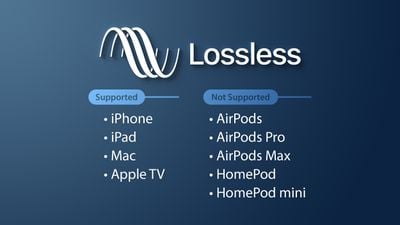
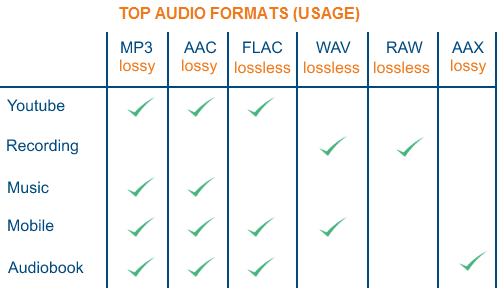
M4A files come in two flavors: lossy and lossless. The lossy version (AAC) sacrifices a bit of audio quality to reduce file size, making it ideal for streaming and sharing. The lossless version, ALAC (Apple Lossless Audio Codec), preserves every detail but results in larger files. Think of it as choosing between a high-definition photo and a quick snapshot.
5. Embedded Metadata
M4A files often contain embedded metadata, such as song title, artist, album, and even album art. This information enhances your music library organization and visual appeal. It’s like having a personal librarian who arranges your books by genre, author, and cover design.
Let’s Explore More About M4A
6. Streaming-Friendly Format
The lossy M4A format (AAC) is a streaming-friendly choice. It allows for smooth streaming without compromising much on audio quality. Imagine a river flowing effortlessly, and you’re enjoying the ride without bumps or interruptions.
7. Ideal for Podcasts
Many podcasters prefer M4A due to its balance between audio quality and file size. It ensures that listeners get clear, enjoyable content without draining their device’s storage. Podcasting with M4A is like serving a delicious, bite-sized snack to your audience.
8. Compressed for Emailing
If you need to send audio files via email, M4A is your friend. Its efficient compression keeps file sizes down, preventing email servers from raising their eyebrows at your attachments. It’s like fitting a puzzle piece seamlessly into the email jigsaw.
9. Audiobooks in M4A
Audiobook enthusiasts often encounter M4A files. With embedded metadata and great sound quality, M4A provides an immersive experience for literary journeys. It’s like having a narrator right by your side, bringing the story to life.
10. Converting M4A to Other Formats
M4A files can be converted to various audio formats, making them versatile for different purposes. Whether you need an MP3 for your car or a WAV for professional editing, M4A can transform to fit the scenario. It’s like a chameleon, adapting to its surroundings.
Latest Words on M4A
In conclusion, M4A is more than just a file format; it’s a versatile companion for all your audio needs. Whether you’re a music lover, a podcaster, or someone who values efficient audio storage, M4A has something to offer. And for those looking for user-friendly solutions to optimize their M4A files, MP4Gain is a suitable choice.











Comments:
This article is a treasure trove of M4A knowledge! I had no idea about the lossy and lossless options. Thanks for enlightening us.
I use M4A for my podcasts, and it’s been a fantastic choice. The embedded metadata makes my episodes look polished and professional.
Could you provide some recommendations for the best software to convert M4A to other formats? That would be really helpful.
M4A is indeed the perfect format for emailing audio files. It’s like sending a message without worrying about the attachment size.
This article clarifies the M4A format in a way that’s easy to understand, even for someone like me who’s not a tech expert. Great job!
As a podcaster, I can attest to the benefits of using M4A. It strikes a balance between quality and file size that’s hard to beat.
I’ve always wondered about the differences between AAC and ALAC. This article finally cleared things up for me. Thank you!
M4A’s versatility is its strongest suit. It’s like a Swiss Army knife for audio formats.
When it comes to audiobooks, M4A is the way to go. The metadata and sound quality are unbeatable.
MP4Gain is mentioned in passing, but I’m curious about how it can optimize M4A files. Could you provide more details on that?