Lossless audio formats 


Free Download Mp4Gain
picture

WAV (.wav) The WAV format is nothing more than a digital recording of real sounds, sounds that come from a source outside the PC. With WAV music, drums, piano, guitar, bass or vocals are heard the same, no matter what computer the file is played on (with the same acoustic quality of hardware components, of course).

wav

DSD (DFF, .Dsf) are used in digital media such as Super Audio CDs. Sampling quality is very high (variable sampling rate is approximately 64 times higher than for audio CDs), although according to several operators in this sector, it must be absolutely determined whether the final quality is higher than the sampling quality. PCM (used in high quality Blu-Ray and DVD Audio). I can reproduce free readers like Foobar 2000 or AIMP on our computer.

AIFF (.aif). It’s the Apple audio format used by Apple for Mac. It’s basically the WAV equivalent used by Windows.

APE (Mono Audio; .ape): Ordinary with a loss that allows us to reduce by about 50% the space occupied by our music (in some cases even more), without losing quality. In this way, an album that takes up about 600 MB in wav format averages 300 MB (much more than about 100 MB of high-speed mpc and 60 mp3 mp3, but the quality is the same as the original); On average, I speak because there are certain types of music where the level of compression is even higher. You can use WinAmp plug-ins to listen to songs in this format, or better yet, a player that uses it natively as Foobar 2000. Right now, it’s probably the best lossless codec, considering the balance between speed and compression (Click here for a lossless comparison table) format.)

Apple Lossless Audio Codec – ALAC (.m4a) This is a lossless audio codec created by Apple a few years ago and available as an open source from Apple since October 2011. Some programs support it in Windows (encoded). , including DbPowerAmp.

FLAC (.flac): a very popular open source format. It used to be very popular (among music purists), but some space has been lost with the MonkeyAudio bee format, which allows for better compression in the same quality. Compared to others, it always came in .ape format (but also after WavPack).


LA (Lossless Audio: .la): The lossless format that compresses the most. Conversion to this format is very slow, but achieves the best compression in history (for example, MonkeyAudio, this album would take up about 290 MB compared to 300 MB in APE). This is not widespread, as some MB obtained on a bee is not worth the long wait (and less support from third-party programs), but it is the winner of my lossless format comparison.flac
OPTIM FROG (.ofr) – Excellent lossless codec, best after LA as compressibility. Compression, when set to slightly high levels, is about 3 times slower than Monkey Audio and the gain in MB is about 2%. Like all other formats on this site, you can listen without the addition of Foobar 2000.

WAVPACK (.wv, wvc) – is a valid open source compression format that allows lossless, lossy and hybrid results. The compression rate is high and the compression is good. Another interesting hybrid format is that the lossy file is merged with another file, which allows you to completely restore the original file without loss in case we want to restore it.


Free Download Mp4Gain
picture


Mp4Gain Main Window
picture


Mp4Gain Features
picture


Free Download Mp4Gain
picture

What are the most popular audio formats?

What are the most popular audio formats?

There are dozens of audio files that we can use to convert a song, but the really useful ones can be counted on the fingers of one hand.

losseless

When we think of an audio file, most of us immediately think of MP3. Without a doubt, it’s one of the most popular audio formats, but it’s not the only one. Let’s see what are the most popular audio formats and what are the differences in use. And we have to choose that according to our needs.

There are different categories of audio files. First we defined the formats as uncompressed. The word itself defines this section of the file. In this case, the recorded sound waves are actually converted into a digital format without further processing. What does it all mean? In files that are very difficult to save and take up a lot of space. In order to simplify the storage of audio files and to reduce the load, formats with lossy data compression were created. These sacrifice some quality in favor of the small storage space required.

losseless

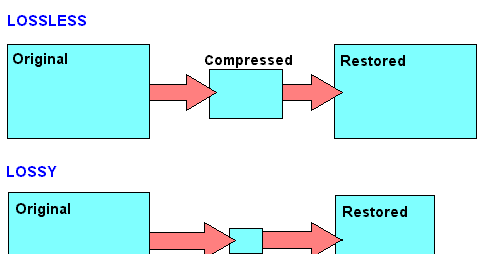
To fix this error, which represents the loss of quality in favor of file size, compressed audio formats were created without loss of data. Obviously, they’re not small files like lossy compression, but they’re still smaller than uncompressed. However, it must be said that these types of formats are only widespread in certain cases.

PCM

PCM is the most common and widely used audio format on CDs and DVDs that we have at home. It is the faithful conversion of analog audio into a digital file. It is no coincidence that it is an uncompressed audio format. Remember that analog sounds exist as waveforms. In order to convert a sound wave into digital bits, the sound must be sampled and recorded at certain intervals.

WAV

WAV stands for Waveform Audio File Format (previously it was also called Audio for Windows, now it is no longer). It is a standard developed by Microsoft and IBM in 1991. WAV files can contain compressed and uncompressed audio formats. In most cases, however, they are used for uncompressed people. Although it was developed for Windows, it can also be safely opened on a Mac.

MP3

This is without a doubt the most popular audio format. It was released in 1993 and over the years its success has increased thanks to the combination with the pieces of music. Why are they used so often? Quite simply, these are lossy compressed files, and the generated files are so small that users can create a music library without taking up too much space. And the quality? It is much lower than other formats, but the human ear doesn’t always manage to notice the difference significantly. MP3 is also a universal file. It can be found on smartphones, computers, smart TVs, tablets and many other electronic devices.

WMA

WMA stands for Windows Media Audio. It was first published in 1999 and has gone through several developments since then, always keeping the same name. As you can easily guess, it is an audio format created by Microsoft. It was developed to replace MP3s. Unfortunately, there are very few platforms that support this, so the MP3 mastery has never been compromised.

OGG

OGG is not a real compression audio format. We can define it as a multi-purpose multimedia container. It can contain all types of audio formats, but is often used to contain Vorbis files. It is one of the best performing files to reduce size without losing quality.

FLAC

FLAC stands for Free Codec Lossless Audio. It is a lossless, compressed format that was created in 2001. A FLAC file can be compressed to 60% of its original size without minimal loss of sound quality. It is also an open source format. Because of this, it is compatible with most programs and devices. It is the best quality alternative to MP3.

Guide to fully understand lossless formats

Guide to fully understand lossless formats

They end with a period followed by three or four letters. This is what happens with absolutely all the files on a computer or smartphone. Those last letters represent the format in which this file is. Today we are going to focus on one type of format, the lossless format.

lossless

ogg

What is a lossless format?

Any element in a computer has to have some type of format, or so to speak, some type of structure that is known by that computer so that it can work with the file. In a parallelism with the world of physical objects, the format would be something like the material with which said object is constructed.

Just as there are different materials with different properties, there are also different formats with different characteristics. Most of the files we use today have a compressed format, so they take up less space on our computer and are easier to send via the Internet, or to upload to any social network. However, these formats are not the highest quality, since this position would be occupied by formats without loss. These formats retain the original quality of the file, and offer the best results.

If we talk about images, the lossless formats are RAW, BMP and PNG, among others. Meanwhile, the compressed formats are JPG and GIF. However, there are certain differences with some of them. RAW, for example, stores all the light data captured by the camera’s sensor. It is a perfect format for photographers. But it would not even be for photographers who want to share a certain photograph on a social network. A RAW photo can easily take up to 25 MB, depending on the resolution of the camera. A high-quality JPG photo would be a photograph that would take two or three megabytes, although it would have less quality.

If we talk about audio, there are three main lossless formats: WAV, FLAC and ALAC. The latter is the one used by Apple in iTunes. They are formats that do not lose anything of quality with respect to the original audio. Yes we would be losing quality with the MP3 and the OGG.

And if we talk about video, there are few lossless formats that we can talk about. In fact, there is a problem, and that is that storing videos without loss would be an impossible task for anyone without a storage server nearby. That is why we usually opt for MKV, WMV, and H.264 formats. Of course, the latter is much better, since the compression process it carries is much more intelligent.

Compression, how does it work?

Now, what is this about compressed formats? As its name suggests, we are talking about formats that reduce files, and we can rely on it to fully understand how these formats work. Surely we have all been in the situation of having to pack a suitcase with just enough space, finish choosing all the clothes that we are going to take on a trip, and finally having to decide what we can do without in order to close the suitcase, because we had too many clothes. Well, that is the compression of each of the formats. They remove elements from that file, and thus make it weigh or occupy less.

Why are there different formats? Returning to the case of the suitcase, each person will make different decisions regarding those things that they can do without for their trip. It will vary from person to person. The same goes for formats. The developers of these reduce the space occupied by a file, but each of the formats removes data in a different way, so that a file compressed to JPG, can be different from one GIF, even if both are compressed. Each of them has followed a different procedure to delete the data, and that the song, image, or video, continues to play practically the same as the original version.

When to convert from compression to lossless?

The question at the top of this paragraph is especially important to anyone who has ever converted a file from a compressed format to a lossless format. And it is that, in reality, it is cheating, because you should never convert a file from a compressed format to a lossless file. Actually, nothing happens if we do, but we will not improve the quality of that file, even if it will now be available in a format in which the files are not compressed.

Of course, it is also not a good idea to convert a file in a compressed format to a different compressed format. Keep in mind that each compression process is different depending on the chosen format. In other words, each format eliminates the data it considers appropriate to maintain the quality of the image. If we have a file in a compressed format, this will mean that it no longer preserves all the original data. If we now convert it to a different compressed format, the compression process will remove new data from the file, and chances are we have a much more corrupted file.

Guide to fully understand lossless formats

They end with a period followed by three or four letters. It is what happens with absolutely all the files of a computer or a smartphone. These last letters represent the format in which said file is. Today we are going to focus on one type of format, the lossless format.

loseless formats

What is a lossless format?

Any element in a computer has to have some kind of format, or so to speak, some kind of structure that is known by that computer so that it can work with the file. In a parallel with the world of physical objects, the format would be something like the material with which the object is constructed.

Just as there are different materials with different properties, there are also different formats with different characteristics. Most of the files we use today have a compressed format, so they take up less space on our computer and are easier to send via the Internet, or upload to a social network. However, these formats are not the highest quality, since this position would be occupied by lossless formats. These formats retain the original quality of the file, and are the ones that offer the best results.

If we talk about images, the lossless formats are RAW, BMP and PNG, among others. Meanwhile, the compressed formats are JPG and GIF. However, there are certain differences with some of them. RAW, for example, stores all the light data captured by the camera’s sensor. It is a perfect format for photographers. But it would not even be for photographers who want to share a particular photograph on a social network. A RAW photo can easily occupy 25 MB, depending on the resolution of the camera. A high quality JPG photo would be a photograph that would occupy two or three megabytes, although it would have less quality.

loseless codecs

If we talk about audio, there are three main formats without loss: WAV, FLAC and ALAC. The latter is the one used by Apple in iTunes. They are formats that do not lose any quality with respect to the original audio. Yes we would be losing quality with MP3 and OGG.

And if we talk about video, there are few lossless formats that we can talk about. In fact, there is a problem, and storing videos without loss would be an impossible task for anyone who did not have a storage server nearby. That is why we usually opt for the MKV, WMV, and H.264 formats. Of course, the latter is much better, because the compression process is much more intelligent.

Compression, how does it work?

Now, what is this about compressed formats? As the name implies, we are talking about formats that reduce files, and we can rely on it to perfectly understand how these formats work. Surely we have all seen ourselves in the situation of having to pack a suitcase with just the right space, finish choosing all the clothes we are going to take on a trip, and finally have to decide what we can do without being able to close the suitcase, because we had too many clothes. For that is the compression of each of the formats. They remove items from that file, and thus make them weigh or occupy less.

Why are there different formats? Returning to the case of the suitcase, each person will make different decisions regarding those things that he can do without for his trip. It will vary from one person to another. The same goes for formats. The developers of these reduce the space occupied by a file, but each of the formats deletes data in a different way, so that a file compressed to JPG, can be different from one GIF, even if the two are compressed. Each of them has followed a different procedure to delete the data, and that the song, image, or video, continue to play almost the same as the original version.

When to convert from compression to lossless?

The question that heads this paragraph is especially important for all those who at some point have converted a file from a compressed format to a lossless format. And, in fact, it goes with a trap, because you should never convert a file from a compressed format to a file without loss. In reality, nothing happens if we do, but we will not improve the quality of that file, although it will now be available in a format in which the files are not compressed.

Of course, it is also not a good idea to convert a file into a compressed format, to a different compressed format. Let’s keep in mind that each compression process is different depending on the format chosen. That is, each format eliminates the data it deems appropriate to maintain image quality. If we have a file in a compressed format, that will mean that it no longer retains all data.