Lossless Audio Codecs in MP4 Containers


Free Download Mp4Gain
picture

Lossless Audio Codecs in MP4 Containers
Lossless Audio Codecs in MP4 Containers

Let’s talk about Lossless Audio Codecs in MP4 Containers

When it comes to preserving the highest quality audio in a compact format, lossless audio codecs in MP4 containers offer an ideal solution. As an audio enthusiast and specialist, I’ve worked with these formats extensively, and I can tell you that they offer a unique combination of compression without sacrificing any of the original audio quality. In this article, I will break down the most popular lossless audio codecs, their benefits, and how they integrate into the MP4 container to enhance both music and video experiences.

What Are Lossless Audio Codecs?

Lossless audio codecs are types of audio compression algorithms that preserve the original sound quality without any data loss. Unlike lossy formats like MP3 or AAC, which sacrifice some of the audio quality to reduce file size, lossless codecs ensure that every nuance and detail of the audio is preserved. This makes them the preferred choice for audiophiles, audio professionals, and anyone who values perfect audio fidelity.

Common Lossless Audio Codecs

  • FLAC (Free Lossless Audio Codec)
  • ALAC (Apple Lossless Audio Codec)
  • WAV (Waveform Audio File Format)
  • APE (Monkey’s Audio)
  • TAK (Tom’s lossless Audio Kompressor)

Each of these codecs has unique features, but they all share the same goal of maintaining high audio quality. In an MP4 container, these codecs can be paired with video streams to create media files that combine the best of both worlds: visually stunning video with perfectly preserved audio.

The Role of MP4 Containers in Audio and Video Files

MP4 is one of the most widely used video container formats, primarily because it supports high-quality video and audio streams while maintaining relatively small file sizes. The MP4 format is versatile and can house both lossy and lossless audio codecs. It’s designed to hold video, audio, and subtitle tracks, along with metadata, all in a single file.

Why MP4 for Lossless Audio?

Many people don’t realize that MP4 containers are highly compatible with lossless audio codecs. The beauty of the MP4 container is that it allows you to store lossless audio without the file sizes becoming unmanageable. For example, when combined with a codec like FLAC, an MP4 file can hold high-fidelity audio, all while remaining relatively small compared to the same content in a WAV file. This makes it a perfect choice for streaming, archiving, and general media use.

Benefits of Using Lossless Audio Codecs in MP4 Containers

Integrating lossless audio codecs into MP4 containers offers numerous advantages, especially for people who want high-quality audio and video in a single, portable file.

High-Quality Audio Without Compromise

The key benefit of using lossless codecs in MP4 files is the ability to enjoy perfectly preserved audio. When you play a FLAC or ALAC file in an MP4 container, you’re hearing every detail of the original sound—every subtle instrument note or vocal inflection is there, untouched. Whether you’re listening to a classical symphony or the latest rock album, lossless audio in MP4 ensures that your music is as close as possible to the artist’s original vision.

Efficient Compression and Storage

MP4 containers are known for their efficiency. When combined with a lossless audio codec, they offer a perfect balance between size and quality. Unlike WAV or PCM files, which can be enormous, FLAC and ALAC files in MP4 containers offer excellent compression, reducing file sizes by 30-60% while retaining all the audio details. This is especially important if you’re archiving large music collections or need to store multiple hours of high-quality audio and video in a single file.

Compatibility Across Devices

Another reason to use lossless audio codecs within MP4 containers is their broad compatibility. Whether you’re listening on a smartphone, a desktop, or a home theater system, MP4 containers with lossless audio codecs are supported by most devices and software. Unlike other formats that may require specific players or software to decode, MP4 is universally accepted, making it incredibly convenient for everyday use.

Popular Lossless Audio Codecs in MP4 Containers

There are a few lossless audio codecs that stand out when it comes to being used in MP4 containers. Let’s explore some of the most popular options available today.

FLAC (Free Lossless Audio Codec)

FLAC is the most widely used lossless audio codec. It’s open-source, meaning anyone can use it, and it offers high-quality compression without any loss of audio fidelity. When used in an MP4 container, FLAC can drastically reduce file size while keeping all of the audio detail intact. Whether you’re listening to music on a smartphone or streaming video with high-fidelity sound, FLAC in MP4 ensures that the audio remains pristine.

ALAC (Apple Lossless Audio Codec)

For those deeply embedded in the Apple ecosystem, ALAC offers another great option. ALAC works similarly to FLAC in that it compresses audio without any loss of data, but it’s optimized for use with Apple devices. When integrated into an MP4 container, ALAC maintains high-quality audio while providing excellent compatibility with iPhones, iPads, and Macs. If you’re an Apple user and want lossless audio in an MP4 container, ALAC is a top choice.

WAV (Waveform Audio File Format)

While not technically a codec, WAV is a raw audio format that can be used in MP4 containers. WAV files are uncompressed, meaning they take up more space, but the audio quality is often unrivaled. However, for most users, FLAC or ALAC is preferable due to their more efficient compression rates. WAV is typically used for professional audio production and editing, where the highest quality is essential.

APE (Monkey’s Audio)

APE is another lossless audio codec, though it’s less widely used than FLAC or ALAC. It provides a high degree of compression without sacrificing quality, but compatibility can be an issue on certain devices. Still, when paired with an MP4 container, APE can offer high-quality audio in a smaller file size than raw WAV files.

TAK (Tom’s lossless Audio Kompressor)

TAK is a relatively niche codec that provides some of the highest compression ratios among lossless codecs. However, it’s not as universally supported as FLAC or ALAC, and it may require specific software to decode. Despite this, it’s worth considering for those who want the smallest possible file sizes without sacrificing quality.

Why You Should Use Lossless Audio Codecs in MP4 Containers

There are several reasons why lossless audio in MP4 containers is a good idea, and why you should consider it for your audio and video projects. Let’s take a look at the most significant benefits.

Perfect for Audiophiles and Professionals

As an audiophile, I can’t stress enough how important it is to preserve the full range of sound. Whether you’re mixing music, editing soundtracks, or just enjoying your favorite album, lossless audio ensures that no detail is lost in the compression process. MP4 containers provide an excellent balance between high-quality audio and manageable file sizes, making them the perfect choice for storing and sharing your audio collection.

Convenience and Flexibility

MP4 is incredibly versatile. Not only can you store high-quality audio, but you can also pair it with high-definition video. This makes MP4 containers an excellent choice for projects that require both elements, like music videos, concert recordings, or multimedia presentations. The ability to store both in one file means that you don’t need to worry about syncing audio and video separately.

Latest Words on Lossless Audio Codecs in MP4 Containers

Lossless audio codecs in MP4 containers offer a powerful combination of high-quality audio and efficient compression. Whether you’re a professional audio engineer, an audiophile, or just someone who wants the best possible sound in their media collection, MP4 containers provide an excellent option for storing and enjoying lossless audio. By using codecs like FLAC, ALAC, and others, you can enjoy perfect sound without the headache of unmanageable file sizes. For those looking for a seamless experience across multiple devices, MP4 containers are the way to go.

Frequently Asked Questions about Lossless Audio Codecs in MP4 Containers

What is a lossless audio codec?

A lossless audio codec preserves the original quality of the sound without any compression that degrades the audio. Popular examples include FLAC (Free Lossless Audio Codec) and ALAC (Apple Lossless Audio Codec). Unlike lossy formats like MP3, these codecs maintain every detail of the original sound, ensuring high-quality playback even after encoding.

Why should I use a lossless codec in an MP4 container?

MP4 containers are versatile, supporting both video and audio content. Using a lossless audio codec like FLAC or ALAC inside an MP4 container allows you to store high-quality, uncompressed audio alongside video files. This provides better audio fidelity while taking advantage of MP4’s efficient container format, which is widely supported across devices.

What is the difference between FLAC and ALAC in MP4 containers?

FLAC is a popular lossless audio codec for non-Apple devices, offering a high compression rate with excellent sound quality. ALAC, on the other hand, is designed for Apple devices, providing seamless compatibility with iTunes, iPhones, and other Apple products. Both codecs are great options for lossless audio, but your choice will depend on the devices you use.

Can I use WAV files in MP4 containers?

While WAV files are often used for lossless audio, they are quite large compared to FLAC or ALAC. Although it’s technically possible to store WAV files in MP4 containers, it’s not the most efficient choice. FLAC and ALAC provide better compression, saving space without sacrificing quality, making them ideal for use within MP4 containers.

What are the advantages of using lossless audio in MP4 over other file formats?

  • Space-efficient: Lossless audio codecs like FLAC and ALAC allow you to maintain high-quality sound while reducing file size, compared to uncompressed formats like WAV.
  • Compatibility: MP4 is widely supported across various platforms and devices, making it easy to share and play your high-quality audio files anywhere.
  • Versatility: MP4 containers allow you to combine both audio and video content, so you can store entire media projects in a single, convenient file.

Can I use MP4 containers for audio-only files?

Yes! MP4 containers aren’t limited to video content. They can store audio-only files with any supported codec, including lossless formats like FLAC and ALAC. This allows you to enjoy the high-quality audio in a compact, widely compatible file format.

What is the best lossless audio codec for MP4 containers?

The best lossless audio codec for an MP4 container depends on your specific needs and devices. FLAC is a great choice for general use, as it provides excellent compression and sound quality. If you’re using Apple devices, ALAC is the way to go due to its seamless integration with Apple’s ecosystem.

Does using a lossless audio codec in MP4 affect playback quality?

No, using a lossless audio codec like FLAC or ALAC in an MP4 container ensures that the audio playback is as close to the original recording as possible. The container format itself does not affect the audio quality, only the codec inside it. Lossless codecs preserve every detail of the sound, resulting in the highest possible quality.

Are there any downsides to using lossless audio codecs in MP4 containers?

The main downside is the larger file size compared to lossy codecs like MP3. However, this is a trade-off for the superior audio quality that lossless codecs provide. If storage space is a concern, you may need to consider the balance between file size and audio quality when choosing a codec.

Comments:

I had no idea that MP4 containers could handle lossless audio like FLAC! This really opened my eyes to how much more I can do with my music library. Definitely going to try this out with my videos too. – MikeTheAudioLover

I’ve been using ALAC with MP4 for years and it’s the best combination for Apple users. But I never knew about TAK. Might check that out. – SaraVibes

Great article! I didn’t realize how much I was losing in terms of sound quality with MP3s. FLAC in MP4 sounds way better. Thanks for the info! – AudiophileGeek

Can someone explain why FLAC is better than WAV for

audio quality in an MP4? I thought WAV was the best, but I see now that FLAC is more efficient. – SoundWaveFan

Great explanation on how lossless audio works in MP4 containers! This is something I’ve been wondering about for a while. It’s much easier to manage FLAC or ALAC in MP4 than raw WAV files. – AudioLover22

I’ve been using WAV for my audio projects for years, but I’m going to try using FLAC with MP4 for better compression. Curious to see how it compares! – TechyGuy01

Very informative! I never realized how versatile MP4 containers are. I always assumed they were just for video. Going to start experimenting with lossless audio in my MP4 videos. – SoundExplorer

I’m new to lossless audio, but now I’m looking to convert my MP3 collection to FLAC in MP4 containers. Any tips on the best tools to do that? – NewbieAudioFan

It’s nice to see a detailed comparison of FLAC, ALAC, and WAV. I’m using FLAC for my personal music library, but I wasn’t aware of ALAC’s benefits for Apple users. Good to know. – JohnDoeAudio

Just wanted to say thanks for breaking down the advantages of MP4 containers for audio. I was skeptical about the whole thing, but I’m convinced. – SmoothBeats

Does anyone have experience with TAK codec? I read about it here, but it seems to have limited support. Would love to know if it’s worth using for high-quality audio. – SoundManiac

I’m not sure I understand the difference between FLAC and ALAC in terms of audio quality in MP4 containers. Can anyone elaborate on that? – AudioFreak77

This article made me realize how much I’ve been underusing MP4 containers. I always thought it was just for video, but now I see the potential for high-quality audio as well. – MusicMan99

FLAC in MP4 is definitely the way to go if you want to save space without compromising audio quality. I’ve been using it for a while now and love it. – DigitalSoundMaster


Free Download Mp4Gain
picture


Mp4Gain Main Window
picture


Mp4Gain Features
picture


Free Download Mp4Gain
picture

lossless music

lossless music

Lossless Music

Lossless music is a kind of music file playback format, which is divided into two types: lossy compression and lossless compression.

Lossless Music

However, due to data loss in the audio digitizing process, it is actually impossible to achieve true lossless.
chinese nameintact musicexplainMusic file playback formatApplication fieldmusicClassificationLossy and lossless compressionaudio compression codeFLAC
content

type of sound
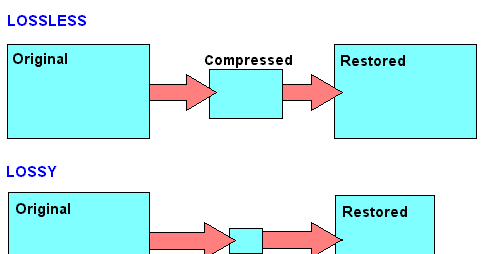
Commonly seen MP3, WMA, and OGG are called lossy compression. As the name implies, lossy compression reduces the audio sample rate and bitrate, and the output audio file will be smaller than the original file. . Another audio compression is called lossless compression, which can compress the volume of the audio file to a smaller size on the premise of saving 100% of all the data in the original file. Same size, same bitrate. Lossless compression formats include APE, FLAC, WavPack, LPAC, WMALossless, AppleLossless, TTA, Tak, TAC, La, OptimFROG, Shorten, and common and conventional lossless compression formats include APE, FLAC, TTA, TAK.
General WAV CD can capture this music format. However, due to the high volume and uncompressed original audio, it can usually be compressed and converted to FLAC or APE at a lower volume. Note: wav is still a lossless format, and the last two are lossless compression formats
encoding format
BOW
APE is one of the popular digital music file formats. APE is a lossless audio compression technology, that is, after compressing the audio data file read from the audio CD in APE format, you can restore the file in APE format, and the restored audio file is the same as the original. compressed audio file. Exactly the same as before, nothing to lose. [one]
FLAC
FLAC is short for Free Lossless Audio Codec [2] , which can be interpreted as Chinese lossless audio compression coding. FLAC is a well-known free audio compression codec, which is characterized by lossless compression. Unlike other lossy compression codes such as MP3 and AAC, it does not destroy any original audio information, so it can restore the sound quality of music discs. It has been supported by many software and hardware audio products since 2012.
FLAC is similar to MP3, but it has lossless compression, which means that the audio is compressed in FLAC without losing any information. This compression is similar to Zip, but FLAC will give you a higher compression ratio, because FLAC is a compression method specially designed for the characteristics of audio, and you can use the player to play FLAC compressed files like you normally play MP3 files (many Car players and home audio devices already support FLAC, and you can find links to the manufacturers of these devices on the FLAC website).
FLAC is free and is supported by most operating systems, including Windows, “unix” (Linux, BSD, Solaris, OSX, IRIX), BeOS, OS/2, and Amiga. And FLAC provides a build system in autotools, MSVC, Watcom C and ProjectBuilder development tools.
WAV

The WAV format is a sound file format developed by Microsoft, also known as a wave sound file. It is the first digital audio format and is widely supported by the Windows platform and its applications. The WAV format supports many compression algorithms, supports a variety of audio bits, sample rates, and channels. It adopts a sampling frequency of 44.1 kHz and a quantization number of 16 bits. Therefore, the sound quality of WAV is almost the same as that of CD, but WAV format requires too much storage space, it is very inconvenient to communicate and broadcast.
WAV’s full name is Wave Audio Files, and WAV is derived from sampling analog waveforms of sound. Sampling the analog waveform of sound with different sampling rates can obtain a series of discrete sample points, convert the values ​​of these sample points into binary numbers with different quantization bits (8 bits or 16 bits), and then store them in the disc, this produces a WAV file of the sound, a wave file . Microsoft Sound System Sound Finder software can convert AIF , SND and VOD files to WAV format.
This format records the waveform of the sound, so as long as the sample rate sample rate

Lossless audio formats

Lossless audio formats

Lossless audio

Audio files can be converted in a more or less space saving way using lossless or lossy codecs. While the data reduction is absolutely true to the original with lossless codecs, a difference can be heard from the original material, especially with heavy compression with lossy codecs.

Lossless compressed audio files lose approximately 25% to 50% of their original file size. Typical representatives are Monkey’s Audio, FLAC, or WavPack. Modern lossy codecs like AAC, Ogg Vorbis, or MP3, on the other hand, reduce source material by 90% without sounding noticeably worse.

Lossless audio compression

Unlike documents or images, for example, audio files are very difficult to compress, since identical repetitions are very rare in music. But it is precisely on such occurrences that the Huffmann or Lempel-Ziv algorithms depend, which are used in ZIP or RAR, for example. Therefore, most non-clustered compressors employ predictive coding. The signal is divided into a music component and a noise component. Depending on how well this prediction has been made, the noise component should ideally be Gaussian white noise that can be easily compressed using conventional methods.
In the ideal case, the result is 50% compression, which is highly dependent on the piece of music.

Monkey’s Audio, FLAC and WavPack are popular formats for lossless compression of WAV (PCM) files, for example digitized original recordings from the recording studio (for archiving or later processing) or archiving copies of music CDs. The sound quality is always the same as the original and the checksums reveal corrupted files. Increasing hard drive capacity at affordable prices makes “Lossless Codecs” interesting for everyday use.

Uncompressed: WAV (PCM)

WAV is the largest common denominator of Windows audio formats. The Macintosh equivalent is called AIFF. WAV is actually the collective term for various subformats, of which PCM is the most common and is generally equated with WAV.

WAV (PCM) is an uncompressed recording of sound samples: the time signal of a noise is sampled, quantized, digitized, and saved at discrete points in time. The more often and finer you record these values, the better the sound. With CD quality music, this instantaneous value is recorded 44,100 times per second and recorded with 16-bit “precision”, that is, 2 ^ 16 = 65536 possible values.

With the help of special programs (eg CDex, EAC, Audiograbber), Audio CDs can be transferred to the hard disk as WAV (PCM) files. Viewed in this way, WAV (PCM) files are copies of the original, provided the CD-ROM drive is not read incorrectly or the CD is damaged. One minute at CD quality requires roughly 10MB of storage space, which is not as happy to give away even in the age of ever-larger hard drives.

On the PC, WAV (PCM) and CD-quality (44.1 kHz, 16-bit, stereo) audio files are often the starting material for creating space-saving audio files in formats such as MP3. However, for sound processing on the home PC, WAV (PCM) is the first choice.

Monkey’s Audio

Monkey’s Audio is a lossless audio codec for PCM wave files. Monkey’s Audio comes with a convenient program interface (in English), over which files can be compressed, decompressed, verified or tagged. PCM wave files (any sample rate, 8/16/24 bit, mono or stereo) or corresponding Shorten or WavPack files are accepted as source files. Monkey’s Audio does not support multiple channels.

The APE tags that are used to store the title information can be supplemented with their own fields and are therefore very flexible. They are now used in conjunction with other audio formats as well.

The included command line encoder allows integration into other programs. Various audio players support the format through plugins. A plug-in for Winamp can be installed at the same time as installation. Monkey’s Audio is a Windows program by default. However, there is a platform independent version of Java.

FLAC

FLAC stands for “Free Lossless Audio Codec”. There are several lossless audio codecs available. FLAC is suitable here for several reasons: FLAC follows the open source philosophy (free open source code, available for many operating systems), works very fast, has a good and secure framework structure.

Lossless audio formats 

WAV (.wav) The WAV format is nothing more than a digital recording of real sounds, sounds that come from a source outside the PC. With WAV music, drums, piano, guitar, bass or vocals are heard the same, no matter what computer the file is played on (with the same acoustic quality of hardware components, of course).

wav

DSD (DFF, .Dsf) are used in digital media such as Super Audio CDs. Sampling quality is very high (variable sampling rate is approximately 64 times higher than for audio CDs), although according to several operators in this sector, it must be absolutely determined whether the final quality is higher than the sampling quality. PCM (used in high quality Blu-Ray and DVD Audio). I can reproduce free readers like Foobar 2000 or AIMP on our computer.

AIFF (.aif). It’s the Apple audio format used by Apple for Mac. It’s basically the WAV equivalent used by Windows.

APE (Mono Audio; .ape): Ordinary with a loss that allows us to reduce by about 50% the space occupied by our music (in some cases even more), without losing quality. In this way, an album that takes up about 600 MB in wav format averages 300 MB (much more than about 100 MB of high-speed mpc and 60 mp3 mp3, but the quality is the same as the original); On average, I speak because there are certain types of music where the level of compression is even higher. You can use WinAmp plug-ins to listen to songs in this format, or better yet, a player that uses it natively as Foobar 2000. Right now, it’s probably the best lossless codec, considering the balance between speed and compression (Click here for a lossless comparison table) format.)

Apple Lossless Audio Codec – ALAC (.m4a) This is a lossless audio codec created by Apple a few years ago and available as an open source from Apple since October 2011. Some programs support it in Windows (encoded). , including DbPowerAmp.

FLAC (.flac): a very popular open source format. It used to be very popular (among music purists), but some space has been lost with the MonkeyAudio bee format, which allows for better compression in the same quality. Compared to others, it always came in .ape format (but also after WavPack).


LA (Lossless Audio: .la): The lossless format that compresses the most. Conversion to this format is very slow, but achieves the best compression in history (for example, MonkeyAudio, this album would take up about 290 MB compared to 300 MB in APE). This is not widespread, as some MB obtained on a bee is not worth the long wait (and less support from third-party programs), but it is the winner of my lossless format comparison.flac

OPTIM FROG (.ofr) – Excellent lossless codec, best after LA as compressibility. Compression, when set to slightly high levels, is about 3 times slower than Monkey Audio and the gain in MB is about 2%. Like all other formats on this site, you can listen without the addition of Foobar 2000.

WAVPACK (.wv, wvc) – is a valid open source compression format that allows lossless, lossy and hybrid results. The compression rate is high and the compression is good. Another interesting hybrid format is that the lossy file is merged with another file, which allows you to completely restore the original file without loss in case we want to restore it.

What are the most popular audio formats?

What are the most popular audio formats?

There are dozens of audio files that we can use to convert a song, but the really useful ones can be counted on the fingers of one hand.

losseless

When we think of an audio file, most of us immediately think of MP3. Without a doubt, it’s one of the most popular audio formats, but it’s not the only one. Let’s see what are the most popular audio formats and what are the differences in use. And we have to choose that according to our needs.

There are different categories of audio files. First we defined the formats as uncompressed. The word itself defines this section of the file. In this case, the recorded sound waves are actually converted into a digital format without further processing. What does it all mean? In files that are very difficult to save and take up a lot of space. In order to simplify the storage of audio files and to reduce the load, formats with lossy data compression were created. These sacrifice some quality in favor of the small storage space required.

losseless

To fix this error, which represents the loss of quality in favor of file size, compressed audio formats were created without loss of data. Obviously, they’re not small files like lossy compression, but they’re still smaller than uncompressed. However, it must be said that these types of formats are only widespread in certain cases.

PCM

PCM is the most common and widely used audio format on CDs and DVDs that we have at home. It is the faithful conversion of analog audio into a digital file. It is no coincidence that it is an uncompressed audio format. Remember that analog sounds exist as waveforms. In order to convert a sound wave into digital bits, the sound must be sampled and recorded at certain intervals.

WAV

WAV stands for Waveform Audio File Format (previously it was also called Audio for Windows, now it is no longer). It is a standard developed by Microsoft and IBM in 1991. WAV files can contain compressed and uncompressed audio formats. In most cases, however, they are used for uncompressed people. Although it was developed for Windows, it can also be safely opened on a Mac.

MP3

This is without a doubt the most popular audio format. It was released in 1993 and over the years its success has increased thanks to the combination with the pieces of music. Why are they used so often? Quite simply, these are lossy compressed files, and the generated files are so small that users can create a music library without taking up too much space. And the quality? It is much lower than other formats, but the human ear doesn’t always manage to notice the difference significantly. MP3 is also a universal file. It can be found on smartphones, computers, smart TVs, tablets and many other electronic devices.

WMA

WMA stands for Windows Media Audio. It was first published in 1999 and has gone through several developments since then, always keeping the same name. As you can easily guess, it is an audio format created by Microsoft. It was developed to replace MP3s. Unfortunately, there are very few platforms that support this, so the MP3 mastery has never been compromised.

OGG

OGG is not a real compression audio format. We can define it as a multi-purpose multimedia container. It can contain all types of audio formats, but is often used to contain Vorbis files. It is one of the best performing files to reduce size without losing quality.

FLAC

FLAC stands for Free Codec Lossless Audio. It is a lossless, compressed format that was created in 2001. A FLAC file can be compressed to 60% of its original size without minimal loss of sound quality. It is also an open source format. Because of this, it is compatible with most programs and devices. It is the best quality alternative to MP3.

Guide to fully understand lossless formats

Guide to fully understand lossless formats

They end with a period followed by three or four letters. This is what happens with absolutely all the files on a computer or smartphone. Those last letters represent the format in which this file is. Today we are going to focus on one type of format, the lossless format.

lossless

ogg

What is a lossless format?

Any element in a computer has to have some type of format, or so to speak, some type of structure that is known by that computer so that it can work with the file. In a parallelism with the world of physical objects, the format would be something like the material with which said object is constructed.

Just as there are different materials with different properties, there are also different formats with different characteristics. Most of the files we use today have a compressed format, so they take up less space on our computer and are easier to send via the Internet, or to upload to any social network. However, these formats are not the highest quality, since this position would be occupied by formats without loss. These formats retain the original quality of the file, and offer the best results.

If we talk about images, the lossless formats are RAW, BMP and PNG, among others. Meanwhile, the compressed formats are JPG and GIF. However, there are certain differences with some of them. RAW, for example, stores all the light data captured by the camera’s sensor. It is a perfect format for photographers. But it would not even be for photographers who want to share a certain photograph on a social network. A RAW photo can easily take up to 25 MB, depending on the resolution of the camera. A high-quality JPG photo would be a photograph that would take two or three megabytes, although it would have less quality.

If we talk about audio, there are three main lossless formats: WAV, FLAC and ALAC. The latter is the one used by Apple in iTunes. They are formats that do not lose anything of quality with respect to the original audio. Yes we would be losing quality with the MP3 and the OGG.

And if we talk about video, there are few lossless formats that we can talk about. In fact, there is a problem, and that is that storing videos without loss would be an impossible task for anyone without a storage server nearby. That is why we usually opt for MKV, WMV, and H.264 formats. Of course, the latter is much better, since the compression process it carries is much more intelligent.

Compression, how does it work?

Now, what is this about compressed formats? As its name suggests, we are talking about formats that reduce files, and we can rely on it to fully understand how these formats work. Surely we have all been in the situation of having to pack a suitcase with just enough space, finish choosing all the clothes that we are going to take on a trip, and finally having to decide what we can do without in order to close the suitcase, because we had too many clothes. Well, that is the compression of each of the formats. They remove elements from that file, and thus make it weigh or occupy less.

Why are there different formats? Returning to the case of the suitcase, each person will make different decisions regarding those things that they can do without for their trip. It will vary from person to person. The same goes for formats. The developers of these reduce the space occupied by a file, but each of the formats removes data in a different way, so that a file compressed to JPG, can be different from one GIF, even if both are compressed. Each of them has followed a different procedure to delete the data, and that the song, image, or video, continues to play practically the same as the original version.

When to convert from compression to lossless?

The question at the top of this paragraph is especially important to anyone who has ever converted a file from a compressed format to a lossless format. And it is that, in reality, it is cheating, because you should never convert a file from a compressed format to a lossless file. Actually, nothing happens if we do, but we will not improve the quality of that file, even if it will now be available in a format in which the files are not compressed.

Of course, it is also not a good idea to convert a file in a compressed format to a different compressed format. Keep in mind that each compression process is different depending on the chosen format. In other words, each format eliminates the data it considers appropriate to maintain the quality of the image. If we have a file in a compressed format, this will mean that it no longer preserves all the original data. If we now convert it to a different compressed format, the compression process will remove new data from the file, and chances are we have a much more corrupted file.

What are digital audio formats

What are digital audio formats

Digital audio formats are basically containers. And the differences between them are fundamentally in:

Whether or not they are compressed.

If they are compressed, in the quality of compression.

The type of labeling they can support.
Digital audio formats

MP3

It is the best known, popular and most widely used. They are known by their “.mp3” extension.

It was developed by Moving Picture Experts Group, so that it was part of the well-known MPEG-1 and MPEG-2 standards.

Its fundamental characteristic resides in the fact that the technology behind it performs a compression of the sound sequence, resulting in a really small file, which normally occupies half of the original file. To achieve this, the loss of certain sounds is necessary, which supposedly cannot be heard by the human ear.

Audio formats

WAV

Developed by the Microsoft and IBM companies, this format, whose name comes from the acronym WAVE (Waveform Aujdio File Format), is currently one of the audio formats that do not have compression in the data, therefore they present an excellent quality.

They are known by their “.wav” extension.

On the other hand, this format has the peculiarity that it includes support for almost all current audio codecs. This makes WAV one of the most widely used formats in the field of professional sound, since the sound is captured with parameters of 44100 Hz and at 16 bits, the same quality can be obtained as on a CD.

On the contrary, one of the disadvantages of this format is that it has a limitation in recording, since it can only capture a maximum of 6.6 hours in the same file at maximum quality.

Audio formats

AIFF

The AIFF (Audio Interchange File Format) format is very similar to WAV. It was born as an answer from Apple to Microsoft’s WAV, being initially only compatible with MAC computers. Currently it can also be used in Windows.

Due to its characteristics, AIFF, together with FLAC and WAV, are usually the most widely used formats in the professional field of audio.

WMA

The WMA (Windows Media Audio) format is a music file format created by Microsoft.

One of its main characteristics is that those files that have been compressed in WMA format take up less space than MP3 files, which also implies a reduction in their quality. Therefore, it is a lossy audio compression format.

OGG

OGG audio formats are compressed audio files, which means that they have a size that allows them to be transmitted via WIFI, but at the same time they avoid the damages that are usually generated in the compression process.

For example, Spotify uses these OGG formats.

Audio formats

FLAC

When we talk about the FLAC (Free Lossless Audio Codec) format, we are referring to a codec free of audio compression and without loss of quality.

Emerged within the community responsible for the OGG project, FLAC has become one of the WAV format’s strongest competitors, due to its advantages in terms of sound quality.

Its objective is to reduce the size of the original file, eliminating data that is usually known as “waste”, without causing loss of quality.

This is the format used by the Tidal platform, the best high quality audio streaming service.

What is the difference between the different audio formats, and which should I choose?

What is the difference between the different audio formats, and which should I choose?

Lossless formats: WAV, AIFF, FLAC, Apple Lossless and others

In summary, there are two types of sound quality: lossless and lossy. Lossless music preserves the sound quality of the original source – in most cases, CD – intact, on the other hand, lossy music compresses the file to save space (in exchange for decreasing quality). Lossless formats include the following formats:

WAV and AIFF: Both are uncompressed formats, making them exact copies of the original sound source. The two formats are essentially the same quality; they simply store the data differently. AIFF was created by Apple – you will see it often in its products – but WAV is much more universal. However, since they are not compressed, they take up too much unnecessary space. Unless you are editing sound, we do not need to use this format.

FLAC: Free Lossless Audio Codec (FLAC). It is the most used lossless codec, it is a good option if we want to store our music without losing quality. Unlike WAV and AIFF, it uses compression, taking up less space. However, it is still a lossless format, which means that the sound quality is the same as the original source, so it is better for listening than WAV and AIFF. It is also free and free software, which is useful if you like to take a look at how it works.

-Lossless Apple (Apple Lossless): Also known as ALAC, it is similar to FLAC. It uses compression, although it is made by Apple. Its compression is not as efficient as that of FLAC, so the files will be slightly larger, but it is compatible with iTunes and iOS (FLAC not). Therefore, if you use iTunes or iOS as the main software for listening to music, you should choose this format.

APE: It is a very high lossless compression file, which means you will save more space. The quality is the same as FLAC, ALAC and other lossless files, but it is not compatible with most players. On the other hand, it makes the processor work more to decode because it is so compressed. Generally, I would not recommend using this format unless you are very concerned about space and have a compatible player.

Lossy formats: MP3, AAC, OGG and more

For day to day, we are more likely to use lossy formats. They save significantly more space, and if they have a high enough bitrate, it will be very difficult to distinguish the quality of the original source. The most commonly used formats are shown below:

MP3: MPEG Audio Layer III, or MP3 for short, is the most common lossy format. So much so that it has become synonymous with music downloads on the internet. It is not the most efficient f-format of all, but it is certainly the most compatible, making this the first choice of lossy sounds.

AAC: Advanced Audio Coding, also known as AAC, is similar to MP3, although slightly more efficient. Which means that the files take up less space and with the same sound quality as MP3. And, with Apple’s iTunes making it so popular, it’s as compatible as MP3.

Ogg Vorbis: The Vorbis format, often known as Ogg Vorbis due to the use of the Ogg container, is the free software version to MP3 and

AAC. Its main attraction is that it is not restricted by patents, but that does not affect you as a user – in fact, despite being open it is of similar quality, and much less popular than MP3 and AAC, so not all players support it. . I do not recommend it unless you are interested in being open source.

WMA: Windows Media Audio. Microsoft’s proprietary format, similar to MP3 or AAC. It really doesn’t offer any advantage over other formats, and it’s not very well supported.

So which one should you use?

Now that we have seen the differences between each format, which one should we use for our music? In general, we recommend using MP3 or AAC. They are compatible with most players, and the quality of both is very similar to that of the original source if encoded with a high bitrate. Unless you have specific needs, MP3 and AAc are the most recommended options.

However, there is something to be said for storing music in lossless formats like FLAC. Although we probably won’t notice higher quality, it is good for storing music if you plan to convert it to other formats later – as converting from one lossy format to another. Lossy (eg from AAC to MP3) will produce lower quality files.