Lossless audio formats


Free Download Mp4Gain
picture

Lossless audio formats

Lossless audio

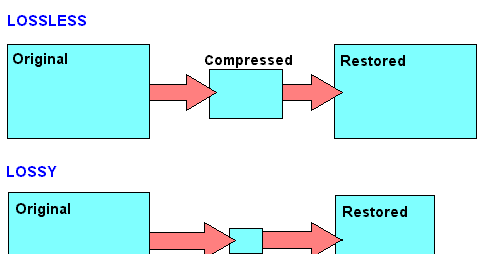
Audio files can be converted in a more or less space saving way using lossless or lossy codecs. While the data reduction is absolutely true to the original with lossless codecs, a difference can be heard from the original material, especially with heavy compression with lossy codecs.

Lossless compressed audio files lose approximately 25% to 50% of their original file size. Typical representatives are Monkey’s Audio, FLAC, or WavPack. Modern lossy codecs like AAC, Ogg Vorbis, or MP3, on the other hand, reduce source material by 90% without sounding noticeably worse.

Lossless audio compression

Unlike documents or images, for example, audio files are very difficult to compress, since identical repetitions are very rare in music. But it is precisely on such occurrences that the Huffmann or Lempel-Ziv algorithms depend, which are used in ZIP or RAR, for example. Therefore, most non-clustered compressors employ predictive coding. The signal is divided into a music component and a noise component. Depending on how well this prediction has been made, the noise component should ideally be Gaussian white noise that can be easily compressed using conventional methods.
In the ideal case, the result is 50% compression, which is highly dependent on the piece of music.

Monkey’s Audio, FLAC and WavPack are popular formats for lossless compression of WAV (PCM) files, for example digitized original recordings from the recording studio (for archiving or later processing) or archiving copies of music CDs. The sound quality is always the same as the original and the checksums reveal corrupted files. Increasing hard drive capacity at affordable prices makes “Lossless Codecs” interesting for everyday use.

Uncompressed: WAV (PCM)

WAV is the largest common denominator of Windows audio formats. The Macintosh equivalent is called AIFF. WAV is actually the collective term for various subformats, of which PCM is the most common and is generally equated with WAV.

WAV (PCM) is an uncompressed recording of sound samples: the time signal of a noise is sampled, quantized, digitized, and saved at discrete points in time. The more often and finer you record these values, the better the sound. With CD quality music, this instantaneous value is recorded 44,100 times per second and recorded with 16-bit “precision”, that is, 2 ^ 16 = 65536 possible values.

With the help of special programs (eg CDex, EAC, Audiograbber), Audio CDs can be transferred to the hard disk as WAV (PCM) files. Viewed in this way, WAV (PCM) files are copies of the original, provided the CD-ROM drive is not read incorrectly or the CD is damaged. One minute at CD quality requires roughly 10MB of storage space, which is not as happy to give away even in the age of ever-larger hard drives.

On the PC, WAV (PCM) and CD-quality (44.1 kHz, 16-bit, stereo) audio files are often the starting material for creating space-saving audio files in formats such as MP3. However, for sound processing on the home PC, WAV (PCM) is the first choice.

Monkey’s Audio

Monkey’s Audio is a lossless audio codec for PCM wave files. Monkey’s Audio comes with a convenient program interface (in English), over which files can be compressed, decompressed, verified or tagged. PCM wave files (any sample rate, 8/16/24 bit, mono or stereo) or corresponding Shorten or WavPack files are accepted as source files. Monkey’s Audio does not support multiple channels.

The APE tags that are used to store the title information can be supplemented with their own fields and are therefore very flexible. They are now used in conjunction with other audio formats as well.

The included command line encoder allows integration into other programs. Various audio players support the format through plugins. A plug-in for Winamp can be installed at the same time as installation. Monkey’s Audio is a Windows program by default. However, there is a platform independent version of Java.

FLAC

FLAC stands for “Free Lossless Audio Codec”. There are several lossless audio codecs available. FLAC is suitable here for several reasons: FLAC follows the open source philosophy (free open source code, available for many operating systems), works very fast, has a good and secure framework structure.


Free Download Mp4Gain
picture


Mp4Gain Main Window
picture


Mp4Gain Features
picture


Free Download Mp4Gain
picture

Lossless audio formatsĀ 

WAV (.wav) The WAV format is nothing more than a digital recording of real sounds, sounds that come from a source outside the PC. With WAV music, drums, piano, guitar, bass or vocals are heard the same, no matter what computer the file is played on (with the same acoustic quality of hardware components, of course).

wav

DSD (DFF, .Dsf) are used in digital media such as Super Audio CDs. Sampling quality is very high (variable sampling rate is approximately 64 times higher than for audio CDs), although according to several operators in this sector, it must be absolutely determined whether the final quality is higher than the sampling quality. PCM (used in high quality Blu-Ray and DVD Audio). I can reproduce free readers like Foobar 2000 or AIMP on our computer.

AIFF (.aif). It’s the Apple audio format used by Apple for Mac. It’s basically the WAV equivalent used by Windows.

APE (Mono Audio; .ape): Ordinary with a loss that allows us to reduce by about 50% the space occupied by our music (in some cases even more), without losing quality. In this way, an album that takes up about 600 MB in wav format averages 300 MB (much more than about 100 MB of high-speed mpc and 60 mp3 mp3, but the quality is the same as the original); On average, I speak because there are certain types of music where the level of compression is even higher. You can use WinAmp plug-ins to listen to songs in this format, or better yet, a player that uses it natively as Foobar 2000. Right now, it’s probably the best lossless codec, considering the balance between speed and compression (Click here for a lossless comparison table) format.)

Apple Lossless Audio Codec – ALAC (.m4a) This is a lossless audio codec created by Apple a few years ago and available as an open source from Apple since October 2011. Some programs support it in Windows (encoded). , including DbPowerAmp.

FLAC (.flac): a very popular open source format. It used to be very popular (among music purists), but some space has been lost with the MonkeyAudio bee format, which allows for better compression in the same quality. Compared to others, it always came in .ape format (but also after WavPack).


LA (Lossless Audio: .la): The lossless format that compresses the most. Conversion to this format is very slow, but achieves the best compression in history (for example, MonkeyAudio, this album would take up about 290 MB compared to 300 MB in APE). This is not widespread, as some MB obtained on a bee is not worth the long wait (and less support from third-party programs), but it is the winner of my lossless format comparison.flac

OPTIM FROG (.ofr) – Excellent lossless codec, best after LA as compressibility. Compression, when set to slightly high levels, is about 3 times slower than Monkey Audio and the gain in MB is about 2%. Like all other formats on this site, you can listen without the addition of Foobar 2000.

WAVPACK (.wv, wvc) – is a valid open source compression format that allows lossless, lossy and hybrid results. The compression rate is high and the compression is good. Another interesting hybrid format is that the lossy file is merged with another file, which allows you to completely restore the original file without loss in case we want to restore it.

What are the most popular audio formats?

What are the most popular audio formats?

There are dozens of audio files that we can use to convert a song, but the really useful ones can be counted on the fingers of one hand.

losseless

When we think of an audio file, most of us immediately think of MP3. Without a doubt, it’s one of the most popular audio formats, but it’s not the only one. Let’s see what are the most popular audio formats and what are the differences in use. And we have to choose that according to our needs.

There are different categories of audio files. First we defined the formats as uncompressed. The word itself defines this section of the file. In this case, the recorded sound waves are actually converted into a digital format without further processing. What does it all mean? In files that are very difficult to save and take up a lot of space. In order to simplify the storage of audio files and to reduce the load, formats with lossy data compression were created. These sacrifice some quality in favor of the small storage space required.

losseless

To fix this error, which represents the loss of quality in favor of file size, compressed audio formats were created without loss of data. Obviously, they’re not small files like lossy compression, but they’re still smaller than uncompressed. However, it must be said that these types of formats are only widespread in certain cases.

PCM

PCM is the most common and widely used audio format on CDs and DVDs that we have at home. It is the faithful conversion of analog audio into a digital file. It is no coincidence that it is an uncompressed audio format. Remember that analog sounds exist as waveforms. In order to convert a sound wave into digital bits, the sound must be sampled and recorded at certain intervals.

WAV

WAV stands for Waveform Audio File Format (previously it was also called Audio for Windows, now it is no longer). It is a standard developed by Microsoft and IBM in 1991. WAV files can contain compressed and uncompressed audio formats. In most cases, however, they are used for uncompressed people. Although it was developed for Windows, it can also be safely opened on a Mac.

MP3

This is without a doubt the most popular audio format. It was released in 1993 and over the years its success has increased thanks to the combination with the pieces of music. Why are they used so often? Quite simply, these are lossy compressed files, and the generated files are so small that users can create a music library without taking up too much space. And the quality? It is much lower than other formats, but the human ear doesn’t always manage to notice the difference significantly. MP3 is also a universal file. It can be found on smartphones, computers, smart TVs, tablets and many other electronic devices.

WMA

WMA stands for Windows Media Audio. It was first published in 1999 and has gone through several developments since then, always keeping the same name. As you can easily guess, it is an audio format created by Microsoft. It was developed to replace MP3s. Unfortunately, there are very few platforms that support this, so the MP3 mastery has never been compromised.

OGG

OGG is not a real compression audio format. We can define it as a multi-purpose multimedia container. It can contain all types of audio formats, but is often used to contain Vorbis files. It is one of the best performing files to reduce size without losing quality.

FLAC

FLAC stands for Free Codec Lossless Audio. It is a lossless, compressed format that was created in 2001. A FLAC file can be compressed to 60% of its original size without minimal loss of sound quality. It is also an open source format. Because of this, it is compatible with most programs and devices. It is the best quality alternative to MP3.

What are digital audio formats

What are digital audio formats

Digital audio formats are basically containers. And the differences between them are fundamentally in:

Whether or not they are compressed.

If they are compressed, in the quality of compression.

The type of labeling they can support.
Digital audio formats

MP3

It is the best known, popular and most widely used. They are known by their “.mp3” extension.

It was developed by Moving Picture Experts Group, so that it was part of the well-known MPEG-1 and MPEG-2 standards.

Its fundamental characteristic resides in the fact that the technology behind it performs a compression of the sound sequence, resulting in a really small file, which normally occupies half of the original file. To achieve this, the loss of certain sounds is necessary, which supposedly cannot be heard by the human ear.

Audio formats

WAV

Developed by the Microsoft and IBM companies, this format, whose name comes from the acronym WAVE (Waveform Aujdio File Format), is currently one of the audio formats that do not have compression in the data, therefore they present an excellent quality.

They are known by their “.wav” extension.

On the other hand, this format has the peculiarity that it includes support for almost all current audio codecs. This makes WAV one of the most widely used formats in the field of professional sound, since the sound is captured with parameters of 44100 Hz and at 16 bits, the same quality can be obtained as on a CD.

On the contrary, one of the disadvantages of this format is that it has a limitation in recording, since it can only capture a maximum of 6.6 hours in the same file at maximum quality.

Audio formats

AIFF

The AIFF (Audio Interchange File Format) format is very similar to WAV. It was born as an answer from Apple to Microsoft’s WAV, being initially only compatible with MAC computers. Currently it can also be used in Windows.

Due to its characteristics, AIFF, together with FLAC and WAV, are usually the most widely used formats in the professional field of audio.

WMA

The WMA (Windows Media Audio) format is a music file format created by Microsoft.

One of its main characteristics is that those files that have been compressed in WMA format take up less space than MP3 files, which also implies a reduction in their quality. Therefore, it is a lossy audio compression format.

OGG

OGG audio formats are compressed audio files, which means that they have a size that allows them to be transmitted via WIFI, but at the same time they avoid the damages that are usually generated in the compression process.

For example, Spotify uses these OGG formats.

Audio formats

FLAC

When we talk about the FLAC (Free Lossless Audio Codec) format, we are referring to a codec free of audio compression and without loss of quality.

Emerged within the community responsible for the OGG project, FLAC has become one of the WAV format’s strongest competitors, due to its advantages in terms of sound quality.

Its objective is to reduce the size of the original file, eliminating data that is usually known as “waste”, without causing loss of quality.

This is the format used by the Tidal platform, the best high quality audio streaming service.

What is the difference between the different audio formats, and which should I choose?

What is the difference between the different audio formats, and which should I choose?

Lossless formats: WAV, AIFF, FLAC, Apple Lossless and others

In summary, there are two types of sound quality: lossless and lossy. Lossless music preserves the sound quality of the original source – in most cases, CD – intact, on the other hand, lossy music compresses the file to save space (in exchange for decreasing quality). Lossless formats include the following formats:

WAV and AIFF: Both are uncompressed formats, making them exact copies of the original sound source. The two formats are essentially the same quality; they simply store the data differently. AIFF was created by Apple – you will see it often in its products – but WAV is much more universal. However, since they are not compressed, they take up too much unnecessary space. Unless you are editing sound, we do not need to use this format.

FLAC: Free Lossless Audio Codec (FLAC). It is the most used lossless codec, it is a good option if we want to store our music without losing quality. Unlike WAV and AIFF, it uses compression, taking up less space. However, it is still a lossless format, which means that the sound quality is the same as the original source, so it is better for listening than WAV and AIFF. It is also free and free software, which is useful if you like to take a look at how it works.

-Lossless Apple (Apple Lossless): Also known as ALAC, it is similar to FLAC. It uses compression, although it is made by Apple. Its compression is not as efficient as that of FLAC, so the files will be slightly larger, but it is compatible with iTunes and iOS (FLAC not). Therefore, if you use iTunes or iOS as the main software for listening to music, you should choose this format.

APE: It is a very high lossless compression file, which means you will save more space. The quality is the same as FLAC, ALAC and other lossless files, but it is not compatible with most players. On the other hand, it makes the processor work more to decode because it is so compressed. Generally, I would not recommend using this format unless you are very concerned about space and have a compatible player.

Lossy formats: MP3, AAC, OGG and more

For day to day, we are more likely to use lossy formats. They save significantly more space, and if they have a high enough bitrate, it will be very difficult to distinguish the quality of the original source. The most commonly used formats are shown below:

MP3: MPEG Audio Layer III, or MP3 for short, is the most common lossy format. So much so that it has become synonymous with music downloads on the internet. It is not the most efficient f-format of all, but it is certainly the most compatible, making this the first choice of lossy sounds.

AAC: Advanced Audio Coding, also known as AAC, is similar to MP3, although slightly more efficient. Which means that the files take up less space and with the same sound quality as MP3. And, with Apple’s iTunes making it so popular, it’s as compatible as MP3.

Ogg Vorbis: The Vorbis format, often known as Ogg Vorbis due to the use of the Ogg container, is the free software version to MP3 and

AAC. Its main attraction is that it is not restricted by patents, but that does not affect you as a user – in fact, despite being open it is of similar quality, and much less popular than MP3 and AAC, so not all players support it. . I do not recommend it unless you are interested in being open source.

WMA: Windows Media Audio. Microsoft’s proprietary format, similar to MP3 or AAC. It really doesn’t offer any advantage over other formats, and it’s not very well supported.

So which one should you use?

Now that we have seen the differences between each format, which one should we use for our music? In general, we recommend using MP3 or AAC. They are compatible with most players, and the quality of both is very similar to that of the original source if encoded with a high bitrate. Unless you have specific needs, MP3 and AAc are the most recommended options.

However, there is something to be said for storing music in lossless formats like FLAC. Although we probably won’t notice higher quality, it is good for storing music if you plan to convert it to other formats later – as converting from one lossy format to another. Lossy (eg from AAC to MP3) will produce lower quality files.