Lossless Audio Archiving


Free Download Mp4Gain
picture

Lossless Audio Archiving: Preserving Sound Fidelity for the Ages

Lossless Audio
Lossless Audio
Lossless Audio
Lossless Audio

The Importance of Lossless Audio Archiving

As a passionate audiophile and expert in preserving audio fidelity, I firmly believe in the significance of lossless audio archiving. It is a meticulous process that ensures the long-term preservation of audio recordings without compromising their original quality. In this article, I will delve into the essence of lossless audio archiving and highlight its importance in safeguarding the integrity and richness of sound for future generations.

Understanding Lossless Audio Compression

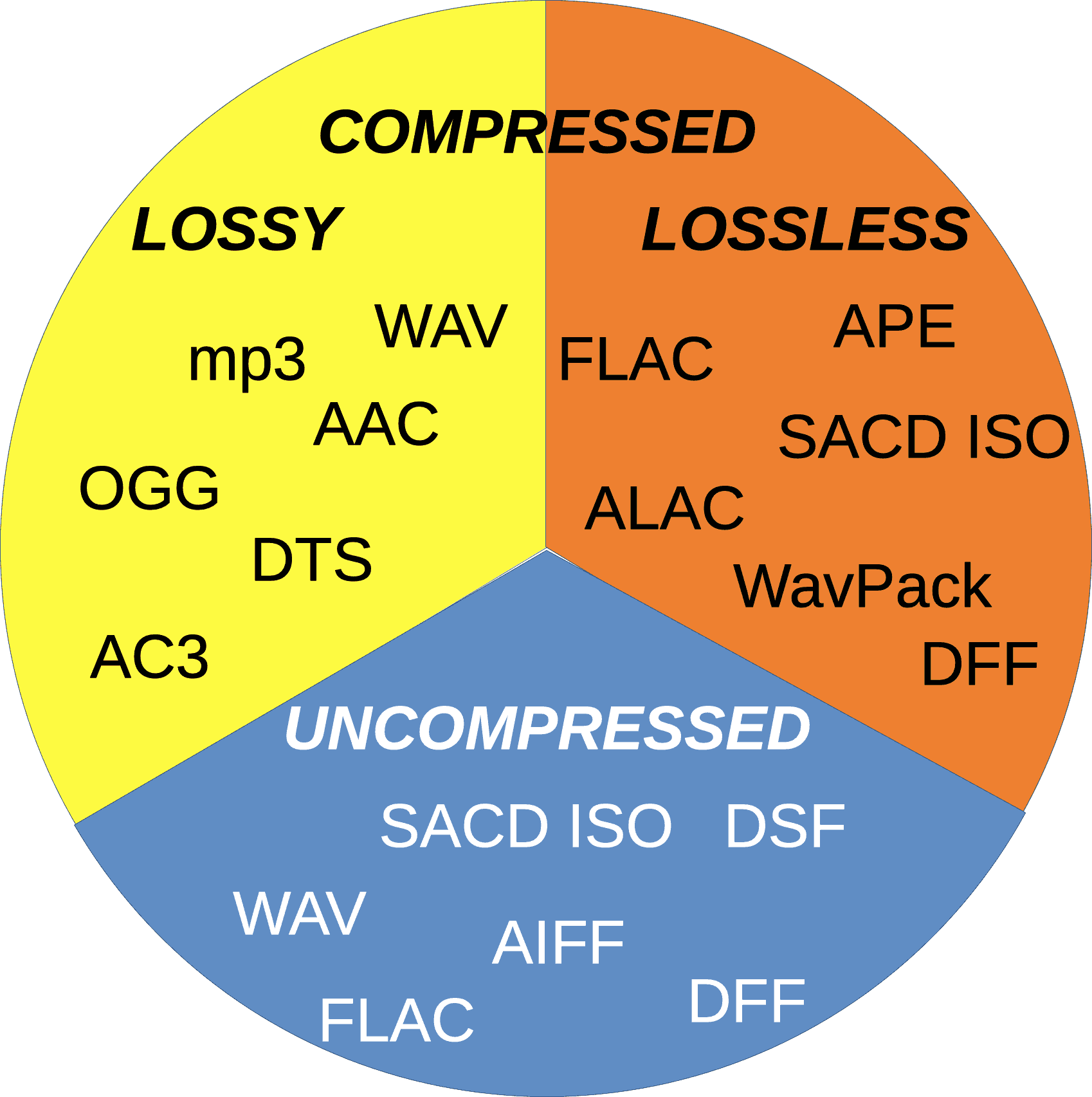
Lossless audio compression is a technique that reduces the file size of audio recordings without sacrificing any audio data. Unlike lossy compression, which discards certain audio information, lossless compression algorithms retain all the original data, allowing for perfect reconstruction of the audio signal. This preservation of every nuance and detail is crucial for archiving purposes, as it guarantees an exact replica of the original recording.

The Process of Lossless Audio Archiving

When embarking on the journey of lossless audio archiving, several key steps must be followed to ensure the highest quality preservation:

Selection of Suitable File Formats

Choosing the right file format is paramount in lossless audio archiving. Formats such as FLAC (Free Lossless Audio Codec) and ALAC (Apple Lossless Audio Codec) are widely recognized as ideal choices for maintaining audio fidelity. These formats employ sophisticated algorithms that compress audio data while preserving every bit of information, resulting in files that are significantly smaller in size without any loss of quality.

Digitization of Analog Audio Sources

For analog audio sources, such as vinyl records or cassette tapes, a meticulous digitization process is necessary to convert them into digital formats. High-quality analog-to-digital converters (ADCs) are utilized to capture the analog audio signal with utmost precision and accuracy, ensuring a faithful representation of the original recording.

Metadata Organization and Tagging

Proper metadata organization and tagging play a crucial role in lossless audio archiving. Metadata includes information such as artist names, album titles, track numbers, and other relevant details. Organizing this information accurately not only helps in cataloging the audio collection but also facilitates easy retrieval and navigation.

Redundant Storage and Backup

Preserving audio fidelity necessitates redundancy in storage and backup. Multiple copies of the archived files should be maintained across different storage mediums, including external hard drives, network-attached storage (NAS) systems, and cloud storage services. Regular backups are essential to guard against any potential data loss or hardware failure.

Long-Term Preservation Strategies

Lossless audio archiving is not a one-time endeavor but an ongoing commitment. Implementing long-term preservation strategies ensures that the archived audio remains accessible and usable for years to come. Regular data integrity checks, format migration when necessary, and periodic re-evaluation of storage solutions are vital components of a comprehensive preservation strategy.

Preserving the Future of Audio Fidelity

In conclusion, lossless audio archiving is an essential practice for audiophiles, professionals, and institutions seeking to preserve the highest quality sound recordings. By understanding the significance of lossless compression, following a meticulous archiving process, and implementing long-term preservation strategies, we can safeguard the integrity and richness of audio for future generations to enjoy. Let us continue to cherish and protect the legacy of exceptional sound quality.


Free Download Mp4Gain
picture


Mp4Gain Main Window
picture


Mp4Gain Features
picture


Free Download Mp4Gain
picture

The Benefits of Lossless Audio Formats

The Benefits of Lossless Audio Formats

Lossless Audio Formats

Lossless Audio Formats Explained

As an audiophile, I always strive to achieve the highest possible quality of sound. Lossless audio formats such as FLAC, ALAC, and WAV are my go-to choices when it comes to digital music. These formats use audio compression algorithms that preserve all the original audio data while reducing the file size. This means that the music you listen to sounds exactly as the artist intended it, without any loss of quality.
When I first discovered lossless audio formats, I was blown away by the difference in sound quality compared to lossy formats like MP3. The music was clearer, more detailed, and had a wider dynamic range. The benefits of lossless audio formats are not just limited to the listening experience, they also have practical benefits. Lossless files take up less storage space on your device than uncompressed audio files like WAV, and can be easily streamed over the internet without compromising quality.

As the famous musician David Byrne once said, “Lossless audio formats offer an uncompromising listening experience that allows you to hear every nuance of a recording. It’s like hearing the music for the first time.”

The Advantages of FLAC and ALAC

FLAC and ALAC are two of the most popular lossless audio formats. They are both open-source and free to use, which means they have a wide range of support across different devices and software. FLAC has become the de facto standard for lossless audio on the internet, while ALAC is the preferred format for Apple devices.
One of the biggest advantages of FLAC and ALAC is their ability to handle high-resolution audio. These formats can handle audio at up to 24-bit/192kHz, which is significantly higher than the 16-bit/44.1kHz standard of CD-quality audio. This means that you can listen to your favorite music with even greater detail and clarity.

In addition, FLAC and ALAC both have robust error correction capabilities. This means that if a file is corrupted during download or transfer, the audio data can still be recovered without any loss of quality. This is a major advantage over lossy formats like MP3, which cannot recover from data errors.

The Benefits of WAV

WAV is a lossless audio format that has been around since the early days of digital audio. It is the standard format for audio CDs, and is widely used in professional audio production. One of the main benefits of WAV is its compatibility with a wide range of hardware and software.
WAV files are uncompressed, which means that they retain all the original audio data. This makes them ideal for situations where maximum audio quality is required, such as mastering and archiving. In addition, WAV files can be edited without any loss of quality, making them the preferred format for audio engineers and producers.

As the great music producer Rick Rubin once said, “WAV files are the gold standard for audio quality. They offer the most accurate representation of the original recording, and are essential for anyone serious about music production.”

Final Words

In conclusion, lossless audio formats offer a superior listening experience compared to lossy formats like MP3. Whether you choose FLAC, ALAC, or WAV, you can be sure that you are getting the best possible sound quality. As an audiophile, I highly recommend using lossless audio formats for your music collection. And if you’re looking for a reliable and efficient way to normalize and convert your audio files, MP4Gain is the perfect solution.

Understanding the Differences between FLAC, MP3, M4A, OGG, and WAV Audio Formats

Understanding the Differences between FLAC, MP3, M4A, OGG, and WAV Audio Formats

Understanding the Differences between FLAC, MP3, M4A, OGG, and WAV Audio Formats


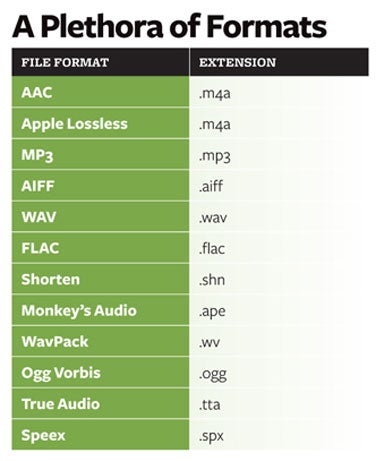
When it comes to digital audio, there are a plethora of different file formats to choose from. Each format has its own set of advantages and disadvantages, making it important to understand the differences between them in order to choose the best option for your needs. In this article, we will take a closer look at five popular audio formats: FLAC, MP3, M4A, OGG, and WAV.

Understanding the Differences between FLAC, MP3, M4A, OGG, and WAV Audio Formats

FLAC

FLAC, or Free Lossless Audio Codec, is a popular open-source format that is known for its lossless compression. This means that, unlike some other formats, FLAC does not lose any audio quality during the compression process. This makes FLAC a great option for audiophiles who want the highest quality audio possible. However, FLAC files are typically larger than other formats, which can be an issue for those with limited storage space.

MP3

MP3, or MPEG Audio Layer III, is one of the most widely used audio formats. It uses a lossy compression method, which means that some audio quality is lost during the compression process. However, MP3 files are significantly smaller than FLAC files, making them a great option for those who want to store a large amount of music on their device. Additionally, the MP3 format is supported by a wide range of devices and software, making it a very convenient option.

M4A

M4A, or MPEG-4 Audio, is a file format that is commonly used for music and other audio files. It is similar to MP3 in that it uses a lossy compression method, but M4A files are typically smaller than MP3 files. Additionally, M4A files can contain advanced features such as chapters and artwork, making them a great option for audiobooks and other spoken-word content. However, it is important to note that not all devices and software support M4A files.

OGG

OGG, or Ogg Vorbis, is a free and open-source format that is similar to MP3 and M4A. It uses a lossy compression method and is known for providing a good balance of audio quality and file size. OGG files are typically smaller than FLAC files but larger than MP3 and M4A files. Additionally, OGG files can contain advanced features such as tags and chapters, making them a great option for audiobooks and other spoken-word content. However, it is important to note that not all devices and software support OGG files.

WAV

WAV, or Waveform Audio File Format, is a popular format that is known for its high audio quality. It is a lossless format, which means that no audio quality is lost during the compression process. However, WAV files are typically larger than other formats, making them an option for those who want the highest quality audio possible but have limited storage space. Additionally, WAV files are supported by a wide range of devices and software, making them a convenient option.

Why are there so many video and audio formats, and is there a difference?

Why are there so many video and audio formats, and is there a difference?

audio formats

7. VQF format

audio formats

The compression ratio of VQF format can reach 1:18, so under the same circumstances, the volume of compressed VQF file is 30-50% smaller than MP3, which is more convenient for Online streaming and sound quality is excellent with close to CD sound quality (16-bit 44.1kHz stereo). However, VQF has not disclosed technical standards and has not yet become popular.
Supplement: rare

8. Format
FLAC FLAC is lossless audio compression encoding. FLAC is a set of well-known free audio compression codes, which is characterized by lossless compression. Unlike other lossy compression codes, such as MP3 and AAC, it won’t destroy any original audio information, so you can restore the sound quality of music CDs. It is now compatible with many software and hardware audio products. In short, FLAC is similar to MP3, but it is lossless compression, which means that the audio will not lose any information when compressed in FLAC mode. This compression is similar to Zip, but FLAC will give you a higher compression ratio, because FLAC is a compression method specially designed for audio characteristics, and you can use the player to play FLAC compressed files, just like you normally do with your MP3. the files are the same.
Supplement: Lossless format, compared to ape , is larger in size, but has good compatibility, fast encoding speed, and broader player support

9. Format
APE APE is one of the most popular digital music file formats. Unlike lossy compression methods such as MP3, APE is a lossless audio compression technology, which means that after compressing audio data files read from an APE-format audio CD, it can also compress audio data files. APE Restore format files and the restored audio. the files are exactly the same as before the compression without any loss. The file size of APE is about half of that of a CD, but with the popularization of broadband, many music lovers love the APE format, especially for friends who want to stream audio CDs over the network. APE can help them save a lot of resources.
Supplement – lossless compression format, compared to FLAC, the volume is smaller. Encoding is slow.

10. Format
MID MID is the abbreviation of midi, which is its extension, “interface of digital musical instruments”, that is, its real meaning is the name of an interface for different devices to transmit signals. All of our current MIDI music production depends on this interface, and the information transmitted between this interface is also called MIDI information. MIDI was first applied to electronic synthesizers (electronic musical instruments played on keyboards. Due to the inconsistent technical specifications of early electronic synthesizers, it was difficult to link different synthesizers. In August 1983, YAMAHA, ROLAND, KAWAI, and others Well-known electronic musical instruments Instrument manufacturers jointly specified a unified digital musical instrument interface specification, which is the MIDI 1.0 Technical Specification.Since then, a number of electronic synthesizers and electronic musical instruments, such as electronic pianos, have adopted this unified specification. , so that various electronic musical instruments can be linked together to transmit MIDI information and form a true synthetic music performance system.

Why are there so many video and audio formats, and is there a difference?

Why are there so many video and audio formats, and is there a difference?

audio formats
audio formats

3.WAV format

audio formats
audio formats

The WAV format is the oldest digital audio format and is widely supported by the Windows platform and its applications. WAV supports many compression algorithms, supports a variety of audio bits, sampling rates and channels, adopts 44.1 kHz sampling rate and 16 quantization bits, so the sound quality of WAV is almost the same than CD, but WAV format requires too much storage space Not easy to communicate and broadcast.
Supplement: Lossless volume is large

4. Format
ASF ASF is a multimedia playback format formulated by Microsoft, suitable for playback on the Internet.
Supplement: rare format

5. Format
AAC AAC is actually short for Advanced Audio Coding. AAC is part of the MPEG-2 specification. The algorithm used by AAC is different from that of MP3. AAC improves encoding efficiency by combining other features. AAC’s audio algorithm far exceeds some older compression algorithms (like MP3, etc.) in terms of compressibility. It also supports up to 48 audio tracks, 15 low-frequency audio tracks, higher sample rates and bit rates, multi-language support, and higher decoding efficiency. In short, AAC can provide better sound quality on the assumption that MP3 files are 30% smaller.
Added: One of the best lossy formats out there. There are many encodings, faac and nero are common, and the bit rate is up to 448kbps. In terms of hardware support, advanced mp3 and mobile phones are generally supported.

6. Format
Mp3Pro Mp3Pro is an improved version of the Mp3 encoding format. MP3Pro is developed by the Swedish Coding Technology Company, which can also compress the volume of sound files to half the size of the original MP3 format while maintaining the same sound quality. Also, the sound quality of the original MP3 music can be improved basically without changing the file size. You can compress audio files to a lower bit rate and keep the sound quality before compression to the greatest extent possible. MP3pro can achieve full compatibility. The extension of the files compressed by mp3Pro remains .mp3. It can be played on old mp3 players. Old mp3 files can be played on the new mp3pro players.

Why are there so many video and audio formats, and is there a difference?

Why are there so many video and audio formats, and is there a difference?

Audio File Formats
Audio File Formats

I found that there are many video and audio formats, what is the difference between them? Is there a player that supports most audio and video playback formats?

Audio File Formats
Audio File Formats

The difference lies in the encoding method. Original video and audio require a lot of storage space. In the era when the storage device was still in MB as a large drive, various lossy compression encoding formats began to appear. The difference between various encoding formats is the compression ratio. The pros and cons of height and reduction ratio.

Basically, there are more advanced encodings that can provide high-quality audio and video effects with higher compression ratio.

1. Format
MP3 MP3 uses MPEG Audio Layer 3 technology to compress music into a file with a smaller capacity at a compression ratio of 1:10 or even 1:12. Files are compressed to a smaller size. But also very good at keeping the original sound quality. It is precisely because of the small size and high sound quality of MP3 that the MP3 format has become almost synonymous with online music. The music per minute MP3 format is only 1 MB in size, so the size of each song is only 3-4 megabytes.

Supplement: the highest bit rate is 320K, and there is no high frequency part is its default. The sound quality is not high!

2. Format
WMA WMA achieves a higher compression ratio by reducing data traffic while maintaining sound quality. The compression rate can generally reach 1:18, and the generated file size is only half of the corresponding MP3 file. This is very important for models that only assemble 32M. It supports both WMA and RA formats, which means that the 32M space is virtually expanded by 2 times. In addition, WMA can also add copy prevention through the DRM scheme, or add restrictions on playback time and number of playbacks, or even restrictions on playback machines, which can effectively prevent piracy.
Supplement: 128 kbps is the optimal compression ratio of wma, 128 kbps wma = 192 kbps mp3

lossless sound quality

lossless sound quality

lossless sound quality

The principle of these audio compression methods is to keep as much as possible the parts that are easy to hear for the human ear.

lossless sound quality


In the main constant bit rate (CBR) mode, audible data in the audio is removed and it is easier for the human ear to hear. The more information that is retained for the part, the less information that is retained for the less audible part. As sound complexity increases, the degree of sound quality degradation becomes more apparent. For example, when listening to pure human music voice performances and performances combined with background music, pure The degree of degradation of the compressed music of the human voice is less obvious than that of the original file.

As for the lossless sound quality provided by today’s streaming platform, there are many formats, but strictly speaking, these formats, including flac and ALAC, belong to lossless compression (non-destructive data compression) rather than quality. lossless sound in a narrow sense, but due to its performance it is almost the same as WAVE, but the file is small, the decoding speed is fast, and it can be used in streaming services, so it is also a representative format of lossless sound quality that has entered the era without CD support, and it is also the current music streaming service.

Also, MQA like Tidal is a more controversial format, because although MQA is lossless audio compression in a broad sense, it focuses on driving high-quality music files that are above CD quality at a size similar to those of CD quality flac files. , but it can also be restored to the original high-quality audio format, but the controversial point is whether the higher compression ratio can maintain the same real auditory sense as the original high-quality audio has always been controversial. At the same time, MQA requires a specific device to perform hardware decoding. Yes, many devices can only decode MQA through software.

â–²Currently called Hi-Res Audio generally refers to sound quality higher than that of a CD, but to be certified, the device must support the processing capability of the 24-bit 96kHz format.

However, since MP3 and AAC are previously planned destructive music compression formats, their purpose is to compress CD-level sound quality into smaller files, so most encoding specifications are presented in one presentation. CD-level 16-bit 44.1 kHz or 16-bit 48 kHz; but MQA is a format with a small file size that locks in high sound quality requirements. Basically, the MQA format will be music equivalent to 24-bit PCM or higher.

lossless sound quality

lossless sound quality

lossless sound quality

Although lossless sound quality and high-quality streaming services have appeared on the market for a while

lossless sound quality

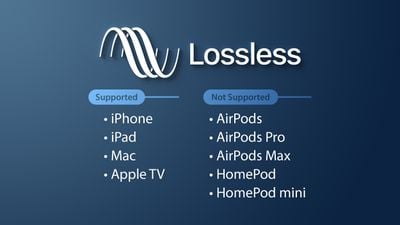
Like Apple isn’t the first to make true wireless earbuds, but it has ridden the wave of the market, with Apple’s launch of so-called hi-fi. compressed sound quality in Apple Music. In fact, after the lossless compression commonly known in the audio industry, lossless sound quality and high sound quality have instantly become a hot topic for many people to discuss, but whether the benefits of quality Lossless sound systems are really Obviously, the author will devote some space from theoretical concepts to practical levels. The difference is a simple overview, but the following arguments focus on easy understanding, so some of the descriptions are not entirely accurate.

What is lossless sound quality? What is the sound quality of the music we usually listen to?
The photo mentions * Introduction to KKBOX sound quality (including format), release year, sound quality, including numbers, KKBox, streaming media, Hi-Res Audio and Hi-Fi

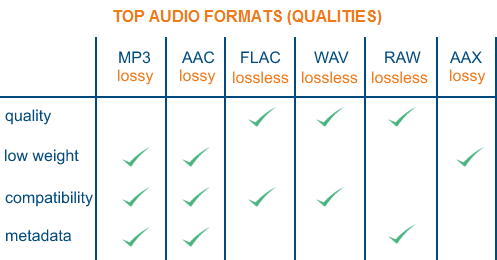
â–² Both AAC and MP3 are destructive compression, while FLAC and ALAC are lossless compression

Before we get into the details, let’s talk about what is called lossless sound quality; From the author’s concept and cognition, the so-called lossless sound quality is a relative word rather than an absolute word. The main source is the relative word born due to the appearance of the MP3 music compression format; after the music industry went digital, digital music files were generally recorded via PCM encoding, and WAVE files were generally used on CDs. The time and space situation that MP3 was born into was because hard drive capacity was generally small at the time. To store a large amount of music data in storage space, you probably need to compress the files.

The reason why MP3 cannot be called a lossless format is because it essentially compresses the original WAVE in a way that limits the bitrate by combining concepts like the psychology of sound. The bitrate compression mode, compared to the bitrate of the original WAVE file, compresses at least in a range of 1:4 to 12:1. The higher the bitrate, the greater the amount of retained information. For example, AAC format also adopts similar audio psychology for compression, but the efficiency is better than MP3. Therefore, most of the lossless sound quality of most streaming platforms currently uses AAC as the mainstream.

Comparison of lossless music formats

Comparison of lossless music formats

lossless music formats


which is better, Flac or Ape or Wav?

lossless music formats

lossless music formats

WAV is a sound file format developed by Microsoft. It complies with the RIFF (Resource Interchange File Format) file specification and is used to store audio information resources on the Windows platform. It is widely compatible with the Windows platform and its applications. also supports MSADPCM, CCITT A LAW and other compression algorithms, supports a variety of audio numbers, sample rates and channels. WAV file with standard format is the same as the CD format, with a sample rate of 44, 1K and 16-bit quantized numbers, so the quality of the sound file is almost the same as a CD.

FLAC is short for Free Lossless Audio Codec, which can be interpreted as lossless audio compression coding in Chinese. FLAC is a well-known free audio compression codec, which is characterized by lossless compression. Unlike other lossy compression codes such as MP3 and AAC, it does not destroy any original audio data, so it can restore the sound quality of music discs. It is now compatible with many software and hardware audio products.

APE is one of the popular digital music file formats. Different from lossy compression methods like MP3, APE is a lossless audio compression technology, that is, after the audio data file read from the audio CD is compressed into APE format, the format file APE is restored and audio data restored The file is restored The audio file is exactly the same as before compression, without any loss. The file size of APE is about half that of CD, and APE can save a lot of resources.

ALAC is short for Apple Lossless Audio Codec. It is a lossless audio format developed by Apple. Apple has released the “Apple Lossless Audio Codec (ALAC)” under the Apache License v2.0. For more information, see the ALAC format entry.

TrueAudio is a free and simple real-time lossless audio codec. TTA is a lossless audio compression based on adaptive predictive filtering that can have the same or better level of compression than other major formats, while maintaining higher bit rates.

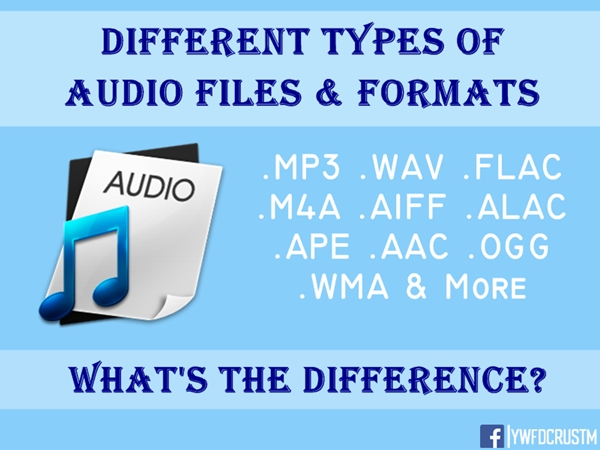
How are audio file formats different and what does this mean for listeners?

How are audio file formats different and what does this mean for listeners?

Music File Formats

Explanation of MP3, AAC, WMA, FLAC, ALAC, WAV, AIFF and PCM

audio file formats

Most devices are capable of playing a wide variety of digital media formats out of the box, often without the need for software or firmware updates. If you flip through the product guide, you might be surprised how many different types there are.

What makes them different from each other? Should it be important to you?

Music file formats
When it comes to digital music, does the format really matter? Answer: it depends.

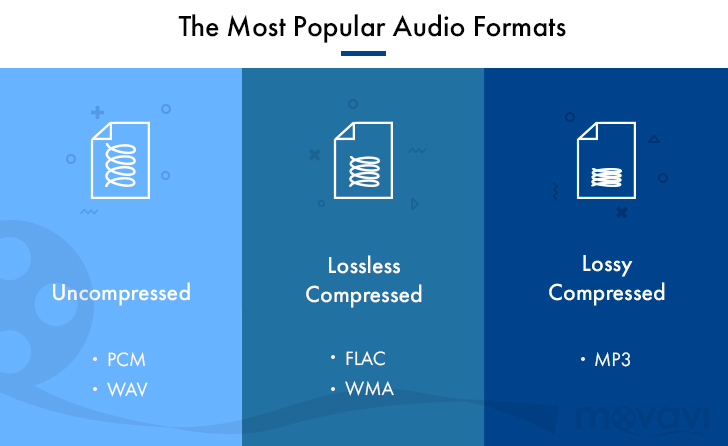
There are compressed and uncompressed audio files that may or may not have quality loss. Lossless files can be huge in size, but if you have enough storage space (such as a PC or laptop, network drive, media server, etc.) and have high-quality audio hardware, there are advantages to using without compress or lossless sound,

But if there isn’t enough space, like on smartphones, tablets, and portable players, or if you plan to use basic headphones or speakers, then all you need are smaller compressed files.

Not due to illness: here is Norkina’s real cause of death
The coronavirus will soon disappear: dates announced
So how do you choose? Here is a breakdown of common format types, some of their important features, and the reasons why you should use them.

-MP3: Developed by the Moving Picture Experts Group (MPEG), an organization that develops standards for encoded video and audio programs, MPEG-1 / MPEG-2 Layer 3 (MP3) is perhaps the most common type of audio file and compatible.
MP3 is a lossy and compressed audio format with a bit rate ranging from 8 kbps to a maximum of 320 kbps and a sampling frequency of 16 kHz to a maximum of 48 kHz. Smaller MP3 file sizes mean faster file transfers and less space used, but at the cost of slightly lower audio quality than lossless file formats.
-AAC: Popular on Apple iTunes, Advanced Audio Coding (AAC) is similar to MP3, but has an added benefit:
-AAC is a lossy compressed audio and audio format, with bit rates ranging from 8 kbps to a maximum of 320 kbps, and sampling rates from 8 kHz to a maximum, with the correct encoding process, 96 kHz.
AAC files can offer the same audio quality as MP3 and take up less space. ACC also supports up to 48 channels, while most MP3 files can only handle two. AAC is widely compatible with, among others, iOS, Android, and portable gaming devices.
-WMA. Developed by Microsoft as a competitor to MP3, Windows Media Audio files offer similar but proprietary capabilities. Standard WMA is a lossy and compressed audio format, although newer standalone versions with more advanced codecs may offer a lossless option.
While many types of portable and home entertainment media players support WMA files by default, only some mobile devices, such as smartphones and tablets, support it. Many require downloading a compatible application to play WMA audio, which can make it less convenient than MP3 or AAC.
-FLAC. Developed by the Xiph.Org Foundation, the free lossless audio codec (FLAC) is very attractive due to its free license and open format.
-FLAC is a lossless, compressed audio format with file quality up to 32-bit / 96 kHz (for comparison, CD is 16-bit / 44.1 kHz). FLAC has the advantage of a reduced file size (approximately 30-40 percent smaller than the original data) without the need to sacrifice sound quality, making it ideal for digital archiving (that is, using it as master copy to create compressed / lost files for general listening).
-ALAC: Apple’s version of FLAC, Apple Lossless Audio Codec (ALAC), shares FLAC in terms of sound quality and file size.
-ALAC is a lossless compressed audio format. It is also fully compatible with iOS and iTunes devices, although FLAC may not be supported. As such, ALAC is the most used by those who use Apple products.
-WAV: Waveform audio file format, also developed by Microsoft, is a standard for Windows-based systems and is compatible with various software applications.