MP4 louder


Free Download Mp4Gain
picture

MP4 louder

mp4 louder
mp4 louder
mp4 louder
mp4 louder

How can I increase the volume of my MP4 file?

Raising the volume of an MP4 file can be essential for various reasons, such as when you’re playing it in a noisy environment or when the original recording was too soft. The sound embedded in an MP4 file is often in digital format. This means that the audio is represented by a series of numbers, and increasing the volume involves manipulating these numbers.

However, it’s essential to be cautious. Amplifying an audio signal can introduce distortion, especially if increased beyond the file’s original capacity. To avoid damaging the audio quality, it’s always advised to raise the volume gradually and test the output.

The concept is similar to adjusting the volume on a traditional radio, where turning the dial too high can lead to a crackling sound. The difference here is that once an MP4 file’s audio is distorted, the damage is permanent unless you have a backup of the original.


Try Mp4gain to adjust the volume of most audio and video formats.

“Our lives are defined by opportunities, even the ones we miss.” – The Curious Case of Benjamin Button

What methods are there to make an MP4 sound louder?

While there are many tools and software to amplify MP4 files, understanding the underlying methods can be insightful. One popular method is waveform amplification, where the audio’s waveform is visually represented and manually adjusted. This allows for precise control over which parts of the audio get amplified.

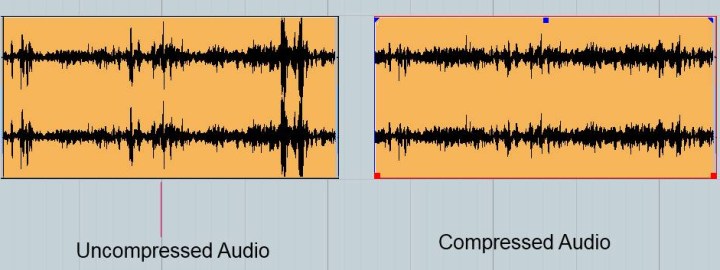
Another method involves compressing the audio dynamic range. This doesn’t mean file compression, but rather, it involves narrowing the gap between the loudest and softest parts of the audio. By doing this, the overall volume can be increased without peaking or distorting the loudest parts.

Finally, audio normalization is a process where the loudest peak of the audio is identified, and the whole track is amplified based on that peak. This ensures the loudest parts don’t clip or distort while maximizing volume.

“The things you own end up owning you.” – Fight Club

Are there manual ways to enhance the audio of an MP4?

Yes, aside from software solutions, there are manual methods to enhance MP4 audio. One can use hardware devices, such as amplifiers, to boost the sound. While these methods are external and don’t alter the MP4 file directly, they can be effective for playback on specific devices.

Another way is to use speaker enhancements. Some speakers come with built-in settings that allow users to adjust the treble, bass, and mid-tones. Manipulating these settings can sometimes produce a louder, clearer audio output when playing the MP4 file.

Lastly, for those who are tech-savvy, it’s possible to extract the audio from the MP4, process it separately using specialized equipment, and then merge it back. This method is intricate and might require some expertise but can yield high-quality results.

“The future belongs to those who believe in the beauty of their dreams.” – Eleanor Roosevelt

Can the loudness of an MP4 file be adjusted without affecting its quality?

Yes, Mp4Gain can do the job for you.

Final words

Increasing the loudness of an MP4 file is not just about amplifying the sound. It’s about understanding the technical aspects, ensuring the audio quality remains intact, and using the right methods for the right situations. Always remember to keep backups of your original files before making any modifications, as it’s easy to introduce unintended distortions.


Free Download Mp4Gain
picture


Mp4Gain Main Window
picture


Mp4Gain Features
picture


Free Download Mp4Gain
picture

MP3 vs Lossless

MP3 vs Lossless

MP3 vs Lossless
MP3 vs Lossless
MP3 vs Lossless
MP3 vs Lossless

Meta Description: Discover the difference between MP3 and lossless audio formats and understand which one suits your listening preferences.

Introduction

Music is an essential part of our lives. It can evoke emotions, motivate us, and even help us relax. The format we listen to music in can have a significant impact on our listening experience. Two of the most popular audio formats are MP3 and lossless. While MP3 is widely used, lossless audio formats are gaining popularity. This article will explore the differences between MP3 and lossless audio formats and help you understand which one is best for your listening preferences.

MP3 vs Lossless: What’s the Difference?

MP3 is a compressed audio format that reduces the file size of audio recordings while maintaining reasonable sound quality. Lossless audio formats, on the other hand, preserve the audio quality of the original recording. Let’s delve deeper into the differences between MP3 and lossless audio formats.

Compression

MP3 audio files are compressed to reduce the file size. This compression results in some data loss, which affects the audio quality. Lossless audio formats, such as FLAC or ALAC, compress audio files without losing any data. This compression is possible due to the fact that these audio formats eliminate redundancy in audio data.

Audio Quality

MP3 audio files have a lower audio quality than lossless audio formats. The audio quality is reduced due to data compression. Lossless audio formats maintain the audio quality of the original recording, making them a better choice for audiophiles and music enthusiasts who want the best possible sound quality.

File Size

MP3 files are significantly smaller in size than lossless audio formats. This small size makes MP3 files easy to share and store, making them a popular choice for digital music distribution. Lossless audio formats, on the other hand, are larger in size, which makes them more challenging to share and store.

Compatibility

MP3 audio files are compatible with a wide range of devices and media players, making them an accessible audio format. Lossless audio formats, on the other hand, have limited compatibility and require specialized software or hardware to play them.

Head-to-Head Comparison: MP3 vs Lossless

Let’s compare MP3 and lossless audio formats head-to-head based on the following factors:

Audio Quality: MP3 compresses audio data, which results in reduced audio quality. Lossless audio formats preserve the audio quality of the original recording.

File Size: MP3 files are significantly smaller in size than lossless audio formats.

Compatibility: MP3 files are compatible with a wide range of devices and media players. Lossless audio formats have limited compatibility and require specialized software or hardware to play them.

Portability: MP3 files are easy to share and store due to their small size. Lossless audio formats are larger in size, making them more challenging to share and store.

Ease of Use: MP3 files are easy to use and require no specialized software or hardware. Lossless audio formats require specialized software or hardware to play them.

Based on the above comparison, MP3 audio files are an excellent choice for those who value portability and ease of use, while lossless audio formats are a better choice for audiophiles who value audio quality over file size.

FAQs

Q: Is MP3 audio quality good enough? A: MP3 audio quality is good enough for most casual listeners. However, audiophiles and music enthusiasts may prefer lossless audio formats for their superior audio quality.

Q: Are lossless audio formats worth the larger file size? A: Lossless audio formats are worth the larger file size for audiophiles and music enthusiasts who value audio quality over file size.

Q: Converting MP3 to Lossless Audio Formats

It is possible to convert MP3 files to lossless audio formats like FLAC or ALAC. However, this conversion does not improve the audio quality of the original MP3 file. The converted file will have the same audio quality as the original MP3 file. Converting an MP3 file to a lossless format only increases the file size and does not improve the audio quality.

Choosing the Right Audio Format for You

When choosing between MP3 and lossless audio formats, it is essential to consider your listening preferences. If you value portability and ease of use, MP3 is the way to go. MP3 files are compatible with a wide range of devices and media players and have a small file size, making them easy to share and store. However, if you are an audiophile or music enthusiast who values audio quality over file size, lossless audio formats like FLAC or ALAC are the way to go. These formats preserve the audio quality of the original recording and provide a superior listening experience.

Conclusion

In conclusion, the choice between MP3 and lossless audio formats ultimately depends on your listening preferences. MP3 files are excellent for those who value portability and ease of use, while lossless audio formats are the better choice for those who prioritize audio quality over file size. Regardless of which format you choose, music is a universal language that brings people together and enhances our lives in countless ways.

The Quality of MP4 Audio

The Quality of MP4 Audio

The Quality of MP4 Audio

Videos are a fun way to share your memories and special moments. However, in order for your videos to sound good, it is important to pay attention to the quality of the audio. Have you ever listened to a video with poor and distorted audio? That’s no fun for anyone.

The Quality of MP4 Audio

In this article, we will explain in a simple and fun way how to make sure that the audio quality in your MP4 videos is the best.

What is MP4 audio?

MP4 audio is simply the sound you hear in an MP4 video. Like video, audio is compressed and saved as an MP4 file.

Audio Quality

Audio quality is measured in bits and samples. The higher the number of bits and samples, the better the audio quality. For example, an audio file with 128 bits and 44.1 samples per second will have better quality than an audio file with 64 bits and 22.05 samples per second.

Improving Audio Quality

There are several ways to improve the audio quality in your MP4 videos. One of the best is to use a program called Mp4Gain. This program allows you to adjust the audio quality in your MP4 videos to make them sound better.

Another way to improve the audio quality in your MP4 videos is to make sure you use a good microphone. A quality microphone will help you record crisp, clear audio in your videos.

Conclusion

In conclusion, to make sure that the audio quality in your MP4 videos is the best, it is important to pay attention to the audio quality and use a program like Mp4Gain. With these simple tips, your MP4 videos will sound better than ever.

lossless sound quality

lossless sound quality

lossless sound quality

The principle of these audio compression methods is to keep as much as possible the parts that are easy to hear for the human ear.

lossless sound quality


In the main constant bit rate (CBR) mode, audible data in the audio is removed and it is easier for the human ear to hear. The more information that is retained for the part, the less information that is retained for the less audible part. As sound complexity increases, the degree of sound quality degradation becomes more apparent. For example, when listening to pure human music voice performances and performances combined with background music, pure The degree of degradation of the compressed music of the human voice is less obvious than that of the original file.

As for the lossless sound quality provided by today’s streaming platform, there are many formats, but strictly speaking, these formats, including flac and ALAC, belong to lossless compression (non-destructive data compression) rather than quality. lossless sound in a narrow sense, but due to its performance it is almost the same as WAVE, but the file is small, the decoding speed is fast, and it can be used in streaming services, so it is also a representative format of lossless sound quality that has entered the era without CD support, and it is also the current music streaming service.

Also, MQA like Tidal is a more controversial format, because although MQA is lossless audio compression in a broad sense, it focuses on driving high-quality music files that are above CD quality at a size similar to those of CD quality flac files. , but it can also be restored to the original high-quality audio format, but the controversial point is whether the higher compression ratio can maintain the same real auditory sense as the original high-quality audio has always been controversial. At the same time, MQA requires a specific device to perform hardware decoding. Yes, many devices can only decode MQA through software.

â–²Currently called Hi-Res Audio generally refers to sound quality higher than that of a CD, but to be certified, the device must support the processing capability of the 24-bit 96kHz format.

However, since MP3 and AAC are previously planned destructive music compression formats, their purpose is to compress CD-level sound quality into smaller files, so most encoding specifications are presented in one presentation. CD-level 16-bit 44.1 kHz or 16-bit 48 kHz; but MQA is a format with a small file size that locks in high sound quality requirements. Basically, the MQA format will be music equivalent to 24-bit PCM or higher.

lossless sound quality

lossless sound quality

lossless sound quality

Although lossless sound quality and high-quality streaming services have appeared on the market for a while

lossless sound quality

Like Apple isn’t the first to make true wireless earbuds, but it has ridden the wave of the market, with Apple’s launch of so-called hi-fi. compressed sound quality in Apple Music. In fact, after the lossless compression commonly known in the audio industry, lossless sound quality and high sound quality have instantly become a hot topic for many people to discuss, but whether the benefits of quality Lossless sound systems are really Obviously, the author will devote some space from theoretical concepts to practical levels. The difference is a simple overview, but the following arguments focus on easy understanding, so some of the descriptions are not entirely accurate.

What is lossless sound quality? What is the sound quality of the music we usually listen to?
The photo mentions * Introduction to KKBOX sound quality (including format), release year, sound quality, including numbers, KKBox, streaming media, Hi-Res Audio and Hi-Fi

â–² Both AAC and MP3 are destructive compression, while FLAC and ALAC are lossless compression

Before we get into the details, let’s talk about what is called lossless sound quality; From the author’s concept and cognition, the so-called lossless sound quality is a relative word rather than an absolute word. The main source is the relative word born due to the appearance of the MP3 music compression format; after the music industry went digital, digital music files were generally recorded via PCM encoding, and WAVE files were generally used on CDs. The time and space situation that MP3 was born into was because hard drive capacity was generally small at the time. To store a large amount of music data in storage space, you probably need to compress the files.

The reason why MP3 cannot be called a lossless format is because it essentially compresses the original WAVE in a way that limits the bitrate by combining concepts like the psychology of sound. The bitrate compression mode, compared to the bitrate of the original WAVE file, compresses at least in a range of 1:4 to 12:1. The higher the bitrate, the greater the amount of retained information. For example, AAC format also adopts similar audio psychology for compression, but the efficiency is better than MP3. Therefore, most of the lossless sound quality of most streaming platforms currently uses AAC as the mainstream.

What is the difference between MP3 and lossless sound quality?

What is the difference between MP3 and lossless sound quality?

MP3 LOSSLESS
MP3 LOSSLESS


Is it possible to distinguish Mp3 quality from CD Quality?


mp3 lossless
mp3 lossless


Although the sound quality of a CD does not reach the true hearing limit of the human ear, it is impossible for most people to tell the difference between a CD and a higher sampling rate, so everyone assumes that the CD sound quality is 44.1 kHz can be converted to lossless sound quality.

In the past, the capacity of storage media was not large. To store more music and make it easier to stream, we used to compress large CD audio files. High frequency and low volume sounds are removed to achieve the purpose of reducing file size. Similar formats include 3GP, M4A, AA3, WMA, etc.

With the development of the Internet and storage media, the size of audio files is no longer important, so lossless compression has gradually become popular. Common formats are APE, FLAC, etc., which are similar to the beginning of ZIP compressed files, compress audio files AND packed, the final file size is basically only half of the original CD file. Here it is emphasized that the WAV format we often say is a waveform record file, which uses uncompressed PCM encoding, which is also a relatively large WAV file. 44.1 kHz 16-bit WAV audio can also be considered uncompressed. Lossless sound quality.

Since different devices support different audio compression formats, we often need to transcode, and each transcode will cause some loss in audio. For example: If you convert MP3 to lossless format, you can only achieve the sound quality of the original MP3 file. This lossless can also be called false lossless. This is the case for most lossless music provided by music portals.

I have been recording for many years and have used speakers ranging from tens of thousands to millions of dollars. Why do I rarely use speakers under 10,000 yuan? Because speakers under 10,000 yuan cannot be used as monitors. I advise everyone not to charge money for listening to music on music portals for lossless sound quality. Untrained ears will not be able to hear the difference between true and false without loss. For normal ears, MP3 with a bit rate of 320 kbps is already the best.

What is the difference between MP3 and lossless sound quality?

What is the difference between MP3 and lossless sound quality?

Mp3 Lossless
Mp3 Lossless

Now, many people think that it is impossible to listen to MP3, so they search for lossless music everywhere on the Internet.

Mp3 Lossless
Mp3 Lossless

So what is the difference between lossless music and MP3? What about the various lossless music formats?

A few days ago, a friend of mine bought a Porsche sports car and then came to ask me for lossless sound quality music. I told him there was no need to play MP3s, but people weren’t happy. The sound in the car was fine. Playing MP3 is a loss of audio.

Now there are many music websites that give lossless to the myth, but do you know what lossless is? What is the difference between lossless music and ordinary MP3? Today I come to talk to you about those things that have no losses.

I remember when Apple held the Iphone4 conference, it came up with a definition: retina display. In short, it has been replaced by a high resolution screen with pixels that exceed the recognition limit of the human eye since the Iphone4. I must say that Mr. Qiao’s trick is very good, he defines a word that everyone can accept and makes Apple mobile phones sell all over the world.

However, the same concept is much older in the world of acoustics. Sound is a type of energy wave. After the experimental research of countless generations of ancestors, it is believed that 40 kHz is a value that can well restore the sound heard by the human ear. Later, for various commercial reasons, some record companies defined the sample rate of CDs at 44.1 kHz, which they considered to be the “retina display” that the ears could hear. Later, 44.1 kHz brought innumerable problems to subsequent generations, because it is not an integer and cannot be divided and multiplied simply by performing SRC sampling, so early Inter defined the output sample rate of the sound card as 48 kHz to save problem. , which creates a sample rate conversion problem that all sound engineers hate

What is the difference between MP3 and MP4?

What is the difference between MP3 and MP4?


MP3 vs MP4

Explain how the sound quality will change depending on the file format.

MP3 vs MP4

Presenting the history and brief differences between popular MP4 data and popular MP3, what is MP3, what is MP4, the bit rate related to each sound quality, reciprocity and return method. It is an article that explains such things.

What is the difference between MP3 and MP4? Explain how the sound quality will change depending on the file format.

Table of Contents
1What are the “MP3” and “MP4” file formats?
・ Comparison table of MP3 and MP4
・ “MP3” file format for audio files
・ “MP4” file format for video files
2Difference in sound quality between “MP3” and “MP4”
・ Comparison table by extension
・ Which sound quality is better, MP3 or MP4?
3Proper use of “MP3” and “MP4”
・ “MP3” for audio only
・ “MP4” for video with audio
4How to Convert MP3 / MP4 File Formats
・ Convert MP3 to MP4
・ Convert MP4 to MP3
Understand the difference between MP3 and MP4!

What are the “MP3” and “MP4” file formats?
Streaming video image on smartphone
Pixabay LogoPhoto by TheDigitalArtist
MP3s are becoming more popular as an extension of the music you listen to on a daily basis. However, the difference with MP4 is still not well understood. In this article, I will explain what is different between MP3 and MP4, and how they are used.

MP3s and MP4s have similar names, but you can see that they are completely different, starting with definition, release time, and usage. MP3 has only audio data, but MP4 has video and video data.

File format “MP3” for audio files

MP3 is one of the audio compression methods used when compressing and converting audio. It is one of the formats that are mainly used to compress music and audio and are treated as audio data. It’s a format called lossy compression format, and when compressing, the parts that are difficult for humans to perceive are actually scraped off to reduce the data in the file, so if you try to restore it, the sound quality will deteriorate.

The bit rate must be kept high to maintain the overall quality. Bit rate refers to the amount of data that can be sent and received per second.

Unlike MP3, MP4 is one of the video format files that can contain not only audio but also video data. The names are similar, but the file format and other usage and compression formats are also different. In recent years, it is compatible with many hardware, often in the standard video format, and in the case of files containing video, the MP4 format is used.

Since it is a lossy compression format, it deteriorates when you try to restore it, which is the same as MP3.

Thumb What is the difference between MP3 and AAC? It also explains the benefits of compressing file size and sound quality!
This article introduces the compressed music file storage formats called MP3 and AAC. MP3 / AA …

Difference in sound quality between “MP3” and “MP4”

MP3 and MP4 have very different uses. However, it is the same as compressing audio data. Today, the difference in sound quality and extent changes due to the difference in various methods of compressing audio data. I will explain that point.

Some of the most popular digital audio formats.

Main audio formats without loss of quality.


WAVE (.wav) – This is the most common uncompressed audio file format. When you rip audio from a music CD on your computer, this will be the format you get. It takes up a lot of space (1411 KB of information per second on 4400 Hz / 16 bits of stereo music), but reproduces the sounds in a quiet way. In terms of quality and amount of information, it resembles the AIFF (.aif) format, which is mainly part of the Mac world. Suitable for audio files and those that record music.

FLAC (.flac) – Free Lossless Audio Codec: It is an open source codec that is often used to store music CDs on the computer without loss of quality. While .wav offers uncompressed audio, .flacs are called “lossless c compressed”. However, compression is minimal and the vast majority of people do not notice differences between a Wave file and a FLAC file. However, they take up less space than WAV files. This is possible because they use a variable amount of compression as needed. This means that, in the case of very complex and rich music parts, it uses encodings that are equal to WAV files (1411 Kb / s data). However, in the case of the “simpler” parts, the number of bits used to represent them will be smaller. It is suitable for demanding ears who also want to save some space on their hard drives.

APE Monkey’s Audio is one of the most powerful and popular lossless multimedia compression algorithms for audio files.
The lossless format, that is without data loss, ensures that the original sound quality is maintained in smaller files than compressed sample formats (such as WAV).
The format used is “.ape”, Monkey’s Audio allows compression of a WAVin mono source and also the opposite procedure, ie mono decoding for other formats such as WAV or MP3

ALAC Apple Lossless Audio Codec: Similar to FLAC, which always uses maximum compression. The quality is good on average, but the format is not as effective as FLAC in terms of weight. Not all players support it, so if your life is not exclusively dedicated to Apple and its products, it’s not a recommended format. Other important but less popular lossless audio formats are Monkey’s Audio (.ape) and OptimFROG (.ofr).

AIFF Audio Interchange File Format is a standard file format used to store audio recordings on a personal computer. The format was developed by the Apple computer based on Electronic Arts electronic exchange format and is often used on Apple Macintosh systems, which is why it is also called Apple Interchange File Format.
The audio data in the AIFF file is not compressed, so the file tends to be much larger than other formats, both lost and lost, such as ALE or MP3. One minute sound records approx. 10 MB of data, this is because it is a format created for sharing, although it is also used for editing.
However, there are compressed formats, called AIFFC (AIFF compressed), that can reduce the file size by a third (AIFF3) or a sixth (AIFF6), but this results in a great loss of quality, so there is virtually no use.

The most important sound quality formats in loss quality.

MP3 (.mp3) or MPEG-1 or MPEG-2 Audio Layer III – is the best known compressed audio standard. It was the forerunner of the category (it was published as an international standard in 1998) and is still the most widely used. Minifying a WAV file to MP3 makes it up to 90% easier for MB. The quality varies depending on the bit rate, ranging from 32 to 320 Kbit information for every second of music. The default is 128 Kb / s. At 320 the performance is pretty good.

AAC (.aac) – Advanced audio coding. It’s an Apple standard that iTunes uses by default when importing music. It works like MP3, and with the same bit rate, it takes the same space. The difference is in the way compression is handled. In simple words, “music” sums up another way. According to many people it sounds better than MP3. Especially suitable for those who use iPhone and iPod to listen to music.

WMA (.wma) – This is a proprietary format from Microsoft and is considered Redmund’s response to MP3. Its incompatibility with the iPod makes it very uncomfortable. Incidentally, although most players support MP3, WMA does not. Basically, unless your music world starts and ends with Windows Media Player, it’s a generally discouraged format. It is not compatible with Mac and iTunes.


OGG VORBIS: It is an open source or free format, which means that it does not require any license to be implemented in an audio player (the details are irrelevant for us users). The quality is comparable to MP3, perhaps a little higher. A noble and well-made creation, but not widespread enough to justify its massive use. In light of all this, therefore, recording music in WAV and broadcasting it in MP3 or AAC is the most reasonable option. In this way, you will have quality when you need it and the guarantee of usability of music wherever you are.

Digital Music: A Quick Guide to Having the Best Lossless Files

Digital Music: A Quick Guide to Having the Best Lossless Files

Digital Music

Surely changing our music from one side to the other, from an analog format to a digital one or even music already stored in digital format on a compact disc towards one for use on mobile devices, would result in a loss of sound quality that would exceed convenience and comfort.

This has been the main vision of people who care about sound quality, since the concept of digital music files was born. A reference generated by the common use of highly compressed lossy formats such as MP3.

wHowever, it is an opinion that simply “cannot take any more water.” Yes, popular formats like MP3 and AAC sacrifice some quality to keep file sizes small, but the emergence of lossless digital audio formats that are capable of preserving every piece of information from a CD recording means that a ripped file It may sound indistinguishable from the original.

You may still be wondering why you should spend precious time ripping up your CD collection. It’s all about convenience: a lossless digital music collection saves shelf space, is easy to move and to back up; for larger collections, it also makes locating individual songs and albums much easier and faster. You can also access a digital music library from multiple sources simultaneously, for example, from multiple network music players located in different rooms in your home.

Additionally, thanks to higher quality file acquisitions with popular streaming and download sites like B&W Society of Sound, higher quality music files can now be accessed as part of a subscription-based model without taking up space valuable on shelves – or even the attic – with physical means.

On the hardware side, storage devices like NAS and external hard drives offer huge amounts of space at ever lower prices. And with increasingly better and less expensive, widely available high-quality DACs, computers now offer excellent reproduction and can be easily connected to your existing hi-fi system, either wired or wireless.

When streaming or ripping discs, the file format option may seem complicated by too many options. This is what we think of the main formats that can be the salvation of true audio enthusiasts:

FLAC

Free Lossless Audio Codec is a popular choice for many audiophiles. Like MP3 and AAC, FLAC is compressed to keep file sizes relatively small, but unlike those formats, it is lossless and therefore – in theory – indistinguishable from the quality of a CD. In theory. Audio from CD converted to FLAC will typically shrink about 50 percent from its original size; a typical three-minute song on a CD will take up 30-40MB of space, while a ripped FLAC version of that song results in 15-20MB.

FLAC supports metadata (artist and song information can be embedded in the file and artwork can be referenced by the file) and will be played on a wide variety of software and hardware. Crucially for many, it is currently not compatible with Apple products like iTunes or the iPhone.

However, there are downsides to FLAC from an audiophile perspective and a lot of that comes during encoding and decompressing the file for playback. Because FLAC is unzipped on the fly, the sound quality is highly dependent on the software you are using to do that. Therefore, although it is theoretically lossless, there are still barriers to overcome when listening to the music contained in FLAC.

Apple Lossless

As you might guess from the name, Apple Lossless Audio Codec (or ALAC) was developed by Apple and works with company products like iTunes, iPod and iPhone (as well as supported by a number of other computers and players on software); If you are an avid user of the Apple team, it will be very attractive to you. However, like FLAC, this format is compressed, and files ripped from a CD are typically around 40-60 percent of their original size. Furthermore, ALAC suffers from the same decoding problems as FLAC.

AIFF

AIFF is a lossless format, but also without compression. While this means that it takes up as much space as the source file when ripping from a CD, it also avoids any compression issues, making it the ideal file for people who are concerned about sound quality.