The Advantages of Lossless Audio Formats: FLAC and ALAC


Free Download Mp4Gain
picture

The Advantages of Lossless Audio Formats: FLAC and ALAC


FLAC and ALAC
FLAC and ALAC
FLAC and ALAC
FLAC and ALAC

As an expert in audio optimization, I am always on the lookout for formats that deliver exceptional sound quality without compromising on file size. In this article, I will delve into the world of lossless audio formats, with a specific focus on two popular options: FLAC and ALAC. These formats have gained significant popularity among audiophiles and music enthusiasts for their ability to preserve the original audio quality while offering efficient compression. Join me as we explore the advantages of these lossless audio formats and why they should be your top choice.

Superior Sound Quality

When it comes to lossless audio formats, the primary concern is maintaining the utmost sound quality. FLAC and ALAC excel in this regard, as they employ compression algorithms that preserve every detail of the original audio recording. Whether it’s the rich harmonies of a symphony orchestra or the subtle nuances in a vocalist’s performance, these formats ensure an immersive and authentic listening experience. With FLAC and ALAC, you can indulge in music the way it was intended to be heard, without any compromise on audio fidelity.

Efficient Compression

Efficient compression is another remarkable advantage of lossless audio formats like FLAC and ALAC. These formats utilize sophisticated compression techniques that significantly reduce file sizes while retaining all the audio data. This means you can store more music on your devices without sacrificing quality or resorting to lower-bitrate alternatives. Whether you have a vast music library or limited storage space, FLAC and ALAC offer a practical solution to keep your favorite tracks accessible at all times.

Wide Compatibility

One of the key considerations when choosing an audio format is its compatibility with different devices and platforms. FLAC and ALAC have gained widespread support across various software and hardware ecosystems. Many popular media players, portable devices, and operating systems are compatible with these formats, ensuring seamless playback without the need for additional conversions or transcoding. Whether you’re using a Mac, Windows, or mobile device, FLAC and ALAC guarantee a hassle-free listening experience.

Versatility and Metadata Support

Versatility is an essential aspect of lossless audio formats, and FLAC and ALAC don’t disappoint. Apart from delivering exceptional audio quality, these formats also support a range of metadata. You can embed album art, track information, lyrics, and other relevant details within the audio files themselves. This ensures that your music collection remains organized and easily searchable across different platforms and media players. With FLAC and ALAC, it’s not just about the audio; it’s about creating a comprehensive and immersive musical experience.

Archival and Future-Proofing

For audiophiles and music collectors, archival is a crucial consideration. FLAC and ALAC are ideal for archiving purposes as they provide a reliable and future-proof solution. By choosing these formats, you can preserve your music collection in its original quality for years to come, ensuring that your favorite albums and tracks withstand the test of time. Moreover, since FLAC and ALAC have gained widespread acceptance, it’s highly likely that they will continue to be supported by future audio systems and technologies.

Smooth Integration with Existing Libraries

If you already have an extensive collection of audio files in other formats, the transition to FLAC or ALAC can be seamless. Both formats support transcoding, allowing you to convert your existing audio files into lossless formats without any loss of quality. This ensures that you can integrate FLAC and ALAC files seamlessly with your existing music library, avoiding any disruptions in your listening experience. With their wide compatibility and transcoding capabilities, FLAC and ALAC offer a convenient pathway to upgrade your audio collection.

Community and Support

FLAC and ALAC have garnered a passionate and dedicated community of supporters, comprising audio enthusiasts, music professionals, and developers. This active community ensures ongoing support, updates, and development for the formats, assuring users that they are investing in a long-term and reliable audio solution. Whether you seek advice, troubleshooting, or simply want to connect with like-minded individuals, the FLAC and ALAC community is always there to assist and share their expertise.

Streaming and Online Distribution

With the rise of music streaming platforms and online distribution, the demand for lossless audio formats has also increased. Many streaming services and online stores now offer FLAC as a preferred option for audiophiles, ensuring that you can enjoy your favorite music in its original quality, streamed directly to your devices. This development not only reinforces the advantages of lossless formats but also opens up new avenues for artists, allowing them to deliver their music to fans with uncompromised fidelity.

Preservation of Music History

Lossless audio formats like FLAC and ALAC play a crucial role in the preservation of music history. They allow us to digitize and archive classic recordings, ensuring that future generations can enjoy the same musical experiences as previous ones. By opting for FLAC and ALAC, you contribute to the preservation of cultural heritage and ensure that the legacy of iconic musicians and compositions lives on.

Audiophile-Grade Experience

Lastly, but certainly not least, FLAC and ALAC offer an unparalleled audiophile-grade experience. These formats cater to the discerning ears of audiophiles who crave the utmost audio quality. Whether you’re using high-end headphones, a dedicated audio setup, or a premium sound system, FLAC and ALAC provide the fidelity and richness necessary to truly appreciate the intricacies of the music. With their lossless nature and superior sound reproduction, these formats elevate your listening experience to new heights.

In conclusion, FLAC and ALAC stand out as the go-to choices for anyone seeking lossless audio formats. With their superior sound quality, efficient compression, wide compatibility, and versatile features, they offer an unmatched audio experience. Whether you’re an audiophile, music collector, or simply someone who values exceptional sound, FLAC and ALAC provide the perfect combination of fidelity and convenience. Embrace the advantages of lossless audio formats and let your music shine in its full glory.


Free Download Mp4Gain
picture


Mp4Gain Main Window
picture


Mp4Gain Features
picture


Free Download Mp4Gain
picture

lossless sound quality

lossless sound quality

lossless sound quality

The principle of these audio compression methods is to keep as much as possible the parts that are easy to hear for the human ear.

lossless sound quality


In the main constant bit rate (CBR) mode, audible data in the audio is removed and it is easier for the human ear to hear. The more information that is retained for the part, the less information that is retained for the less audible part. As sound complexity increases, the degree of sound quality degradation becomes more apparent. For example, when listening to pure human music voice performances and performances combined with background music, pure The degree of degradation of the compressed music of the human voice is less obvious than that of the original file.

As for the lossless sound quality provided by today’s streaming platform, there are many formats, but strictly speaking, these formats, including flac and ALAC, belong to lossless compression (non-destructive data compression) rather than quality. lossless sound in a narrow sense, but due to its performance it is almost the same as WAVE, but the file is small, the decoding speed is fast, and it can be used in streaming services, so it is also a representative format of lossless sound quality that has entered the era without CD support, and it is also the current music streaming service.

Also, MQA like Tidal is a more controversial format, because although MQA is lossless audio compression in a broad sense, it focuses on driving high-quality music files that are above CD quality at a size similar to those of CD quality flac files. , but it can also be restored to the original high-quality audio format, but the controversial point is whether the higher compression ratio can maintain the same real auditory sense as the original high-quality audio has always been controversial. At the same time, MQA requires a specific device to perform hardware decoding. Yes, many devices can only decode MQA through software.

â–²Currently called Hi-Res Audio generally refers to sound quality higher than that of a CD, but to be certified, the device must support the processing capability of the 24-bit 96kHz format.

However, since MP3 and AAC are previously planned destructive music compression formats, their purpose is to compress CD-level sound quality into smaller files, so most encoding specifications are presented in one presentation. CD-level 16-bit 44.1 kHz or 16-bit 48 kHz; but MQA is a format with a small file size that locks in high sound quality requirements. Basically, the MQA format will be music equivalent to 24-bit PCM or higher.

lossless sound quality

lossless sound quality

lossless sound quality

Although lossless sound quality and high-quality streaming services have appeared on the market for a while

lossless sound quality

Like Apple isn’t the first to make true wireless earbuds, but it has ridden the wave of the market, with Apple’s launch of so-called hi-fi. compressed sound quality in Apple Music. In fact, after the lossless compression commonly known in the audio industry, lossless sound quality and high sound quality have instantly become a hot topic for many people to discuss, but whether the benefits of quality Lossless sound systems are really Obviously, the author will devote some space from theoretical concepts to practical levels. The difference is a simple overview, but the following arguments focus on easy understanding, so some of the descriptions are not entirely accurate.

What is lossless sound quality? What is the sound quality of the music we usually listen to?
The photo mentions * Introduction to KKBOX sound quality (including format), release year, sound quality, including numbers, KKBox, streaming media, Hi-Res Audio and Hi-Fi

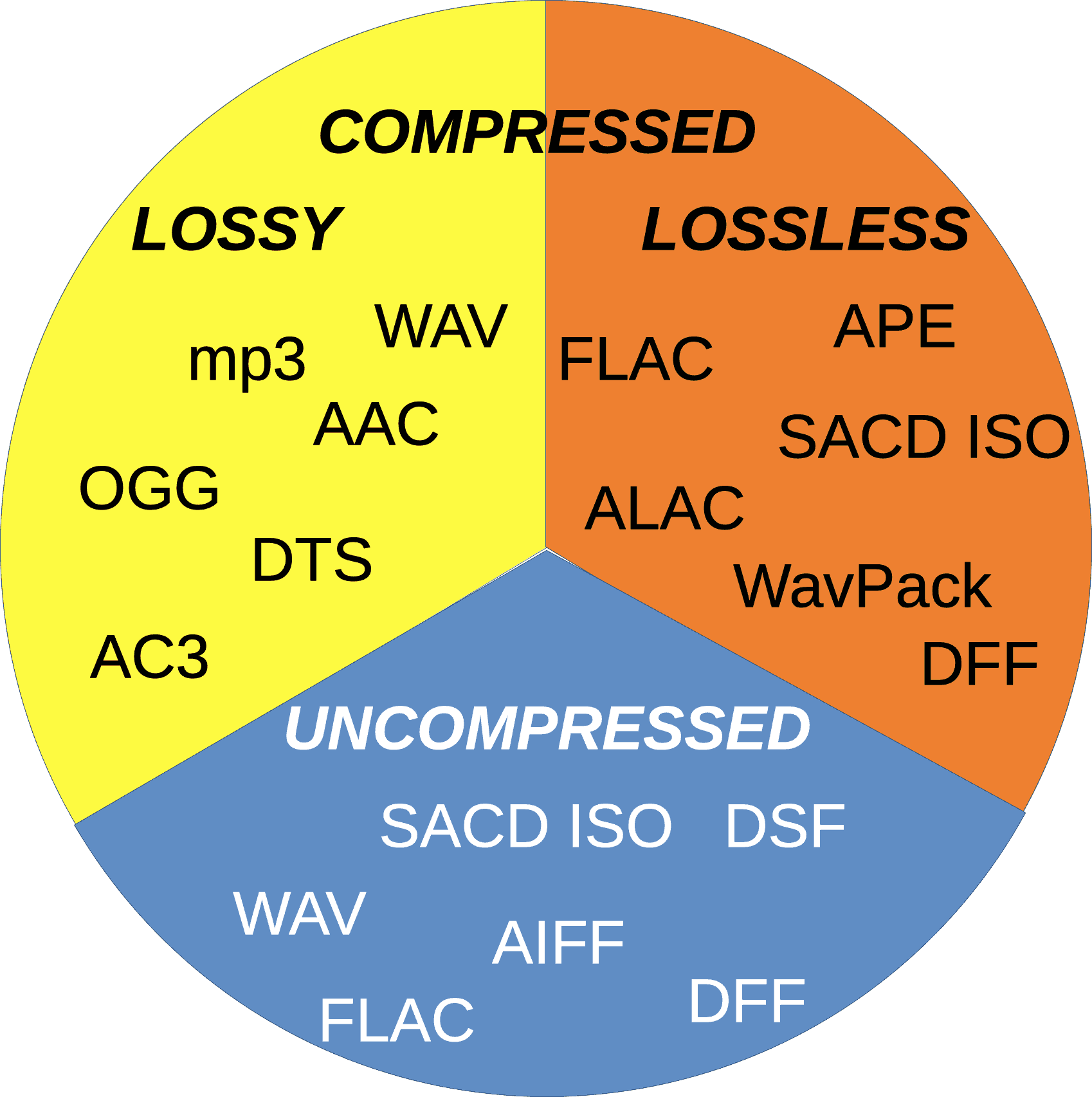
â–² Both AAC and MP3 are destructive compression, while FLAC and ALAC are lossless compression

Before we get into the details, let’s talk about what is called lossless sound quality; From the author’s concept and cognition, the so-called lossless sound quality is a relative word rather than an absolute word. The main source is the relative word born due to the appearance of the MP3 music compression format; after the music industry went digital, digital music files were generally recorded via PCM encoding, and WAVE files were generally used on CDs. The time and space situation that MP3 was born into was because hard drive capacity was generally small at the time. To store a large amount of music data in storage space, you probably need to compress the files.

The reason why MP3 cannot be called a lossless format is because it essentially compresses the original WAVE in a way that limits the bitrate by combining concepts like the psychology of sound. The bitrate compression mode, compared to the bitrate of the original WAVE file, compresses at least in a range of 1:4 to 12:1. The higher the bitrate, the greater the amount of retained information. For example, AAC format also adopts similar audio psychology for compression, but the efficiency is better than MP3. Therefore, most of the lossless sound quality of most streaming platforms currently uses AAC as the mainstream.

Comparison of audio encoding formats

Comparison of audio encoding formats

audio encoding formats

Parameters and nouns

audio encoding formats

Rate/bit rate/code rate, Kbps, i.e. the volume of data contained in a transmission medium or audio file per unit of time. In general, the higher the volume, the higher the sound quality. Of course, the comparison standards are different under different compression algorithms, and the bitrate may be lower as well. The sound quality is relatively high, for example, the sound quality of aac with a medium bitrate is better than that of mp3 with a high bitrate. The CD bit rate is 1411.2 kbps and there are some lossless compressions that can come close to this value, such as flac.
The sampling rate, KHz, is the number of points that the audio acquisition device collects audio signals in unit time. In general, it is believed that the higher the sample rate of the same encoding algorithm and the same bit rate, the higher the sound quality. However, the standards of comparison between different encoding algorithms are different. Currently, 44.1 KHz and 48 KHz are more commonly used in mobile devices, and the sample rate in instant messaging is lower, possibly 16 KHz or less.
The number of channels, it is generally believed that the greater the number of channels, the more stereoscopic the sound. Real-time communication can be monophonic, and network transmission often uses two channels. Minimal mono, up to 5 channels?
Tracks, sounds made by different instruments/people, up to 48 tracks?
Compression ratio, compared to the source audio file, the volume changes after compression, such as 1/18, 1/12. Compression ratio opus>aac>ogg>mp3 (and wma)>ape>flac>wav (under the same sound source condition). The compression ratio of wma below 192kbps is higher than that of mp3.
Sound quality, lossy or lossless, can be restored to the audio source file after decoding. Sound quality comparison wav=flac=ape>aac=opus>ogg>mp3~wma
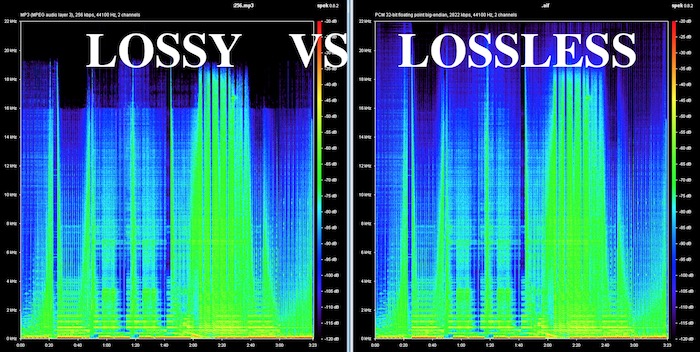
Frequency, Hz, low frequency or high frequency. Note that the human ear is more sensitive to low frequency signals. For example, the mp3 compression algorithm removes all high-frequency signals.
Hardware support, device support on the capture and playback end, mp3>wma>aac~wav~opus>flac~ogg>ape.

What are the advantages of the lossless audio format?

What are the advantages of the lossless audio format?

Lossless and Lossy Audio Files

The advantage of lossless for storing an audio collection is that the quality of the recordings is much higher than that of lossy codecs and they take up less space than uncompressed audio. It is true that lossy files are smaller than lossless music files. Most modern playback programs understand the lossless format. Programs that cannot play it can easily learn it using the lossless plugin. What are lossless audio formats?

Lossless audio

Lossless audio formats
A true music lover is unlikely to be satisfied with the sound of music recorded in Ogg Vorbis or MP3 compression formats. Of course, if you listen to audio recordings on home audio equipment, sound defects cannot be heard with your ear, but if you try to play a compressed file on high-quality Hi-Fi equipment, you will immediately find the sound defects. . Of course, creating a collection of quality music on CD or vinyl is not easy. There is a reasonable alternative to this path for lovers of high-quality sound – lossless music. It can be stored on a PC in a way that allows you to keep your music’s original settings unchanged, even if compression is applied. In this way it simultaneously solves the problems of high-quality music and its compact storage, since audio equipment for listening (headphones, speakers, amplifiers) is quite affordable.

Uncompressed lossless audio formats:

CDDA is an audio CD standard;
WAV: Microsoft Wave;
IFF-8SVX;
IFF-16SV;
AIFF;
Compressed formats:

FLAC;
APE – Monkey’s Audio;
M4A – Apple Lossless – Apple’s high-quality music format;
WV – WavPack;
WMA: Windows Media Audio 9;
TTA – True Audio.

FLAC format
The most common format is the. It differs from lossy audio codecs in that no data is removed from the audio stream when it is used. This makes it possible to use it successfully to play music on Hi-Fi and Hi-End equipment, as well as to create an archive from a collection of audio recordings.

The great advantage of the format is its free distribution. This is important for musicians who record music on their own. The format has gained a lot of popularity recently, thanks to which its support is included in the vast majority of multimedia players.

APE format
Unlike FLAC, for the APE format there are only codecs and plugins for the Windows platform. For other platforms, there are expensive third-party software solutions. The algorithm is capable of achieving lossless compression of audio information between 1.5 and 2 times. It includes three main stages of encoding, of which only one is based on the use of inherent properties of sound for compression. The rest are similar to conventional filing cabinets. Even though the compression algorithm is distributed free of charge, the licensing restrictions are such that it is practically inaccessible to amateur musicians.

Apple Lossless Format
You can listen to high-quality lossless music using the audio compression codec without sacrificing Apple quality. This format was developed by Apple for use on its own devices. The format is compatible with iPods with special dock connectors and the latest firmware. The format does not use specific rights management (DRM) tools, but the container format contains such capabilities. It also supports QuickTime and is included as a feature in iTunes.

The format is part of the free access libraries, which allows you to organize listening to files in Windows applications. In 2011, Apple released the source codes for the format, opening up broad prospects for the codec. In the future, it can seriously compete with other formats. The tests yielded good results. Compressed files vary in size between 40-60% of the originals. The decoding speed is also impressive, which justifies its use for mobile devices, whose performance is not high.

One of the disadvantages of the codec is that the extension of the audio files matches the audio codec, leading to confusion because AAC is not a high-quality music format. Therefore, it was decided to store the data in an MP4 container with the extension .m4a.

All about all audio file formats

Dematerialized music has evolved considerably for almost 15 years and has played an important role in the daily life of every individual. We’ve all heard more or less about FLAC, MP3, WAV, etc.! Few people really know the difference between each size, its pros and cons …

audio formats

This article is intended to enlighten you to make the best possible choice for extracting and compressing your audio files.

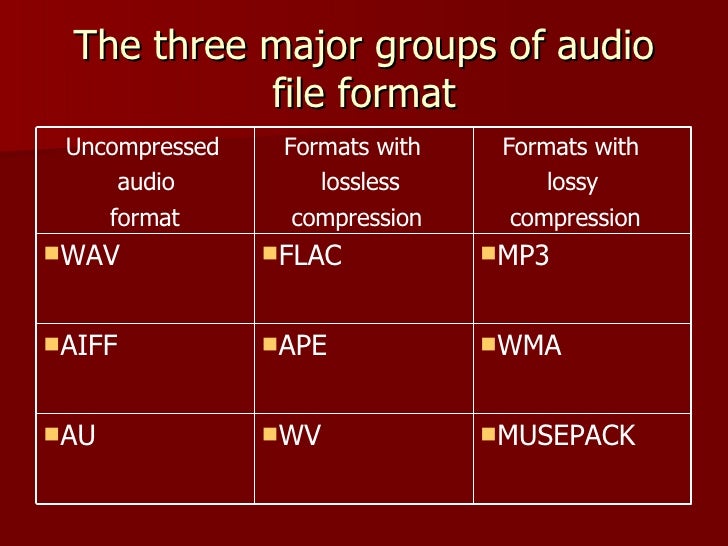
There are different types of layouts that can be grouped into several large families:

– uncompressed files

-lossless compressed files

– Lossy compressed files

audio formats

-Uncompressed files

WAV: WAV (Waveform Audio File Format) is an audio file format created by Microsoft for Windows. This format is usually an uncompressed container. Therefore, an audio CD with a duration of about 80 minutes in WAV weighs plus or minus 800 MB

Advantages: the file remains in its original form, no loss of information (no loss)

Disadvantages: The WAV file is an uncompressed format that gives it a large size and therefore takes up more space in the storage space.

AIFF – Audio Interchange File Format (AIFF) is the Mac OS equivalent of the WAV format. Therefore, it has the same characteristics as this. The pros and cons of this format are the same as for WAV.

– Lossless compressed files

FLAC: The FLAC (Free Lossless Audio Codec) format is without doubt the most beneficial file for the user. Firstly, in terms of WAV and AIFF, this format is a lossless format, ie the digitization of the file does not imply any loss of information from the audio spectrum. The file is scanned and returned as is. The second advantage of this format is the size it occupies in the storage space. Nondestructive compression is applied to this type of format as a ZIP file, making the scanned file about 2 times less space than a WAV file. Therefore, for 80 minutes of music on CD, the occupied space will be approximately 400 MB. Finally, this format is universal, compatible with most multimedia players, it is compatible with all operating systems except iOS,

Advantages: file size, identical reproduction of the original file during scanning, free and compatible with almost all media players and operating systems

– Disadvantages: none

ALAC: The ALAC (Apple Lossless Audio Codec) format is simply the Apple equivalent of the FLAC file.

– Lossy compressed files

MP3: The MP3 format (Mpeg Layer 3) is a well-known format. It is a format with destructive compression, that is, a recording from which musical information has been removed thanks to the so-called psychoacoustic compression algorithm (taking into account the peculiarities of the human ear), so that less scanning is needed to create a lighter file to obtain . This format is most commonly used for dematerialized music, as it allows a significant space saving in the storage space with a size of about 150 MB for an 80 minute CD. Compression can be more or less destructive depending on the speed used, which can range from 4: 1 (320 Kbits / sec) to 12: 1 (128 Kbits / sec).

-Advantages: it takes up little space on the hard disk and does not affect the quality of the songs with a dynamic range and a limited variety of timbres

– Disadvantages: paid MP3 license, destructive compression for “richer” songs.

AAC: The AAC (Advanced Audio Coding) format is a format close to the MP3 format, but provides additional definition with an identical compression rate. Apple uses this specific format in the iTunes Store, but also on YouTube. the extension can be written in various forms, such as .AAC, .M4A or MP4

-Advantages: better compression quality than MP3

-Cons: compressed file format at a loss

Which format for digital music should you choose?

AAC, MP3, MP3 Pro, Ogg Vorbis, WMA. In the digital age, choosing one or the other of these standards is not easy. Especially since their properties lend them to one use instead of another. Detailed review

codec

Which format for digital music should you choose?


MP3 is far from alone in the world. Feeling that compressed digital music is likely to change the record market, many developers have begun designing formats designed to offer the best compromise between the amount of data used and the sound quality. Thus, AAC for Apple, WMA from Microsoft and other OGG Vorbis communities were born. So many standards that have their advantages and disadvantages and that it is advisable to know them well before choosing the most appropriate coding software for your needs.

audio formats

First, remember that an audio CD uses uncompressed data. Music is digitized on its surface at a rate of 44,100 samples per minute. Second, each of these samples is encoded in 16 bits (2 bytes) and in stereo. This gives a total of 176 KB per Second music, or about 10 MB per second. Minute. Even if an increasing number of Internet users use broadband, websites that sell music for download cannot afford to offer 40-minute four-minute songs. Compression formats allow this amount of data to be shared by a factor ranging from 8 to 15, with little or no loss of quality.

All of these compression algorithms work on the same principle: eliminate frequencies that the human ear does not perceive at all, or very little, and level the frequencies close to each other for identical values ​​to increase compression. These are the so-called “destructive” algorithms. In other words, when converting a compressed audio file from an audio CD to an audio CD format, the resulting data will not be the same as the original file. Depending on the formats and needs, compression may be more or less important. It is defined by what is called bitrate, that is, the flow of information per. Second of music. It can range from 32 kbps (kilobits per second) to 320 kbps. Detailed review of the different formats.

audio formats

MP3

Commonly designed by the Fraunhofer Institute and Thomson and standardized in 1992, it is a derivative of audio compression used for MPEG-1 format videos (MP3 also stands for MPEG-1 Audio Layer 3).
This is the format offered by the main configuration panel. In fact, we can define a bit rate (“bit rate” in jargon) that ranges from 32 to 320 kbps. From 128 Kbps the sound quality becomes enough to encode songs. At 192 Kbps, the quality is similar to an audio CD. At this compression rate, one minute of music equals 1.4 MB of data. But it is also possible to choose a variable bit rate called VBR (variable bit rate). In this case, the encoder increases the compression ratio in less complex music regions, reducing the size of the final file slightly. The benefit depends largely on the type of song: 5 to 10% with an extract from classical or jazz music, not much with rock or rap.
The great advantage of MP3 remains its compatibility with all portable audio players, but also certain hi-fi systems, car radios and DVD players in the living room. Almost universal, it appears on all free download sites such as Kazaa or eDonkey. On the other hand, this format sinks slightly at the level of high frequency recovery and is therefore less suitable for e.g. Classical music.
Free MP3 encoding software includes WinAmp and MusicMatch JukeBox. Lastly, note that there are several MP3 coding algorithms, with “Fraunhofer” being the most widely used, and “Lame” being the most effective, with the latter being especially compatible with Pinnacle’s CDex.

WMA

Launched in 1999 by Microsoft, WMA (Windows Media Audio) was only intended to counter the rise of MP3. With compelling arguments. By utilizing the features of the human ear more effectively in the audible spectrum, WMA is able to eliminate frequencies that are truly useless while maintaining certain high frequencies that affect sound quality. The relatively efficient compression algorithm maintains a quality that corresponds to an audio CD with a 128 kbps bit rate, or 1 MB per second. Minute of a song.
Completely free of charge, WMA also has the advantage of having an encoder built into Windows Media Player. An effective way to ensure the spread of this support. Especially since this format is linked to precise copyright management (DRM or Digital Right Management) that allows, for example, to define a limited useful life of files or prohibit recording options. That’s why some music download sites use it. Many digital audio players also support WMA and reputable shareware such as WinAmp allows encoding in this format.

AAC

Contrary to belief, AAC (Advanced Audio Coding) is not a format developed by Apple, but by a consortium that includes the Fraunhofer Institute (father of MP3), Sony and even Dolby. Prestigious names that grow well. In fact, AAC is arguably the most efficient compression algorithm. Unlike MP3 and WMA, it is not based on MPEG-1 but on MPEG-4 (the format behind DivX). This choice seems to have paid off as it allows you to get a better compromise between compression ratio and sound quality. That’s why at AAC we get the equivalent of audio CD quality with a bit rate of only 96 kbps. In addition, as with WMA, the DRM (copyright management) features and the ability to control sounds on 48 different channels,
We found AAC on the Apple iTunes online music site and on your iPod player. But it is also integrated into software like WinAmp.

OGG Vorbis

OGG Vorbis is in audio compression format, as Linux is in operating systems. In fact, it is an “open” format whose source codes are public and can be customized and changed by anyone. It’s still a pretty effective format. At 128 kbps, we reach the quality level of an audio CD (1 MB in 1 minute). The compression structure of OGG format is also significantly different from MP3, WMA and other AACs. Segmenting audio sources into successive packets, the compression algorithm works first on each packet independently of the others. This allows you to not really have weakness at certain frequencies and to maintain the same quality regardless of the type of music.
In addition, polyphony features allow playback of up to 255 audio channels (sic). The package structure also makes it very suitable for streaming on the Internet, especially for online radios. Open, OGG Vorbis needed to evolve quickly and maybe move closer to AAC in terms of performance.

What is the best file format for listening to music?

Digitizing music involves compressing the original sound that may distort the work. AAC, MP3, WMA or Wav: which of these formats offers the best representation?

Best audio format

If we are not aware of or no longer aware of the quality of today’s music in its digital form, it is often because our audio rendering tools are so poor. This is due to the speakers that come with desktops or built-in laptops, but also to the headphones / earphones that come with MP3 players, which are mostly entry-level products. On the other hand, for those with high performance equipment, listening to poorly recorded or poorly coded songs quickly becomes unpleasant.

best audio format

Therefore, choosing the best audio format for the same recording is best for fun. Today, there are 5 main audio file formats: AAC (promoted by Apple, iPod and iPhone in mind), WMA (promoted by Microsoft), MP3, Wav and Ogg (the last three are neutral).

In addition to the file format, there is another criterion called the compression ratio. The more a file is compressed, the more it removes the frequency bands in the music and therefore potentially small nuances that enrich the listening. The compression ratio is expressed in the number of bits, the basic computing unit. Values ​​range from 56 Kbits / s (56,000 bits per second, minimum quality for radio or podcasts) to 320 Kbits / s. The lower the number, the more compressed and small the file will be, but the less comfortable it is to listen to.

The sampling frequency is also important. This value is expressed in Hz and must be as large as possible to preserve the shape of the original audio signal and therefore the accuracy of the recording. In general, we prefer a file with a sampling rate for CD quality (44,100 Hz), but we also found lower quality files (22,000 Hz).

The study from the Musiclassics studio.

This online digital music sales site dedicated exclusively to classical music launched a modernization of its interface during 2009. On this occasion, the question arose about the best audio formats that its customers could offer. To make it right, the site invited 15 people (bloggers, musicians, fans, audiophiles) to a listening session in a professional studio. They had to judge from 1 to 5 the quality of 4 different musical excerpts representative of the diversity of classical music (voice, violin, piano, orchestra and heart), coded in 6 different ways: MP3 320 Kbps, Wav, WMA 192 Kbps and 320 Kbps, AAC 192 Kbps and 320 Kbps. Here are the results of this study:

Examine listening results
File formats average rating received (out of 5)
MP3 320 Kbps ……………… 3.1
Wav ………………………………. 3.5
WMA 192 Kbps …………… 3.7
AAC 192 Kbps ……………. 3.8
AAC 320 Kbps ……………. 3.8
WMA 320 Kbps …………. 4.0

Since formats compressed at 128 Kbps or less have not been studied, the difference in ratings is relatively small. However, the MP3 format, even compressed at 320 Kbps, is the worst with a significant difference. More surprisingly, the CD (Wav file) is located behind the WMA and AAC formats. These files seem to change the rendering slightly. It is observed that the difference in notation between the 192 and 320 Kbps compression is not significant.

But too bad MusiClassics did not want to integrate the free and open OGG file format into these results. However, we noticed that as a consumer it would be better to choose 192 Kbps AAC or WMA files instead of 320 Kbps MP3 and 192 192 Kbps MP3. 128 Kbps files would score less than 3/5, which is not satisfactory.

What is the best audio format?

What is the best audio format?

Many are known, but there is always the question of what is the best audio format. The main and most recognized for listening to music are MP3, Wav, FLAC and Ogg.

But, to choose the best audio format, you must first know that they have several conformations, and you can always choose the best. Music always goes everywhere, at home in front of the computer, in a living room with a hi-fi system, with headphones on public transport or when playing a sport. Music that gives a special meaning at all times and that encourages listening.

best audio format

There are many ways to take advantage of it, but this is usually done in digital format. In audio files, there is a wide variety and normally many still use MP3 for convenience. But there are less popular alternatives that seek to provide a different, better experience. For those who do not know it, there are a number of main sound systems.

The best audio format

Beyond the fact that the MP3 format is the most popular of all the audio formats available, it is not the only one. Some others like “FLAC”, “WMA”, “OGG” have certain characteristics which, depending on what you want, can be very useful on certain occasions.

In technology, audio formats can generally be classified into 2 categories. There are those which preserve all the quality and those which involve losses of quality of the sound or information.

Those that preserve the quality of the audio are those that come from pure sources such as CDs. This is how those who lose quality and sacrifice this information must save space.

Audio quality formats

“FLAC” is a lossless audio codec or “FLAC”. It is one of the formats that best preserves audio quality and its compression algorithm is excellent. It is open source, does not generate quality losses and the file size because it is compressed, is much smaller.

best audio format
lossless

Apple Lossless is known as “ALAC” and is very similar to “FLAC”. The difference is that it is not as efficient, so these files are larger, although they still have unconditional support for iOS, which “FLAC” does not.

“APE” is another and although the problem with this format is that it is not compatible with the vast majority of players, it is considered to be similar to the “FLAC” or “ALAC” format in terms of audio quality. . As it is highly compressed, it accelerates the functioning of the computer’s processor and it is therefore not recommended to use it in low-consumption computer equipment.

“WAV” and “AIFF” are not compression formats, but rather exact copies of the original content and differ in the way they record the data. “AIFF” was created by Apple and “WAV” is more universal, but both have too much disk space.

Formats with loss of audio quality

MP3, MPEG Audio Layer III or MP3, as many people already know, is the most common format that can be found. “ACC” is very popular on iTunes and is considered more efficient than MP3 because files in this format are smaller.

OGG Vorbis is one of the free and open source alternatives to MP3 and ACC. It is not limited by patents, but it is also not supported by many players. WMA is Microsoft’s proprietary format and is very similar to MP3, but without much advantage over the others.

best audio formats

Which audio format to choose?

The most recommended is “MP3” or “AAC” because many players support it. In addition, if they are encoded with a high bit rate, they can hardly be distinguished from the original source. However, if you want to burn music, formats like “FLAC” are recommended, because you can then convert everything to other formats without losing audio quality.

Once the audio formats are known, when choosing, the differences between each must be taken into account. In general, what the experts recommend is to use “MP3” or “AAC” as they are compatible with most players and the quality of both is very similar to that of the original source, especially if it is encoded with a high bit rate. Unless you have a specific need, “MP3” and “AAC” are the most recommended options.

However, one thing to know is that to store music in lossless formats, there is no “FLAC”. You probably won’t notice any higher quality, but it’s good for storing music if you plan to convert it to other formats later. In these cases, “FLAC” is always recommended, and it is also possible to choose the format without loss or degradation of quality