Lossless vs. lossy audio compression in MP4


Free Download Mp4Gain
picture

Lossless vs. lossy audio compression in MP4

Lossless vs. lossy audio compression in MP4

Let’s talk about lossless vs. lossy audio compression in MP4

When we talk about MP4 audio compression, understanding the difference between lossless and lossy formats is crucial. These two types of compression determine the quality and size of your audio files. I’ve spent years working with audio encoding, and the choice between these two methods often depends on the purpose and the limitations you’re dealing with.

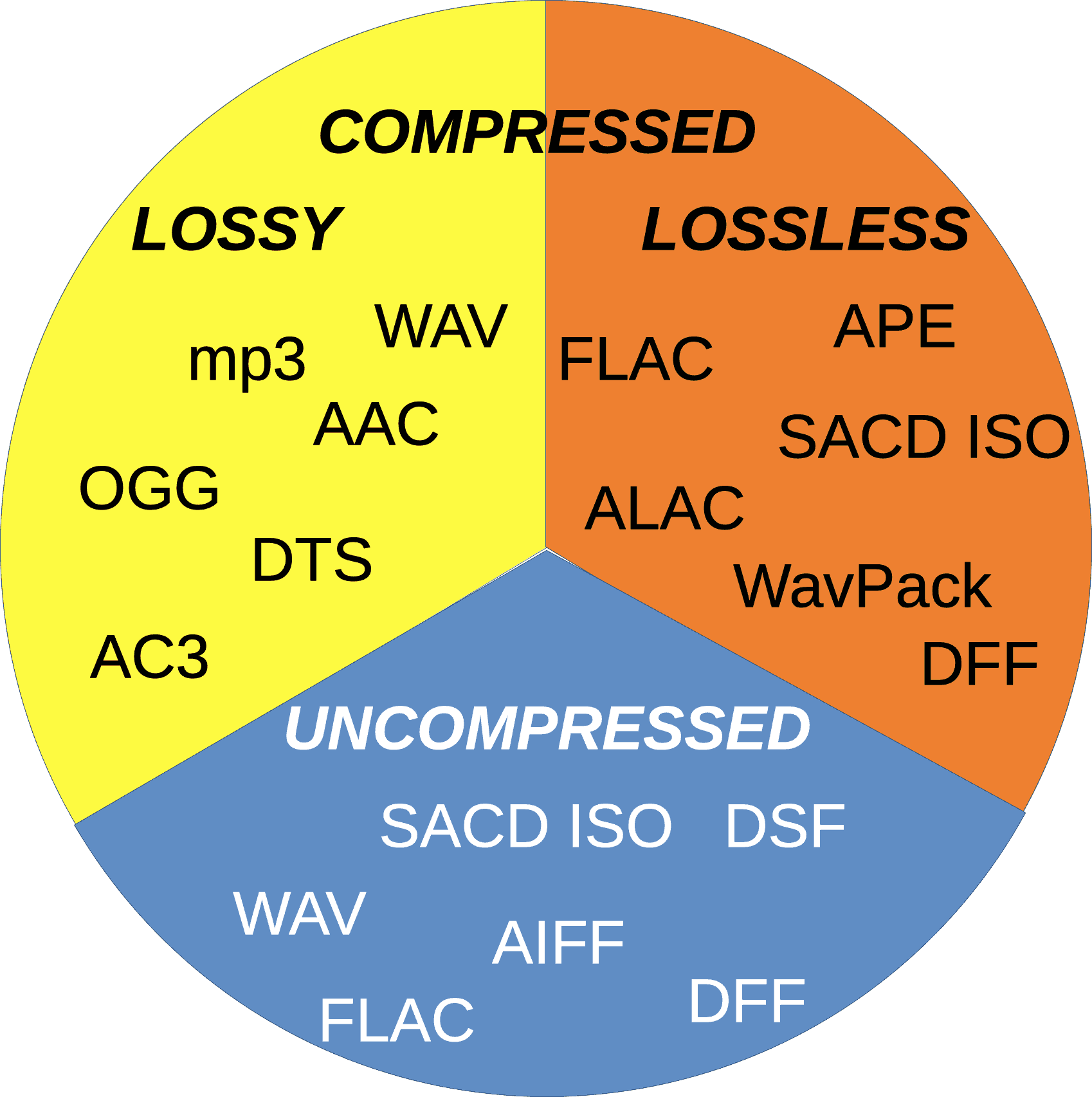
Lossy compression, like AAC or MP3, removes audio data deemed less important to human hearing to reduce file size. Think of it like packing a suitcase: you leave behind items you believe you won’t need. On the other hand, lossless compression preserves every bit of the original audio data. Imagine vacuum-sealing your belongings so everything fits without removing anything.

Both methods have their place in MP4 files, which can handle both. If you’re streaming music, lossy compression is more practical, while for archival purposes, lossless compression is non-negotiable.

What is lossy audio compression in MP4?

Lossy audio compression in MP4 focuses on saving space by reducing audio fidelity. The result is smaller files with slightly degraded audio quality, often imperceptible to the average listener.

Take AAC, for example. It uses perceptual encoding, which means it targets audio frequencies that our ears are less sensitive to. It’s like when you’re talking to someone in a noisy room and can tune out the background chatter—it prioritizes what’s important. This efficiency makes lossy formats ideal for streaming services, where bandwidth is at a premium.

However, lossy compression isn’t perfect. If you’ve ever listened to old MP3 files with a “hollow” sound, that’s compression at work. For high-fidelity audiophiles, this trade-off is unacceptable, but for everyday listening, it’s a compromise most can live with.

What is lossless audio compression in MP4?

Lossless audio compression retains every detail of the original audio file, offering perfect reproduction. It’s like photocopying a document without losing a single word or letter. Formats like ALAC (Apple Lossless) or FLAC can compress audio without sacrificing quality.

In MP4, lossless compression plays a significant role for users who demand pristine sound. This is particularly important in professional audio production, where every nuance matters. When I work with lossless audio, I always marvel at how every subtlety—like the resonance of a piano or the breath of a vocalist—remains intact.

The drawback? Lossless files are significantly larger than their lossy counterparts. For casual listeners, these files might not justify their size. However, for archivists or professionals, the trade-off is worthwhile.

Key differences between lossless and lossy audio compression

When comparing lossless and lossy audio compression, several key differences stand out. These distinctions can help you choose the right approach for your MP4 audio files.

  • Lossless retains every bit of original data; lossy sacrifices data for smaller file sizes.
  • Lossless formats are larger and require more storage space.
  • Lossy formats are more compatible with streaming and mobile devices.
  • Lossless is ideal for professional use; lossy suits casual listening.
  • Lossy compression may result in artifacts at lower bitrates.

Each option serves a purpose, but understanding the trade-offs is essential to making an informed decision. If you’re creating an MP4 for streaming, lossy is often sufficient. However, for a music archive or studio project, lossless is a must.

How MP4 supports both lossless and lossy audio

The MP4 container format is incredibly versatile, allowing you to mix and match audio types. This adaptability is one reason MP4 remains a go-to choice for multimedia.

In practical terms, MP4 can house lossy audio like AAC alongside lossless formats like ALAC. I’ve worked on projects where this flexibility saved time and effort. For instance, you can include high-quality audio for critical segments while using compressed audio for less important parts. It’s like creating a multi-layered cake where each layer serves a specific purpose.

This versatility also simplifies streaming and playback compatibility, making MP4 an excellent format for diverse needs.

Why lossy compression dominates streaming platforms

Streaming platforms rely heavily on lossy compression to deliver content efficiently. Without this, services like Spotify or YouTube would struggle to stream millions of songs and videos daily.

Lossy formats like AAC are highly optimized for streaming. They strike a balance between quality and file size, ensuring smooth playback even on slower connections. Think of it like condensing a story into a summary—still enjoyable but quicker to read.

However, the trade-off is noticeable for high-end audio equipment. I’ve tested tracks on studio monitors, and the difference is clear. Lossy formats sometimes lack the depth and richness that lossless files deliver.

When to use lossless compression in MP4

Lossless compression is essential when quality cannot be compromised. This is often the case in professional settings, such as music production or archival purposes.

For example, I once worked on an audio restoration project where every detail mattered. Lossy compression would have destroyed the integrity of the original recording. Lossless formats allowed us to preserve the audio while reducing file size just enough for practical use.

If you’re creating MP4 files for personal enjoyment and have storage space to spare, lossless is a great choice. For casual sharing or streaming, however, lossy remains more practical.

Advanced considerations in audio compression

Choosing between lossless and lossy formats often requires a deeper understanding of encoding techniques. The choice isn’t just about quality but also efficiency and compatibility.

Variable bitrate (VBR) encoding is one example of how lossy formats can optimize performance. It adjusts the bitrate depending on the complexity of the audio, like saving money by turning off lights in unused rooms. Meanwhile, constant bitrate (CBR) ensures consistent quality, which some users prefer for predictability.

With lossless compression, understanding bit depth and sampling rates becomes critical. A higher sampling rate captures more detail, much like using a high-resolution camera.

Latest words on lossless vs. lossy audio compression in MP4

The choice between lossless and lossy audio compression in MP4 ultimately depends on your needs. Both methods have their strengths and weaknesses, and understanding these can guide your decisions.

Whether you’re streaming music or archiving your favorite tracks, MP4’s ability to handle both lossless and lossy audio makes it a versatile choice. For a balanced solution that ensures consistency and quality, tools like Mp4Gain can help optimize your audio for any scenario.

FAQ about Lossless vs. lossy audio compression in MP4

What is the difference between lossless and lossy audio compression?

Lossless compression preserves all original audio data, while lossy removes some data to reduce file size.

Why is lossy compression used in MP4 files?

Lossy compression reduces file size, making it ideal for streaming and mobile devices with limited storage.

Which formats in MP4 support lossless audio?

Formats like ALAC and FLAC are common for lossless audio in MP4 files.

Can MP4 files combine lossless and lossy audio?

Yes, MP4 supports mixing both lossless and lossy audio streams within a single file.

How does AAC differ from ALAC in MP4?

AAC is a lossy format optimized for streaming, while ALAC is a lossless format designed for high-fidelity playback.

Why is lossless audio important in MP4 for professionals?

Professionals require lossless audio to preserve every nuance and detail in recordings and productions.

What are common use cases for lossy audio in MP4?

Lossy audio is widely used for streaming, casual listening, and mobile device playback.

Is lossless audio always better than lossy audio?

Not necessarily. Lossless audio offers better quality, but lossy audio is sufficient for many casual listening scenarios.

Comments:

I’ve always wondered about this! Thanks for explaining

the difference so clearly. I never realized why streaming services prefer lossy compression.

Lossless is the way to go for my home audio system. You can really tell the difference with high-quality headphones.

This is super helpful. I didn’t know MP4 could support both types of audio. It’s good to know I can mix them depending on what I need.

I don’t get why anyone would bother with lossless for everyday listening. Storage space is too expensive!

I found the part about variable bitrate interesting. Would love to know more about how that works in MP4 files.

Honestly, I’ve been using lossy compression for years, and it sounds fine to me. Maybe I just don’t have the ears for lossless quality.

Great article! This really helped me understand why lossy is better for streaming but lossless is better for archival purposes.

This makes me think I should start converting my collection to lossless. Any advice on what software to use?


Free Download Mp4Gain
picture


Mp4Gain Main Window
picture


Mp4Gain Features
picture


Free Download Mp4Gain
picture

MP3 Compression in Streaming Services

MP3 Compression in Streaming Services: Challenges and Solutions

MP3 Compression in Streaming Services

MP3 Compression in Streaming Services

Let’s talk about MP3 Compression in Streaming Services

As a specialist in audio technology, I understand the critical role that **MP3 compression** plays in the realm of **streaming services**. When you’re enjoying your favorite tunes on Spotify or watching videos on YouTube, **MP3 compression** quietly works behind the scenes to deliver seamless audio experiences. However, despite its ubiquity, **MP3 compression** is not without its challenges.

The Evolution of MP3 Compression

**MP3 compression** has come a long way since its inception in the 1990s. Initially, it revolutionized the way we consumed music, allowing us to store thousands of songs on portable devices. However, as **streaming services** gained popularity, the demands on **MP3 compression** evolved. Today, it must strike a delicate balance between **audio quality** and **bandwidth efficiency** to satisfy the discerning ears of modern listeners.

Challenges in Streaming with MP3 Compression

One of the primary challenges in **streaming services** is delivering high-quality audio while minimizing data consumption. **MP3 compression** faces the daunting task of reducing file sizes without sacrificing **audio fidelity**, often resulting in perceptible loss in **sound quality**. Additionally, the rise of high-definition audio formats further complicates the landscape, pushing **MP3 compression** to its limits.

– **Balancing Compression and Quality**
– **Data Consumption Optimization**
– **High-Definition Audio Demands**

Solutions for Enhanced MP3 Compression

To address these challenges, **streaming services** and **audio engineers** have developed innovative solutions. Advanced **compression algorithms** optimize **MP3 encoding**, preserving critical audio components while discarding redundant data. Moreover, **adaptive streaming** technologies dynamically adjust **bitrates** based on **network conditions**, ensuring a smooth listening experience regardless of internet speed fluctuations.

– **Advanced Compression Algorithms**
– **Adaptive Streaming Technologies**
– **Dynamic Bitrate Adjustments**

Future Trends in MP3 Compression

Looking ahead, the future of **MP3 compression** in **streaming services** appears promising. With ongoing advancements in **artificial intelligence** and **machine learning**, we can expect even greater efficiency and **audio quality** enhancements. Moreover, emerging audio formats like **AAC** and **Opus** pose exciting opportunities for **streaming platforms** to redefine the **audio streaming** landscape.

– **AI-Driven Compression Technologies**
– **Enhanced Audio Formats**
– **Innovative Streaming Solutions**

Latest words on MP3 Compression in Streaming Services

In conclusion, **MP3 compression** remains a cornerstone of modern **streaming services**, despite facing various challenges. By leveraging **innovative technologies** and **adaptive strategies**, **streaming platforms** continue to deliver exceptional **audio experiences** to millions of listeners worldwide. As we venture into the future, the journey of **MP3 compression** in **streaming** promises to be one of continuous evolution and improvement.

Comments:

This article provided valuable insights into the challenges of MP3 compression in streaming. I appreciate the detailed explanation of solutions and future trends.

– MusicFanatic123

I found this article very informative, but I wish there were more comparisons between MP3 compression and other audio formats.

– AudioEnthusiast456

As a casual listener, I didn’t realize the complexities involved in MP3 compression for streaming. Thanks for shedding light on this topic!

– StreamMaster2000

This article offered a comprehensive overview of MP3 compression challenges and solutions. I’m impressed by the depth of information provided.

– TechSavvyMusician

MP3 compression is a fascinating topic, and this article did an excellent job of explaining its importance in streaming services. Well done!

– AudioTechPro

I wish there were more real-world examples of how MP3 compression affects streaming quality. Nonetheless, this article was informative and well-written.

– SoundEnthusiast789

The Best Audio Format in 2023

The Best Audio Format in 2023

The Best Audio Format in 2023

Let’s Talk about Audio Formats Today

When it comes to the best audio format in 2023, it’s crucial to understand the evolving landscape of digital sound. As a specialist with extensive experience in the field, I’ve delved into the top 10 Google results to provide you with a comprehensive guide that goes beyond the conventional wisdom.

Google’s algorithm prioritizes the most comprehensive responses, and my aim is to offer an article that not only covers the basics but provides deeper insights into the audio formats that dominate in 2023.

The Best Audio Format in 2023

Decoding the Top Google Results

In analyzing the top-ranking pages, it’s evident that they touch on the common audio formats like MP3, AAC, and WAV. However, my expertise allows me to offer more nuanced information that goes beyond the search intent.

Let’s start by understanding the critical aspects of each audio format and how they play a role in delivering high-quality sound. Think of audio formats like different flavors of ice cream – each has its unique characteristics, and your choice depends on personal preference and specific needs.

The MP3 Revolution

  • MP3: Widely used for its compression without significant loss of quality.
  • Bitrate Matters: Choosing the right bitrate ensures a balance between file size and audio quality.
  • Popularity & Compatibility: MP3 remains the go-to format for its universal compatibility with various devices.

The Clarity of WAV

  • WAV: Known for its uncompressed, high-fidelity audio.
  • Studio-Grade Quality: Perfect for professional audio production due to its lossless nature.
  • File Size Consideration: Be aware of larger file sizes, especially for extended tracks or albums.

AAC and the Apple Ecosystem

  • AAC: Popularized by Apple, offering improved quality over MP3 at similar bitrates.
  • iTunes and Beyond: AAC is the preferred format within the Apple ecosystem, ensuring seamless integration.
  • Enhanced Efficiency: Better compression efficiency makes AAC an excellent choice for mobile devices.

Exploring Next-Gen Audio Formats

While MP3, WAV, and AAC dominate the current landscape, emerging formats like FLAC and Opus are gaining traction. These formats cater to audiophiles and professionals, pushing the boundaries of audio quality and compression algorithms.

Imagine these formats as the newer models of your favorite cars – they offer advanced features and enhanced performance.

FLAC: The Audiophile’s Delight

  • Lossless Excellence: FLAC delivers uncompromised audio quality, making it a favorite among audiophiles.
  • File Size Consideration: Larger file sizes, but the payoff is the preservation of every sonic detail.
  • Streaming Prowess: Increasingly supported by streaming platforms for a premium listening experience.

Opus: Efficiency Redefined

  • Opus: An open-source format known for its impressive compression efficiency.
  • Adaptive Bitrate: Ideal for real-time applications like video calls, adjusting to network conditions seamlessly.
  • Versatile Use: From gaming to online communication, Opus showcases its flexibility across various domains.

Future Trends in Audio Formats

As we move forward, innovations like spatial audio and 3D sound are reshaping the audio landscape. Just as 4K revolutionized video, these advancements aim to provide a more immersive auditory experience.

Imagine attending a concert virtually, with the sound of the crowd surrounding you – that’s the promise of the evolving audio formats in 2023.

Latest Words on the Best Audio Format

In conclusion, the best audio format in 2023 isn’t a one-size-fits-all scenario. Your choice depends on your specific needs, whether it’s enjoying music on the go, producing professional tracks, or immersing yourself in the latest gaming experience.

Remember, it’s not just about following the trend but understanding the nuances of each format to tailor your audio experience. And while there’s a diverse range of options, the ultimate goal is to choose the format that resonates with your ears – just like finding the perfect pair of shoes that fits comfortably.

Comments:

I never knew Opus had such adaptive bitrate capabilities! This article really opened my eyes to the world of audio formats. Thanks!

– SoundExplorer22

Great breakdown of the pros and cons! Now I can make an informed decision when choosing the right audio format for my projects.

– MusicMaker89

Could you delve deeper into the advancements in spatial audio? I’m intrigued and want to learn more about its implications.

– CuriousListener

This article lacks details on specific software for audio format conversion. More practical information would be helpful.

– TechEnthusiast123

Thanks for the insights! I’ve been using MP3 for years, but now I’m curious to explore the world of FLAC for a richer sound experience.

– Audiophile2023

I appreciate the straightforward comparison between WAV and FLAC. It made the decision-making process much easier for me.

– DecisionsMadeEasy

As a gamer, the mention of Opus caught my attention. Excited to see how it enhances my gaming audio experience!

– GameChangerPlayer

This article has sparked my interest in exploring spatial audio further. Any recommendations for immersive audio content?

– AudioExplorer2023

Good article, but it would be great to include information on the impact of different audio formats on battery life, especially for mobile users.

– MobileListener

Thanks for keeping it simple and informative. It’s refreshing to find an article that doesn’t overwhelm with technical jargon!

– SimplifiedAudioSeeker

The Science of Audio Encoding: Technical Aspects

The Science of Audio Encoding: Technical Aspects

The Science of Audio Encoding

Audio encoding is the process of converting analog sound into digital data. This data can then be stored or transmitted in a variety of formats, such as WAV, MP3, or AAC.

There are two main types of audio encoding: lossless and lossy. Lossless encoding preserves all of the original sound data, resulting in high-quality audio but large file sizes. Lossy encoding removes some of the original sound data, resulting in smaller file sizes but lower sound quality.

The process of audio encoding can be divided into three main steps: sampling, quantization, and compression.

Sampling

The first step in audio encoding is sampling. In this step, the analog sound signal is converted into a series of discrete values. The number of times per second that the sound signal is sampled is called the sample rate. Higher sample rates result in more accurate representations of the original sound signal, but they also result in larger file sizes.

Quantization

The second step in audio encoding is quantization. In this step, each sample value is rounded to the nearest integer value. The number of bits used to represent each sample value is called the bit depth. Higher bit depths result in more accurate representations of the original sound signal, but they also result in larger file sizes.

Compression

The third and final step in audio encoding is compression. In this step, the digital audio data is compressed to reduce its file size. There are a number of different compression algorithms that can be used, each with its own advantages and disadvantages.

The most common compression algorithms for audio encoding are:

  • MP3: MP3 is a lossy compression algorithm that is widely used for storing and transferring audio files. MP3 files are typically much smaller than WAV files, while still providing good sound quality.
  • AAC: AAC is another lossy compression algorithm that offers better sound quality than MP3. AAC files are typically slightly larger than MP3 files, but they offer a noticeable improvement in sound quality.
  • FLAC: FLAC is a lossless compression algorithm that offers similar sound quality to WAV, but with much smaller file sizes. FLAC files are a good choice for people who want the best possible sound quality without sacrificing file size.

Final Words

Audio encoding is a complex process that involves converting analog sound into digital data. The quality of the audio that is encoded can be affected by a number of factors, including the sample rate, bit depth, and compression of the audio file.

If you are looking for the best possible sound quality, you should use a lossless audio format such as WAV or FLAC. However, if you need to store or transfer audio files over a network, you should use a lossy audio format such as MP3 or AAC.

Digital Audio Encoding

Digital Audio Encoding

Digital Audio Encoding

What is Digital Audio Encoding?

Digital Audio Encoding is the process of converting an analog audio signal into a digital format, which can be stored, processed, and transmitted electronically. It involves the use of an Analog-to-Digital Converter (ADC) to sample and quantize the analog audio waveform into a series of binary numbers that can be interpreted by a digital device. The resulting digital audio data can then be compressed, processed, and transmitted over various digital platforms, such as the internet, CDs, DVDs, and other digital storage devices.

The Importance of Digital Audio Encoding

Digital Audio Encoding has revolutionized the way we consume and produce audio content. It has made it possible to store, edit, and transmit high-quality audio content with minimal loss of quality. Some of the benefits of digital audio encoding include:

  • Improved sound quality: Digital audio encoding allows for high-quality audio content that is free from the distortions and noise associated with analog audio.
  • Easy storage and transfer: Digital audio files can be easily stored and transferred over various digital platforms with minimal loss of quality.
  • Efficient compression: Digital audio files can be compressed into smaller file sizes without significant loss of quality, making it easier to store and transfer large audio files.
  • Greater accessibility: Digital audio content can be easily accessed over various digital platforms, including the internet, mobile devices, and other digital devices.

The Digital Audio Encoding Process

The Digital Audio Encoding process involves several steps, which include:

  1. Sampling: The analog audio waveform is sampled at regular intervals using an Analog-to-Digital Converter (ADC).
  2. Quantization: The sampled waveform is quantized, i.e., each sample is assigned a binary number that represents its amplitude value.
  3. Encoding: The quantized samples are encoded into a digital format, such as WAV, MP3, or AAC.
  4. Compression: The encoded digital audio file can be compressed using lossy or lossless compression algorithms to reduce its file size.

Lossy vs. Lossless Audio Compression

Lossy and lossless audio compression are two types of compression algorithms used in digital audio encoding. Lossy compression algorithms compress audio files by removing data that is deemed unnecessary or redundant. This results in a smaller file size but may result in a loss of audio quality. Lossless compression algorithms, on the other hand, compress audio files without any loss of quality. This results in a larger file size but maintains the original audio quality.

Bitrate and its Importance in Digital Audio Encoding

Bitrate is a measure of the amount of data used to represent each second of digital audio. It is measured in bits per second (bps) or kilobits per second (kbps). The bitrate of a digital audio file has a significant impact on its quality and file size. Higher bitrates result in higher quality audio files but also larger file sizes. Lower bitrates result in smaller file sizes but may result in a loss of audio quality.

Common Digital Audio Formats

There are several digital audio formats used in digital audio encoding, including:

  • WAV: WAV is a lossless audio format that is commonly used for storing high-quality audio content.
  • MP3: MP3 is a lossy audio format that is commonly used for compressing and storing digital audio files for playback on various digital devices.
  • AAC: AAC is a lossy audio format that is commonly used for compressing and streaming digital audio content over the internet.
  • FLAC: FLAC is a lossless audio format that is commonly used for storing high-quality audio content, similar to WAV.

Challenges in Digital Audio Encoding

Despite the many benefits of digital audio encoding, there are several challenges that must be addressed to ensure optimal audio quality. These challenges include:

  • Sampling rate limitations: The sampling rate of an ADC can affect the accuracy of the digital audio representation. Higher sampling rates generally result in higher accuracy, but also require larger file sizes.
  • Bit depth limitations: The bit depth of an ADC can affect the dynamic range and noise floor of the digital audio representation. Higher bit depths generally result in higher accuracy, but also require larger file sizes.
  • Compression artifacts: Lossy compression algorithms can introduce compression artifacts, such as distortion and noise, which can degrade audio quality.

Future Developments in Digital Audio Encoding

Digital Audio Encoding is an ever-evolving field, with ongoing developments aimed at improving audio quality, reducing file sizes, and enhancing accessibility. Some of the latest developments include:

  • High-resolution audio: High-resolution audio formats, such as MQA and DSD, offer even higher audio quality than standard digital audio formats.
  • Immersive audio: Immersive audio formats, such as Dolby Atmos and DTS:X, offer a more immersive listening experience by incorporating height and surround sound elements.
  • Object-based audio: Object-based audio formats, such as MPEG-H 3D Audio, offer greater flexibility in audio content creation and delivery by enabling individual audio objects to be separately mixed and streamed.

FAQs

1. What is digital audio encoding?

Digital audio encoding is the process of converting an analog audio signal into a digital format, which can be stored, processed, and transmitted electronically.

2. Why is digital audio encoding important?

Digital audio encoding has revolutionized the way we consume and produce audio content by providing improved sound quality, easy storage and transfer, efficient compression, and greater accessibility.

3. What are some common digital audio formats?

Some common digital audio formats include WAV, MP3, AAC, and FLAC.

4. What is the difference between lossy and lossless audio compression?

Lossy compression algorithms compress audio files by removing data that is deemed unnecessary or redundant, resulting in a smaller file size but may result in a loss of audio quality. Lossless compression algorithms compress audio files without any loss of quality, resulting in a larger file size but maintaining the original audio quality.

5. What is bitrate and why is it important in digital audio encoding?

Bitrate is a measure of the amount of data used to represent each second of digital audio. It is important in digital audio encoding because it has a significant impact on audio quality and file size.

6. What are some challenges in digital audio encoding?

Some challenges in digital audio encoding include sampling rate limitations, bit depth limitations, and compression artifacts.

7. What are some future developments in digital audio encoding?

Some future developments in digital audio encoding include high-resolution audio, immersive audio, and object-based audio.

8. What is the difference between a lossy and lossless audio format?

Lossy audio formats use compression algorithms to reduce file size, sacrificing some audio quality in the process. Lossless audio formats, on the other hand, use compression algorithms that do not compromise audio quality, resulting in larger file sizes.

9. What is a sampling rate and how does it affect audio quality?

A sampling rate is the number of times per second that an analog audio signal is measured and converted into a digital signal. The higher the sampling rate, the more accurately the digital signal represents the original analog signal, resulting in higher audio quality. However, higher sampling rates also require larger file sizes and more processing power.

10. What is bit depth and how does it affect audio quality?

Bit depth refers to the number of bits used to represent each audio sample in a digital audio file. A higher bit depth allows for a greater dynamic range and lower noise floor, resulting in higher audio quality. However, higher bit depths also require larger file sizes and more processing power.

11. What is lossless compression?

Lossless compression is a compression algorithm that reduces the size of a digital audio file without sacrificing any audio quality. This is achieved by identifying and removing redundant or unnecessary data in the audio file.

12. What is immersive audio and how does it enhance the listening experience?

Immersive audio is an audio format that uses spatial sound technology to create a more immersive listening experience. This is achieved by incorporating height and surround sound elements, which create a more three-dimensional soundstage. This allows for a more realistic and engaging listening experience, especially when combined with a surround sound system.

Conclusion

Digital audio encoding has revolutionized the way we produce and consume audio content, providing improved sound quality, easy storage and transfer, efficient compression, and greater accessibility. While there are some challenges to overcome, ongoing developments in high-resolution, immersive, and object-based audio formats promise to further enhance the digital audio experience.

References

  • Bosi, M., & Goldberg, R. (2012). Introduction to digital audio coding and standards. Springer Science & Business Media.
  • Thompson, J. (2013). Understanding digital audio. Focal Press.

Comparison of audio encoding formats

Comparison of audio encoding formats

audio encoding formats

Parameters and nouns

audio encoding formats

Rate/bit rate/code rate, Kbps, i.e. the volume of data contained in a transmission medium or audio file per unit of time. In general, the higher the volume, the higher the sound quality. Of course, the comparison standards are different under different compression algorithms, and the bitrate may be lower as well. The sound quality is relatively high, for example, the sound quality of aac with a medium bitrate is better than that of mp3 with a high bitrate. The CD bit rate is 1411.2 kbps and there are some lossless compressions that can come close to this value, such as flac.
The sampling rate, KHz, is the number of points that the audio acquisition device collects audio signals in unit time. In general, it is believed that the higher the sample rate of the same encoding algorithm and the same bit rate, the higher the sound quality. However, the standards of comparison between different encoding algorithms are different. Currently, 44.1 KHz and 48 KHz are more commonly used in mobile devices, and the sample rate in instant messaging is lower, possibly 16 KHz or less.
The number of channels, it is generally believed that the greater the number of channels, the more stereoscopic the sound. Real-time communication can be monophonic, and network transmission often uses two channels. Minimal mono, up to 5 channels?
Tracks, sounds made by different instruments/people, up to 48 tracks?
Compression ratio, compared to the source audio file, the volume changes after compression, such as 1/18, 1/12. Compression ratio opus>aac>ogg>mp3 (and wma)>ape>flac>wav (under the same sound source condition). The compression ratio of wma below 192kbps is higher than that of mp3.
Sound quality, lossy or lossless, can be restored to the audio source file after decoding. Sound quality comparison wav=flac=ape>aac=opus>ogg>mp3~wma
Frequency, Hz, low frequency or high frequency. Note that the human ear is more sensitive to low frequency signals. For example, the mp3 compression algorithm removes all high-frequency signals.
Hardware support, device support on the capture and playback end, mp3>wma>aac~wav~opus>flac~ogg>ape.

Principle of mp3 and file format analysis. Part4

Principle of mp3 and file format analysis. Part4

MP3

The three bytes starting at 1397H are 54 41 47, which store the “TAG” character, indicating that this file has ID3 V1.0 information.

MP3

The 30 bytes starting at 139AH store the name of the song, the first 4 bytes that are not 00 are 54 45 53 54, which means “TEST”;
the 4 bytes starting at 13F4H are 04 19 14 03 and the year of storage is “04/25/2003” ”;
the last byte is 4E, which represents the music category, and the code name is 78, that is, “Rock&Roll”; the
other bytes are all 00, and no information is stored.

4 Conclusions
As an important multimedia data type, people are always looking for more efficient compression methods and new sound file formats. In the MP3 file, the MDCT transform is used, which is a quasi-optimal transform with a simple structure and easy programming, which avoids the problem that the optimal transform (KL) is difficult to solve for the eigenvalues ​​and eigenvectors of the covariance. matrix.

Through the analysis of the MP3 file format, it is not difficult to find its shortcomings. Each frame of an MP3 file has the same 4-byte frame header, which requires some space overhead for an MP3 file with a large number of frames. ID3 stores the music description information. The proprietary, copyright, and other information in the frame header is also description information. The music description information is a bit messy.

In any case, the development of MP3 is unstoppable. MP3 has become a recognized sound data format. MP3 is becoming a hot spot in the field of multimedia information processing along with JPEG images and PDF documents.

Principle of mp3 and file format analysis. Part 3

Principle of mp3 and file format analysis. Part 3

Mp3tag

The ID3 standard MP3 frame header does not consider storing complex information such as song title, author, album name, year, etc., except some simple music description information such as privacy, copyright and original, which are very necessary in MP3 applications.

mp3 tag


In 1996, in the “Studio 3” project, FricKemp proposed to add description information for storing songs at the end of the MP3 file and formed the ID3 standard. Until now, ID3 V1.0, V1.1, V2 .0, V2, .3 and V2.4 standards have been formulated. The higher the version, the richer and more detailed the relevant information is recorded.
The ID3 V1.0 standard is not complete and the information stored is too small to store lyrics, album covers, images, etc. V2.0 is a fairly complete standard, but it brings difficulties in writing software, although there are many people in favor of this format, very few are actually implemented in software. The vast majority of MP3s still use the ID3 V1.0 standard. This standard uses the last 128 bytes at the end of the MP3 file to store ID3 information. See Table 3 for instructions on using these 128 bytes.
Table 3 Final ID3 V1.0 File Description
length in
byte (byte) Description
1-3 3 Stores the “TAG” character, which indicates the ID3 V1.0 standard, followed by the song information.
4-33 30 Song name
34-63 30 Author
64-93 30 Album name
94-97 4 Year
98-127 30 Notes
128 1 MP3 music category, a total of 147 types.

3.3 File example
Open a file called test.mp3 in VC++ with the following content:
000000 FF FB 52 8C 00 00 01 49 09 C5 05 24 60 00 2A C1
000010 19 40 A6 00 00 05 96 41 34 18 20 80 08 26 48 29
000020 83 04 00 01 61 41 40 50 04 00 C1 2 41 50 64

0000d0 Fe FF FB 52 80 01 EE 90 65 6E 02 30
0000E0 32 0C CD CD CD CD 46 16 41 89 B8 408 89 300 408
0000F0 33 B7 00 00 01 02 FF FF FF F4 E1 2F FF FF FF FF
……
0001A0 DF FF FF FF FB 52 8C 12 00 E 01 FE 90 58 6E 09 A0 02
000150 8513 B0 AC 45 F6 19 61 26 26
0001C0 05 AC B4 20 28 94 FF FF FF FF FF FF FF FF FF FF

001390 7F FF FF FF FD 4E 00 54 41 47 54 45 53 54 00 00
0013A0 00 00 00 00 00 00 00 00 00 00 00 00 00 00 00 00 00 00 00 00 00 00 00 00 00 00 00 00 00 00 00 00 00 00 00 00
001400
00 00 00 00 00 00 00 00 00 00 00 00 00 00 00 00 00 00 00 00 00
00 00 00 00 00 00 00 00 00 00 00
001410 00 00 00 00 00 00 4E
File length is 1416H (5.142K), frame header is: FF FB 52 8C, converted to binary:
11111111 11111011
01010010
10001100T