The Science of Audio Encoding: Technical Aspects


Free Download Mp4Gain
picture

The Science of Audio Encoding: Technical Aspects

The Science of Audio Encoding

Audio encoding is the process of converting analog sound into digital data. This data can then be stored or transmitted in a variety of formats, such as WAV, MP3, or AAC.

There are two main types of audio encoding: lossless and lossy. Lossless encoding preserves all of the original sound data, resulting in high-quality audio but large file sizes. Lossy encoding removes some of the original sound data, resulting in smaller file sizes but lower sound quality.

The process of audio encoding can be divided into three main steps: sampling, quantization, and compression.

Sampling

The first step in audio encoding is sampling. In this step, the analog sound signal is converted into a series of discrete values. The number of times per second that the sound signal is sampled is called the sample rate. Higher sample rates result in more accurate representations of the original sound signal, but they also result in larger file sizes.

Quantization

The second step in audio encoding is quantization. In this step, each sample value is rounded to the nearest integer value. The number of bits used to represent each sample value is called the bit depth. Higher bit depths result in more accurate representations of the original sound signal, but they also result in larger file sizes.

Compression

The third and final step in audio encoding is compression. In this step, the digital audio data is compressed to reduce its file size. There are a number of different compression algorithms that can be used, each with its own advantages and disadvantages.

The most common compression algorithms for audio encoding are:

  • MP3: MP3 is a lossy compression algorithm that is widely used for storing and transferring audio files. MP3 files are typically much smaller than WAV files, while still providing good sound quality.
  • AAC: AAC is another lossy compression algorithm that offers better sound quality than MP3. AAC files are typically slightly larger than MP3 files, but they offer a noticeable improvement in sound quality.
  • FLAC: FLAC is a lossless compression algorithm that offers similar sound quality to WAV, but with much smaller file sizes. FLAC files are a good choice for people who want the best possible sound quality without sacrificing file size.

Final Words

Audio encoding is a complex process that involves converting analog sound into digital data. The quality of the audio that is encoded can be affected by a number of factors, including the sample rate, bit depth, and compression of the audio file.

If you are looking for the best possible sound quality, you should use a lossless audio format such as WAV or FLAC. However, if you need to store or transfer audio files over a network, you should use a lossy audio format such as MP3 or AAC.



Free Download Mp4Gain
picture


Mp4Gain Main Window
picture


Mp4Gain Features
picture


Free Download Mp4Gain
picture

opus vs ogg – The Difference Between Opus and Ogg Vorbis: Exploring Audio Formats

Opus vs Ogg: The Difference Between Opus and Ogg Vorbis:

opus vs ogg
opus vs ogg
opus vs ogg
opus vs ogg


Opus vs Ogg: A Comparison of Audio Codecs

Opus and Ogg are two popular audio codecs that often spark debates among enthusiasts and content creators. Opus, developed by the Internet Engineering Task Force (IETF), is renowned for its exceptional versatility and low latency, making it suitable for a wide range of applications like VoIP, video conferencing, and real-time communications. With its robust compression algorithm, Opus can deliver high-quality audio even at low bit rates, making it an excellent choice for streaming services and online content distribution. On the other hand, Ogg is a container format, often paired with the Vorbis audio codec. Ogg Vorbis is an open-source codec known for its superior sound quality and efficient compression, particularly in delivering lossy audio without significant quality degradation. Content creators often face a dilemma when choosing between Opus and Ogg Vorbis, as both offer unique advantages depending on the specific use case.

Opus vs Ogg: The Audio Quality and Compression Efficiency Debate

The Opus vs Ogg comparison frequently revolves around audio quality and compression efficiency. Opus has gained popularity as a go-to codec for real-time communications due to its low latency and adaptive bit rate capabilities. Its dynamic nature allows it to adjust the bit rate based on network conditions, ensuring smooth audio transmission over varying internet connections. Furthermore, Opus supports both mono and stereo audio, making it versatile for different media formats. On the other hand, Ogg Vorbis excels in delivering excellent sound quality while maintaining relatively smaller file sizes. It is well-suited for streaming and online content distribution, where efficient compression is crucial to minimize bandwidth usage and optimize user experience. Ultimately, the choice between Opus and Ogg Vorbis depends on prioritizing either low latency and adaptability or the highest possible audio fidelity and compression efficiency.

Opus vs Ogg: Choosing the Right Codec for Specific Use Cases

When making a decision between Opus and Ogg Vorbis, content creators need to consider the specific use case and target audience. For applications that require real-time audio communication with minimal delays, such as online gaming or video conferencing, Opus is a compelling choice. Its ability to maintain high-quality audio even in challenging network conditions ensures smooth communication experiences for users. On the other hand, Ogg Vorbis may be preferable for media distribution platforms where audio quality is of utmost importance, like music streaming services or podcasting platforms. The open-source nature of Ogg Vorbis also appeals to communities that prioritize open standards and free access to the technology. Ultimately, a careful assessment of the requirements and priorities will guide content creators to select the most suitable audio codec between Opus and Ogg Vorbis.

“Audio is a powerful medium that has the ability to evoke emotions and feelings like no other,” said Jack Johnson in his book, “The Power of Sound.” Audio quality is important, and choosing the right format can make a big difference in how your audio sounds. Opus and Ogg Vorbis are two audio formats that are commonly used for music and voice recordings. In this article, we will explore the differences between Opus and Ogg Vorbis and help you determine which format is best for your needs.

What are Opus and Ogg Vorbis?

“Opus is a lossy audio coding format designed for real-time interactive communication over the Internet,” according to the Xiph.Org Foundation. “Ogg Vorbis is a fully open, non-proprietary, patent-and-royalty-free, general-purpose compressed audio format for mid to high quality (8kHz-48.0kHz, 16+ bit, polyphonic) audio and music at fixed and variable bitrates from 16 to 128 kbps/channel.”

Quality

The quality of the audio is an important factor to consider when choosing between Opus and Ogg Vorbis. Opus is generally considered to have better quality than Ogg Vorbis at lower bitrates. According to a study by the GStreamer team, Opus was found to have better quality than Ogg Vorbis at bitrates of 64kbps or less. However, at higher bitrates, the difference in quality becomes less noticeable.

Compatibility

Compatibility is another important factor to consider when choosing between Opus and Ogg Vorbis. Opus is a relatively new format, and as such, it may not be supported by all devices or software. Ogg Vorbis, on the other hand, has been around since 2002 and is supported by a wide range of devices and software. If you are looking for a format that is widely compatible, Ogg Vorbis may be the better choice.

File Size

The size of the audio file is another consideration when choosing between Opus and Ogg Vorbis. Opus is known for its small file sizes, making it a great choice for streaming audio over the Internet. Ogg Vorbis files are also relatively small, but they may be slightly larger than Opus files at similar bitrates.

Final Words

Choosing between Opus and Ogg Vorbis ultimately depends on your needs and preferences. Opus is a great choice if you are looking for high-quality audio at low bitrates or if you need small file sizes for streaming. Ogg Vorbis, on the other hand, may be the better choice if you are looking for a format that is widely compatible with a range of devices and software. No matter which format you choose, make sure to test it out and see if it meets your needs. As Jack Johnson said, “The power of sound can bring us closer to ourselves and each other.” Choose the right audio format and let the power of sound bring you closer to what matters most.

MP3 finally goes into the public domain

MP3 finally goes into the public domain

mp3

Open Source

Mp3 Public Domain

Perhaps many did not think so, but the mp3 standard so well known to all had problems with the purity of patents. On April 23, 2017, the last patents expired and the format was finally free. Technicolor has officially stopped collecting royalties from manufacturers of software and embedded solutions.

License

Although hardware mp3 decoding is built into all other coffee machines, until recently its use in commercial projects required royalties from the developer: Fraunhofer Society. In 2005 alone, the amount paid was one hundred million euros. Most of the patents became invalid in the European Union in 2012. However, some of them continued to operate in the United States due to peculiarities of local law. What does this news bring to the community? At least now it will be possible to compile Gentoo and listen to music at the same time immediately on the base distribution. Many distributions will be able to provide support for the standard to the main repository. Now, for example, Ubuntu itself requires the installation of non-free components from a separate Ubuntu Restricted Extras meta-package to support mp3.

Bourbon vanilla vs vanillin

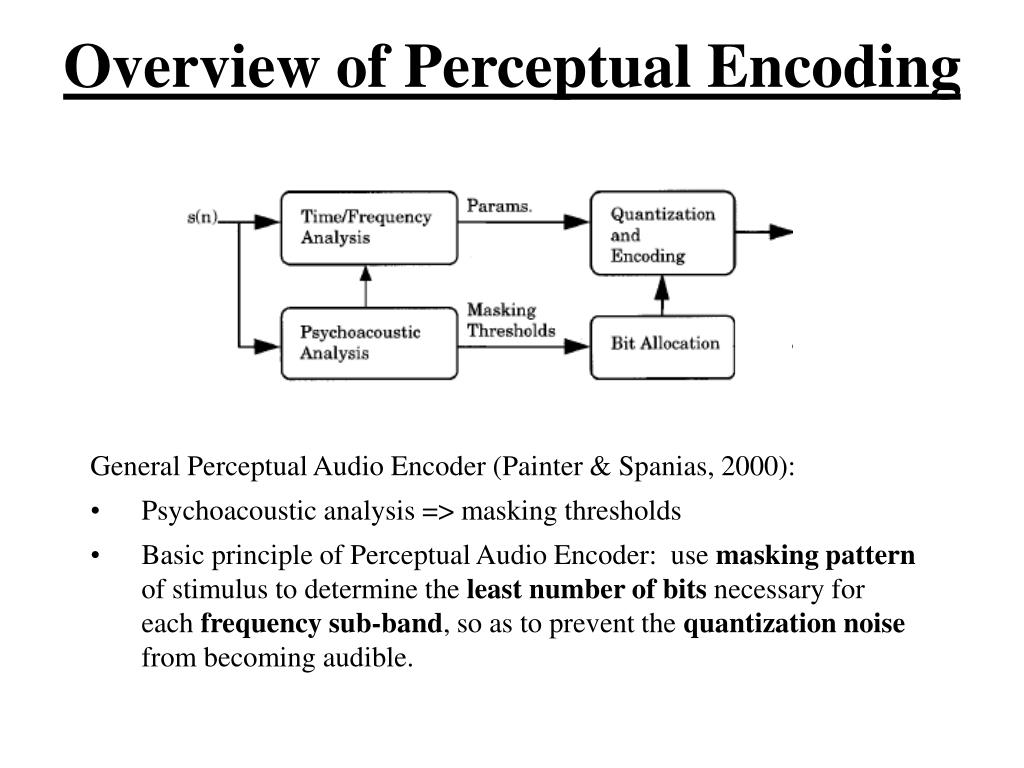
How does this standard, which has been the main standard in this area for 24 years, despite many more advanced free options? mp3 is in many ways similar in principle to its cousin in the photo world: JPEG. Due to the imperfection of our hearing aid and the peculiarities of psychoacoustics, it is possible to “discard” those parts of the audio spectrum that do not make a significant contribution to the musical pattern. In particular, in the illustration above, you can see how the amount of information encoded in the high-frequency region increases.

High frequencies are often sacrificed for the sake of preserving detail in the lower region – vocals, most instruments (thanks for the comment, KorDen32). Standard values ​​of cutoff frequencies for the lame encoder:

CBR 096 kbps: 14000 – 15000 Hz;
CBR 112 kbps: 15000-15600 Hz;
CBR 128 kbps: 16000 – 16500 Hz;
CBR 160 kbps: 16500-17500 Hz;
CBR 192 kbps: 18000-18700 Hz;
CBR 224 kbps: 19000-19400 Hz;
CBR 256 kbps: 19500-19700 Hz;
CBR 320 kbps: 20,000 – 21,000 Hz.

The method can be compared to the creativity of flavor chemists. You’ve probably noticed that strawberry gum is very conventionally strawberry, and there isn’t enough lemon in synthetic lemon tea. Any natural flavoring composition contains dozens and even hundreds of chemical compounds. But the main core generally creates only a very limited amount. So, for example, vanillin defines most of the aroma of natural vanilla, and if you don’t appreciate the subtle nuances too much, the remaining components can be neglected. mp3 uses the same principles, removing insignificant portions of the spectrum. Most people cannot tell the lossless formats by ear from the normally encoded 320kbps mp3s, which saves a lot of space when storing your media library.

Audio Coding: Secrets Revealed Part 2

Audio Coding: Secrets Revealed Part 2

Bit Depth

Bit depth

audio encoding

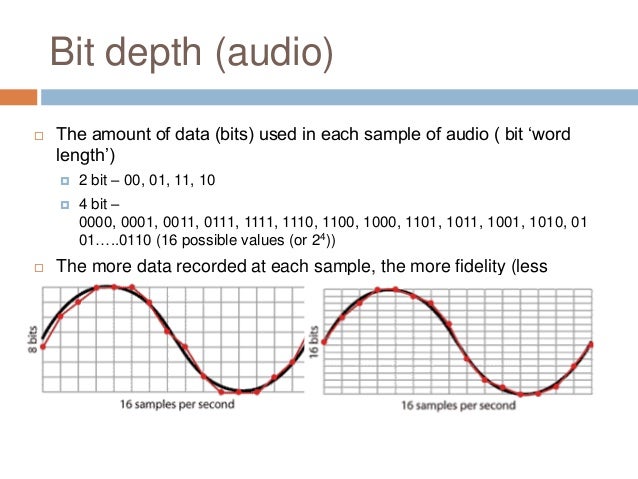
Along with the sample rate, there is the bit depth or depth of the sound. Bit depth is the number of bits of digital information to encode each sample. Simply put, the bit depth determines the “accuracy” of the input signal measurement. The larger the digit capacity, the smaller the error will be for each individual conversion from the magnitude of an electrical signal to a number and vice versa. With the smallest possible bit depth, there are only two options for measuring sound accuracy: 0 for full silence and 1 for full sound. If the bit width is 8 (16), then by measuring the input signal, 2 8 = 256 (2 16 = 65,536) different values ​​can be obtained.

Bit depth is fixed in the PCM codec, but for codecs that assume compression (eg MP3 and AAC), this parameter is calculated during encoding and may vary from sample to sample.

Bitrate
Bit rate is an indicator of the amount of information that one second of sound encodes. The higher it is, the less distortion and the closer the encoded composition is to the original. For linear PCM, the bit rate is very easy to calculate.

bitrate = sample rate × bit depth × channels

For systems like the Epiphan Pearl Mini that encode 16-bit (16-bit) linear PCM, this calculation can be used to determine how much additional bandwidth the PCM audio might require. For example, for stereo (two channels), the signal is digitized at 44.1 kHz at 16 bits and the bit rate is calculated as follows:

44.1 kHz × 16 bit × 2 = 1411.2 kbps

Meanwhile, audio compression algorithms like AAC and MP3 have fewer bits to transmit the signal (that’s their purpose), so they use low bit rates. Typically, the values ​​are in the range of 96 kbps to 320 kbps. For these codecs, the higher the bit rate you choose, the more audio bits you get per sample and the better the sound quality.

Sample rate, bit depth and bit rates in real life.
Audio CDs, one of the most popular early inventions for the general public for storing digital audio, used 44.1 kHz (20 Hz – 20 kHz, human ear range) and 16 bits. These values ​​were chosen to be able to save as much audio as possible to disk with good sound quality.

When video was added to audio and DVD and then Blu-ray discs came along, a new standard was created. DVD and Blu-Ray recordings typically use 48 kHz (stereo) or 96 kHz (5.1 surround) linear PCM format and 24-bit depth. These settings have been selected as ideal for keeping audio in sync with video while obtaining the best possible quality using the additional available disk space.

Our recommendations
CDs, DVDs, and Blu-Ray discs all have one goal: to provide the consumer with a high-quality playback engine. The goal of all developments was to provide high-quality audio and video without worrying about file size (if only it could fit on disk). Such quality could be provided by linear PCM.

In contrast, mobile media and streaming media have a completely different goal: to use the lowest bit rate, as low as possible, while still being sufficient to maintain acceptable quality for the listener. Compression algorithms are best suited for this task. You can follow the same principles for your records.

When recording audio from a video …
In case the record is used for the next on-ra-ki-bot, choose the 48 kHz PCM codec and the maximum bit depth (16 or 24) to provide the best audio quality. We recommend these parameters for Epiphan Pearl Mini.

When streaming audio from video …
With streaming or recording for later translation, good sound can be obtained with less bandwidth, using MP3 or AAC codecs with a frequency of 44.1 kHz and a bit rate of 128 kbit / s or higher. These parameters ensure that the sound is good enough without affecting the quality of the transmission.

Audio encoding: secrets revealed

Audio encoding: secrets revealed

Audio Encoding

Audio settings for video capture and transmission.

audio and video encoding

As people directly related to the AV sphere, we constantly talk about audio coding and audio codecs, but what is it? An audio codec is essentially a device or algorithm that can encode and decode a digital audio signal.

In practice, the audio waves that travel through the air are continuous analog signals. The signals are converted to digital form by a device called an analog-to-digital converter (ADC), and the reverse converter is called a digital-to-analog converter (DAC). The codec lies between these two functions and it is he who allows you to adjust some important parameters for the successful capture, recording and transmission of an audio signal: the codec algorithm, the sampling frequency, the bit width and the speed of the audio signal. data.

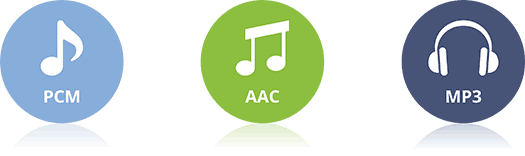
The three most popular audio codecs are Pulse-Code Modulation (PCM), MP3, and Advanced Audio Coding (AAC). The choice of codec determines the compression rate and the recording quality. PCM is a codec used by computers, CDs, digital phones, and sometimes SACD. The PCM signal source is sampled at regular intervals, and each sample is the digital amplitude of the analog signal. PCM is the simplest option for digitizing an analog signal.

With the correct parameters, this digitized signal can be completely converted back to analog without any loss. But this codec, which provides an almost complete identity with the original audio, is unfortunately not very cheap, which translates into very large file sizes, and such files are not suitable for streaming. We recommend using PCM to record digital images for your sources or when doing audio post-processing.

Fortunately, we always have the option of choosing a different codec that can compress digital data (rather than PCM) based on some helpful observations on the behavior of sound waves. But in this case, you have to make a compromise: all alternative algorithms are associated with “losses”, since it is impossible to completely restore the original signal, but nevertheless the result is still so good that most users will not be able to to catch the difference.

MP3 is an audio encoding format that uses a digital data compression algorithm that allows you to save the audio signal in smaller files. The MP3 codec is the most used by users to record and store music files. We recommend using MP3 to stream audio content as it requires less network bandwidth.

AAC is a newer audio encoding algorithm that is the successor to MP3. AAC has become the standard for MPEG-2 and MPEG-4 formats. In fact, this is also a digital data compression codec, but with less quality loss than MP3 when encoded with the same bit rate. We recommend using this codec for online streaming.

Sampling frequency (kHz, kHz)
Sample rate (or sample rate): the frequency with which the signal is digitized, stored, processed, or converted from analog to digital. Time sampling means that the signal is represented by several of its samples (samples) taken at regular intervals.

Measured in hertz (Hz, Hz) or kilohertz (kHz, kHz,) 1 kHz equals 1000 Hz. For example, 44,100 samples per second can be labeled 44,100 Hz or 44.1 kHz. The selected sample rate will determine the maximum playback frequency and, as follows from Kotelnikov’s theorem, to fully restore the original signal, the sample rate must be twice the highest frequency in the signal spectrum.

As you know, the human ear is capable of picking up frequencies between 20 Hz and 20 kHz. Given these parameters and the values ​​shown in the table below, you can understand why 44.1 kHz was chosen as the sampling frequency for CD and is still considered a very good frequency for recording.

There are several reasons for choosing a higher sample rate, although it may seem like a waste of time and effort to reproduce sound outside the range of human hearing. At the same time, 44.1 – 48 kHz will suffice for the average listener for a high-quality solution to most problems.

Audio encoding and processing

Audio encoding and processing

Encoding

Sound information.

ENCODING

Sound is a wave that travels through air, water, or other medium with a continuously changing intensity and frequency.

A person perceives sound waves (air vibrations) with the help of hearing in the form of sound of different volume and pitch. The higher the intensity of the sound wave, the louder the sound, the higher the frequency of the wave, the higher the pitch of the sound

The human ear perceives sound at a frequency of 20 vibrations per second (low sound) to 20,000 vibrations per second (high sound).

A person can perceive sound in a wide range of intensities, in which the maximum intensity is 10 14 times greater than the minimum (one hundred thousand billion times). A special unit “decibel” (dbl) is used to measure the volume of sound (Table 5.1). Decreasing or increasing the volume of the sound by 10 dB corresponds to a decrease or increase in the intensity of the sound by 10 times.

Table 5.1. Sound volume
Sonar Volume in decibels
Lower limit of human ear sensitivity 0
Whisper of Leaves 10
Conversation 60
Horn 90
Jet engine 120
Pain threshold 140
Sound time sampling. For a computer to process sound, a continuous audio signal must be converted to a discrete digital form using time sampling. A continuous sound wave is divided into separate small time sections, for each section a certain value of sound intensity is set.

Therefore, the continuous dependence of the loudness of the sound at time A (t) is replaced by a discrete sequence of loudness levels.

Sampling frequency.

A microphone connected to the sound card is used to record analog sound and convert it to digital format. The quality of the digital sound obtained depends on the number of measurements of the sound volume level per unit time, that is, the sampling frequency. The more measurements that are made in 1 second (the higher the sampling frequency), the more accurately the “ladder” of the digital audio signal repeats the curve of the dialogue signal.

The audio sample rate is the number of measurements of the volume of a sound in one second.

The audio sample rate can range from 8000 to 48000 sound volume measurements per second.

Audio encoding depth. Each “step” is assigned a specific value for the volume level of the sound. Loudness levels of sound can be viewed as a set of possible states N, for which a certain amount of information is needed to encode, which is called audio encoding depth.

Audio encoding depth is the amount of information required to encode the discrete volume levels of digital audio.

If the known encoding depth, the number of digital audio volume levels can be calculated using the formula N = 2 I. Let the sound encoding depth be 16 bit, then the number of sound volume levels is:

N = 2 I = 2 16 = 65 536.

During the encoding process, each sound volume level is assigned its own 16-bit binary code, the smallest sound level will correspond to the code 0000000000000000 and the highest, 1111111111111111.

The quality of digitized sound. The higher the sound sampling frequency and depth, the better the digitized sound will sound. The lowest quality of digitized sound, corresponding to the quality of telephone communication, is obtained at a sampling rate of 8000 times per second, a sampling rate of 8 bits, and by recording an audio track (“mono” mode). The highest quality digitized audio, corresponding to the quality of an audio CD, is achieved with a sampling rate of 48,000 times per second, a sampling rate of 16 bits, and the recording of two audio tracks (“stereo” mode ).

It should be remembered that the higher the quality of the digital sound, the greater the volume of information in the audio file. It is possible to estimate the information volume of a digital stereo sound file with a duration of 1 second with an average sound quality (16 bits, 24,000 measurements per second). To do this, the encoding depth must be multiplied by the number of measurements in 1 second and multiplied by 2 (stereo sound):

16 bits × 24,000 × 2 = 768,000 bits = 96,000 bytes = 93.75 KB.

Audio Coding: Secrets Revealed – Part 2

Audio Coding: Secrets Revealed – Part 2

AUDIO ENCODING

Audio settings for video capture and transmission.

AUDIO ENCODING

Sampling frequency (kHz, kHz)
Sample rate (or sample rate): the frequency with which the signal is digitized, stored, processed, or converted from analog to digital. Time sampling means that the signal is represented by several of its samples (samples) taken at regular intervals.

Measured in hertz (Hz, Hz) or kilohertz (kHz, kHz,) 1 kHz equals 1000 Hz. For example, 44,100 samples per second can be labeled 44,100 Hz or 44.1 kHz. The selected sample rate will determine the maximum playback frequency and, as follows from Kotelnikov’s theorem, to fully restore the original signal, the sample rate must be twice the highest frequency in the signal spectrum.

As you know, the human ear is capable of picking up frequencies between 20 Hz and 20 kHz. Given these parameters and the values ​​shown in the table below, you can understand why 44.1 kHz was chosen as the sampling frequency for CD and is still considered a very good frequency for recording.

There are several reasons for choosing a higher sample rate, although it may seem like a waste of time and effort to reproduce sound outside the range of the human ear. At the same time, 44.1 – 48 kHz will suffice for the average listener for a high-quality solution to most problems.

Bit depth
Along with the sample rate, there is the bit depth or depth of sound. Bit depth is the number of bits of digital information to encode each sample. Simply put, the bit depth determines the “accuracy” of the input signal measurement. The larger the digit capacity, the smaller the error for each individual conversion from the magnitude of an electrical signal to a number and vice versa. With the smallest possible bit depth, there are only two options for measuring sound accuracy: 0 for full silence and 1 for full sound. If the bit width is 8 (16), then by measuring the input signal, 2 8 = 256 (2 16 = 65,536) different values ​​can be obtained.

Bit depth is fixed in the PCM codec, but for codecs that assume compression (eg MP3 and AAC), this parameter is calculated during encoding and may vary from sample to sample.

Bitrate
Bit rate is an indicator of the amount of information that one second of sound encodes. The higher it is, the less distortion and the closer the encoded composition is to the original. For linear PCM, the bit rate is very easy to calculate.

bitrate = sample rate × bit depth × channels

For systems such as the Epiphan Pearl Mini that encode 16-bit (16-bit) linear PCM, this calculation can be used to determine how much additional bandwidth the PCM audio might require. For example, for stereo (two channels), the signal is digitized at 44.1 kHz at 16 bits and the bit rate is calculated as follows:

44.1 kHz × 16 bit × 2 = 1411.2 kbps

Meanwhile, audio compression algorithms like AAC and MP3 have fewer bits to transmit the signal (that’s their purpose), so they use low bit rates. Typically, the values ​​are in the range of 96 kbps to 320 kbps. For these codecs, the higher the bit rate you choose, the more audio bits you get per sample and the better the sound quality.

Sample rate, bit depth and bit rates in real life.
Audio CDs, one of the most popular early inventions for the general public for storing digital audio, used 44.1 kHz (20 Hz – 20 kHz, human ear range) and 16 bits. These values ​​were chosen to be able to save as much audio as possible to disk with good sound quality.

When video was added to audio and DVD and then Blu-ray discs came along, a new standard was created. DVD and Blu-Ray recordings typically use 48 kHz (stereo) or 96 kHz (5.1 surround) linear PCM format and 24-bit depth. These settings have been chosen as ideal for keeping the audio in sync with the video while obtaining the best possible quality using additional available disk space.

Our recommendations
CDs, DVDs, and Blu-Ray discs all have one goal: to provide the consumer with a high-quality playback engine. The goal of all developments was to provide high-quality audio and video without worrying about file size (if only it could fit on disk). Such quality could be provided by linear PCM.

By contrast, mobile media and streaming media have a completely different goal: to use the lowest bit rate possible, while still being sufficient to maintain acceptable quality for the listener.

Audio encoding: secrets revealed

Audio encoding: secrets revealed

audio encoding

Audio settings for video capture and transmission.

AUDIO ENCODING

As people directly related to the AV sphere, we constantly talk about audio coding and audio codecs, but what is it? An audio codec is essentially a device or algorithm that can encode and decode a digital audio signal.

In practice, the audio waves that travel through the air are continuous analog signals. The signals are converted to digital form by a device called an analog-to-digital converter (ADC), and the reverse converter is called a digital-to-analog converter (DAC). The codec lies between these two functions and it is he who allows you to adjust some important parameters for the successful capture, recording and transmission of an audio signal: the codec algorithm, the sampling frequency, the bit width and the speed of the audio signal. data.

The three most popular audio codecs are Pulse-Code Modulation (PCM), MP3, and Advanced Audio Coding (AAC). The choice of codec determines the compression rate and the recording quality. PCM is a codec used by computers, CDs, digital phones, and sometimes SACD. The PCM signal source is sampled at regular intervals, and each sample is the digital amplitude of the analog signal. PCM is the simplest option for digitizing an analog signal.

With the correct parameters, this digitized signal can be completely converted back to analog without any loss. But this codec, which provides an almost complete identity with the original audio, is unfortunately not very cheap, which results in very large file sizes, and such files are not suitable for streaming. We recommend using PCM to record digital images for your sources or when doing audio post-processing.

Fortunately, we always have the option of choosing a different codec that can compress digital data (rather than PCM) based on some helpful observations on the behavior of sound waves. But in this case, you have to make a compromise: all alternative algorithms are associated with “losses”, since it is impossible to completely restore the original signal, but nevertheless the result is still so good that most users will not be able to to catch the difference.

MP3 is an audio encoding format that uses a digital data compression algorithm that allows you to save the audio signal in smaller files. The MP3 codec is the most used by users to record and store music files. We recommend using MP3 to stream audio content as it requires less network bandwidth.

AAC is a newer audio encoding algorithm that is the successor to MP3. AAC has become the standard for the MPEG-2 and MPEG-4 formats. In fact, this is also a digital data compression codec, but with less quality loss than MP3 when encoded with the same bit rate. We recommend using this codec for online streaming.

Digital audio encoding

Digital audio encoding

Digital audio encoding

PC-based audio coding is based on the process of converting air vibrations into electrical current fluctuations and the subsequent sampling of an analog electrical signal.

DIGITAL AUDIO ENCODING

The encoding and reproduction of audio information is carried out using special programs. The quality of reproduction of the encoded sound depends on the sampling frequency and its resolution (sound encoding depth – the number of levels).

Digital audio is an analog audio signal represented by discrete numerical values ​​of its amplitude.

Sound digitization is a technology with a divided time step and subsequent recording of the values ​​obtained in numerical form. Another name for digitizing audio is analog to digital audio conversion, which includes the following operations:

Bandwidth limiting is done by using a low pass filter to suppress spectral components that are more than half the sample rate.

Time sampling, that is, replacing a continuous analog signal with a sequence of its values ​​at discrete moments of time: samples.

Level quantization is the replacement of the signal’s reference value with the closest value of a set of fixed values: quantization levels.

Encoding or digitization, as a result of which the value of each quantized sample is represented as a number corresponding to the ordinal number of the quantization level.

This is done as follows: a continuous analog signal is “cut” into sections with a sample rate, a discrete digital signal is obtained, which goes through the quantization process with a certain bit depth, and is then encoded, that is, it is replaced by a sequence of code symbols. To record sound in a 20-20,000 Hz frequency band, a sampling frequency of 44.1 and higher is required (today there are ADCs and DACs with a sampling frequency of 192 and even 384 kHz). To obtain a high-quality recording, 16-bit is sufficient, however, to expand the dynamic range and improve the quality of the sound recording, 24 (less often 32) bits are used.

Sound coding methods (of course an electrical signal coming from a microphone) are based on the fact that, theoretically, any complex sound can be decomposed into a sequence of simpler harmonic signals of different frequencies, each of which it is a sinusoid, called the spectrum of the original signal. The task of encoding sound, like any other analog signal, is to represent it in the form of another analog or digital signal, which is more convenient for its transmission or storage in each specific case. Real sound sources have a limited spectrum width, therefore, for encoding, transformation methods are used that transform the original signal into one, the spectrum of which is more suitable for transmission on the selected channel. Representing an analog signal as another analog signal is commonly referred to as modulation and digitally as encoding. This division is very arbitrary. An analog signal can be represented as a harmonic signal (that is, a sinusoid), the parameters of which change depending on the value of the original signal. In the event that the amplitude of the sinusoid changes with a change in the original signal, it is amplitude modulation (AM). If, depending on the value of the original signal, the frequency or phase of the sinusoid changes, we are dealing with frequency modulation (FM) or phase modulation (PM). Amplitude and frequency modulation, for example, is widely used to transmit sound by radio. These types of modulation, of course, are not the decomposition of the original signal into harmonics. The development of digital technology and the use of computer processing and information storage has led to the widespread use of pulse encoding or modulation methods. Such types of modulation are, for example, pulse code modulation, in which the value of the original signal at regular intervals is represented in code form. The vast majority of “computer sound” is precisely the recording of the binary code of the received signal in short equal time intervals, determined by the sampling frequency. For storage and transmission through communication channels, this signal is usually compressed (reducing the volume by discarding unnecessary or insignificant information). In addition to pulse code modulation, other types of digital modulation (pulse width, pulse frequency, etc.) are also used to encode sound.

Audio encoding.

Audio encoding.

AUDIO ENCODING

Digital audio is an analog audio signal represented by discrete numerical values ​​of its amplitude.

audio encodig

Sound digitization is a technology with a divided time step and subsequent recording of the values ​​obtained in numerical form.

Another name for digitizing audio is analog to digital audio conversion.

Sound digitization involves two processes:

sample (sample) a signal over time
amplitude quantification process.
Meanwhile, there is no need to worry about it. ”

Discretization of time.

Meanwhile, there is no need to worry about it. ”

The time sampling process is the process of obtaining the values ​​of the signal that is being converted, with a certain time step: the sampling step. The number of measurements of the magnitude of the signal, carried out in one second, is called the sampling frequency or the sampling rate, or sampling frequency (from the English “sampling” – “sampling”). The lower the sampling step, the higher the sampling frequency and the more accurate representation of the signal that we will obtain.

This is confirmed by Kotelnikov’s theorem (in foreign literature it is found as Shannon’s theorem, Shannon). According to him, an analog signal with a limited spectrum can be accurately described by a discrete sequence of values ​​of its amplitude, if these values ​​are taken with a frequency that is at least twice the highest frequency in the spectrum of the signal. That is, an analog signal in which the highest spectrum frequency is F m can be accurately represented by a sequence of discrete amplitude values ​​if F d> 2F m is satisfied for the sampling frequency F d.

In practice, this means that for the digitized signal to contain information on the full audible frequency range of the original analog signal (0 – 20 kHz), it is necessary that the selected sample rate be at least 40 kHz. The number of amplitude measurements per second is called the sampling rate (if the sampling step is constant).

The main difficulty of digitization is the inability to record the measured signal values ​​with perfect precision.

Analog to digital converters (ADC).

Meanwhile, there is no need to worry about it. ”

The above process of digitizing sound is done using analog-to-digital converters (ADCs).

This transformation includes the following operations:

Bandwidth limiting is done by a low pass filter to suppress spectral components that are more than half the sample rate.
Discretization in time, that is, substitution of a continuous analog signal with a sequence of its values ​​at discrete moments in time: samples. This problem is solved by using a special circuit at the input of the ADC – a sample and hold device.
Level quantization is the replacement of the signal’s reference value with the closest value of a set of fixed values: quantization levels.
Encoding or digitization, as a result of which the value of each quantized sample is represented as a number corresponding to the ordinal number of the quantization level.
This is done as follows: a continuous analog signal is “cut” into sections with a sample rate, a discrete digital signal is obtained, which goes through a quantization process with a certain bit depth, and is then encoded, that is, it is replaced by a sequence of code symbols. To record sound in a frequency band of 20-20,000 Hz, a sampling frequency of 44.1 and higher is required (today there are ADCs and DACs with a sampling frequency of 192 and even 384 kHz). To obtain a high-quality recording, 16 bits are sufficient, however, to expand the dynamic range and improve the quality of sound recording, 24 (less often 32) bits are used.

Meanwhile, there is no need to worry about it. ”

Encoding methods.

Frequency modulation.

Sound coding methods (of course we mean the electrical signal coming from the microphone) are based on the fact that, in theory, any complex sound can be broken down into a sequence of the simplest harmonic signals of different frequencies, each one of which is a sinusoid, called the original signal spectrum. The task of encoding sound, like any other analog signal, is to represent it in the form of another analog or digital signal, more convenient for its transmission or storage in each specific case.