The Science of Audio Encoding: Technical Aspects


Free Download Mp4Gain
picture

The Science of Audio Encoding: Technical Aspects

The Science of Audio Encoding

Audio encoding is the process of converting analog sound into digital data. This data can then be stored or transmitted in a variety of formats, such as WAV, MP3, or AAC.

There are two main types of audio encoding: lossless and lossy. Lossless encoding preserves all of the original sound data, resulting in high-quality audio but large file sizes. Lossy encoding removes some of the original sound data, resulting in smaller file sizes but lower sound quality.

The process of audio encoding can be divided into three main steps: sampling, quantization, and compression.

Sampling

The first step in audio encoding is sampling. In this step, the analog sound signal is converted into a series of discrete values. The number of times per second that the sound signal is sampled is called the sample rate. Higher sample rates result in more accurate representations of the original sound signal, but they also result in larger file sizes.

Quantization

The second step in audio encoding is quantization. In this step, each sample value is rounded to the nearest integer value. The number of bits used to represent each sample value is called the bit depth. Higher bit depths result in more accurate representations of the original sound signal, but they also result in larger file sizes.

Compression

The third and final step in audio encoding is compression. In this step, the digital audio data is compressed to reduce its file size. There are a number of different compression algorithms that can be used, each with its own advantages and disadvantages.

The most common compression algorithms for audio encoding are:

  • MP3: MP3 is a lossy compression algorithm that is widely used for storing and transferring audio files. MP3 files are typically much smaller than WAV files, while still providing good sound quality.
  • AAC: AAC is another lossy compression algorithm that offers better sound quality than MP3. AAC files are typically slightly larger than MP3 files, but they offer a noticeable improvement in sound quality.
  • FLAC: FLAC is a lossless compression algorithm that offers similar sound quality to WAV, but with much smaller file sizes. FLAC files are a good choice for people who want the best possible sound quality without sacrificing file size.

Final Words

Audio encoding is a complex process that involves converting analog sound into digital data. The quality of the audio that is encoded can be affected by a number of factors, including the sample rate, bit depth, and compression of the audio file.

If you are looking for the best possible sound quality, you should use a lossless audio format such as WAV or FLAC. However, if you need to store or transfer audio files over a network, you should use a lossy audio format such as MP3 or AAC.


Free Download Mp4Gain
picture


Mp4Gain Main Window
picture


Mp4Gain Features
picture


Free Download Mp4Gain
picture

Audio Expansion

How Understanding Audio Expansion Can Improve Your Music Production

Audio Expansion
Audio Expansion
Audio Expansion
Audio Expansion

What is Audio Expansion and How Does it Work?

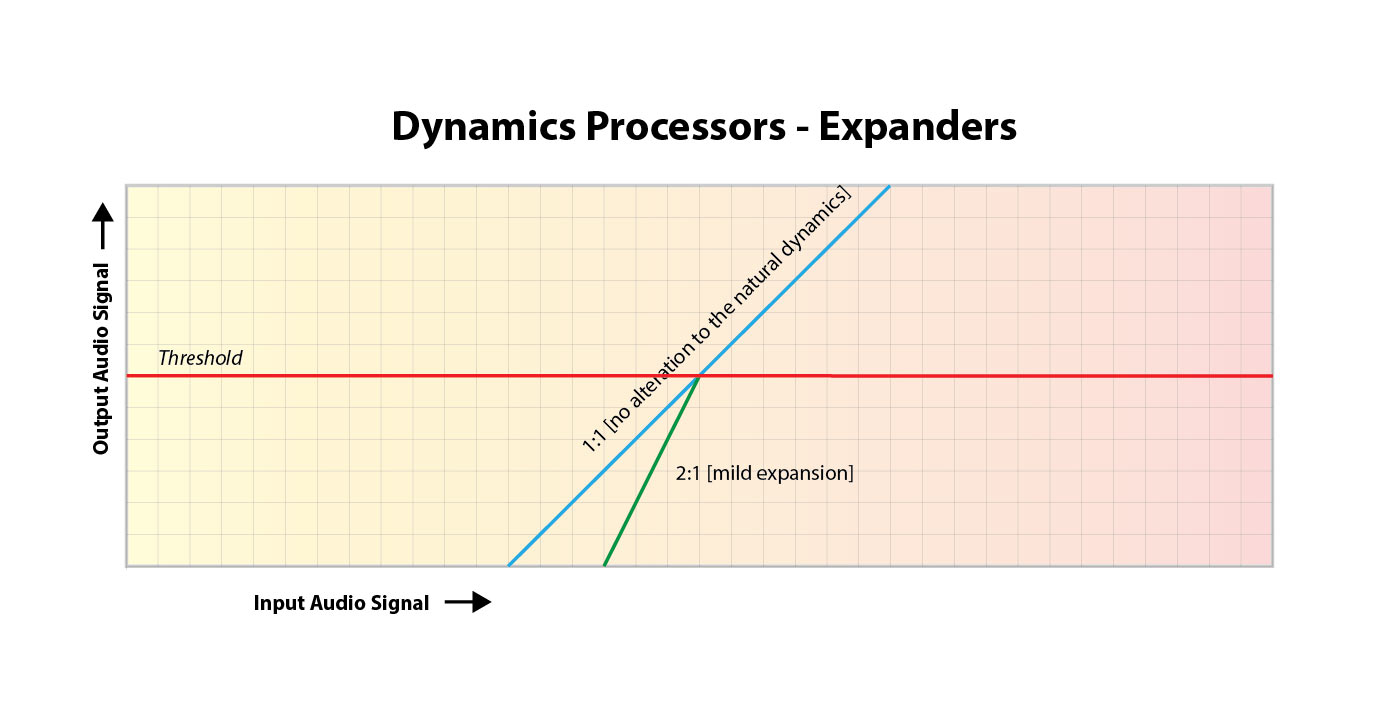
As a music producer, understanding the concept of audio expansion is crucial to achieving the desired sound quality in your productions. Audio expansion, also known as upward expansion, is a dynamic audio processing technique that increases the gain of a signal when it is below a certain threshold level. This technique is used to increase the dynamic range of a signal by amplifying only the quieter parts, resulting in a more natural and transparent sound.
To put it simply, audio expansion is like a reverse compressor. While a compressor reduces the dynamic range of a signal by reducing the gain of louder parts, an expander increases the dynamic range by amplifying quieter parts. According to Roey Izhaki in “Mixing Audio,” “expansion is a powerful tool that can significantly enhance a mix, giving it a lively and open sound.”

How to Use Audio Expansion in Your Music Production

To use audio expansion effectively, you first need to set the threshold level. The threshold is the level at which the expander starts to increase the gain. The higher the threshold, the less effect the expander will have. You also need to set the ratio, which determines the amount of gain increase when the signal falls below the threshold level. The ratio is expressed in decibels and can range from 1.5:1 to 10:1 or higher.
One important thing to keep in mind is that audio expansion should be used sparingly. Overuse can result in an unnatural and exaggerated sound. It is recommended to use a gentle ratio and adjust the threshold level to suit the dynamics of the source material.

The Benefits of Audio Expansion in Music Production

Using audio expansion in your music production can result in a more natural and transparent sound. It can also help to improve the overall dynamic range of your mix, making it sound more open and spacious. By selectively amplifying the quieter parts of a signal, you can bring out subtle details and nuances that may have been masked by louder elements.
As an audio engineer, I have found that audio expansion can be particularly useful when working with vocals or acoustic instruments. By gently expanding the dynamics, you can help to preserve the natural character of the performance and avoid the artificial sound that can result from heavy compression.

In the words of Roey Izhaki, “expansion can be a great tool to help you achieve your sonic goals.” With careful use and experimentation, audio expansion can be a powerful technique to enhance your music production.

Final Words:
In conclusion, understanding audio expansion is an important skill for any music producer. By using this dynamic processing technique, you can improve the sound quality and dynamic range of your productions. Remember to use audio expansion sparingly and experiment with different settings to find the best results for your mix.

audio dynamics, dynamic processing, audio processing, music production, sound quality, mixing techniques, signal processing, dynamic range, compression, mastering, mixing, audio engineering, audio effects, audio plugins, VST plugins, audio editing, audio software, DAW, audio mixing, audio mastering, audio normalization, audio EQ, audio filters, audio enhancement, audio post-production, audio mastering services, audio production tips, audio recording, audio editing software, audio effects plugins, audio frequency, audio volume, audio levels, audio peak, audio clipping, audio restoration, audio quality, audio improvement,

What is Audio Expansion in Digital Audio?

What is Audio Expansion in Digital Audio?

Audio Expansion in Digital Audio


Digital Audio Expansion Explained

As someone who has been working with digital audio for years, I can tell you that audio expansion is a concept that often gets overlooked, but it’s incredibly important to understand. In simple terms, audio expansion is the process of increasing the dynamic range of a digital audio signal. It involves adjusting the volume of quieter sounds so that they can be heard more easily, while keeping louder sounds at the same level. This results in a more natural and pleasing sound that is easier to listen to for long periods of time.
One great way to understand audio expansion is to think about it in terms of a movie soundtrack. Have you ever been watching a movie, and the dialogue is so quiet that you have to turn up the volume, but then the action scenes are so loud that you have to turn it down again? Audio expansion helps to balance out these differences, so that you can hear everything clearly without constantly adjusting the volume.

Expanding Digital Audio

So how does audio expansion work in the world of digital audio? The process involves applying gain to the quieter parts of the audio signal, while leaving the louder parts untouched. This can be done using specialized hardware or software, and there are many different algorithms that can be used to achieve the desired effect.
One thing to keep in mind is that audio expansion is not the same thing as compression. Compression is the process of reducing the dynamic range of a signal, while expansion is the process of increasing it. While they are both useful tools in the world of audio engineering, it’s important to understand the differences between them in order to use them effectively.

Understanding Audio Dynamics

At its core, audio expansion is all about dynamics. Dynamic range refers to the difference between the loudest and quietest parts of a signal. By expanding the dynamic range of a signal, you are making it easier to hear all of the different elements in the mix. This can be particularly useful in situations where the listener may be in a noisy environment, such as a car or a busy office.
As the legendary producer Quincy Jones once said, “The sound of music is the sound of emotions.” By understanding how audio expansion can help to enhance the emotional impact of a piece of music or a film soundtrack, you can take your work as an audio engineer to the next level.

Dynamic Range in Digital Audio

One of the challenges of working with digital audio is that it can be very easy to lose dynamic range during the recording and mixing process. This is because digital audio has a limited amount of headroom, which means that there is only so much room for the loudest sounds before they start to clip or distort.
Audio expansion can be a powerful tool for restoring some of that lost dynamic range. By carefully adjusting the gain of different parts of the signal, you can bring out subtle nuances in the mix that might otherwise be lost.

Audio Expansion in Depth

There is a lot more to audio expansion than we can cover in just a few paragraphs. If you’re interested in learning more about this important topic, I highly recommend checking out some of the excellent books and articles that have been written on the subject. One of my personal favorites is “Mixing Audio” by Roey Izhaki, which covers audio expansion in depth and provides a wealth of practical advice for audio engineers of all levels.

Expanding audio is a complex and multifaceted process that requires a deep understanding of sound engineering principles. One of the key challenges of audio expansion is managing the dynamic range of a recording. In order to prevent clipping and distortion, engineers must carefully adjust the volume levels of individual tracks and ensure that no single element is too loud or too quiet. Compression and limiting are often used to control the dynamic range of a mix, while expansion can be used to bring out the quieter parts of a recording and enhance its overall presence.

Another important aspect of audio expansion is the use of effects. Effects like reverb, delay, and chorus can add depth and dimension to a mix, while EQ can be used to shape the tone and balance of individual tracks. However, it’s important to use effects sparingly and purposefully, as too much processing can result in a muddy or cluttered sound.

Ultimately, the key to successful audio expansion is a deep understanding of sound engineering principles and a commitment to experimentation and creativity. Whether you’re a seasoned pro or a beginner, there’s always something new to learn and explore in the world of audio production.

Conclusion

In conclusion, audio expansion is a vital component of modern audio production that allows engineers to create rich, dynamic recordings that capture the full range of a musical performance. By carefully managing the dynamic range of a mix, using effects judiciously, and experimenting with different processing techniques, audio engineers can create recordings that sound great on a wide range of playback systems and capture the true essence of a musical performance. So if you’re interested in taking your audio production skills to the next level, be sure to explore the world of audio expansion and see what kind of creative possibilities await you.

Final Words

In the end, audio expansion is a fundamental part of modern audio production that can help you create recordings that truly stand out. By understanding the principles of dynamic range management, using effects creatively, and experimenting with different processing techniques, you can take your recordings to the next level and capture the full essence of a musical performance. And if you’re looking for a powerful tool to help you achieve your audio expansion goals, be sure to check out MP4Gain, the ultimate audio normalization and conversion software for Windows. With its intuitive interface, advanced processing algorithms, and wide range of supported formats, MP4Gain is the perfect tool for any audio production enthusiast looking to take their recordings to the next level.

Structure of an mp3

Structure of an mp3


Structure of an mp3
Structure of an mp3

audio compression

Structure of an mp3
Structure of an mp3


The MP3 format began in the mid-1980s and the Fraunhofer Institute in Erlangen, Germany, was committed to high-quality, low-data-rate audio coding.

MP3 audio compression includes encoding and decoding in two parts. Encoding is converting the data in the WAV file into a highly compressed bitstream format, and decoding is accepting the bitstream and reconstructing it into the WAV file.

MP3 uses the distortion algorithm of Perceptual Audio Coding (PerceptualAudioCoding). The frequency range of sound perceived by the human ear is from 20 Hz to 220 kHz. MP3 cuts out a lot of redundant signals and irrelevant signals. The encoder transforms the original sound into the frequency domain through a hybrid filter bank. Using the psychoacoustic model, it is estimated that it may simply be The perceived noise level is quantized and converted to Huffman coding to form an MP3 bitstream. The decoder is much simpler and its task is to extract the sound signal from the encoded spectral line components through inverse quantization and inverse transformation.

When compressing audio data, the original sound data is first divided into fixed blocks, and then direct MDCT is performed. MDCT itself does not perform data compression, but only converts a set of time-domain data to frequency-domain data to obtain time-domain data. In case of change, the direct MDCT converts the value of each block into 512 MDCT coefficients. Quantization compresses data, and when bits are allocated to transformed samples after quantization, it is necessary to consider making the entire quantized block the smallest, which becomes lossy compression. When decompressing, the 512 coefficients are restored to the original sound data by reverse MDCT, and the original sound data before and after are inconsistent, because redundant and irrelevant data are removed during the compression process.


MP3 file structure
MP3 files are roughly divided into three parts: TAG_V2(ID3V2), Frame, TAG_V1(ID3V1)

ID3V2 Contains information such as author, composer, album, etc., the duration is not fixed, expanding the amount of information of ID3V1
framework


A series of frames, the number is determined by the file size and frame length

The length of each frame can be variable or fixed, determined by the bit rate.

Each FRAME is divided into two parts: frame header and data entity

The frame header records the bitrate, sample rate, version, and other mp3 information, and each frame is independent of each other.

ID3V1    Contains author, composer, album and other information, length is 128BYTE

Structure of an mp3

Structure of an mp3


Structure of an mp3
Structure of an mp3

The full name of MP3 is MPEG Audio Layer3, which is an efficient computer audio coding scheme.

Structure of an mp3
Structure of an mp3

It converts audio files into smaller files with .MP3 extension with a higher compression ratio and basically keeps the sound quality of the original file. MP3 is part of the ISO/MPEG standard. The ISO/MPEG standard describes audio compression using a high-performance perceptual coding scheme. This standard has been continuously updated to meet the pursuit of “high quality, low volume”. MPEGLayer1, Layer2 , and Layer 3 have now formed three audio codec schemes. The compression rate of MPEGLayer3 can reach from 1:10 to 1:12. A 1M MP3 file can play for 1 minute, while a 1 minute CD-quality WAV file (44100 Hz, 16-bit, two channels, 60 seconds) will take up 10M of space. , A 650M MP3 disc should play for more than 10 hours, while a CD with the same capacity should play for about 70 minutes. The advantages of MP3 are unmatched by CD.

MPEG audio standard
MPEG (Motion Picture Experts Group) is a moving picture expert group under ISO, and the MPEG standard it creates is widely used in various multimedia. MPEG standards include video and audio standards, among which MPEG-1, MPEG-2, MPEG-2AAC, and MPEG-4 audio standards have been developed.

The MPEG-1 and MPEG-2 standards use the same family of audio codecs: Layer 1, 2, and 3. A new feature of MPEG-2 is the use of low sample rate expansion to reduce data traffic, and another feature is multi-channel expansion, which increases the number of main channels to five. The MPEG-2AAC (MPEG-2 Advanced Audio Coding) standard was released by FraunhoferIIS and AT&T in 1997, with the goal of significantly reducing data traffic. MPEG22AAC adopts the Modified Discrete Cosine Transform (MDCT) algorithm and the sampling rate can be between 8 KHz and 96 KHz. The number of channels can be between 1 and 48.

MPEG Audio Layer1, 2, and 3 use the same filter bank, bitstream structure, and header information, and the sample rate is either 32 KHz, 4411 KHz, or 48 KHz. Layer1 is designed for DCC (DigitalCompactCassette) digital compression tape, the data rate is 384kbps, Layer2 has made a compromise between complexity and performance, and the data rate has been reduced to 256kbps-192kbps. Layer 3 was designed for low data traffic from the start, and data traffic ranges from 128 kbps to 112 kbps. Layer 3 adds MDCT transform, making its frequency resolution 18 times higher than Layer 2. Layer 3 also uses EntropyCoding similar to MPEGVid2eo, reducing redundant information. The vast majority of MP3s use the MPEG21 standard.

What are MP3 files?

What are MP3 files?

What are MP3 files?


The audio format is directly related to the quality and purpose of the audio track, i.e. where and on which device it will be played and what is its purpose.

What are MP3 files?

But before you can figure out the difference between them and choose the best audio format for your music, you need to know what categories they fall into. Let’s keep going!

Uncompressed audio is like a picture, and uncompressed audio is of better quality, larger file size, safer to copy, and nearly identical in detail to the original sound.

WAV is the most widely used of these audio formats and plays music just as accurately as it records it.

compressed audio
When music is compressed, the files become smaller and can be easily stored on a device. Due to this advantage, users tend to choose compressed audio more.

However, it must be remembered that some audio formats in this category may lose quality depending on the option selected, just like MP3 and AAC.

What is the best audio format?
As we said before, the first step in deciding on an audio format is to know the final objective of the track. Whether it’s for music lessons, performances, karaoke, auditions, or recording versions, you need to understand the pros and cons of each option.

WAV
WAV (Waveform Audio File Format) is an uncompressed format and therefore requires ample storage space. This is suitable for those who already work with music, such as subject matter experts, or users who want to edit audio.

At high fidelity rates, WAV faithfully reproduces the elements and characteristics of the original soundtrack. Also, this format allows you to choose between different sample rates and bit rates and can be used on multiple platforms.

FLAC
FLAC (Free Lossless Audio Codec) is one of the most widely used compression formats by music lovers these days.

Digital audio encoding allows you to preserve its quality, but the resulting file will be smaller. Over the years, this format has become more widely used and compatible with different devices and platforms.

FLAC is free and open source, ready to use and can be easily played on smartphones and other devices.

MP3
Before deciding on the best audio format, it is worth taking a look at the most famous format in the world of music: MP3.

MP3 is one of the leading audio compression formats, and has become synonymous with the convenience and efficiency of producing files quickly, with smaller files, and at a certain level of quality.

Many devices and programs can play this format. But MP3 is difficult to use in professional audio processing and advanced audio editing.

As is known, this format exists on almost all platforms and is ideal for sharing audio.

Another interesting factor is its bitrate, although in a compressed format it can vary depending on the user’s objectives and quality improvements.

AAC Like MP3, Advanced Audio Coding (AAC) is a more efficient audio format than its predecessor.

If you need to create smaller files with less storage space, AAC is a great choice, reducing the file size for the user while maintaining a high-quality audio track.

Compatible with different platforms and devices, it is convenient to apply in different situations.

Analysis of the above audio formats leads to the conclusion that it is impossible to say which format is better than the other, just that each target has its own ideal format. So before downloading or uploading a file, check what platform the music will play on and what it is for.

What are MP3 files?

What are MP3 files?

What are MP3 files?
What are MP3 files?

A file with the .mp3 extension is a digitally encoded file format for audio files, officially based on MPEG-1 Audio Layer III or MPEG-2 Audio Layer III.

What are MP3 files?
What are MP3 files?

It was developed by the Moving Picture Experts Group (MPEG) using Layer 3 audio compression. The compression achieved by the MP3 file format is 1/10 the size of a .WAV or .AIF file. This format offers the advantage of streaming such audio files over the Internet for online listening, which was previously not possible due to the large size of audio files. The sound quality of MP3 audio files can be controlled by setting parameters such as bit rate, sample rate, common or normal stereo.

A brief history of MP3

The MP3 format was invented and developed by a German company, Fraunhofer-Gesellshart. The algorithm has licensed patents for the compression techniques it uses. Here’s a helpful MP3 schedule:

• 1987 : The Fraunhofer Institute in Germany begins research on high-quality, low-bitrate audio coding. It’s called the EUREKA project EU147, Digital Audio Broadcasting.

• January 1988: The Moving Picture Experts Group (MPEG) is formed.

• **April 1989**: Fraunhofer patented the MP3 in Germany.

• 1992-Dieter Seitzer, who helped Fraunhofer with his research, integrated his audio encoding with MPEG-1.

• 1993 – Publication of the MPEG-1 standard.

• 1994 – The MPEG-2 standard was developed and released a year later.

• November 26, 1996 : US patent for MP3 is published.

• September 1998 – Fraunhofer begins to enforce the patent. People who used the MP3 audio codec paid Fraunhofer a license fee.

• February 1999 – SubPop, a record label, releases music in MP3 format, the first to do so.

• 1999 – The first portable MP3 player appears.

File format MP3##
MP3 files consist of MP3 frames, where each frame consists of a header and a data block. Frames are not independent and generally cannot be mined at arbitrary frame boundaries. The data blocks of a file contain frequency and amplitude information about the audio. The sync word in the header identifies the start of a valid frame. This is followed by 3 bits where the first bit indicates that it is an MPEG standard and the remaining 2 bits indicate that layer 3 is used; therefore, MPEG-1 Audio Layer 3 or MP3. After this, the value will vary depending on the MP3 file. ISO/IEC 11172-3 defines the range of values for each part of the header and the header specification. Most current MP3 files contain ID3 metadata, which precedes or follows the MP3 frame, as shown. Data streams may contain an optional checksum.

Which format has the best sound quality for music?

Which format has the best sound quality for music?

Music Format
Music Format


PCM, the highest level in audio files, is the ancestor of all digital audio (not including analog), with the highest fidelity and high volume.

Music Format
Music Format

Common formats include pcm and cda, which are primarily used to burn records as CD files. CD is not a format, it is a standard, please refer to the official red book published by SONY (Sony) for details. It could be on a common CD-ROM, which was later modified) and cannot be saved as format.
Therefore, it must be said that PCM format has the best sound quality, but its volume is extremely large, so it generally uses WAV as the original file to save audio files, the quality is also quite high, the loss is almost quite small, but the volume is relatively large. This is a format developed and illustrated by Microsoft, which is suitable for Windows operating systems and can also be used on the latest MAC systems. Extension: .wav
is the original audio format dedicated to the MAC system, it is AIFF, the extension is Aiff, which was independently developed by Apple and is very common on Mac. That said, this is the best format (except PCM) on a Mac.
On Unix and Java platforms (which mostly refer to SUN platforms), the corresponding format is AU and the extension is au. It is currently the standard audio format under Unix and Java.
The above formats are all original file formats, which are usually huge in size. In order to facilitate transmission on computers, people have developed compression formats. Compression is divided into lossy compression and lossless compression. Obviously, lossy compression has a higher compression rate, but it requires The problem to be solved is how to solve the sound quality problem. The usual practice is to sacrifice the part that the human ear cannot hear, but the human ear is very different, so it is difficult to care for all people. Among the song formats, the best ones are flac (lossless, flac extension), Monkey’s Audio (lossless, ape extension), DTS (multichannel, mainly used with DVD, dtc/wav extension), AC3 (released by Dolby, multichannel surround , realistic sense of presence, extension ac3), AAC (loaded, good sound quality, extension Aac or mp4), WMV (this is also a video format, an improved version of wma and asf, quality is comparable High, extension wmv), as well as MusePack (mpc extension, completely free) and MP3Pro (mp3 extension) are also quite good, these formats are quite high in sound quality, even for users who require not bad sound. Also, the most popular formats are mp3 and ogg, as well as SONY’s special ATRAC/ATRAC3 format, which is dedicated to MD. These effects are also good and are more common on the Internet, but the effect is obviously not as good as the formats mentioned above.
As for rm and wma, because the compression is too high, the sound quality is really unflattering, especially those that circulate on the Internet, which are lost and cannot be lost anymore, so it is highly discouraged.

What music format has the best sound quality?

What music format has the best sound quality?

Music Format
Music Format

When I want to download songs, I always feel that the sound quality is not so pure, it seems a bit muddy, what format is good to listen to?

Music Format
Music Format

There are three lossless music quality formats: ape, wav and flac.

APE is one of the popular lossless compression formats for digital music. Due to its early appearance, it has a wide user base all over the world, especially in mainland China. Lossless compression formats such as APE use a more refined recording method to reduce volume, and the restored data is the same as the original file, ensuring file integrity.

WAV is a sound file format developed by Microsoft. It complies with the RIF file specification and is used to store audio information resources on the Windows platform. It is widely compatible with the Windows platform and its applications. This format supports a variety of compression types. algorithms and supports multiple WAV file with standard format is the same as CD format, with 44.1K sampling frequency and 16-bit quantization number, so the sound file quality is almost the Same as CD.

Chinese translation FLAC is a lossless audio compression coding. FLAC is a well-known free audio compression codec, which is characterized by lossless compression. Unlike other lossy compression codes such as MP3 and AAC, it does not destroy any original audio data, so it can restore the sound quality of music discs. It has been compatible with many software and hardware audio products (such as CDs, etc.) since 2012.