Audio Expansion


Free Download Mp4Gain
picture

How Understanding Audio Expansion Can Improve Your Music Production

Audio Expansion
Audio Expansion
Audio Expansion
Audio Expansion

What is Audio Expansion and How Does it Work?

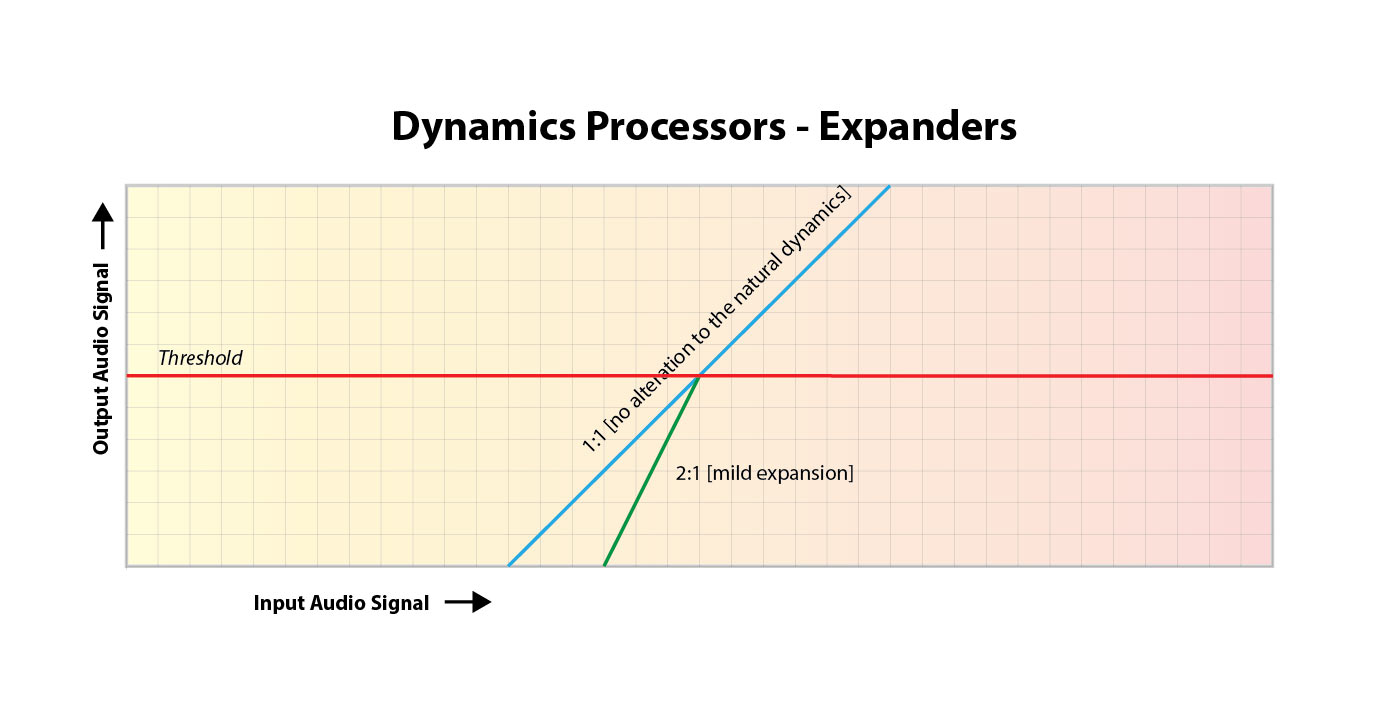
As a music producer, understanding the concept of audio expansion is crucial to achieving the desired sound quality in your productions. Audio expansion, also known as upward expansion, is a dynamic audio processing technique that increases the gain of a signal when it is below a certain threshold level. This technique is used to increase the dynamic range of a signal by amplifying only the quieter parts, resulting in a more natural and transparent sound.
To put it simply, audio expansion is like a reverse compressor. While a compressor reduces the dynamic range of a signal by reducing the gain of louder parts, an expander increases the dynamic range by amplifying quieter parts. According to Roey Izhaki in “Mixing Audio,” “expansion is a powerful tool that can significantly enhance a mix, giving it a lively and open sound.”

How to Use Audio Expansion in Your Music Production

To use audio expansion effectively, you first need to set the threshold level. The threshold is the level at which the expander starts to increase the gain. The higher the threshold, the less effect the expander will have. You also need to set the ratio, which determines the amount of gain increase when the signal falls below the threshold level. The ratio is expressed in decibels and can range from 1.5:1 to 10:1 or higher.
One important thing to keep in mind is that audio expansion should be used sparingly. Overuse can result in an unnatural and exaggerated sound. It is recommended to use a gentle ratio and adjust the threshold level to suit the dynamics of the source material.

The Benefits of Audio Expansion in Music Production

Using audio expansion in your music production can result in a more natural and transparent sound. It can also help to improve the overall dynamic range of your mix, making it sound more open and spacious. By selectively amplifying the quieter parts of a signal, you can bring out subtle details and nuances that may have been masked by louder elements.
As an audio engineer, I have found that audio expansion can be particularly useful when working with vocals or acoustic instruments. By gently expanding the dynamics, you can help to preserve the natural character of the performance and avoid the artificial sound that can result from heavy compression.

In the words of Roey Izhaki, “expansion can be a great tool to help you achieve your sonic goals.” With careful use and experimentation, audio expansion can be a powerful technique to enhance your music production.

Final Words:
In conclusion, understanding audio expansion is an important skill for any music producer. By using this dynamic processing technique, you can improve the sound quality and dynamic range of your productions. Remember to use audio expansion sparingly and experiment with different settings to find the best results for your mix.

audio dynamics, dynamic processing, audio processing, music production, sound quality, mixing techniques, signal processing, dynamic range, compression, mastering, mixing, audio engineering, audio effects, audio plugins, VST plugins, audio editing, audio software, DAW, audio mixing, audio mastering, audio normalization, audio EQ, audio filters, audio enhancement, audio post-production, audio mastering services, audio production tips, audio recording, audio editing software, audio effects plugins, audio frequency, audio volume, audio levels, audio peak, audio clipping, audio restoration, audio quality, audio improvement,


Free Download Mp4Gain
picture


Mp4Gain Main Window
picture


Mp4Gain Features
picture


Free Download Mp4Gain
picture

What is Audio Expansion in Digital Audio?

What is Audio Expansion in Digital Audio?

Audio Expansion in Digital Audio


Digital Audio Expansion Explained

As someone who has been working with digital audio for years, I can tell you that audio expansion is a concept that often gets overlooked, but it’s incredibly important to understand. In simple terms, audio expansion is the process of increasing the dynamic range of a digital audio signal. It involves adjusting the volume of quieter sounds so that they can be heard more easily, while keeping louder sounds at the same level. This results in a more natural and pleasing sound that is easier to listen to for long periods of time.
One great way to understand audio expansion is to think about it in terms of a movie soundtrack. Have you ever been watching a movie, and the dialogue is so quiet that you have to turn up the volume, but then the action scenes are so loud that you have to turn it down again? Audio expansion helps to balance out these differences, so that you can hear everything clearly without constantly adjusting the volume.

Expanding Digital Audio

So how does audio expansion work in the world of digital audio? The process involves applying gain to the quieter parts of the audio signal, while leaving the louder parts untouched. This can be done using specialized hardware or software, and there are many different algorithms that can be used to achieve the desired effect.
One thing to keep in mind is that audio expansion is not the same thing as compression. Compression is the process of reducing the dynamic range of a signal, while expansion is the process of increasing it. While they are both useful tools in the world of audio engineering, it’s important to understand the differences between them in order to use them effectively.

Understanding Audio Dynamics

At its core, audio expansion is all about dynamics. Dynamic range refers to the difference between the loudest and quietest parts of a signal. By expanding the dynamic range of a signal, you are making it easier to hear all of the different elements in the mix. This can be particularly useful in situations where the listener may be in a noisy environment, such as a car or a busy office.
As the legendary producer Quincy Jones once said, “The sound of music is the sound of emotions.” By understanding how audio expansion can help to enhance the emotional impact of a piece of music or a film soundtrack, you can take your work as an audio engineer to the next level.

Dynamic Range in Digital Audio

One of the challenges of working with digital audio is that it can be very easy to lose dynamic range during the recording and mixing process. This is because digital audio has a limited amount of headroom, which means that there is only so much room for the loudest sounds before they start to clip or distort.
Audio expansion can be a powerful tool for restoring some of that lost dynamic range. By carefully adjusting the gain of different parts of the signal, you can bring out subtle nuances in the mix that might otherwise be lost.

Audio Expansion in Depth

There is a lot more to audio expansion than we can cover in just a few paragraphs. If you’re interested in learning more about this important topic, I highly recommend checking out some of the excellent books and articles that have been written on the subject. One of my personal favorites is “Mixing Audio” by Roey Izhaki, which covers audio expansion in depth and provides a wealth of practical advice for audio engineers of all levels.

Expanding audio is a complex and multifaceted process that requires a deep understanding of sound engineering principles. One of the key challenges of audio expansion is managing the dynamic range of a recording. In order to prevent clipping and distortion, engineers must carefully adjust the volume levels of individual tracks and ensure that no single element is too loud or too quiet. Compression and limiting are often used to control the dynamic range of a mix, while expansion can be used to bring out the quieter parts of a recording and enhance its overall presence.

Another important aspect of audio expansion is the use of effects. Effects like reverb, delay, and chorus can add depth and dimension to a mix, while EQ can be used to shape the tone and balance of individual tracks. However, it’s important to use effects sparingly and purposefully, as too much processing can result in a muddy or cluttered sound.

Ultimately, the key to successful audio expansion is a deep understanding of sound engineering principles and a commitment to experimentation and creativity. Whether you’re a seasoned pro or a beginner, there’s always something new to learn and explore in the world of audio production.

Conclusion

In conclusion, audio expansion is a vital component of modern audio production that allows engineers to create rich, dynamic recordings that capture the full range of a musical performance. By carefully managing the dynamic range of a mix, using effects judiciously, and experimenting with different processing techniques, audio engineers can create recordings that sound great on a wide range of playback systems and capture the true essence of a musical performance. So if you’re interested in taking your audio production skills to the next level, be sure to explore the world of audio expansion and see what kind of creative possibilities await you.

Final Words

In the end, audio expansion is a fundamental part of modern audio production that can help you create recordings that truly stand out. By understanding the principles of dynamic range management, using effects creatively, and experimenting with different processing techniques, you can take your recordings to the next level and capture the full essence of a musical performance. And if you’re looking for a powerful tool to help you achieve your audio expansion goals, be sure to check out MP4Gain, the ultimate audio normalization and conversion software for Windows. With its intuitive interface, advanced processing algorithms, and wide range of supported formats, MP4Gain is the perfect tool for any audio production enthusiast looking to take their recordings to the next level.

Audio to WAV Converter

Audio to WAV Converter: Everything You Need to Know

Audio to WAV Converter

If you’re struggling with incompatible audio file formats and need to convert your audio files to a different format, an audio to WAV converter may be just what you need. In this article, we’ll go over everything you need to know about audio to WAV converters, including their benefits, features, and how to use them.

What is an Audio to WAV Converter?

An audio to WAV converter is a software application that allows you to convert audio files to the WAV format. WAV stands for Waveform Audio File Format, and it’s a common format used for storing uncompressed audio files. WAV files are high-quality and compatible with most media players and devices.

Benefits of Using an Audio to WAV Converter

  • High-quality audio: WAV files are uncompressed, which means they maintain the original audio quality of the source file.
  • Compatibility: WAV files are compatible with most media players and devices, including Windows and Mac computers, smartphones, and tablets.
  • Editing: WAV files are easy to edit with audio editing software, making them a popular choice for professional audio production.

Features of an Audio to WAV Converter

Most audio to WAV converters have the following features:

  • Batch conversion: Convert multiple audio files at once.
  • Customization: Choose the output settings, including bitrate, sample rate, and channel.
  • User-friendly interface: Easy-to-use interface for simple and fast conversions.
  • Support for multiple formats: Convert audio files from various formats, including MP3, AAC, WMA, and more.

How to Use an Audio to WAV Converter

Using an audio to WAV converter is simple and straightforward. Here are the basic steps:

  1. Download and install the audio to WAV converter software.
  2. Select the audio files you want to convert.
  3. Choose the output settings, including bitrate, sample rate, and channel.
  4. Start the conversion process.

Frequently Asked Questions (FAQs)

What is the difference between WAV and MP3?

WAV files are uncompressed, which means they maintain the original audio quality of the source file. MP3 files, on the other hand, use compression to reduce the file size, which can result in a loss of audio quality. WAV files are larger than MP3 files, but they offer higher audio quality.

Can I convert WAV files to other audio formats?

Yes, most audio to WAV converters also allow you to convert WAV files to other audio formats, including MP3, AAC, WMA, and more.

Is an audio to WAV converter free?

There are both free and paid audio to WAV converter software available. Free software may have limited features or be supported by ads, while paid software may offer more advanced features and support.

Conclusion

An audio to WAV converter can help you convert audio files to the WAV format quickly and easily. WAV files are high-quality and compatible with most media players and devices. With the right audio to WAV converter software, you can enjoy high-quality audio and edit your audio files easily.

Mp4Gain is the best wav converter, download it and test it.

The Science Behind Digital Audio Levelers

The Science Behind Digital Audio Levelers

audio leveling
audio leveling

When it comes to creating high-quality audio recordings, one of the most important considerations is maintaining consistent volume levels. Digital audio levelers are software tools designed to automatically adjust the volume of an audio track, ensuring that it remains at a consistent level throughout. But how do these tools actually work, and what is the science behind their operation? In this article, we’ll take a deep dive into the world of digital audio levelers, exploring the principles that underpin their operation and the key factors that affect their effectiveness.

audio leveling
audio leveling

Understanding Audio Levels

Before we dive into the world of digital audio levelers, it’s important to first understand the basics of audio levels. At its most basic, audio level refers to the amplitude of a sound wave, which is usually measured in decibels (dB). When recording audio, it’s important to ensure that the levels remain consistent throughout the recording, as fluctuations in volume can be jarring to the listener and can even cause distortion or clipping.

Traditionally, maintaining consistent audio levels required manual adjustments by the sound engineer or producer, who would listen to the recording and adjust the levels in real-time to ensure that they remained consistent. However, with the advent of digital audio technology, this process has become increasingly automated, with digital audio levelers offering a more streamlined and efficient solution.

How Digital Audio Levelers Work

So how do digital audio levelers actually work? At their most basic, digital audio levelers operate by analyzing the incoming audio signal and adjusting the volume level to ensure that it remains consistent. There are several different methods that levelers can use to accomplish this, but most operate using one of two primary techniques: peak normalization or RMS normalization.

Peak Normalization

Peak normalization is a technique that involves analyzing the audio signal and identifying the highest peak amplitude. The leveler then adjusts the volume level so that the highest peak is at a predetermined level, typically 0 dB. This ensures that the loudest part of the audio track is as loud as possible without causing distortion or clipping.

RMS Normalization

RMS normalization is a more complex technique that involves analyzing the average level of the audio signal over time. Rather than focusing on the highest peak, the leveler looks at the entire signal and adjusts the volume level to ensure that the average level remains consistent. This can help to ensure that the audio track maintains a more consistent volume level overall, even if there are individual peaks that exceed the average level.

Factors Affecting Leveler Effectiveness

While digital audio levelers can be incredibly effective at maintaining consistent audio levels, there are several factors that can affect their overall effectiveness. One of the most important of these factors is the dynamic range of the audio signal. Dynamic range refers to the difference between the loudest and quietest parts of an audio signal. If the dynamic range is too wide, it can be difficult for a leveler to maintain consistent levels without causing distortion or clipping.

Another factor that can affect leveler effectiveness is the type of audio being recorded. For example, speech recordings may require a different approach than music recordings, as the natural dynamic range of speech is typically narrower than that of music. Similarly, different genres of music may require different approaches, as the dynamic range of a rock song may be different from that of a classical piece.

Conclusion

During the last decades, digital audio levelers have become essential tools for the music industry, broadcasting, film, and TV production. They help ensure that the audio output meets specific standards, and the sound quality is consistent across different playback systems. As we have seen, digital audio levelers are sophisticated devices that incorporate various algorithms to analyze and adjust the audio levels, making them essential for modern media production.

The most widely used digital audio leveler, MP4Gain, has proven to be effective and reliable. With its advanced algorithms and intuitive user interface, MP4Gain simplifies the process of optimizing audio levels, making it accessible even to non-technical users. However, there are many other options available in the market, each with its own unique features and benefits.

When selecting a digital audio leveler, it is important to consider the specific needs and requirements of your project. Factors such as budget, level of technical expertise, and desired features should be taken into account. Additionally, it is crucial to stay informed about new developments and advancements in the field of digital audio levelers, as technology is constantly evolving.

In conclusion, digital audio levelers play a critical role in ensuring the quality and consistency of audio output across different playback systems. They are powerful tools that incorporate advanced algorithms to analyze and adjust audio levels, making them essential for modern media production.

Why is the volume of music played by MP3 different?

Why is the volume of music played by MP3 different?

Why is the volume of music played by MP3 different?

When the MP3 player plays music, when the volume of the player is fixed, why some songs are loud and some are soft? Is there any way to solve this problem? Make MP3s play all music at the same volume.

Why is the volume of music played by MP3 different?

Mp4Gain manages to correct these differences in volume and optimize the quality of the audio, not only with mp3s, but with many audio and video formats as well.

When each music file is produced, the amplitude of the sound is included (the statement has nothing to do with bitrate). Therefore, different music files usually have different volume levels. This software can adjust to the same volume level in batches, MP4Gain is recommended.

These questions come to us all the time:

-How to deal with the different sound levels of the downloaded MP3 and put it in the MP3

MP4Gain is a volume adjustment software for
MP3 and many audio and video formats.
You can not only adjust the volume of a single
MP3, but also balance the volume of the entire album and also supports single channel adjustment.

It can analyze and adjust the volume of all MP3 or MP4 songs to the same size before burning a disc, so you don’t need to adjust the volume every time.

MP4Gain can analyze mp3 files to determine their loudness for human hearing. MP4Gain can then adjust mp3, mp4, flac, etc files so that the volume of each file is consistent without affecting the sound quality. In this way, you don’t have to adjust the volume buttons every time you play an mp3 when you play an mp3 with an mp3 player.

-The volume of downloaded mp3 or mp4 is different~
I put the downloaded songs in the player, but the volume is different and I can’t adjust the volume once I only listen to one song~ How to solve it?

With Mp4Gain you can simultaneously normalize audio or video files or extract the audio from a video and save it as mp3, flac, ogg, acc, m4a, etc.

Why some songs or videos play loud and others play low volume?

Why some songs or videos play loud and others play low volume?

Why some songs or videos play loud and others play low volume?

First of all, a correction, the concept of “recording level” should not be used here, because the music released is not the original dry material.

Why some songs or videos play loud and others play low volume?

Most commercially released music (except for special types such as classical) has been subjected to Maximize processing, which is equivalent to extreme compression processing, which reduces the dynamic contrast between loud and soft music and improves the overall level. “loudness war” in the industry.

However, not all music has the same dynamic, some music can make the dynamic fluctuation very small, but some can’t. For music that requires high dynamics, if the overall level is increased, the peak part will cause the level to overload, so the average level is reduced by the gap between the maximum level and the lowest level. medium loudness to judge the volume. Yes, in this way, we will feel that the volume of some music is “low”.

Also, some files downloaded from the Internet will have the Earning Tag parameter. If your player reads this parameter, it will adjust the relative level of the output via gain compensation, because the amount of gain compensation is different for different files. , so the volume goes up and down.

The solution? Mp4Gain that manages to avoid these differences in volume levels, not only in mp3, but in many audio or video formats.