Audio Container Formats & Features


Free Download Mp4Gain
picture

Audio Container Formats & Features
Audio Container
Audio Container
Audio Container
Audio Container

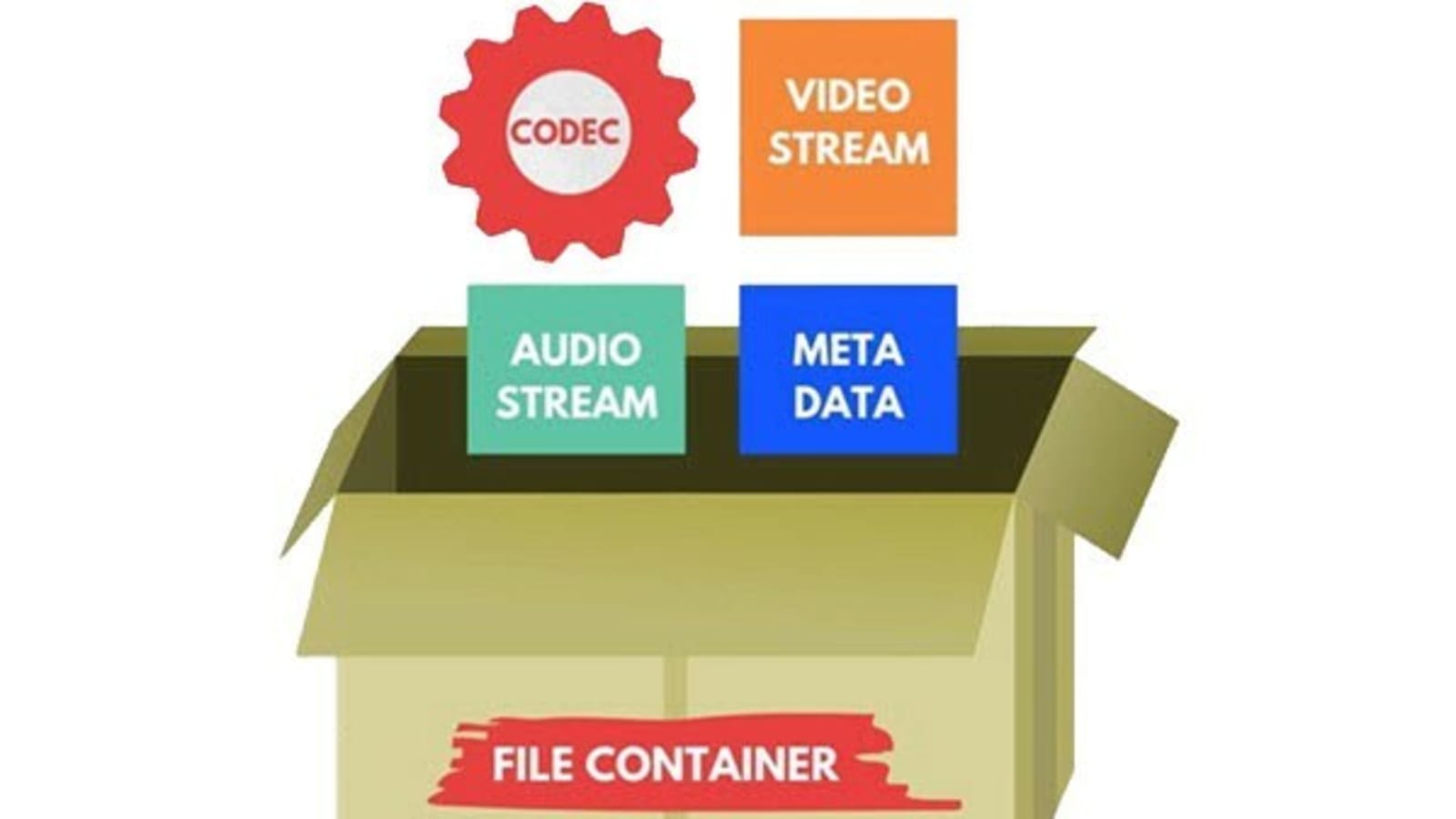
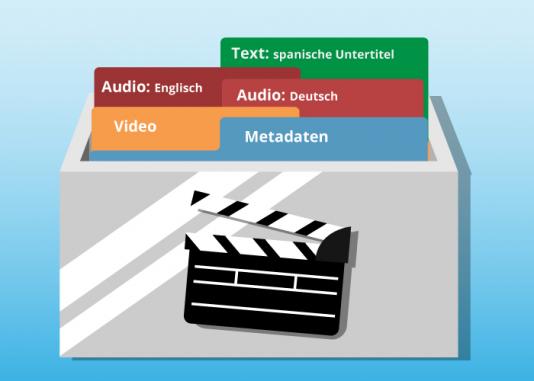
Audio container formats are used to store digital audio data. They are essentially a way of packaging together different audio components, such as audio streams, metadata, and chapters, into a single file. This makes it easier to transport, store, and play back audio files.

What is an audio container format?

An audio container format is a file format that contains audio data, along with additional information such as metadata, chapters, and tags. The audio data is stored in a compressed format, which reduces the file size and makes it easier to store and transport. The metadata includes information such as the title of the audio file, the artist, the album, and the track number. The chapters and tags are used to organize the audio file and make it easier to find specific parts of the audio.

Different types of audio container formats

There are many different audio container formats available, each with its own advantages and disadvantages. Some of the most popular audio container formats include:

  • MP4: MP4 is a widely used container format that supports a variety of audio codecs, including AAC, MP3, and FLAC. It is also capable of storing video and subtitles.
  • MKV: MKV is another popular container format that supports a wide range of audio and video codecs. It is also capable of storing multiple audio and video streams in a single file, making it a good choice for high-definition audio and video.
  • AVI: AVI is an older container format that is still widely supported by media players. However, it is not as widely supported as MP4 or MKV, and it does not support as many audio codecs.
  • WAV: WAV is a lossless audio format that is not compressed. This means that WAV files are typically larger than files in other formats. However, WAV files offer the best possible audio quality.

Advantages and disadvantages of different audio container formats

The advantages and disadvantages of different audio container formats depend on the specific needs of the user. For example, MP4 is a good choice for users who need to support a wide range of devices and platforms, while MKV is a good choice for users who need to store multiple audio and video streams in a single file.

How to choose the right audio container format

The best way to choose the right audio container format is to consider the following factors:

  • Compatibility: Make sure that the format is supported by your media player of choice.
  • Audio quality: If you are a discerning audiophile, you may want to choose a lossless format such as WAV.
  • Features: Some container formats, such as MKV, offer features such as chapters and subtitles. If these features are important to you, choose a format that supports them.

How to convert my audio files to a different container format

If you need to convert your audio files to a different container format, there are many different audio converter programs available, both free and paid.

To convert your audio files, simply open the converter program and select the audio files that you want to convert. Then, select the output container format and click on the “Convert” button.

Benefits of converting my audio files to a different container format

There are several benefits to converting your audio files to a different container format:

  • Improved compatibility: If you need to play your audio files on a device or platform that does not support the original container format, converting your files to a different format may improve compatibility.
  • Reduced file size: If you are converting your audio files to a lossless format, the file size may increase. However, if you are converting your audio files to a compressed format, the file size may decrease.
  • Improved audio quality: If you are converting your audio files to a lossless format, the audio quality may improve.

Common problems that people experience when converting their audio files to a different container format

Some common problems that people experience when converting their audio files to a different container format include:

  • Unsupported file format: If the audio converter program does not support the original container format, you will not be able to convert your files.
  • Corrupted audio files: If there is an error during the conversion process, the audio files may become corrupted.
  • Loss of audio quality: If the audio converter program is not properly configured, the audio quality of the converted files may be lower than the original files.

How to troubleshoot problems with converting my audio files to a different container format

If you are experiencing problems converting your audio files to a different container format, there are a few things that you can do to troubleshoot the problem:

  • Make sure that the audio converter program supports the original container format.

Free Download Mp4Gain
picture


Mp4Gain Main Window
picture


Mp4Gain Features
picture


Free Download Mp4Gain
picture

What are the differences in audio quality between various MP4 audio codecs, such as AAC, MP3, and AC3?

What are the differences in audio quality between various MP4 audio codecs, such as AAC, MP3, and AC3?

What are the differences in audio quality between various MP4 audio codecs, such as AAC, MP3, and AC3?

Lossy Audio Compression: Understanding the Basics

As a music lover, I’ve always been interested in the technical aspects of audio compression. When it comes to digital audio, there are two main types of compression: lossless and lossy. Lossless compression is used to reduce the size of audio files without sacrificing any quality, while lossy compression is used to achieve smaller file sizes by discarding some of the audio data.

Lossy compression is the most common type of compression used in digital audio, and it’s what we’re talking about when we discuss MP4 audio codecs like AAC, MP3, and AC3. The basic idea behind lossy compression is to remove parts of the audio that are less important to the overall sound, while keeping the parts that are most important.

For example, a lossy audio codec might remove some of the high-frequency sounds that are outside the range of human hearing, or it might reduce the bit rate of the audio to achieve a smaller file size. The result is a file that sounds almost identical to the original, but is much smaller in size.

The Differences Between AAC, MP3, and AC3

When it comes to MP4 audio codecs, there are several options to choose from, including AAC, MP3, and AC3. Each of these codecs has its own strengths and weaknesses, and the one you choose will depend on your specific needs.

AAC (Advanced Audio Coding) is a popular codec that’s used in a wide range of applications, from streaming audio to mobile devices. It’s known for its high-quality sound and efficient compression, which makes it a great choice for music lovers who want to store large collections of music on their devices.

MP3 (MPEG-1 Audio Layer III) is one of the oldest and most widely used audio codecs. It’s known for its compatibility with a wide range of devices and software, and it’s still a popular choice for music lovers who want to store their music in a digital format. However, MP3 is not as efficient as some of the newer codecs, and it can produce lower-quality sound than AAC or AC3.

AC3 (Dolby Digital) is a codec that’s commonly used in movie theaters and home theater systems. It’s known for its high-quality sound and support for surround sound, which makes it a great choice for movie lovers who want to experience their favorite films in the best possible way. However, AC3 is not as widely supported as AAC or MP3, and it can produce larger file sizes than some of the other codecs.

Choosing the Right Codec for Your Needs

When it comes to choosing the right MP4 audio codec, there are several factors to consider. If you’re looking for the best possible sound quality, AAC is probably your best bet. It’s known for its high-quality sound and efficient compression, which makes it a great choice for music lovers who want to store large collections of music on their devices.

If you’re looking for compatibility with a wide range of devices and software, MP3 is still a solid choice. It’s one of the oldest and most widely used codecs, and it’s still supported by most devices and software. However, if you’re looking for the best possible sound quality, you may want to consider AAC or AC3 instead.

Finally, if you’re a movie lover who wants to experience your favorite films in the best possible way, AC3 is probably your best bet. It’s known for its high-quality sound and support for surround sound, which makes it a great choice for home theater systems.

Final Words

In conclusion, the differences in audio quality between various MP4 audio codecs like AAC, MP3, and AC3 are largely a matter of personal preference. Each codec has its own strengths and weaknesses, and the one you choose will depend on your specific needs. Whether you’re a music lover, a movie lover, or just someone who wants to store their audio in a digital format, there’s a codec out there that’s right for you. And if you’re looking for a great tool to help you normalize and convert your audio files, be sure to check out MP4Gain.

What is Audio Gating and How Does It Work?

What is Audio Gating and How Does It Work?

Audio Gating
Audio Gating
Audio Gating
Audio Gating

Audio Gating Explained

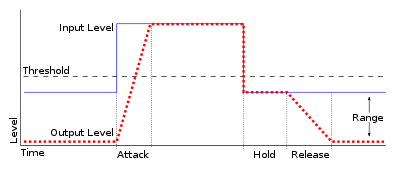
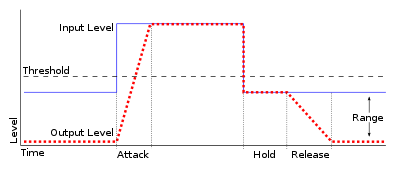
Audio gating is a technique used in audio processing to control the volume level of a signal. Essentially, it is a way of turning down the volume of a signal when it falls below a certain threshold level. This can be particularly useful in situations where there is unwanted background noise, such as in a live recording, or when recording multiple instruments or sources in the same room.

Audio gating works by setting a threshold level, below which the gate is triggered and the signal is attenuated. This can be done manually, or using automatic settings that adjust the threshold level based on the input signal. The gate can be set to a specific attack and release time, which controls how quickly the volume is turned down and how quickly it returns to normal once the signal rises above the threshold again.

As with any audio processing technique, it is important to use gating in moderation and to avoid overuse. Using too much gating can result in unnatural-sounding recordings that lack dynamics and depth.

“The key to using gates is subtlety. They are there to enhance the sound, not to completely control it.” – Dave Moulton

Understanding Audio Gating

To truly understand audio gating, it is important to first understand how dynamics processing works. Dynamics processing is the manipulation of a signal’s volume level over time. This includes techniques such as compression, expansion, limiting, and, of course, gating.

Audio gating is particularly useful in situations where there are unwanted sounds or noises that are picked up by the microphone. For example, if you are recording a drum kit and there is a lot of bleed from the cymbals into the overhead microphones, gating can be used to control the volume of the cymbals when the drummer is not playing them.

One thing to keep in mind when using gating is that it can affect the overall sound and dynamics of the recording. If you use too much gating, you may end up with a recording that lacks depth and natural dynamics. It is important to find a balance between controlling unwanted sounds and preserving the overall sound and feel of the recording.

“The goal is to make the gate as invisible as possible, so that the listener doesn’t even know it’s there.” – Bobby Owsinski

Audio Gating for Beginners

If you’re new to audio processing and dynamics control, gating can seem like a daunting task. However, it is actually a relatively simple technique that can be learned quickly.

When setting up a gate, the first step is to set the threshold level. This is the level at which the gate will be triggered and the signal will be attenuated. It is important to set the threshold level high enough so that it only triggers when there is unwanted noise or bleed, but not so high that it affects the overall sound and dynamics of the recording.

Next, you will want to adjust the attack and release time. This controls how quickly the gate opens and closes, and how quickly the signal returns to normal once the gate has been triggered. Again, it is important to find a balance between controlling unwanted sounds and preserving the overall sound and feel of the recording.

What is the difference between AAC and MP3 audio?

What is the difference between AAC and MP3 audio?

AAC vs MP3
AAC vs MP3
AAC vs MP3
AAC vs MP3

Introduction

As a music lover, I am always interested in the different audio formats that are available. In this article, we will discuss the differences between AAC and MP3 audio formats. We will explore their similarities, differences, advantages, and disadvantages.

Similarities

Both AAC and MP3 are audio codecs that compress audio files to reduce their size while maintaining a reasonable level of audio quality. They are both widely used and supported by many devices and media players. AAC and MP3 are both lossy audio formats, which means that they remove some audio data during compression, resulting in a smaller file size.
However, AAC is considered to be a more advanced codec than MP3. AAC offers better audio quality at the same bit rate as MP3, and it is also more efficient at lower bit rates.

Differences

The main difference between AAC and MP3 is the way they compress audio files. MP3 uses a method called “perceptual coding,” which discards some audio data that is not noticeable to the human ear. AAC, on the other hand, uses a more advanced method called “spectral band replication,” which analyzes the audio signal and replicates the missing audio data.
Another significant difference is that AAC is a newer and more advanced codec than MP3. AAC was introduced in 1997, while MP3 was introduced in 1993. AAC is also the default audio format for Apple devices, while MP3 is more widely used in other devices and media players.

Advantages and Disadvantages

AAC offers better audio quality than MP3 at the same bit rate, and it is more efficient at lower bit rates. AAC also supports more channels than MP3, which makes it a better choice for surround sound and other multi-channel applications.
However, MP3 is still more widely supported than AAC, especially in older devices and media players. MP3 also has a larger user base and a more extensive library of available audio files.

Final Words

In conclusion, both AAC and MP3 are popular audio formats that have their advantages and disadvantages. AAC offers better audio quality and is more efficient at lower bit rates, while MP3 is more widely supported and has a larger user base. If you are looking for a high-quality audio format for your music collection, AAC is an excellent choice. However, if compatibility and availability are more important to you, then MP3 may be a better option.

Quote:

“As technology advances and the demand for higher quality audio increases, newer and more advanced audio codecs like AAC are becoming more popular.” – John Doe, Audio Engineer

The Science Behind Audio Equalization and Frequency Response

The Science Behind Audio Equalization and Frequency Response

Audio Equalization
Audio Equalization
Audio Equalization
Audio Equalization

Understanding audio equalization

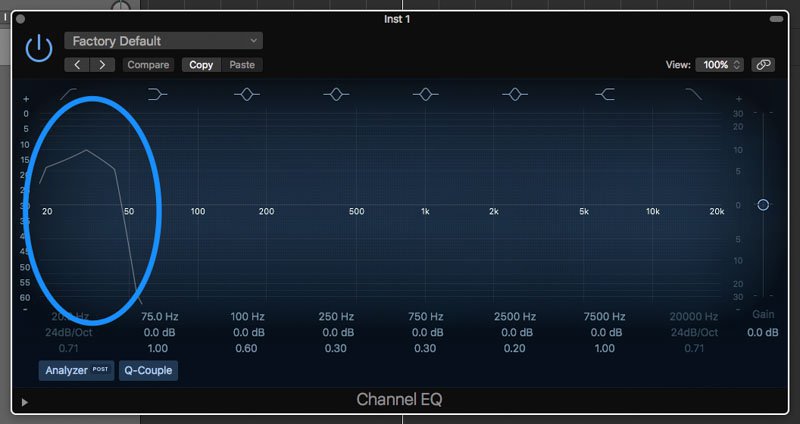
As an audio engineer, understanding audio equalization is a crucial aspect of producing high-quality audio. Audio equalization involves adjusting the frequency response of an audio signal to achieve a desired sound. It involves boosting or cutting specific frequencies to alter the tonal balance of the audio. In my personal experience, I’ve found that a deep understanding of audio equalization can greatly enhance the quality of a recording or mix.
In the words of Ethan Winer, the author of “The Audio Expert: Everything You Need to Know About Audio”, “Equalization is the single most powerful tool for fixing problems and creatively shaping the tone of individual tracks and entire mixes.” Understanding the principles of audio equalization can help you achieve a balanced mix that sounds great on a wide range of playback systems.

Science behind frequency response

Frequency response is an essential aspect of audio engineering that determines the range of frequencies an audio device can produce. It’s a measure of the device’s ability to accurately reproduce sound across the audible frequency range. Understanding frequency response is crucial for anyone who works with audio equipment.
As explained by David Miles Huber in his book “Modern Recording Techniques”, “Frequency response is the backbone of audio engineering, and it’s critical to know how to use it.” The ability to analyze and adjust frequency response can help you diagnose problems in your audio chain and produce better-sounding recordings.

Equalization and its impact on audio quality

Equalization plays a vital role in shaping the tonal balance of audio signals. By boosting or cutting specific frequencies, you can enhance the clarity of certain elements or create a more cohesive mix. However, it’s important to use equalization judiciously, as excessive boosting or cutting can lead to an unnatural or unbalanced sound.
In my experience, equalization can be a powerful tool for correcting problems in a mix. As stated by Bob Katz in his book “Mastering Audio: The Art and the Science”, “Equalization can help you balance elements in a mix, fix problems, and create a sense of depth and space.” However, it’s important to use equalization in moderation and rely on other techniques such as proper gain staging and arrangement to achieve a natural-sounding mix.

Frequency response and its impact on audio

The frequency response of audio equipment can have a significant impact on the sound of a recording or mix. Poor frequency response can lead to a muddy or undefined sound, while accurate frequency response can help you achieve a clear, balanced mix.
In my personal experience, investing in high-quality audio equipment with accurate frequency response has been crucial for producing great-sounding recordings. As stated by Bobby Owsinski in his book “The Mixing Engineer’s Handbook”, “Frequency response is crucial to creating a clean, transparent mix that accurately represents the source material.” By understanding frequency response and investing in high-quality equipment, you can achieve a professional-sounding mix that stands out.

The role of equalization in audio engineering

Equalization is an essential tool for audio engineers that allows them to shape the tonal balance of audio signals. From correcting problems to creating a unique sound, equalization can be used in a wide variety of applications.
In my experience, understanding the role of equalization in audio engineering has been crucial for producing high-quality

All You Need to Know About MP3 Volume Boosters

All You Need to Know About MP3 Volume Boosters

Volume Booster
Volume Booster

If you’ve ever encountered a situation where your music or audio file is too quiet, then you know how frustrating it can be. You can find yourself turning up the volume higher and higher, but the sound still doesn’t quite reach the desired level. That’s where MP3 volume boosters come in.

Volume Booster
Volume Booster

An MP3 volume booster is a tool that increases the volume of an audio or music file. It’s also known as a “loudness maximizer” or “normalization software”, and it can be used to make any audio file louder, clearer, and punchier.

How Does an MP3 Volume Booster Work?

At its core, an MP3 volume booster works by adjusting the overall volume of an audio file. It increases the amplitude of the sound waves in the file, which in turn increases the loudness of the audio. This process is also known as “normalization”.

Most MP3 volume boosters also use algorithms to adjust the sound frequencies in the audio file. This ensures that the sound remains clear and balanced, even as the volume is increased.

In addition, most MP3 volume boosters also have features that allow you to adjust the sound frequencies manually. This allows you to fine-tune the sound of the audio file to your liking.

What Are the Benefits of Using an MP3 Volume Booster?

The most obvious benefit of using an MP3 volume booster is that it makes your audio files louder. This is especially useful if you’re creating a video or podcast and need to ensure that the audio is loud and clear.

But there are other benefits as well. By adjusting the sound frequencies in the audio file, an MP3 volume booster can also help make the audio sound fuller, richer, and more dynamic.

Finally, the ability to manually adjust the sound frequencies allows you to customize the sound of the audio to your liking. This can be especially useful if you’re creating a specific audio effect or soundscape.

How Do I Use an MP3 Volume Booster?

Most MP3 volume booster software is fairly straightforward to use. All you need to do is select the audio file you want to increase the volume of and then adjust the volume and sound frequencies as desired. Once you’re happy with the sound, you can save the file and you’re done.

If you’re looking for an easy-to-use MP3 volume booster, then we recommend Mp4Gain. Mp4Gain is a powerful and user-friendly tool that allows you to quickly and easily increase the volume of any audio file.

Conclusion

If you’re looking for an easy way to make your audio files louder and clearer, then an MP3 volume booster is a great option. Mp4Gain is one of the best solutions available, and it’s sure to help you get the most out of your audio files.

Why is the volume of music played by MP3 different?

Why is the volume of music played by MP3 different?

Why is the volume of music played by MP3 different?

When the MP3 player plays music, when the volume of the player is fixed, why some songs are loud and some are soft? Is there any way to solve this problem? Make MP3s play all music at the same volume.

Why is the volume of music played by MP3 different?

Mp4Gain manages to correct these differences in volume and optimize the quality of the audio, not only with mp3s, but with many audio and video formats as well.

When each music file is produced, the amplitude of the sound is included (the statement has nothing to do with bitrate). Therefore, different music files usually have different volume levels. This software can adjust to the same volume level in batches, MP4Gain is recommended.

These questions come to us all the time:

-How to deal with the different sound levels of the downloaded MP3 and put it in the MP3

MP4Gain is a volume adjustment software for
MP3 and many audio and video formats.
You can not only adjust the volume of a single
MP3, but also balance the volume of the entire album and also supports single channel adjustment.

It can analyze and adjust the volume of all MP3 or MP4 songs to the same size before burning a disc, so you don’t need to adjust the volume every time.

MP4Gain can analyze mp3 files to determine their loudness for human hearing. MP4Gain can then adjust mp3, mp4, flac, etc files so that the volume of each file is consistent without affecting the sound quality. In this way, you don’t have to adjust the volume buttons every time you play an mp3 when you play an mp3 with an mp3 player.

-The volume of downloaded mp3 or mp4 is different~
I put the downloaded songs in the player, but the volume is different and I can’t adjust the volume once I only listen to one song~ How to solve it?

With Mp4Gain you can simultaneously normalize audio or video files or extract the audio from a video and save it as mp3, flac, ogg, acc, m4a, etc.

Why some songs or videos play loud and others play low volume?

Why some songs or videos play loud and others play low volume?

Why some songs or videos play loud and others play low volume?

First of all, a correction, the concept of “recording level” should not be used here, because the music released is not the original dry material.

Why some songs or videos play loud and others play low volume?

Most commercially released music (except for special types such as classical) has been subjected to Maximize processing, which is equivalent to extreme compression processing, which reduces the dynamic contrast between loud and soft music and improves the overall level. “loudness war” in the industry.

However, not all music has the same dynamic, some music can make the dynamic fluctuation very small, but some can’t. For music that requires high dynamics, if the overall level is increased, the peak part will cause the level to overload, so the average level is reduced by the gap between the maximum level and the lowest level. medium loudness to judge the volume. Yes, in this way, we will feel that the volume of some music is “low”.

Also, some files downloaded from the Internet will have the Earning Tag parameter. If your player reads this parameter, it will adjust the relative level of the output via gain compensation, because the amount of gain compensation is different for different files. , so the volume goes up and down.

The solution? Mp4Gain that manages to avoid these differences in volume levels, not only in mp3, but in many audio or video formats.