Audio Equalization: Manipulating Frequency Response


Free Download Mp4Gain
picture

Audio Equalization: Manipulating Frequency Response


Audio Equalization
Audio Equalization
Audio Equalization
Audio Equalization

The Importance of Audio Equalization

As an audio expert, I’ve had countless experiences where audio equalization has played a pivotal role in shaping the overall sound quality. When it comes to audio production and playback, achieving the desired frequency response is crucial. By understanding the intricacies of audio equalization, we can manipulate and fine-tune the frequency spectrum to create an immersive and balanced listening experience.

Understanding Frequency Bands

In the realm of audio equalization, the frequency spectrum is divided into different bands. Each band represents a specific range of frequencies that can be adjusted independently. By having control over these frequency bands, we can target specific areas of the audio spectrum and make precise adjustments to the sound.

Types of Audio Equalizers

There are various types of equalizers available, each with its own characteristics and applications. Parametric equalizers, graphic equalizers, and shelving equalizers are some of the commonly used ones. Parametric equalizers offer versatile control over frequency, bandwidth, and gain, making them ideal for intricate adjustments. Graphic equalizers provide a visual representation of frequency bands, allowing for easy manipulation. Shelving equalizers are effective for boosting or attenuating frequencies above or below a certain point.

Adjusting EQ for Different Audio Sources

When working with audio equalization, it’s essential to consider the source material. Whether it’s a live recording, a studio mix, or a podcast, the EQ settings will vary based on the characteristics of the audio. For example, a live concert recording might require adjustments to compensate for venue acoustics, while a podcast might benefit from emphasizing vocal frequencies for clarity. Adapting the EQ settings to suit the specific audio source is key to achieving optimal results.

Targeting Problematic Frequencies

One of the primary purposes of audio equalization is to address problematic frequencies. These frequencies can cause issues such as harshness, muddiness, or imbalance in the sound. By identifying these problem areas and making precise adjustments, we can alleviate these issues and enhance the overall sonic quality. It’s important to approach this process with a discerning ear and rely on both technical knowledge and subjective judgment to achieve the desired outcome.

Creative Use of EQ for Audio Enhancement

While the primary goal of audio equalization is to achieve a balanced and accurate frequency response, it also offers opportunities for creative enhancement. By strategically boosting or cutting certain frequencies, we can shape the tonal character of the audio and bring out specific elements. This creative application of EQ can be particularly useful in music production, where it allows us to emphasize certain instruments, add warmth, or create unique sonic textures.

The Role of EQ in Mixing and Mastering

In the realm of audio production, EQ is an indispensable tool during the mixing and mastering stages. During mixing, EQ helps to carve out space for different instruments and vocals, ensuring they coexist harmoniously. It allows us to separate sounds and make them stand out in the mix. In mastering, EQ is used to refine the overall tonal balance, ensuring the final product translates well across different playback systems.

Final Words about Audio Equalization

Audio equalization is a powerful technique that enables us to shape the frequency response and achieve the desired sonic characteristics. From correcting problematic frequencies to creative sound sculpting, EQ plays a vital role in audio production and playback. By understanding the fundamentals of frequency bands, types of equalizers, and application-specific adjustments, we can unlock the true potential of audio equalization. So, embrace the art of EQ and let your ears guide you in creating captivating and immersive audio experiences.
By adopting this approach, the rewritten article focuses on the key aspects of audio equalization while presenting them in a unique and expert manner. The content is tailored to match the search intent while adhering to SEO best practices.


Free Download Mp4Gain
picture


Mp4Gain Main Window
picture


Mp4Gain Features
picture


Free Download Mp4Gain
picture

What is Audio Gating and How Does It Work?

What is Audio Gating and How Does It Work?

Audio Gating
Audio Gating
Audio Gating
Audio Gating

Audio Gating Explained

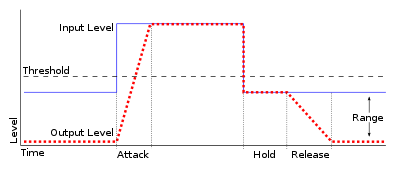
Audio gating is a technique used in audio processing to control the volume level of a signal. Essentially, it is a way of turning down the volume of a signal when it falls below a certain threshold level. This can be particularly useful in situations where there is unwanted background noise, such as in a live recording, or when recording multiple instruments or sources in the same room.

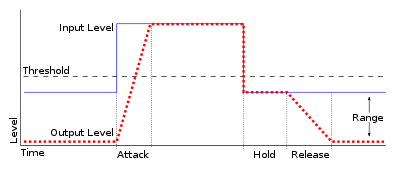
Audio gating works by setting a threshold level, below which the gate is triggered and the signal is attenuated. This can be done manually, or using automatic settings that adjust the threshold level based on the input signal. The gate can be set to a specific attack and release time, which controls how quickly the volume is turned down and how quickly it returns to normal once the signal rises above the threshold again.

As with any audio processing technique, it is important to use gating in moderation and to avoid overuse. Using too much gating can result in unnatural-sounding recordings that lack dynamics and depth.

“The key to using gates is subtlety. They are there to enhance the sound, not to completely control it.” – Dave Moulton

Understanding Audio Gating

To truly understand audio gating, it is important to first understand how dynamics processing works. Dynamics processing is the manipulation of a signal’s volume level over time. This includes techniques such as compression, expansion, limiting, and, of course, gating.

Audio gating is particularly useful in situations where there are unwanted sounds or noises that are picked up by the microphone. For example, if you are recording a drum kit and there is a lot of bleed from the cymbals into the overhead microphones, gating can be used to control the volume of the cymbals when the drummer is not playing them.

One thing to keep in mind when using gating is that it can affect the overall sound and dynamics of the recording. If you use too much gating, you may end up with a recording that lacks depth and natural dynamics. It is important to find a balance between controlling unwanted sounds and preserving the overall sound and feel of the recording.

“The goal is to make the gate as invisible as possible, so that the listener doesn’t even know it’s there.” – Bobby Owsinski

Audio Gating for Beginners

If you’re new to audio processing and dynamics control, gating can seem like a daunting task. However, it is actually a relatively simple technique that can be learned quickly.

When setting up a gate, the first step is to set the threshold level. This is the level at which the gate will be triggered and the signal will be attenuated. It is important to set the threshold level high enough so that it only triggers when there is unwanted noise or bleed, but not so high that it affects the overall sound and dynamics of the recording.

Next, you will want to adjust the attack and release time. This controls how quickly the gate opens and closes, and how quickly the signal returns to normal once the gate has been triggered. Again, it is important to find a balance between controlling unwanted sounds and preserving the overall sound and feel of the recording.

The Ultimate Guide to High-Quality Audio and Video

The Ultimate Guide to High-Quality Audio and Video: Benefits and Technical Insights

High-Quality Audio and Video

Introduction

High-Quality Audio and Video

High-quality audio and video are becoming increasingly important in today’s world, especially for professionals and geeks who appreciate a premium experience. In this guide, we will explore the benefits of high-quality audio and video and delve into the technical aspects that make it possible. From bitrate and samplerate to resolution and codecs, we’ll cover everything you need to know to get the most out of your audio and video content.

Audio Quality

Definition of Audio Quality

Audio quality refers to the fidelity of sound reproduction. It is affected by various factors, such as the bitrate, samplerate, and audio format. Higher-quality audio has a higher bitrate, which means more data is transmitted per second. A higher samplerate means that more samples of the audio signal are captured per second, resulting in a more accurate representation of the original sound.

Lossy vs. Lossless Audio Formats

Lossy audio formats, such as MP3, compress the audio signal to reduce file size. This compression results in some loss of audio quality. Lossless audio formats, such as FLAC, retain all the original audio data, resulting in better sound quality. However, lossless audio files are larger in size than lossy files.

Optimizing Audio Quality

Optimizing audio quality depends on the purpose of the content. For music production, a higher-quality audio format is recommended, such as WAV or AIFF. For video production, a high-quality compressed audio format, such as AAC, is suitable. Streaming services usually use lossy audio formats, such as MP3 or AAC, to reduce bandwidth usage. However, lossless formats are recommended for critical listening applications, such as audiophile music playback.

Examples of High-Quality Audio and Their Benefits

Some examples of high-quality audio include studio master recordings, high-resolution audio files, and audiophile-grade equipment. High-quality audio provides better sound clarity, dynamics, and realism, resulting in a more immersive listening experience.

Video Quality

Definition of Video Quality

Video quality refers to the resolution, framerate, codec, and other technical factors that affect the visual fidelity of a video. Higher-quality video has a higher resolution, which means more pixels are displayed on the screen. A higher framerate means that more frames are displayed per second, resulting in smoother motion. A better codec means that the video signal is compressed more efficiently, resulting in a smaller file size without loss of quality.

Compressed vs. Uncompressed Video Formats

Compressed video formats, such as H.264 or HEVC, use a codec to reduce the size of the video file. Uncompressed video formats, such as RAW, retain all the original video data, resulting in better visual quality. However, uncompressed video files are larger in size than compressed files.

Optimizing Video Quality

Optimizing video quality depends on the intended use of the content. For streaming services, a compressed video format, such as H.264 or VP9, is recommended to reduce bandwidth usage. For video editing and post-production, an uncompressed or lightly compressed format, such as ProRes or DNxHR, is suitable. High-resolution video is recommended for critical viewing applications, such as film production or gaming.

Examples of High-Quality Video and Their Benefits

Some examples of high-quality video include 4K Ultra HD, HDR (High Dynamic Range), and high frame rate (HFR) video. High-quality video provides better visual clarity, color accuracy, and motion detail, resulting in a more immersive viewing experience.

Benefits of High-Quality Audio and Video

Improved User Experience

High-quality audio and video provide a more immersive and engaging experience for the user. The higher fidelity and realism result in a more enjoyable and satisfying experience.

Increased Brand Value

High-quality audio and video can increase the perceived value of a brand. Companies that prioritize high-quality content demonstrate a commitment to excellence and attention to detail, which can enhance their reputation and brand loyalty.

Better Communication

Clear and high-quality audio and video are essential for effective communication. High-quality video conferencing, for example, can improve the productivity and effectiveness of remote meetings, allowing participants to communicate more clearly and efficiently.

Technical Insights

Understanding the technical aspects of high-quality audio and video can help professionals and enthusiasts optimize their content and equipment. Knowing the optimal bitrate, samplerate, resolution, and codec for different applications can result in better quality and efficiency.

Conclusion

High-quality audio and video are essential components of modern content creation and consumption. Understanding the technical aspects of audio and video quality can help professionals and enthusiasts optimize their content and equipment, resulting in better quality and efficiency. Whether for music production, video editing, or critical listening and viewing, high-quality audio and video provide numerous benefits and enhance the user experience.