H.265 CODEC


Free Download Mp4Gain
picture

H.265 CODEC

H.265 CODEC
H.265 CODEC
H.265 CODEC
H.265 CODEC


H.265 CODEC Information

H.265 is a video coding standard that offers greater compression efficiency than its predecessor, H.264. This means that H.265 can generate video of high quality with a smaller file size, making it ideal for streaming and high-definition recording applications.

Benefits of using H.265

H.265 offers a number of benefits over H.264, including:

Greater compression efficiency: H.265 can generate video of high quality with a smaller file size, making it ideal for streaming and high-definition recording applications.
Better image quality: H.265 can generate video of higher quality than H.264, even with a smaller file size.
Increased device support: H.265 is becoming more compatible with devices, including smartphones, tablets, and Blu-ray players.

How is H.265 used?

H.265 is used in a variety of applications, including:

Streaming: H.265 is used by streaming video services such as Netflix and Amazon Prime Video to provide high-quality video to their users.
Recording: H.265 is used by high-definition cameras to record high-quality video.
Editing: H.265 is used by video editors to edit high-quality video.

Challenges of using H.265

H.265 has some challenges, including:

Requires more processing power than H.264: H.265 requires more processing power than H.264 to encode and decode video. This can be a problem for devices with low processing power, such as smartphones and tablets.
Not compatible with all devices: H.265 is not compatible with all devices. This can be a problem for people who want to play H.265 video on older or uncommon devices.

Is H.265 the future of video coding?

H.265 is likely to be the future of video coding. It offers a number of benefits over H.264, including greater compression efficiency, better image quality, and increased device support. As H.265 becomes more compatible with devices, it is likely to become more popular.

It’s time to switch to H.265!

H.265 is the future of video coding and offers a number of benefits over its predecessor, H.264. If you are looking for the best image quality and the smallest file size, then H.265 is the option for you.

There are a number of devices that now support H.265, so there is no need to wait. Upgrade today and start enjoying the benefits of H.265!

What is H.265?

H.265, also known as HEVC (High Efficiency Video Coding), is a video coding standard that offers greater compression efficiency than its predecessor, H.264. This means that H.265 can generate video of high quality with a smaller file size, making it ideal for streaming and high-definition recording applications.

What are the benefits of using H.265?

H.265 offers a number of benefits over H.264, including:

  • Greater compression efficiency: H.265 can generate video of high quality with a smaller file size, making it ideal for streaming and high-definition recording applications.
  • Better image quality: H.265 can generate video of higher quality than H.264, even with a smaller file size.
  • Increased device support: H.265 is becoming more compatible with devices, including smartphones, tablets, and Blu-ray players.

How is H.265 used?

H.265 is used in a variety of applications, including:

  • Streaming: H.265 is used by streaming video services such as Netflix and Amazon Prime Video to provide high-quality video to their users.
  • Recording: H.265 is used by high-definition cameras to record high-quality video.
  • Editing: H.265 is used by video editors to edit high-quality video.

What are the challenges of using H.265?

H.265 has some challenges, including:

  • Requires more processing power than H.264: H.265 requires more processing power than H.264 to encode and decode video. This can be a problem for devices with low processing power, such as smartphones and tablets.
  • Not compatible with all devices: H.265 is not compatible with all devices. This can be a problem for people who want to play H.265 video on older or uncommon devices.

Is H.265 the future of video coding?

H.265 is likely to be the future of video coding. It offers a number of benefits over H.264, including greater compression efficiency, better image quality, and increased device support. As H.265 becomes more compatible with devices, it is likely to become more popular.

What are the differences between H.265 and H.264?

H.265 and H.264 are both video coding standards, but H.265 offers greater compression efficiency than H.264. This means that H.265 can generate video of high quality with a smaller file size than H.264.

What are the advantages of using H.265 over H.264?

Some of the advantages of using H.265 over H.264 include:

  • Better image quality
  • Smaller file size
  • Increased device support

What are the disadvantages of using H.265 over H.264?

Some of the disadvantages of using H.265 over H.264 include:

  • Requires more processing power
  • Not compatible with all devices

What devices support H.265?

More and more devices are supporting H.265, including smartphones, tablets, Blu-ray players, and smart TVs.

How can I switch to H.265?

To switch to H.265, you will need to make sure that your device and your video player support H.265. Once you have done this, you can begin playing H.265 video.

Final words

H.265 is a video coding standard that offers a number of benefits over its predecessor, H.264. It is becoming more popular as more devices support it. If you are looking for the best image quality and the smallest file size, then H.265 is the option for you.



Free Download Mp4Gain
picture


Mp4Gain Main Window
picture


Mp4Gain Features
picture


Free Download Mp4Gain
picture

Codecs and Their Importance in Video Production

Codecs and Their Importance in Video Production

Video Codecs
Video Codecs
Video Codecs
Video Codecs


“A codec is a way of encoding and decoding video or audio data so that it can be transmitted, stored and played back efficiently,” says John Watkinson in his book The Art of Digital Video. In essence, a video codec is a software or hardware that compresses and decompresses video data. This process helps to reduce the size of video files, which makes them easier to store, transmit and stream over the internet.

The Function of Video Codecs

“Codecs are used to compress video data to reduce the amount of data that needs to be stored or transmitted,” explains Brian Nadel in his article on Techradar. He adds that codecs “also help to maintain the quality of the video by minimizing any loss of data during compression.” This is done by removing redundant information and compressing the remaining data without affecting the quality of the video.

The Different Types of Video Codecs

“There are two main types of codecs: lossy and lossless,” notes Larry Jordan in his article on Digital Media Net. Lossy codecs, such as H.264 and MPEG-4, compress video data by permanently discarding some of the information in the video. While lossy codecs result in smaller file sizes, they may also compromise the quality of the video. On the other hand, lossless codecs, such as Apple ProRes and Avid DNxHD, preserve all the information in the video, resulting in higher quality videos but larger file sizes.

Choosing the Right Video Codec

“When choosing a video codec, you must consider the final use of the video,” advises Richard Harrington in his book Video Made on a Mac. For instance, if you are creating a video for the internet, you may want to use a codec that results in a small file size without compromising the quality of the video. On the other hand, if you are producing a video for broadcast, you may want to use a lossless codec that maintains the quality of the video but results in a larger file size.

The Advantages of Video Codecs

“Video codecs are essential in modern video production because they help to compress video data, reducing storage space requirements and making video transmission over the internet much faster and smoother,” states Jeff Strong in his article on Lifewire. By compressing video data, codecs also make it possible to store and transmit high-quality videos without consuming excessive amounts of bandwidth.

The Disadvantages of Video Codecs

“Video codecs may also result in a loss of data, which can affect the quality of the video,” cautions Chris Stevens in his article on Adorama. Furthermore, some codecs may not be compatible with certain software or hardware, which can result in compatibility issues when editing or playing back videos. It is therefore essential to choose the right codec that meets your specific needs and requirements.

Final Words

In conclusion, video codecs play an essential role in modern video production, enabling efficient storage, transmission, and playback of video data. By understanding the different types of codecs and their respective advantages and disadvantages, you can choose the right codec for your specific needs and ensure that your videos are of the highest quality while being optimized for storage and transmission.

Understanding Video Containers: MP4, AVI, MKV, and More

Understanding Video Containers: MP4, AVI, MKV, and More

Video Containers
Video Containers

Introduction to Video Containers

Video Containers
Video Containers

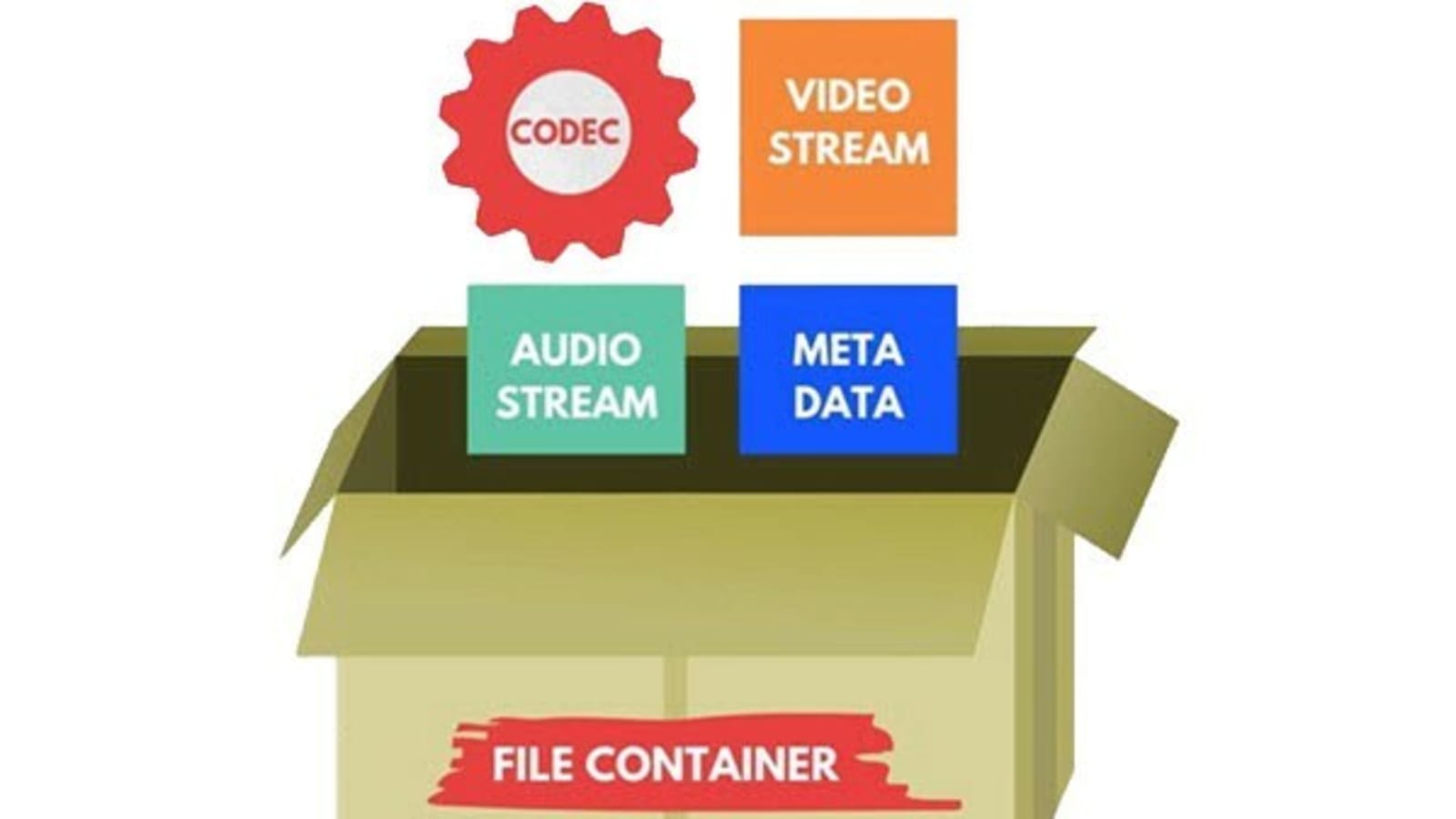
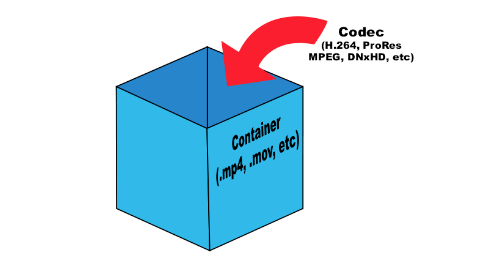
Video containers are an integral part of digital video technology, and they play a crucial role in delivering video content to users. A video container is essentially a file format that combines different types of data, including video, audio, and subtitles, into a single file. Video containers enable users to store and play back video files, and they support a wide range of codecs and other video-related technologies.

In this article, we will explore some of the most popular video containers in use today, including MP4, AVI, and MKV. We will provide an in-depth technical analysis of each container, including their history, features, benefits, and common codecs. We will also cover the purpose and definition of video containers, as well as the importance of choosing the right container for your needs.

The Purpose of Video Containers

The primary purpose of a video container is to store and organize video and audio content in a single file. Video containers are designed to accommodate multiple video and audio codecs, which are used to compress the video and audio data in the file. The container format also includes information about the video and audio streams, such as the frame rate, resolution, and bit rate.

The video container provides a common structure for storing video and audio data, and it enables users to easily share and distribute video files. Video containers are also used to deliver video content over the internet, as they support streaming technologies that enable users to watch video content without having to download the entire file.

History of Video Containers

The history of video containers dates back to the early days of digital video technology, when various video formats were being developed to store and play back digital video content. One of the earliest video container formats was AVI (Audio Video Interleave), which was introduced by Microsoft in 1992. AVI was designed to support multiple video and audio codecs, and it quickly became a popular format for storing and playing back video content.

In the years that followed, a number of other video container formats were developed, each with its own unique features and benefits. One of the most popular video container formats today is MP4 (MPEG-4 Part 14), which was introduced in 2001 as a successor to the older MPEG-2 video format. MP4 is designed to be a highly versatile and efficient container format that can support a wide range of video and audio codecs.

Another popular video container format is MKV (Matroska Video), which was introduced in 2002 as an open-source alternative to other container formats. MKV is designed to support a wide range of video and audio codecs, and it also includes support for advanced features such as subtitles and multiple audio tracks.

Features and Benefits of Video Containers

One of the key features of video containers is their support for multiple video and audio codecs. Video codecs are used to compress video data in order to reduce file size and improve playback performance. Audio codecs are used to compress audio data in a similar manner.

Video containers also include information about the video and audio streams in the file, such as the frame rate, resolution, and bit rate. This information is used by media players to correctly play back the video and audio content, and it ensures that the video is displayed at the correct size and aspect ratio.

Another important feature of video containers is their support for streaming technologies, which enable users to watch video content without having to download the entire file. Streaming technologies work by delivering the video content in small chunks, which are downloaded and played back in real-time.

Common Codecs Used in Video Containers

One of the most important components of video containers is the codec used to compress and decompress the video data. Codecs are responsible for reducing the file size of the video while maintaining its quality. There are many different codecs available, each with its own strengths and weaknesses.

H.264/AVC

H.264/AVC is a widely used codec that provides a high compression ratio with good video quality. It is supported by most modern devices and is often used for streaming video online. However, it can be computationally intensive, requiring a powerful processor to decode.

HEVC/H.265

HEVC/H.265 is a newer codec that provides even better compression than H.264/AVC, resulting in smaller file sizes with higher quality video. It is also more efficient than H.264/AVC, meaning it requires less bandwidth to stream. However, it is not yet widely supported by devices and software, and it can be more computationally intensive to decode than H.264/AVC.

VP9

VP9 is a codec developed by Google that provides high-quality video at lower bitrates. It is commonly used for streaming video on YouTube and other Google services. However, it is not as widely supported as H.264/AVC or HEVC/H.265, and it can be more computationally intensive to decode.

AV1

AV1 is a relatively new codec that provides high-quality video at even lower bitrates than VP9. It is an open-source codec developed by the Alliance for Open Media, which includes major tech companies such as Google, Microsoft, and Amazon. However, it is not yet widely supported by devices and software, and it can be computationally intensive to decode.

Choosing the Right Video Container

When it comes to choosing the right video container, there are several factors to consider, including compatibility with devices and software, quality and file size considerations, and future-proofing.

Compatibility

The first factor to consider is compatibility. Different devices and software support different video containers and codecs, so it is important to choose a container and codec that is widely supported. MP4 is a good choice for maximum compatibility, as it is supported by most devices and software.

Quality and File Size

Another factor to consider is the quality and file size of the video. Different containers and codecs can result in different levels of quality and file size. Generally, newer codecs like HEVC/H.265 and AV1 provide higher quality video at lower file sizes, but they may not be supported by all devices and software.

Future-Proofing

Finally, it is important to consider future-proofing when choosing a video container. Video technology is constantly evolving, so it is important to choose a container and codec that will be supported in the future. MP4 is a good choice for future-proofing, as it is widely supported and likely to remain so in the future.

Conclusion

Video containers play a crucial role in the storage and playback of video content. Understanding the differences between video containers like MP4, AVI, and MKV, as well as the codecs used to compress and decompress the video data, is essential for choosing the right container for your needs. By considering factors like compatibility, quality and file size, and future-proofing, you can ensure that your video content is stored and played back seamlessly on a wide range of devices and software.

The Importance of Codecs in Video Compression

The Importance of Codecs in Video Compression

Video Codec
Video Codec

Introduction

Video Codec
Video Codec

Video codecs play a vital role in video compression. The quality and size of video files depend largely on the type of codec used to compress them. In this article, we will explore the significance of video codecs in video compression and the technical aspects that determine the quality and efficiency of video files.

History of Video Codecs

The first video codec was developed in the 1970s, called H.120. This codec allowed for the transmission of video over ISDN telephone lines. Since then, video codecs have evolved significantly, and we now have a wide range of codecs available that offer different levels of compression and quality.

Understanding Video Quality

Video quality can be defined as the degree of excellence that a video possesses. This quality is determined by various factors, including the resolution, bit rate, frame rate, and compression method used.

Resolution

The resolution of a video is the number of pixels that make up the image. Higher resolution videos have more pixels, which means they are sharper and more detailed. The most common resolutions are 720p, 1080p, and 4K.

Bit Rate

The bit rate is the amount of data that is processed per second. A higher bit rate means more data is processed, resulting in a higher-quality video. However, higher bit rates also mean larger file sizes, which can be challenging for storage and transmission.

Frame Rate

The frame rate is the number of frames that are displayed per second. A higher frame rate results in a smoother video, but it also requires more data to be processed, resulting in larger file sizes.

Compression Method

Compression methods are used to reduce the size of video files without compromising on quality. Lossless compression methods preserve the original quality of the video, while lossy compression methods sacrifice some quality to achieve smaller file sizes.

Video Codecs and Formats

Video codecs can be classified into two categories: proprietary codecs and open-source codecs. Proprietary codecs are developed by companies and are generally licensed for use. Open-source codecs, on the other hand, are developed by communities and are free to use.

Proprietary Codecs

Proprietary codecs are developed by companies such as Apple, Microsoft, and Google. They are often used in popular video formats such as MP4, AVI, and MOV. These codecs are optimized for specific devices and software, resulting in high-quality videos that are compatible with a wide range of devices.

Open-Source Codecs

Open-source codecs are developed by communities and are free to use. The most popular open-source codec is the VP9 codec developed by Google. It is used in the WebM format and offers a high level of compression with minimal loss of quality.

Choosing the Right Codec

When choosing a codec, it is important to consider the factors that affect video quality, such as resolution, bit rate, frame rate, and compression method. Proprietary codecs are often optimized for specific devices and software, while open-source codecs offer more flexibility and are free to use.

Format

The format of a video file also plays a significant role in determining the quality and efficiency of the file. Popular video formats include MP4, AVI, MOV, and WebM. Each format has its own set of advantages and disadvantages, and it is important to choose the right format based on your needs.

Conclusion

Video codecs are an essential part of video compression, and they play a significant role in determining the quality and size of video files. By understanding the technical aspects of video quality and the different types of codecs and formats available, you can make informed decisions when choosing

H.264 vs H.265: Which Video Codec is Better?

H.264 vs H.265: Which Video Codec is Better?

H.264 vs H.265
H.264 vs H.265

The world of video codecs can be a complicated and confusing one, but two of the most important codecs in use today are H.264 and H.265. In this article, we will compare these two codecs in detail, examining their histories, technical specifications, performance, and use cases to determine which one is better for different applications.

H.264 vs H.265
H.264 vs H.265

History of H.264 and H.265

First introduced in 2003, H.264 quickly became the industry standard for video compression, thanks to its high compression efficiency and broad compatibility. Its widespread adoption made it the most widely used video codec in the world for many years, until the release of H.265 in 2013. H.265, also known as High Efficiency Video Coding (HEVC), was designed to provide even greater compression efficiency and improved video quality, making it an attractive alternative to H.264 for many use cases.

Technical Specifications

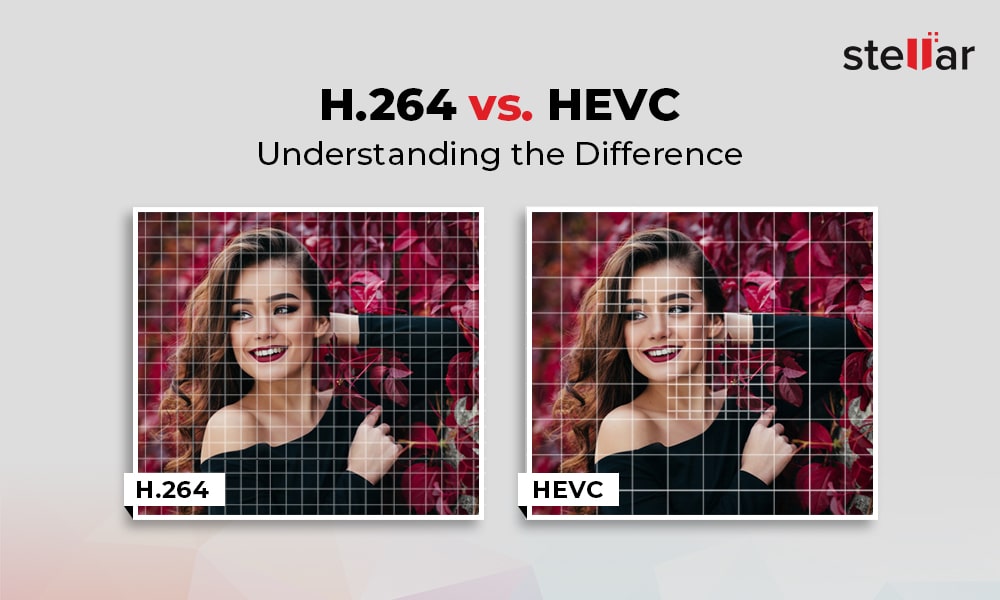
The key technical difference between H.264 and H.265 is their compression efficiency. H.265 is able to achieve significantly higher compression rates than H.264, meaning that it can deliver higher quality video at lower bitrates. In addition, H.265 supports higher resolutions and frame rates, making it better suited to modern video applications. However, H.264 has broader compatibility with older devices and software, and is often more easily implemented in legacy systems.

Both codecs use similar encoding and decoding processes, but H.265 includes some additional features and optimizations to improve compression efficiency and video quality. For example, H.265 includes support for larger block sizes, which allows it to more accurately represent complex image structures and textures, leading to higher quality video.

Performance and Quality Comparison

When it comes to comparing the performance and quality of H.264 and H.265, the results can vary depending on the specific use case and testing methodology. However, in general, H.265 is considered to offer superior video quality at lower bitrates than H.264. This is particularly true for high-resolution and high-fps video, where the higher compression efficiency of H.265 allows it to deliver smoother, clearer video. However, H.264 may still be preferable in certain cases, such as streaming to older devices or for applications with lower bandwidth availability.

Applications and Use Cases

H.264 and H.265 are both used in a wide variety of applications, including video streaming, video conferencing, and video surveillance. In general, H.264 is still more widely supported in legacy systems and devices, making it a more common choice for many applications. However, H.265 is becoming increasingly popular in new applications and systems, thanks to its improved video quality and compression efficiency. Some specific use cases where H.265 may be preferable include high-resolution and high-fps video, mobile streaming, and surveillance applications where storage and bandwidth are limited.

Advantages of H.265

H.265 has several advantages over its predecessor, H.264. The most significant ones are:

Better Compression

H.265 uses more advanced compression techniques, which enable it to achieve better compression rates than H.264. This means that H.265 can deliver the same video quality as H.264 with less data. This is particularly important for video streaming, where bandwidth is often limited.

Support for Higher Resolutions

H.265 supports resolutions up to 8K, while H.264 only supports resolutions up to 4K. This makes H.265 more future-proof and suitable for applications that require high-resolution video, such as virtual reality or surveillance.

Improved Parallel Processing

H.265 is designed to take advantage of multi-core CPUs and GPUs, which makes it faster and more efficient than H.264. This is particularly important for real-time applications, such as video conferencing or live streaming.

H.264 vs. H.265: Which One is Better?

So, which one is better? The answer is not straightforward, as it depends on the specific use case.

H.264 is Still Widely Used

H.264 is still the most widely used video codec, as it is supported by almost all devices and software. This means that if you want your videos to be compatible with as many devices as possible, H.264 is still a safe choice.

H.265 is More Efficient

However, if you are looking for better compression and support for higher resolutions, H.265 is the better choice. It is also more efficient in terms of processing power, which can be a significant advantage in certain applications.

The Future of Video Codec

In any case, it is clear that H.265 is the future of video codec. As more and more devices support it, and more content is encoded in H.265, it will become the new standard for video compression.

Conclusion

In conclusion, both H.264 and H.265 have their advantages and disadvantages. H.264 is still the most widely used video codec and is compatible with almost all devices and software. On the other hand, H.265 offers better compression, support for higher resolutions, and improved processing efficiency. As technology advances and more devices support H.265, it will become the new standard for video compression.

Which Audio Codec is Better?

Which Audio Codec is Better?

Audio Codec
Audio Codec

When it comes to audio, the codec is the magic behind the scenes that helps you hear your favorite songs and sounds. But have you ever wondered what makes one codec better than another? In this article, we’ll explore the world of audio codecs and find out which one is the best.

Audio Codec
Audio Codec

What is an audio codec?

An audio codec is a type of software that compresses and decompresses audio files. This process makes the audio smaller, so it can be easily stored and shared on your computer, phone, or online. When you want to listen to the audio, the codec decompresses it so you can hear it in its original quality.

Why are there different codecs?

Just like how you can choose between different types of ice cream flavors, there are different types of codecs because everyone has different tastes and preferences. Some codecs are better for music, while others are better for speech. Some are easy to use, while others are more complex. The choice of codec depends on the type of audio you want to compress, the size of the file, and the quality of the sound you want to preserve.

The most popular codecs

There are many different audio codecs out there, but here are some of the most popular ones:

  • MP3
  • AAC
  • FLAC
  • WAV

MP3

MP3 is one of the most popular codecs and has been around for over 20 years. It’s a great choice for music because it compresses audio files into smaller sizes while still preserving the quality of the sound. MP3 is also compatible with most devices and players, making it a convenient option for many people.

AAC

AAC stands for Advanced Audio Coding and is a newer codec that was developed by Apple. It’s commonly used by Apple devices, like the iPhone and iPad, and provides better sound quality than MP3 at a lower bit rate. AAC is also used by many online streaming services, like Spotify and Apple Music, to deliver high-quality audio to their users.

FLAC

FLAC stands for Free Lossless Audio Codec and is a popular option for audiophiles. This codec compresses audio files into smaller sizes without losing any quality, making it the perfect choice for people who want the best sound possible. The downside to FLAC is that it’s not as widely supported as MP3 and AAC, so you may need to use special software to play FLAC files on your device.

WAV

WAV is a common codec for professional audio and is often used in recording studios. It’s a lossless codec, which means it doesn’t compress audio files and preserves the original sound quality. However, WAV files are usually much larger than files compressed with other codecs, so they may take up a lot of space on your device.

Conclusion

In conclusion, the choice of codec depends on the type of audio you want to store and share, and your personal preferences. MP3 is a classic and widely supported option, while AAC offers better sound quality. FLAC is the perfect choice for audiophiles who want to preserve the original sound quality, and WAV is used in professional settings. To find the best solution for you, consider your needs and try out different codecs to see which one works best for you. And finally, if you want to enhance the audio quality of your files, you can use Mp4Gain to adjust the volume and improve the sound of your audio files.

It’s important to remember that the audio codec you choose will affect the size, quality, and compatibility of your audio files. So choose wisely, and enjoy the world of audio!

What is a video codec?

What is a video codec?

video codec
video codec

A codec is a program or device that encodes and decodes video. This means that it takes a video and compresses it into a smaller format so it can be streamed or stored more efficiently. Then, when you want to watch the video, the codec decodes it and plays it in its original format.

video codec
video codec

Why is a video codec important?

Video codecs are important because they make videos more accessible and easier to use. Without a codec, the videos would be too large to stream or store, which would mean that we would have to wait a long time to watch them or have a very large storage space to save them.

In addition, the codecs also make the videos look better. Some codecs use advanced techniques to compress the video without affecting its quality. This means that we can see sharp and clear videos, even when they are compressed to a smaller size.

Codecs are also important because they allow videos to be compatible with different devices and platforms. For example, if a video is encoded with a specific codec, it can be viewed on a computer, smartphone, smart TV, or game console without any problem.

What types of video codecs are there?

There are many different types of video codecs, but some of the most common are H.264, H.265, VP9, and AV1. Each codec has its own advantages and disadvantages, and some are better for certain uses than others.

For example, H.264 is a very popular codec used to compress high-definition video. It is a good option for most users as it is compatible with most devices and platforms. However, H.265 is a newer codec that is more efficient in terms of bandwidth and can offer improved video quality.

VP9 is an open source codec developed by Google that is used on some devices and platforms. AV1 is an open source codec developed by a coalition of technology companies and is a promising option for the future, offering more efficient compression and improved video quality.

It is important to note that not all codecs are created equal and some may require more processing power or bandwidth to function properly. Therefore, it is important to choose the correct codec for each situation.

Conclusion

In conclusion, a video codec is an essential program or device that allows you to compress and decode videos to make them more accessible and compatible. There are many different types of video codecs available, and it’s important to choose the one that’s best for each situation. Mp4Gain is an excellent solution for those looking to optimize and enhance their video experience.

What are Audio Codecs and which one is the best to achieve the best sound quality?

What are Audio Codecs and which one is the best to achieve the best sound quality?

Audio Codecs
Audio Codecs

Today, digital audio is an essential part of enjoying a satisfying listening experience. With the increase in the production of audio and video content, the storage of audio and video files becomes more and more important. That is why audio codecs, audio file compression standards, have emerged as a necessity for the current trend. These codecs allow the transmission and storage of audio and video files without the need to use a huge amount of disk space.

Audio Codecs
Audio Codecs

What are Audio Codecs?

Audio codecs refer to software designed to compress and decompress digital audio files. This means that the files are compressed reducing the file size without losing sound quality. This compression becomes possible thanks to codec technology. Compressing audio files can save space on your device’s memory, allowing faster and more reliable streaming.

Advantages of Audio Codecs

There are many reasons why audio codecs are so powerful and popular. Audio codecs offer a number of advantages, such as:

  • Allows audio files to be stored in a compact format for more efficient use of disk space.
  • Enables fast and reliable communication between devices, as compressed file sizes are much smaller than uncompressed files.
  • Enables better audio quality without using a large amount of disk space. Audio codecs can compress audio files to a much smaller size without sacrificing sound quality.
  • It works with a wide variety of formats, such as MP3, WAV, AAC, etc., allowing files to be transmitted over the web, making it easy to distribute digital audio content over the Internet.</ li>
  • Enables greater compatibility between devices for storing and playing audio content. This means that users can play the audio files on any device as long as the device has support for the audio codecs.

What Are The Most Used Audio Codecs?

There are several types of audio codecs available for commercial use. The most common codecs are:

  • MP3 – MP3 is the most popular audio format today. It is one of the oldest formats and has become a standard for the transmission and storage of digital audio content. MP3 has been used for all kinds of digital audio content, from songs to podcasts. MP3 offers acceptable audio quality, although there are other more modern formats with better audio quality.
  • AAC (Advanced Audio Coding) – AAC is a newer digital audio format. It offers better audio quality than MP3 even though the compressed file size is much larger. AAC has become the preferred audio format for the transmission and storage of digital audio content.
  • WAV (Waveform Audio File Format) – WAV is an uncompressed audio format that offers excellent audio quality. This means that WAV files are not compressed. These files are ideal for audio editing as they have uncompromised audio quality. However, the size of WAV files is much larger than that of compressed files.

What is the Best Audio Codec?

Each audio format has its own advantages and disadvantages. The best audio codec for your purpose will depend on your needs for storing and streaming audio content. For example, if you want to edit an audio file for use in an audio production project, then the WAV format is the best choice. If you want to stream audio content over the web, then the AAC format is the best option.

What is Mp4Gain and What is its Importance?

Mp4Gain is a software tool used to normalize the volume of audio and video files. This tool allows you to adjust the volume of files so that all files are of the same volume. This is important for audio and video files that are being streamed over the web. With Mp4Gain, users can ensure that audio and video files are played at the same volume for a better listening experience.