The Importance of Codecs in Video Compression


Free Download Mp4Gain
picture

The Importance of Codecs in Video Compression

Video Codec
Video Codec

Introduction

Video Codec
Video Codec

Video codecs play a vital role in video compression. The quality and size of video files depend largely on the type of codec used to compress them. In this article, we will explore the significance of video codecs in video compression and the technical aspects that determine the quality and efficiency of video files.

History of Video Codecs

The first video codec was developed in the 1970s, called H.120. This codec allowed for the transmission of video over ISDN telephone lines. Since then, video codecs have evolved significantly, and we now have a wide range of codecs available that offer different levels of compression and quality.

Understanding Video Quality

Video quality can be defined as the degree of excellence that a video possesses. This quality is determined by various factors, including the resolution, bit rate, frame rate, and compression method used.

Resolution

The resolution of a video is the number of pixels that make up the image. Higher resolution videos have more pixels, which means they are sharper and more detailed. The most common resolutions are 720p, 1080p, and 4K.

Bit Rate

The bit rate is the amount of data that is processed per second. A higher bit rate means more data is processed, resulting in a higher-quality video. However, higher bit rates also mean larger file sizes, which can be challenging for storage and transmission.

Frame Rate

The frame rate is the number of frames that are displayed per second. A higher frame rate results in a smoother video, but it also requires more data to be processed, resulting in larger file sizes.

Compression Method

Compression methods are used to reduce the size of video files without compromising on quality. Lossless compression methods preserve the original quality of the video, while lossy compression methods sacrifice some quality to achieve smaller file sizes.

Video Codecs and Formats

Video codecs can be classified into two categories: proprietary codecs and open-source codecs. Proprietary codecs are developed by companies and are generally licensed for use. Open-source codecs, on the other hand, are developed by communities and are free to use.

Proprietary Codecs

Proprietary codecs are developed by companies such as Apple, Microsoft, and Google. They are often used in popular video formats such as MP4, AVI, and MOV. These codecs are optimized for specific devices and software, resulting in high-quality videos that are compatible with a wide range of devices.

Open-Source Codecs

Open-source codecs are developed by communities and are free to use. The most popular open-source codec is the VP9 codec developed by Google. It is used in the WebM format and offers a high level of compression with minimal loss of quality.

Choosing the Right Codec

When choosing a codec, it is important to consider the factors that affect video quality, such as resolution, bit rate, frame rate, and compression method. Proprietary codecs are often optimized for specific devices and software, while open-source codecs offer more flexibility and are free to use.

Format

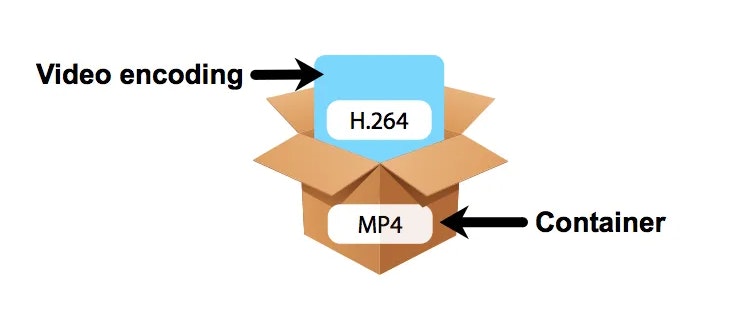
The format of a video file also plays a significant role in determining the quality and efficiency of the file. Popular video formats include MP4, AVI, MOV, and WebM. Each format has its own set of advantages and disadvantages, and it is important to choose the right format based on your needs.

Conclusion

Video codecs are an essential part of video compression, and they play a significant role in determining the quality and size of video files. By understanding the technical aspects of video quality and the different types of codecs and formats available, you can make informed decisions when choosing


Free Download Mp4Gain
picture


Mp4Gain Main Window
picture


Mp4Gain Features
picture


Free Download Mp4Gain
picture

What is a video codec?

What is a video codec?

video codec
video codec

A codec is a program or device that encodes and decodes video. This means that it takes a video and compresses it into a smaller format so it can be streamed or stored more efficiently. Then, when you want to watch the video, the codec decodes it and plays it in its original format.

video codec
video codec

Why is a video codec important?

Video codecs are important because they make videos more accessible and easier to use. Without a codec, the videos would be too large to stream or store, which would mean that we would have to wait a long time to watch them or have a very large storage space to save them.

In addition, the codecs also make the videos look better. Some codecs use advanced techniques to compress the video without affecting its quality. This means that we can see sharp and clear videos, even when they are compressed to a smaller size.

Codecs are also important because they allow videos to be compatible with different devices and platforms. For example, if a video is encoded with a specific codec, it can be viewed on a computer, smartphone, smart TV, or game console without any problem.

What types of video codecs are there?

There are many different types of video codecs, but some of the most common are H.264, H.265, VP9, and AV1. Each codec has its own advantages and disadvantages, and some are better for certain uses than others.

For example, H.264 is a very popular codec used to compress high-definition video. It is a good option for most users as it is compatible with most devices and platforms. However, H.265 is a newer codec that is more efficient in terms of bandwidth and can offer improved video quality.

VP9 is an open source codec developed by Google that is used on some devices and platforms. AV1 is an open source codec developed by a coalition of technology companies and is a promising option for the future, offering more efficient compression and improved video quality.

It is important to note that not all codecs are created equal and some may require more processing power or bandwidth to function properly. Therefore, it is important to choose the correct codec for each situation.

Conclusion

In conclusion, a video codec is an essential program or device that allows you to compress and decode videos to make them more accessible and compatible. There are many different types of video codecs available, and it’s important to choose the one that’s best for each situation. Mp4Gain is an excellent solution for those looking to optimize and enhance their video experience.

Lossless video compression

Lossless video compression

Lossless video

In mid-November of last year, I was struck by the news from AlparySoft R&D Company about the launch of a codec developed by it to work with video. And although there are many codecs now, Lossless Video Codec still has one distinctive feature – these are the algorithms used that allow you to compress a video signal without mathematical loss. That is, after the encode-decode process, the source and the final video will be absolutely identical, and the original video is compressed 2 to 5 times.

Lossless

And so, last Saturday (May 15), Lossless Video Codec 2.0 was released. An important innovation was the addition of a lossless compression algorithm, that is, compression in which the human eye cannot differentiate between the original and processed video. The compression ratio here, for obvious reasons, is higher and amounts to 5-15 times.

I managed to learn the details about the new product with the help of Elena, the company’s public relations manager.

– What difficulties did you face when developing lossless compression algorithms?

– As with all other algorithms for processing and analyzing large amounts of data (either by filtering or eliminating data redundancy), there is the problem of choosing between compression quality and performance.

Obviously, the more time you can spend analyzing the data (in our case, it’s a frame from a movie), the better it can be compressed. On the other hand, we are faced with the task of compressing the stream of frames in real time (that is, 25-30 frames per second). Low-level optimization of its individual parts plays an important role in the development process of a program, which, although it is a laborious process, can significantly increase the speed of algorithms.

– Okay, but what does Lossless Video Codec look like in the context of similar products and in particular DivX?

– Compared to similar products, our codec looks pretty decent. For example, the tests and the results of the comparison with the well-known HuffYUV codec can be viewed on our website (www.alparysoft.ru/prod/compression/compress-compare.php).

Comparison with DivX would be wrong as there are several fundamental differences. First, DivX is a lossy codec; In any case, during compression, some information is lost, while in our codec, as noted above, lossless compression algorithms are presented. Second, our codec does not use video information from previous frames to compress a frame, because of this, videos compressed by our codec can be much easier to use for editing in various video editing programs.

– Elena, how long has your team been working on Alparysoft Lossless Video Codec?

– Work on the codec takes just over a year. Three developers participate in it.

– How popular is the codec developed today?

– According to statistics, there were several thousand downloads from the Russian Alparysoft website alone. But our codec is hosted on many sites, mostly foreign. Among them, there are such popular resources dedicated directly to video processing as Dvdrhelp.com and Doom9.com; here we constantly post updates to our programs.

Of course, there are comments and wishes, and advice and criticism from the users of our programs, as the site has a forum: any user can express his opinion about Alparysoft products. I do not pretend to say that absolutely all reviews are positive, but on the other hand, competent criticism and professional advice is always the force that helps to advance, improve, taking into account the requirements of consumers of rapidly developing technologies.

– From what I understand, the codec is free at this stage of development …

– Yes indeed, Alparysoft Lossless Video Codec is a free product and you just need to register online to get started. We took that step to popularize the products and technologies developed.