Video Codec Comparison: Technical analysis of popular codecs
Video CodecVideo Codec
Comparing Video Codecs: In-depth Look
When I first started working with video, I was confused by all the different codecs out there. It’s essential to understand the technical aspects of each codec to make informed decisions. In this section, we’ll dive deep into the world of video codecs and compare their performance, compression efficiency, and compatibility.
One of my favorite quotes from the movie “The Social Network” is, “The internet is not written in pencil, it’s written in ink.” This quote reminds me of the importance of choosing the right codec for your video projects. A poor codec choice can lead to compatibility issues and poor video quality.
I’ve had my fair share of experiences with various codecs, and I’ve learned that it’s crucial to consider factors like bitrate, frame rate, and resolution when comparing codecs. These factors can significantly impact the final video quality and playback performance.
Analyzing Top Video Codecs: A Technical Perspective
In my experience, some of the most popular video codecs include H.264, H.265 (HEVC), VP9, and AV1. Each codec has its strengths and weaknesses, and understanding these differences can help you choose the best codec for your project.
H.264 is widely supported and offers good compression efficiency, making it a solid choice for most applications. However, it may struggle with high-resolution content and require higher bitrates to maintain quality.
On the other hand, H.265 (HEVC) provides better compression efficiency than H.264, especially for high-resolution content. But it’s not as widely supported and may require more processing power for playback.
VP9 is an open-source codec developed by Google, offering similar compression efficiency to H.265. It’s well-suited for web streaming but may not be as widely supported as H.264.
Lastly, AV1 is a newer open-source codec that promises even better compression efficiency than H.265 and VP9. However, it’s still in the early stages of adoption and may not be supported by all devices and platforms.
Video Codec Showdown: A Technical Breakdown
When comparing video codecs, it’s essential to consider factors like compression efficiency, playback performance, and compatibility. In my experience, I’ve found that newer codecs like H.265 and AV1 offer better compression efficiency, which can result in smaller file sizes and lower bandwidth requirements.
However, these newer codecs may require more processing power for playback, which can be a concern for older devices or slower internet connections. Additionally, compatibility can be an issue, as not all devices and platforms support the latest codecs.
In the end, it’s crucial to weigh the pros and cons of each codec and consider your specific needs and target audience. For example, if compatibility is a top priority, H.264 may be the best choice, while H.265 or AV1 might be more suitable for high-resolution content or bandwidth-limited scenarios.
Final Words
Choosing the right video codec can be a daunting task, but understanding the technical aspects of each codec can help you make an informed decision. In my experience, it’s essential to consider factors like compression efficiency, playback performance, and compatibility when comparing codecs.
If you’re looking for a tool to help you with video conversion and normalization, I recommend checking out mp4gain. It’s not free or open-source, but it’s a powerful solution for working with various audio and video formats, including an integrated equalizer. It runs on Windows and can be a valuable tool for managing your video projects.
If you have ever used a video camera, watched a movie or streamed a video online, you may have come across the term “video resolution.” In simple terms, video resolution refers to the number of pixels in a video image. It determines the clarity, sharpness, and overall quality of the video. In this article, we will explore video resolution in detail and answer the most common questions about it.
What is Video Resolution?
Video resolution refers to the number of pixels that make up an image in a video. Pixels are tiny dots that make up an image on a screen. The more pixels an image has, the sharper and clearer it appears. Video resolution is usually measured in width and height, and the total number of pixels is calculated by multiplying the two dimensions.
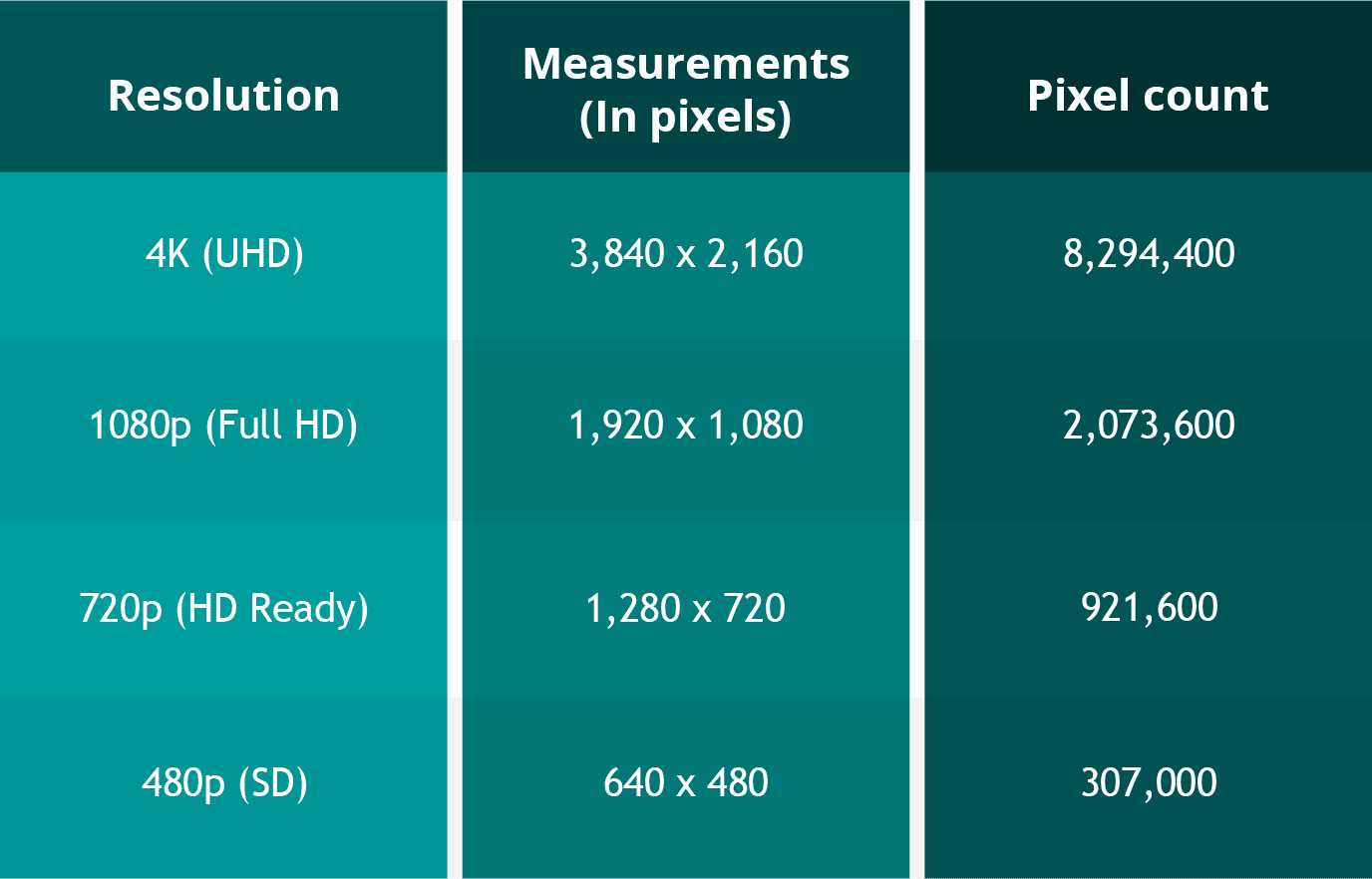
For example, a video with a resolution of 1920 x 1080 has 1920 pixels in width and 1080 pixels in height. The total number of pixels in this video is 2,073,600 (1920 x 1080 = 2,073,600). This is also referred to as 1080p or Full HD resolution.
What are the different types of Video Resolutions?
There are several different types of video resolutions available today. Here are some of the most common video resolutions:
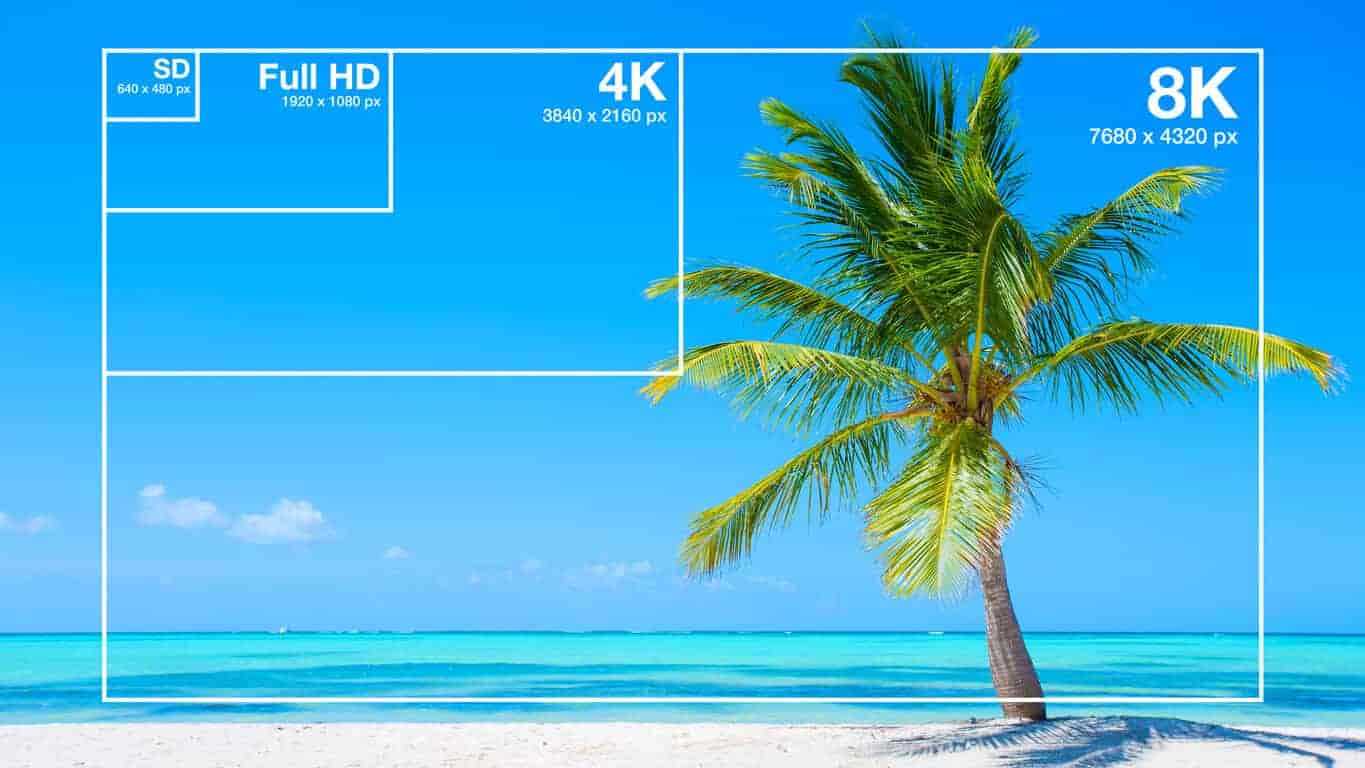
480p – This is standard definition (SD) video and has a resolution of 640 x 480 pixels. It is commonly used for older TV shows and movies.
720p – This is high definition (HD) video and has a resolution of 1280 x 720 pixels. It is commonly used for streaming videos online and for newer TV shows and movies.
1080p – This is Full HD video and has a resolution of 1920 x 1080 pixels. It is commonly used for Blu-ray discs, streaming videos, and newer TV shows and movies.
4K – This is Ultra HD (UHD) video and has a resolution of 3840 x 2160 pixels. It is commonly used for high-end TVs and streaming videos.
8K – This is the latest and highest resolution available for video and has a resolution of 7680 x 4320 pixels. It is used for high-end TVs and is not yet commonly available for streaming or other video content.
What factors affect Video Resolution?
Several factors can affect video resolution, including the quality of the camera or device used to capture the video, the lighting conditions, and the amount of compression used to store or transmit the video. Higher-quality cameras and devices can capture more pixels and produce sharper and clearer images. Good lighting conditions can also help produce better quality videos, while poor lighting can result in grainy or blurry images. Additionally, compression can reduce the file size of a video but can also reduce the quality of the video.
People Also Ask
What is aspect ratio in video resolution?
Aspect ratio refers to the ratio of the width of a video image to its height. It determines the shape of the video image and is usually expressed as a ratio of the width to the height. The most common aspect ratios for video are 4:3, which is standard definition, and 16:9, which is high definition.
What is the difference between 1080p and 4K resolution?
The difference between 1080p and 4K resolution lies in the number of pixels. 1080p has a resolution of 1920 x 1080 pixels, while 4K has a resolution of 3840 x 2160 pixels, which is four times the number of pixels as 1080p. This means that 4K displays have a much higher pixel density, resulting in sharper, more detailed images.
Another difference between the two is that 4K content requires more bandwidth and storage space than 1080p content. This is because 4K files are much larger, due to the increased number of pixels. Therefore, streaming 4K content or storing it on a device requires a faster internet connection and more storage space.
It’s worth noting that the human eye can only perceive so much detail, and the benefits of 4K resolution are most noticeable on larger screens or when sitting closer to the display. On smaller screens or at typical viewing distances, the difference between 1080p and 4K may not be as noticeable.
What is HDR?
HDR stands for High Dynamic Range, and it is a technology that expands the range of colors and brightness levels that can be displayed on a screen. HDR content is encoded with information about the brightness and color of each pixel, allowing displays that support HDR to reproduce a wider range of colors and brightness levels, resulting in more vibrant and lifelike images.
HDR content is available in a variety of formats, including HDR10, Dolby Vision, and HLG (Hybrid Log-Gamma). HDR10 is an open standard that is widely used, while Dolby Vision is a proprietary format developed by Dolby Laboratories that offers additional features, such as dynamic metadata that adjusts the brightness and color levels of each scene. HLG is a format designed for broadcasting and is compatible with both standard dynamic range and high dynamic range displays.
What is the difference between refresh rate and frame rate?
Refresh rate and frame rate are two different measurements that are often confused. Refresh rate refers to how many times per second a display updates the image on the screen, while frame rate refers to how many still images or frames are displayed per second in a video.
Refresh rate is measured in Hertz (Hz), with common refresh rates being 60Hz, 120Hz, or 144Hz. A higher refresh rate can reduce motion blur and make fast-paced action in video games or sports appear smoother.
Frame rate, on the other hand, is typically 24, 30, or 60 frames per second (fps) in video content. A higher frame rate can result in smoother motion and less stuttering, especially in fast-paced or action-packed scenes.
It’s important to note that a higher refresh rate does not necessarily mean a higher frame rate, as the two are independent of each other. A display can have a high refresh rate but still display content at a lower frame rate, resulting in a less smooth image. Conversely, a display with a low refresh rate can display high frame rate content, but the image may appear choppy due to motion blur.
Conclusion
Video resolution is an important aspect of the viewing experience, as it determines the level of detail and clarity of the image. Higher resolutions, such as 4K, can provide more detailed images with greater clarity, but they also require more bandwidth and storage space. HDR is a technology that expands the range of colors and brightness levels that can be displayed on a screen, resulting in more vibrant and lifelike images. Refresh rate refers to the number of times per second that an image is redrawn on the screen. It is measured in Hertz (Hz), with common refresh rates being 60Hz, 120Hz, and 144Hz. A higher refresh rate can result in a smoother image, especially during fast-paced action scenes or sports events. However, not all content can take advantage of a high refresh rate, so it may not be necessary for all users.
Frame rate, on the other hand, refers to the number of individual frames that make up one second of video. It is typically measured in frames per second (fps), with common frame rates being 24fps, 30fps, and 60fps. A higher frame rate can result in a smoother video, especially for fast-moving content, but it can also require more processing power and storage space.
What is aspect ratio?
Aspect ratio is another important measurement to consider when it comes to video resolution. It refers to the proportional relationship between the width and height of a video image. Common aspect ratios include 16:9 (widescreen), 4:3 (standard), and 21:9 (ultra-wide).
The aspect ratio can affect how the video is displayed on the screen, as well as the overall viewing experience. For example, a wider aspect ratio can be better for watching movies, while a narrower aspect ratio may be more suitable for certain types of content, such as computer applications or documents.
Conclusion
Video resolution is a key factor in determining the quality and clarity of video content. Understanding the different measurements and terms used to describe resolution can help you make informed decisions when purchasing a new TV or monitor, or when creating and sharing your own video content.
Remember to consider factors such as aspect ratio, refresh rate, and frame rate, as well as the resolution itself, when evaluating the quality of video content. With a better understanding of these concepts, you can enjoy your favorite movies, TV shows, and other video content in the best possible quality.
People also ask
What is the difference between resolution and pixel density?
Resolution refers to the number of pixels in an image, while pixel density refers to the concentration of those pixels within a given area. A higher pixel density can result in a sharper, more detailed image, even at lower resolutions.
What is 8K resolution?
8K resolution, also known as 7680 x 4320 or 4320p, is the highest resolution currently available for consumer video content. It offers four times the resolution of 4K and sixteen times the resolution of 1080p.
Can I upscale lower-resolution content to a higher resolution?
While it is possible to upscale lower-resolution content to a higher resolution, the quality of the resulting image may not be as good as native high-resolution content. Upscaling can also result in issues such as artifacts, blurriness, and distortion. It is generally recommended to view content at its native resolution whenever possible.
Video Enhancement: How to Transform Your Footage into a Cinematic Masterpiece
Video EnhancementVideo Enhancement
The Basics of Video Enhancement
In today’s digital age, video has become an integral part of our lives. Whether it’s for personal use or professional purposes, the quality of the video is crucial to make it more engaging and impactful. This is where video enhancement comes in. Video enhancement is the process of improving the visual quality of the video by applying various techniques such as color correction, noise reduction, and sharpening. In this article, we will explore the different methods and tools of video enhancement, and how they can help you turn your footage into a cinematic masterpiece.
Color Correction
Color correction is a technique used to adjust the colors of the video footage to make them more vibrant, natural, and appealing. It involves adjusting the brightness, contrast, and saturation of the colors to achieve the desired effect. Color correction can be done manually by adjusting the settings of the camera before filming, or by using software specifically designed for color grading.
Noise Reduction
Noise reduction is the process of removing unwanted grain or static from the video footage. This can be caused by low light, high ISO, or compression artifacts. Noise reduction tools use algorithms to analyze the video and selectively reduce the noise without affecting the details or sharpness of the video.
Sharpening
Sharpening is the process of enhancing the details and edges of the video to make them appear more crisp and defined. This can be done through software that applies filters to the footage or by adjusting the sharpness settings of the camera before filming.
Other Techniques
Other techniques that can be used for video enhancement include:
Stabilization – removing shaky footage
Color Grading – enhancing the colors and tones of the footage
Slow Motion – slowing down the footage to emphasize certain moments
Special Effects – adding visual effects such as lens flares, light leaks, or transitions to enhance the overall look of the video
Frequently Asked Questions
Can video enhancement improve the quality of low-resolution footage?
While video enhancement can improve the quality of low-resolution footage to some extent, it cannot completely restore the lost details. It is always best to film in the highest resolution possible to ensure the best quality footage.
Can video enhancement fix out-of-focus footage?
Video enhancement cannot fix out-of-focus footage. It is important to ensure that the footage is in focus before filming to avoid blurry or unusable footage.
Conclusion
Video enhancement is a crucial step in making your video footage more engaging and impactful. By applying techniques such as color correction, noise reduction, and sharpening, you can transform your footage into a cinematic masterpiece. Remember to film in the highest resolution possible and use the appropriate techniques to ensure the best quality footage. With practice and experimentation, you can master the art of video enhancement and create stunning visuals that captivate your audience.
What is the difference between video enhancement and video editing?
Video enhancement is the process of improving the visual quality of the video by applying various techniques such as color correction, noise reduction, and sharpening. Video editing, on the other hand, involves the process of selecting and arranging the footage to tell a story or convey a message. While video enhancement can be a part of the video editing process, it is not the same thing.
Is video enhancement only for professional videographers?
No, anyone can use video enhancement techniques to improve the quality of their video footage, regardless of their level of experience or expertise. With the availability of user-friendly software and tutorials online, even beginners can enhance their footage and make it more engaging and impactful.
Can video enhancement be done on a smartphone?
Yes, there are many apps available that allow you to enhance your video footage on your smartphone. These apps typically offer basic features such as color correction and noise reduction, but may not be as powerful as desktop software.
What are some common mistakes to avoid when doing video enhancement?
Some common mistakes to avoid when doing video enhancement include over-saturating the colors, over-sharpening the footage, and applying too many effects. It is important to use these techniques judiciously and with a discerning eye, keeping in mind the overall look and feel of the footage.
Can video enhancement be used to alter the content of the footage?
No, video enhancement should not be used to alter the content of the footage or to misrepresent the reality of the situation. The purpose of video enhancement is to improve the visual quality of the footage, not to manipulate or distort it.
Are there any ethical considerations to keep in mind when doing video enhancement?
Yes, it is important to be transparent and honest about any enhancements made to the footage. If the footage has been significantly altered, it may be necessary to disclose this to the audience. Additionally, it is important to respect the privacy and dignity of any individuals featured in the footage and to obtain their consent before sharing it publicly.
Understanding Video Resolution: Everything You Need to Know
Video Resolution
Video Resolution – Introduction
Video Resolution
Video resolution is one of the most important factors to consider when watching or creating videos. It affects the overall quality of the video and can make a huge difference in how enjoyable it is to watch. In this article, we’ll cover everything you need to know about video resolution, from the basics of what it means to how it affects your viewing experience.
What is Video Resolution?
Video resolution refers to the number of pixels displayed on a screen in a video. A pixel is a tiny dot that makes up a part of an image or video. The more pixels there are in a video, the sharper and more detailed the image will be.
Video resolution is measured in terms of the number of pixels that are displayed horizontally and vertically on a screen. For example, a video resolution of 1920×1080 means that there are 1920 pixels displayed horizontally and 1080 pixels displayed vertically on the screen. The higher the number of pixels, the higher the video resolution.
Common Video Resolutions
480p – 640×480 pixels
720p – 1280×720 pixels
1080p – 1920×1080 pixels
4K – 3840×2160 pixels
8K – 7680×4320 pixels
How Video Resolution Affects Viewing Experience
The video resolution can have a significant impact on the viewing experience. Videos with higher resolutions look sharper and more detailed, and are generally more enjoyable to watch. However, the difference in quality may not be noticeable on smaller screens or if the video is compressed.
Another important factor to consider is the size of the screen. A video with a high resolution will look better on a larger screen than on a smaller one. This is because the pixels are spread out over a larger area, making the image appear sharper and more detailed.
Factors that Affect Video Resolution
There are several factors that can affect the video resolution, including:
1. Recording Device
The recording device is one of the most important factors that affect the video resolution. Cameras with higher resolutions will capture videos with more pixels, resulting in a higher video resolution.
2. Compression
Videos are often compressed to make them smaller and easier to share. However, compression can also reduce the video resolution and make the video look less sharp and detailed.
3. Display Device
The display device, such as a TV or computer monitor, is also an important factor that affects the video resolution. If the display device has a lower resolution than the video, the video will be downscaled to match the capabilities of the display device.
FAQs
Q: What is the difference between 1080p and 4K resolution?
A: 4K resolution has four times the number of pixels as 1080p resolution, resulting in a much sharper and more detailed image.
Q: Can I watch a 4K video on a non-4K TV?
A: Yes, you can still watch a 4K video on a non c-4K TV, but the video will be downscaled to match the capabilities of the display device, resulting in a lower video resolution.
Q: Why do some videos look better than others even if they have the same resolution?
A: Video quality is influenced by several factors, such as the recording device, lighting, and color grading. Videos shot with high-end cameras and with good lighting and color grading will generally look better than videos shot with lower-end cameras or under poor lighting conditions.
Conclusion
Video resolution is an important factor to consider when watching or creating videos. The higher the video resolution, the sharper and more detailed the image will be. The size of the screen also plays a role in the viewing experience, as higher resolutions look better on larger screens. When creating videos, it’s important to use a recording device with a high resolution and to avoid excessive compression to maintain the video quality. Overall, understanding video resolution can help you make better decisions when it comes to choosing the right video to watch or creating high-quality videos yourself.
A video format is like a special type of container that holds a video file. It’s kind of like a lunch box that holds your food. There are many different types of video formats, just like there are many different types of lunch boxes.
Types of Video Formats
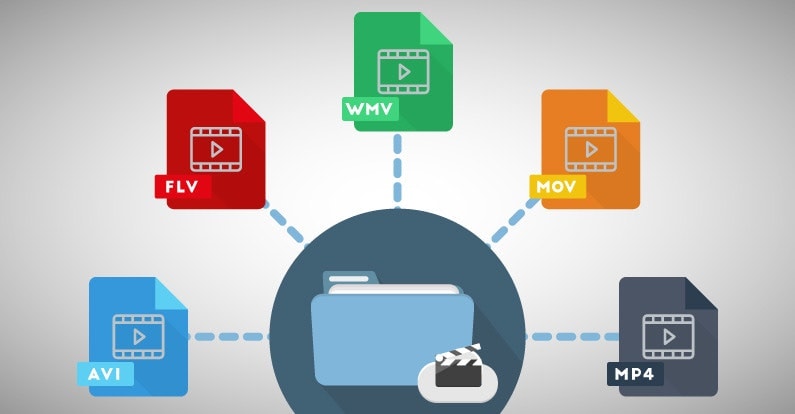
One of the most popular video formats is called MP4. This is like a lunch box that can hold lots of different types of food. Another popular format is AVI, which is like a lunch box that can only hold certain types of food.
There are many other video formats as well, like MOV, WMV, and FLV. Each one is like a different type of lunch box that can hold different types of food.
What is Compression?
Now, let’s talk about something called compression. This is like when you take a big sandwich and squish it down so it can fit in your lunch box. Video files can be really big, and that can make them hard to share or store. So, compression is a way to make the file smaller without losing too much quality.
Codecs
Compression is done using something called a codec. A codec is like a special tool that knows how to squish your video file down. Just like you might use a knife to cut your sandwich, a codec can cut your video file down to size.
There are many different codecs, and some are better than others. For example, H.264 is a very popular codec because it can make your video file much smaller without losing too much quality.
Why do Formats Matter?
So, why does all of this matter? Well, different devices and websites can only play certain types of video formats. It’s like how some lunch boxes can only fit certain types of food.
If you have a video file in the wrong format, you might not be able to play it on your device or share it with your friends. That’s why it’s important to know what format your video is in, and to convert it to a different format if you need to.
Conclusion
So, that’s video formats in a nutshell! Remember, a video format is like a lunch box that holds your video file. Compression is like squishing your sandwich down so it fits in the lunch box, and codecs are like special tools that do the squishing.
It’s important to know what format your video file is in, and to convert it to a different format if you need to. And if you want to make your videos louder, you can try using a tool like mp4gain to boost the volume.
The History of Video Formats
Video formats have a long and fascinating history, dating back to the early days of video recording. Over the years, video formats have evolved and improved, becoming smaller, more efficient, and more versatile. In this section, we’ll take a closer look at the history of video formats, from the early days of analog recording to the latest digital formats.
Early Analog Formats
The first video recording devices used large, bulky tapes that could only hold a few minutes of footage. These analog tapes were cumbersome and difficult to work with, but they were the only option available at the time.
In the 1970s, the VHS format was introduced, which became the standard for home video recordings. Betamax tapes were also popular in Japan, but VHS ultimately won out due to its longer recording time and lower cost.
Digital Video Emerges
In the 1990s, digital video formats started to emerge, offering a more efficient and versatile way to record and store video. The first digital video format was called DV, which used small cassettes that could hold up to 60 minutes of footage.
Other digital formats soon followed, including MiniDV, Digital8, and HDV. These formats offered higher quality and greater flexibility than analog tapes, but they still had limitations when it came to sharing and distributing video content.
The Rise of Online Video
As the internet became more popular, new video formats were developed to make it easier to share videos online. In the early 2000s, the Flash Video format was introduced by Adobe, which made it possible to play videos on websites.
Other formats soon followed, including Windows Media Video (WMV), QuickTime, and RealVideo. However, these formats were often proprietary and could only be played on certain devices or platforms.
The Modern Era of Video Formats
Today, there are many different video formats available, each with its own advantages and disadvantages. MP4 has become one of the most popular formats, thanks to its versatility and ability to be played on many different devices.
Other popular formats include AVI, MOV, and WMV. There are also specialized formats for different types of video content, such as H.264 for high-definition video and HEVC for 4K and 8K content.
The Future of Video Formats
As technology continues to evolve, we can expect to see even more advanced video formats in the future, making it easier than ever to capture, share, and enjoy high-quality video content. Some of the emerging technologies in video formats include:
360-degree video formats, which allow viewers to experience video content in a fully immersive way
High Dynamic Range (HDR) formats, which offer a wider range of colors and contrast for more realistic and vibrant video
Virtual Reality (VR) formats, which allow viewers to experience video content in a completely immersive and interactive way
In conclusion, video formats have come a long way over the years, from the early days of analog recording to the latest digital and online formats. As technology continues to evolve, we can expect to see even more exciting developments in video formats, making it easier and more enjoyable than ever to capture and share high-quality video content.
Video codecs play a vital role in video compression. The quality and size of video files depend largely on the type of codec used to compress them. In this article, we will explore the significance of video codecs in video compression and the technical aspects that determine the quality and efficiency of video files.
History of Video Codecs
The first video codec was developed in the 1970s, called H.120. This codec allowed for the transmission of video over ISDN telephone lines. Since then, video codecs have evolved significantly, and we now have a wide range of codecs available that offer different levels of compression and quality.
Understanding Video Quality
Video quality can be defined as the degree of excellence that a video possesses. This quality is determined by various factors, including the resolution, bit rate, frame rate, and compression method used.
Resolution
The resolution of a video is the number of pixels that make up the image. Higher resolution videos have more pixels, which means they are sharper and more detailed. The most common resolutions are 720p, 1080p, and 4K.
Bit Rate
The bit rate is the amount of data that is processed per second. A higher bit rate means more data is processed, resulting in a higher-quality video. However, higher bit rates also mean larger file sizes, which can be challenging for storage and transmission.
Frame Rate
The frame rate is the number of frames that are displayed per second. A higher frame rate results in a smoother video, but it also requires more data to be processed, resulting in larger file sizes.
Compression Method
Compression methods are used to reduce the size of video files without compromising on quality. Lossless compression methods preserve the original quality of the video, while lossy compression methods sacrifice some quality to achieve smaller file sizes.
Video Codecs and Formats
Video codecs can be classified into two categories: proprietary codecs and open-source codecs. Proprietary codecs are developed by companies and are generally licensed for use. Open-source codecs, on the other hand, are developed by communities and are free to use.
Proprietary Codecs
Proprietary codecs are developed by companies such as Apple, Microsoft, and Google. They are often used in popular video formats such as MP4, AVI, and MOV. These codecs are optimized for specific devices and software, resulting in high-quality videos that are compatible with a wide range of devices.
Open-Source Codecs
Open-source codecs are developed by communities and are free to use. The most popular open-source codec is the VP9 codec developed by Google. It is used in the WebM format and offers a high level of compression with minimal loss of quality.
Choosing the Right Codec
When choosing a codec, it is important to consider the factors that affect video quality, such as resolution, bit rate, frame rate, and compression method. Proprietary codecs are often optimized for specific devices and software, while open-source codecs offer more flexibility and are free to use.
Format
The format of a video file also plays a significant role in determining the quality and efficiency of the file. Popular video formats include MP4, AVI, MOV, and WebM. Each format has its own set of advantages and disadvantages, and it is important to choose the right format based on your needs.
Conclusion
Video codecs are an essential part of video compression, and they play a significant role in determining the quality and size of video files. By understanding the technical aspects of video quality and the different types of codecs and formats available, you can make informed decisions when choosing
Digital Video File Formats: Understanding Video Formats and Their Differences
Video formats
When it comes to digital video, there are many different file formats to choose from. Each format has its own unique characteristics and is optimized for specific uses. Understanding the differences between these formats is important if you want to get the most out of your digital video content. In this article, we’ll take a closer look at digital video file formats and explore the top related keyword: digital video file formats.
Video Formats
What Are Digital Video File Formats?
Digital video file formats are a way of encoding and storing video data on a digital medium, such as a hard drive or flash drive. These file formats determine how the video is compressed, encoded, and played back. There are many different digital video file formats available, each with their own unique characteristics.
Why Are Video Formats Important?
Video formats are important because they determine how the video is encoded and compressed. This can affect the quality of the video, the file size, and the compatibility with different devices and software. Choosing the right video format is essential for creating high-quality video content that is optimized for your specific needs.
Popular Digital Video File Formats
There are many different digital video file formats to choose from, but some of the most popular ones include:
MP4: A highly versatile format that is compatible with most devices and software. It is a widely used format for web streaming and mobile devices.
AVI: A widely used format that is compatible with most devices and software. It is a popular format for video editing and video production.
WMV: A format developed by Microsoft that is optimized for Windows operating systems. It is a popular format for web streaming and video production.
MPEG: A format developed by the Motion Picture Experts Group that is optimized for high-quality video. It is a popular format for DVD and Blu-ray discs.
How to Choose the Right Video Format
Choosing the right video format depends on your specific needs. Some factors to consider when choosing a video format include:
Compatibility: Make sure the video format you choose is compatible with the devices and software you plan to use.
Quality: Choose a video format that delivers the quality you need for your specific application.
File Size: Consider the file size of the video format you choose, especially if you plan to share or distribute the video online.
Encoding Time: The time it takes to encode the video can be an important factor, especially for time-sensitive projects.
Conclusion
Digital video file formats are an important consideration when creating, editing, and sharing digital video content. Understanding the differences between the most popular digital video file formats is essential if you want to create high-quality video content that is optimized for your specific needs. In conclusion, if you want the best solution for your digital video file formats, we recommend using Mp4Gain. It is a powerful tool that can optimize your video files for maximum quality and compatibility.
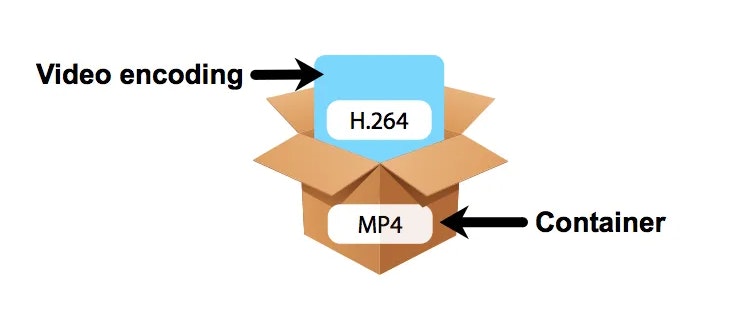
A codec is a program or device that encodes and decodes video. This means that it takes a video and compresses it into a smaller format so it can be streamed or stored more efficiently. Then, when you want to watch the video, the codec decodes it and plays it in its original format.
video codec
Why is a video codec important?
Video codecs are important because they make videos more accessible and easier to use. Without a codec, the videos would be too large to stream or store, which would mean that we would have to wait a long time to watch them or have a very large storage space to save them.
In addition, the codecs also make the videos look better. Some codecs use advanced techniques to compress the video without affecting its quality. This means that we can see sharp and clear videos, even when they are compressed to a smaller size.
Codecs are also important because they allow videos to be compatible with different devices and platforms. For example, if a video is encoded with a specific codec, it can be viewed on a computer, smartphone, smart TV, or game console without any problem.
What types of video codecs are there?
There are many different types of video codecs, but some of the most common are H.264, H.265, VP9, and AV1. Each codec has its own advantages and disadvantages, and some are better for certain uses than others.
For example, H.264 is a very popular codec used to compress high-definition video. It is a good option for most users as it is compatible with most devices and platforms. However, H.265 is a newer codec that is more efficient in terms of bandwidth and can offer improved video quality.
VP9 is an open source codec developed by Google that is used on some devices and platforms. AV1 is an open source codec developed by a coalition of technology companies and is a promising option for the future, offering more efficient compression and improved video quality.
It is important to note that not all codecs are created equal and some may require more processing power or bandwidth to function properly. Therefore, it is important to choose the correct codec for each situation.
Conclusion
In conclusion, a video codec is an essential program or device that allows you to compress and decode videos to make them more accessible and compatible. There are many different types of video codecs available, and it’s important to choose the one that’s best for each situation. Mp4Gain is an excellent solution for those looking to optimize and enhance their video experience.