
What is Video Resolution?
If you have ever used a video camera, watched a movie or streamed a video online, you may have come across the term “video resolution.” In simple terms, video resolution refers to the number of pixels in a video image. It determines the clarity, sharpness, and overall quality of the video. In this article, we will explore video resolution in detail and answer the most common questions about it.
What is Video Resolution?
Video resolution refers to the number of pixels that make up an image in a video. Pixels are tiny dots that make up an image on a screen. The more pixels an image has, the sharper and clearer it appears. Video resolution is usually measured in width and height, and the total number of pixels is calculated by multiplying the two dimensions.
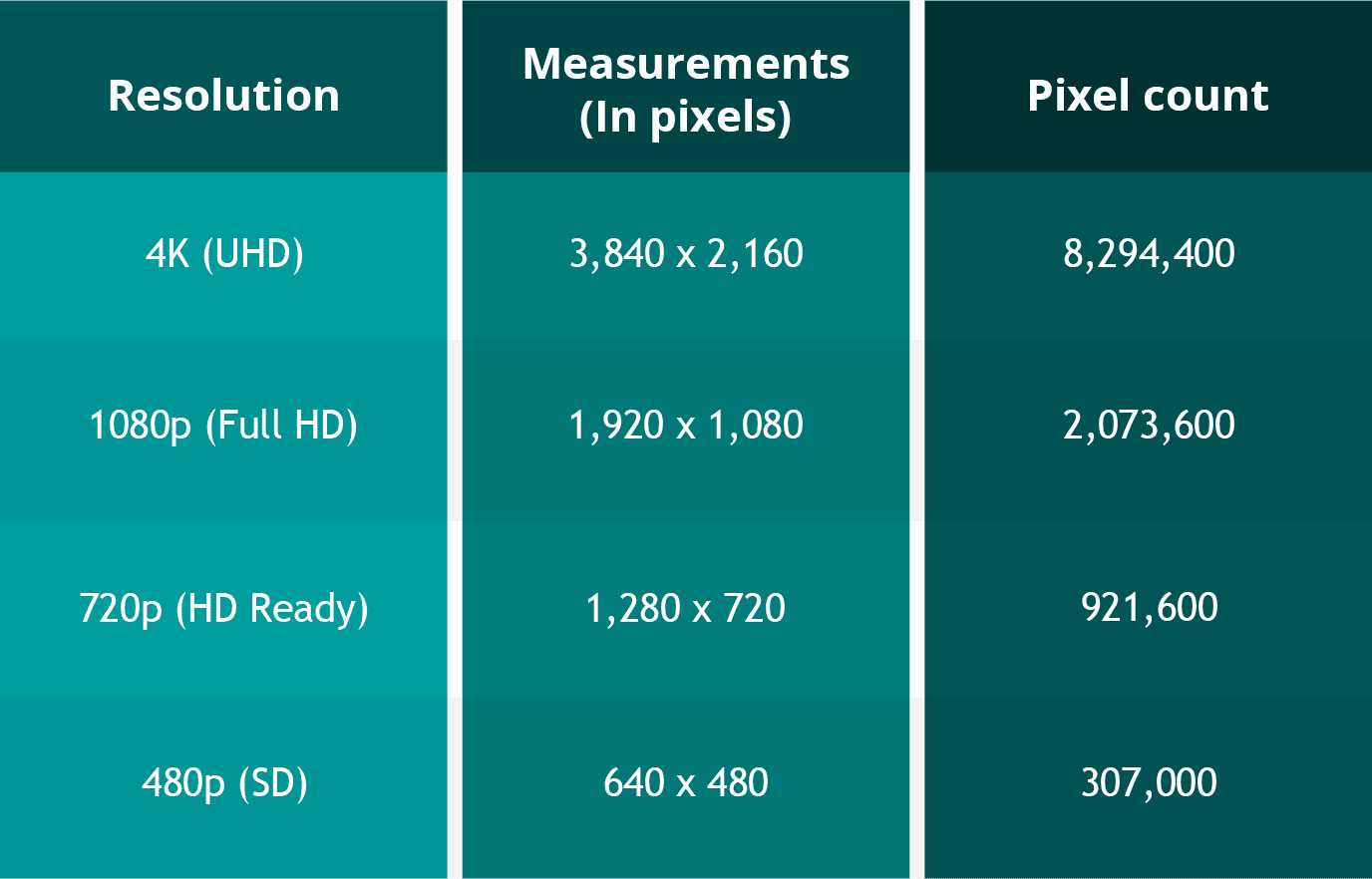
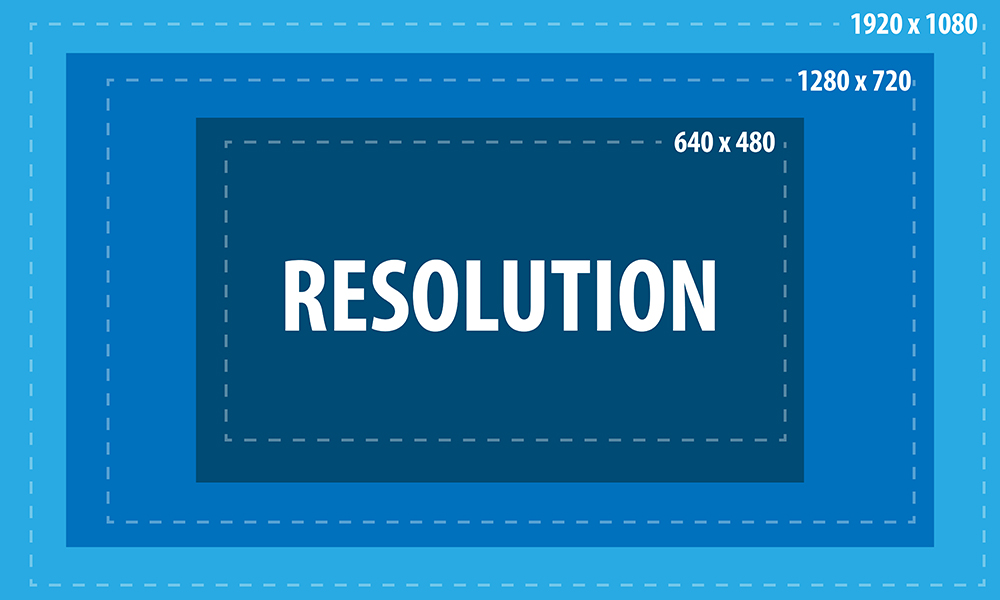
For example, a video with a resolution of 1920 x 1080 has 1920 pixels in width and 1080 pixels in height. The total number of pixels in this video is 2,073,600 (1920 x 1080 = 2,073,600). This is also referred to as 1080p or Full HD resolution.
What are the different types of Video Resolutions?
There are several different types of video resolutions available today. Here are some of the most common video resolutions:
- 480p – This is standard definition (SD) video and has a resolution of 640 x 480 pixels. It is commonly used for older TV shows and movies.
- 720p – This is high definition (HD) video and has a resolution of 1280 x 720 pixels. It is commonly used for streaming videos online and for newer TV shows and movies.
- 1080p – This is Full HD video and has a resolution of 1920 x 1080 pixels. It is commonly used for Blu-ray discs, streaming videos, and newer TV shows and movies.
- 4K – This is Ultra HD (UHD) video and has a resolution of 3840 x 2160 pixels. It is commonly used for high-end TVs and streaming videos.
- 8K – This is the latest and highest resolution available for video and has a resolution of 7680 x 4320 pixels. It is used for high-end TVs and is not yet commonly available for streaming or other video content.
What factors affect Video Resolution?
Several factors can affect video resolution, including the quality of the camera or device used to capture the video, the lighting conditions, and the amount of compression used to store or transmit the video. Higher-quality cameras and devices can capture more pixels and produce sharper and clearer images. Good lighting conditions can also help produce better quality videos, while poor lighting can result in grainy or blurry images. Additionally, compression can reduce the file size of a video but can also reduce the quality of the video.
People Also Ask
What is aspect ratio in video resolution?
Aspect ratio refers to the ratio of the width of a video image to its height. It determines the shape of the video image and is usually expressed as a ratio of the width to the height. The most common aspect ratios for video are 4:3, which is standard definition, and 16:9, which is high definition.
What is the difference between 1080p and 4K resolution?
The difference between 1080p and 4K resolution lies in the number of pixels. 1080p has a resolution of 1920 x 1080 pixels, while 4K has a resolution of 3840 x 2160 pixels, which is four times the number of pixels as 1080p. This means that 4K displays have a much higher pixel density, resulting in sharper, more detailed images.
Another difference between the two is that 4K content requires more bandwidth and storage space than 1080p content. This is because 4K files are much larger, due to the increased number of pixels. Therefore, streaming 4K content or storing it on a device requires a faster internet connection and more storage space.
It’s worth noting that the human eye can only perceive so much detail, and the benefits of 4K resolution are most noticeable on larger screens or when sitting closer to the display. On smaller screens or at typical viewing distances, the difference between 1080p and 4K may not be as noticeable.
What is HDR?
HDR stands for High Dynamic Range, and it is a technology that expands the range of colors and brightness levels that can be displayed on a screen. HDR content is encoded with information about the brightness and color of each pixel, allowing displays that support HDR to reproduce a wider range of colors and brightness levels, resulting in more vibrant and lifelike images.
HDR content is available in a variety of formats, including HDR10, Dolby Vision, and HLG (Hybrid Log-Gamma). HDR10 is an open standard that is widely used, while Dolby Vision is a proprietary format developed by Dolby Laboratories that offers additional features, such as dynamic metadata that adjusts the brightness and color levels of each scene. HLG is a format designed for broadcasting and is compatible with both standard dynamic range and high dynamic range displays.
What is the difference between refresh rate and frame rate?
Refresh rate and frame rate are two different measurements that are often confused. Refresh rate refers to how many times per second a display updates the image on the screen, while frame rate refers to how many still images or frames are displayed per second in a video.
Refresh rate is measured in Hertz (Hz), with common refresh rates being 60Hz, 120Hz, or 144Hz. A higher refresh rate can reduce motion blur and make fast-paced action in video games or sports appear smoother.
Frame rate, on the other hand, is typically 24, 30, or 60 frames per second (fps) in video content. A higher frame rate can result in smoother motion and less stuttering, especially in fast-paced or action-packed scenes.
It’s important to note that a higher refresh rate does not necessarily mean a higher frame rate, as the two are independent of each other. A display can have a high refresh rate but still display content at a lower frame rate, resulting in a less smooth image. Conversely, a display with a low refresh rate can display high frame rate content, but the image may appear choppy due to motion blur.
Conclusion
Video resolution is an important aspect of the viewing experience, as it determines the level of detail and clarity of the image. Higher resolutions, such as 4K, can provide more detailed images with greater clarity, but they also require more bandwidth and storage space. HDR is a technology that expands the range of colors and brightness levels that can be displayed on a screen, resulting in more vibrant and lifelike images. Refresh rate refers to the number of times per second that an image is redrawn on the screen. It is measured in Hertz (Hz), with common refresh rates being 60Hz, 120Hz, and 144Hz. A higher refresh rate can result in a smoother image, especially during fast-paced action scenes or sports events. However, not all content can take advantage of a high refresh rate, so it may not be necessary for all users.
Frame rate, on the other hand, refers to the number of individual frames that make up one second of video. It is typically measured in frames per second (fps), with common frame rates being 24fps, 30fps, and 60fps. A higher frame rate can result in a smoother video, especially for fast-moving content, but it can also require more processing power and storage space.
What is aspect ratio?
Aspect ratio is another important measurement to consider when it comes to video resolution. It refers to the proportional relationship between the width and height of a video image. Common aspect ratios include 16:9 (widescreen), 4:3 (standard), and 21:9 (ultra-wide).
The aspect ratio can affect how the video is displayed on the screen, as well as the overall viewing experience. For example, a wider aspect ratio can be better for watching movies, while a narrower aspect ratio may be more suitable for certain types of content, such as computer applications or documents.
Conclusion
Video resolution is a key factor in determining the quality and clarity of video content. Understanding the different measurements and terms used to describe resolution can help you make informed decisions when purchasing a new TV or monitor, or when creating and sharing your own video content.
Remember to consider factors such as aspect ratio, refresh rate, and frame rate, as well as the resolution itself, when evaluating the quality of video content. With a better understanding of these concepts, you can enjoy your favorite movies, TV shows, and other video content in the best possible quality.
People also ask
What is the difference between resolution and pixel density?
Resolution refers to the number of pixels in an image, while pixel density refers to the concentration of those pixels within a given area. A higher pixel density can result in a sharper, more detailed image, even at lower resolutions.
What is 8K resolution?
8K resolution, also known as 7680 x 4320 or 4320p, is the highest resolution currently available for consumer video content. It offers four times the resolution of 4K and sixteen times the resolution of 1080p.
Can I upscale lower-resolution content to a higher resolution?
While it is possible to upscale lower-resolution content to a higher resolution, the quality of the resulting image may not be as good as native high-resolution content. Upscaling can also result in issues such as artifacts, blurriness, and distortion. It is generally recommended to view content at its native resolution whenever possible.


