A Closer Look at Video Resolution and Aspect Ratios


Free Download Mp4Gain
picture

A Closer Look at Video Resolution and Aspect Ratios
Video Resolution
Video Resolution


Video Resolution
Video Resolution

What is the difference between resolution and aspect ratio?

When it comes to video quality, two important factors to consider are resolution and aspect ratio. Although they are related, they represent different aspects of the visual experience. Let’s delve deeper into each of these terms.

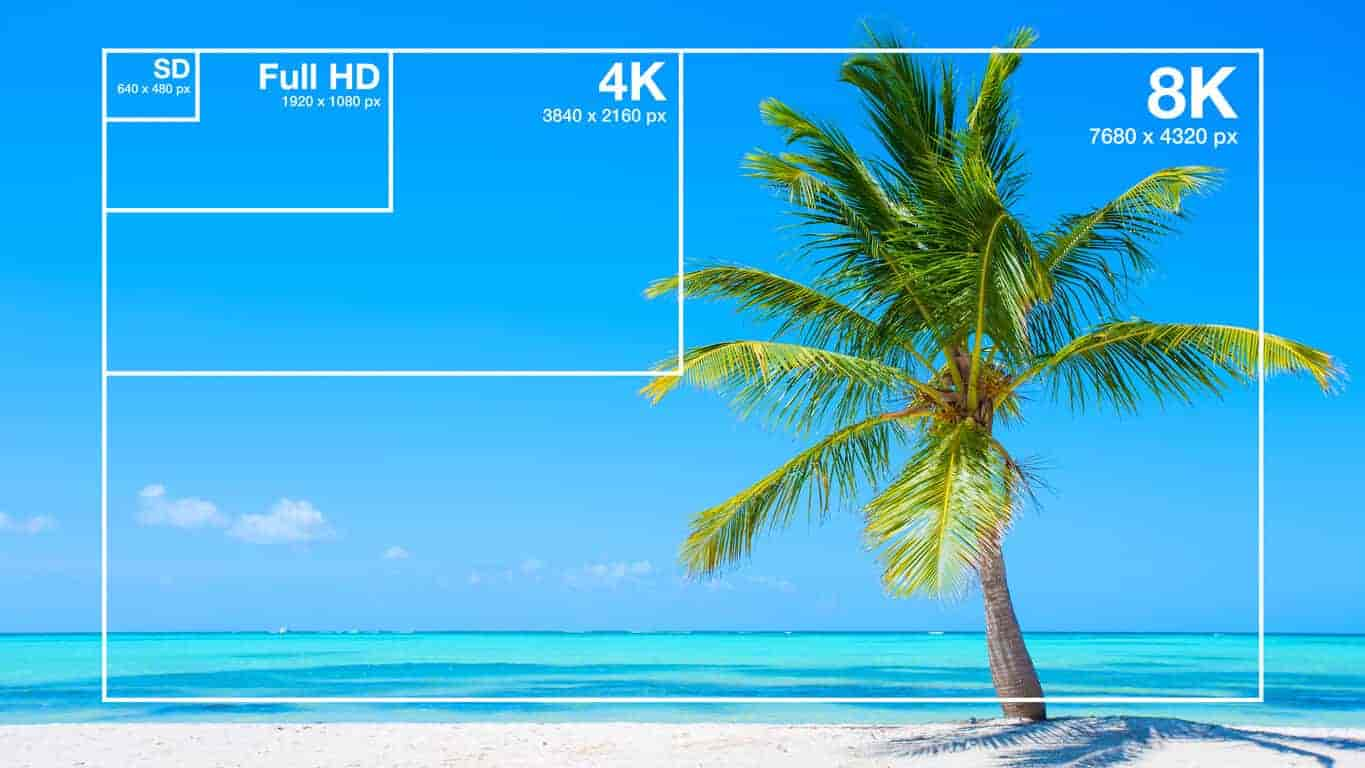
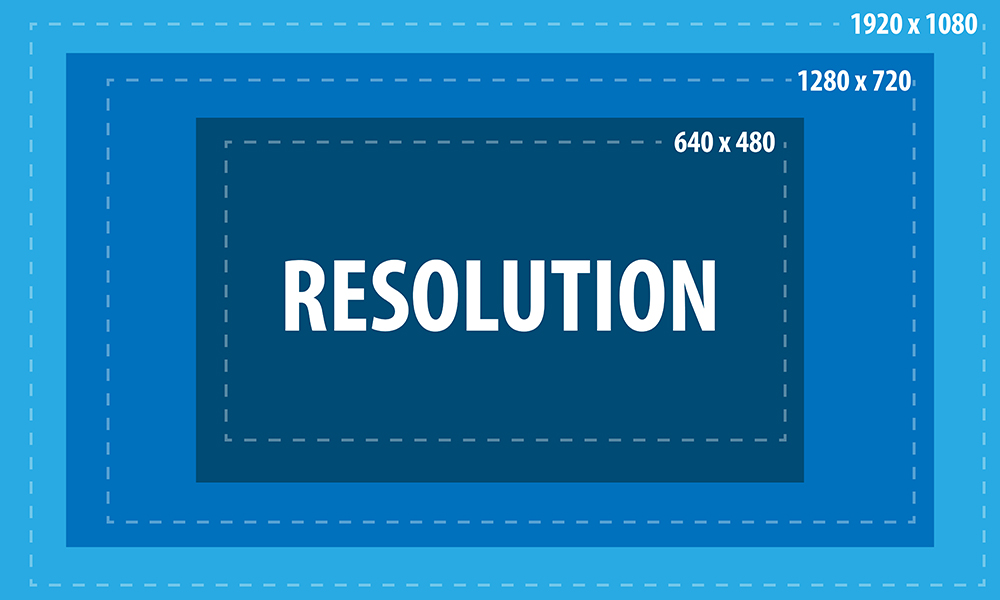
Resolution refers to the number of pixels contained in a video display. It indicates the level of detail and sharpness in the image. Common video resolutions include HD (1280×720 pixels), Full HD (1920×1080 pixels), and 4K Ultra HD (3840×2160 pixels). Higher resolutions generally offer more clarity and precision, resulting in a more immersive viewing experience.

Aspect ratio refers to the proportional relationship between the width and height of a video frame. It determines the shape and size of the video display. The most common aspect ratios are 16:9 and 4:3. A 16:9 aspect ratio is widely used in modern devices, such as widescreen TVs and computer monitors, while the 4:3 aspect ratio was common in older CRT TVs. The aspect ratio can affect the composition and visual perception of a video.

Now that we understand the basics of resolution and aspect ratio, let’s explore their impact on video quality and viewing experience.

Enhancing video quality with higher resolutions

Achieving higher video resolutions can significantly enhance the visual quality and level of detail in videos. With technological advancements, video resolutions have evolved over the years, allowing for more immersive and lifelike experiences. Higher resolutions are particularly beneficial for larger screens or when viewing videos up close.

4K Ultra HD resolution, with its impressive 3840×2160 pixel count, has become increasingly popular among consumers. This resolution offers four times the number of pixels as Full HD, resulting in exceptionally sharp and detailed images. 4K content is now widely available, allowing viewers to enjoy breathtaking visuals with rich colors and fine details. Whether it’s the majestic landscapes in nature documentaries or the intricate special effects in movies, 4K resolution brings out the best in visual storytelling.

Additionally, 8K resolution is on the horizon, with even higher pixel counts that promise an unprecedented level of detail. Although 8K content is still limited, it is expected to become more prevalent in the future, further enhancing the video viewing experience.

Aspect ratio and its impact on visual composition

The aspect ratio of a video frame plays a crucial role in the composition and overall visual experience. Different aspect ratios can evoke different emotions and aesthetics. Let’s explore two common aspect ratios and their effects:

16:9 aspect ratio has become the standard for modern video content. It offers a wider field of view, making it ideal for immersive experiences and capturing expansive landscapes. The 16:9 aspect ratio is also compatible with most modern devices, ensuring that videos fit perfectly on widescreen displays without black bars.

4:3 aspect ratio was prevalent in older TVs and has a more square-shaped frame. While it may feel outdated for some, it can be used creatively to evoke a nostalgic or vintage aesthetic. Additionally, some video content, such as archival footage or certain documentaries, may still use the 4:3 aspect ratio for historical accuracy.

In conclusion, understanding video resolution and aspect ratios is essential for optimizing the viewing experience. Higher resolutions offer greater detail and clarity, while aspect ratios influence the composition and visual appeal of videos. By considering these factors, content creators and viewers can make informed decisions to ensure the best possible video quality.

How does video resolution impact streaming quality?

When it comes to streaming videos online, video resolution plays a significant role in determining the quality of the viewing experience. Let’s explore how different video resolutions affect streaming quality and bandwidth requirements.

Streaming platforms, such as Netflix and YouTube, offer various resolution options to accommodate different devices and internet connection speeds. The available resolutions typically range from standard definition (SD) to high definition (HD) and even ultra-high definition (UHD or 4K).

SD resolution is the most basic option, with a resolution of 480p (640×480 pixels). It provides acceptable quality on smaller screens or for users with limited bandwidth. SD resolution requires less internet bandwidth, making it suitable for slower internet connections or mobile data usage.

HD resolution is a significant improvement over SD, offering a more detailed and enjoyable viewing experience. With a resolution of 720p (1280×720 pixels) or 1080p (1920×1080 pixels), HD videos are crisp and clear, especially on larger screens. HD resolution requires more internet bandwidth than SD but is still manageable for most internet connections.

4K UHD resolution is the highest available resolution for streaming. With its impressive pixel count of 3840×2160, 4K UHD videos provide unparalleled clarity and detail. However, streaming 4K content requires a robust internet connection and higher bandwidth capabilities. Viewers need a stable and fast internet connection to avoid buffering or interruptions.

When streaming videos, it’s important to consider both the resolution and available bandwidth. Higher resolutions offer better visual quality but require faster internet speeds. If your internet connection is not capable of streaming in a particular resolution, the video may automatically downgrade to a lower resolution to prevent buffering.

In summary, video resolution directly impacts streaming quality, with higher resolutions providing better visual experiences. However, it’s crucial to ensure that your internet connection can handle the required bandwidth for the selected resolution. By choosing the appropriate resolution based on your internet capabilities, you can enjoy smooth and uninterrupted streaming.

Optimizing video resolution for mobile devices

With the widespread use of smartphones and tablets, optimizing video resolution for mobile devices has become increasingly important. Let’s explore some considerations and tips for achieving the best video quality on mobile screens.

Mobile screen sizes vary significantly, ranging from smaller smartphone screens to larger tablets. It’s essential to optimize video resolution to ensure optimal viewing experiences across different devices. Choosing a resolution that balances quality and file size is crucial to avoid consuming excessive storage or bandwidth on mobile devices.

Adaptive streaming is a technique used by many streaming platforms to adjust the video resolution based on the viewer’s internet connection and device capabilities. This ensures smooth playback and prevents buffering issues. By dynamically adapting the resolution, viewers can enjoy videos seamlessly on their mobile devices, regardless of their internet speed.

Compressed file formats such as H.264 or HEVC (High-Efficiency Video Coding) can help reduce the file size without compromising video quality. These formats use advanced compression techniques to maintain the visual integrity while reducing the overall file size. By utilizing compressed formats, you can optimize video resolution for mobile devices while minimizing storage and bandwidth requirements.

In conclusion, optimizing video resolution for mobile devices is crucial to deliver high-quality viewing experiences. By considering factors such as screen size, adaptive streaming, and compressed file formats, content creators can ensure that their videos are optimized for mobile devices. Providing a seamless and enjoyable viewing experience on mobile platforms is essential in today’s mobile-centric world.

LSI keywords: video quality, display resolution, pixel density, screen aspect ratio, visual experience, video streaming, screen sizes, mobile


Free Download Mp4Gain
picture


Mp4Gain Main Window
picture


Mp4Gain Features
picture


Free Download Mp4Gain
picture

What is Video Resolution?

What is Video Resolution?

Video Resolution
Video Resolution
Video Resolution
Video Resolution


If you have ever used a video camera, watched a movie or streamed a video online, you may have come across the term “video resolution.” In simple terms, video resolution refers to the number of pixels in a video image. It determines the clarity, sharpness, and overall quality of the video. In this article, we will explore video resolution in detail and answer the most common questions about it.

What is Video Resolution?

Video resolution refers to the number of pixels that make up an image in a video. Pixels are tiny dots that make up an image on a screen. The more pixels an image has, the sharper and clearer it appears. Video resolution is usually measured in width and height, and the total number of pixels is calculated by multiplying the two dimensions.

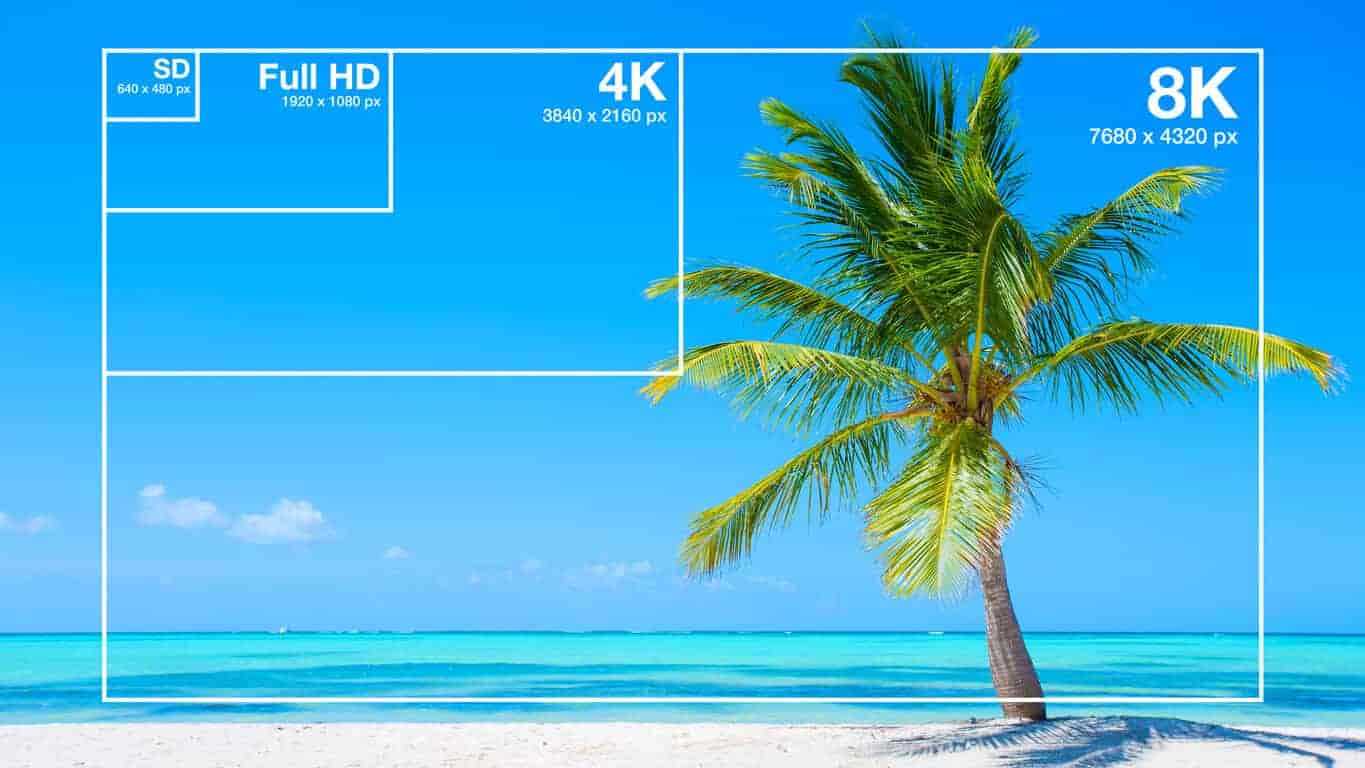
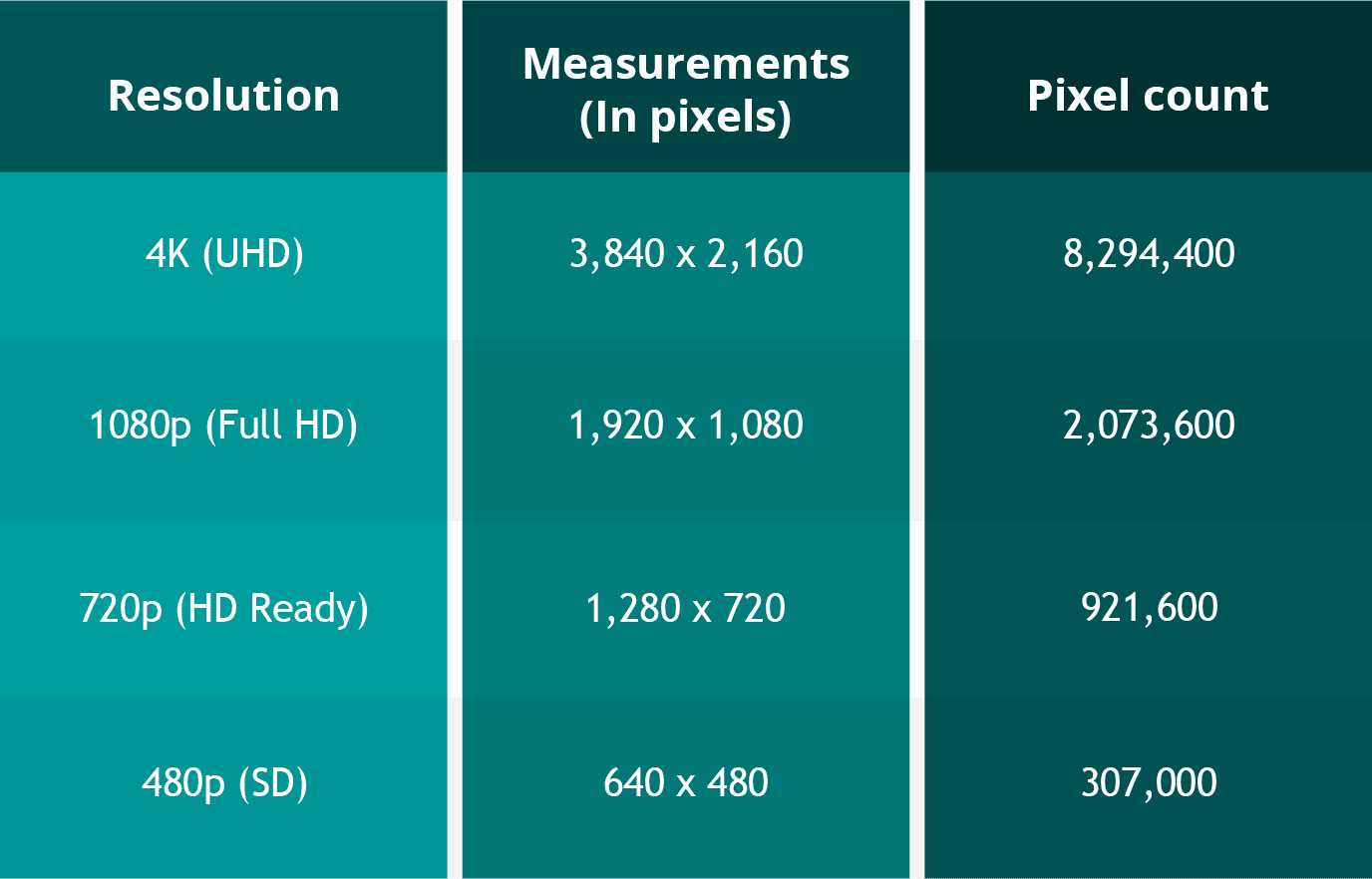
For example, a video with a resolution of 1920 x 1080 has 1920 pixels in width and 1080 pixels in height. The total number of pixels in this video is 2,073,600 (1920 x 1080 = 2,073,600). This is also referred to as 1080p or Full HD resolution.

What are the different types of Video Resolutions?

There are several different types of video resolutions available today. Here are some of the most common video resolutions:

  • 480p – This is standard definition (SD) video and has a resolution of 640 x 480 pixels. It is commonly used for older TV shows and movies.
  • 720p – This is high definition (HD) video and has a resolution of 1280 x 720 pixels. It is commonly used for streaming videos online and for newer TV shows and movies.
  • 1080p – This is Full HD video and has a resolution of 1920 x 1080 pixels. It is commonly used for Blu-ray discs, streaming videos, and newer TV shows and movies.
  • 4K – This is Ultra HD (UHD) video and has a resolution of 3840 x 2160 pixels. It is commonly used for high-end TVs and streaming videos.
  • 8K – This is the latest and highest resolution available for video and has a resolution of 7680 x 4320 pixels. It is used for high-end TVs and is not yet commonly available for streaming or other video content.

What factors affect Video Resolution?

Several factors can affect video resolution, including the quality of the camera or device used to capture the video, the lighting conditions, and the amount of compression used to store or transmit the video. Higher-quality cameras and devices can capture more pixels and produce sharper and clearer images. Good lighting conditions can also help produce better quality videos, while poor lighting can result in grainy or blurry images. Additionally, compression can reduce the file size of a video but can also reduce the quality of the video.

People Also Ask

What is aspect ratio in video resolution?

Aspect ratio refers to the ratio of the width of a video image to its height. It determines the shape of the video image and is usually expressed as a ratio of the width to the height. The most common aspect ratios for video are 4:3, which is standard definition, and 16:9, which is high definition.

What is the difference between 1080p and 4K resolution?

The difference between 1080p and 4K resolution lies in the number of pixels. 1080p has a resolution of 1920 x 1080 pixels, while 4K has a resolution of 3840 x 2160 pixels, which is four times the number of pixels as 1080p. This means that 4K displays have a much higher pixel density, resulting in sharper, more detailed images.

Another difference between the two is that 4K content requires more bandwidth and storage space than 1080p content. This is because 4K files are much larger, due to the increased number of pixels. Therefore, streaming 4K content or storing it on a device requires a faster internet connection and more storage space.

It’s worth noting that the human eye can only perceive so much detail, and the benefits of 4K resolution are most noticeable on larger screens or when sitting closer to the display. On smaller screens or at typical viewing distances, the difference between 1080p and 4K may not be as noticeable.

What is HDR?

HDR stands for High Dynamic Range, and it is a technology that expands the range of colors and brightness levels that can be displayed on a screen. HDR content is encoded with information about the brightness and color of each pixel, allowing displays that support HDR to reproduce a wider range of colors and brightness levels, resulting in more vibrant and lifelike images.
HDR content is available in a variety of formats, including HDR10, Dolby Vision, and HLG (Hybrid Log-Gamma). HDR10 is an open standard that is widely used, while Dolby Vision is a proprietary format developed by Dolby Laboratories that offers additional features, such as dynamic metadata that adjusts the brightness and color levels of each scene. HLG is a format designed for broadcasting and is compatible with both standard dynamic range and high dynamic range displays.

What is the difference between refresh rate and frame rate?

Refresh rate and frame rate are two different measurements that are often confused. Refresh rate refers to how many times per second a display updates the image on the screen, while frame rate refers to how many still images or frames are displayed per second in a video.
Refresh rate is measured in Hertz (Hz), with common refresh rates being 60Hz, 120Hz, or 144Hz. A higher refresh rate can reduce motion blur and make fast-paced action in video games or sports appear smoother.

Frame rate, on the other hand, is typically 24, 30, or 60 frames per second (fps) in video content. A higher frame rate can result in smoother motion and less stuttering, especially in fast-paced or action-packed scenes.

It’s important to note that a higher refresh rate does not necessarily mean a higher frame rate, as the two are independent of each other. A display can have a high refresh rate but still display content at a lower frame rate, resulting in a less smooth image. Conversely, a display with a low refresh rate can display high frame rate content, but the image may appear choppy due to motion blur.

Conclusion

Video resolution is an important aspect of the viewing experience, as it determines the level of detail and clarity of the image. Higher resolutions, such as 4K, can provide more detailed images with greater clarity, but they also require more bandwidth and storage space. HDR is a technology that expands the range of colors and brightness levels that can be displayed on a screen, resulting in more vibrant and lifelike images. Refresh rate refers to the number of times per second that an image is redrawn on the screen. It is measured in Hertz (Hz), with common refresh rates being 60Hz, 120Hz, and 144Hz. A higher refresh rate can result in a smoother image, especially during fast-paced action scenes or sports events. However, not all content can take advantage of a high refresh rate, so it may not be necessary for all users.

Frame rate, on the other hand, refers to the number of individual frames that make up one second of video. It is typically measured in frames per second (fps), with common frame rates being 24fps, 30fps, and 60fps. A higher frame rate can result in a smoother video, especially for fast-moving content, but it can also require more processing power and storage space.

What is aspect ratio?

Aspect ratio is another important measurement to consider when it comes to video resolution. It refers to the proportional relationship between the width and height of a video image. Common aspect ratios include 16:9 (widescreen), 4:3 (standard), and 21:9 (ultra-wide).
The aspect ratio can affect how the video is displayed on the screen, as well as the overall viewing experience. For example, a wider aspect ratio can be better for watching movies, while a narrower aspect ratio may be more suitable for certain types of content, such as computer applications or documents.

Conclusion

Video resolution is a key factor in determining the quality and clarity of video content. Understanding the different measurements and terms used to describe resolution can help you make informed decisions when purchasing a new TV or monitor, or when creating and sharing your own video content.
Remember to consider factors such as aspect ratio, refresh rate, and frame rate, as well as the resolution itself, when evaluating the quality of video content. With a better understanding of these concepts, you can enjoy your favorite movies, TV shows, and other video content in the best possible quality.

People also ask

What is the difference between resolution and pixel density?

Resolution refers to the number of pixels in an image, while pixel density refers to the concentration of those pixels within a given area. A higher pixel density can result in a sharper, more detailed image, even at lower resolutions.

What is 8K resolution?

8K resolution, also known as 7680 x 4320 or 4320p, is the highest resolution currently available for consumer video content. It offers four times the resolution of 4K and sixteen times the resolution of 1080p.

Can I upscale lower-resolution content to a higher resolution?

While it is possible to upscale lower-resolution content to a higher resolution, the quality of the resulting image may not be as good as native high-resolution content. Upscaling can also result in issues such as artifacts, blurriness, and distortion. It is generally recommended to view content at its native resolution whenever possible.

Video Enhancement: How to Transform Your Footage into a Cinematic Masterpiece

Video Enhancement: How to Transform Your Footage into a Cinematic Masterpiece

Video Enhancement
Video Enhancement
Video Enhancement
Video Enhancement

The Basics of Video Enhancement

In today’s digital age, video has become an integral part of our lives. Whether it’s for personal use or professional purposes, the quality of the video is crucial to make it more engaging and impactful. This is where video enhancement comes in. Video enhancement is the process of improving the visual quality of the video by applying various techniques such as color correction, noise reduction, and sharpening. In this article, we will explore the different methods and tools of video enhancement, and how they can help you turn your footage into a cinematic masterpiece.

Color Correction

Color correction is a technique used to adjust the colors of the video footage to make them more vibrant, natural, and appealing. It involves adjusting the brightness, contrast, and saturation of the colors to achieve the desired effect. Color correction can be done manually by adjusting the settings of the camera before filming, or by using software specifically designed for color grading.

Noise Reduction

Noise reduction is the process of removing unwanted grain or static from the video footage. This can be caused by low light, high ISO, or compression artifacts. Noise reduction tools use algorithms to analyze the video and selectively reduce the noise without affecting the details or sharpness of the video.

Sharpening

Sharpening is the process of enhancing the details and edges of the video to make them appear more crisp and defined. This can be done through software that applies filters to the footage or by adjusting the sharpness settings of the camera before filming.

Other Techniques

Other techniques that can be used for video enhancement include:

  • Stabilization – removing shaky footage
  • Color Grading – enhancing the colors and tones of the footage
  • Slow Motion – slowing down the footage to emphasize certain moments
  • Special Effects – adding visual effects such as lens flares, light leaks, or transitions to enhance the overall look of the video

Frequently Asked Questions

Can video enhancement improve the quality of low-resolution footage?

While video enhancement can improve the quality of low-resolution footage to some extent, it cannot completely restore the lost details. It is always best to film in the highest resolution possible to ensure the best quality footage.

Can video enhancement fix out-of-focus footage?

Video enhancement cannot fix out-of-focus footage. It is important to ensure that the footage is in focus before filming to avoid blurry or unusable footage.

Conclusion

Video enhancement is a crucial step in making your video footage more engaging and impactful. By applying techniques such as color correction, noise reduction, and sharpening, you can transform your footage into a cinematic masterpiece. Remember to film in the highest resolution possible and use the appropriate techniques to ensure the best quality footage. With practice and experimentation, you can master the art of video enhancement and create stunning visuals that captivate your audience.

What is the difference between video enhancement and video editing?

Video enhancement is the process of improving the visual quality of the video by applying various techniques such as color correction, noise reduction, and sharpening. Video editing, on the other hand, involves the process of selecting and arranging the footage to tell a story or convey a message. While video enhancement can be a part of the video editing process, it is not the same thing.

Is video enhancement only for professional videographers?

No, anyone can use video enhancement techniques to improve the quality of their video footage, regardless of their level of experience or expertise. With the availability of user-friendly software and tutorials online, even beginners can enhance their footage and make it more engaging and impactful.

Can video enhancement be done on a smartphone?

Yes, there are many apps available that allow you to enhance your video footage on your smartphone. These apps typically offer basic features such as color correction and noise reduction, but may not be as powerful as desktop software.

What are some common mistakes to avoid when doing video enhancement?

Some common mistakes to avoid when doing video enhancement include over-saturating the colors, over-sharpening the footage, and applying too many effects. It is important to use these techniques judiciously and with a discerning eye, keeping in mind the overall look and feel of the footage.

Can video enhancement be used to alter the content of the footage?

No, video enhancement should not be used to alter the content of the footage or to misrepresent the reality of the situation. The purpose of video enhancement is to improve the visual quality of the footage, not to manipulate or distort it.

Are there any ethical considerations to keep in mind when doing video enhancement?

Yes, it is important to be transparent and honest about any enhancements made to the footage. If the footage has been significantly altered, it may be necessary to disclose this to the audience. Additionally, it is important to respect the privacy and dignity of any individuals featured in the footage and to obtain their consent before sharing it publicly.

Understanding Video Resolution

Understanding Video Resolution: Everything You Need to Know

Video Resolution
Video Resolution

Video Resolution – Introduction

Video Resolution
Video Resolution

Video resolution is one of the most important factors to consider when watching or creating videos. It affects the overall quality of the video and can make a huge difference in how enjoyable it is to watch. In this article, we’ll cover everything you need to know about video resolution, from the basics of what it means to how it affects your viewing experience.

What is Video Resolution?

Video resolution refers to the number of pixels displayed on a screen in a video. A pixel is a tiny dot that makes up a part of an image or video. The more pixels there are in a video, the sharper and more detailed the image will be.

Video resolution is measured in terms of the number of pixels that are displayed horizontally and vertically on a screen. For example, a video resolution of 1920×1080 means that there are 1920 pixels displayed horizontally and 1080 pixels displayed vertically on the screen. The higher the number of pixels, the higher the video resolution.

Common Video Resolutions

  • 480p – 640×480 pixels
  • 720p – 1280×720 pixels
  • 1080p – 1920×1080 pixels
  • 4K – 3840×2160 pixels
  • 8K – 7680×4320 pixels

How Video Resolution Affects Viewing Experience

The video resolution can have a significant impact on the viewing experience. Videos with higher resolutions look sharper and more detailed, and are generally more enjoyable to watch. However, the difference in quality may not be noticeable on smaller screens or if the video is compressed.

Another important factor to consider is the size of the screen. A video with a high resolution will look better on a larger screen than on a smaller one. This is because the pixels are spread out over a larger area, making the image appear sharper and more detailed.

Factors that Affect Video Resolution

There are several factors that can affect the video resolution, including:

1. Recording Device

The recording device is one of the most important factors that affect the video resolution. Cameras with higher resolutions will capture videos with more pixels, resulting in a higher video resolution.

2. Compression

Videos are often compressed to make them smaller and easier to share. However, compression can also reduce the video resolution and make the video look less sharp and detailed.

3. Display Device

The display device, such as a TV or computer monitor, is also an important factor that affects the video resolution. If the display device has a lower resolution than the video, the video will be downscaled to match the capabilities of the display device.

FAQs

Q: What is the difference between 1080p and 4K resolution?

A: 4K resolution has four times the number of pixels as 1080p resolution, resulting in a much sharper and more detailed image.

Q: Can I watch a 4K video on a non-4K TV?

A: Yes, you can still watch a 4K video on a non c-4K TV, but the video will be downscaled to match the capabilities of the display device, resulting in a lower video resolution.

Q: Why do some videos look better than others even if they have the same resolution?

A: Video quality is influenced by several factors, such as the recording device, lighting, and color grading. Videos shot with high-end cameras and with good lighting and color grading will generally look better than videos shot with lower-end cameras or under poor lighting conditions.

Conclusion

Video resolution is an important factor to consider when watching or creating videos. The higher the video resolution, the sharper and more detailed the image will be. The size of the screen also plays a role in the viewing experience, as higher resolutions look better on larger screens. When creating videos, it’s important to use a recording device with a high resolution and to avoid excessive compression to maintain the video quality. Overall, understanding video resolution can help you make better decisions when it comes to choosing the right video to watch or creating high-quality videos yourself.

Quality, resolution and size of YouTube videos

Differences between the formats of 240p, 360p, 480p, 720p, 1080p, HD, 2K, 4K and their bit rate. 360 degree panoramic videos. Connection speed and bandwidth required to watch and play videos without interruption.

Everyone who accesses YouTube or other websites in search of music videos, documentaries, series or movies, we see that there are several nominations referring to quality or resolution such as 360p, HD, 1080p, 4K and recently 360 degree videos, terms They cause confusion.
The same happens when we want to acquire a television, a monitor for the computer or a cell phone and we are not clear about the resolutions they support and the video formats they can play.
In this article we explain the difference between these terms used to specify the quality in the world of digital video, we explain its characteristics and which one is the most suitable to enjoy YouTube content.

Resolutions of videos on YouTube

The YouTube service allows you to view the videos in various resolutions, so that each user can watch them without interruptions and at the same time can enjoy the highest resolution and quality, which allows your device and the speed of the internet connection you use.

Below we explain the characteristics of the most used and most recent resolutions.

Videos in 240p and 144p

Both video resolutions are used in devices with small screens and slow internet connections, such as dial-up (56K), which are still being used in several countries.

360p videos (standard definition quality)

360p is the traditional web resolution, used in the vast majority of web pages that show impregnated YouTube videos.
In this size, videos load and play quickly on standard connections and are viewed correctly if they are not maximized.

HD videos (high resolution)

The HD video format for a long time was videos with the highest quality and resolution available at that time.
HD stands for high resolution (hight resolution), they offer excellent quality on displays of portable devices such as phones and tablets.
On the screens of computers and televisions that support it, they look correctly.
Two types of videos in HD quality are available on YouTube: 1080p or Full HD and 720p.

1080 videos

1080p is an alternative name used to designate the maximum resolution used in high definition (HD).
A video with the 1080p rating indicates that it is recorded in Full HD so its resolution is 1920 by 1080 pixels.
The same goes for the devices that indicate that they support this resolution.
The number 1080 represents 1080 horizontal lines and the letter p means progressive scan.
There are devices and TV screens that only support other resolution known as 1080i.
The letter i in this case indicates interlaced (from the English ‘interlaced’).
1080i is a name to refer to the high-definition devices that they use in interlaced mode, that is, they contain half the pixels with respect to 1080p, although they keep the width and height of the videos.

4K videos

The so-called 4K is a recent video format, which is gradually imposed on the internet and at home. It is the one that currently allows maximum resolution and quality.
Many videos are currently available on YouTube in 4K quality, similar to the content offered by the Netflix TV service.
4K videos use a higher resolution than the previous HD (about four times), allowing a reproduction with photographic quality, which allows us to see details similar to an 8 megapixel photo.
They allow to see incredible details with an extraordinary sharpness, that otherwise would go unnoticed There are currently two formats of 4K videos, the one used in the cinema and on television, with differences in width, height and aspect resolution.

Quality, resolution and size of YouTube videos

Differences between 240p, 360p, 480p, 720p, 1080p, HD, 2K, 4K formats and their bit rate. 360 degree panoramic videos. Connection speed and bandwidth required to watch and play videos without interruption.

youtube audio volumen

Quality, resolution and size of YouTube videos

Everyone who accesses YouTube or other websites in search of music videos, documentaries, series or movies, we see that there are several nominations referring to quality or resolution such as 360p, HD, 1080p, 4K and recently 360 degree videos, terms They cause confusion.

The same happens when we want to buy a television, a monitor for the computer or a cell phone and we are not clear about the resolutions they support and the video formats they can play.
In this article we explain the difference between these terms used to specify the quality in the world of digital video, we explain its characteristics and which one is the most suitable to enjoy YouTube content.

youtube resolution

Resolutions of videos on YouTube

The YouTube service allows you to view the videos in several resolutions, so that each user can watch them without interruptions and at the same time can enjoy the highest resolution and quality, which allows your device and the speed of the internet connection you use.
The following resolutions are available, which are known by their generic names:

2160p (4K) – 3840 x 2160 pixels
1440p (2K) – 2560 x 1440 pixels
1080p (HD) – 1920 x 1080 pixels
720p (HD) – 1280 x 720 pixels
480p – 854 x 480 pixels
360p – 640 x 360 pixels
240p – 426 x 240 pixels
144p – 256 x 144 pixels

Resolutions of videos on YouTube

The YouTube service allows you to view the videos in several resolutions, so that each user can watch them without interruptions and at the same time can enjoy the highest resolution and quality, which allows your device and the speed of the internet connection you use.
The following resolutions are available, which are known by their generic names:

2160p (4K) – 3840 x 2160 pixels
1440p (2K) – 2560 x 1440 pixels
1080p (HD) – 1920 x 1080 pixels
720p (HD) – 1280 x 720 pixels
480p – 854 x 480 pixels
360p – 640 x 360 pixels
240p – 426 x 240 pixels
144p – 256 x 144 pixels

Below we explain the characteristics of the most used and most recent resolutions.

Videos in 240p and 144p

Both video resolutions are used in devices with small screens and slow internet connections, such as dial-up (56K), which are still being used in several countries.

youtube quality definition

360p videos (standard definition quality)

360p is the traditional web resolution, used in the vast majority of web pages that show impregnated YouTube videos.
In this size, videos load and play quickly on standard connections and are viewed correctly if they are not maximized.

HD videos (high resolution)

The HD video format for a long time was videos with the highest quality and resolution available at that time.
HD stands for high resolution (hight resolution), they offer excellent quality on screens of portable devices such as phones and tablets.
On the screens of computers and televisions that support it, they look correctly.
Two types of videos in HD quality are available on YouTube: 1080p or Full HD and 720p.

1080p videos

1080p is an alternative name used to designate the maximum resolution used in high definition (HD).
A video with the 1080p rating indicates that it is recorded in Full HD so its resolution is 1920 by 1080 pixels.
The same goes for the devices that indicate that they support this resolution.
The number 1080 represents 1080 horizontal lines and the letter p means progressive scan.
There are devices and TV screens that only support other resolution known as 1080i.
The letter i in this case indicates interlaced (from the English ‘interlaced’).
1080i is a name to refer to the high-definition devices that they use in interlaced mode, that is, they contain half the pixels with respect to 1080p, although they keep the width and height of the videos.

4K videos

The so-called 4K is a recent video format, which is gradually imposed on the Internet and at home. It is the one that currently allows maximum resolution and quality.
Many videos are currently available on YouTube in 4K quality, similar to the content offered by the Netflix TV service.
4K videos use a resolution higher than the previous HD (about four times), allowing a reproduction with photographic quality, which allows us to see details similar to an 8 megapixel photo.
They allow to see incredible details with an extraordinary sharpness, that otherwise would go unnoticed There are currently two video formats, the one used in film and television, with differences in width, height and aspect resolution.

– Full 4K7 (Cinemas resolution) – 4096 × 2160 pixels (17: 9)

– 4K UHDV (Resolution of TV screens) – 3840 x 2160 pixels (16: 9)

There are televisions available in 4K format and computer monitors.
Also several mobile devices, all the latest models of high-end cell phones support that resolution.

Requirements to watch YouTube videos without interruption

Videos from YouTube and other internet sites are streamed, that is, it is not necessary to download the entire file, only what is going to be downloaded immediately, stored in a buffer.
So that there are no interruptions in playback, an internet connection is needed whose speed is equal to or greater than the bit rate of the video or its load coding.
Below we show the minimum bit rate required by each video resolution, although it is higher when it comes to videos with high frame rate (50-60).

2160p (4K) – 26 Mbps
1440p (2K) – 16 Mbps
1080p (HD) – 8 Mbps
720p (HD) – 5 Mbps
480p – 2.5 Mbps
360p – 1 Mbps

According to this data, we must configure the quality in our phone, tablet or desktop browser to be able to use the videos smoothly.