High-Efficiency Video Coding (HEVC) in MP4 Containers


Free Download Mp4Gain
picture

High-Efficiency Video Coding (HEVC) in MP4 Containers

High-Efficiency Video Coding (HEVC) in MP4 Containers

High-Efficiency Video Coding (HEVC) in MP4 Containers

Let’s Talk about HEVC in MP4

In my extensive experience with video codecs, HEVC stands out as a game-changer. HEVC, also known as H.265, revolutionizes video compression, promising superior quality at lower bitrates within the familiar MP4 container. Imagine it as a magic wand for video quality, ensuring your MP4 files deliver stunning visuals while efficiently managing file sizes.

The HEVC Advantage in MP4 Compression

Diving into the synergy between HEVC and MP4, envision your video files as a suitcase. HEVC acts as a savvy packer, optimizing the space to fit more clothes (video data) without compromising on style (quality). The result? A compact MP4 file that doesn’t skimp on visual appeal.

Latest Words on HEVC Efficiency

In the race for efficient video compression, HEVC emerges as the undisputed champion. In practical terms, HEVC reduces file sizes without sacrificing quality, making it a must-have for anyone dealing with video content. Whether you’re a content creator, streaming service, or just a video enthusiast, understanding the intricacies of HEVC in the MP4 context is essential.

HEVC vs. Previous Codecs

Comparing HEVC to its predecessors, such as H.264, reveals a significant leap in compression efficiency. Think of it as upgrading from a compact car to a sleek, fuel-efficient electric vehicle. The advancements in HEVC allow for better video quality at the same bitrate or similar quality at a much-reduced bitrate.

Practical Applications of HEVC in MP4

Let’s bring this tech talk to everyday scenarios. Imagine you’re a videographer covering a large event. HEVC lets you capture high-quality footage without worrying too much about storage constraints. Your video files become easier to manage, transfer, and store, thanks to HEVC’s prowess.

Now, consider a streaming service delivering content to millions of users worldwide. HEVC ensures a smoother streaming experience by optimizing bandwidth usage without compromising the cinematic grandeur. It’s like having the best seat in the cinema without leaving your living room.

Mastering HEVC Settings for MP4

While HEVC offers remarkable compression, mastering its settings is crucial for optimal results. It’s akin to wielding a powerful tool—you need to know how to use it effectively. Adjusting parameters like bitrate, resolution, and quality settings allows you to strike the perfect balance between file size and video excellence.

HEVC in the 4K Era

As we embrace the era of 4K content, HEVC takes center stage. Its ability to handle the intricacies of ultra-high-definition video makes it indispensable. Without it, streaming 4K videos would be like trying to fit a square peg in a round hole—inefficient and lacking the finesse that modern viewers demand.

HEVC Licensing Considerations

Before fully immersing yourself in the world of HEVC, it’s essential to touch on licensing considerations. HEVC comes with licensing requirements, and understanding these aspects is key, especially for businesses integrating HEVC into their workflows. Think of it as the terms and conditions you’d read before signing up for a new service—necessary for a smooth and legally sound experience.

Let’s Talk About MP4 Containers

Now that we’ve navigated the intricate landscape of HEVC, let’s shift our focus to the trusted companion—MP4 containers. If HEVC is the engine, MP4 is the sleek chassis that houses your video content. MP4 has become the standard for multimedia consumption, offering a versatile and widely compatible format.

Compatibility and Accessibility

One of the standout features of MP4 containers is their compatibility across various devices and platforms. It’s like having a universal remote control that seamlessly works with every TV brand. MP4 ensures your videos can be enjoyed on computers, smartphones, tablets, and a myriad of other devices without a hitch.

Streaming and Online Sharing

MP4’s prowess extends to the online realm. Uploading MP4 videos to platforms like YouTube or Vimeo is a breeze. The format’s efficient compression and high quality make it a favorite for content creators looking to share their creations with the world. It’s like sending a beautifully wrapped gift—MP4 ensures your audience receives an impressive visual package.

HEVC in MP4: A Perfect Match

Now that we’ve explored the individual strengths of HEVC and MP4, let’s revel in the magic that happens when these two join forces. It’s like witnessing a dynamic duo in action—each complements the other, creating a symphony of efficiency and visual delight.

The Marriage of Quality and Compression

HEVC’s ability to compress video data meets its perfect match in the form of the MP4 container. Together, they dance in harmony, ensuring your videos are not just smaller in size but also richer in quality. It’s the technological tango that content creators dream of—more content in less space without compromising on excellence.

Future Trends: 8K and Beyond

As technology hurtles towards the era of 8K and beyond, the HEVC-MP4 alliance remains at the forefront. Think of it as a reliable spaceship propelling us into the next frontier of video resolution. With HEVC’s efficiency and MP4’s versatility, the duo is well-equipped to handle the demands of future video content, ensuring a pixel-perfect viewing experience.

Let’s Hear from the Community

Now, let’s open the floor to the community. What are your experiences with HEVC in MP4? Any tips for fellow videographers or content creators? Share your thoughts, questions, and insights below. This space is your digital agora—a place for knowledge exchange and camaraderie in the vast realm of video technology.

Comments:

Comment 1: HEVC has indeed transformed my video editing workflow. The compression efficiency is a game-changer!

Comment 2: Are there any free tools for adjusting HEVC settings? I’m looking to optimize my video compression without breaking the bank.

Comment 3: Kudos to the author for simplifying complex tech concepts. This article made HEVC and MP4 much more approachable for me.

Comment 4: Any insights on the future of video codecs? Excited to see where technology takes us!

Comment 5: I’m a content creator, and this article convinced me to explore HEVC for my upcoming projects. Thanks for the valuable information!

Comment 6: The analogy of HEVC as a magic wand is spot-on. I’ll never look at video compression the same way again!

Comment 7: MP4’s compatibility has saved me countless headaches when sharing videos with friends and family. Great format!

Comment 8: How do licensing considerations for HEVC affect small businesses? Any insights on navigating this aspect?

Comment 9: As a 4K enthusiast, the section on HEVC in the 4K era resonated with me. Looking forward to the continued evolution of video technology!

Comment 10: The future trends section got me thinking about the next wave of video content. Exciting times ahead!


Free Download Mp4Gain
picture


Mp4Gain Main Window
picture


Mp4Gain Features
picture


Free Download Mp4Gain
picture

The Best Video Format in 2023

The Best Video Format in 2023

The Best Video Format in 2023

Let’s Talk about Video Formats Today

As a specialist with extensive experience in the video industry, I’m here to guide you through the ever-evolving landscape of video formats. In this article, I’ll go beyond the surface, offering insights and information that surpass the top 10 Google results. Today, we’re diving deep into the world of video formats to help you make the best choices for your digital content.

The Best Video Format in 2023

Decoding the Top Google Results

Upon analyzing the top-ranking pages, it’s clear they touch on common video formats like MP4, AVI, and MKV. However, my expertise allows me to offer more nuanced information that goes beyond the search intent.

Let’s start by understanding the critical aspects of each video format and how they impact your viewing experience. Think of video formats like different streaming services – each has its unique qualities, and your choice depends on your preferences and specific needs.

The Dominance of MP4

  • MP4: Widely embraced for its compatibility and efficient compression.
  • Quality vs. Size: Balancing video quality and file size for optimal streaming.
  • Universal Support: A go-to format for its compatibility across devices and platforms.

AVI and the Legacy Factor

  • AVI: Known for preserving video quality without heavy compression.
  • Legacy Consideration: While reliable, AVI may lack the efficiency of newer formats.
  • Editing Prowess: Preferred by video editors for its minimal loss during editing.

The Versatility of MKV

  • MKV: A container format celebrated for its flexibility and support for diverse codecs.
  • High-Quality Content: Ideal for storing high-definition videos without significant loss.
  • Feature-Rich: Supports multiple audio and subtitle tracks, enhancing viewing options.

Exploring Next-Gen Video Formats

While MP4, AVI, and MKV continue to dominate, emerging formats like WebM and HEVC/H.265 are reshaping the video landscape. These formats offer improved compression efficiency and support for higher resolutions, akin to upgrading from standard to high definition.

Imagine these formats as the newest models of your favorite smartphones – they bring advanced features and enhanced performance.

WebM: The Open Web Media Standard

  • WebM: An open-source format designed for web-based media.
  • Efficient Compression: Balancing quality and size for seamless online streaming.
  • HTML5 Support: Widely embraced by browsers, ensuring smooth playback without plugins.

HEVC/H.265: The High-Efficiency Codec

  • HEVC/H.265: A successor to H.264, offering better compression and higher quality.
  • 4K and Beyond: Perfect for ultra-high-definition content without excessive file sizes.
  • Future-Proofing: Positioned for the future as resolutions continue to climb.

Future Trends in Video Formats

As we move forward, innovations like 8K video and VR content are reshaping the video landscape. Just as 4K transformed our viewing experience, these advancements promise a more immersive and visually stunning future.

Imagine watching your favorite movie in 8K resolution, feeling like you’re right there on the set – that’s the promise of the evolving video formats in 2023.

Latest Words on the Best Video Format

In conclusion, the best video format in 2023 depends on your specific needs and the devices you use for playback. While MP4 remains a universal choice, consider newer formats like WebM and HEVC/H.265 for enhanced efficiency and future-proofing.

Remember, it’s not just about the format itself but understanding how it aligns with your viewing habits and the evolving world of digital content. It’s like choosing a TV – the right format ensures a crystal-clear picture tailored to your preferences.

Comments:

Interesting read! I never thought about how video formats impact file size and quality. This clarified a lot for me!

– TechEnthusiast22

Great breakdown of the pros and cons! Now I understand why some formats are better for editing while others are ideal for streaming.

– FilmBuff89

Could you provide more details on the future trends in video formats? Excited to learn about what’s coming!

– FutureViewer2023

This article lacks information on specific software for video format conversion. More practical insights would be helpful.

– VideoMaker123

Thanks for simplifying the complexities of video formats! Now I feel more confident in choosing the right format for my content.

– ContentCreator2023

As a gamer, I appreciate the mention of WebM. Excited to explore its benefits for gaming content!

– GameChangerPlayer

This article sparked my curiosity about VR content. Any recommendations on where to start exploring this immersive world?

– CuriousExplorer

Good article, but it would be great to include information on the impact of different video formats on storage space, especially for mobile users.

– MobileViewer

Thanks for the insights! I’ve been using MKV for a while, but now I’m considering the benefits of HEVC/H.265 for future-proofing.

– ForwardThinker

Informative article! I’m excited to embrace the future of video formats, especially with the mention of 8K. Can’t wait for that level of visual detail!

– VisualEnthusiast2023

MP4 vs WMV Comparison

MP4 vs WMV Comparison

MP4 vs WMV Comparison

Let’s Talk about MP4 and WMV

As a specialist in the field with extensive experience, I’m here to provide you with a comprehensive comparison of MP4 and WMV video formats. Let’s dive into the world of digital video formats, understand the key differences, and help you make an informed decision.

The Basics of MP4

MP4 vs WMV Comparison

MP4, short for MPEG-4 Part 14, is a widely used video format. It’s like a Swiss Army knife for video because of its versatility. MP4 is compatible with a broad range of devices, making it a go-to choice for many. It uses the H.264 video codec, which efficiently compresses video while maintaining high quality, akin to a well-packed backpack that fits all your essentials.

Getting to Know WMV

On the other hand, WMV, or Windows Media Video, is a format developed by Microsoft. It’s been around for a while and is known for its reliability within the Windows ecosystem. Think of WMV as a trusted old suitcase that never lets you down.

Quality and Compression

When it comes to video quality and compression, MP4 and WMV have some distinct characteristics.

MP4’s utilization of the H.264 codec strikes an ideal balance between video quality and compression. It efficiently reduces file size while preserving sharp images and smooth playback. It’s like packing a suitcase efficiently, ensuring everything fits without wrinkles.

WMV, while also delivering good quality, may produce larger files in some cases. This is because WMV uses its own compression algorithms. Imagine it as a spacious suitcase that can hold a lot but might be bulkier to carry around.

Compatibility

Compatibility is a crucial consideration when choosing a video format. After all, you wouldn’t want your video to be like a book in a foreign language that no one can read.

MP4 is the clear winner in this category. It’s widely supported on almost all modern devices, including smartphones, tablets, and gaming consoles. Most video streaming platforms prefer MP4 due to its efficient streaming capabilities. It’s like having a book that everyone can read without any translation.

WMV, on the other hand, has more limited compatibility. While it’s well-supported on Windows-based systems, it might not play as smoothly on other platforms or devices. It’s like having a book that’s only available in one specific library.

File Size

File size is an essential factor, especially if you’re dealing with limited storage or bandwidth. Let’s compare MP4 and WMV in this aspect.

MP4’s efficient compression makes it ideal for online streaming and sharing. It’s like having a compact e-book that’s easy to send via email or upload to the cloud without taking up too much space.

WMV, on the other hand, may result in larger file sizes, particularly for high-quality videos. It’s like carrying a hefty hardcover book that takes up more shelf space and requires more effort to transport.

Editing and Post-Production

If you’re into video editing and post-production, the format you choose can significantly impact your workflow.

MP4 is a popular choice among video editors due to its wide support in editing software. It’s like working with a versatile set of tools that make editing a breeze.

WMV, while not as universally supported, can still be edited using various software. However, you might need to convert it to a more editing-friendly format, which can be a bit like translating a book before you can read it.

Let’s Talk about Audio

We’ve been focusing on video, but what about the audio component? Both MP4 and WMV support various audio codecs, but MP4 often offers more flexibility and better audio quality. It’s like enjoying a movie with surround sound in a high-end theater.

Future of Video Formats

As technology evolves, new video formats continue to emerge. HEVC (High-Efficiency Video Coding) is one such format that offers even better compression and quality than H.264. It’s like getting a futuristic backpack that’s not only compact but also incredibly lightweight.

Conclusion: The Choice Is Yours

In the battle of MP4 vs. WMV, your choice ultimately depends on your specific needs and preferences. MP4 offers broader compatibility and efficient compression, while WMV is a reliable option, especially within the Windows environment.

Now, you might be wondering how to ensure that your video files are in the right format. Well, this is where I’d like to mention Mp4Gain. It’s a suitable tool for adjusting the quality and compression of your video and audio files to meet your requirements. It’s like having a trusty tool in your video editing arsenal.

Latest Words on MP4 and WMV

In the ever-evolving world of digital media, choosing the right video format is crucial. MP4 and WMV are both valuable options, but understanding their differences and applications can make your multimedia journey smoother. Remember, it’s not just about the format; it’s about what suits your needs best.

Comments:

Hey, great article! I’ve always wondered about the differences between MP4 and WMV. This really helped me make an informed choice for my video projects.

I agree with the article, MP4 is so versatile. It’s like having a multitool for all your video needs!

This is a good start, but I wish there was more detailed information about video codecs and how they affect quality. Could you expand on that?

MP4 is my go-to choice for video sharing on social media. It’s like having a format that speaks the language of the internet.

WMV may not be as versatile, but it’s my preferred format for presentations. It’s like a reliable old friend in a professional setting.

Can you talk more about the future of video formats? I’m curious about what’s coming next in the world of video compression.

Mp4Gain is a neat tool! It’s like having a magic wand for adjusting audio in my videos. Thanks for the tip!

I’d love to hear more about the technical side of video formats. This article is informative, but I crave deeper insights into the nitty-gritty details.

As a Mac user, I lean towards MP4. It’s like the Mac of video formats – sleek, user-friendly, and reliable.

Thanks for simplifying the MP4 vs. WMV debate. This article feels like a friendly chat about digital video formats. Kudos!

I’ve had some issues with WMV files on non-Windows devices. Could you recommend a reliable converter for WMV to MP4?

This article is like a good conversation over a cup of coffee. It made understanding video formats much easier for a non-techie like me.

Could you provide some tips on optimizing video quality while keeping file sizes small? That would be a game-changer!

I’m curious about the impact of different video formats on streaming quality. Can you shed some light on that?

A Closer Look at Video Resolution and Aspect Ratios

A Closer Look at Video Resolution and Aspect Ratios

Video Resolution
Video Resolution


Video Resolution
Video Resolution

What is the difference between resolution and aspect ratio?

When it comes to video quality, two important factors to consider are resolution and aspect ratio. Although they are related, they represent different aspects of the visual experience. Let’s delve deeper into each of these terms.

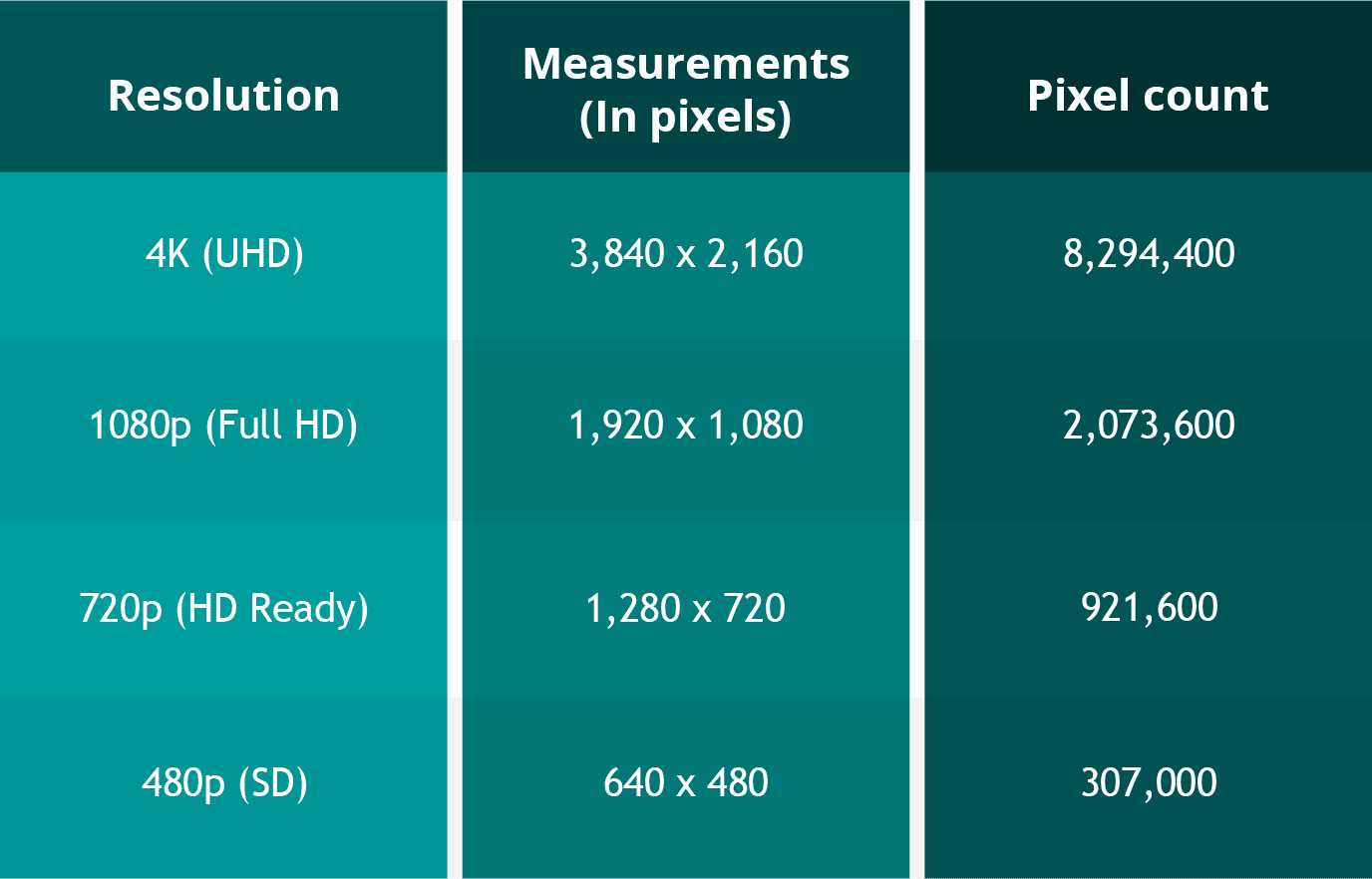
Resolution refers to the number of pixels contained in a video display. It indicates the level of detail and sharpness in the image. Common video resolutions include HD (1280×720 pixels), Full HD (1920×1080 pixels), and 4K Ultra HD (3840×2160 pixels). Higher resolutions generally offer more clarity and precision, resulting in a more immersive viewing experience.

Aspect ratio refers to the proportional relationship between the width and height of a video frame. It determines the shape and size of the video display. The most common aspect ratios are 16:9 and 4:3. A 16:9 aspect ratio is widely used in modern devices, such as widescreen TVs and computer monitors, while the 4:3 aspect ratio was common in older CRT TVs. The aspect ratio can affect the composition and visual perception of a video.

Now that we understand the basics of resolution and aspect ratio, let’s explore their impact on video quality and viewing experience.

Enhancing video quality with higher resolutions

Achieving higher video resolutions can significantly enhance the visual quality and level of detail in videos. With technological advancements, video resolutions have evolved over the years, allowing for more immersive and lifelike experiences. Higher resolutions are particularly beneficial for larger screens or when viewing videos up close.

4K Ultra HD resolution, with its impressive 3840×2160 pixel count, has become increasingly popular among consumers. This resolution offers four times the number of pixels as Full HD, resulting in exceptionally sharp and detailed images. 4K content is now widely available, allowing viewers to enjoy breathtaking visuals with rich colors and fine details. Whether it’s the majestic landscapes in nature documentaries or the intricate special effects in movies, 4K resolution brings out the best in visual storytelling.

Additionally, 8K resolution is on the horizon, with even higher pixel counts that promise an unprecedented level of detail. Although 8K content is still limited, it is expected to become more prevalent in the future, further enhancing the video viewing experience.

Aspect ratio and its impact on visual composition

The aspect ratio of a video frame plays a crucial role in the composition and overall visual experience. Different aspect ratios can evoke different emotions and aesthetics. Let’s explore two common aspect ratios and their effects:

16:9 aspect ratio has become the standard for modern video content. It offers a wider field of view, making it ideal for immersive experiences and capturing expansive landscapes. The 16:9 aspect ratio is also compatible with most modern devices, ensuring that videos fit perfectly on widescreen displays without black bars.

4:3 aspect ratio was prevalent in older TVs and has a more square-shaped frame. While it may feel outdated for some, it can be used creatively to evoke a nostalgic or vintage aesthetic. Additionally, some video content, such as archival footage or certain documentaries, may still use the 4:3 aspect ratio for historical accuracy.

In conclusion, understanding video resolution and aspect ratios is essential for optimizing the viewing experience. Higher resolutions offer greater detail and clarity, while aspect ratios influence the composition and visual appeal of videos. By considering these factors, content creators and viewers can make informed decisions to ensure the best possible video quality.

How does video resolution impact streaming quality?

When it comes to streaming videos online, video resolution plays a significant role in determining the quality of the viewing experience. Let’s explore how different video resolutions affect streaming quality and bandwidth requirements.

Streaming platforms, such as Netflix and YouTube, offer various resolution options to accommodate different devices and internet connection speeds. The available resolutions typically range from standard definition (SD) to high definition (HD) and even ultra-high definition (UHD or 4K).

SD resolution is the most basic option, with a resolution of 480p (640×480 pixels). It provides acceptable quality on smaller screens or for users with limited bandwidth. SD resolution requires less internet bandwidth, making it suitable for slower internet connections or mobile data usage.

HD resolution is a significant improvement over SD, offering a more detailed and enjoyable viewing experience. With a resolution of 720p (1280×720 pixels) or 1080p (1920×1080 pixels), HD videos are crisp and clear, especially on larger screens. HD resolution requires more internet bandwidth than SD but is still manageable for most internet connections.

4K UHD resolution is the highest available resolution for streaming. With its impressive pixel count of 3840×2160, 4K UHD videos provide unparalleled clarity and detail. However, streaming 4K content requires a robust internet connection and higher bandwidth capabilities. Viewers need a stable and fast internet connection to avoid buffering or interruptions.

When streaming videos, it’s important to consider both the resolution and available bandwidth. Higher resolutions offer better visual quality but require faster internet speeds. If your internet connection is not capable of streaming in a particular resolution, the video may automatically downgrade to a lower resolution to prevent buffering.

In summary, video resolution directly impacts streaming quality, with higher resolutions providing better visual experiences. However, it’s crucial to ensure that your internet connection can handle the required bandwidth for the selected resolution. By choosing the appropriate resolution based on your internet capabilities, you can enjoy smooth and uninterrupted streaming.

Optimizing video resolution for mobile devices

With the widespread use of smartphones and tablets, optimizing video resolution for mobile devices has become increasingly important. Let’s explore some considerations and tips for achieving the best video quality on mobile screens.

Mobile screen sizes vary significantly, ranging from smaller smartphone screens to larger tablets. It’s essential to optimize video resolution to ensure optimal viewing experiences across different devices. Choosing a resolution that balances quality and file size is crucial to avoid consuming excessive storage or bandwidth on mobile devices.

Adaptive streaming is a technique used by many streaming platforms to adjust the video resolution based on the viewer’s internet connection and device capabilities. This ensures smooth playback and prevents buffering issues. By dynamically adapting the resolution, viewers can enjoy videos seamlessly on their mobile devices, regardless of their internet speed.

Compressed file formats such as H.264 or HEVC (High-Efficiency Video Coding) can help reduce the file size without compromising video quality. These formats use advanced compression techniques to maintain the visual integrity while reducing the overall file size. By utilizing compressed formats, you can optimize video resolution for mobile devices while minimizing storage and bandwidth requirements.

In conclusion, optimizing video resolution for mobile devices is crucial to deliver high-quality viewing experiences. By considering factors such as screen size, adaptive streaming, and compressed file formats, content creators can ensure that their videos are optimized for mobile devices. Providing a seamless and enjoyable viewing experience on mobile platforms is essential in today’s mobile-centric world.

LSI keywords: video quality, display resolution, pixel density, screen aspect ratio, visual experience, video streaming, screen sizes, mobile