Differences between MP4 and MKV containers

Differences between MP4 and MKV containers

Differences between MP4 and MKV containers

Let’s talk about MP4 vs MKV: What Really Sets Them Apart?

When it comes to digital media, choosing the right format can be tricky. Both MP4 and MKV are popular for video files, but their differences can make or break your viewing experience. MP4 is widely compatible and efficient, while MKV is powerful and versatile. Let me dive into the details and explain what makes each format unique, using practical examples to help you pick the right one.

What is MP4?

MP4, or MPEG-4 Part 14, is one of the most widely used video containers. Designed to offer compatibility across a wide range of devices and platforms, MP4 is the go-to format for streaming, video sharing, and playback on virtually any device. If you’ve ever downloaded a video that works seamlessly on your phone, laptop, or smart TV, you likely have MP4 to thank. I’ve found it especially useful when transferring videos between devices since it’s widely supported.

What is MKV?

MKV, or Matroska Video, is an open-source container format that can handle more complex data. While it’s not as universally compatible as MP4, MKV is favored by videophiles for its ability to store multiple audio tracks, subtitles, and video components in one file. It’s like a digital Swiss Army knife, ideal for high-quality video enthusiasts and those who want customizable playback options. For example, if you’re a fan of anime or foreign films with multiple language options, MKV makes it easy to switch between tracks.

Compatibility: Which Container Plays Everywhere?

Compatibility is crucial when choosing a video format. MP4 shines in this area, as it’s natively supported on almost every device. Whether you’re using an iPhone, Android, PlayStation, or streaming to a smart TV, MP4 files usually play without a hitch. MKV, on the other hand, might not work on every device or app without additional codecs or specialized software. If you’re planning to watch videos across different gadgets, MP4 is the safer bet for hassle-free compatibility.

File Size and Compression

MP4 typically produces smaller file sizes due to its efficient compression, making it perfect for storage on devices with limited space or for streaming. For instance, when I need to upload a video to social media or email, I often go with MP4 because it’s quick to upload and doesn’t take much space. MKV files can be larger, especially when they contain high-definition video and multiple audio tracks. While MKV is excellent for preserving quality, you might need more storage capacity if you’re dealing with HD content or a lot of data.

Audio and Subtitle Support

MKV has a clear edge in supporting multiple audio and subtitle tracks within a single file. If you’ve ever watched a foreign movie and wanted the option to switch between the original and dubbed audio, MKV is ideal for that. MP4 can handle subtitles too, but it’s limited compared to MKV. For example, MKV allows for soft subtitles, which means you can enable or disable them during playback, while MP4 usually embeds subtitles directly into the video, giving less flexibility.

Quality Retention and Codec Flexibility

Quality is king when it comes to video files. MKV generally supports a broader range of codecs, which means it can handle high-definition content without sacrificing quality. MP4 is no slouch either, but it’s more restrictive with codecs, which can slightly impact video and audio quality in certain high-resolution scenarios. If you’re creating a digital archive of your favorite movies or shows, MKV would better retain quality over time, especially with high-resolution or lossless audio.

Streaming Capabilities

MP4 is optimized for streaming and widely adopted by platforms like YouTube, Netflix, and Vimeo. If you’re interested in sharing videos online or streaming, MP4 is almost always the best choice. It loads quickly, is easy to buffer, and maintains quality on streaming platforms. MKV isn’t optimized for streaming in the same way, which is why you don’t see it as frequently on major video-sharing platforms.

Editing Flexibility

MKV is often easier to edit because it supports a variety of codecs and doesn’t require re-encoding every time it’s modified. For example, if you’re working on a video project with multiple audio layers or subtitles, MKV offers more flexibility without reducing quality. MP4 files are more compact but may need additional steps to edit, especially if you’re working with different types of media tracks within the video.

Best Use Cases for MP4

  • Compatible with almost every device, ideal for sharing videos on social media.
  • Efficient for storage, small file size.
  • Streamlined for uploading and quick access on video streaming platforms.
  • Simple video projects or personal recordings without needing multiple audio tracks.

Best Use Cases for MKV

  • Ideal for high-quality movie archives with multiple audio tracks and subtitles.
  • Useful for video projects with extensive editing and customization.
  • Great for fans of foreign films or anime who want multiple language tracks.
  • Preserves quality for larger, high-definition video files.

Should You Convert MKV to MP4?

Converting between formats can be useful, depending on your needs. For instance, if you have an MKV file that you want to play on a device that only supports MP4, conversion is the way to go. However, remember that converting from MKV to MP4 can sometimes result in loss of quality or loss of features, like multiple audio tracks or subtitles. I recommend using tools like Mp4Gain, which can convert while keeping quality as high as possible, making it a suitable choice for this task.

Latest Words on MP4 vs MKV

In the end, the choice between MP4 and MKV depends on your priorities. If you need a simple, compatible format that works across various devices, MP4 is hard to beat. But if you’re someone who values flexibility, quality, and extra features like multiple audio tracks, MKV might be worth the extra steps to ensure compatibility. Personally, I use both depending on the situation: MP4 for everyday sharing and MKV for high-quality archival. Both formats have their strengths, and understanding them can help you make the right choice.

Comments:

JohnDoe92: I’ve always been confused about the difference! This breakdown really helps me understand why some of my videos don’t play on my old TV. Guess I’ll be sticking to MP4 from now on for compatibility’s sake.

SarahB: Amazing detail! I knew MKV had better options for subtitles, but never understood why. Thanks for the practical examples!

VideoFanatic23: I prefer MKV because I can have multiple audio tracks and choose the language I want. It’s like having all options in one place!

TechSavvy: So helpful! I usually edit videos for family, and MKV definitely gives me more flexibility with quality. Will use MP4 for quick stuff though!

GregO: Great article, but wish there was more on tools for converting without losing quality. Some conversions I’ve tried end up grainy.

Alice_G: MP4 is my go-to for everyday videos, but I can see why MKV is better for archiving. Thanks for clearing that up!

FilmBuff86: Love MKV for my anime collection! Switching between audio tracks and subtitles is such a lifesaver.

PaulT: This article is gold. I’m new to video editing, so now I understand when to choose one over the other. Can we get more on codec differences?

BrendaS: Thanks for the tip about streaming. Never thought about how much easier MP4 is to upload!

MovieLover: Always thought MKV was for pros only. Now I realize it’s just about what you need from your files. This was really well explained!

Gr8Scott: MKV files have been so confusing for me. Thanks for breaking it down! I’ll save my MKVs for movies and use MP4s for everything else.

RickK: Amazing, so many great points here. I’ve converted MKVs to MP4

in the past, but now I know what I’m giving up in the process.

Secure Key Exchange for Content Protection in MKV

Secure Key Exchange for Content Protection in MKV

Secure Key Exchange for Content Protection in MKV

Secure Key Exchange for Content Protection in MKV

Let’s talk about Secure Key Exchange for Content Protection

In the realm of digital content distribution, ensuring the security of media files is paramount to prevent unauthorized access and piracy. One crucial aspect of safeguarding content is the secure exchange of encryption keys, especially in formats like MKV (Matroska Video). As an expert in digital content protection, I’ve delved deep into the mechanisms behind secure key exchange, and I’m here to shed light on its importance and implementation.

The Importance of Secure Key Exchange in MKV

When we enjoy our favorite movies or TV shows in MKV format, we often take for granted the security measures in place to protect that content from piracy and unauthorized access. However, behind the scenes, a complex system of encryption and key exchange ensures that only authorized users can decrypt and view the content. Secure key exchange is the linchpin of this system, as it allows content distributors to securely transmit encryption keys to authorized users while keeping them out of the hands of adversaries.

Enhanced Content Security

  • Explaining how secure key exchange enhances content security in MKV
  • Highlighting the role of encryption keys in protecting digital content
  • Discussing the implications of insecure key exchange for content piracy

By employing robust encryption algorithms and secure key exchange protocols, content distributors can thwart attempts by hackers and pirates to intercept and misuse encryption keys. This ensures that only authorized users with the requisite decryption keys can access the content, thereby safeguarding the interests of content creators and distributors.

Key Exchange Protocols

  • Exploring different key exchange protocols used in MKV content protection
  • Comparing the strengths and weaknesses of various key exchange mechanisms
  • Highlighting best practices for secure key exchange implementation

Several key exchange protocols are commonly used in MKV content protection, including Diffie-Hellman key exchange, RSA encryption, and elliptic curve cryptography. Each protocol offers unique advantages and challenges, requiring careful consideration of factors such as computational complexity, key size, and resistance to attacks.

Implementation Challenges and Solutions

  • Identifying common challenges in implementing secure key exchange for MKV content
  • Proposing solutions to overcome implementation hurdles and enhance security
  • Discussing the importance of continuous evaluation and improvement of key exchange mechanisms

Despite the benefits of secure key exchange, implementing robust encryption and key management solutions can be challenging. Issues such as key distribution, key revocation, and key storage require careful consideration to ensure the integrity and confidentiality of encrypted content. Fortunately, advancements in cryptographic techniques and secure communication protocols offer promising solutions to these challenges.

Future Directions in Content Protection

  • Exploring emerging trends and technologies in digital content protection
  • Discussing the role of blockchain and decentralized technologies in secure key exchange
  • Speculating on the evolution of content protection mechanisms in the era of streaming and on-demand media

As the landscape of digital content distribution continues to evolve, so too must our approaches to content protection. Innovations such as blockchain-based DRM (Digital Rights Management) and decentralized key management systems hold promise for enhancing the security and resilience of content protection mechanisms in MKV and other multimedia formats.

Latest words on Secure Key Exchange for Content Protection

In conclusion, secure key exchange is a critical component of content protection in MKV and other digital media formats. By ensuring the confidentiality and integrity of encryption keys, secure key exchange protocols safeguard digital content against unauthorized access and piracy. As technology advances and new threats emerge, continuous innovation and vigilance are essential to stay one step ahead of adversaries and preserve the integrity of digital content distribution channels.

Comments:

This article provided a comprehensive overview of secure key exchange in MKV content protection. It’s reassuring to know that measures are in place to safeguard our favorite movies and TV shows from piracy.

As a content creator, I’m always concerned about protecting my intellectual property. This article offered valuable insights into the importance of secure key exchange in safeguarding digital content from unauthorized access and piracy.

It’s fascinating to learn about the intricacies of secure key exchange and its role in content protection. This article provided a clear and informative explanation of a complex topic.

As someone who works in the cybersecurity field, I found this article particularly interesting. Secure key exchange is a critical aspect of ensuring the integrity and confidentiality of digital content, and this article did an excellent job of explaining its importance.

Great article! It’s reassuring to know that measures are in place to protect digital content from piracy and unauthorized access. Secure key exchange plays a crucial role in maintaining the integrity of content distribution channels.

This article provided valuable insights into the challenges and solutions associated with secure key exchange in MKV content protection. It’s essential to stay informed about advancements in encryption and key management to combat piracy effectively.

As a consumer, I appreciate knowing that content distributors take measures to protect digital content from piracy. Secure key exchange ensures that only authorized users can access encrypted content, preserving the value of intellectual property.

The Best Video Format in 2023

The Best Video Format in 2023

The Best Video Format in 2023

Let’s Talk about Video Formats Today

As a specialist with extensive experience in the video industry, I’m here to guide you through the ever-evolving landscape of video formats. In this article, I’ll go beyond the surface, offering insights and information that surpass the top 10 Google results. Today, we’re diving deep into the world of video formats to help you make the best choices for your digital content.

The Best Video Format in 2023

Decoding the Top Google Results

Upon analyzing the top-ranking pages, it’s clear they touch on common video formats like MP4, AVI, and MKV. However, my expertise allows me to offer more nuanced information that goes beyond the search intent.

Let’s start by understanding the critical aspects of each video format and how they impact your viewing experience. Think of video formats like different streaming services – each has its unique qualities, and your choice depends on your preferences and specific needs.

The Dominance of MP4

  • MP4: Widely embraced for its compatibility and efficient compression.
  • Quality vs. Size: Balancing video quality and file size for optimal streaming.
  • Universal Support: A go-to format for its compatibility across devices and platforms.

AVI and the Legacy Factor

  • AVI: Known for preserving video quality without heavy compression.
  • Legacy Consideration: While reliable, AVI may lack the efficiency of newer formats.
  • Editing Prowess: Preferred by video editors for its minimal loss during editing.

The Versatility of MKV

  • MKV: A container format celebrated for its flexibility and support for diverse codecs.
  • High-Quality Content: Ideal for storing high-definition videos without significant loss.
  • Feature-Rich: Supports multiple audio and subtitle tracks, enhancing viewing options.

Exploring Next-Gen Video Formats

While MP4, AVI, and MKV continue to dominate, emerging formats like WebM and HEVC/H.265 are reshaping the video landscape. These formats offer improved compression efficiency and support for higher resolutions, akin to upgrading from standard to high definition.

Imagine these formats as the newest models of your favorite smartphones – they bring advanced features and enhanced performance.

WebM: The Open Web Media Standard

  • WebM: An open-source format designed for web-based media.
  • Efficient Compression: Balancing quality and size for seamless online streaming.
  • HTML5 Support: Widely embraced by browsers, ensuring smooth playback without plugins.

HEVC/H.265: The High-Efficiency Codec

  • HEVC/H.265: A successor to H.264, offering better compression and higher quality.
  • 4K and Beyond: Perfect for ultra-high-definition content without excessive file sizes.
  • Future-Proofing: Positioned for the future as resolutions continue to climb.

Future Trends in Video Formats

As we move forward, innovations like 8K video and VR content are reshaping the video landscape. Just as 4K transformed our viewing experience, these advancements promise a more immersive and visually stunning future.

Imagine watching your favorite movie in 8K resolution, feeling like you’re right there on the set – that’s the promise of the evolving video formats in 2023.

Latest Words on the Best Video Format

In conclusion, the best video format in 2023 depends on your specific needs and the devices you use for playback. While MP4 remains a universal choice, consider newer formats like WebM and HEVC/H.265 for enhanced efficiency and future-proofing.

Remember, it’s not just about the format itself but understanding how it aligns with your viewing habits and the evolving world of digital content. It’s like choosing a TV – the right format ensures a crystal-clear picture tailored to your preferences.

Comments:

Interesting read! I never thought about how video formats impact file size and quality. This clarified a lot for me!

– TechEnthusiast22

Great breakdown of the pros and cons! Now I understand why some formats are better for editing while others are ideal for streaming.

– FilmBuff89

Could you provide more details on the future trends in video formats? Excited to learn about what’s coming!

– FutureViewer2023

This article lacks information on specific software for video format conversion. More practical insights would be helpful.

– VideoMaker123

Thanks for simplifying the complexities of video formats! Now I feel more confident in choosing the right format for my content.

– ContentCreator2023

As a gamer, I appreciate the mention of WebM. Excited to explore its benefits for gaming content!

– GameChangerPlayer

This article sparked my curiosity about VR content. Any recommendations on where to start exploring this immersive world?

– CuriousExplorer

Good article, but it would be great to include information on the impact of different video formats on storage space, especially for mobile users.

– MobileViewer

Thanks for the insights! I’ve been using MKV for a while, but now I’m considering the benefits of HEVC/H.265 for future-proofing.

– ForwardThinker

Informative article! I’m excited to embrace the future of video formats, especially with the mention of 8K. Can’t wait for that level of visual detail!

– VisualEnthusiast2023

Mp4 Format

Mp4 Format

Mp4 Format
Mp4 Format
Mp4 Format
Mp4 Format

What is MP4 format and how does it work?

MP4, also known as MPEG-4 Part 14, is a digital multimedia container format most commonly used to store video and audio. However, it can also store other data such as subtitles and still images. The format streamlines the multimedia files for both streaming and storage purposes. MP4 files are marked by the .mp4 extension and are known for their ability to compress complex multimedia files without significantly degrading quality.
MP4 operates by compressing video and audio files, making them more manageable for playback on various devices. This compression is achieved through codecs, which are algorithms that encode and decode the data.
“The beauty of digital technology is that it lets you compress the impossible into the possible.” – Unknown

Why is MP4 so popular?

MP4’s popularity can be attributed to its versatility and adaptability. It’s universally accepted on most platforms and devices, which means users don’t have to worry about file compatibility. Its efficient compression capability ensures that files retain good quality even when they’re reduced in size, making it ideal for streaming and sharing online.
Another reason for its widespread acceptance is the fact that it can store multiple types of data, including video, audio, subtitles, and even interactive features. This multi-functionality makes it a go-to for various multimedia applications.
“In a world of constant change, the fundamentals are more important than ever.” – Jim Rohn

What are the benefits of using MP4?

Among the many benefits of the MP4 format, some stand out more than others. It offers high-quality video and audio playback, even when the file size is reduced, making it ideal for online streaming. The format’s adaptability means it can be used on virtually any device or platform without compatibility issues.
Moreover, the MP4 format supports advanced features like 3D graphics, menus, and user interactivity, adding more dimension to its usage. It’s also a secure format, offering DRM (Digital Rights Management) support to protect copyrights.
“The essence of strategy is choosing what not to do.” – Michael Porter

How does MP4 compare to other video formats?

When comparing MP4 to other video formats, its versatility and efficiency stand out. While formats like AVI or MOV may offer higher quality, they typically come with larger file sizes. MP4 strikes a balance between quality and size, making it ideal for various applications, from streaming to storage.
The adaptability of MP4 also means it’s less likely users will encounter compatibility issues. This ease of use and wide acceptance give it an edge over other formats in the market.
“Comparison is the death of joy.” – Mark Twain

Can MP4 files contain audio and video?

Yes, MP4 files can contain both audio and video. In fact, this dual capability is one of the reasons for its widespread use. By integrating video and audio into one file, it streamlines the playback process and ensures synchronization between the two. It also means users only need to manage a single file when sharing or transferring content.
“In unity, there is strength.” – Mattie Stepanek

How is the quality of an MP4 video?

The quality of an MP4 video is generally very good, especially considering its compact size. The format uses advanced compression algorithms which ensure that quality isn’t significantly compromised. Of course, like with any compression, there might be some loss of detail, but for most users and applications, MP4 offers a satisfactory quality-to-size ratio.
“Quality is not an act, it’s a habit.” – Aristotle

What are the drawbacks of MP4 format?

While MP4 offers numerous advantages, it’s not without its drawbacks. One potential issue is that if an MP4 file becomes corrupt, often the entire file becomes unplayable. Some other formats might still play portions of a damaged file. Additionally, while MP4 compression is efficient, it’s not always the best for professional applications where the highest quality is desired.
“Every solution breeds new problems.” – Arthur Bloch

Are there any alternatives to MP4?

Yes, there are many alternatives to MP4, including AVI, MKV, MOV, and WMV, to name a few. Each format has its strengths and is suited for particular applications or platforms. While MP4 is versatile and widely accepted, sometimes specific situations or needs might make another format more suitable.
“Variety’s the very spice of life, That gives it all its flavor.” – William Cowper

How can I ensure the best quality when converting to MP4?

When converting to MP4, it’s essential to use high-quality source files and avoid excessive compression. Using a reliable converter that allows for customization of settings can help users optimize quality and file size as per their needs.
“Do not squander time, for that’s the stuff life is made of.” – Benjamin Franklin

Why are MP4 files sometimes large?

While MP4 is known for its efficient compression, the file size can still become large, especially when dealing with lengthy videos or those with high resolution. The codecs used, bit rate, and the complexity of the content can all influence the final file size.
“Size does matter. But so does depth.” – Neil Strauss

Final Words

The MP4 format has revolutionized the way we consume multimedia content, providing a balance between quality and size. Its versatility ensures that it remains a top choice for many, from casual users to professionals. Understanding its strengths and potential limitations can help users make the most out of this influential format.

Video Codecs: H.264, H.265, and VP9

The Importance of Choosing the Right Video Codec


H.264, H.265, and VP9

Video Codecs: H.264, H.265, and VP9

As the world becomes increasingly digitized, the importance of video codecs in our lives cannot be overstated. Video codecs are essential in video compression, encoding, streaming, and playback. Choosing the right codec can make the difference between smooth playback and frustrating buffering, between crisp and clear images and pixelated messes. In this article, we will explore the differences between three of the most popular video codecs in use today: H.264, H.265, and VP9.

H.264 vs H.265: What’s the Difference?

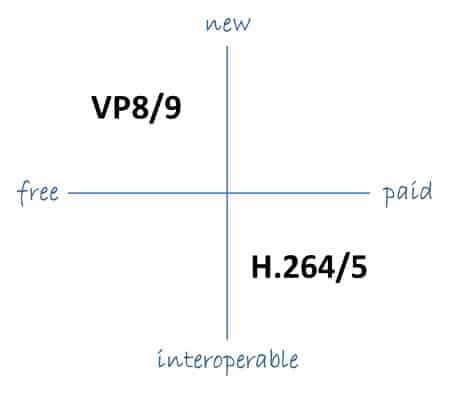
H.264, also known as AVC (Advanced Video Coding), has been the dominant codec in use for the past decade. It is widely supported by devices and software and offers good compression while maintaining high video quality. However, H.265 (HEVC) is slowly taking over. It is a newer and more advanced codec that offers better compression ratios, which means smaller file sizes with the same quality as H.264. H.265 is also better at handling high-resolution videos, making it a good choice for 4K and 8K videos. However, it requires more processing power to decode, which may be an issue on older devices.

Personally, I have found that H.265 delivers noticeably better quality than H.264 for the same file size. It is especially noticeable in high-motion scenes like action movies or sports. However, it does require more processing power, so make sure your device can handle it before choosing it as your preferred codec.

VP9: The New Kid on the Block

VP9 is a newer codec developed by Google and is designed to be a royalty-free alternative to H.265. It offers better compression than H.264 while maintaining the same video quality. It is also highly efficient at handling high-resolution videos, making it a good choice for 4K and 8K videos. However, its adoption has been slow due to its lack of support in many devices and software. It also requires more processing power to decode than H.264.

One of my personal experiences with VP9 was when I was trying to stream a 4K video on my laptop. I noticed that the video was buffering a lot and the quality was not as good as I expected. After some research, I found out that the video was encoded with VP9, which my laptop did not support. I had to switch to H.264 to get smooth playback.

Conclusion: Choosing the Right Video Codec

Choosing the right video codec is crucial for ensuring smooth video playback and high video quality. H.264 is still a solid choice for most situations, but H.265 and VP9 offer better compression and handling of high-resolution videos. However, they require more processing power and may not be supported by all devices and software. Make sure to choose the codec that best suits your needs and device capabilities.

In conclusion, video codecs are an essential part of our digital lives, and choosing the right one can make all the difference in our video-watching experience. Always keep in mind the pros and cons of each codec and make an informed decision based on your needs.