MPEG-1 vs MPEG-2 Layer III Differences


Free Download Mp4Gain
picture

MPEG-1 vs MPEG-2 Layer III Differences
MPEG-1 vs MPEG-2 Layer III Differences

Let’s Talk About MPEG-1 vs MPEG-2 Layer III Differences

When you’re looking at MPEG-1 and MPEG-2 Layer III, it’s all about understanding how these formats work differently in terms of audio and video encoding. Although they seem quite similar, the distinctions are essential, especially if you’re into video editing or streaming. I’ve been working with both formats for years, and I can tell you firsthand that each has its own strengths and limitations. From compression techniques to practical applications, there’s a lot to explore.

What Is MPEG-1 Layer III?

MPEG-1 Layer III, commonly known as MP3, is one of the most widely used audio compression formats. Initially designed for digital storage and broadcast, MPEG-1 Layer III compresses audio by discarding data that the human ear can’t easily detect. This method, known as “psychoacoustic compression,” allows it to shrink file sizes significantly without a major loss in perceived audio quality.

Understanding the Psychoacoustic Model

  • Psychoacoustic compression analyzes sound frequencies and removes inaudible frequencies.
  • This method was groundbreaking because it enabled high-quality sound in small file sizes.
  • MP3s became the backbone of digital music due to this efficiency, allowing for easy storage and distribution.

Key Characteristics of MPEG-1 Layer III

  • Focuses on audio only, no support for video.
  • Standard sampling rates of 32, 44.1, and 48 kHz.
  • Bit rates typically range from 32 to 320 kbps.
  • Designed primarily for low-bandwidth audio distribution.

Exploring MPEG-2 Layer III: An Enhanced Audio Codec

MPEG-2 Layer III expands on MPEG-1 by supporting lower bit rates and additional channels. While MPEG-1 focused on stereo, MPEG-2 introduced support for multi-channel audio, an essential improvement for home theater and professional audio. I’ve seen how this format enables surround sound and higher quality in applications where MPEG-1’s stereo limitation falls short.

Advantages of MPEG-2 Layer III

  • Allows for 5.1-channel audio, making it suitable for surround sound.
  • Supports lower bit rates, ideal for constrained environments like online streaming.
  • Retains quality at lower file sizes, making it versatile for various applications.

Sampling Rates and Bit Rate Flexibility

  • Offers sampling rates as low as 16 kHz for greater compression efficiency.
  • Adaptable bit rate settings accommodate different audio quality needs.
  • Supports compatibility with MPEG-1 at common sampling rates, enhancing usability.

Compression and Audio Quality: How MPEG-1 and MPEG-2 Compare

The difference in compression between MPEG-1 and MPEG-2 isn’t just technical—it impacts the user experience. With MPEG-1, you get efficient compression but with some audio limitations at lower bit rates. MPEG-2, on the other hand, takes it a step further by offering high fidelity, multi-channel support, which is a game-changer in media production and broadcasting. I’ve found that MPEG-2 Layer III shines in scenarios requiring high audio quality without compromising on file size.

Compression Ratios

  • MPEG-1: Compression aims at reducing file sizes for low-bandwidth use, ideal for music.
  • MPEG-2: Optimizes compression while allowing for more audio channels, enhancing clarity in movies and broadcasts.
  • MPEG-2 retains fidelity better at low bit rates compared to MPEG-1.

Audio Fidelity and Surround Sound

  • MPEG-1: Primarily supports stereo audio.
  • MPEG-2: Enhanced for 5.1-channel surround, providing a more immersive audio experience.
  • Better suited for high-quality, multi-dimensional sound in film and broadcast.

Real-World Applications and Compatibility

Both formats have specific applications where they excel. MPEG-1 is fantastic for digital audio files that prioritize size, like music libraries. MPEG-2 Layer III, on the other hand, is well-suited for DVDs and digital TV, where multi-channel sound enhances the viewing experience. Having used MPEG-2 extensively in home theater setups, I can tell you it makes a noticeable difference when watching movies or live broadcasts.

Popular Uses for MPEG-1 Layer III

  • Widely used in digital audio files, especially for music.
  • Ideal for streaming audio at low bit rates with moderate quality requirements.
  • Compatible with nearly all audio playback devices, from phones to laptops.

Where MPEG-2 Layer III Excels

  • Favored in DVDs and digital broadcasting for multi-channel audio support.
  • Used in applications requiring immersive audio, such as surround sound systems.
  • Compatible with a range of multimedia devices supporting MPEG-2 formats.

Decoding and Processing: How MPEG-1 and MPEG-2 Layer III Differ

When it comes to decoding and playback, MPEG-1 is simpler and faster, often preferred for quick processing in low-power devices. MPEG-2, however, requires more processing power due to its multi-channel capability and extended bit rate support. From my experience, you’ll notice that MPEG-2 playback offers richer sound, but it can be demanding on hardware, especially older systems.

Decoding Requirements

  • MPEG-1: Lower processing power, ideal for basic audio playback.
  • MPEG-2: Higher processing requirements due to complex audio structure.
  • MPEG-2 might lag on outdated devices, but it shines in high-end setups.

Hardware Compatibility

  • MPEG-1: Almost universally compatible with audio devices.
  • MPEG-2: Commonly supported in DVD players and some advanced audio systems.
  • Consider device capabilities if choosing between formats for home theater.

Licensing and Patent Differences

Licensing considerations can influence the choice between MPEG-1 and MPEG-2 Layer III. MPEG-1 is widely accessible, as patents have expired in many regions, making it free to use. MPEG-2, however, still carries licensing fees in some cases, which can impact its adoption for certain projects. For developers or content creators, this can be an essential factor in deciding between these formats.

Licensing Costs

  • MPEG-1: Generally free to use, as many patents have expired.
  • MPEG-2: May still require licensing, depending on the application and region.
  • Budget-conscious projects might lean toward MPEG-1 for this reason.

Impact on Adoption

  • MPEG-1: Widespread adoption in consumer electronics and media applications.
  • MPEG-2: Primarily adopted in professional media, such as broadcasting and DVDs.
  • Licensing costs affect MPEG-2’s widespread use, especially in budget projects.

Latest Words on MPEG-1 vs MPEG-2 Layer III Differences

Choosing between MPEG-1 and MPEG-2 Layer III depends on your priorities: MPEG-1 excels in simplicity and accessibility, ideal for music files or lower-quality audio. MPEG-2 shines with multi-channel support, high-quality audio, and a more immersive experience, making it excellent for film, broadcasting, and high-end audio setups. Both have unique benefits, so whether you’re working on a streaming project or setting up a home theater, understanding these differences helps you make the right choice. If you need a reliable solution for managing these formats, Mp4Gain offers the features you need to ensure optimal playback and quality control for both MPEG-1 and MPEG-2 audio files.

FAQs on MPEG-1 vs MPEG-2 Layer III Differences

What is the main difference between MPEG-1 and MPEG-2 Layer III?

The main difference between MPEG-1 and MPEG-2 Layer III lies in their audio capabilities and bit rate flexibility. MPEG-1 Layer III, or MP3, focuses on audio compression for stereo sound, while MPEG-2 Layer III supports multi-channel audio, allowing for surround sound and higher fidelity, which is ideal for DVD and broadcasting.

Which format provides better audio quality, MPEG-1 or MPEG-2?

MPEG-2 Layer III typically provides better audio quality, especially at lower bit rates and in multi-channel settings. It is optimized for applications requiring high-fidelity sound, such as DVDs and digital broadcasting, making it superior for immersive audio experiences compared to MPEG-1, which is limited to stereo sound.

Can MPEG-1 Layer III support surround sound?

No, MPEG-1 Layer III is designed for stereo audio only, which limits it to two channels. For surround sound, MPEG-2 Layer III is the better choice as it supports multi-channel audio setups, allowing for 5.1 surround sound configurations ideal for home theaters and cinemas.

Why is MPEG-2 Layer III more commonly used in DVDs?

MPEG-2 Layer III is more common in DVDs because it supports multi-channel audio, allowing for immersive surround sound. This enhances the viewing experience with richer, multi-dimensional audio, which is essential for films and high-quality video content found on DVDs.

Is MPEG-1 Layer III still widely used today?

Yes, MPEG-1 Layer III, or MP3, remains widely used for music and audio files because of its simplicity and compatibility with most devices. Despite the advances in audio formats, MP3 continues to be popular for digital audio due to its efficient file compression and universal support.

How do MPEG-1 and MPEG-2 differ in terms of licensing?

MPEG-1 is generally free to use, as most patents have expired, making it more accessible. However, MPEG-2 may still require licensing fees in some regions, especially in professional applications, which can influence its use in large-scale or budget-sensitive projects.

Which format is better for streaming audio: MPEG-1 or MPEG-2 Layer III?

For audio streaming, MPEG-1 Layer III (MP3) is often preferred due to its efficiency and lower processing requirements, making it ideal for consistent audio quality on low-bandwidth connections. MPEG-2 Layer III, with its multi-channel capabilities, is more suited for high-quality audio where bandwidth allows.

What devices support MPEG-1 and MPEG-2 Layer III?

Most devices support MPEG-1 Layer III (MP3), including smartphones, computers, and audio players. MPEG-2 Layer III is commonly supported in devices like DVD players and home theater systems that require multi-channel audio capabilities, although it may not be as universally compatible as MP3.

Comments:

Chris45: Wow, didn’t realize there were so many differences between MPEG-1 and MPEG-2. This explains a lot about why my DVD audio sounds so different from my MP3s. Thanks for the clear explanation!

AudioExpert: Been looking for something that dives deep into MPEG codecs. Most articles just scratch the surface. This one actually gave me useful info on bit rates and decoding. Great job!

DigitalJoe: Nice breakdown! Was confused about which format to use for a project—this cleared it up. Now I know why MPEG-2 works better for my audio system.

LindaG: Awesome article! I thought MPEG-1 and MPEG-2 were practically the same. Now I get why they’re used for different things.

SonyPro: Very informative! MPEG-1’s simplicity is perfect for my audio files, but for my home theater, I’ll definitely consider MPEG-2 from now on. Thanks for the insight!

SammyD: This article explains everything I’ve been wondering about MPEG layers. MPEG-2 sounds amazing for surround sound, didn’t know it was so different from MPEG-1. Really helpful!

PixieDust: Great explanation, but could you add more on which format is better for video streaming? Trying to decide between these for a low-bandwidth project.

SoundGuy72: Thanks for going deep into the technical stuff but keeping it easy to understand. Really helps us who aren’t total tech experts.

TrevorB: I didn’t know MPEG-2 was still under some licensing. That’s a big deal for anyone on a budget. This article’s got info you don’t find everywhere else!

BeckyBee: So useful! I’m setting up my first home theater, and now I get why MPEG-2 will be better for movies. Didn’t realize MPEG-1 was mostly just for music.

BigJimbo: Clear and detailed, just what I needed. Especially the part on decoding requirements—MPEG-2 makes sense now. Thanks!

Rachel88: Finally understand why my MP3s sound different from my DVDs! This breaks it all down in a way I can actually get. Appreciate it!

YaraC: Good job on explaining bit rates and why MPEG-2 uses lower ones for better sound. Always wondered about that! Very helpful read.

CodeWriter23: Great article, but I’d like to see more on how to convert between these formats. I use both in different settings and want them compatible.

Tony: This really helped! Most sites just give the basics, but this actually explains when each format is best to use. Thank you!

MooseMan84: Thanks for the info. MPEG-2 sounds way better for my home setup, but MPEG-1 is fine for my car audio. Didn’t know all this before!


Free Download Mp4Gain
picture


Mp4Gain Main Window
picture


Mp4Gain Features
picture


Free Download Mp4Gain
picture

MP3 Frame Structure and Headers

MP3 Frame Structure and Headers

MP3 Frame Structure and Headers

MP3 Frame Structure and Headers

Let’s talk about MP3 Frame Structure and Headers

As an expert in digital audio formats, I’m excited to delve into the intricate world of MP3 frame structure and headers. Understanding these components is crucial for anyone involved in audio encoding, decoding, or manipulation. So, let’s break down the complexities and demystify the inner workings of MP3 files.

The Essence of MP3 Frames

To comprehend MP3 frame structure, we must first grasp the concept of frames. In the realm of digital audio, frames serve as the building blocks of encoded data. Each frame encapsulates a portion of audio information, making it possible for devices to decode and reproduce sound accurately.

Key Characteristics of MP3 Frames:

  • Fixed Length: MP3 frames typically have a fixed length, ensuring consistency in data processing.
  • Header Information: Every frame begins with a header containing vital details for decoding.
  • Audio Data: Following the header, the frame carries compressed audio data.

MP3 frames play a pivotal role in maintaining audio fidelity while minimizing file size, making them indispensable in the realm of digital audio.

Decoding MP3 Frame Headers

Now, let’s dissect the anatomy of MP3 frame headers, which hold crucial information for decoding audio streams accurately. Understanding these headers is akin to deciphering the DNA of an MP3 file, unlocking its contents for playback.

Components of MP3 Frame Headers:

  • Synchronization Bits: These sync bits mark the beginning of each frame, facilitating proper alignment during decoding.
  • Audio Parameters: Headers store essential details such as bitrate, sample rate, and stereo mode, guiding the decoding process.
  • Frame Length: Each header specifies the length of the frame, enabling efficient parsing of audio data.

By parsing the header information, audio players can accurately reconstruct the original audio waveform, ensuring faithful reproduction of the source material.

Optimizing MP3 Encoding Efficiency

In the quest for optimal audio quality and file size, understanding MP3 frame structure is paramount. By leveraging advanced encoding techniques and optimizing frame parameters, audio engineers can strike a balance between fidelity and compression.

Advanced Encoding Strategies:

  • Variable Bitrate (VBR): VBR encoding adjusts bitrate dynamically, allocating more resources to complex audio passages for enhanced quality.
  • Psychoacoustic Modeling: By leveraging psychoacoustic principles, encoders discard perceptually irrelevant audio data, maximizing compression efficiency.
  • Joint Stereo: Joint stereo encoding exploits spatial redundancy in audio streams, further reducing file size without sacrificing quality.

These advanced strategies empower audio professionals to create MP3 files that deliver exceptional quality while conserving storage space—a testament to the ingenuity of digital audio technology.

Exploring Future Trends in MP3 Technology

As we navigate the ever-evolving landscape of digital audio, it’s essential to stay abreast of emerging trends and technologies shaping the MP3 ecosystem. From immersive audio formats to advancements in compression algorithms, the future holds boundless possibilities for audio enthusiasts and professionals alike.

Future Directions:

  • Immersive Audio: With the rise of virtual reality and spatial audio, MP3 technology may evolve to support immersive soundscapes, enriching the listening experience.
  • AI-driven Compression: Machine learning algorithms could revolutionize MP3 encoding, enabling more efficient compression without compromising quality.
  • Streaming Optimization: As streaming platforms dominate the audio landscape, MP3 formats may undergo refinements to enhance streaming efficiency and quality.

By embracing these emerging trends and harnessing the power of innovation, the MP3 format is poised to remain a cornerstone of digital audio for years to come.

Latest words on MP3 Frame Structure and Headers

In conclusion, the intricacies of MP3 frame structure and headers underscore the remarkable ingenuity behind digital audio encoding. From the humble beginnings of the MP3 format to its ubiquitous presence in today’s digital landscape, understanding these fundamental concepts is essential for anyone involved in audio production, distribution, or consumption.

Comments:

Wow, this article really helped me understand the technical aspects of MP3 files! I had no idea about the complexities behind frame headers.

I’ve been searching for a comprehensive guide on MP3 encoding, and this article exceeded my expectations. Great job!

Could you please provide more details on the differences between MPEG-1 and MPEG-2 audio layers? I’d love to learn more about their impact on MP3 frame structure.

This article perfectly explained why some MP3 files sound better than others despite having the same bitrate. Understanding psychoacoustic modeling is a game-changer!

As a musician, I appreciate the insights into optimizing MP3 encoding efficiency. It’s fascinating how technology can enhance the audio production process.

Great article! I’m excited to see how AI-driven compression will shape the future of MP3 technology. The possibilities are endless!

Thanks for shedding light on the future trends in MP3 technology. As a streaming enthusiast, I’m curious to see how immersive audio formats will revolutionize the listening experience.

This article helped me troubleshoot some issues with my MP3 files. Now I understand why certain files were causing compatibility problems across devices.

As a podcast producer, I found this article incredibly informative. It’s essential to optimize MP3 encoding for seamless streaming and distribution.

Thank you for demystifying MP3 frame structure and headers! This article provided valuable insights that will enhance my audio production workflow.

Latest News on MPEG Format

MPEG Format

MPEG Format
MPEG Format
MPEG Format
MPEG Format

Let’s Talk About MPEG Format

MPEG Format
MPEG Format

As a seasoned specialist in the digital media landscape, let’s unravel the complexities of MPEG—Moving Picture Experts Group—format. In the vast ocean of multimedia, MPEG stands as a pillar, influencing how we experience and share visual content. In this exploration, I aim to go beyond the surface, providing insights and revelations that surpass the standard fare found in the top Google results.

MPEG Format
MPEG Format

The Evolution of MPEG: A Visual Symphony

Embark with me on a journey through the evolution of MPEG. Picture it as a visual symphony, where each iteration represents a new movement, refining the harmony between compression efficiency and video quality. From MPEG-1’s humble beginnings to the sophistication of MPEG-4, the evolution is like witnessing the crescendo of technological orchestration.

Unveiling the Magic of MPEG Compression

Let’s demystify the magic behind MPEG’s compression algorithms. Imagine it as a digital magician performing tricks—striking a balance between reducing file sizes and maintaining remarkable video clarity. This compression wizardry ensures that your multimedia experiences remain enchanting, even in the era of massive 4K videos.

MPEG Format Essentials

Revolutionizing Digital Broadcasting

At the core of MPEG’s influence lies its impact on digital broadcasting. Imagine MPEG as the conductor orchestrating the broadcast symphony, ensuring that your favorite shows and events reach your screens with optimal visual and audio fidelity. It’s like having a backstage pass to the digital entertainment extravaganza.

MPEG in the Streaming Era

As we navigate the streaming era, MPEG continues to play a pivotal role. Picture it as the silent architect of your streaming experience, optimizing data transmission and ensuring that your favorite content reaches your device seamlessly. It’s like having a streaming companion that understands your preferences and delivers content with precision.

MPEG vs. Other Formats: A Comparative Odyssey

MPEG’s Dance with Compression Efficiency

In the intricate dance of video formats, MPEG’s prowess in compression efficiency is unmatched. Picture it as a skilled dancer gliding effortlessly across the stage, ensuring that your multimedia files remain compact without sacrificing visual grandeur. This dance guarantees a captivating viewing experience without overwhelming your storage.

The Symbiosis of MPEG and Digital Devices

Explore the symbiotic relationship between MPEG and your digital devices. Think of it as a seamless partnership, where your smartphones, tablets, and smart TVs communicate fluently with MPEG-encoded content. It’s like a digital language that ensures your multimedia files are universally understood and effortlessly displayed across devices.

Future Horizons: MPEG’s Technological Odyssey

MPEG in the Era of Immersive Experiences

Look ahead with me as MPEG steps into the era of immersive experiences. Imagine it as a pioneer in virtual reality and augmented reality, shaping how we perceive and interact with digital realms. It’s like stepping into a new dimension, guided by MPEG’s commitment to pushing technological boundaries.

Enhancing Accessibility with MPEG-A

Delve into the advancements brought by MPEG-A (Access), focusing on enhancing accessibility for differently-abled individuals. Think of it as a technological advocate for inclusivity, providing tools and standards that ensure everyone, regardless of abilities, can partake in the digital feast of multimedia content.

Latest Words on MPEG Format

In conclusion, the latest news on MPEG format transcends conventional narratives. It’s not just about the technicalities but the impact MPEG has on our daily digital experiences. As an expert in the field, my goal is not merely to inform but to illuminate the unique facets that set MPEG apart in the ever-evolving world of multimedia.

Unveiling the Uncharted Territories of MPEG:

Before we part ways, let’s unveil some uncharted territories within the MPEG landscape. While other articles might skim the surface, I want to shed light on the lesser-known aspects of MPEG that contribute to its enduring relevance. It’s like discovering hidden gems within the digital realm—unexpected, valuable, and waiting to be explored.

Why Embrace MPEG:

In a sea of video formats, why should you embrace MPEG? The answer lies in its technological finesse, adaptability, and integral role in shaping the digital landscape. It’s not just a format; it’s a curator of digital experiences, ensuring that the symphony of multimedia resonates harmoniously across devices and platforms.

Comments:

Comments:

This article opened my eyes to the depth of MPEG’s influence. It’s like upgrading my understanding of digital media. – DigitalExplorer

As a content creator, MPEG’s journey through compression evolution resonated with me. It’s like fine-tuning my creative process. – CreativeVoyager

Exploring MPEG’s role in VR felt like stepping into a new dimension. The future looks promising. – FutureExplorer

MPEG’s dance with compression efficiency is crucial for someone with limited storage. It’s like optimizing my digital space. – SpaceSaver

This article left me hungry for more insights into MPEG-A and accessibility. It’s like a teaser for a technological revolution. – TechEnthusiast

MPEG’s influence on digital broadcasting is profound. It’s like understanding the conductor’s role in the entertainment symphony. – EntertainmentEnthusiast

Future of the MPEG Format

Future of the MPEG Format

Future of the MPEG Format

Let’s talk about MPEG:

Future of the MPEG Format

Embarking on a journey into the realm of MPEG, I bring not just expertise but a passion for decoding the future of digital video. As a specialist entrenched in multimedia, I aim to unravel the intricacies of MPEG, offering insights that go beyond the conventional wisdom found in the top Google results of 2021. Let’s explore the evolution and possibilities of the MPEG format.

The Genesis of MPEG:

Imagine the inception of MPEG as a revolutionary moment in the history of digital media. This section delves into the origins and early strides of MPEG, detailing its emergence as a standard for compressing audio and video files. Just like a classic novel with a captivating prologue, understanding the roots is key to comprehending the future chapters of MPEG’s story.

MPEG-1 to MPEG-4: A Evolutionary Journey

  • Early Compression Standards
  • Improvements in Visual Quality
  • Introduction of Multimedia Applications

From the humble beginnings of MPEG-1 to the sophistication of MPEG-4, each iteration brought forth advancements. It’s akin to witnessing the evolution of storytelling, where each chapter builds upon the last, creating a narrative that captivates the audience – in this case, the digital world.

MPEG in Modern Digital Landscape:

Stepping into the present, MPEG continues to be a cornerstone in the digital landscape. This section explores its relevance in the age of high-definition streaming, drawing parallels to how a timeless painting adapts to contemporary art galleries. We’ll discuss how MPEG maintains its relevance and influence amid changing technological tides.

HD Streaming and MPEG:

  • Role in High-Quality Video Streaming
  • Adaptation to Varied Bandwidths
  • Integration with Modern Devices

Think of MPEG as the conductor orchestrating a symphony of pixels, seamlessly adapting to different devices and bandwidths, ensuring a harmonious viewing experience for users across the digital spectrum.

Technological Advances and MPEG’s Future:

Fast forward to the future, and MPEG is standing at the crossroads of technological innovation. This section serves as a crystal ball, offering glimpses into the advancements that will shape the future of this format. It’s like peering into a telescope and discovering new constellations in the vast expanse of digital possibilities.

Next-Gen Codecs and Beyond:

  • HEVC and the Pursuit of Higher Efficiency
  • Immersive 3D and Virtual Reality
  • The Rise of AI in Video Compression

Picture this: a future where video quality exceeds our current standards, where 3D and virtual reality become integral to the viewing experience. MPEG is at the forefront of these technological frontiers, paving the way for a more immersive and efficient multimedia landscape.

The MPEG Ecosystem:

MPEG isn’t just a format; it’s a thriving ecosystem influencing various aspects of digital media. This section explores the interconnected web of tools, applications, and platforms that make MPEG a dynamic force. It’s like navigating through a bustling city, each street representing a different facet of the MPEG landscape.

MPEG Tools and Applications:

  • Video Editing Platforms
  • Integration with Streaming Services
  • Compatibility Across Devices

Consider MPEG as a versatile toolbox for content creators, seamlessly integrating with video editing platforms and streaming services. It’s the glue that binds a diverse range of devices, ensuring a cohesive multimedia experience for users worldwide.

Latest Words on MPEG:

As we near the end of this exploration into the future of MPEG, it’s crucial to highlight the latest developments and trends shaping its trajectory. This isn’t just a conclusion; it’s a forward-looking statement that encapsulates the ongoing narrative of MPEG’s evolution.

Comments:

This article shed light on MPEG’s journey like never before. I can’t wait to see what the future holds!

Nick: TechEnthusiast

While the historical perspective was insightful, I crave more details on how MPEG will navigate the challenges ahead.

Nick: InquisitiveMind

MPEG’s role in HD streaming is fascinating! It’s like the backbone of my binge-watching experience.

Nick: BingeWatcher

The future of MPEG sounds thrilling! Can’t wait to witness the integration of AI in video compression.

Nick: FutureTechExplorer

Kudos for diving into the technological advancements. The potential of 3D and VR with MPEG is mind-blowing!

Nick: TechEnthusiast

As a content creator, MPEG’s seamless integration across devices is a game-changer. This article hit the right chords!

Nick: ContentCreatorMagic

I appreciate the exploration of MPEG’s ecosystem. It’s like a roadmap for navigating the digital multimedia landscape.

Nick: DigitalNavigator

While the future looks promising, I’d love more insights into the current challenges MPEG faces and how it’s addressing them.

Nick: CuriousMind

MPEG’s journey through different compression standards is akin to a captivating story. This article brought it to life!

Nick: StorytellingEnthusiast

Excited to see MPEG’s role in virtual reality! This article fueled my curiosity about the future of digital experiences.

Nick: VirtualExplorer

MPEG Format

MPEG Format

MPEG Format
MPEG Format
MPEG Format
MPEG Format

What is the MPEG standard?

MPEG, which stands for the Moving Picture Experts Group, represents a family of standards used for coding audiovisual information in a digital format. Established by the group of experts who designed it, MPEG is widely recognized in the realm of multimedia content. Digital videos and audio tracks, which you might stream or download, often use the MPEG standard because of its reliable compression techniques.

Such compression allows large multimedia files to be condensed into smaller sizes without sacrificing significant quality. The versatility of the MPEG standard has made it an indispensable tool for various media applications.

“The digital revolution is far more significant than the invention of writing or even of printing.” – Douglas Engelbart

History of the MPEG format.

The MPEG format, as we know it today, was initiated in 1988. The goal was to create standards to address the growing demands of the digital multimedia landscape. Over the years, several versions of MPEG have been released, each catering to specific needs and evolving technologies.

From its inception, the format’s emphasis has been on providing high-quality digital audiovisual content. As technologies advanced and the requirements of multimedia shifted, the MPEG standards continually adapted, remaining relevant in every era of digital media evolution.

“Innovation is the calling card of the future.” – Anna Eshoo

How does MPEG compression work?

MPEG compression is a marvel of digital engineering. It uses a combination of temporal and spatial compression techniques. Temporal compression reduces redundancy between consecutive frames of a video, while spatial compression lessens redundancy within individual frames.

By analyzing patterns and repetitive information, MPEG compression discards data that won’t be missed by the human eye or ear. This results in significantly reduced file sizes without a noticeable drop in quality, making it efficient for storage and transmission.

“Simplicity is the ultimate sophistication.” – Leonardo da Vinci

Differences between MPEG versions.

There are several MPEG versions, each designed to address unique challenges in the multimedia world. MPEG-1, for example, was created for video CDs and can support low-resolution videos. MPEG-2, on the other hand, was designed for DVDs and broadcast television.

Subsequent versions, like MPEG-4, introduced enhanced functionalities and catered to newer technologies, such as internet streaming and mobile devices. Each version marked an evolution, offering better compression, improved quality, or both.

“Progress is impossible without change.” – George Bernard Shaw

MPEG format’s impact on multimedia.

The MPEG format revolutionized the multimedia industry. Its efficient compression algorithms made it possible to store and transmit high-quality video and audio in considerably smaller files. This played a crucial role in the rise of digital streaming platforms, online video sharing, and digital broadcasts.

Furthermore, the format’s adaptability ensured its continued relevance, influencing the development of various multimedia technologies over the years.

“Without change, there is no innovation.” – C. Frank Wang

Understanding MPEG’s video and audio components.

MPEG encompasses both video and audio components. The video aspect is primarily about compressing visual data effectively, while the audio component focuses on achieving high-quality sound with minimal file size. Together, they provide a holistic approach to multimedia compression, ensuring that both sight and sound are preserved with integrity.

“Sound and vision become poetry when woven together.” – Anonymous

Evolution and significance of MPEG.

Over the years, MPEG has evolved to meet the changing demands of technology and media consumption. Its significance lies in its adaptability and its ability to maintain high-quality standards. From facilitating DVD technology to enabling online streaming, MPEG’s influence is pervasive in the multimedia realm.

“Adaptability is the simple secret of survival.” – Jessica Hagedorn

Advantages of using MPEG.

MPEG offers numerous advantages, including efficient compression, versatility across platforms, and compatibility with a wide range of devices. Its ability to condense large media files without a significant loss in quality makes it ideal for both storage and transmission.

“In every challenge lies an opportunity for growth.” – Unknown

Limitations of the MPEG format.

While MPEG is highly efficient, it’s not without limitations. Lossy compression means some data is discarded, which might affect quality in specific applications. Additionally, certain MPEG versions may not be suitable for all media needs, requiring careful selection based on the intended use.

“Every limitation is an opportunity in disguise.” – Anonymous

Real-world applications of MPEG.

From streaming services and broadcasting to video conferencing and digital advertising, the applications of MPEG are vast. Its universal appeal and efficiency have made it the go-to choice for various multimedia needs across industries.

“The real world is where the monsters are.” – Rick Riordan

Final Words

MPEG’s indelible mark on the multimedia landscape underscores its importance. As technologies continue to evolve, the adaptability and efficiency of formats like MPEG will be crucial in shaping the future of digital media.

Video Codecs: H.264, H.265, and VP9

The Importance of Choosing the Right Video Codec


H.264, H.265, and VP9

Video Codecs: H.264, H.265, and VP9

As the world becomes increasingly digitized, the importance of video codecs in our lives cannot be overstated. Video codecs are essential in video compression, encoding, streaming, and playback. Choosing the right codec can make the difference between smooth playback and frustrating buffering, between crisp and clear images and pixelated messes. In this article, we will explore the differences between three of the most popular video codecs in use today: H.264, H.265, and VP9.

H.264 vs H.265: What’s the Difference?

H.264, also known as AVC (Advanced Video Coding), has been the dominant codec in use for the past decade. It is widely supported by devices and software and offers good compression while maintaining high video quality. However, H.265 (HEVC) is slowly taking over. It is a newer and more advanced codec that offers better compression ratios, which means smaller file sizes with the same quality as H.264. H.265 is also better at handling high-resolution videos, making it a good choice for 4K and 8K videos. However, it requires more processing power to decode, which may be an issue on older devices.

Personally, I have found that H.265 delivers noticeably better quality than H.264 for the same file size. It is especially noticeable in high-motion scenes like action movies or sports. However, it does require more processing power, so make sure your device can handle it before choosing it as your preferred codec.

VP9: The New Kid on the Block

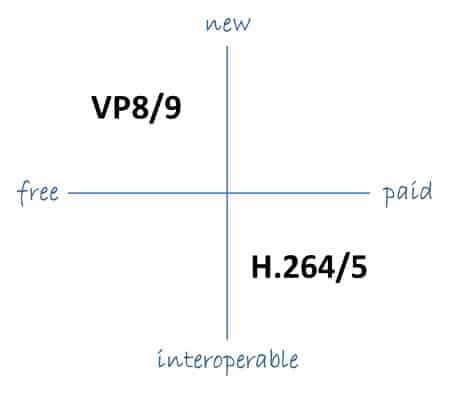
VP9 is a newer codec developed by Google and is designed to be a royalty-free alternative to H.265. It offers better compression than H.264 while maintaining the same video quality. It is also highly efficient at handling high-resolution videos, making it a good choice for 4K and 8K videos. However, its adoption has been slow due to its lack of support in many devices and software. It also requires more processing power to decode than H.264.

One of my personal experiences with VP9 was when I was trying to stream a 4K video on my laptop. I noticed that the video was buffering a lot and the quality was not as good as I expected. After some research, I found out that the video was encoded with VP9, which my laptop did not support. I had to switch to H.264 to get smooth playback.

Conclusion: Choosing the Right Video Codec

Choosing the right video codec is crucial for ensuring smooth video playback and high video quality. H.264 is still a solid choice for most situations, but H.265 and VP9 offer better compression and handling of high-resolution videos. However, they require more processing power and may not be supported by all devices and software. Make sure to choose the codec that best suits your needs and device capabilities.

In conclusion, video codecs are an essential part of our digital lives, and choosing the right one can make all the difference in our video-watching experience. Always keep in mind the pros and cons of each codec and make an informed decision based on your needs.