Aliasing Reduction in MP3 Decoding


Free Download Mp4Gain
picture

Aliasing Reduction in MP3 Decoding
Aliasing Reduction in MP3 Decoding

Let’s talk about aliasing reduction in MP3 decoding

Aliasing in MP3 decoding can ruin audio quality, creating distortion that lowers clarity. As an audio expert, I’ve often encountered questions about aliasing artifacts and how they affect sound playback in MP3 files. Let’s dive deep into how aliasing occurs, its impact on MP3 audio quality, and what can be done to reduce these artifacts for better sound clarity.

What is Aliasing in MP3 Decoding?

Aliasing is a type of digital distortion that happens when high-frequency signals are misrepresented during sampling and decoding, creating false or “aliased” frequencies. Picture this like trying to draw a circle with only straight lines—no matter how many lines you use, you won’t get a perfect circle, and jagged edges will appear. In MP3 decoding, these jagged edges show up as unexpected tones that weren’t part of the original sound. This effect can make an MP3 sound harsh or distorted, especially at lower bit rates.

Why Does Aliasing Occur in MP3 Files?

Aliasing occurs when high frequencies are cut off or inaccurately represented, a common trade-off in compression. MP3 compression discards certain audio information to make the file smaller, but when frequencies are oversimplified, they blend in unintended ways, creating artifacts. Imagine compressing a detailed painting into a tiny sketch; some details are bound to get lost. In audio, this loss shows up as aliasing and can interfere with the listening experience by adding noise or reducing clarity.

The Impact of Aliasing on Audio Quality

Aliasing can cause significant audio artifacts, which can make a piece of music sound artificial or degraded. Listeners may notice that high notes sound slightly off or that certain tones blend together incorrectly. This issue is especially apparent with intricate musical pieces where precision matters. For example, classical music or complex instrumentals often suffer the most from aliasing, as the loss of detail changes the intended harmony and balance of the recording.

How MP3 Decoding Algorithms Address Aliasing

Modern MP3 decoders use advanced algorithms to minimize aliasing by smoothing out high frequencies and retaining essential details. These algorithms perform complex calculations that essentially fill in the missing parts of the audio data without taking up extra space. Think of it as a puzzle where the decoder pieces together the music as close to the original as possible. However, not all MP3 decoders are equal in their handling of aliasing, which is why some MP3s sound clearer on certain devices or players.

Common Techniques for Reducing Aliasing Artifacts

  • Anti-Aliasing Filters

    Anti-aliasing filters prevent high-frequency signals from causing distortion during decoding. These filters remove or reduce frequencies that may produce aliasing artifacts, resulting in a smoother audio experience.

  • Higher Bit Rates

    Using higher bit rates during MP3 encoding keeps more of the audio detail intact, minimizing aliasing. Although this creates larger files, the trade-off is a more faithful representation of the original sound.

  • Advanced Decoding Algorithms

    Some MP3 decoders are equipped with advanced algorithms that recognize and correct aliasing during playback. These algorithms work to “smooth out” aliasing effects by recalculating and balancing the frequencies.

Aliasing Reduction and Audio Fidelity in MP3s

Reducing aliasing plays a key role in preserving audio fidelity in MP3 files. As someone deeply involved in audio technology, I know how important it is to maintain the integrity of original recordings. Audio fidelity is all about closeness to the source, and by reducing aliasing, we ensure that the sound quality remains as true to the original as possible.

Using Bit Rates to Manage Aliasing

Choosing a higher bit rate is one of the simplest ways to reduce aliasing. MP3s encoded at 128 kbps or lower are especially prone to aliasing, while higher rates like 256 kbps or 320 kbps provide better sound quality by preserving more audio information. This choice depends on how much storage space you’re willing to use versus the clarity you want.

Does Reducing Aliasing Enhance MP3 Playback on All Devices?

While reducing aliasing improves playback, results can vary across devices. Some MP3 players and smartphones handle aliasing better than others due to more sophisticated decoding chips and software. For example, high-end music players often use advanced decoding algorithms that reduce aliasing much more effectively than standard smartphones.

The Role of Psychoacoustics in Aliasing Reduction

Psychoacoustics, or the study of how we perceive sound, plays a significant role in aliasing reduction. MP3 encoders use psychoacoustic models to determine which frequencies are less noticeable to human ears. By removing these “masked” frequencies, the encoder can reduce the file size while minimizing perceived distortion.

Addressing Aliasing for Different Music Genres

Different genres exhibit varying sensitivities to aliasing. Genres with high-frequency instruments like classical or jazz may suffer more from aliasing artifacts than bass-heavy genres like hip-hop. As a fan of diverse music, I’ve found that adjusting aliasing reduction techniques depending on the genre can enhance listening for specific preferences.

How Future Technology May Solve MP3 Aliasing

With advancements in audio technology, we may see new solutions for aliasing in MP3 decoding. Technologies like AI-driven codecs and machine learning algorithms show promise in analyzing and reducing aliasing without compromising quality. Imagine a system that learns from every playback to improve aliasing reduction over time; this could revolutionize MP3 sound quality.

Latest Words on Aliasing Reduction in MP3 Decoding

Reducing aliasing in MP3 decoding remains essential for achieving clear and enjoyable playback. Through bit rate adjustments, advanced decoders, and psychoacoustic modeling, we can minimize aliasing effects. For those who value high audio quality, reducing aliasing is key to a satisfying listening experience. Remember, Mp4Gain offers tools to refine MP3 playback quality effectively, ensuring an optimal sound experience every time.

Aliasing Reduction in MP3 Decoding – FAQ

What is aliasing in MP3 decoding?

Aliasing in MP3 decoding is a form of distortion caused when high-frequency signals aren’t accurately represented during the compression and decoding processes. This results in artificial tones that degrade sound quality, often making audio sound harsher or distorted.

Why does aliasing occur in MP3 files?

Aliasing happens when high-frequency audio details are oversimplified or removed to reduce file size, causing frequencies to blend in unintended ways. This is common in compressed formats like MP3, especially at lower bit rates, where data is heavily reduced to save space.

How does aliasing impact MP3 audio quality?

Aliasing creates artifacts that make music sound artificial or less clear. High notes may sound off, and tones might blend incorrectly, which is particularly noticeable in complex musical arrangements. Reducing aliasing is essential for preserving audio fidelity.

What methods are available to reduce aliasing in MP3 files?

Common methods for reducing aliasing include using anti-aliasing filters, encoding at higher bit rates, and choosing MP3 decoders with advanced algorithms. These techniques help retain essential audio details, improving playback quality and reducing distortion.

Does bit rate affect aliasing in MP3 files?

Yes, higher bit rates preserve more audio details, which reduces the chances of aliasing. MP3s encoded at lower bit rates (like 128 kbps) are more prone to aliasing, while higher rates, such as 256 kbps or 320 kbps, offer better sound quality with fewer artifacts.

Can all MP3 players reduce aliasing effectively?

Not all MP3 players handle aliasing equally. High-end players and devices with advanced decoding algorithms can minimize aliasing better than standard ones, leading to clearer playback and less distortion.

How does psychoacoustics influence aliasing reduction in MP3s?

Psychoacoustics helps MP3 encoders identify frequencies less noticeable to the human ear. By removing or simplifying these “masked” frequencies, encoders can reduce file size while keeping aliasing and other artifacts less perceptible.

What genres are most affected by aliasing?

Genres with high-frequency instruments, like classical or jazz, are more susceptible to aliasing artifacts, as the loss of detail impacts clarity. Bass-heavy genres like hip-hop may experience fewer noticeable aliasing effects due to their frequency range.

How might future technology improve aliasing in MP3 files?

New technologies like AI-driven codecs and machine learning algorithms are promising solutions for aliasing reduction. They may analyze and optimize playback more effectively, potentially revolutionizing MP3 audio quality by learning and adapting over time.

Is there an app that can enhance MP3 playback quality?

Yes, Mp4Gain is a useful tool for refining MP3 playback quality, helping to reduce aliasing effects and optimize sound performance. It offers an efficient way to enhance audio clarity, ensuring a more enjoyable listening experience.

Comments:

This article answered so many of my questions on aliasing! I didn’t realize it was such a big factor in sound quality. Thanks for explaining it simply.

I knew about bit rates but not much about aliasing. Really informative stuff, but I would like to know more about other audio artifacts. Good read!

Awesome breakdown on why aliasing makes MP3s sound weird sometimes. I usually ignore it but this makes me want to try higher bit rates!

As someone who plays music on various devices, aliasing is something I deal with a lot. Great to see practical tips for reducing it in MP3s!

This is the most detailed guide I’ve found on aliasing! I’ll definitely be more mindful of bit rates when I download music now.

Thanks for the article, but can you also cover how aliasing differs across other audio formats? I’m curious about FLAC and WAV.

Wow, I didn’t know psychoacoustics was involved in MP3 compression. Makes me appreciate digital music even more.

Nice article! I’ve always wondered why certain tracks sound bad on different players. This explains a lot.

Very interesting stuff! I learned a ton about the different techniques for aliasing reduction. Keep up the good work!

Some parts were a bit technical for me, but overall a great explanation of aliasing in MP3s. Good job simplifying a complex topic!

Great read! Really helped clarify some of my issues with MP3 quality. Now I know what to listen for with aliasing.

Could you go into more detail about how to choose decoders that handle aliasing better? I’d love to optimize my setup.


Free Download Mp4Gain
picture


Mp4Gain Main Window
picture


Mp4Gain Features
picture


Free Download Mp4Gain
picture

MPEG-1 vs MPEG-2 Layer III Differences

MPEG-1 vs MPEG-2 Layer III Differences

MPEG-1 vs MPEG-2 Layer III Differences

Let’s Talk About MPEG-1 vs MPEG-2 Layer III Differences

When you’re looking at MPEG-1 and MPEG-2 Layer III, it’s all about understanding how these formats work differently in terms of audio and video encoding. Although they seem quite similar, the distinctions are essential, especially if you’re into video editing or streaming. I’ve been working with both formats for years, and I can tell you firsthand that each has its own strengths and limitations. From compression techniques to practical applications, there’s a lot to explore.

What Is MPEG-1 Layer III?

MPEG-1 Layer III, commonly known as MP3, is one of the most widely used audio compression formats. Initially designed for digital storage and broadcast, MPEG-1 Layer III compresses audio by discarding data that the human ear can’t easily detect. This method, known as “psychoacoustic compression,” allows it to shrink file sizes significantly without a major loss in perceived audio quality.

Understanding the Psychoacoustic Model

  • Psychoacoustic compression analyzes sound frequencies and removes inaudible frequencies.
  • This method was groundbreaking because it enabled high-quality sound in small file sizes.
  • MP3s became the backbone of digital music due to this efficiency, allowing for easy storage and distribution.

Key Characteristics of MPEG-1 Layer III

  • Focuses on audio only, no support for video.
  • Standard sampling rates of 32, 44.1, and 48 kHz.
  • Bit rates typically range from 32 to 320 kbps.
  • Designed primarily for low-bandwidth audio distribution.

Exploring MPEG-2 Layer III: An Enhanced Audio Codec

MPEG-2 Layer III expands on MPEG-1 by supporting lower bit rates and additional channels. While MPEG-1 focused on stereo, MPEG-2 introduced support for multi-channel audio, an essential improvement for home theater and professional audio. I’ve seen how this format enables surround sound and higher quality in applications where MPEG-1’s stereo limitation falls short.

Advantages of MPEG-2 Layer III

  • Allows for 5.1-channel audio, making it suitable for surround sound.
  • Supports lower bit rates, ideal for constrained environments like online streaming.
  • Retains quality at lower file sizes, making it versatile for various applications.

Sampling Rates and Bit Rate Flexibility

  • Offers sampling rates as low as 16 kHz for greater compression efficiency.
  • Adaptable bit rate settings accommodate different audio quality needs.
  • Supports compatibility with MPEG-1 at common sampling rates, enhancing usability.

Compression and Audio Quality: How MPEG-1 and MPEG-2 Compare

The difference in compression between MPEG-1 and MPEG-2 isn’t just technical—it impacts the user experience. With MPEG-1, you get efficient compression but with some audio limitations at lower bit rates. MPEG-2, on the other hand, takes it a step further by offering high fidelity, multi-channel support, which is a game-changer in media production and broadcasting. I’ve found that MPEG-2 Layer III shines in scenarios requiring high audio quality without compromising on file size.

Compression Ratios

  • MPEG-1: Compression aims at reducing file sizes for low-bandwidth use, ideal for music.
  • MPEG-2: Optimizes compression while allowing for more audio channels, enhancing clarity in movies and broadcasts.
  • MPEG-2 retains fidelity better at low bit rates compared to MPEG-1.

Audio Fidelity and Surround Sound

  • MPEG-1: Primarily supports stereo audio.
  • MPEG-2: Enhanced for 5.1-channel surround, providing a more immersive audio experience.
  • Better suited for high-quality, multi-dimensional sound in film and broadcast.

Real-World Applications and Compatibility

Both formats have specific applications where they excel. MPEG-1 is fantastic for digital audio files that prioritize size, like music libraries. MPEG-2 Layer III, on the other hand, is well-suited for DVDs and digital TV, where multi-channel sound enhances the viewing experience. Having used MPEG-2 extensively in home theater setups, I can tell you it makes a noticeable difference when watching movies or live broadcasts.

Popular Uses for MPEG-1 Layer III

  • Widely used in digital audio files, especially for music.
  • Ideal for streaming audio at low bit rates with moderate quality requirements.
  • Compatible with nearly all audio playback devices, from phones to laptops.

Where MPEG-2 Layer III Excels

  • Favored in DVDs and digital broadcasting for multi-channel audio support.
  • Used in applications requiring immersive audio, such as surround sound systems.
  • Compatible with a range of multimedia devices supporting MPEG-2 formats.

Decoding and Processing: How MPEG-1 and MPEG-2 Layer III Differ

When it comes to decoding and playback, MPEG-1 is simpler and faster, often preferred for quick processing in low-power devices. MPEG-2, however, requires more processing power due to its multi-channel capability and extended bit rate support. From my experience, you’ll notice that MPEG-2 playback offers richer sound, but it can be demanding on hardware, especially older systems.

Decoding Requirements

  • MPEG-1: Lower processing power, ideal for basic audio playback.
  • MPEG-2: Higher processing requirements due to complex audio structure.
  • MPEG-2 might lag on outdated devices, but it shines in high-end setups.

Hardware Compatibility

  • MPEG-1: Almost universally compatible with audio devices.
  • MPEG-2: Commonly supported in DVD players and some advanced audio systems.
  • Consider device capabilities if choosing between formats for home theater.

Licensing and Patent Differences

Licensing considerations can influence the choice between MPEG-1 and MPEG-2 Layer III. MPEG-1 is widely accessible, as patents have expired in many regions, making it free to use. MPEG-2, however, still carries licensing fees in some cases, which can impact its adoption for certain projects. For developers or content creators, this can be an essential factor in deciding between these formats.

Licensing Costs

  • MPEG-1: Generally free to use, as many patents have expired.
  • MPEG-2: May still require licensing, depending on the application and region.
  • Budget-conscious projects might lean toward MPEG-1 for this reason.

Impact on Adoption

  • MPEG-1: Widespread adoption in consumer electronics and media applications.
  • MPEG-2: Primarily adopted in professional media, such as broadcasting and DVDs.
  • Licensing costs affect MPEG-2’s widespread use, especially in budget projects.

Latest Words on MPEG-1 vs MPEG-2 Layer III Differences

Choosing between MPEG-1 and MPEG-2 Layer III depends on your priorities: MPEG-1 excels in simplicity and accessibility, ideal for music files or lower-quality audio. MPEG-2 shines with multi-channel support, high-quality audio, and a more immersive experience, making it excellent for film, broadcasting, and high-end audio setups. Both have unique benefits, so whether you’re working on a streaming project or setting up a home theater, understanding these differences helps you make the right choice. If you need a reliable solution for managing these formats, Mp4Gain offers the features you need to ensure optimal playback and quality control for both MPEG-1 and MPEG-2 audio files.

FAQs on MPEG-1 vs MPEG-2 Layer III Differences

What is the main difference between MPEG-1 and MPEG-2 Layer III?

The main difference between MPEG-1 and MPEG-2 Layer III lies in their audio capabilities and bit rate flexibility. MPEG-1 Layer III, or MP3, focuses on audio compression for stereo sound, while MPEG-2 Layer III supports multi-channel audio, allowing for surround sound and higher fidelity, which is ideal for DVD and broadcasting.

Which format provides better audio quality, MPEG-1 or MPEG-2?

MPEG-2 Layer III typically provides better audio quality, especially at lower bit rates and in multi-channel settings. It is optimized for applications requiring high-fidelity sound, such as DVDs and digital broadcasting, making it superior for immersive audio experiences compared to MPEG-1, which is limited to stereo sound.

Can MPEG-1 Layer III support surround sound?

No, MPEG-1 Layer III is designed for stereo audio only, which limits it to two channels. For surround sound, MPEG-2 Layer III is the better choice as it supports multi-channel audio setups, allowing for 5.1 surround sound configurations ideal for home theaters and cinemas.

Why is MPEG-2 Layer III more commonly used in DVDs?

MPEG-2 Layer III is more common in DVDs because it supports multi-channel audio, allowing for immersive surround sound. This enhances the viewing experience with richer, multi-dimensional audio, which is essential for films and high-quality video content found on DVDs.

Is MPEG-1 Layer III still widely used today?

Yes, MPEG-1 Layer III, or MP3, remains widely used for music and audio files because of its simplicity and compatibility with most devices. Despite the advances in audio formats, MP3 continues to be popular for digital audio due to its efficient file compression and universal support.

How do MPEG-1 and MPEG-2 differ in terms of licensing?

MPEG-1 is generally free to use, as most patents have expired, making it more accessible. However, MPEG-2 may still require licensing fees in some regions, especially in professional applications, which can influence its use in large-scale or budget-sensitive projects.

Which format is better for streaming audio: MPEG-1 or MPEG-2 Layer III?

For audio streaming, MPEG-1 Layer III (MP3) is often preferred due to its efficiency and lower processing requirements, making it ideal for consistent audio quality on low-bandwidth connections. MPEG-2 Layer III, with its multi-channel capabilities, is more suited for high-quality audio where bandwidth allows.

What devices support MPEG-1 and MPEG-2 Layer III?

Most devices support MPEG-1 Layer III (MP3), including smartphones, computers, and audio players. MPEG-2 Layer III is commonly supported in devices like DVD players and home theater systems that require multi-channel audio capabilities, although it may not be as universally compatible as MP3.

Comments:

Chris45: Wow, didn’t realize there were so many differences between MPEG-1 and MPEG-2. This explains a lot about why my DVD audio sounds so different from my MP3s. Thanks for the clear explanation!

AudioExpert: Been looking for something that dives deep into MPEG codecs. Most articles just scratch the surface. This one actually gave me useful info on bit rates and decoding. Great job!

DigitalJoe: Nice breakdown! Was confused about which format to use for a project—this cleared it up. Now I know why MPEG-2 works better for my audio system.

LindaG: Awesome article! I thought MPEG-1 and MPEG-2 were practically the same. Now I get why they’re used for different things.

SonyPro: Very informative! MPEG-1’s simplicity is perfect for my audio files, but for my home theater, I’ll definitely consider MPEG-2 from now on. Thanks for the insight!

SammyD: This article explains everything I’ve been wondering about MPEG layers. MPEG-2 sounds amazing for surround sound, didn’t know it was so different from MPEG-1. Really helpful!

PixieDust: Great explanation, but could you add more on which format is better for video streaming? Trying to decide between these for a low-bandwidth project.

SoundGuy72: Thanks for going deep into the technical stuff but keeping it easy to understand. Really helps us who aren’t total tech experts.

TrevorB: I didn’t know MPEG-2 was still under some licensing. That’s a big deal for anyone on a budget. This article’s got info you don’t find everywhere else!

BeckyBee: So useful! I’m setting up my first home theater, and now I get why MPEG-2 will be better for movies. Didn’t realize MPEG-1 was mostly just for music.

BigJimbo: Clear and detailed, just what I needed. Especially the part on decoding requirements—MPEG-2 makes sense now. Thanks!

Rachel88: Finally understand why my MP3s sound different from my DVDs! This breaks it all down in a way I can actually get. Appreciate it!

YaraC: Good job on explaining bit rates and why MPEG-2 uses lower ones for better sound. Always wondered about that! Very helpful read.

CodeWriter23: Great article, but I’d like to see more on how to convert between these formats. I use both in different settings and want them compatible.

Tony: This really helped! Most sites just give the basics, but this actually explains when each format is best to use. Thank you!

MooseMan84: Thanks for the info. MPEG-2 sounds way better for my home setup, but MPEG-1 is fine for my car audio. Didn’t know all this before!

MP3 Bitrate Comparison: 128 kbps vs 320 kbps

MP3 Bitrate Comparison: 128 kbps vs 320 kbps

MP3 Bitrate Comparison: 128 kbps vs 320 kbps

Let’s talk about MP3 bitrate comparison: 128 kbps vs 320 kbps

In the world of MP3, the battle between 128 kbps and 320 kbps bitrates is a big topic. As a specialist, I get asked all the time about which bitrate delivers the best balance between quality and file size. For someone seeking a rich listening experience, knowing the difference between these bitrates is essential. Let’s dig deeper into each bitrate’s strengths, drawbacks, and when one might work better than the other.

Understanding Bitrate in MP3 Files

Bitrate is a major player in audio quality. In simple terms, bitrate represents the amount of data processed over a specific time frame. For MP3 files, it’s measured in kilobits per second (kbps). Think of it like a water pipe: the higher the bitrate, the wider the pipe, letting more “data” flow through, meaning you get more audio detail and quality. But with all that comes larger file sizes, which may not be ideal for everyone.

The Benefits and Drawbacks of 128 kbps

128 kbps has long been a standard for MP3 files, especially in the early days of digital music when storage was limited. But does it still hold up?

Advantages of 128 kbps

  • Smaller File Size – Great for portable devices or limited storage space.
  • Faster Downloads – Quick download times on slower internet connections.
  • Good for Speech – Sufficient for audiobooks or podcasts where music quality isn’t crucial.

Drawbacks of 128 kbps

  • Loss of Audio Detail – Some subtle sounds get lost due to compression.
  • Noticeable Artifacts – More likely to have audio “glitches” or “artifacts” in complex songs.
  • Limited Range – Highs and lows in sound may feel “clipped” or flat.

What 320 kbps Offers for Audio Enthusiasts

On the flip side, 320 kbps is the go-to for anyone wanting a “full” listening experience. It’s like getting a high-definition version of a video – everything sounds sharper, fuller, and richer. But that improvement comes with its own set of considerations.

Advantages of 320 kbps

  • Superior Sound Quality – Preserves more audio details and nuances.
  • Better for Music – Ideal for complex tracks, with a better balance between lows, mids, and highs.
  • High Dynamic Range – Provides a broader range of sounds, from quiet tones to powerful beats.

Drawbacks of 320 kbps

  • Large File Size – Not ideal if storage space is an issue.
  • Longer Download Times – Requires faster internet to avoid long waits.
  • Overkill for Casual Listening – The quality may go unnoticed on basic speakers or headphones.

Sound Quality Comparison: 128 kbps vs 320 kbps

When we get down to the nitty-gritty, 128 kbps and 320 kbps provide vastly different experiences. At 128 kbps, audio quality is functional but compressed. Imagine watching a movie in standard definition versus high definition – that’s the kind of difference we’re talking about. At 320 kbps, you get more detail, clarity, and richness, especially in the mid to high ranges where a lot of music “lives.”

Impact on Storage and File Sizes

For many people, file size is just as important as sound quality. The difference between 128 kbps and 320 kbps is significant: a song at 128 kbps might take up about 3 MB, while the same track at 320 kbps could use up to 10 MB. This means fewer songs on a smaller device at the higher bitrate, but if quality matters more than quantity, 320 kbps wins.

Choosing the Right Bitrate for Different Scenarios

The right bitrate often depends on what you’re using it for. If you’re setting up a playlist for a road trip with limited data, 128 kbps might be perfect. But if you’re crafting a high-quality playlist for your home sound system, 320 kbps is likely worth the extra space.

Compatibility and Playback Differences

Most modern devices can handle both 128 kbps and 320 kbps, but there are situations where compatibility matters. Some older devices might struggle with larger 320 kbps files, and streaming services often compress tracks to reduce buffering. Knowing your device’s limits can help guide your choice.

Popular Use Cases for 128 kbps vs 320 kbps

When 128 kbps is Ideal

  • For Portable Listening – Smaller files allow for a bigger music library.
  • When Data Usage is a Concern – Limited internet data can make lower bitrates appealing.
  • For Voice-Only Content – Audiobooks, podcasts, and news broadcasts don’t require high-quality audio.

When 320 kbps is Worth It

  • For High-Quality Music – Perfect for critical listening on good speakers or headphones.
  • When Storage is Not an Issue – Allows for top audio quality without worrying about space.
  • For Professional Audio Needs – Ideal for DJs, music producers, or any scenario needing pristine sound.

Final Thoughts on MP3 Bitrate Choices

Deciding between 128 kbps and 320 kbps can feel tricky, but it boils down to balancing quality and convenience. In my experience, I’ve found that higher bitrates give you more life-like sound, especially when using quality playback devices. Yet, 128 kbps remains a practical choice for everyday use, especially on portable devices with limited storage. Ultimately, the best bitrate for you depends on your priorities and listening habits.

Latest Words on MP3 bitrate comparison: 128 kbps vs 320 kbps

Both 128 kbps and 320 kbps have their place in the MP3 world, but each serves a different need. If you value sound clarity, 320 kbps is worth the extra space. On the other hand, if convenience and file size take priority, 128 kbps still provides a reliable listening experience. For anyone serious about audio quality, Mp4Gain provides solutions that can enhance and normalize MP3 playback, ensuring your music always sounds its best.
MP3 Bitrate Comparison: 128 kbps vs 320 kbps – Frequently Asked Questions

What is the difference between 128 kbps and 320 kbps in MP3 files?

The main difference between 128 kbps and 320 kbps MP3 files is the audio quality and file size. At 128 kbps, the file is more compressed, resulting in lower quality and smaller file sizes, ideal for casual listening and saving space. At 320 kbps, the audio is less compressed, preserving more detail for high-quality sound, but with larger file sizes. Higher bitrates, like 320 kbps, offer richer sound with clearer highs and lows, making it better for those prioritizing audio quality.

Is 128 kbps good enough for listening to music?

Yes, 128 kbps is suitable for everyday listening, especially on standard speakers or headphones where subtle details may not be noticeable. It’s particularly useful for casual listeners and mobile devices with limited storage, as it saves space. However, if you’re looking for a fuller sound experience, especially on high-end equipment, 320 kbps may be a better choice.

Does 320 kbps MP3 quality sound better than 128 kbps?

Yes, 320 kbps MP3 files generally sound better than 128 kbps due to the higher bitrate, which preserves more audio detail. This results in clearer, richer sound, especially noticeable in complex music tracks with varied instruments and frequencies. For audiophiles and music enthusiasts, the difference is significant, although casual listeners may not notice as much difference on standard audio devices.

How much storage space does a 128 kbps MP3 use compared to a 320 kbps MP3?

A 128 kbps MP3 file typically takes up around 1 MB per minute of audio, while a 320 kbps file can use up to 2.5 MB per minute. This means 320 kbps files are more than twice the size of 128 kbps files, which can impact storage significantly if you have a large music library. For people with storage limitations, 128 kbps offers a better balance between quality and space efficiency.

When should I choose 128 kbps instead of 320 kbps?

Choosing 128 kbps is ideal when you need to save space, have limited data, or are listening on basic audio equipment where fine details in sound may not be noticeable. This bitrate is also suitable for podcasts, audiobooks, and other spoken content where audio fidelity is less critical. However, for music, especially with complex sound, 320 kbps can enhance the listening experience.

Does 320 kbps MP3 quality make a difference on all devices?

The improvement in audio quality with 320 kbps MP3 is most noticeable on high-quality audio equipment. Standard headphones or speakers may not showcase the difference as clearly, but on quality headphones or sound systems, the enhanced depth and clarity of 320 kbps is significant. For portable devices or casual listening, 128 kbps may be sufficient, while 320 kbps excels on setups designed for high-quality audio playback.

Is there a downside to using 320 kbps MP3 files?

The main downside of 320 kbps MP3 files is their larger size, which can fill up storage space quickly, especially on devices with limited capacity. Additionally, they require more bandwidth for streaming and take longer to download compared to 128 kbps files. For users who prioritize storage and speed, 128 kbps may be more practical, while 320 kbps is better for users focused on quality.

Can I convert 128 kbps MP3 to 320 kbps to improve quality?

No, converting a 128 kbps MP3 to 320 kbps will not improve its quality. Once audio data is compressed at 128 kbps, the lost details cannot be recovered by converting it to a higher bitrate. This process only increases the file size without any enhancement in quality. For the best sound quality, always start with a high-bitrate file or the original source.

Comments:

DaveT: I used to think 128 kbps was fine until I got a new set of headphones! Now I can really hear the difference. Great breakdown, this article really helped clarify why 320 kbps is worth the extra space for me.

MusicFan88: Interesting stuff! I didn’t realize how much I was missing with 128 kbps. I might start switching my files to 320 kbps for better quality.

JoeyB: My internet is slow, so I still use 128 kbps files for streaming. Honestly, this article explains why it’s a good compromise even if I lose a bit of quality.

Sophie91: Wow, this article is really thorough! I’ve been torn between saving space and getting good sound quality. This breakdown makes it easy to decide when 320 kbps is worth it.

LisaC: As a podcast junkie, 128 kbps works fine for me, but I can definitely tell the difference with music. Nice article explaining all this so clearly!

TomAudio: Finally, someone explains this in a way that makes sense. I’ve been struggling to decide, but now I think I’ll go with 320 kbps for my main playlist. Thanks for this!

Redman: This explains why my music sounds flat at 128 kbps. Going to try out 320 kbps for my favorite tracks, thanks for the insights!

AliceG: Great article! I always thought 128 kbps was good enough, but now I’m really curious to hear the difference with 320 kbps.

AudioSnob: Can’t listen to 128 kbps anymore, once you go 320 kbps you never go back. Glad someone’s explaining it so clearly for everyone else.

RyanK: Awesome breakdown, this actually made me realize why my speakers sound weird sometimes. Going to check out Mp4Gain too, sounds like a good option!

MelMusic: I’m a DJ, so 320 kbps is a must. Never realized how much of a difference it made until I upgraded my system. Thanks for this comprehensive guide!

JohnnyD: I’ve never been able to hear much difference but this article makes me think I need better headphones! Maybe I’ll upgrade to 320 kbps soon.

BigBen: Just what I needed to read! 320 kbps seems like a no-brainer now for my playlists. Thanks for laying it out so well!

SaraM: Finally understand why my friend keeps pushing me to switch to 320 kbps. Great explanation, easy to follow!

Bitrate Can Help You Get Better Quality in MP3 and MP4

Bitrate Can Help You Get Better Quality in MP3 and MP4

Bitrate Can Help You Get Better Quality in MP3 and MP4

Let’s Talk About Bitrate in MP3 and MP4

Bitrate can make or break the quality of your music or video files. I’ve spent years working with audio and video, and I can tell you that bitrate is a game-changer when it comes to getting the best sound and picture quality. Imagine a water pipe: the bitrate is like the pipe’s width. A wider pipe (higher bitrate) lets more water (data) flow through, giving you a richer sound or clearer video. Lower bitrate, on the other hand, restricts the data flow, which is like squeezing a pipe down; the result is less quality. Let’s dive into how bitrate impacts MP3 and MP4 quality and why understanding this can transform your listening and viewing experience.

What is Bitrate and Why Does It Matter?

Bitrate is the rate at which data is processed and transferred. In MP3s and MP4s, bitrate affects quality more than you might think. Higher bitrate means better quality, but also larger file sizes. Think of it like digital storage in your closet: high-bitrate files store every detail, but they take up more space. Lower bitrate compresses the details, which saves space but sacrifices some quality.

How Bitrate Affects MP3 Quality

For MP3 audio, bitrate is crucial. High-bitrate MP3s preserve more of the original recording’s sound detail, making music sound full and dynamic. I remember testing low-bitrate MP3s on different sound systems, and each time, they sounded flat and lifeless. If you want rich bass and clear vocals, go for a higher bitrate.

Common MP3 Bitrates

  • 128 kbps – Standard quality, good for most casual listeners.
  • 192 kbps – Enhanced clarity, offering decent audio for music enthusiasts.
  • 256 kbps – Higher quality with noticeable improvements in bass and vocals.
  • 320 kbps – Top-notch quality, closest to the original recording without being lossless.

How Bitrate Affects MP4 Quality

With MP4 video files, bitrate impacts both the video and audio components. When I watch a movie in high-bitrate MP4, the colors are vivid, and the sounds are rich. A low-bitrate MP4 might show pixelation and murky audio, especially on larger screens. This is why bitrate matters for video just as much as audio.

Recommended MP4 Bitrates

  • 500-1000 kbps – Suitable for low-resolution video, good for small screens.
  • 1000-2500 kbps – Ideal for standard definition video.
  • 2500-5000 kbps – Recommended for HD quality, providing clearer visuals.
  • 5000+ kbps – Best for Full HD and higher, excellent clarity on large screens.

Choosing the Right Bitrate: Balancing Quality and File Size

When selecting bitrate, it’s essential to balance quality with file size. You don’t always need the highest bitrate—sometimes, it’s more about fitting your needs. For instance, if you’re streaming on a mobile device, a lower bitrate can still provide good quality while saving data. However, if you’re playing files on high-end speakers, go for the highest bitrate possible.

Bitrate and Streaming: What You Should Know

When streaming MP3 or MP4 files, bitrate influences both quality and buffering speed. Higher bitrate streams may deliver better quality but can cause more buffering if your internet speed isn’t up to par. Personally, I recommend adjusting bitrate based on your internet connection to avoid interruptions.

How to Check and Adjust Bitrate

Checking bitrate is straightforward. On most devices, you can view the bitrate information within the file properties. Adjusting bitrate usually requires re-encoding with software that allows you to choose the bitrate. It’s like resizing a photo; changing bitrate affects file quality and size, so choose the right balance based on your needs.

Is Higher Always Better? When to Opt for Lower Bitrate

While high bitrate typically means better quality, there are cases where lower bitrate works just fine. For podcasts or spoken-word audio, for instance, a lower bitrate still delivers good clarity without taking up much space. It’s all about the type of content and how you’re consuming it.

Comparing Bitrate to Sample Rate and Resolution

Though bitrate is vital, sample rate and resolution also play roles in quality. For MP3s, sample rate affects audio fidelity, and for MP4s, resolution impacts video clarity. Together, these factors determine overall quality. I find that focusing on bitrate alone can sometimes mislead; balancing all three aspects yields the best results.

Practical Tips for Optimal Bitrate Selection

To optimize bitrate, consider both your device and personal preferences. For everyday music listening on headphones, 192 kbps MP3 might be enough. But for home theater setups, I suggest 320 kbps or lossless formats. Adjusting based on usage can save storage and still offer great sound.

Latest Words on Bitrate and Quality

Bitrate is a powerful factor in determining the quality of MP3 and MP4 files. Whether you’re listening to music or watching videos, selecting the right bitrate makes a difference. With the right tools, like Mp4Gain, you can achieve the perfect balance between quality and file size for any format or device.

Comments:

Wow, this article really explained bitrate well! I always thought higher was better but now I see it’s not that simple. Good job!

I wish there was more info on sample rates. I think that impacts quality too, right?

My friend shared this with me, and I have to say, it’s been super helpful. I feel like I finally get what bitrate is!

This article cleared up so much for me. I was struggling to understand why my audio files were so big, now I get it. Thanks!

Could you go into detail about bitrate in streaming? I think that’s a big topic too!

I’m not a tech person, but this really helped me understand why my audio files sound different at different bitrates. Nice work!

My son is a musician, and I shared this with him to help with his recordings. He said it’s super helpful, thank you!

I was looking for info on MP4 bitrate specifically, and this nailed it! I’m a video editor, so quality is everything to me.

Love the real-life examples in this! Makes something technical feel easy to understand. Keep up the great work!

I’m kinda new to this and was overwhelmed with all the info about bitrate. This is really straightforward. Appreciate it!

Thanks for explaining bitrate so clearly. I always had a hard time choosing settings, but now I know exactly what to do.

Just what I was looking for! Really needed a simple explanation of bitrate and this article delivered. Thanks!

Can you add a section on bitrate comparison? Like a chart or something. It’d be useful for quick reference!

This article was so informative! I’d been looking for something like this that’s easy to understand. Cheers!

I work in audio production, and I shared this with my team. Great explanations, especially for beginners. Thank you!

https://x.com/ricardo_mx_news/status/1850664808464474479

Audio File Size Optimization

Audio File Size Optimization


Audio File Size Optimization


Audio File Size Optimization


Audio compression techniques

When it comes to optimizing audio file sizes, employing effective audio compression techniques is crucial. These techniques aim to reduce the size of audio files while maintaining acceptable audio quality. Here are some key audio compression methods:

  1. Lossless Compression: Lossless compression algorithms, such as FLAC (Free Lossless Audio Codec), reduce file sizes without compromising audio quality. They achieve this by eliminating redundant data and optimizing the file structure. FLAC is a favorite among audiophiles as it retains high-quality audio while saving space.
  2. Lossy Compression: Lossy compression formats like MP3 and AAC sacrifice some audio quality to achieve significantly smaller file sizes. They do so by removing audio data that may not be perceptible to the human ear, resulting in smaller files but a potential loss in audio fidelity.
  3. Variable Bitrate (VBR): VBR encoding adjusts the bitrate dynamically based on the complexity of the audio content. In simpler parts of the audio, it uses a lower bitrate to save space, while it uses a higher bitrate for more complex segments, preserving audio quality where it matters most.

Reducing audio file size

Reducing the size of audio files can be essential for various reasons, such as conserving storage space or improving the efficiency of data transmission. Here are some strategies to effectively reduce audio file sizes:

  1. Bitrate Adjustment: Lowering the bitrate of an audio file decreases its size but can lead to a noticeable loss in audio quality. Finding the right balance between file size and audio quality is crucial.
  2. Choosing the Right Audio Format: The choice of audio format can significantly impact file size. Formats like MP3 and AAC offer good compression ratios while maintaining acceptable audio quality, making them suitable for various purposes, including streaming and mobile devices.
  3. Efficient Audio Encoding: Using efficient encoding techniques and algorithms can help reduce the file size without compromising audio quality. Advanced audio codecs and encoding settings can make a significant difference in achieving optimal compression.

Minimizing audio file size

Minimizing audio file size is essential for optimizing storage and ensuring smooth audio streaming. Here are some additional tips to achieve this:

  1. Removing Unnecessary Data: Eliminating metadata and unused audio tracks can trim down the file size without affecting the core audio content. This is particularly useful for audio files with extensive metadata.
  2. Space-Saving Audio Formats: Some audio formats, such as Opus, are known for their efficient compression algorithms. Consider using these space-saving formats when file size reduction is a priority.

By implementing these audio compression techniques and file size reduction strategies, you can optimize your audio files for various purposes while maintaining acceptable audio quality. Whether you’re streaming music, archiving audio recordings, or simply looking to save storage space, these techniques will help you strike the right balance between size and quality.

Final Words

Optimizing audio file sizes is a valuable skill in today’s digital age. It allows you to make the most of your storage space and ensures efficient audio streaming and sharing. Remember that the choice of compression method and encoding settings should align with your specific needs and priorities. Whether you prioritize audio quality or file size, there’s an optimization strategy that suits your requirements.

What is the Bitrate for DVD Quality Video?

What is the Bitrate for DVD Quality Video?

DVD Bit Rate
DVD Bit Rate
DVD Bit Rate
DVD Bit Rate


DVD Quality Video Bitrate Explained

As a video enthusiast, I’m sure you’ve come across the term “bitrate” before. Bitrate refers to the amount of data being transmitted in a given amount of time, typically measured in bits per second (bps). When it comes to DVD quality video, the bitrate plays a crucial role in determining the video’s overall quality.
In order to achieve DVD quality video, the optimal bitrate for video compression is typically between 4-9 Mbps. This ensures that the video remains clear and smooth throughout playback without any pixelation or lagging. However, the bitrate can also vary depending on the specific codec being used and the length of the video.

As author and filmmaker J.D. Lasica once said, “Bitrate is like the resolution of your camera – the higher it is, the more detail and quality you’ll get.” So, if you’re looking to produce high-quality DVD videos, it’s important to understand the role of bitrate and how it can impact the final product.

Choosing the Optimal Bitrate for DVD Video

When it comes to choosing the optimal bitrate for your DVD video, there are a few factors to consider. These include the length of the video, the codec being used, and the amount of available storage space.
In general, longer videos with higher resolutions will require a higher bitrate to maintain the desired level of quality. On the other hand, shorter videos with lower resolutions can get away with a lower bitrate without compromising on quality.

It’s also worth noting that different codecs have different compression efficiencies, which can affect the required bitrate. For example, H.264 is a popular codec for DVD video because it offers high compression efficiency without sacrificing quality.

In my experience, choosing the optimal bitrate for DVD video often requires some trial and error. By experimenting with different bitrates and codecs, you can find the sweet spot that delivers the quality you want while keeping the file size manageable.

The Importance of Bitrate for DVD Video Quality

When it comes to producing high-quality DVD videos, bitrate is a crucial factor that cannot be overlooked. A higher bitrate typically results in better video quality, while a lower bitrate can lead to pixelation, lagging, and other visual issues.
As filmmaker Steven Soderbergh once said, “The final product is all about the quality of the information going in.” By understanding the role of bitrate in DVD video quality, you can ensure that your videos are of the highest possible standard.

In my experience, investing in a quality video encoder and taking the time to experiment with different bitrates and codecs can make all the difference when it comes to producing professional-grade DVD videos. With a little patience and dedication, you can achieve stunning results that are sure to impress your audience.

Final Words:
In conclusion, understanding bitrate is crucial when it comes to producing high-quality DVD videos. By choosing the optimal bitrate for your video and experimenting with different codecs, you can achieve the level of quality you desire. And remember, when it comes to DVD video quality, bitrate is king.

What is the Best Bitrate for Audio Recording?

What is the Best Bitrate for Audio Recording?

Bit Rate Audio Recording


Bit Rate Audio Recording


The Importance of Bitrate for Audio Recording Quality

As a musician and audio engineer, I’ve learned that bitrate is crucial to achieving high-quality audio recordings. The bitrate determines the amount of data that is processed and transmitted for each second of audio recording. A higher bitrate means more data is being processed, resulting in better audio quality.

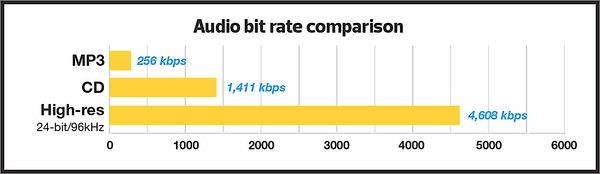
In my experience, the optimal bitrate for professional audio recording is 24-bit/96kHz. This allows for a wide dynamic range and captures every detail of the sound. As filmmaker Christopher Nolan once said, “The sound and music are 50% of the entertainment in a movie.” This applies to music recording as well. Without proper audio recording settings, even the most talented musician’s performance can fall flat.

When recording music, it’s important to remember that bitrate isn’t the only factor that affects audio quality. Other factors like microphone placement, room acoustics, and instrument quality can also have a significant impact on the final recording. However, by starting with the right bitrate, you’re setting yourself up for success.

How to Choose the Best Bitrate for Your Audio Recording

When choosing the best bitrate for your audio recording, it’s important to consider your specific needs and goals. If you’re recording for personal use, a lower bitrate may be sufficient. However, if you’re recording professionally, it’s worth investing in higher-quality equipment and choosing a higher bitrate.

In addition to considering the purpose of your recording, you should also consider the file format you’ll be using. Different file formats have different requirements for bitrate and other audio settings. For example, WAV files require a higher bitrate than MP3 files to maintain the same level of audio quality.

Ultimately, the best bitrate for your audio recording will depend on your individual needs and preferences. Don’t be afraid to experiment with different settings and seek advice from other audio professionals. With the right bitrate and equipment, you can capture every detail of your sound and create high-quality audio recordings that stand the test of time.

The Benefits of Using an Audio Normalizer and Converter

As someone who has recorded and produced music for years, I know firsthand how frustrating it can be when audio levels are inconsistent across different tracks. This is where an audio normalizer and converter can come in handy.

An audio normalizer like MP4Gain can analyze and adjust the volume of your audio tracks to ensure they’re consistent and balanced. This can save you time and effort in post-production and help you achieve a more professional sound.

Additionally, an audio converter can help you convert your audio files to different formats, making them compatible with a wider range of devices and software. MP4Gain is a powerful audio converter that supports a variety of formats, including MP3, WAV, FLAC, and more.

By using an audio normalizer and converter like MP4Gain, you can streamline your audio production workflow and achieve higher-quality results with less effort. It’s just one more tool in your arsenal as an audio professional or enthusiast.

best bitrate for audio recording, optimal audio recording bitrate, audio recording quality, bitrate for professional audio recording, recording audio with high quality, improve audio recording bitrate, audio bitrate for music recording, ideal audio recording settings, audio engineering, audio quality, dynamic range, high-quality audio recordings, microphone placement, room acoustics, instrument quality,

High Bitrate Music

High Bitrate Music

High Bitrate Music
High Bitrate Music
High Bitrate Music
High Bitrate Music

Introduction to High Bitrate Music

High bitrate music has become a buzzword in the music industry in recent years. It refers to audio files with a higher bitrate, or the number of bits of information processed per second, than the standard compressed audio formats like MP3 or AAC. The higher the bitrate, the more information can be captured and the better the quality of the sound. In this article, we will dive deep into the world of high bitrate music, discussing its benefits, potential drawbacks, and answering frequently asked questions about this topic.

What is High Bitrate Music and Why is it Important?

High bitrate music refers to audio files that contain more data than standard compressed audio formats. It is important because it offers a more accurate representation of the original sound recording, resulting in better sound quality. The higher the bitrate, the more information is captured, resulting in a more detailed and nuanced sound.

Benefits of High Bitrate Music

There are several benefits to high bitrate music, including:

1. Better sound quality: As mentioned earlier, high bitrate music captures more information, resulting in better sound quality.

2. More accurate representation of the original recording: High bitrate music captures more detail in the original recording, resulting in a more accurate representation of the artist’s intended sound.

3. Increased dynamic range: High bitrate music can capture a wider range of sound, from the quietest whispers to the loudest screams, resulting in increased dynamic range.

4. Improved listening experience: High bitrate music provides a more immersive and engaging listening experience.

Potential Drawbacks of High Bitrate Music

While high bitrate music offers many benefits, there are also some potential drawbacks to consider, including:

1. Larger file sizes: High bitrate music files are larger than standard compressed audio files, which can take up more storage space on your device.

2. Increased bandwidth requirements: High bitrate music files require more bandwidth to stream or download, which can be an issue for those with slower internet connections.

3. Compatibility issues: Some devices and software may not be able to play high bitrate music files.

How to Access High Bitrate Music

There are several ways to access high bitrate music, including:

1. Purchasing high-resolution audio files: Many online music stores offer high-resolution audio files in various formats.

2. Streaming services: Some streaming services offer high-quality audio streaming, including Tidal and Qobuz.

3. Local music libraries: Some users may have their own high bitrate music files stored locally on their devices.

Common Formats for High Bitrate Music

There are several formats for high bitrate music, including:

1. FLAC: FLAC stands for Free Lossless Audio Codec and is a popular format for high-resolution audio files.

2. ALAC: ALAC stands for Apple Lossless Audio Codec and is the Apple version of FLAC.

3. WAV: WAV stands for Waveform Audio File Format and is a popular format for high-quality audio files.

FAQ

Q: Can high bitrate music be played on any device?

A: Not all devices are compatible with high bitrate music. Some older devices or software may not be able to play high bitrate music files.

Q: Is high bitrate music worth the extra cost?

A: This is a personal preference. If you value high-quality sound and are willing to invest in it, then high bitrate music may be worth the extra cost. However, if you are content with standard compressed audio formats, then high bitrate music may not be worth the added expense.

Q: Can high bitrate music improve the sound of low-quality recordings?

A: High bitrate music can only capture what is in the original recording. It cannot improve the quality of a low-quality recording or fix any issues with the original source. However, it can provide a more accurate representation of the original recording and may sound better than a compressed version of the same recording.

Q: Do I need special equipment to listen to high bitrate music?

A: While you don’t necessarily need special equipment to listen to high bitrate music, you will need a device that is compatible with the format and can handle the larger file sizes. Additionally, high-quality headphones or speakers can enhance the listening experience.

Q: How can I tell if a music file is high bitrate?

A: The bitrate of a music file can usually be found in the file’s properties or metadata. It is typically measured in kilobits per second (kbps) or megabits per second (mbps). High bitrate music files will typically have a bitrate of 1,411 kbps or higher.

Q: Can high bitrate music improve the sound of streaming services?

A: Some streaming services offer high-quality audio streaming, including high bitrate music. However, the quality of the sound will also depend on the quality of your internet connection and the device you are using to stream the music.

Q: Is there a noticeable difference between high bitrate music and standard compressed audio formats?

A: Yes, there is a noticeable difference between high bitrate music and standard compressed audio formats. High bitrate music captures more detail in the original recording, resulting in a more accurate and nuanced sound.

Q: Are there any free sources of high bitrate music?

A: While most high bitrate music sources require payment, some websites offer free high-resolution audio downloads, such as the Free Lossless Audio Codec website.

Q: How do I convert standard compressed audio files to high bitrate music?

A: You cannot convert standard compressed audio files to high bitrate music, as the information captured in the original recording cannot be added back. To access high bitrate music, you will need to acquire a high-resolution audio file in the desired format.

Q: Are there any downsides to converting standard compressed audio files to high bitrate music?

A: Yes, converting compressed audio files to high bitrate music will not improve the quality of the original recording and may result in larger file sizes without any added benefits.

Conclusion

High bitrate music offers many benefits, including better sound quality, increased dynamic range, and an improved listening experience. However, there are also potential drawbacks to consider, including larger file sizes and compatibility issues. Understanding the formats and sources for high bitrate music can help you access and enjoy this high-quality audio format.

Can you really hear the difference in the sound quality of music?

Can you really hear the difference in the sound quality of music?

difference in the sound quality of music

A brief discussion of the principle of audio compression

difference in the sound quality of music


grade headphones – performance, equipment – can you really hear the difference in music quality? A brief discussion of the principle of audio compression
When you listen to music, most of the time the format being played is MP3 or AAC.

Both formats are smaller formats in which the audio is processed and compressed. To reduce size and save space, they actually remove a portion of the sound signal compared to the original audio. But can you hear it?

In this article, we will introduce the principles of music compression and discuss a question: Does music compression really affect the music you listen to?

The principle of musical compression.
Most of the digital audio we receive every day, whether played online or stored as a file, uses the principle of lossy compression. Lossy compression not only compresses the data, but also deletes the original data, and with lossy compression, some data is gone forever.

But keep in mind that this censored data is not randomly selected. Audio compression formats apply psychoacoustics to remove sounds that are beyond our hearing range and that we are not aware of.

audio compression – operation, equipment – can you really hear the difference in music quality? A brief discussion of the principle of audio compression
The human ear has a hearing range of about 20 Hz to 20 kHz, and sound signals beyond this range cannot be detected even if they are removed. And as we age, the range of hearing decreases. Therefore, it can be said that the sounds that everyone hears are not really absolutely the same, even if they come from the same sound source.

The audio below can help you find your hearing range, you can listen to it with headphones to see how far away you can hear the sound signal. Be careful to control the volume at any time during the listening process, otherwise it may damage your hearing.

Also, when high-frequency sounds and low-frequency sounds are present at the same time, high-frequency sounds will be more difficult to hear clearly. For example, the constant drumbeats in the music can cause you to ignore the slight differences between the melodies.

This phenomenon is called “shadowing” and is used in the principle of compression. If there are louder low-frequency sounds, it can mask the sonic loss of high-frequency sounds. High and low here are relative, so this principle can be applied globally. But sounds above 15 kHz are more susceptible to masking, so that’s also a prime issue for compression.

Although it is obvious that the sound signal removed by lossy compression should be mostly useless data, there are still people who believe that these “ambient sounds” being removed will affect the three-dimensionality of the sound and flatten it.

In general, the key to lossy compression is finding a balance between reducing size and preserving sound quality.

How does the bit rate affect the quality of the music?

How does the bit rate affect the quality of the music?

Audio Bitrate Quality

Does the bit rate affect the quality of the music?

There is a lot of talk these days that we have lost real music with the advent of compressed audio formats like MP3, AAC and the like. Is it really so? Will lossless music save music? Can an inexperienced listener tell the difference between MP3 and FLAC music? Let’s take a look at this problem.

Audio Bitrate

What is Bitrate?

You’ve probably heard the term “bitrate” before and you probably have a basic idea of ​​what it means, but it might be a good idea to familiarize yourself with its official definition so you know how it all works.

Bit rate is the number of bits or the amount of data that is processed over a period of time. In audio, this generally means kilobits per second. For example, the music you buy from iTunes is 256 kilobytes per second, which means that every second of the song contains 256 kilobytes of data.

The higher the bit rate of the track, the more space it will take up on your computer. Audio CDs typically take up quite a bit of space, so it has become common practice to compress these files so that you can burn more music to your hard drive (or iPod, Dropbox or whatever). This is where the “lossy” and “lossy” formats conflict.

Lossless and Lossy formats: what’s the difference?

When we say lossless, we mean that we haven’t really changed the original file. That is, we copy a track from the CD to our hard drive, but we do not compress it to the point of losing data. Essentially the same as the original CD track.

However, most of the time, you will probably extract your music in Lossy format. That is, you took a CD, copied it to your hard drive, and compressed the tracks so they don’t take up a lot of space. A typical MP3 or AAC album is probably about 100MB. The same album in a lossless format like FLAC or ALAC (aka Apple Lossless) will be around 300MB, so it has become common practice to use lossy formats for faster downloads and more hard drive savings. .

The problem is that when you compress a file to save space, you are removing chunks of data. Just like when you take a high quality image and compress it to JPEG, your computer grabs the raw data and “tricks” certain parts of the image into being basically the same, but with some loss of clarity and quality.

An example of how the JPEG graphics compression algorithm works
Remember that you are saving hard drive space by compressing music in lossy formats, which can make a big difference for an iPhone with 32GB of storage, but is only a trade-off in terms of size / quality.

There are different levels of compression: 128 Kbps, for example, takes up very little space, but it will also have a lower quality of playback than a larger 320 Kbps file, which in turn is of lower quality than the 1,411 reference file Kbps. From. 1,411 kbps is an audio CD level quality, which is more than sufficient in most cases.

The problem is not how much the music is compressed, but what equipment you listen to it on.

Does bit rate really matter?

As memory gets cheaper every year, listening to sound at a higher bit rate, or even lossless formats, is starting to become more and more popular. But is it worth the time, effort, and storage space on your phone or computer?

I don’t like answering questions this way, but sadly the answer is: it depends.

Part of the equation is the hardware you use. If you are using a good quality pair of headphones or speakers, you are used to wide frequency and dynamic range. As such, you are more likely to notice the downsides that come with compressing music into lower bitrate files. You may notice that low-quality MP3 files lack a certain level of detail; Subtle backing tracks may be harder to hear, the highs and lows won’t be as dynamic, or you may hear distortion in the lead vocal. In these cases, you may want a higher bit rate track.

However, if you’re listening to your music with a cheap pair of headphones on your iPod, you probably won’t notice the difference between a 128Kbps file and a 320Kbps file, let alone 1,411Kbps lossless music. Remember when you I showed the image a few paragraphs above and noticed that you probably had to look at it to see the flaws? Your headphones are like a truncated version of the image: they will make these imperfections difficult to perceive, as they are not physically capable of reproducing the music for you the way you want them to.

The other part of the equation is, of course, your own ears. It can be very difficult for some people to distinguish between two different bit rates for the simple reason: they listen to little music. Listening skills, like any other, develop with practice. If you listen to your favorite music often and a lot, your hearing becomes more accurate and begins to pick up small details and midtones. But until then, doesn’t it really matter what bitrate you use?

So what format and bit rate should you choose yourself? Is 320 Kbps enough for you or do you definitely need Lossless format?

The point is that it is difficult to hear the difference between a lossless file and a 320Kbps MP3 file. To hear the difference, you need serious high-quality equipment, good hearing, and some kind of music (for example, classical or jazz). .

For the vast majority of people, 320 Kbps is more than enough to listen to.

What else should you consider?

Music recorded in the Lossless format can be useful. Lossless files are more reliable in the future, in the sense that you can always compress them to Lossy format when you need to, but you can’t do the opposite and restore original CD quality from MP3 file. This, again, is one of the fundamental problems of online music stores: if you have created a huge music library on iTunes and one day you decide that you need more bitrate, you will have to buy it again, but this time only in CD format . …

Whenever I can, I always buy or copy music in Lossless format for backup.

I understand that audiophiles are like a needle under your nails. Like I said, it all depends on you, your audition and the equipment you have.

Compare two tracks recorded in Lossless and Lossy formats. Try a few different audio formats, listen to them for a while and see if it makes a difference for you or not.