In this article, we will explore the technical aspects of audio bitrates. We will discuss what a bitrate is, how it affects audio quality, and how to choose the right bitrate for your needs.
What is a bitrate?
A bitrate is the number of bits per second that are used to encode an audio file. The higher the bitrate, the more data is used to encode the file, and the higher the quality of the audio will be. However, higher bitrates also result in larger file sizes.
How does bitrate affect audio quality?
Bitrate affects audio quality by determining how much data is used to represent the original sound waves. Higher bitrates allow for more data to be used, which results in more accurate representations of the original sound waves. This results in better audio quality, such as increased clarity and reduced noise.
How to choose the right bitrate
The right bitrate for you will depend on a number of factors, including:
The type of audio you are listening to. For example, music and speech have different requirements.
The quality of your audio equipment. Higher-quality equipment can reproduce higher bitrates without introducing any noticeable distortion.
Your personal preferences. Some people may prefer the sound of higher bitrates, while others may not notice a difference.
General bitrate recommendations
Here are some general bitrate recommendations for different types of audio:
Speech: 32 kbps to 96 kbps
Music: 128 kbps to 320 kbps
High-quality audio: 256 kbps to 512 kbps or higher
It is important to note that these are just general recommendations. The best way to determine the right bitrate for you is to experiment and see what sounds best to your ears.
Final words about audio bitrates
Audio bitrate is an important factor to consider when choosing an audio file format or when setting up an audio streaming service. By understanding how bitrate affects audio quality, you can choose the right bitrate for your needs and get the best possible listening experience.
As a video enthusiast, I’m sure you’ve come across the term “bitrate” before. Bitrate refers to the amount of data being transmitted in a given amount of time, typically measured in bits per second (bps). When it comes to DVD quality video, the bitrate plays a crucial role in determining the video’s overall quality.
In order to achieve DVD quality video, the optimal bitrate for video compression is typically between 4-9 Mbps. This ensures that the video remains clear and smooth throughout playback without any pixelation or lagging. However, the bitrate can also vary depending on the specific codec being used and the length of the video.
As author and filmmaker J.D. Lasica once said, “Bitrate is like the resolution of your camera – the higher it is, the more detail and quality you’ll get.” So, if you’re looking to produce high-quality DVD videos, it’s important to understand the role of bitrate and how it can impact the final product.
Choosing the Optimal Bitrate for DVD Video
When it comes to choosing the optimal bitrate for your DVD video, there are a few factors to consider. These include the length of the video, the codec being used, and the amount of available storage space.
In general, longer videos with higher resolutions will require a higher bitrate to maintain the desired level of quality. On the other hand, shorter videos with lower resolutions can get away with a lower bitrate without compromising on quality.
It’s also worth noting that different codecs have different compression efficiencies, which can affect the required bitrate. For example, H.264 is a popular codec for DVD video because it offers high compression efficiency without sacrificing quality.
In my experience, choosing the optimal bitrate for DVD video often requires some trial and error. By experimenting with different bitrates and codecs, you can find the sweet spot that delivers the quality you want while keeping the file size manageable.
The Importance of Bitrate for DVD Video Quality
When it comes to producing high-quality DVD videos, bitrate is a crucial factor that cannot be overlooked. A higher bitrate typically results in better video quality, while a lower bitrate can lead to pixelation, lagging, and other visual issues.
As filmmaker Steven Soderbergh once said, “The final product is all about the quality of the information going in.” By understanding the role of bitrate in DVD video quality, you can ensure that your videos are of the highest possible standard.
In my experience, investing in a quality video encoder and taking the time to experiment with different bitrates and codecs can make all the difference when it comes to producing professional-grade DVD videos. With a little patience and dedication, you can achieve stunning results that are sure to impress your audience.
Final Words:
In conclusion, understanding bitrate is crucial when it comes to producing high-quality DVD videos. By choosing the optimal bitrate for your video and experimenting with different codecs, you can achieve the level of quality you desire. And remember, when it comes to DVD video quality, bitrate is king.
The Importance of Bitrate for Audio Recording Quality
As a musician and audio engineer, I’ve learned that bitrate is crucial to achieving high-quality audio recordings. The bitrate determines the amount of data that is processed and transmitted for each second of audio recording. A higher bitrate means more data is being processed, resulting in better audio quality.
In my experience, the optimal bitrate for professional audio recording is 24-bit/96kHz. This allows for a wide dynamic range and captures every detail of the sound. As filmmaker Christopher Nolan once said, “The sound and music are 50% of the entertainment in a movie.” This applies to music recording as well. Without proper audio recording settings, even the most talented musician’s performance can fall flat.
When recording music, it’s important to remember that bitrate isn’t the only factor that affects audio quality. Other factors like microphone placement, room acoustics, and instrument quality can also have a significant impact on the final recording. However, by starting with the right bitrate, you’re setting yourself up for success.
How to Choose the Best Bitrate for Your Audio Recording
When choosing the best bitrate for your audio recording, it’s important to consider your specific needs and goals. If you’re recording for personal use, a lower bitrate may be sufficient. However, if you’re recording professionally, it’s worth investing in higher-quality equipment and choosing a higher bitrate.
In addition to considering the purpose of your recording, you should also consider the file format you’ll be using. Different file formats have different requirements for bitrate and other audio settings. For example, WAV files require a higher bitrate than MP3 files to maintain the same level of audio quality.
Ultimately, the best bitrate for your audio recording will depend on your individual needs and preferences. Don’t be afraid to experiment with different settings and seek advice from other audio professionals. With the right bitrate and equipment, you can capture every detail of your sound and create high-quality audio recordings that stand the test of time.
The Benefits of Using an Audio Normalizer and Converter
As someone who has recorded and produced music for years, I know firsthand how frustrating it can be when audio levels are inconsistent across different tracks. This is where an audio normalizer and converter can come in handy.
An audio normalizer like MP4Gain can analyze and adjust the volume of your audio tracks to ensure they’re consistent and balanced. This can save you time and effort in post-production and help you achieve a more professional sound.
Additionally, an audio converter can help you convert your audio files to different formats, making them compatible with a wider range of devices and software. MP4Gain is a powerful audio converter that supports a variety of formats, including MP3, WAV, FLAC, and more.
By using an audio normalizer and converter like MP4Gain, you can streamline your audio production workflow and achieve higher-quality results with less effort. It’s just one more tool in your arsenal as an audio professional or enthusiast.
best bitrate for audio recording, optimal audio recording bitrate, audio recording quality, bitrate for professional audio recording, recording audio with high quality, improve audio recording bitrate, audio bitrate for music recording, ideal audio recording settings, audio engineering, audio quality, dynamic range, high-quality audio recordings, microphone placement, room acoustics, instrument quality,
How to Calculate Audio Bitrate: A Comprehensive Guide
Audio Bitrate
Calculating audio bitrate is an essential skill for anyone working with digital audio files. Bitrate is the amount of data used to encode one second of audio, and it plays a significant role in the quality of audio files. In this comprehensive guide, we will discuss everything you need to know about audio bitrate and how to calculate it.
Audio Bitrate
What is Audio Bitrate?
Bitrate is the number of bits used to encode one second of audio. It is typically measured in kilobits per second (kbps) and determines the audio file’s size and quality. The higher the bitrate, the larger the audio file’s size and the better the audio quality.
Audio bitrate is determined by several factors, including:
The audio format
The audio codec
The audio signal characteristics
Audio Format and Codec
The audio format and codec are two critical factors that determine audio bitrate. Audio format refers to the type of audio file, such as MP3, WAV, or FLAC. Each audio format has its own advantages and disadvantages, including file size, compatibility, and audio quality.
The audio codec, on the other hand, is the software used to compress and decompress audio data. Codecs determine how efficiently audio data is compressed and how much data is used to encode one second of audio.
It is essential to choose the right audio format and codec for your needs, as they can significantly impact the audio bitrate and quality. For example, MP3 files are smaller in size but lower in quality than WAV or FLAC files.
Audio Signal Characteristics
The characteristics of the audio signal, such as its frequency range and amplitude, can also affect the effectiveness of audio compression and the resulting audio bitrate. Higher frequencies and amplitudes require more data to encode accurately, resulting in a higher bitrate.
Other factors that can affect audio bitrate include the number of audio channels and the audio’s dynamic range. Stereo audio files require more data than mono audio files, while audio files with a wide dynamic range require more data than those with a narrow dynamic range.
Calculating Audio Bitrate
Calculating audio bitrate requires you to know the audio file’s duration, size, and format. Once you have this information, you can use the following formula to calculate audio bitrate:
Bitrate = (File size in bits / Duration in seconds) / 1000
For example, if you have a 3-minute MP3 audio file with a size of 4,320,000 bytes:
Convert the file size to bits: 4,320,000 x 8 = 34,560,000 bits
Convert the duration to seconds: 3 x 60 = 180 seconds
In this example, the audio file has a bitrate of 192 kbps.
Conclusion
Calculating audio bitrate is an essential skill for anyone working with digital audio files. Understanding audio format, codec, and signal characteristics can help you choose the right audio settings for your needs and ensure the best audio quality possible. By following the formula above, you can easily calculate the required bitrate for your audio files and adjust the settings accordingly. Keep in mind that bitrate is not the only factor that affects audio quality, so be sure to consider other factors such as the audio format, codec, and signal characteristics when selecting your settings.
When working with audio, it’s important to strike a balance between file size and audio quality. Higher bitrates generally result in better audio quality, but also larger file sizes. It’s up to you to determine the optimal balance for your specific needs and use case.
Final Thoughts
Calculating audio bitrate may seem like a daunting task, but with the right tools and knowledge, it can be a straightforward process. By understanding the different factors that affect audio quality and file size, you can make informed decisions when selecting your audio settings.
Remember, bitrate is just one of many factors that affect audio quality. Other factors, such as the audio format and codec, can also have a significant impact. By taking these factors into consideration and making informed decisions, you can achieve the best possible audio quality for your needs.
Whether you’re an audio professional or simply someone who enjoys working with digital audio files, understanding how to calculate audio bitrate is an important skill to have. By following the guidelines outlined in this article, you can ensure that your audio files are optimized for the best possible quality and file size.
Note: The information provided in this article is for educational purposes only and should not be construed as professional advice. Always consult a professional audio engineer or other qualified expert for advice on specific audio projects or issues.
What do bitrate and sample rate mean in audio files?
Audio Bitrate
What is the proper video bitrate?
Audio Bitrate
What do bitrate and sample rate mean in audio files?
The meaning of bit rate and sample rate in audio files is as follows:
1. Bit rate:
Bit rate refers to the number of bits (bits) transmitted per second. The unit is bps (bits per second) The higher the bit rate, the more data is transmitted per second. Bitrate in sound refers to the amount of binary data per unit of time after converting an analog sound signal to a digital sound signal, which is an indirect measure of audio quality.
2. Sampling rate:
Audio sample rate refers to the number of times the recording device samples the sound signal in one second. The higher the sample rate, the more realistic and natural the sound will be. On today’s major capture cards, the sample rate is generally divided into five levels: 11025 Hz, 22050 Hz, 24000 Hz, 44100 Hz and 48000 Hz.
What is the proper video bitrate?
After knowing what the video bitrate is, let’s take a look at the proper video bitrate. As mentioned above, many video bitrates are between 2M-4M, which is divided by the video resolution, of which 720p video The bitrate of 1080P video is generally 2M, and the bitrate of 1080P video is 4M. If the video bitrate exceeds 4M, then the video quality is what we often call 2K or even 4K, and the video production cost is relatively high .
Finally, let’s introduce the optimal bitrate of each resolution video, so you can adjust it according to the needs of the video:
1.360p or 480p video: The bit rate of this type of video is preferably greater than or equal to 0.8M.
2720p video: The bitrate of this type of video should be greater than or equal to 1.5M, of which 2M bitrate is the best.
3. 1080p video: ≥2.5M, the optimal bit rate is 4M-8M.
4.4k video: 4k is currently the highest quality type of video and its bit rate is typically 12M.
What is the proper audio bitrate? When recording gameplay videos and putting them on the Internet, the bit rate used to suppress the video depends on the end use. If you are going to share it on an online video site like Youku, the requirements for videos will vary from site to site. Youku’s requirements for video formats are as follows: Generally speaking, when uploading videos to online sites, it is recommended that the video be encoded in H264/X264, and the video bitrate should be 1600Kbps;
What is the proper audio bitrate?
When recording gameplay videos and putting them on the Internet, the bit rate used to suppress the video depends on the end use.
If you are going to share it on an online video site like Youku, the requirements for videos will vary from site to site. Youku’s requirements for video formats are as follows:
Generally speaking, when uploading to online video website, it is recommended that the video be encoded by H264/X264, the video bit rate should be 1600Kbps; audio must be AAC encoded and audio bitrate must be 128 Kbps.
If you plan to put it on the network drive and share it with friends, it is recommended to use a higher bit rate. For example, the video is encoded by H264/X264 and the video bit rate is 2400Kbps; the audio is AAC encoded and the audio bitrate is 128 Kbps.
What does audio bitrate mean?
The code rate is the number of data bits transmitted per unit of time during data transmission. Generally, the unit we use is kbps, that is, kilobits per second.
A common understanding is the sample rate. The higher the sample rate per time unit, the higher the precision, and the processed file will be closer to the original file, but the file size is proportional to the sample rate, so almost all encoding formats pay attention to This is how to use the lowest code rate to achieve the least distortion. The cbr (fixed code rate) and vbr (variable code rate) derived from this core are all items in this regard, but things are not absolute, In terms of audio, the higher the bit rate, the lower the compressed ratio, the smaller the sound quality loss and the closer it is to the sound quality of the audio source.
Basically, the sound quality of the two data 44.1 and 128 in the MP3 song attribute is very good.
What do the bits, bit rate and sample rate of an audio file mean? Part 2
bit rate and sample rate
If it’s in a lossless uncompressed format, the bit rate is strictly equal to the number of bits * sample rate * number of channels. And typically, the MP3 bitrate you can see just represents how much capacity the format needs to describe this one second of audio.
bit rate and sample rate
MP3 is a lossy compression. In the compression process, some information is lost, but the lost information cannot be represented by the number of bits and the sampling rate. In general, the higher the bit rate, the less information will be lost. Mathematically, bitrate and sound quality are proportional. As for whether you can hear it or not, it depends on many factors. The MP3 algorithm is not complicated, of course, to understand it you have to learn what the Fourier transform is.
There is also lossless compression (representing APE, FLAC, etc.), which also has a bitrate, and this bitrate has nothing to do with sound quality. It also describes how much capacity the file uses to describe one second of audio content, but the same audio content can be compressed to different sizes (compression ratios), similar to zip compression ratios. No matter how big you compress it, in the end it can be restored to the same file. So if you see who is chasing lossless bitrate, you can basically conclude that the product is a bad pen.
What do the bits, bit rate and sample rate of an audio file mean?
bits, bit rate and sample rate
For example, the common mp3 format audio source is 16-bit 320 Kbps or Sony Hi-Res 24-bit 192 KHz.
bits, bit rate and sample rate
The stored sound data (for uncompressed PCM format) is equivalent to drawing a curve on graph paper, and its points can only be on the grid.
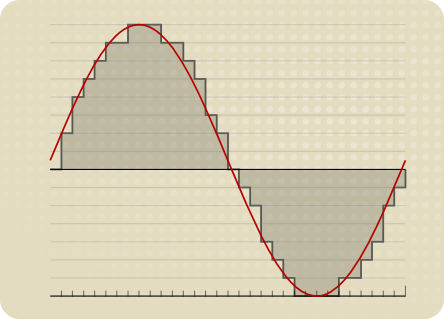
Then the sampling rate is how dense the grid is in the horizontal direction (how many grids per second); the number of digits is how dense the grid is in the vertical direction (how thin and how much storage each sample is stored), 16 Bit means that the range of values of each sample point is from 2 to the 16th, i.e. , from 0 to 65535. The code rate is the multiplication of the two (how much storage the samples take per second).
First, there are two cases, lossy and lossless. After figuring out lossless and lossless, we need to figure out the sample rate and bit depth. After calculating the sample rate and bit depth, we need to figure out the difference between the ratio of bit rate and bit depth to sample rate and its impact on audio quality.
In order to store a continuous physical signal (well, tell me about Planck’s constant…) in a computer, it must be converted to a digital signal. In acoustics, a digital signal is a digital representation of the amplitude of the sound wave at any moment.
Sound waves are longitudinal waves, which are difficult to draw. The following figure is replaced by transverse waves (the concept of longitudinal waves is the phenomenon that the density of air or other media changes regularly due to energy. The peaks represent high density, the troughs represent low density, and the horizontal line is the average density, i.e. silent state)
Using high school physics, waves contain two dimensions, one is intensity and the other is time. “Number of digits” indicates how many levels the sound wave is divided into from the strongest to the weakest; “Sampling Rate” determines the precision of the time axis or the sampling density, i.e. the length of time represented by each red dot, and the code rate is one second The number of dots on the clock, multiplied by the space that each point occupies.
So the so-called 24 bits consist of dividing the intensity of the sound wave by 2 at power level 24, occupying 3 bytes of space. Obviously, the finer the grade, the more details are restored.
The sample rate is generally 44100 Hz for CD (Hertz = times/second), 48000 Hz for DVD, and 96000 Hz as standard. As with the number of digits, the more points you get in a single second, the more details are restored. Why does CD take this value? Because the hearing range of the human ear is generally believed to be between 20 and 20,000 Hz. It is necessary to represent a peak and a valley, and at least two sampling points are required. So the CD can represent the sound of 22050 Hz at most, but this sound doesn’t have any detail, because if there are only two peak and trough points, the mean waveform is completely lost. Therefore, there will be a higher sampling rate.
About the sample rate. What is the most intuitive effect of sample rate?
Audio bit depth, sample rate, and bit rate
Affects the expressiveness of the sound’s frequency range. The higher the sample rate, the larger the frequency range that can be expressed. 44.1KHz sampling rate can represent the frequency range from 0Hz to 22050Hz; 48KHz sampling rate can represent the frequency range from 0Hz to 24000Hz; 96 KHz sample rate can represent the frequency range from 0 Hz to 48000 Hz. The average frequency range that the human ear can hear is approximately 20 Hz-20,000 Hz. Combining the above two, if you see one parameter: 16Bit 44.1KHz , it means this digital audio can express “96dB dynamic range” and “0 Hz -22050 Hz” frequency range; 24Bit 48KHz , it means this digital audio can Performance ” 144dB Dynamic Range ” and ” 0Hz -24000 ”
Hertz” frequency range. (3) Audio bit rate, also called bit rate, or bit rate. Bit rate refers to the amount of information that can pass through a data stream per second, which can also be understood as: how much is used per second The amount of data in bits to represent In principle, the higher the audio bitrate, the better the quality However, if it is lossy compressed audio , different compression algorithms, even if the bitrate is the same, will lead to completely different sound quality results.Typical representative: 96kbpsThe sound quality of WMA audio format is obviously better than that of MP3 audio format than 96 kbps. Why is this? The difference is due to different compression algorithms and different data utilization rates. Another example, if the MP3 is compressed below 48 kbps, it’s already terrible. And if it’s format AAC audio, to the same 48kbps bit rate, the sound quality is obviously better than MP3. For lossless compressed audio, even if the bitrate is completely different, the final sound quality is the same
. For example, if the same WAV file is compressed in FLAC and APE formats, the bit rate of the output file is not the same, but the sound quality is the same. Even if it is the same format, the compression level is different and the bitrate is completely different, but the end result, the sound quality remains the same (but when encoding and decoding, the CPU usage is different and the encoding time is also different).
And the audio has several important parameters, such as KHZ, BIT, channel, KBPS, etc.
MP3 Quality
And the format is different, the algorithm is also different, so even if the above parameters are the same, the format is different. The sound quality will also be very different. Among them, VBR is a dynamic sampling. For a detailed and complete explanation, please refer to the description below.
After reading it patiently, you will be able to say a thing or two.
Audio sampling explains the digital audio system The original sound is reproduced by converting the waveform of the sound wave into a series of binary data The equipment used in this step is an analog-to-digital (A/D) converter, which samples the sound wave at a rate of tens of thousands of times per second. A sampler records the state of the original analog sound wave at a given time, called a sampler. A series of samples can be connected to describe a sound wave. The number of samples per second is called the sample rate or sample rate, and the unit is HZ.
(hertz). The higher the sample rate, the higher the frequency of the sound wave that can be described. The sample rate determines the frequency range (equivalent to the pitch) of the sound, which can be represented by a digital waveform. The frequency range is often called the bandwidth. To understand properly, audio sampling can be broken down into the number of bits sampled and the frequency of the sample. 1. The number of sampling bits The number of sampling bits can be understood as the resolution of the sound processed by the capture card. The higher the value, the higher the resolution and the more realistic the sound recorded and played back. The first thing we need to know: sound files on the computer are represented by the numbers 0 and 1 . So the essence of recording on the computer is to convert the analog sound signal into a digital signal. On the contrary, during playback, the digital signal is restored to an analog sound signal output. The capture card bit refers to the binary digits of the digital sound signal used by the capture card when capturing and playing sound files. The bits on the capture card objectively reflect the accuracy of the digital sound signal’s description of the input sound signal. 8 bits represent the eighth power of 2–256 and 16 bits represent the sixteenth power of 2–64K . For comparison, for the same music data, a 16-bit sound card can break it down into 64K precision units for processing, while an 8-bit sound card can only handle 256 precision units.
It causes a large signal loss, and the final sampling effect is naturally incomparable. All the major products on the market today are 16-bit capture cards, not 64-bit or even 128-bit as some ignorant marketers advocate, who confuse the concept of polyphony in capture cards with the concept of bits of sampling. Although the EMU10K1 chip used by the most powerful capture card series is claimed to be 32-bit, it is just a Direct Sound acceleration-based multi-audio streaming technology, and its essence is still a 16-bit sound card. . It must be said that the 16-bit sampling precision is more than enough for computer multimedia audio. 2. Audio Sampling Level (Audio Sampling Rate) The digital audio system reproduces the original sound by converting the sound waveform into a series of binary data. The equipment used to accomplish this step is an analog-to-digital (A/D) converter, which takes each sound wave, and each sampler records the state of the original analog sound wave at a given time, which is called sample. A series of samples can be connected to describe a sound wave. The number of samples per second is called the sample rate or sample rate, and the unit is HZ (Hertz). The higher the sample rate, the higher the frequency of the sound wave that can be described.