Flac Normalizer – How to Normalize FLAC Files with mp4gain


Free Download Mp4Gain
picture

How to Normalize FLAC Files with mp4gain
Flac Normalizer
Flac Normalizer
Flac Normalizer
Flac Normalizer


FLAC is a lossless audio format that offers excellent sound quality. However, the volume of FLAC files can vary, which can be annoying when listening to music. Normalization is the process of adjusting the volume of audio files so that they have a consistent level. This can help to ensure that your FLAC files sound their best, regardless of the playback device or software you use.

There are a number of different ways to normalize FLAC files. One popular option is to use mp4gain. mp4gain is a tool that can be used to normalize FLAC files on Windows.

To use mp4gain, simply download the software and install it on your computer. Once installed, open mp4gain and select the FLAC files that you want to normalize. You can then adjust the target volume level. The default target volume level is 89dB, but you may want to adjust this level depending on your preferences.

Once you have set the target volume level, click on the “Normalize” button. mp4gain will then normalize the FLAC files and save them to your computer.

Why Normalize FLAC Files?

There are a few reasons why you might want to normalize FLAC files. First, normalization can help to improve the overall sound quality of your FLAC files. When FLAC files are not normalized, the volume of each file can vary, which can make it difficult to listen to music in a consistent way. Normalization helps to ensure that all of your FLAC files have a consistent volume level, which can make your music sound better.

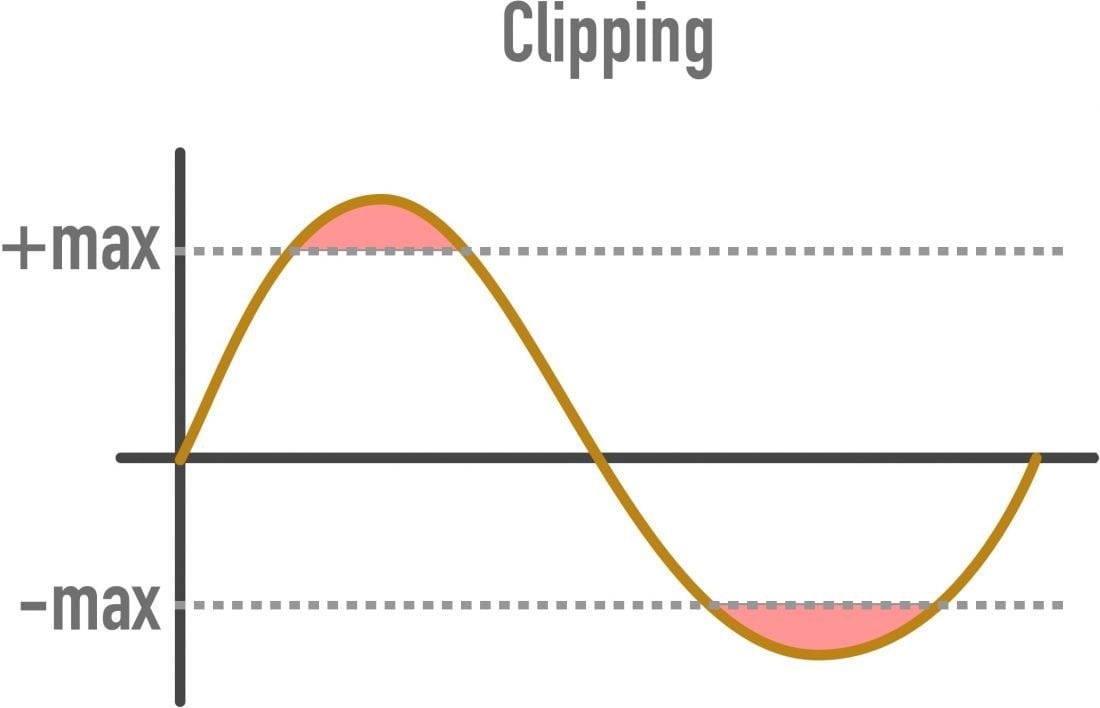
Second, normalization can help to prevent clipping. Clipping occurs when the volume of an audio file is too high and the waveform reaches the maximum level. This can cause distortion and make your music sound unpleasant. Normalization can help to prevent clipping by ensuring that the volume of your FLAC files is not too high.

Finally, normalization can help to make your FLAC files more compatible with different playback devices and software. Some playback devices and software have different volume settings, which can make it difficult to get your FLAC files to sound the same on all devices. Normalization can help to ensure that your FLAC files sound consistent regardless of the playback device or software you use.

How to Use mp4gain

Using mp4gain to normalize FLAC files is very simple. Here are the steps involved:

Download and install mp4gain on your computer.
Open mp4gain and select the FLAC files that you want to normalize.
Adjust the target volume level. The default target volume level is 89dB, but you may want to adjust this level depending on your preferences.
Click on the “Normalize” button. mp4gain will then normalize the FLAC files and save them to your computer.
**

Final Words About Normalization

Normalization is a simple but effective way to improve the sound quality of your FLAC files. If you want to make sure that your FLAC files sound their best, I recommend using mp4gain to normalize them.


Free Download Mp4Gain
picture


Mp4Gain Main Window
picture


Mp4Gain Features
picture


Free Download Mp4Gain
picture

Exploring Audio Bitrates: Technical Deep Dive

Exploring Audio Bitrates: Technical Deep Dive

Audio Bitrates
Audio Bitrates
Audio Bitrates
Audio Bitrates

In this article, we will explore the technical aspects of audio bitrates. We will discuss what a bitrate is, how it affects audio quality, and how to choose the right bitrate for your needs.

What is a bitrate?

A bitrate is the number of bits per second that are used to encode an audio file. The higher the bitrate, the more data is used to encode the file, and the higher the quality of the audio will be. However, higher bitrates also result in larger file sizes.

How does bitrate affect audio quality?

Bitrate affects audio quality by determining how much data is used to represent the original sound waves. Higher bitrates allow for more data to be used, which results in more accurate representations of the original sound waves. This results in better audio quality, such as increased clarity and reduced noise.

How to choose the right bitrate

The right bitrate for you will depend on a number of factors, including:

  • The type of audio you are listening to. For example, music and speech have different requirements.
  • The quality of your audio equipment. Higher-quality equipment can reproduce higher bitrates without introducing any noticeable distortion.
  • Your personal preferences. Some people may prefer the sound of higher bitrates, while others may not notice a difference.

General bitrate recommendations

Here are some general bitrate recommendations for different types of audio:

  • Speech: 32 kbps to 96 kbps
  • Music: 128 kbps to 320 kbps
  • High-quality audio: 256 kbps to 512 kbps or higher

It is important to note that these are just general recommendations. The best way to determine the right bitrate for you is to experiment and see what sounds best to your ears.

Final words about audio bitrates

Audio bitrate is an important factor to consider when choosing an audio file format or when setting up an audio streaming service. By understanding how bitrate affects audio quality, you can choose the right bitrate for your needs and get the best possible listening experience.


Mp4Gain

Mp4Gain

Why FLAC bit rate is typically around 1000 kbps?

Why FLAC bit rate is typically around 1000 kbps?

FLAC bit rate
FLAC bit rate
FLAC bit rate
FLAC bit rate

The Basics of FLAC

FLAC, or Free Lossless Audio Codec, is a popular format for high-quality digital audio. It uses lossless compression, which means that the audio is compressed without losing any of the original data. This is in contrast to lossy compression, which compresses the audio by removing data that is considered unnecessary. FLAC files typically have a high bit rate, often around 1000 kbps, which allows for the preservation of more audio information.

Why the High Bit Rate?

The reason why FLAC has a high bit rate is that it uses lossless compression. This means that all the audio data is preserved, and the file size is not reduced as much as it would be with lossy compression. While a lossy format like MP3 might have a bit rate of 128 kbps or even lower, FLAC can have a bit rate of up to 5000 kbps or more, depending on the audio content. This high bit rate ensures that the audio is of the highest quality possible.

The Benefits of FLAC

One of the biggest benefits of FLAC is that it offers high-quality audio without sacrificing any of the original data. This means that the audio is reproduced exactly as it was recorded, with no loss of quality. Additionally, FLAC files can be compressed to a smaller size without any loss in quality, which makes them easier to store and share.

The Drawbacks of FLAC

The main drawback of FLAC is that it has a larger file size compared to lossy formats like MP3. This can make it more difficult to store and share, especially when dealing with large collections of audio files. Additionally, not all devices and media players support FLAC playback, which can limit its usefulness in certain situations.

Final Words

In conclusion, the high bit rate of FLAC is a result of its lossless compression, which preserves all the original audio data. While this makes FLAC files larger in size, it also ensures that the audio is of the highest quality possible. Despite its drawbacks, FLAC remains a popular format among audiophiles and music enthusiasts who demand the best possible audio experience.

Why FLAC is the Future of Music Streaming

Why FLAC is the Future of Music Streaming

Why FLAC is the Future of Music Streaming

FLAC stands for Free Lossless Audio Codec and is becoming increasingly popular for music streaming. Unlike MP3 and other lossy formats, FLAC preserves the original quality of the music and does not compromise on the sound quality. This makes it the perfect choice for music lovers who want to experience their favorite tracks in the best possible quality.

Why FLAC is the Future of Music Streaming

Why is FLAC Better than MP3?

When music is compressed into MP3 format, some of the data is lost. This can result in a noticeable difference in the sound quality, especially if you have high-quality audio equipment. FLAC, on the other hand, is a lossless format, meaning that no data is lost during the compression process. This means that the sound quality is exactly the same as the original recording, giving you the full, rich sound that the artist intended.

Another advantage of FLAC is that it offers a higher level of compression compared to MP3, making it possible to store more music on your device without taking up too much space. This is especially important for music lovers who have a large collection of tracks and want to keep them all in one place.

Why is FLAC the Future of Music Streaming?

As technology continues to advance, music lovers are demanding higher-quality audio and FLAC is the perfect solution. With the popularity of high-end audio equipment, such as headphones and speakers, the demand for high-quality music is only going to increase. FLAC offers the perfect combination of high-quality audio and efficient compression, making it the ideal choice for music streaming services.

Music streaming services that offer FLAC as a format have already seen an increase in popularity among music lovers who want to enjoy their favorite tracks in the best possible quality. Additionally, with the rise of high-speed internet and powerful smartphones, it is now possible to stream high-quality music on the go, making FLAC a convenient option for anyone who wants to enjoy their music on the move.

How Does FLAC Benefit Music Lovers?

For music lovers, FLAC offers a number of benefits. Firstly, it provides a high-quality listening experience, allowing you to enjoy your favorite tracks in the best possible quality. Secondly, FLAC is a versatile format that can be played on a range of devices, from computers and smartphones to home entertainment systems. This means that you can enjoy your music wherever you go, without having to worry about compatibility issues.

Finally, FLAC is a cost-effective solution for music lovers. With the rise of music streaming services, there is no longer any need to buy CDs or download individual tracks. Instead, you can subscribe to a service that offers FLAC as a format and enjoy a huge library of high-quality music for a low monthly fee.

Conclusion

FLAC is the future of music streaming and is the perfect choice for music lovers who want to experience their favorite tracks in the best possible quality. With its combination of high-quality audio and efficient compression, FLAC is sure to become the go-to format for music streaming services and music lovers alike. If you’re looking for the best solution to improve your music experience, look no further than Mp4Gain.

What is the capacity of the high resolution sound source?

What is the capacity of the high resolution sound source?

Hi-Res audio

High resolution sound source with more information than conventional CDs.

HiRes Audio

Since the data size is large, you can enjoy high-quality sound with a three-dimensional effect, but the problem is that when managing multiple high-resolution audio sources, the required storage capacity becomes huge.

Then I will introduce what is the capacity of the high resolution sound source, including the management method.

What is the capacity of Hi-Res Audio sources compared to CDs?
In determining the capacity (file size) of a high-resolution sound source, the sampling frequency and bit depth of the sound source are important factors.

The sample rate (sample rate) is a numerical value that is used as an index when converting analog data, such as speech, to a digital signal.

It indicates how many times per second an information sample was measured, and is expressed in “Hz (hertz)”.

If sampling is done every 44,100 seconds, it will be “44.1 kHz”.

On the other hand, the bit depth is a numerical value that indicates how many pieces are recorded in each divided data.

It is represented by “bit”.

Both the sample rate and the bit depth mean that the higher the number, the more information there will be, that is, the higher the resolution.

The amount of music data per second is called the bit rate.

Bit rate is the sample rate multiplied by the bit depth and is expressed in “bps”.

The calculation formula is as follows.

Bit rate (bps) = sample rate (Hz) x bit depth (bit) x 2

For example, the bit rate and sample rate of a CD sound source are generally “44.1 kHz / 16 bits”.

Most so-called “CD sound quality” sound sources are based on this number.

The size of the 5 minute 44.1 kHz / 16 bit / sound source file is about 50 MB.

But what about hi-res audio sources?

High resolution sound source capacity per song (5 minutes) varies depending on the music data format, as shown below.

WAV: 192 kHz / 24-bit: capacity for 5 minutes is 330 MB
FLAC: 192 kHz / 24 bit: capacity for 5 minutes is 200 MB
ALAC: 192 kHz / 24 bits: capacity for 5 minutes is 200 MB
What you can see from this is that the capacity of the high resolution sound source is 4 to 6 times that of the CD sound source in 5 minutes.

Large capacity high resolution music management equipment
If you download 5 high-resolution songs for 4 minutes, it will take up about 700MB (for 96kHz / 24-bit WAV files).

In the case of 10 songs, it exceeds 1400MB, that is, 1GB.

If so, I would like to have enough storage to handle that amount of data.

An effective way to do this is to build a NAS-centric network audio system that incorporates a large-capacity hard drive.

For example, if you can prepare a 4TB (terabyte) hard drive, it can store around 20,000 high-resolution songs.

Next, we will explain what NAS and network audio are like.

NAS
NAS stands for “Network Attached Storage” and it reads like aubergine.

It stands for network attached storage, and it is also called a network hard drive or network compatible HDD.

In other words, it is an external hard drive that is used when connecting to a network (LAN).

A normal external hard drive used when connecting to a PC = PC via USB etc. can basically be used with only one PC.

However, if it is a NAS, it can be used with multiple devices participating in the LAN.

Files saved on the hard drive can also be used and shared from, for example, the personal computers of each family member participating in the home LAN, smartphones connected via Wi-Fi, and TVs in the living room to be.

It is also possible to access the data on the NAS from the outside via the Internet.

The NAS is often used in the home to store and share data for music, video (video / TV recording data), photos (images), etc.

Meaning and relationship of sample rate, bit depth, and bit rate

Meaning and relationship of sample rate, bit depth, and bit rate

bit depth

Sampling rate
Bit depth
Bit rate

bit depth audio

I will present the three meanings and relationships of.

Table of Contents
What is the sampling rate?
What is bit depth?
What is a bit rate?
resume
Sponsorship

What is the sampling rate?
For example, let’s say you say “Ah” for 1 second.

When recording this “Ah” sound on a personal computer, the “Ah” sound is divided into tens of thousands per second, each divided into tens of thousands.

“The height of this section was about this.”
“The length of this section was about this.”
Record it as data like this.

The personal computer continually reads each of this divided data and outputs it as a “voice” called “Ah”.

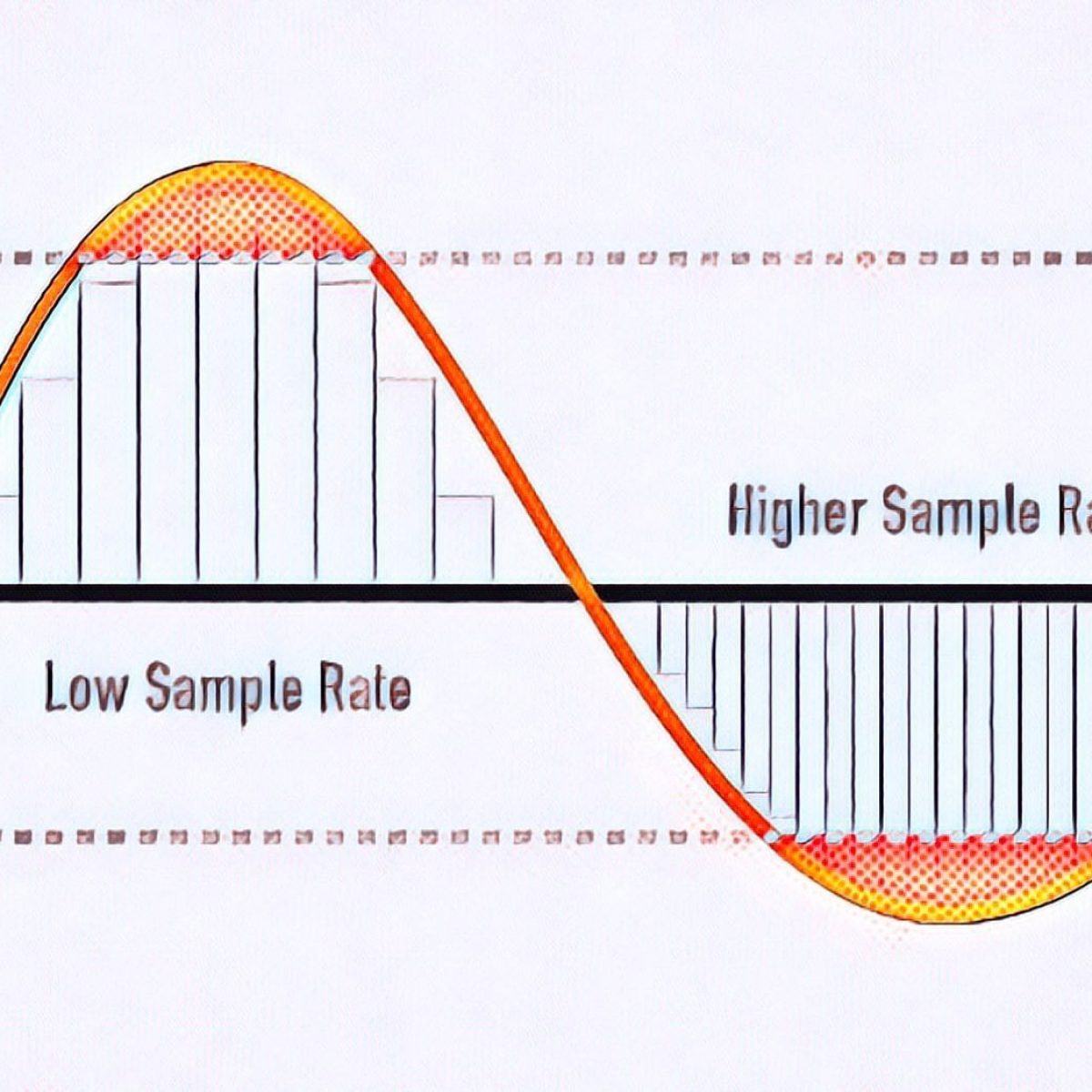
At this time, “how many tens of thousands of sounds are collected per second” is called the “sample rate.” (Also called “sample rate”)

Sampling rate
▲ Sample rate image

The more divisions you make, the smoother the sound will be, and as a result, you will feel that the sound quality has improved!

What is bit depth?
The sample rate is “how many tens of thousands of sounds are collected per second”.

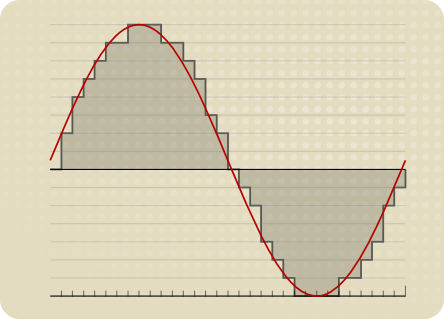
“How much capacity is given to each divided data (sample)” is called “bit depth”.

Figure_bit depth
▲ Bit depth image

Also called “number of quantization bits”, “number of sample bits”, “bit offset”, and so on.

For example, if the bit depth is “16 bits”, the amount of information is 2 to the 16th power (65536) for one sample.

The higher the bit depth, the greater the expressiveness of the sound’s fineness and volume, and as a result, I feel like the sound quality has improved!

By the way, the bit depth of most of the world’s sound sources is 16 bit.

that’s why

“Import music from CD!”
“Import music downloaded from the Internet!”
In such cases, 16 bits is sufficient.

On the other hand, if you say “What you recorded in your DAW comes out wav!”, It is better to have 16 bits or more.

This is because, for example, when processing audio effects with audio editing software, sound deterioration can be reduced to zero by assigning an additional bit depth (for example, 32-bit). (Although 16 bit is fine for final output)

What’s more,
note that “bit depth” on this page has a different meaning than “bit depth” in video.

Reference: What is Bit Depth (Color Depth)? Differences like 10bit / 24bit / 30bit

What is a bit rate?
Bit rate is the “amount of data per second”.

Reference: What is a bit rate? Relationship between image quality, sound quality and codec [Video / Audio]

The “sample rate” and “bit depth” presented above are

Sample rate: how many tens of thousands of sounds are collected per second
Bit depth: how much to give to each divided data
Therefore, the product of these two values ​​is the “bit rate”.

Audio encoding

Audio encoding

Audio Encoding

I wrote over audio files last time, but if you reduce the file size (code at a lower bit rate), the sound quality tends to deteriorate. How much should it really be? .. ..

audio encoding

When compressing using audio encoding (AAC, MP3, etc.), the compression rate is determined by the bit rate at the time of encoding. Specifically, if you set a low bit rate, the compression rate will be higher and the file size when saved will be smaller, but first of all, what is the bit rate for uncompressed original sound source (PCM) ?
If you save it as PCM, the sound quality will be that of the original sound, but it can be a bit awkward to save without worrying about the file size. Also, depending on the application, I think the memory capacity is sufficient even for the original sound size and the communication speed is fine. Therefore, I would like to write about the sample rate and bit rate that are often heard in digital audio.

The bit rate of digital audio is determined by the sampling frequency, the number of bits assigned to a sample (number of quantization bits), and the number of channels (stereo, monaural, etc.).

PCM bit rate (uncompressed) = sample rate x number of quantization bits x number of channels
As I wrote a bit last time, in file containers like wav and mp4 format, this information is attached as a header, so that the application can see the header and play it back. The compression rate of the encoding is determined by the bit rate specified at the time of encoding for this PCM (uncompressed) bit rate.
For example, as many of you know about music CDs, with 44.1 kHz stereo, this is the next bit rate.

Music CD bit rate: 44100Hz x 16bit x 2ch (stereo) = 1411.2kbps
When encoding this with MP3, AAC, etc., it is natural to specify a bit rate lower than 1,411.2 kbps. For example, when encoding at 256 kbps, the compression rate is around 18% when the original sound is 100% and the file size is 1/5 or less.

Encode a music CD at 256 kbps: 256 kbps / 1,411.2 kbps = about 18%
In general, the sample rates of audio devices connected to PCs are 48 kHz and 44.1 kHz for music, 16 kHz and 8 kHz for audio such as microphones and headphones, and 32 kHz, 24 kHz, 22.05 kHz. , etc.

The bit rate of PCM (uncompressed sound source) with 16-bit quantization bits is as follows.

Stereo (for music) PCM 16-bit bit rate (example)
Sampling frequency Number of quantization bits Number of channels Bit rate Comments
48kHz 16 16 2 1536 kbps
44.1 kHz 16 16 2 1,411.2 kbps Music CD
32kHz 16 16 2 1,024 kbps
24kHz 16 16 2 768 kbps
22.05 kHz 16 16 2 705.6 kbps
Monaural (for audio) PCM 16-bit bit rate (example)
Sampling frequency Number of quantization bits Number of channels Bit rate Comments
32kHz 16 16 1 512 kbps Super Wide Band
24kHz 16 16 1 384 kbps
16kHz 16 16 1 256 kbps broadband
8kHz 16 16 1 128 kbps Narrow band

Sampling rate
If you check the web, there are explanations such as the sampling required to convert analog waveforms to digital conversion. For example, it shows how many samples of an audio signal input from a microphone are taken per second and digitized. The larger the sample, the greater the range that can be recorded. When an analog waveform is digitized, the frequency that can be expressed is half the sampling frequency (sampling theorem). For example, with a sample rate of 48kHz, it is possible to express up to 24kHz. At 8kHz (narrowband) and 16kHz (wideband), which are often used for audio, you can only hear up to 4kHz and 8kHz, respectively. The higher the sample rate, the higher the bit rate.

sampling theorem
It is a very simple explanation, but it can express up to half the sample rate. When sampling a signal, if the interval is small, it can be restored close to the original signal, but if it is too thick, it cannot be restored (I would like to write a little more detail when talking about signal processing or other time ).

What is the bit rate? Simple explanation

What is the bit rate? Simple explanation

bitrate

Bit rate is a unit of data transfer.

BITRATE

When used in video or audio, as in video editing, it indicates how much data is represented per unit of time, and “bits per second (bps)” is generally used.
A bit is the smallest unit of data that a computer handles.
Two states of “0” and “1” can be expressed by 1 bit. (1 binary digit)
Similarly, a byte representing the size of a file is a unit of data handled by a computer. (1 byte = 8 bits)
Here are some things to keep in mind about bit rates.
In home appliance hard disk recorders, it is sometimes expressed as a recording mode such as XP, SP, LP.
The higher the bit rate value (numerical value), the better the picture and sound quality, but the greater the amount of data (file size).
The unit of bit rate is usually Mbps, which means 10 6 (10 to the sixth power) for video, and kbps, which means 10 3 (10 to the third power) for audio.
When burning a video to DVD, there is a limit to the amount of data that can be burned to DVD, and if you try to burn a long video, you will have to lower the bit rate, resulting in poor image quality. . To record high-quality video, the bit rate must be increased, which increases the amount of data required and shortens the recording time.
Even if the bit rate used is the same, the image quality and sound quality will differ depending on the encoder and compression method used for digitizing.

What are “bit depth” and “sample rate”? Part 2

What are “bit depth” and “sample rate”? Part 2

Understanding Sample Rate, Bit Depth, and Bit Rate - Headphonesty

What is the sample rate?

Bit Depth

Next, I will explain the sample rate.

The sample rate is like the “resolution” of the audio.

The higher the sample rate, the more samples per second = you can hear better.

Requires double sample rate

One thing to keep in mind here is that you need twice the sample rate to hear sound at that frequency.

For example, if you want to hear a 1000 Hz (1 kHz) sound accurately and clearly, the sampling frequency must be at least 2000 Hz (2 kHz).

If the sample rate is less than twice the value you want to hear, “aliases” will occur and you will not be able to process the sound accurately, such as crackle or noise.

Nyquist frequency

By the way, to use a little technical word, it also means not to exceed the “Nyquist Frequency”.

The Nyquist rate is exactly half the supported sample rate.

For example, if the sampling frequency is 44.1 kHz, the Nyquist frequency will be 22.05 kHz.

If you try to handle this high-pitched sound that exceeds 22.05 kHz, the above-mentioned “aliasing” will occur and you will not be able to reproduce the sound correctly.

Range recognizable by the human ear

The loudest sound that can be recognized by the human ear is said to be 20 kHz, so to hear a 20 kHz sound, you only need to have a sample rate of at least 40 kHz.

After that, to avoid aliasing, apply an anti-aliasing filter until the Nyquist (Transition Band) frequency is reached.

For 44.1 kHz, 2050 samples x 2 are required.

In other words, a sample rate of 44.1 kHz is all that is needed to minimize the limit of sound (20 kHz) that the human ear can hear.

When the sampling frequency is high (96 kHz, 192 kHz)

Recently, it can be set to a high sample rate, such as 96 kHz or 192 kHz.

Unfortunately, even with such a high sample rate, it’s hard to tell the difference.

As shown in the image above, non-human animals can hear higher frequency sounds.

However, it is a level that we do not have to worry about because it is a completely inaudible zone for the human ear.

By the way, many audio interfaces cover up to 192 kHz.

Controversy over sampling rate

In fact, in the 1970s, many media outlets were controversial about sample rates.

At the time, 48 kHz was the audio standard used in radio, television, and video work.

However, broadcasting stations have decided to use 44.1 kHz as a standard to prevent data from being copied to consumers (viewers) by intentionally breaking compatibility (or making conversion difficult) …

It’s difficult to change data from 44.8 kHz to 44.1 kHz, so it prevented the average viewer from converting it to the sample rate used for home devices.

By the way, the article “Comparison of professional versus cheaper audio interface” is summarized here, which is also explained from the point of view of bit rate and sample rate.

What are “bit depth” and “sample rate”?

What are “bit depth” and “sample rate”?

Bit Depth

What are “bit depth” and “sample rate”?
What are “bit rate” and “sample rate”?
I wrote it in the DTM project file settings and audio interface specs, but I don’t understand the meaning …

Bit Depth

This time, we will answer those questions.

Here’s a quick rundown of “What is a Bit Rate / Sample Rate ?,” Explained by Professional Drummer / Engineer / Producer Ed Thorne.

Once you know this, you will be able to export the sound source in the appropriate format and you will be able to understand the standards for the equipment that you will buy in the future.

Please take a look to the end!

What is bit-deapth?

Bit depth refers to the range in which the dynamics (inflection) of the sound can be processed.

For example, if the bit depth is “16-bit”, the range of up to 96 dB can be reproduced and processed from the silent state.

96dB is all about the volume when the audience is excited at the live venue.

On the other hand, if the bit depth is “24 bit”, the 144 dB dynamics can be reproduced and processed.

144dB is roughly the volume of a jet airplane.

Dynamics in the age of streaming

Not long ago, there was no volume limit like current streaming services like YouTube and Spotify.

The louder the sound, the better the music itself, which is why the producers always wanted to make the song louder and bigger than any other music.

Today, many platforms where you can listen to music have volume restrictions, so the idea that “the more music you can play loud sounds, the better” has changed, and times have changed.

So, in this age, 16-bit or 24-bit might not make much of a difference.

The amount of data also changes

By the way, if the bit depth is high, the amount of data will change as well.

When recording a lot, it may be better to consider this a bit.