FLAC, or Free Lossless Audio Codec, is a popular format for high-quality digital audio. It uses lossless compression, which means that the audio is compressed without losing any of the original data. This is in contrast to lossy compression, which compresses the audio by removing data that is considered unnecessary. FLAC files typically have a high bit rate, often around 1000 kbps, which allows for the preservation of more audio information.
Why the High Bit Rate?
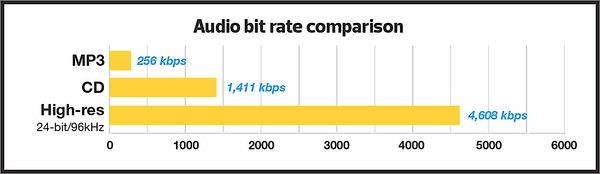
The reason why FLAC has a high bit rate is that it uses lossless compression. This means that all the audio data is preserved, and the file size is not reduced as much as it would be with lossy compression. While a lossy format like MP3 might have a bit rate of 128 kbps or even lower, FLAC can have a bit rate of up to 5000 kbps or more, depending on the audio content. This high bit rate ensures that the audio is of the highest quality possible.
The Benefits of FLAC
One of the biggest benefits of FLAC is that it offers high-quality audio without sacrificing any of the original data. This means that the audio is reproduced exactly as it was recorded, with no loss of quality. Additionally, FLAC files can be compressed to a smaller size without any loss in quality, which makes them easier to store and share.
The Drawbacks of FLAC
The main drawback of FLAC is that it has a larger file size compared to lossy formats like MP3. This can make it more difficult to store and share, especially when dealing with large collections of audio files. Additionally, not all devices and media players support FLAC playback, which can limit its usefulness in certain situations.
Final Words
In conclusion, the high bit rate of FLAC is a result of its lossless compression, which preserves all the original audio data. While this makes FLAC files larger in size, it also ensures that the audio is of the highest quality possible. Despite its drawbacks, FLAC remains a popular format among audiophiles and music enthusiasts who demand the best possible audio experience.
When it comes to music and audio files, bitrate is an important factor to consider. Bitrate refers to the amount of data that is transmitted per second in a digital audio file. The higher the bitrate, the more data is transmitted and the better the audio quality.
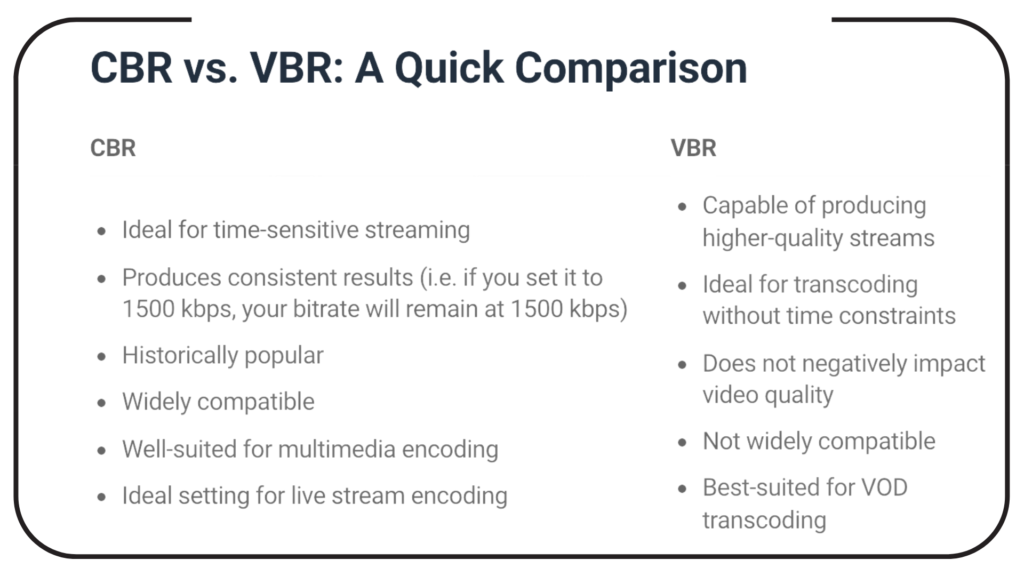
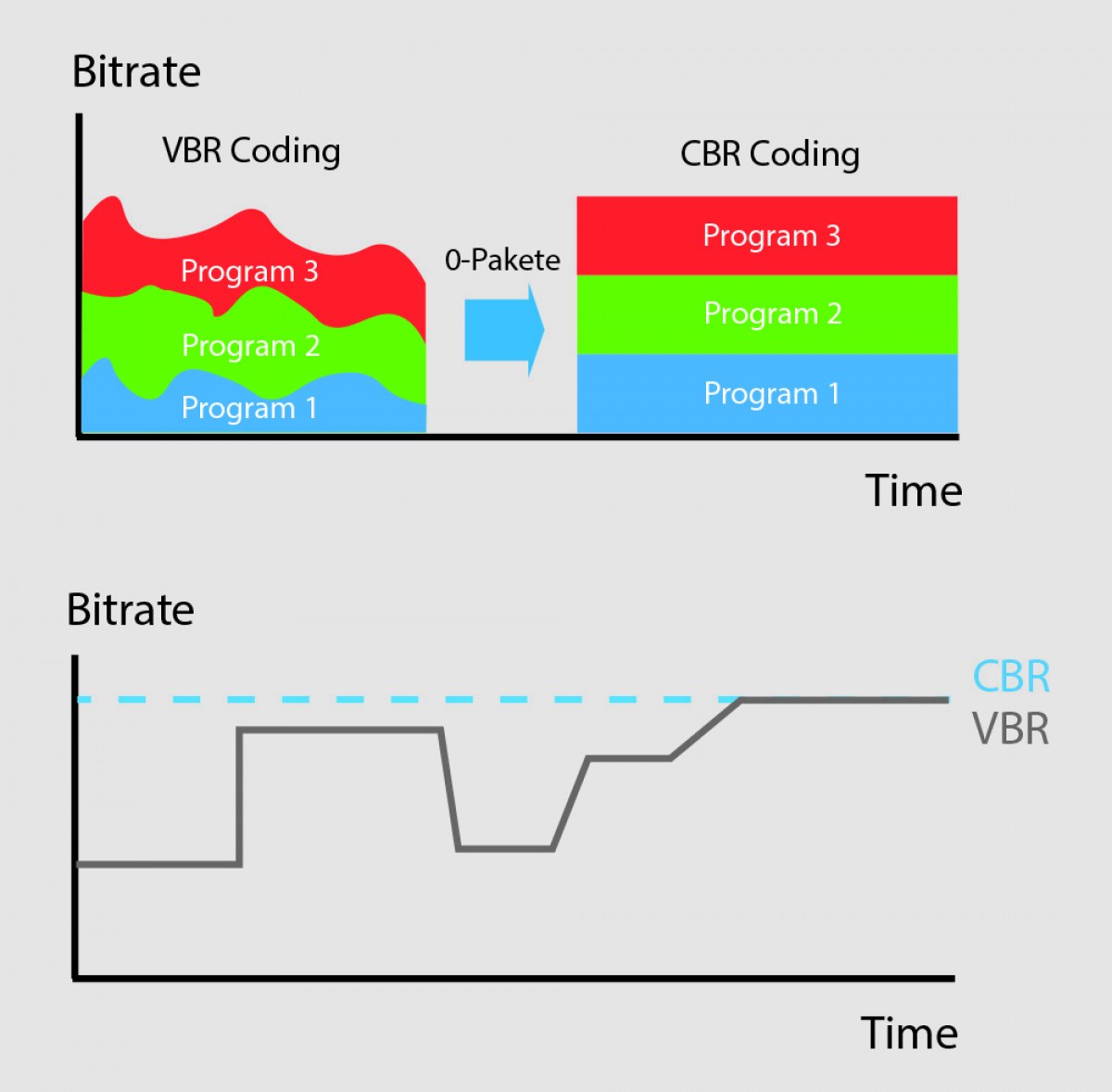
VBR, or variable bitrate, is a type of MP3 encoding that uses a variable bitrate rather than a constant bitrate. This means that the bitrate will vary depending on the complexity of the audio being encoded. For example, a simple audio passage with few instruments and no vocals may have a lower bitrate than a complex audio passage with many instruments and vocals.
VBR MP3 bitrate offers a number of advantages over constant bitrate encoding, including better audio quality, smaller file sizes, and more efficient use of storage space.
How to Choose the Right VBR MP3 Bitrate
When choosing the right VBR MP3 bitrate for your audio files, there are a number of factors to consider. These include the type of audio being encoded, the intended use of the audio, and the storage space available.
For example, if you are encoding audio for use on a mobile device with limited storage space, you may want to use a lower bitrate to minimize file size. On the other hand, if you are encoding audio for use in a high-quality home theater system, you may want to use a higher bitrate to ensure the best possible audio quality.
Ultimately, the right VBR MP3 bitrate will depend on your specific needs and preferences. Experimenting with different bitrates and listening to the resulting audio can help you determine the best option for your particular situation.
The Future of VBR MP3 Bitrate
As technology continues to advance and storage space becomes more abundant, VBR MP3 bitrate is likely to become even more popular in the future. With its ability to offer high-quality audio in a compact and efficient format, VBR MP3 encoding is sure to remain a popular choice for music lovers and audio enthusiasts alike.
In the words of music legend Bob Marley, “One good thing about music, when it hits you, you feel no pain.” With VBR MP3 bitrate, music lovers can experience high-quality audio that hits them right where it counts, without the pain of bloated file sizes or compromised sound quality.
Conclusion: The Benefits of VBR MP3 Bitrate
In conclusion, VBR MP3 bitrate is a powerful tool for encoding high-quality digital audio files. By using a variable bitrate that adapts to the complexity of the audio being encoded, VBR MP3 encoding offers superior sound quality, smaller file sizes, and more efficient use of storage space.
As technology continues to evolve and storage space becomes more abundant, VBR MP3 encoding is sure to become even more popular in the future. So the next time you’re encoding digital audio files, consider using VBR MP3 encoding to experience the benefits of variable bitrate technology for yourself.
In the words of writer Kurt Vonnegut, “The only proof he needed for the existence of God was music.” With VBR MP3 bitrate, the beauty of music can be captured in all its glory, providing an experience that is truly transcendent.
MP4 is a popular video format that is widely used in digital media. It uses a specific compression algorithm to compress video files to make them smaller and easier to share. The bitrate of an MP4 video refers to the amount of data that is used to represent each second of the video. It is typically measured in kilobits per second (kbps) or megabits per second (Mbps). A higher bitrate means that the video will have more data and will be of higher quality, but the file size will also be larger.
Why is MP4 Bitrate Important?
The bitrate of an MP4 video is important because it affects the quality and size of the video file. If the bitrate is too low, the video may appear pixelated or blurry. On the other hand, if the bitrate is too high, the file size will be larger, and it may take longer to upload or download the video. In addition, a higher bitrate requires more bandwidth to stream the video, which may be an issue for viewers with slower internet connections.
How to Choose the Right MP4 Bitrate
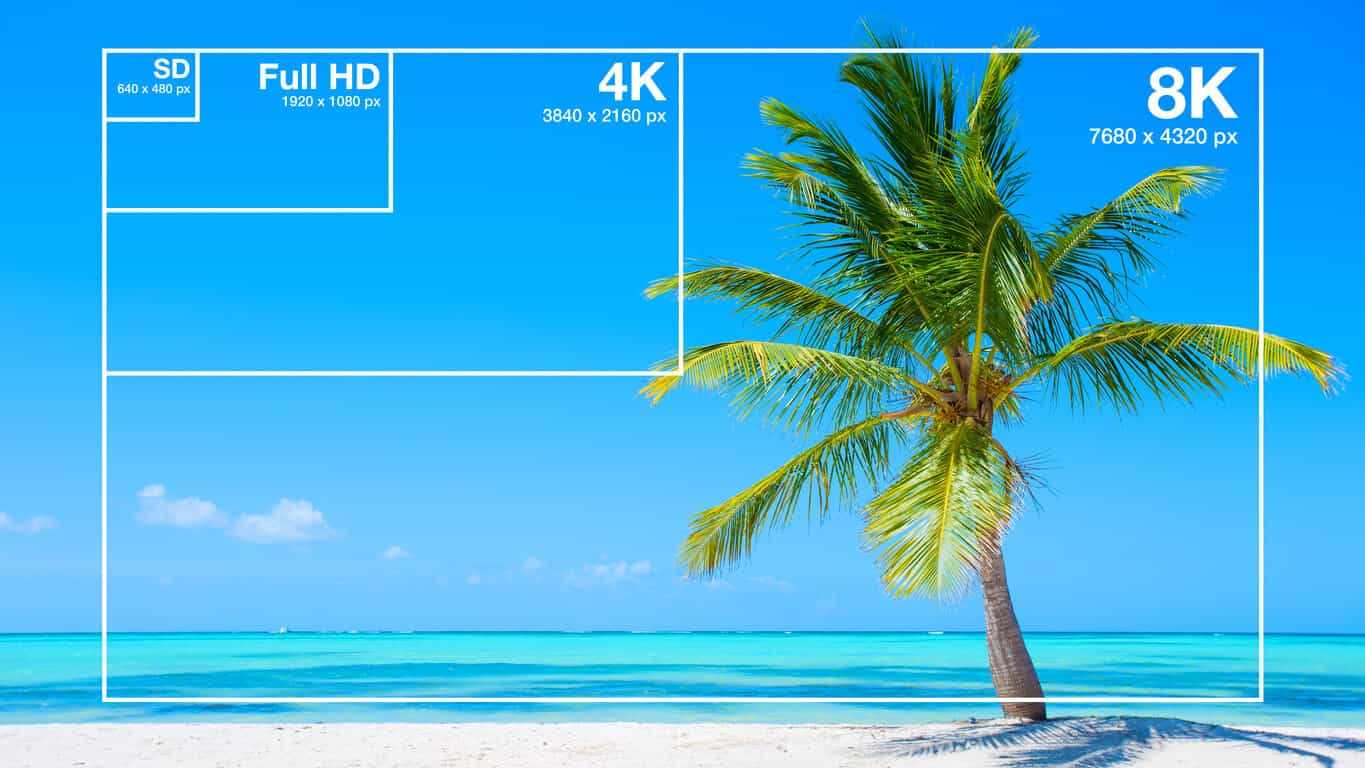
When choosing the bitrate for your MP4 video, you should consider the intended use of the video, the resolution of the video, and the file size. For example, a video that is intended to be viewed on a large screen should have a higher bitrate than a video that will be viewed on a smaller screen. Similarly, a video that has a higher resolution will require a higher bitrate to maintain the same quality as a lower resolution video.
As a general rule of thumb, a bitrate of 5-10 Mbps is suitable for 1080p HD video, while a bitrate of 2-5 Mbps is suitable for 720p HD video. For lower resolution videos, such as 480p or 360p, a bitrate of 1-2 Mbps may be sufficient. It’s also important to consider the file size of the video, as larger files will take longer to upload or download and may be more difficult to share.
How to Change MP4 Bitrate
To change the bitrate of an MP4 video, you will need to use video editing software that allows you to adjust the bitrate settings. There are many different video editing software options available, including Adobe Premiere Pro, Final Cut Pro, and Handbrake. These programs allow you to adjust the bitrate settings and other video parameters to optimize the video for your specific needs.
MP4 Bitrate FAQ
What is the maximum bitrate for MP4 videos?
The maximum bitrate for MP4 videos is 10 Mbps. However, this may vary depending on the specific device or platform where the video will be played.
What is the minimum bitrate for MP4 videos?
The minimum bitrate for MP4 videos will depend on the intended use of the video and the resolution of the video. In general, a bitrate of at least 1 Mbps is recommended for standard definition video, while a bitrate of at least 2 Mbps is recommended for high definition video.
What is the recommended bitrate for streaming MP4 videos?
The recommended bitrate for streaming MP4 videos will depend on the resolution of the video and the available bandwidth. As a general rule of thumb, a bitrate of 5-10 Mbps is suitable for 1080p HD video, while a bitrate of 2-5 Mbps is suitable for 720p HD video. For lower resolution videos, such as 480p or 360p, a bitrate of 1-2 Mbps may be sufficient.
However, it’s important to note that these are just general guidelines, and the optimal bitrate will also depend on factors such as the complexity of the video content, the encoding settings used, and the target audience’s viewing preferences.
For example, videos with fast-moving scenes or complex visual effects may require a higher bitrate to maintain a high level of image quality and avoid compression artifacts, while simpler videos with less motion may be able to use a lower bitrate without sacrificing quality.
Additionally, the target audience’s internet connection speed will also affect the recommended bitrate. For viewers with slower internet connections, a lower bitrate may be necessary to ensure that the video plays smoothly without buffering or interruptions.
What are the advantages of using a higher bitrate?
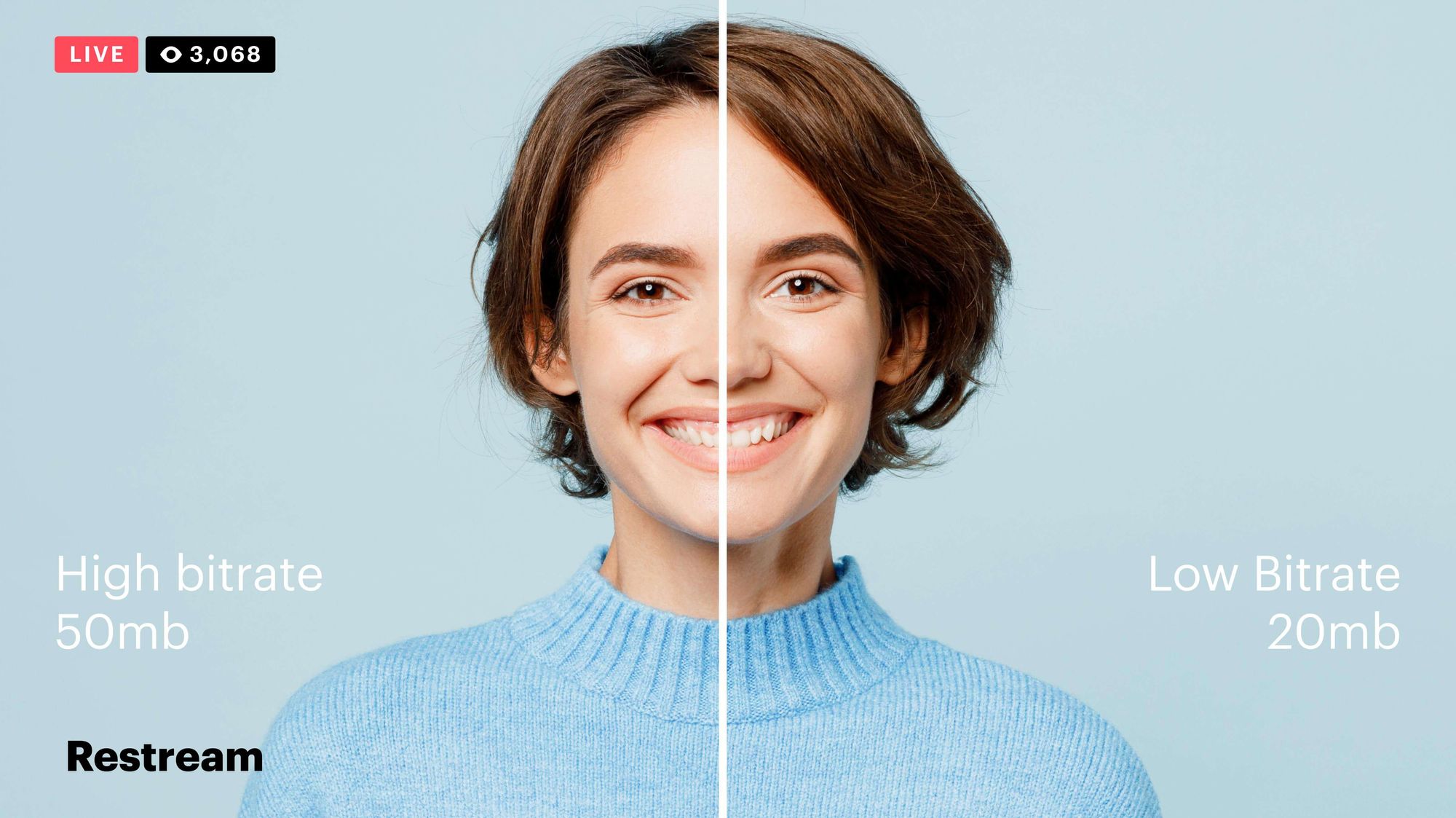
Using a higher bitrate can result in higher quality video with more detail and fewer compression artifacts. This is because a higher bitrate allows for more data to be transmitted and encoded per second, resulting in a more faithful representation of the original video source.
A higher bitrate can also be beneficial for videos with a lot of movement or detail, as it allows the encoding algorithm to capture more information and produce a more detailed image.
However, it’s important to note that using a higher bitrate will also result in larger file sizes and require more bandwidth to stream or download. This can be a disadvantage for viewers with slower internet connections or limited data plans.
What are the disadvantages of using a lower bitrate?
Using a lower bitrate can result in lower quality video with more compression artifacts, such as blurring or pixelation. This is because a lower bitrate means that less data is being transmitted and encoded per second, resulting in a loss of detail and fidelity.
Lower bitrates may also result in a lower overall resolution or frame rate, which can further degrade the quality of the video.
However, using a lower bitrate can also have benefits, such as smaller file sizes and reduced bandwidth requirements. This can be advantageous for viewers with slower internet connections or limited data plans.
Can the bitrate of an MP4 video be adjusted after it’s been encoded?
Yes, it is possible to adjust the bitrate of an MP4 video after it has been encoded. This can be done using video editing software or specialized tools designed for this purpose, such as MP4Gain.
However, it’s important to note that changing the bitrate of a video after it has been encoded can result in a loss of quality or introduce additional compression artifacts. For best results, it’s recommended to encode the video at the desired bitrate from the beginning.
Conclusion
In summary, the bitrate of an MP4 video is an important factor that can affect its quality, file size, and streaming performance. The optimal bitrate will depend on factors such as the resolution of the video, the complexity of the content, and the available bandwidth.
Using a higher bitrate can result in higher quality video with more detail and fewer compression artifacts, while using a lower bitrate can result in smaller file sizes and reduced bandwidth requirements.
If you need to adjust the bitrate of an MP4 video, it is possible to do so using specialized tools such as MP4Gain. However, it’s recommended to encode the video at the desired bitrate from the beginning for best results.
Overall, understanding how bitrate affects MP4 video quality can help you create and deliver video content that meets your needs and those of your audience.
When compressing audio and video files, the MP3 bit rate indicates how many bits are available to the decoder to encode exactly one second of a track. The higher the bit rate of the MP3 file, the better the quality achieved. The bit rate can be constant (constant bit rate, CBR) or variable (variable bit rate, VBR). Our guide explains the differences.
MP3 has established itself as a leading music format on the Internet in recent years and all popular MP3 players support this format. It was developed by the Fraunhofer Institute and is now considered the best known standard for Audiocodierun g. But where are the differences in the jungle of MP3 bit rates?
What MP3 bitrates are there anyway?
A distinction is made between the following common bit rates for MP3 files:
32, 40, 48, 56, 64, 80, 96, 112, 128, 160, 192, 224, 256 and 320 kBit / s.
This increases the quality of MP3s, but also the size of the files created. Compared to the original, an MP3 file only requires about 10 percent of the original storage space.
Starting at a bit rate of 192 kbit / s, you can hardly hear any difference from the quality of the original CD in many pieces of music.
Low bit rates: 32 to 128 kBit / s
Average bit rates: between 128 and 192 kBit / s
High bit rates: more than 192 kBit / s
What is the best bit rate for MP3 compression?
Again and again the question arises of what bit rate to select when converting songs to MP3 to achieve roughly CD quality. An MP3 compression with 192 kbit / s variable bit rate here is an ideal compromise between size and quality.
At just 128 kb / s, you can often hear a distinct difference from the original songs on CD. Music pieces with a lot of dynamics suffer more if the compression is too high (weak bass, lack of treble). So here it is better to use a higher bit rate.
How does the quality of bit rates differ depending on the compression method?
Constant Bit Rate (CBR)
With constant bit rate, each unit of time (for example, one second) is always allocated the same amount of storage space in the entire MP3 file. Therefore, the quality may vary depending on the piece of music. For this, the size of the resulting file can be calculated more precisely.
Variable Bit Rate (VBR)
Variable bit rate is usually the best compression method for normal use, as it can be used to produce consistent high quality. With Acapella parts, 320 kBit / s are not required, as only a few complex frequencies need to be encoded here. However, if you are playing a full orchestra, 128 kBit / s is usually not enough to cover the entire frequency spectrum of the various instruments. Depending on the piece of music, more bits are used when they are important, or those that are not can be omitted. In return, the file size varies more.
Average Bit Rate (ABR)
Some MP3 encoders also support average data rates. Technically, this variant is almost identical to Variable Bit Rate (VBR). Here, too, the encoder software always tries to achieve a uniform quality of the musical piece. However, the bit rate achieved often deviates slightly.
As an example: if you want a target bit rate of 128 kBit / s, then the bandwidth of the achieved bit rate is between 120 and 140 kBit / s. To achieve the desired average bit rate as accurately as possible, some codecs offer a two-pass compression process. The material is analyzed first and is only encoded in the second run. The ABR mode corresponds to a mix of CBR and VBR and is therefore qualitatively more in the middle.
Good and technological days surely you have heard the word bitrate when an expert talks about videos in digital format, but if you don’t know what is what it consists of we tell you the same as the resolution and the final format of digital video another factor determinants to obtain an excellent image quality is the bitrate specifically the bit rate is the flow or the data rate, that is the amount of information when playing a video that reads on our computer per second.
For that reason and in the same way that happens with the size of the image how much the greater the data flow the greater the quality of the material in fact the bit rate can be even more decisive than the size of the image to define its quality the breed even though we have a great video size if the data flow is poor the material will be of poor quality by example a 352 x 288 resolution vcd with 1150 kilobits per second will be of higher quality than one of 720 x 576 resolution and 300 kilobits per second in this example.
If one of them has a screen size the greater its bandwidth is scarce because this data stores the information referred to the luminaire and the color of the video for that reason. When the flow of data is poor the computer will have to group a lot of pixels that contain the same information this generates a redundancy that affects the video quality but as always it is better to put a practical example.
Now we are going to lower the bit rate to this video that is the number of ones and zeros that are being used to encode it and as you can imagine youtube is going to change this as soon as we upload it to the channel but you cannot put the details again in the video, so even though you are watching it at the highest quality allowed between what you’re seeing is a version limited.
Right now we have a reasonable bit rate although it’s almost not looks so bad with modern rating and some details may be missed but still you can perfectly see what is going on now let’s add a few stars all of a sudden all those bits are not getting using to represent me but the opposite actually are used to keep track of everything around me now we add many more stars As you can see, the more things there are in the background, the more demanding the video with the bitrate we add a few more right now no matter how much I tried the encoder to optimize my face or skin tone just not it has enough if you look it’s not about if there are many or few stars but of movement if we freeze this whole scenario and what we treat as a background the quality of the video will return and if we upload again the bitrate we will have an ops video quality
A normal bit rate for an MP3 is between 128 kilobits per second, or kbps, and 320 kbps. Different bit rates in this range have different advantages; To rip music from CD to MP3, choose the bit rate that best suits your purposes. In general, the higher the bit rate of an MP3, the better the audio quality, but the larger the file size. The most common bit rates in MP3s are 128 kbps, 192 kbps, and 320 kbps.
Bit rate
The bit rate of an MP3 indicates the density of the audio information contained in the file. Therefore, every second on a 192 kbps MP3 contains 192 kilobits (24 bytes) of data. The higher the bit rate, the more information the MP3 contains; the more information it contains, the quality is closer to the original audio recording. The bit rate also determines the size of the MP3 file: a four-minute song encoded at 128 kbps takes up just over 3.5 MB, while the same song encoded at 320 kbps requires more than 9 MB of space.
Choosing a bit rate
When you convert a sound file or rip your CD collection to MP3, you must specify the bit rate you want the encoder to use. Choose a bit rate based on the type of audio you are encoding and its intended purpose. If you are converting a conference or other piece of vocal audio, a 128kbps bitrate is more than enough. If you’re encoding MP3 files for use with a portable media player, a 192kbps bitrate usually provides a good balance between audio quality and file size. If you are converting your CD collection to MP3 for archiving, encode the files with a 320 kbps bit rate.
Variable bit rate
Encoding with a variable bit rate changes the MP3 bit rate depending on the type of data present at a certain point in the audio. For example, a variable bit rate encoder could encode a dense piece of information from an MP3 at 320 kbps; however, when the audio contains a mute section, the encoder lowers the bit rate to 32 kbps. If the bit rate of an MP3 has an unusual number (for example, 204 kbps), this indicates that the MP3 creator encoded it with a variable bit rate.
Bit rate conversion
Although most MP3 encoding and conversion programs can modify an MP3 at a different bit rate, this is not a good idea, generally speaking. Converting an MP3 to a higher bit rate does not add audio information to the file, so the sound quality is not increased. Converting an MP3 to a lower bit rate reduces the file size, but could also introduce audio defects, since the encoder is compressing a file that is already compressed. If you need an MP3 file to have a different bit rate, re-encode an MP3 from the original audio CD or WAV file.
MP3 is a popular digital audio encoding format. When looking at the bit rate of an MP3, generally the higher the bit rate, the better the sound quality. A lower bit rate is only useful when space is minimal.
What does the bit rate mean
The bit rate of an MP3 file is a measure of the performance of audio data over a specified period of time. Simply put, it is the number of bits that are processed each second.
For example, audio data in an MP3 file that has been encoded with a constant bit rate (CBR) of 128 kilobits per second (kbit / s) is processed at 128,000 bits per second. For audio that has been encoded at a variable bit rate (VBR), the displayed value is an average.
The higher the bit rate, the better the sound quality will be when playing a lossy audio format tune. To put digital audio compression into perspective when it comes to bit rates, a standard audio CD, which contains uncompressed audio data, has a bit rate of 1,411 kbit / s. This is much higher than the best bit rate for MP3, which is 320 kbit / s.
Does the bit rate matter?
Unless you consider yourself an audiophile and have a top-notch pair of headphones to wear while listening to your music, the bit rate of your MP3s may not be as important.
If you use low-cost headphones with your iPod, you won’t be able to hear the difference in your music. Even with premium headphones, the difference between high and low bit rates is most noticeable in just a few areas:
Some details in low bitrate MP3 may be missing.
You may not be able to hear subtle background tracks.
You may hear a slight distortion.
Use an audio file converter to change the bit rate of an MP3.
Here are some examples of how audio quality differs as bit rate increases:
32 kbit / s: Generally used only for spoken audio
96 kbit / s: low quality voice or transmission
128 or 160 kbit / s: midrange bit rate quality
192 kbit / s: medium quality bit rate
256 kbit / s – A commonly used high quality bit rate
320 kbit / s – The highest bit rate level MP3 supports