MP3 Bitrate Calculation Methods


Free Download Mp4Gain
picture

MP3 Bitrate Calculation Methods

MP3 Bitrate
MP3 Bitrate
MP3 Bitrate
MP3 Bitrate

What is MP3 Bitrate?

MP3 bitrate is the amount of data that is used to encode an MP3 audio file. The higher the bitrate, the higher the quality of the audio file. However, higher bitrates also result in larger file sizes.

How is MP3 Bitrate Calculated?

MP3 bitrate is calculated using a variety of factors, including the complexity of the audio signal, the desired quality of the audio file, and the target file size.

What are the Different Types of MP3 Bitrate Calculation Methods?

There are two main types of MP3 bitrate calculation methods:

  • Constant bitrate (CBR): This method uses a constant bitrate for the entire audio file. This results in a consistent audio quality throughout the file, but it can also result in larger file sizes for complex audio signals.
  • Variable bitrate (VBR): This method uses a variable bitrate, which means that the bitrate changes depending on the complexity of the audio signal. This results in smaller file sizes for complex audio signals, but it can also result in a slight variation in audio quality.

Which MP3 Bitrate Calculation Method is Best?

The best MP3 bitrate calculation method depends on your needs. If you need a consistent audio quality throughout the file, then CBR is the best option. If you are more concerned about file size, then VBR is the best option.

How to Choose the Right MP3 Bitrate for Your Needs

When choosing the right MP3 bitrate for your needs, you should consider the following factors:

  • The type of audio signal: Complex audio signals, such as those that contain a lot of high-frequency content, require a higher bitrate than simple audio signals.
  • The desired quality of the audio file: If you want the highest possible quality, then you should use a higher bitrate. If you are more concerned about file size, then you can use a lower bitrate.
  • The target file size: If you have a specific file size in mind, then you can use a bitrate calculator to determine the bitrate that you need.

Conclusion

MP3 bitrate is an important factor to consider when encoding audio files. By understanding the different types of MP3 bitrate calculation methods and how to choose the right bitrate for your needs, you can ensure that your audio files sound great and have a reasonable file size.

Here are some additional details about the different types of MP3 bitrate calculation methods:

  • Constant bitrate (CBR): This method is the simplest to understand and implement. It is also the most reliable, as it ensures that the audio quality is consistent throughout the file. However, it can result in larger file sizes for complex audio signals.
  • Variable bitrate (VBR): This method is more complex than CBR, but it can result in smaller file sizes for complex audio signals. This is because VBR allows the encoder to use a lower bitrate for less complex parts of the audio signal, and a higher bitrate for more complex parts of the audio signal. However, VBR can result in a slight variation in audio quality, depending on the complexity of the audio signal.

Ultimately, the best MP3 bitrate calculation method for you depends on your specific needs. If you need a consistent audio quality throughout the file, then CBR is the best option. If you are more concerned about file size, then VBR is the best option.


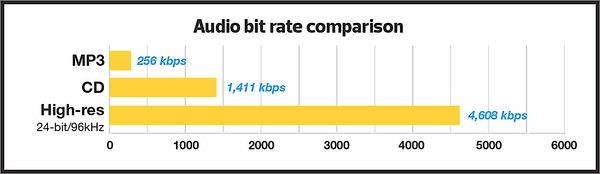
Free Download Mp4Gain
picture


Mp4Gain Main Window
picture


Mp4Gain Features
picture


Free Download Mp4Gain
picture

MP3 Bit Rate Guide – Quality and Differences Explained

Bit rate Quality

When compressing audio and video files, the MP3 bit rate indicates how many bits are available to the decoder to encode exactly one second of a track. The higher the bit rate of the MP3 file, the better the quality achieved. The bit rate can be constant (constant bit rate, CBR) or variable (variable bit rate, VBR). Our guide explains the differences.

Bitrate  Quality

MP3 has established itself as a leading music format on the Internet in recent years and all popular MP3 players support this format. It was developed by the Fraunhofer Institute and is now considered the best known standard for Audiocodierun g. But where are the differences in the jungle of MP3 bit rates?

What MP3 bitrates are there anyway?

A distinction is made between the following common bit rates for MP3 files:

32, 40, 48, 56, 64, 80, 96, 112, 128, 160, 192, 224, 256 and 320 kBit / s.

This increases the quality of MP3s, but also the size of the files created. Compared to the original, an MP3 file only requires about 10 percent of the original storage space.

Starting at a bit rate of 192 kbit / s, you can hardly hear any difference from the quality of the original CD in many pieces of music.

Low bit rates: 32 to 128 kBit / s
Average bit rates: between 128 and 192 kBit / s
High bit rates: more than 192 kBit / s

What is the best bit rate for MP3 compression?

Again and again the question arises of what bit rate to select when converting songs to MP3 to achieve roughly CD quality. An MP3 compression with 192 kbit / s variable bit rate here is an ideal compromise between size and quality.

At just 128 kb / s, you can often hear a distinct difference from the original songs on CD. Music pieces with a lot of dynamics suffer more if the compression is too high (weak bass, lack of treble). So here it is better to use a higher bit rate.

How does the quality of bit rates differ depending on the compression method?

Constant Bit Rate (CBR)

With constant bit rate, each unit of time (for example, one second) is always allocated the same amount of storage space in the entire MP3 file. Therefore, the quality may vary depending on the piece of music. For this, the size of the resulting file can be calculated more precisely.

Variable Bit Rate (VBR)

Variable bit rate is usually the best compression method for normal use, as it can be used to produce consistent high quality. With Acapella parts, 320 kBit / s are not required, as only a few complex frequencies need to be encoded here. However, if you are playing a full orchestra, 128 kBit / s is usually not enough to cover the entire frequency spectrum of the various instruments. Depending on the piece of music, more bits are used when they are important, or those that are not can be omitted. In return, the file size varies more.

Average Bit Rate (ABR)

Some MP3 encoders also support average data rates. Technically, this variant is almost identical to Variable Bit Rate (VBR). Here, too, the encoder software always tries to achieve a uniform quality of the musical piece. However, the bit rate achieved often deviates slightly.

As an example: if you want a target bit rate of 128 kBit / s, then the bandwidth of the achieved bit rate is between 120 and 140 kBit / s. To achieve the desired average bit rate as accurately as possible, some codecs offer a two-pass compression process. The material is analyzed first and is only encoded in the second run. The ABR mode corresponds to a mix of CBR and VBR and is therefore qualitatively more in the middle.