Bitrate Control Methods in MP4 Encoding


Free Download Mp4Gain
picture

Bitrate Control Methods in MP4 Encoding

Bitrate Control Methods in MP4 Encoding

Let’s Talk About Bitrate Control in MP4 Encoding

Bitrate control is more than just a technical setting; it’s the backbone of video quality and file size management. When encoding MP4 files, we decide how much data is used to represent each second of video, and that choice impacts everything from playback clarity to download times. Think of bitrate as the “detail level” you choose to capture in a painting—the more paint (or data) you use, the clearer the image, but with more size to handle. Let’s explore why bitrate control matters in MP4 encoding, how various methods impact your final file, and how you can choose the right one to fit your needs.

Why Bitrate Control is Essential in Video Encoding

In video encoding, bitrate control isn’t just about file size; it affects the visual and auditory experience. Higher bitrates can make an image sharper and richer, while lower bitrates save space but may sacrifice some quality. Imagine watching a movie at different quality levels—at the highest quality, you see every detail clearly, but if it’s too low, it’s like watching through frosted glass. Getting the bitrate right means balancing quality with practicality, and that’s where bitrate control techniques come into play.

Understanding Bitrate Control: Constant Bitrate (CBR) vs. Variable Bitrate (VBR)

Different encoding methods affect how bitrate is distributed across a video file. Here’s an in-depth look at the two primary methods: Constant Bitrate (CBR) and Variable Bitrate (VBR).

  • Constant Bitrate (CBR): Pros, Cons, and Practical Applications

CBR uses a fixed bitrate throughout the video, keeping data usage steady. This method is straightforward and predictable—no matter the scene, the bitrate remains the same, which can be helpful for streaming on low-bandwidth networks. But there’s a downside: since CBR doesn’t adjust to scene complexity, it may waste data on simple scenes or underrepresent complex scenes. Imagine painting every square inch of a mural with the same amount of paint, even on spots that don’t need it.

  • Variable Bitrate (VBR): Advantages, Drawbacks, and Usage Scenarios

VBR adapts the bitrate based on content complexity, dedicating more data to complex scenes while using less for simpler ones. This flexibility improves overall quality while optimizing file size, but it can increase encoding time. It’s like adjusting brush strokes based on the level of detail needed—more for a detailed section, less for plain areas. VBR is excellent for content where quality is a priority, such as HD movies or high-action scenes, but it requires more computing power and time.

  • Real-World Scenarios Using CBR and VBR in Video Encoding

CBR is typically chosen for live streaming, where a steady bitrate keeps the stream stable. VBR, meanwhile, shines in offline content, where the file is created once, and quality can be optimized. Think of it this way: live sports streaming may benefit from CBR’s stability, while VBR’s adaptability suits a blockbuster movie’s intricate scenes.

Advanced Techniques for Bitrate Control

More sophisticated methods allow for even greater control over bitrate distribution and quality.

  • 2-Pass Encoding: What It Is and Why It Matters

Two-pass encoding allows for the best of both worlds in VBR. During the first pass, the encoder analyzes the video, and in the second pass, it adjusts bitrate distribution based on scene complexity. This approach maximizes quality and minimizes file size, though it takes double the time. If you’re creating high-stakes content like a music video, the time investment for a 2-pass VBR could make a big difference in quality.

  • Average Bitrate (ABR): Balancing Quality and File Size

ABR keeps a consistent average bitrate across the file, but unlike CBR, it allows some variation. This hybrid approach combines predictability with flexibility. For instance, encoding a training video where some scenes are complex and others are static can benefit from ABR’s moderate adaptability without the complexity of VBR.

  • Adaptive Bitrate Streaming and Machine Learning in Encoding

Adaptive bitrate streaming takes bitrate flexibility even further, adjusting in real time based on the viewer’s connection speed. Often used by streaming platforms, this technique ensures that viewers experience the best quality possible without buffering. Machine learning enhances this by predicting viewer needs based on past data, making encoding smarter and more efficient.

Factors Influencing Bitrate Control Decisions

Choosing a bitrate control method is more than a technical choice; it’s a matter of balancing multiple factors.

  • Source Video Quality and Resolution

Higher resolution content demands higher bitrate to maintain quality. Encoding a 4K video requires far more data than standard definition to retain clarity, so your bitrate control needs to match the resolution to avoid pixelation.

  • Playback Device Requirements and Limitations

If your content will be viewed on mobile devices, encoding should prioritize smaller file sizes and efficient compression. For larger screens, prioritize quality, as viewers will notice subtle details. It’s like packing for a trip: you’d bring different gear for hiking than for a beach vacation.

  • Bandwidth and Storage Considerations

Encoding for low-bandwidth areas calls for bitrate control methods that preserve quality with minimal data usage. When file storage is limited, efficient compression methods like 2-pass VBR become valuable.

Comparing Different MP4 Encoding Tools and Their Bitrate Control Capabilities

Various encoding tools handle bitrate differently. While all offer CBR and VBR, some excel with advanced features like 2-pass encoding or adaptive bitrate capabilities. High-end tools often support machine learning, analyzing content to maximize compression efficiency without sacrificing quality.

Common Challenges in Bitrate Control and How to Address Them

Bitrate control brings unique challenges, from maintaining quality to managing file size.

  • Maintaining Quality in Low-Bandwidth Conditions

Encoding for low-bandwidth requires carefully balancing bitrate and compression to avoid quality loss. VBR or ABR can help by prioritizing quality in key scenes while conserving data in others.

  • Optimizing for Different Platforms and Devices

Each platform has its playback standards; for instance, social media may require smaller file sizes. Adjust bitrate control to meet these standards without compromising quality.

  • Managing File Size without Losing Quality

It’s tricky to balance quality with small file sizes. Using 2-pass encoding or adaptive bitrate control can help optimize quality by ensuring each scene gets the right amount of data.

Choosing the Best Bitrate Control Method for Your Needs

Selecting the ideal bitrate control method depends on your video type, audience, and storage limits. For a polished product, 2-pass VBR often yields the best results, while live streaming benefits from CBR. Experiment with these methods to find the right fit.

Latest Words on Bitrate Control in MP4 Encoding

Bitrate control continues to evolve, with new tools leveraging machine learning to optimize compression. In the future, we may see real-time adaptive methods that adjust based on user preferences and network conditions, creating smoother viewing experiences than ever. Ultimately, understanding bitrate control empowers you to create videos that balance quality and efficiency.


https://x.com/ricardo_mx_news


Free Download Mp4Gain
picture


Mp4Gain Main Window
picture


Mp4Gain Features
picture


Free Download Mp4Gain
picture

What is the difference between bit depth and bitrate?

What is the difference between bit depth and bitrate?

Bit Depth
Bit Depth
Bit depth
Bit Depth

Understanding Bit Depth and Bitrate

When it comes to audio and video files, there are two terms that are often used interchangeably: bit depth and bitrate. However, they are not the same thing. Bit depth refers to the number of bits used to represent each sample in an audio or video file, while bitrate refers to the amount of data transmitted per second.
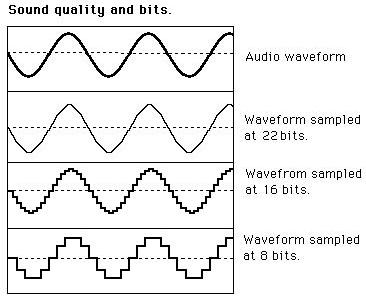
Bit depth determines the number of possible values for each sample in a digital audio or video file. For example, an 8-bit audio file can have 256 possible values per sample, while a 16-bit file can have 65,536. The higher the bit depth, the more accurate the representation of the original sound or image.

On the other hand, bitrate refers to the amount of data transmitted per second in a digital file. In other words, it’s the rate at which data is encoded in a file. Higher bitrates typically mean higher quality files with more information, but also larger file sizes.

Audio Bit Depth vs Bitrate

When it comes to audio files, the bit depth and bitrate are both important factors in determining the quality of the sound. A higher bit depth means a more accurate representation of the original sound, while a higher bitrate means more data is transmitted per second, resulting in a higher quality sound.
However, it’s important to note that a higher bitrate does not necessarily mean a higher quality sound. If the original recording is of poor quality, increasing the bitrate will not improve the sound. In fact, it can actually result in larger file sizes with no improvement in sound quality.

Video Bit Depth vs Bitrate

Video files also have bit depth and bitrate, but they work slightly differently than in audio files. Bit depth determines the number of colors that can be represented in a video file, while bitrate determines the amount of data transmitted per second.
A higher bit depth means a wider range of colors can be represented in the video, resulting in a more accurate and vibrant image. However, a higher bitrate is also important for video files, as it determines the amount of detail that can be captured in each frame.

It’s important to find the right balance between bit depth and bitrate for video files, as increasing one can have a negative impact on the other. For example, a high bit depth with a low bitrate can result in a choppy or pixelated image, while a low bit depth with a high bitrate can result in a washed-out or blurry image.

Final Words

In conclusion, bit depth and bitrate are both important factors to consider when working with audio and video files. While they may seem similar, they serve different purposes and have different effects on the quality of the final product. It’s important to find the right balance between the two to ensure the best possible sound or image quality.
Keywords: audio bit depth, video bit depth, bit depth vs bitrate, bitrate definition, bitrate vs quality, audio quality, video quality, digital audio, digital video, file size, data transmission, accuracy, color representation, image quality, sound quality, audio recording, video recording, data encoding, pixelation, file format, media production, sound engineering, video editing, multimedia, digital media, technology, mp4gain, audio normalization, audio conversion, equalizer, windows, digital signal processing, dynamic

What is the difference between 128k and 320k music? Part 2

What is the difference between 128k and 320k music? Part 2

Bit Rate

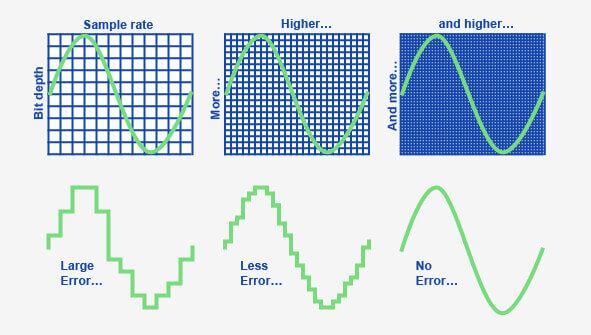
In simple terms, we can think of a sound wave as a curve.

Bit Rate

We know that the curve is made up of points, and the sampling rate is the number of points in the middle of the length per second (the horizontal axis in the figure above). Sampling precision is the number of points in the dynamic range (upper vertical axis). The finer the positioning of these two dimensions, the greater the true sound restoration and the better the sound quality. Of course, the larger the audio file will be. The customer mentioned by the above colleague said that the latest Hi-Res Audio format released by SONY is a 6-channel 192kHz/24-bit recorded audio file. The size of the lossless format, of course, will be more than 200 megabytes.

The sampling frequency is approximately the following depending on the type of use (k is the thousand-bit symbol, 1khz=1000hz):

8khz: used for phones etc, is enough to record human voices.

22.05khz: transmission use frequency.

44.1kb: Audio CD.

48khz: used in DVD and digital TV.

96khz-192khz: used for DVD-Audio, Blu-ray HD, etc.

The common range of sample precision is 8 bits to 32 bits, with 16 bits generally used on CD.

Having said that, my friends are starting to get confused. It’s not the bitrate that determines the sound quality, so why is everyone saying that 320kb sound quality is better than 128kb?

【Audio Compression】

Well, in fact, the bit rate should be said to be another dimension, it is a compression of audio files.

Nowadays, most of the audio formats we use regularly are based on the original “WAV” file of the audio CD (44.1khz sample rate, 16bit sample precision, 2ch). The original recorded sound data is stored in a matrix, which is in PCM format, while WAV format is an encoding format developed by Microsoft. Its function is to reproduce the data in PCM format through encoding.

Since the data in WAV basically completely restores the PCM data, MP3, AAC and other lossless encoding formats are basically recompressed based on the WAV files. Therefore, we can simply think that WAV is the original audio format and other audio formats are compressed formats.

When it comes to compression, storage and transmission are inseparable. The purpose of compression is to improve storage and transmission, so before we talk about compression, we need to understand the basic units of computers.

We all know that the computer is a binary number system, and the files stored by the computer are made up of two numbers, 0 and 1. Therefore, the computer’s transmission is based on each number, and each number is called 1 ” bit”. For example, for an audio piece, its basic data is “0,1,1,1,0,1, 1 ,0”, and when transmitting, these numbers are transmitted one by one. The sampling precision mentioned above is this unit.

The storage unit of the computer is “byte (Byte)”. In the computer, 1 byte consists of 8 bits, that is, 8b(bit)=1B(Byte). In computer parlance, data storage is expressed in decimal and data transmission is expressed in binary, so 1KB=1024B=1024×8b. This is also part of the reason why the hard drive capacity we see does not match the actual capacity.

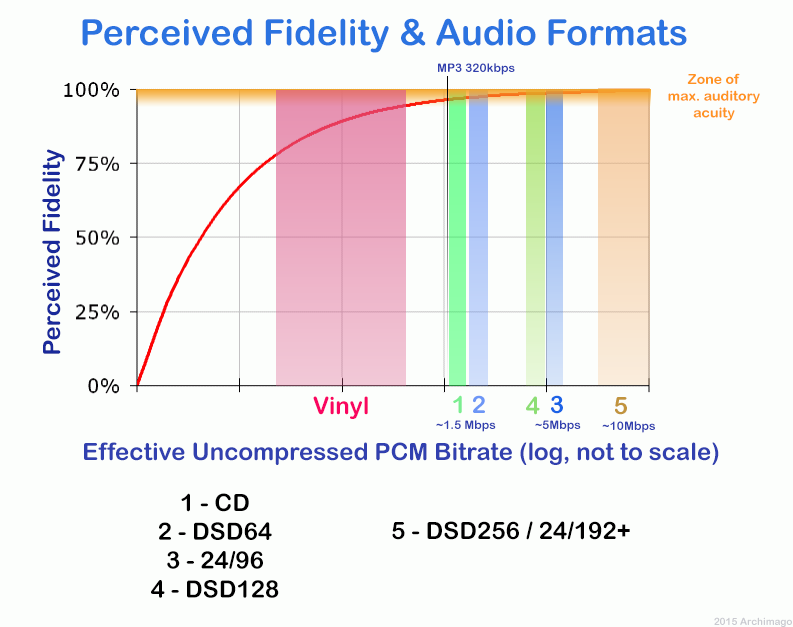
Go back and talk about audio compression, the bitrate of the audio is actually the compression ratio. So the bitrate really just defines the size of the file, but because under normal conditions the larger the file, the less data you lose, so the sound quality is relatively higher. However, the bit rate itself does not directly affect the quality of the file. For example, if we take a 128kb file as the source file, even if it is converted to a 320kb file, the sound quality will not be better than 128kb. .

What is the difference between 128k and 320k music?

What is the difference between 128k and 320k music?

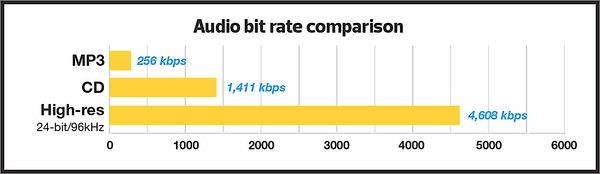
Bit rate comparision

192k is a turning point. Below 192K, the sound quality is relatively damaged, especially the high-frequency part above 16Khz will be cut off.

bitrate

In a nutshell, mp3s above 192k can no longer be listened to with CD sound quality on ordinary home devices, except for Golden Ears and Hifi devices. Of course, these data are not 100% reliable. There are always people on the internet sharing fake mp3 above 192K. In fact, they are converting low bitrate music to high bitrate through software, but the sound quality will not improve. be improved. Windows Media Player compresses it. The resulting mp3 is absolutely wonderful, no matter how high the compressed bitrate is, it will cut perfectly around 16K.

Some time ago, a colleague came across a very troubled client. The mess was said to have been caused by the client asking him to provide song files larger than 100MB-200MB in size. And my colleagues don’t know much about audio formats, so they started endlessly fumbling about FLAC, WAV and audio size. In the end, the colleague did not explain to the client what was going on.

After that, other things happened that made me feel that in the music industry there are too many practitioners around me who have an extremely poor understanding of music and even lack some basic knowledge related to music. I don’t even have the idea to understand, which makes me very sad. It seems that music has only one merchandise attribute, and our practitioners only need to organize the shelves, encode various merchandise, and use the big data of users’ purchase records to recommend merchandise to users, no matter why to users. they like this. features that these products have, and use cold data to provide users with various services.

Therefore, I think it is necessary to write something. I don’t expect practitioners to become people who really love music. I just hope that even if you still think of “her” as a commodity, you can first figure out what you’re selling. and what is..

PS: The content of the first lesson is about media files. Since the relevant content involves a lot of technical stuff, it seems a bit boring, but if you read it carefully, you will find that it is actually very easy to understand, but this basic knowledge can be very helpful.

Bit Rate, Sample Rate, Lossless, MP3, FLAC, APE, 320kb, 192kb, 128kb, 44.1khz, CBR, VBR. Does this bunch of various names make you both familiar and unknown?

The higher the bitrate, the better the sound quality. Lossless music is the highest sound quality, right? So, let’s start with the sound collection.

【Audio composition】

Nowadays, when we talk about audio, everything is digital audio. Digital audio consists of three parts: sample rate, sample precision, and number of sound channels.

Sample Rate: Both the sample rate, which refers to the number of samples per second when recording the sound, expressed in Hertz (Hz).

Sampling Precision: Refers to the dynamic range of the recorded sound, measured in bits (Bit).

What is the optimal bit rate?

What is the optimal bit rate?

Optimal Bitrate

To decide what the flow can be, it is necessary to understand how it works, at least in the first approximation.

BitRate

In the H.264 codec (MPEG-4 Part 10), the construction of the video image is as follows: the camera creates a reference frame (I-frame) and, based on it (therefore, it is called a frame of reference), subtract the still parts of the picture from the frame – a P- frame. The third of this second frame is then subtracted and a modified P-frame is also created. Thus, a series of P-frames is created, which only carry changes between two adjacent frames. Since in the process of “subtracting” frames, errors may occur leading to artifacts, then after a certain number of frames the scheme is repeated, a reference frame is sent again, and then a series is sent of frames with changes across the network. The resulting keyframes and modified P-frames are sent over the LAN to recreate a series of full frames on the display device. It does this by “appending” or “superimposing” P-frames to a reference frame and sending the resulting series of frames to the monitor. This is how codecs work with interframe compression. Of course, in practice everything is more complicated by an order of magnitude (there are also B-frames, which, based on the analysis of a large set of frames, predict where a particular object will move in the field of view of the camera, which allows to significantly reduce the flow when observing the translational movement, for example, that -to the mechanisms).

With a slight change in the observed scene, the changes between adjacent frames will also be minimal, respectively, and the traffic on the network will be minimal. The reverse is also true: if the scene changes significantly, the changes between frames will be significant, consequently affecting the network load.

Do not forget about the peculiarities of codecs with interframe compression, they introduce quite a noticeable delay between the moment of the event itself and the moment it is displayed on the screen. This is due to the work of the codec itself, as the camera needs to receive both frames, then subtract one from the other, send it to the image output device, and overlay it on the reference frame, which takes time and therefore introduces a delay.

There is no point in talking about optimal resolutions without referring to the observed scene, since, for example, when observing an empty corridor at a quality of 1080p / 25 fps, the transmission can be approximately 1 Mbps, and when observing a station of meter at rush hour, an image in the 720p / 25 fps format may take up to 20-30 Mbps

What is the bit rate?

What is the bit rate?

Bitrate

Bitrate, or as they say the width of the sequence

Bitrate

It is the amount of data transmitted or processed in 1 second. The concept mainly applies to multimedia content, for example, video bit rate is nothing more than the amount of video information that is displayed on the screen in one second. To measure the bit rate, the designation “Kbit / s (kbps)” is used, that is, kilobits per second, less frequently Mbit / s, and so on. The more information that is transmitted during a specific period of time, the higher the quality of the image.

When people say “low bit rate video” they are generally referring to low quality video. Blur, opacity, and pixelation are characteristic of such video, while high-bit-rate video has a detailed image with rich colors. Like video, audio also comes with low and high bit rates. Music with a low bit rate loses in the frequency range, words and chords become less distinguishable, and itself takes on an unnatural sound, as if it were an electronic sound.

Bit rate types
When compressing video, you have 3 modes to choose from: constant, variable, and average. Let’s start in order:

Constant Bit Rate (CBR). Sets the desired value and does not change throughout the video. The advantage of this option is that you know in advance what the size of the final file will be. But there is also a downside, especially in relation to sound. It may grow during playback, which may require changing the bit rate. Since you don’t get what you want, quality suffers.
Changes in sound level

Variable (VBR). In this case, you are working in conjunction with a codec. Your task is to set the maximum bitrate and programs must select the required value for each scene. Thus, the “minus” of the previous regime has been eliminated. Also, the file size may be even smaller than expected, but the outcome is impossible to predict.
Average (ABR). From the name it is clear: this is a cross between the first and second mode. Here you set not only the maximum, but also the minimum bitrate, and the codec itself selects it within these limits, based on the dynamics of the video. Its quality is better than that of the variable option, because the bit rate does not fall below the set value.
YI 4K video bit rate increase
Although action cameras have been in our lives for a long time, not everyone understands their true purpose. More than once I have come across the fact that people see them as a compact analog of ordinary consumer camcorders and make corresponding demands on them. First of all, it comes down to the quality of the footage shot. “I just want to take the camera out of my pocket, start recording, and get a picture like on film.”

… This is impossible in principle. And it is doubly impossible in an action camera, since it is a compromise between “action” (a set of characteristics for operation in extreme conditions) and the quality of the shot: improving one thing, the other will deteriorate proportionally.

However, you can do something. For example, replace the lens or increase the video bit rate. What will increase the bit rate? Some improvement in image quality. It should be understood that although the camera shoots at a fairly high bit rate (up to 60 Mbps), the built-in codec uses a fast profile. In other words, video recorded with a 60 Mbps camera will be worse than video recorded on a computer with the same bit rate. First of all, areas of almost uniform color and “jerky” undergo such coding. For example, grass, ripples in the water, or foliage. Increasing the bitrate is not a panacea here, but a tangible step forward. It is true that you need to understand that the developer set a limit of 60 Mbit / s for a reason and that increasing the bit rate is done at your own risk and risk. Also, this increases the requirements for the memory card used and the writing speed on it.

If you use a camera, for example, for video blogs with video uploading to YouTube, you don’t need to change anything, as the video host will recode your video by itself, regardless of the initial parameters. If you’re post-processing the footage, it makes sense to give it a try as there is minimal body movement.
DISCLAIMER OF LIABILITY
In many respects, this article expresses the subjective opinion of the author. Furthermore, the author is not responsible for possible damage to the camera.

What is bit rate and why is it important?

What is bit rate and why is it important?

What is bitrate?

With today’s technology, we can expect high speed and quality in everything we do on our computers, our smartphones, and any other newer devices. However, although this increase in speed and quality has several factors, many of them have to do with what is called the bit rate.

Bit rate

What bitrate means depends on the context you’re using it in, but it’s very important to know what it is and what benefits it might bring you (or what to expect instead).

What is the bit rate?

Bit rate is a term used to describe the amount of data that is transferred over a period of time. Depending on the context, common bitrate measures include kbps and Mbps, respectively, which means kilobits per second and megabits per second. Regardless of which drives are used, a higher number is usually good, indicating high speed or high quality.

However, it is also important to understand that smaller numbers can reduce the load on your hardware, which can be important for devices such as smartphones and netbooks.

When it comes to internet speed, a higher bit rate is always desirable – it doesn’t overload your own hardware, it just sends you the content you want faster. With higher bit rates, you can do more with an Internet connection – stream HD movies, play online games with minimal latency, and download large files in just seconds.

You can find out what bitrate you are getting by visiting a website like speedtest.net and running your tests. The numbers are good to compare with others, but generally don’t expect the expected number (other than the number your ISP announced). Certain parts of the world and Google Fiber users can get speeds of up to 1 Gbps (1000 Mbps), while typical cable broadband users in the US can get as low as 10 Mbps.

There has been a lot of discussion in online communities like Reddit about high internet prices in the US due to how slow speeds are, and initiatives like Google Fiber are starting to pay off.

When it comes to audio and video, bit rates take on a different definition. In this context, bit rates refer to the amount of data stored per second of multimedia playback. For example, a 320 kbps MP3 audio file has a higher quality than the same file at just 128 kbps, as long as both files were created from the same ideal source. You will have to remember that you cannot improve an audio file that sounds bad by copying it to an audio file with a higher bit rate, as the source was bad from the beginning. So a higher bit rate is a general rule of thumb, but it is not 100% correct.

The same is true for video: a higher bitrate will have a higher quality when comparing the same video with the same resolution. The bit rate is expected to increase as the resolution increases as more data is processed. Consequently, high bit rates for audio and video can provide superior quality, but can also put a lot of pressure on your hardware, which can lead to stuttering.

Also, keep in mind that different file formats use different compression algorithms, which can result in lower bit rates and higher quality. However, for these algorithms, the processing load tends to increase.

MP3 Bit Rate Guide – Quality and Differences Explained

Bit rate Quality

When compressing audio and video files, the MP3 bit rate indicates how many bits are available to the decoder to encode exactly one second of a track. The higher the bit rate of the MP3 file, the better the quality achieved. The bit rate can be constant (constant bit rate, CBR) or variable (variable bit rate, VBR). Our guide explains the differences.

Bitrate  Quality

MP3 has established itself as a leading music format on the Internet in recent years and all popular MP3 players support this format. It was developed by the Fraunhofer Institute and is now considered the best known standard for Audiocodierun g. But where are the differences in the jungle of MP3 bit rates?

What MP3 bitrates are there anyway?

A distinction is made between the following common bit rates for MP3 files:

32, 40, 48, 56, 64, 80, 96, 112, 128, 160, 192, 224, 256 and 320 kBit / s.

This increases the quality of MP3s, but also the size of the files created. Compared to the original, an MP3 file only requires about 10 percent of the original storage space.

Starting at a bit rate of 192 kbit / s, you can hardly hear any difference from the quality of the original CD in many pieces of music.

Low bit rates: 32 to 128 kBit / s
Average bit rates: between 128 and 192 kBit / s
High bit rates: more than 192 kBit / s

What is the best bit rate for MP3 compression?

Again and again the question arises of what bit rate to select when converting songs to MP3 to achieve roughly CD quality. An MP3 compression with 192 kbit / s variable bit rate here is an ideal compromise between size and quality.

At just 128 kb / s, you can often hear a distinct difference from the original songs on CD. Music pieces with a lot of dynamics suffer more if the compression is too high (weak bass, lack of treble). So here it is better to use a higher bit rate.

How does the quality of bit rates differ depending on the compression method?

Constant Bit Rate (CBR)

With constant bit rate, each unit of time (for example, one second) is always allocated the same amount of storage space in the entire MP3 file. Therefore, the quality may vary depending on the piece of music. For this, the size of the resulting file can be calculated more precisely.

Variable Bit Rate (VBR)

Variable bit rate is usually the best compression method for normal use, as it can be used to produce consistent high quality. With Acapella parts, 320 kBit / s are not required, as only a few complex frequencies need to be encoded here. However, if you are playing a full orchestra, 128 kBit / s is usually not enough to cover the entire frequency spectrum of the various instruments. Depending on the piece of music, more bits are used when they are important, or those that are not can be omitted. In return, the file size varies more.

Average Bit Rate (ABR)

Some MP3 encoders also support average data rates. Technically, this variant is almost identical to Variable Bit Rate (VBR). Here, too, the encoder software always tries to achieve a uniform quality of the musical piece. However, the bit rate achieved often deviates slightly.

As an example: if you want a target bit rate of 128 kBit / s, then the bandwidth of the achieved bit rate is between 120 and 140 kBit / s. To achieve the desired average bit rate as accurately as possible, some codecs offer a two-pass compression process. The material is analyzed first and is only encoded in the second run. The ABR mode corresponds to a mix of CBR and VBR and is therefore qualitatively more in the middle.