Perceptual Entropy in MP3 Compression


Free Download Mp4Gain
picture

Perceptual Entropy in MP3 Compression
Perceptual Entropy in MP3 Compression

Let’s talk about perceptual entropy in MP3 compression

When we think of compressing audio files, the concept of perceptual entropy often comes up. In simple terms, perceptual entropy is the key to making MP3 files smaller without making them sound lower in quality. As a specialist in audio technology, I’ve spent years examining how different methods can reduce file size while keeping what the listener actually hears intact. Perceptual entropy is central to that process because it helps us decide what data is essential and what isn’t. Let’s dive into the science behind perceptual entropy in MP3s, and I’ll show you how it all works, using some real-life examples to make it easier to understand.

What is perceptual entropy?

Perceptual entropy is a measure of how complex or unpredictable an audio signal is to the human ear. It’s like understanding which parts of a song your brain considers crucial and which it doesn’t mind losing in compression. In the world of audio engineering, we refer to this as perceptual coding, a technique that allows us to remove certain parts of an audio signal that are less noticeable. The MP3 format uses this principle extensively, focusing on parts of the audio that the human ear is sensitive to while discarding less crucial data. This is why an MP3 can be much smaller in size yet still sound almost identical to the original recording.

How does perceptual entropy impact MP3 compression?

The role of perceptual entropy in MP3 compression is all about making smart choices. Imagine you’re packing for a trip but have limited luggage space. You’ll prioritize essentials over less-needed items. Similarly, perceptual entropy allows MP3 compression algorithms to determine which audio elements should stay and which can go. This focus on essential audio content lets us create smaller files without sacrificing perceived quality, a process made possible by decades of research into how our ears and brains process sound.

Why does perceptual entropy matter to listeners?

Perceptual entropy is crucial because it directly affects how we experience sound. When you listen to an MP3, perceptual entropy is why you still hear most details despite heavy compression. Without this concept, audio files would either be too large to store easily or sound hollow and distorted after compression. As someone who works with audio files daily, I can attest that perceptual entropy lets us enjoy high-quality audio while using minimal storage space, a huge win for consumers and professionals alike.

The role of psychoacoustics in perceptual entropy

Psychoacoustics is the study of how we perceive sound, and it’s the science behind perceptual entropy. Our ears don’t hear every frequency equally; some are more noticeable than others. For instance, a whisper in a quiet room is clear, but it would be lost in a noisy crowd. This concept applies to MP3 compression. By understanding psychoacoustics, we can identify parts of audio that the brain will ignore or mask in favor of other sounds. This approach allows us to apply perceptual entropy principles, reducing the data we need to store while maintaining audio quality.

Examples of perceptual masking in everyday life

Perceptual masking is something we experience daily. Think about driving in traffic with the radio on. While you might hear the music, the car horns and engine noises in the background don’t affect your ability to understand the song. Perceptual entropy relies on this same masking effect to compress audio files. By removing sounds that are masked by louder or more prominent sounds, MP3 files become more manageable without losing important audio details. This technique is the cornerstone of how MP3s achieve efficient, high-quality compression.

How MP3 compression algorithms use perceptual entropy

MP3 compression algorithms, such as those based on the Layer 3 format, leverage perceptual entropy by dividing audio data into critical and non-critical components. When encoding a file, the algorithm focuses on the parts that carry the most perceptual weight, ignoring data the ear is less likely to notice. This step-by-step filtering process allows the MP3 to retain audio fidelity while keeping file size minimal. From my experience working with MP3s, understanding how these algorithms work has been invaluable in optimizing both storage and sound quality.

The balance between file size and sound quality

Finding a balance between file size and sound quality is a challenge that perceptual entropy addresses. As we compress an audio file, there’s always a risk of degrading its quality. However, by focusing on perceptual entropy, MP3 technology allows us to keep the parts of audio that matter most while trimming away excess. The result is a smaller, high-quality audio file that meets both storage and listening standards. For anyone who’s ever struggled with storage space but still wants great sound, perceptual entropy is the hero behind the scenes making that possible.

Challenges and limitations of perceptual entropy in MP3s

Despite its benefits, perceptual entropy has limitations, especially when it comes to complex sounds like orchestras or high-definition audio. With very intricate music, some nuances can be lost because the algorithm may discard data deemed “unimportant.” As an audio expert, I’ve seen how this can sometimes result in a slightly artificial sound when listening closely. However, most listeners rarely notice these changes, proving that perceptual entropy is highly effective in everyday audio scenarios, though not flawless.

Comparing perceptual entropy in MP3 vs. other audio formats

While MP3 is the most well-known format that uses perceptual entropy, other formats like AAC and OGG Vorbis also rely on similar principles. However, each format applies perceptual entropy differently. In my experience, AAC generally provides better sound quality at similar bitrates, while OGG Vorbis offers more flexibility for open-source projects. Comparing these formats helps us appreciate the unique strengths and weaknesses of MP3 compression. Understanding these differences is essential for selecting the right format for specific needs.

Applications of perceptual entropy beyond MP3s

Perceptual entropy is not exclusive to MP3s; it also applies to video and image compression. For example, in JPEG images, certain colors or details that are less noticeable to the human eye can be removed without affecting the perceived quality. In video compression, perceptual entropy helps reduce data by focusing on high-visibility frames while discarding redundant or low-impact pixels. This cross-media application shows how powerful perceptual entropy is in digital media, making it an essential concept across various types of files beyond just audio.

Latest words on perceptual entropy in MP3 compression

Perceptual entropy revolutionizes how we experience digital audio, enabling us to store and share music with minimal data loss. MP3 compression is all about balancing sound quality with file size, and perceptual entropy is the science that makes it happen. By focusing on the sounds that matter most to our ears, we get smaller files that still deliver excellent audio quality. Whether we’re saving space on our devices or streaming online, perceptual entropy continues to shape the way we enjoy digital sound. For those who want a reliable solution for enhancing and normalizing their MP3s, Mp4Gain offers a great tool to fine-tune audio without compromising quality, allowing even better use of the principles behind perceptual entropy.

Comments:

JamesV45: Wow, this article is exactly what I needed! I’ve always wondered how MP3s manage to stay small but still sound great. Now I know perceptual entropy is the reason behind it. Thanks for such an in-depth explanation!

SoundGeek29: This really cleared up a lot of things for me. I always thought compressing audio would ruin the quality, but now I see how the tech makes it work. Really appreciate the details and the examples, made it super easy to get.

AudioFanatic: Amazing article, but I’d love to see more about how other formats like FLAC compare. This got me thinking about what format is really the best. Thanks!

M4db3atz: Man, this is a goldmine of info. So many people don’t even know what perceptual entropy is. Thanks for explaining it in a way even non-audio folks can understand. Keep it up!

SarahJ: I feel like I actually understand MP3s better now. I didn’t know there was so much science behind it, but it makes sense now why MP3s don’t sound bad even when compressed. Appreciate the clear explanations!

DigitalListener: The examples made this so much easier to get. Never thought of perceptual entropy this way. I wish more articles explained it like this. Thanks a ton!

Lucas_P: I agree with everyone, this article is top-notch! I’m no expert, but now I feel like I actually understand what makes MP3s work. Great job making a complex topic easy to understand.

MikeSoundTech: I’m working with sound files all the time, and this article just made so much sense to me. The perceptual entropy concept explains so much about why MP3s are still relevant. Would be interested to see more about how this applies to other file types, though.

AnnaTheAudioNerd: This was awesome to read! I’ve always felt like audio compression was kind of a mystery, but now I feel like I get it. The real-life examples helped a lot. Wish there was even more detail, though!

JohnnyT: Dang, never thought I’d find myself reading a whole article about perceptual entropy, but this was actually really interesting. Learned a ton. Thanks for keeping it simple!

ZenSound: This article is spot on! Perceptual entropy is such an overlooked part of compression. The science behind MP3s really comes alive here. Thanks for such a thorough breakdown.

AudioKing87: Loved it! Now I can explain to my friends why MP3s don’t sound bad even when they’re super small. Thanks for putting this in plain language!

NickLoud: Interesting read! I’d heard of perceptual coding before, but this gave me a way better understanding of how it works with MP3s. Makes me want to learn even more about audio compression.

SweetSoundWave: Honestly, this is one of the best articles on audio compression I’ve come across. It’s clear, detailed, and actually useful. More articles like this, please!

Jenna_M: Thanks for writing this up! I’m doing a project on audio formats, and this article is exactly what I needed. The section on psychoacoustics and perceptual entropy was especially helpful!


Free Download Mp4Gain
picture


Mp4Gain Main Window
picture


Mp4Gain Features
picture


Free Download Mp4Gain
picture

What is the code rate?

What is the code rate?

CODE RATE

What is the bit rate for? What is frame rate? What is the resolution?

CODE RATE

Students often ask, what is the code rate? What is the bit rate for? What is frame rate? What is the resolution?

This problem of not being able to speak clearly, listening and not understanding has worried many beginners.

Today Ben Shuai specially came to solve these professional terms for you.

frame

In the video, do you know what the unit less than a second is?

That’s right, it’s what I’m going to talk about today: “framework”!

Frame: It is the smallest unit in video animation and countless frames constitute seconds.

Simply put, one frame equals one image, and a second is made up of a certain frame, that is, a certain number of images!

Play the images continuously and you will see dynamic images under the influence of the visual residue produced by your eyes.

The more frames per second, the smoother and more realistic the images we see!

We also call the number of frames in 1 second the number of frames, usually expressed in fps (FramesPer Second).

Bit rate

Bit rate

Bitrate

Bit rate refers to the number of bits (bit) transmitted per unit of time, in bps (bit per second).

bit rate

Bit rate is also known as “binary bit rate”, commonly known as “code rate”. Indicates the number of bits transmitted per unit of time. It is used to measure the transmission speed of digital information, often written as bit/sec. According to the number of bits occupied by each image storage frame and the transmission bit rate, the digital image information transmission speed can be calculated [1].
In modern digital communication, the transmission volume of digitized video and other information is large, so it is often measured in kilobits per second or megabits per second, which are written as kbit/sec (or kbps) and Mbit/sec. (or Mbps respectively). ). For example, the amount of information digitized from an ordinary color TV signal can reach 216 Mbit/sec. A good digital broadcast channel can transmit dozens of color TV programs, and its capacity can reach several gigabits or gigabits per second (written as Gbit/sec or Gbps) [1] .
Bitrate is often used to measure the quality of video files.
flexibility edit stream
Because each network is unique and each access line has different conditions (such as length, attenuation, crosstalk environment, etc.), access lines from different telephone companies must support different data rates. For ADSL and VDSL modems, it is best to set the data rate to one of many possible data rates. For example, DMT-based ADSL and VDSL can theoretically change the tariff at fine intervals, and CAP-based RADSL (Rate Adaptive ADSL) also provides some flexibility in tariff configuration [2].
However, telephone companies may want to limit xDSL service to a small set of rates sufficient to provide a variety of services. If a limited set of tariffs can be adapted to a wide range of services, then the management of the services in this case is simpler than in the case of variable tariffs. Telephone companies want the choice of modem speed to be under the control of the network, not the user [2] .
In this mode, the selection of the transmission rate set of the xDSL network must be prudent. In this case, there is a possibility that two adjacent systems receive traffic at very different rates and the system must be able to handle such a situation. The other model, the “best match” approach using adaptive rate ADSL (similar to a voiceband modem), is more beneficial to new network operators and Internet Service Providers (ISPs) [2] .
Transmission control method
Most bit rate control schemes consist of two parts. Part of the encoded bit stream output by the encoder is fed into a buffer. For a constant bitrate channel, the data in the buffer is fetched at a constant rate, and if the buffer is large enough, the bitrate variation caused by the MPEG picture type, etc. can be smoothed out. This is necessary for both constant bit rate transmission and variable bit rate transmission in general. However, in practice, the buffer size is always limited. The buffering process will bring a delay to the system, and this delay is proportional to the size of the buffer. Latency is often a serious issue for real-time image communication, so buffers should be kept as small as possible. That is, long-term fluctuations in bitrate due to changes in scene content or changes, etc. they cannot be softened in this way, so another part is needed. This is to send some measure of the output bitrate to the encoder to control the encoding process, thus changing the output bitrate [3] .

Quality (bit rate)

Quality (bit rate)

Bit Rate

In multimedia technology, quality is often used to judge the effect of audio, and quality here is actually bitrate.

Bit Rate

1. Introduction
2 sound control
3 encoding mode
Introductionedit transmission
The term quality is widely used.
In multimedia technology, quality is often used to judge the effect of audio, and quality here is actually bitrate.
On WINDOWS it is called “bit rate” and on some players it is described as ” bit rate “.
Quality refers to the bit rate at which digital sound is converted from analog to digital format. The higher the bitrate, the better the quality of the restored sound.
sound control edit stream
16 Kbps = phone quality
24 Kbps = increase phone quality, shortwave transmission, longwave transmission, European standard medium wave transmission
40 Kbps = American standard medium wave transmission
56Kbps=Voice
64 Kbps = boost voice (best bitrate setting for cell phone ringtones, best setting for cell phone mono MP3 players)
112 Kbps = FM stereo broadcast FM 128 Kbps = tape (best setting for mobile phone stereo MP3 player, best setting for low-end MP3 player)
160 Kbps = HIFI high fidelity (best setting for mid to high end MP3 players)
192Kbps=CD (best setting for high-end MP3 players)
256Kbps=Studio Music Studio (for music enthusiasts)
In fact, with the advancement of technology, the quality of music is also getting higher and higher, the highest quality of MP3 is 320Kbps, but some formats can achieve higher sound quality.
For example, the emerging APE audio format can provide real audiophile level lossless sound quality and smaller volume than WAV format, and its quality is usually 550kbps-950kbps.
encoding modeedit stream
VBR (Variable Bitrate) Dynamic Bitrate means there is no fixed bitrate. The compression software immediately determines which bitrate to use based on the audio data being compressed. This is a method that takes quality as a premise and takes file size into account The recommended encoding mode;
ABR Average Bit Rate (Average Bit Rate) is an interpolation parameter of VBR. LAME created this encoding mode in response to the low file volume ratio of CBR and the variable size of files generated by VBR. Within the specified file size, ABR takes every 50 frames (about 1 second for 30 frames) as a segment. High-frequency and insensitive frequencies use relatively low traffic, and low-frequency and large dynamic performance use high traffic, which can be used as VBR and CBR, a compromise option.
CBR (constant bitrate), constant bitrate means the file has one bitrate from start to finish. Compared to VBR and ABR, the compressed file size is very large and the sound quality will not improve significantly compared to VBR and ABR.

What is the difference between 128k and 320k music? Part 2

What is the difference between 128k and 320k music? Part 2

Bit Rate

In simple terms, we can think of a sound wave as a curve.

Bit Rate

We know that the curve is made up of points, and the sampling rate is the number of points in the middle of the length per second (the horizontal axis in the figure above). Sampling precision is the number of points in the dynamic range (upper vertical axis). The finer the positioning of these two dimensions, the greater the true sound restoration and the better the sound quality. Of course, the larger the audio file will be. The customer mentioned by the above colleague said that the latest Hi-Res Audio format released by SONY is a 6-channel 192kHz/24-bit recorded audio file. The size of the lossless format, of course, will be more than 200 megabytes.

The sampling frequency is approximately the following depending on the type of use (k is the thousand-bit symbol, 1khz=1000hz):

8khz: used for phones etc, is enough to record human voices.

22.05khz: transmission use frequency.

44.1kb: Audio CD.

48khz: used in DVD and digital TV.

96khz-192khz: used for DVD-Audio, Blu-ray HD, etc.

The common range of sample precision is 8 bits to 32 bits, with 16 bits generally used on CD.

Having said that, my friends are starting to get confused. It’s not the bitrate that determines the sound quality, so why is everyone saying that 320kb sound quality is better than 128kb?

【Audio Compression】

Well, in fact, the bit rate should be said to be another dimension, it is a compression of audio files.

Nowadays, most of the audio formats we use regularly are based on the original “WAV” file of the audio CD (44.1khz sample rate, 16bit sample precision, 2ch). The original recorded sound data is stored in a matrix, which is in PCM format, while WAV format is an encoding format developed by Microsoft. Its function is to reproduce the data in PCM format through encoding.

Since the data in WAV basically completely restores the PCM data, MP3, AAC and other lossless encoding formats are basically recompressed based on the WAV files. Therefore, we can simply think that WAV is the original audio format and other audio formats are compressed formats.

When it comes to compression, storage and transmission are inseparable. The purpose of compression is to improve storage and transmission, so before we talk about compression, we need to understand the basic units of computers.

We all know that the computer is a binary number system, and the files stored by the computer are made up of two numbers, 0 and 1. Therefore, the computer’s transmission is based on each number, and each number is called 1 ” bit”. For example, for an audio piece, its basic data is “0,1,1,1,0,1, 1 ,0”, and when transmitting, these numbers are transmitted one by one. The sampling precision mentioned above is this unit.

The storage unit of the computer is “byte (Byte)”. In the computer, 1 byte consists of 8 bits, that is, 8b(bit)=1B(Byte). In computer parlance, data storage is expressed in decimal and data transmission is expressed in binary, so 1KB=1024B=1024×8b. This is also part of the reason why the hard drive capacity we see does not match the actual capacity.

Go back and talk about audio compression, the bitrate of the audio is actually the compression ratio. So the bitrate really just defines the size of the file, but because under normal conditions the larger the file, the less data you lose, so the sound quality is relatively higher. However, the bit rate itself does not directly affect the quality of the file. For example, if we take a 128kb file as the source file, even if it is converted to a 320kb file, the sound quality will not be better than 128kb. .

What is the difference between 128k and 320k music?

What is the difference between 128k and 320k music?

Bit rate comparision

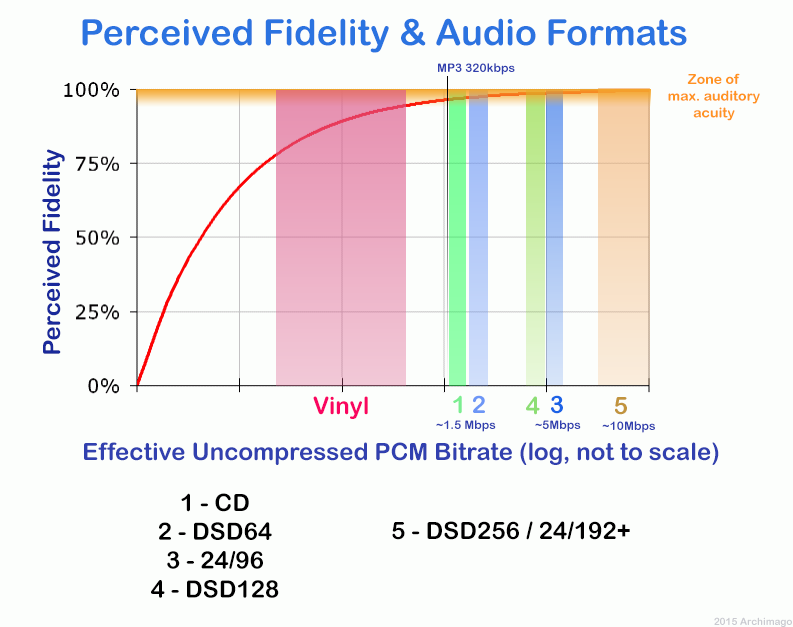
192k is a turning point. Below 192K, the sound quality is relatively damaged, especially the high-frequency part above 16Khz will be cut off.

bitrate

In a nutshell, mp3s above 192k can no longer be listened to with CD sound quality on ordinary home devices, except for Golden Ears and Hifi devices. Of course, these data are not 100% reliable. There are always people on the internet sharing fake mp3 above 192K. In fact, they are converting low bitrate music to high bitrate through software, but the sound quality will not improve. be improved. Windows Media Player compresses it. The resulting mp3 is absolutely wonderful, no matter how high the compressed bitrate is, it will cut perfectly around 16K.

Some time ago, a colleague came across a very troubled client. The mess was said to have been caused by the client asking him to provide song files larger than 100MB-200MB in size. And my colleagues don’t know much about audio formats, so they started endlessly fumbling about FLAC, WAV and audio size. In the end, the colleague did not explain to the client what was going on.

After that, other things happened that made me feel that in the music industry there are too many practitioners around me who have an extremely poor understanding of music and even lack some basic knowledge related to music. I don’t even have the idea to understand, which makes me very sad. It seems that music has only one merchandise attribute, and our practitioners only need to organize the shelves, encode various merchandise, and use the big data of users’ purchase records to recommend merchandise to users, no matter why to users. they like this. features that these products have, and use cold data to provide users with various services.

Therefore, I think it is necessary to write something. I don’t expect practitioners to become people who really love music. I just hope that even if you still think of “her” as a commodity, you can first figure out what you’re selling. and what is..

PS: The content of the first lesson is about media files. Since the relevant content involves a lot of technical stuff, it seems a bit boring, but if you read it carefully, you will find that it is actually very easy to understand, but this basic knowledge can be very helpful.

Bit Rate, Sample Rate, Lossless, MP3, FLAC, APE, 320kb, 192kb, 128kb, 44.1khz, CBR, VBR. Does this bunch of various names make you both familiar and unknown?

The higher the bitrate, the better the sound quality. Lossless music is the highest sound quality, right? So, let’s start with the sound collection.

【Audio composition】

Nowadays, when we talk about audio, everything is digital audio. Digital audio consists of three parts: sample rate, sample precision, and number of sound channels.

Sample Rate: Both the sample rate, which refers to the number of samples per second when recording the sound, expressed in Hertz (Hz).

Sampling Precision: Refers to the dynamic range of the recorded sound, measured in bits (Bit).