MP3 file format


Free Download Mp4Gain
picture

MP3 file format

MP3 file format
MP3 file format

The full name of MP3 is MPEG-1 or MPEG-2 Audio Layer III, which is a popular format for digital audio coding and lossy compression of minor parts, to achieve the purpose of compressing into smaller files.

MP3 file format
MP3 file format

source
The MP3 format was invented in the mid-1980s by a group of engineers at the Fraunhofer research organization in Erlangen, Germany, and standardized in 1991. The association is committed to research in low-rate, high-quality sound coding of data. Although MP3 is a lossy compression format, for the listening experience of most users, the sound quality of MP3 does not have a noticeable decrease compared to the original uncompressed audio.

Later, with the popularization of the MP3, it had an impact and influence in the music industry.

MPEG audio standard
MPEG (Motion Picture Experts Group) is a moving picture expert group under ISO, and the MPEG standard formulated by it is widely used in various multimedia. MPEG standards include video and audio standards, from which MPEG-1, MPEG-2, MPEG-2AAC, and MPEG-4 audio standards have been developed.

The MPEG-1 and MPEG-2 standards use the same family of audio codecs: Layer1, 2, 3. A new feature of MPEG-2 is the use of low sample rate expansion to reduce data traffic, and another feature is multi-channel expansion, which increases the number of main channels to five. The MPEG-2AAC (MPEG-2 Advanced Audio Coding) standard was launched by FraunhoferIIS and AT&T in 1997 to significantly reduce data traffic. The Modified Discrete Co2sine Transform (MDCT) algorithm adopted by MPEG22AAC, the sampling rate It can be between 8KHz and 96KHz, and the number of channels can be between 1-48.

All three layers of MPEG Audio Layer1, 2, and 3 use the same filter bank, bitstream structure, and header information, and the sample rate is either 32 KHz, 4411 KHz, or 48 KHz.

Layer1 is designed for DCC (DigitalCompactCassette) digital compression tape, with a data rate of 384kbps.
Layer2 balances complexity and performance, and data traffic drops to 256kbps-192kbps.
Layer3 was designed for low data traffic from the beginning, and the data traffic is 128Kbps-112Kbps. Layer3 adds MDCT transform, which makes its frequency resolution 18 times than Layer 2. Layer3 also uses EntropyCoding similar to MPEGVid2eo Redundant information is reduced.
Currently, most MP3s use the MPEG21 standard.



Free Download Mp4Gain
picture


Mp4Gain Main Window
picture


Mp4Gain Features
picture


Free Download Mp4Gain
picture

Change the bit rate of an MP3 file

Change the bit rate of an MP3 file

mp3 bit rate
mp3 bit rate

Do you want to change the bit rate of an MP3 file?

mp3 bit rate
mp3 bit rate

This can be useful, for example, if you need to reduce the size of an MP3 file. A 320 kbps MP3 file, the highest bit rate allowed for an MP3 file, can be lowered to 192 kbps to significantly reduce the size of the MP3 file.

There will be some loss in quality, but the difference will be negligible to most listeners using standard speakers or headphones. If you’re an audiophile, chances are you’ll never use the MP3 format outside of expensive audio equipment.

Most likely, you are using a lossless format, such as compressed or uncompressed PCM audio, WAV, AIFF, FLAC, ALAC, or APE. Uncompressed PCM audio files are approximately 10 times larger than CD-quality MP3 files.

The MP3 format is a lossy format, which means sacrificing audio quality to keep file sizes relatively small. Almost all sites will tell you that you shouldn’t convert lossless audio files to MP3 unless you can afford to lose some audio quality.

Almost all the time. The only time it might make sense is if you have a bitrate audio file in a low quality format like WAV. For example, it might make sense to convert a 96 kbps WAV file to MP3, but only if you choose a bit rate of 192 kbps or higher. A higher bit rate in an MP3 file will allow it to maintain the same quality as a WAV file even though it has a lower bit rate.
The second thing to read is that you should never switch to a lower bitrate. bitrate stream to a higher bitrate stream and hope it sounds better. You cannot gain quality by increasing the bit rate. This is absolutely true. If you try to convert the bitrate, it will actually reduce the quality of the MP3 file.

Bit rate

Bit rate

Bitrate

Bit rate refers to the number of bits (bit) transmitted per unit of time, in bps (bit per second).

bit rate

Bit rate is also known as “binary bit rate”, commonly known as “code rate”. Indicates the number of bits transmitted per unit of time. It is used to measure the transmission speed of digital information, often written as bit/sec. According to the number of bits occupied by each image storage frame and the transmission bit rate, the digital image information transmission speed can be calculated [1].
In modern digital communication, the transmission volume of digitized video and other information is large, so it is often measured in kilobits per second or megabits per second, which are written as kbit/sec (or kbps) and Mbit/sec. (or Mbps respectively). ). For example, the amount of information digitized from an ordinary color TV signal can reach 216 Mbit/sec. A good digital broadcast channel can transmit dozens of color TV programs, and its capacity can reach several gigabits or gigabits per second (written as Gbit/sec or Gbps) [1] .
Bitrate is often used to measure the quality of video files.
flexibility edit stream
Because each network is unique and each access line has different conditions (such as length, attenuation, crosstalk environment, etc.), access lines from different telephone companies must support different data rates. For ADSL and VDSL modems, it is best to set the data rate to one of many possible data rates. For example, DMT-based ADSL and VDSL can theoretically change the tariff at fine intervals, and CAP-based RADSL (Rate Adaptive ADSL) also provides some flexibility in tariff configuration [2].
However, telephone companies may want to limit xDSL service to a small set of rates sufficient to provide a variety of services. If a limited set of tariffs can be adapted to a wide range of services, then the management of the services in this case is simpler than in the case of variable tariffs. Telephone companies want the choice of modem speed to be under the control of the network, not the user [2] .
In this mode, the selection of the transmission rate set of the xDSL network must be prudent. In this case, there is a possibility that two adjacent systems receive traffic at very different rates and the system must be able to handle such a situation. The other model, the “best match” approach using adaptive rate ADSL (similar to a voiceband modem), is more beneficial to new network operators and Internet Service Providers (ISPs) [2] .
Transmission control method
Most bit rate control schemes consist of two parts. Part of the encoded bit stream output by the encoder is fed into a buffer. For a constant bitrate channel, the data in the buffer is fetched at a constant rate, and if the buffer is large enough, the bitrate variation caused by the MPEG picture type, etc. can be smoothed out. This is necessary for both constant bit rate transmission and variable bit rate transmission in general. However, in practice, the buffer size is always limited. The buffering process will bring a delay to the system, and this delay is proportional to the size of the buffer. Latency is often a serious issue for real-time image communication, so buffers should be kept as small as possible. That is, long-term fluctuations in bitrate due to changes in scene content or changes, etc. they cannot be softened in this way, so another part is needed. This is to send some measure of the output bitrate to the encoder to control the encoding process, thus changing the output bitrate [3] .

Quality (bit rate)

Quality (bit rate)

Bit Rate

In multimedia technology, quality is often used to judge the effect of audio, and quality here is actually bitrate.

Bit Rate

1. Introduction
2 sound control
3 encoding mode
Introductionedit transmission
The term quality is widely used.
In multimedia technology, quality is often used to judge the effect of audio, and quality here is actually bitrate.
On WINDOWS it is called “bit rate” and on some players it is described as ” bit rate “.
Quality refers to the bit rate at which digital sound is converted from analog to digital format. The higher the bitrate, the better the quality of the restored sound.
sound control edit stream
16 Kbps = phone quality
24 Kbps = increase phone quality, shortwave transmission, longwave transmission, European standard medium wave transmission
40 Kbps = American standard medium wave transmission
56Kbps=Voice
64 Kbps = boost voice (best bitrate setting for cell phone ringtones, best setting for cell phone mono MP3 players)
112 Kbps = FM stereo broadcast FM 128 Kbps = tape (best setting for mobile phone stereo MP3 player, best setting for low-end MP3 player)
160 Kbps = HIFI high fidelity (best setting for mid to high end MP3 players)
192Kbps=CD (best setting for high-end MP3 players)
256Kbps=Studio Music Studio (for music enthusiasts)
In fact, with the advancement of technology, the quality of music is also getting higher and higher, the highest quality of MP3 is 320Kbps, but some formats can achieve higher sound quality.
For example, the emerging APE audio format can provide real audiophile level lossless sound quality and smaller volume than WAV format, and its quality is usually 550kbps-950kbps.
encoding modeedit stream
VBR (Variable Bitrate) Dynamic Bitrate means there is no fixed bitrate. The compression software immediately determines which bitrate to use based on the audio data being compressed. This is a method that takes quality as a premise and takes file size into account The recommended encoding mode;
ABR Average Bit Rate (Average Bit Rate) is an interpolation parameter of VBR. LAME created this encoding mode in response to the low file volume ratio of CBR and the variable size of files generated by VBR. Within the specified file size, ABR takes every 50 frames (about 1 second for 30 frames) as a segment. High-frequency and insensitive frequencies use relatively low traffic, and low-frequency and large dynamic performance use high traffic, which can be used as VBR and CBR, a compromise option.
CBR (constant bitrate), constant bitrate means the file has one bitrate from start to finish. Compared to VBR and ABR, the compressed file size is very large and the sound quality will not improve significantly compared to VBR and ABR.

What is the capacity of the high resolution sound source?

What is the capacity of the high resolution sound source?

Hi-Res audio

High resolution sound source with more information than conventional CDs.

HiRes Audio

Since the data size is large, you can enjoy high-quality sound with a three-dimensional effect, but the problem is that when managing multiple high-resolution audio sources, the required storage capacity becomes huge.

Then I will introduce what is the capacity of the high resolution sound source, including the management method.

What is the capacity of Hi-Res Audio sources compared to CDs?
In determining the capacity (file size) of a high-resolution sound source, the sampling frequency and bit depth of the sound source are important factors.

The sample rate (sample rate) is a numerical value that is used as an index when converting analog data, such as speech, to a digital signal.

It indicates how many times per second an information sample was measured, and is expressed in “Hz (hertz)”.

If sampling is done every 44,100 seconds, it will be “44.1 kHz”.

On the other hand, the bit depth is a numerical value that indicates how many pieces are recorded in each divided data.

It is represented by “bit”.

Both the sample rate and the bit depth mean that the higher the number, the more information there will be, that is, the higher the resolution.

The amount of music data per second is called the bit rate.

Bit rate is the sample rate multiplied by the bit depth and is expressed in “bps”.

The calculation formula is as follows.

Bit rate (bps) = sample rate (Hz) x bit depth (bit) x 2

For example, the bit rate and sample rate of a CD sound source are generally “44.1 kHz / 16 bits”.

Most so-called “CD sound quality” sound sources are based on this number.

The size of the 5 minute 44.1 kHz / 16 bit / sound source file is about 50 MB.

But what about hi-res audio sources?

High resolution sound source capacity per song (5 minutes) varies depending on the music data format, as shown below.

WAV: 192 kHz / 24-bit: capacity for 5 minutes is 330 MB
FLAC: 192 kHz / 24 bit: capacity for 5 minutes is 200 MB
ALAC: 192 kHz / 24 bits: capacity for 5 minutes is 200 MB
What you can see from this is that the capacity of the high resolution sound source is 4 to 6 times that of the CD sound source in 5 minutes.

Large capacity high resolution music management equipment
If you download 5 high-resolution songs for 4 minutes, it will take up about 700MB (for 96kHz / 24-bit WAV files).

In the case of 10 songs, it exceeds 1400MB, that is, 1GB.

If so, I would like to have enough storage to handle that amount of data.

An effective way to do this is to build a NAS-centric network audio system that incorporates a large-capacity hard drive.

For example, if you can prepare a 4TB (terabyte) hard drive, it can store around 20,000 high-resolution songs.

Next, we will explain what NAS and network audio are like.

NAS
NAS stands for “Network Attached Storage” and it reads like aubergine.

It stands for network attached storage, and it is also called a network hard drive or network compatible HDD.

In other words, it is an external hard drive that is used when connecting to a network (LAN).

A normal external hard drive used when connecting to a PC = PC via USB etc. can basically be used with only one PC.

However, if it is a NAS, it can be used with multiple devices participating in the LAN.

Files saved on the hard drive can also be used and shared from, for example, the personal computers of each family member participating in the home LAN, smartphones connected via Wi-Fi, and TVs in the living room to be.

It is also possible to access the data on the NAS from the outside via the Internet.

The NAS is often used in the home to store and share data for music, video (video / TV recording data), photos (images), etc.

Meaning and relationship of sample rate, bit depth, and bit rate

Meaning and relationship of sample rate, bit depth, and bit rate

bit depth

Sampling rate
Bit depth
Bit rate

bit depth audio

I will present the three meanings and relationships of.

Table of Contents
What is the sampling rate?
What is bit depth?
What is a bit rate?
resume
Sponsorship

What is the sampling rate?
For example, let’s say you say “Ah” for 1 second.

When recording this “Ah” sound on a personal computer, the “Ah” sound is divided into tens of thousands per second, each divided into tens of thousands.

“The height of this section was about this.”
“The length of this section was about this.”
Record it as data like this.

The personal computer continually reads each of this divided data and outputs it as a “voice” called “Ah”.

At this time, “how many tens of thousands of sounds are collected per second” is called the “sample rate.” (Also called “sample rate”)

Sampling rate
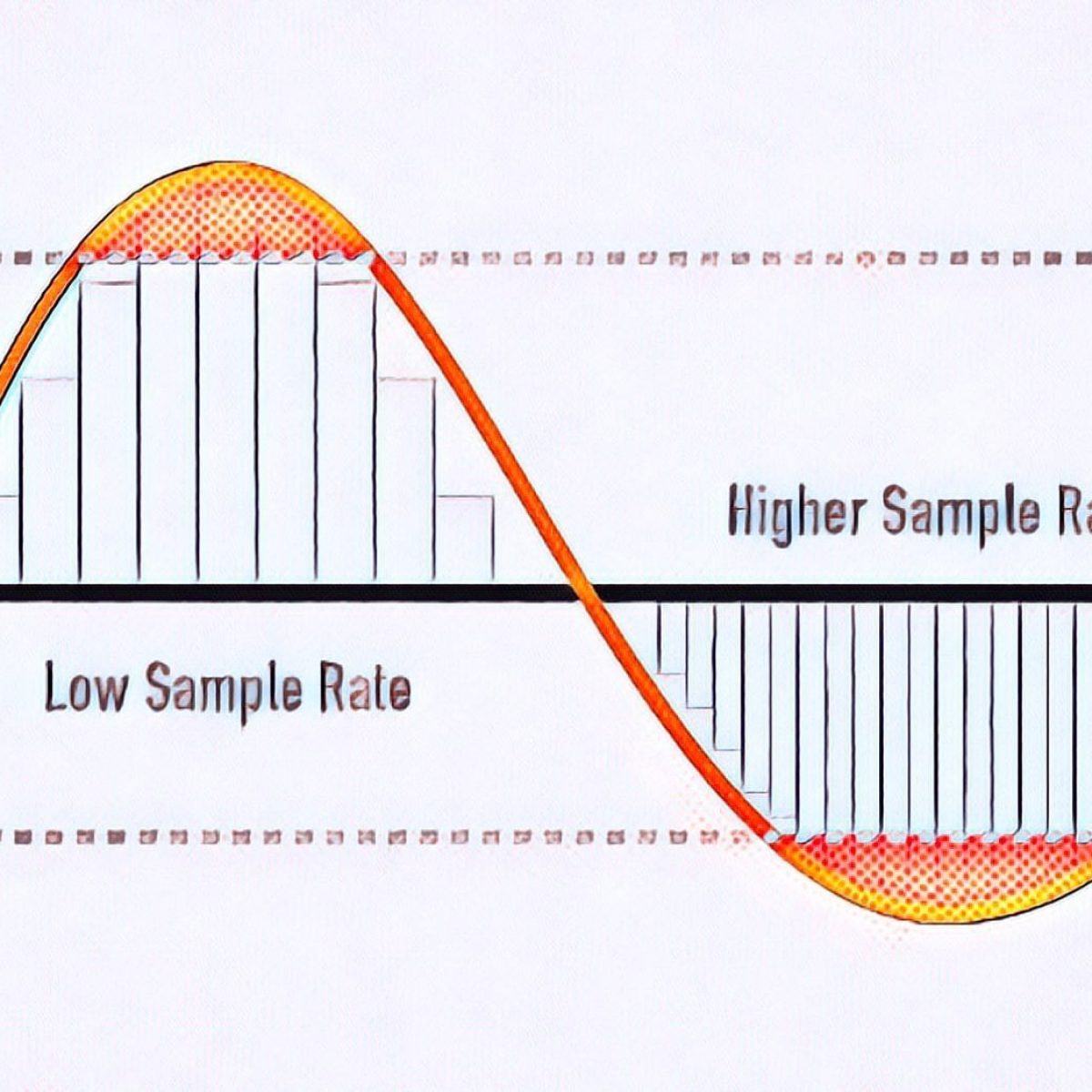
â–² Sample rate image

The more divisions you make, the smoother the sound will be, and as a result, you will feel that the sound quality has improved!

What is bit depth?
The sample rate is “how many tens of thousands of sounds are collected per second”.

“How much capacity is given to each divided data (sample)” is called “bit depth”.

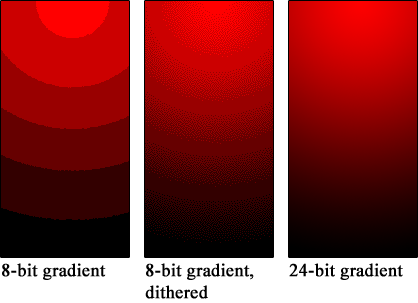
Figure_bit depth
â–² Bit depth image

Also called “number of quantization bits”, “number of sample bits”, “bit offset”, and so on.

For example, if the bit depth is “16 bits”, the amount of information is 2 to the 16th power (65536) for one sample.

The higher the bit depth, the greater the expressiveness of the sound’s fineness and volume, and as a result, I feel like the sound quality has improved!

By the way, the bit depth of most of the world’s sound sources is 16 bit.

that’s why

“Import music from CD!”
“Import music downloaded from the Internet!”
In such cases, 16 bits is sufficient.

On the other hand, if you say “What you recorded in your DAW comes out wav!”, It is better to have 16 bits or more.

This is because, for example, when processing audio effects with audio editing software, sound deterioration can be reduced to zero by assigning an additional bit depth (for example, 32-bit). (Although 16 bit is fine for final output)

What’s more,
note that “bit depth” on this page has a different meaning than “bit depth” in video.

Reference: What is Bit Depth (Color Depth)? Differences like 10bit / 24bit / 30bit

What is a bit rate?
Bit rate is the “amount of data per second”.

Reference: What is a bit rate? Relationship between image quality, sound quality and codec [Video / Audio]

The “sample rate” and “bit depth” presented above are

Sample rate: how many tens of thousands of sounds are collected per second
Bit depth: how much to give to each divided data
Therefore, the product of these two values ​​is the “bit rate”.

Audio encoding

Audio encoding

Audio Encoding

I wrote over audio files last time, but if you reduce the file size (code at a lower bit rate), the sound quality tends to deteriorate. How much should it really be? .. ..

audio encoding

When compressing using audio encoding (AAC, MP3, etc.), the compression rate is determined by the bit rate at the time of encoding. Specifically, if you set a low bit rate, the compression rate will be higher and the file size when saved will be smaller, but first of all, what is the bit rate for uncompressed original sound source (PCM) ?
If you save it as PCM, the sound quality will be that of the original sound, but it can be a bit awkward to save without worrying about the file size. Also, depending on the application, I think the memory capacity is sufficient even for the original sound size and the communication speed is fine. Therefore, I would like to write about the sample rate and bit rate that are often heard in digital audio.

The bit rate of digital audio is determined by the sampling frequency, the number of bits assigned to a sample (number of quantization bits), and the number of channels (stereo, monaural, etc.).

PCM bit rate (uncompressed) = sample rate x number of quantization bits x number of channels
As I wrote a bit last time, in file containers like wav and mp4 format, this information is attached as a header, so that the application can see the header and play it back. The compression rate of the encoding is determined by the bit rate specified at the time of encoding for this PCM (uncompressed) bit rate.
For example, as many of you know about music CDs, with 44.1 kHz stereo, this is the next bit rate.

Music CD bit rate: 44100Hz x 16bit x 2ch (stereo) = 1411.2kbps
When encoding this with MP3, AAC, etc., it is natural to specify a bit rate lower than 1,411.2 kbps. For example, when encoding at 256 kbps, the compression rate is around 18% when the original sound is 100% and the file size is 1/5 or less.

Encode a music CD at 256 kbps: 256 kbps / 1,411.2 kbps = about 18%
In general, the sample rates of audio devices connected to PCs are 48 kHz and 44.1 kHz for music, 16 kHz and 8 kHz for audio such as microphones and headphones, and 32 kHz, 24 kHz, 22.05 kHz. , etc.

The bit rate of PCM (uncompressed sound source) with 16-bit quantization bits is as follows.

Stereo (for music) PCM 16-bit bit rate (example)
Sampling frequency Number of quantization bits Number of channels Bit rate Comments
48kHz 16 16 2 1536 kbps
44.1 kHz 16 16 2 1,411.2 kbps Music CD
32kHz 16 16 2 1,024 kbps
24kHz 16 16 2 768 kbps
22.05 kHz 16 16 2 705.6 kbps
Monaural (for audio) PCM 16-bit bit rate (example)
Sampling frequency Number of quantization bits Number of channels Bit rate Comments
32kHz 16 16 1 512 kbps Super Wide Band
24kHz 16 16 1 384 kbps
16kHz 16 16 1 256 kbps broadband
8kHz 16 16 1 128 kbps Narrow band

Sampling rate
If you check the web, there are explanations such as the sampling required to convert analog waveforms to digital conversion. For example, it shows how many samples of an audio signal input from a microphone are taken per second and digitized. The larger the sample, the greater the range that can be recorded. When an analog waveform is digitized, the frequency that can be expressed is half the sampling frequency (sampling theorem). For example, with a sample rate of 48kHz, it is possible to express up to 24kHz. At 8kHz (narrowband) and 16kHz (wideband), which are often used for audio, you can only hear up to 4kHz and 8kHz, respectively. The higher the sample rate, the higher the bit rate.

sampling theorem
It is a very simple explanation, but it can express up to half the sample rate. When sampling a signal, if the interval is small, it can be restored close to the original signal, but if it is too thick, it cannot be restored (I would like to write a little more detail when talking about signal processing or other time ).

What is the bit rate? Simple explanation

What is the bit rate? Simple explanation

bitrate

Bit rate is a unit of data transfer.

BITRATE

When used in video or audio, as in video editing, it indicates how much data is represented per unit of time, and “bits per second (bps)” is generally used.
A bit is the smallest unit of data that a computer handles.
Two states of “0” and “1” can be expressed by 1 bit. (1 binary digit)
Similarly, a byte representing the size of a file is a unit of data handled by a computer. (1 byte = 8 bits)
Here are some things to keep in mind about bit rates.
In home appliance hard disk recorders, it is sometimes expressed as a recording mode such as XP, SP, LP.
The higher the bit rate value (numerical value), the better the picture and sound quality, but the greater the amount of data (file size).
The unit of bit rate is usually Mbps, which means 10 6 (10 to the sixth power) for video, and kbps, which means 10 3 (10 to the third power) for audio.
When burning a video to DVD, there is a limit to the amount of data that can be burned to DVD, and if you try to burn a long video, you will have to lower the bit rate, resulting in poor image quality. . To record high-quality video, the bit rate must be increased, which increases the amount of data required and shortens the recording time.
Even if the bit rate used is the same, the image quality and sound quality will differ depending on the encoder and compression method used for digitizing.

What are “bit depth” and “sample rate”? Part 2

What are “bit depth” and “sample rate”? Part 2

Understanding Sample Rate, Bit Depth, and Bit Rate - Headphonesty

What is the sample rate?

Bit Depth

Next, I will explain the sample rate.

The sample rate is like the “resolution” of the audio.

The higher the sample rate, the more samples per second = you can hear better.

Requires double sample rate

One thing to keep in mind here is that you need twice the sample rate to hear sound at that frequency.

For example, if you want to hear a 1000 Hz (1 kHz) sound accurately and clearly, the sampling frequency must be at least 2000 Hz (2 kHz).

If the sample rate is less than twice the value you want to hear, “aliases” will occur and you will not be able to process the sound accurately, such as crackle or noise.

Nyquist frequency

By the way, to use a little technical word, it also means not to exceed the “Nyquist Frequency”.

The Nyquist rate is exactly half the supported sample rate.

For example, if the sampling frequency is 44.1 kHz, the Nyquist frequency will be 22.05 kHz.

If you try to handle this high-pitched sound that exceeds 22.05 kHz, the above-mentioned “aliasing” will occur and you will not be able to reproduce the sound correctly.

Range recognizable by the human ear

The loudest sound that can be recognized by the human ear is said to be 20 kHz, so to hear a 20 kHz sound, you only need to have a sample rate of at least 40 kHz.

After that, to avoid aliasing, apply an anti-aliasing filter until the Nyquist (Transition Band) frequency is reached.

For 44.1 kHz, 2050 samples x 2 are required.

In other words, a sample rate of 44.1 kHz is all that is needed to minimize the limit of sound (20 kHz) that the human ear can hear.

When the sampling frequency is high (96 kHz, 192 kHz)

Recently, it can be set to a high sample rate, such as 96 kHz or 192 kHz.

Unfortunately, even with such a high sample rate, it’s hard to tell the difference.

As shown in the image above, non-human animals can hear higher frequency sounds.

However, it is a level that we do not have to worry about because it is a completely inaudible zone for the human ear.

By the way, many audio interfaces cover up to 192 kHz.

Controversy over sampling rate

In fact, in the 1970s, many media outlets were controversial about sample rates.

At the time, 48 kHz was the audio standard used in radio, television, and video work.

However, broadcasting stations have decided to use 44.1 kHz as a standard to prevent data from being copied to consumers (viewers) by intentionally breaking compatibility (or making conversion difficult) …

It’s difficult to change data from 44.8 kHz to 44.1 kHz, so it prevented the average viewer from converting it to the sample rate used for home devices.

By the way, the article “Comparison of professional versus cheaper audio interface” is summarized here, which is also explained from the point of view of bit rate and sample rate.

What are “bit depth” and “sample rate”?

What are “bit depth” and “sample rate”?

Bit Depth

What are “bit depth” and “sample rate”?
What are “bit rate” and “sample rate”?
I wrote it in the DTM project file settings and audio interface specs, but I don’t understand the meaning …

Bit Depth

This time, we will answer those questions.

Here’s a quick rundown of “What is a Bit Rate / Sample Rate ?,” Explained by Professional Drummer / Engineer / Producer Ed Thorne.

Once you know this, you will be able to export the sound source in the appropriate format and you will be able to understand the standards for the equipment that you will buy in the future.

Please take a look to the end!

What is bit-deapth?

Bit depth refers to the range in which the dynamics (inflection) of the sound can be processed.

For example, if the bit depth is “16-bit”, the range of up to 96 dB can be reproduced and processed from the silent state.

96dB is all about the volume when the audience is excited at the live venue.

On the other hand, if the bit depth is “24 bit”, the 144 dB dynamics can be reproduced and processed.

144dB is roughly the volume of a jet airplane.

Dynamics in the age of streaming

Not long ago, there was no volume limit like current streaming services like YouTube and Spotify.

The louder the sound, the better the music itself, which is why the producers always wanted to make the song louder and bigger than any other music.

Today, many platforms where you can listen to music have volume restrictions, so the idea that “the more music you can play loud sounds, the better” has changed, and times have changed.

So, in this age, 16-bit or 24-bit might not make much of a difference.

The amount of data also changes

By the way, if the bit depth is high, the amount of data will change as well.

When recording a lot, it may be better to consider this a bit.