MP4 Compression Techniques


Free Download Mp4Gain
picture

MP4 Compression Techniques

MP4 Compression Techniques

Let’s talk about MP4 compression techniques

As a video encoding specialist, I’m constantly exploring ways to optimize video files for size and quality. Understanding MP4 compression techniques is essential for anyone involved in video production, streaming, or distribution. Properly compressing MP4 files ensures they are manageable, stream efficiently, and maintain good visual fidelity.

What is MP4 Compression and Why Is It Necessary?

MP4 compression involves reducing the file size of a video while preserving acceptable quality. I often encounter situations where uncompressed video files are enormous, making them impractical for storage and distribution. Imagine trying to share a 4K video recording from your phone – the file size could be several gigabytes! MP4 compression techniques address this issue by using algorithms to remove redundant or less important data, resulting in smaller, more manageable files.

Lossy vs. Lossless MP4 Compression: Understanding the Trade-Offs

MP4 compression can be achieved through lossy or lossless methods. I always consider the trade-offs between file size and quality when choosing a compression technique.

* Lossy Compression: Removes some of the original data to achieve smaller file sizes. This can result in a slight reduction in quality, but it’s often imperceptible to the human eye. Common lossy codecs include H.264 and H.265.
* Lossless Compression: Preserves all of the original data, resulting in no loss of quality. However, lossless compression typically results in larger file sizes compared to lossy compression.

Key Codecs Used in MP4 Compression: H.264, H.265, and AV1

The choice of codec significantly impacts the effectiveness of MP4 compression. I’ve worked extensively with H.264, H.265, and AV1, and each has its strengths and weaknesses.

* H.264 (AVC): A widely supported codec that provides a good balance of quality and compression. It’s compatible with most devices and platforms.
* H.265 (HEVC): Offers better compression efficiency than H.264, resulting in smaller file sizes with comparable quality. However, it requires more processing power and may not be supported by older devices.
* AV1: A newer, open-source codec that aims to provide even better compression efficiency than H.265. It’s gaining popularity but may not be as widely supported as H.264 or H.265.

Bit Rate: Controlling MP4 File Size and Quality

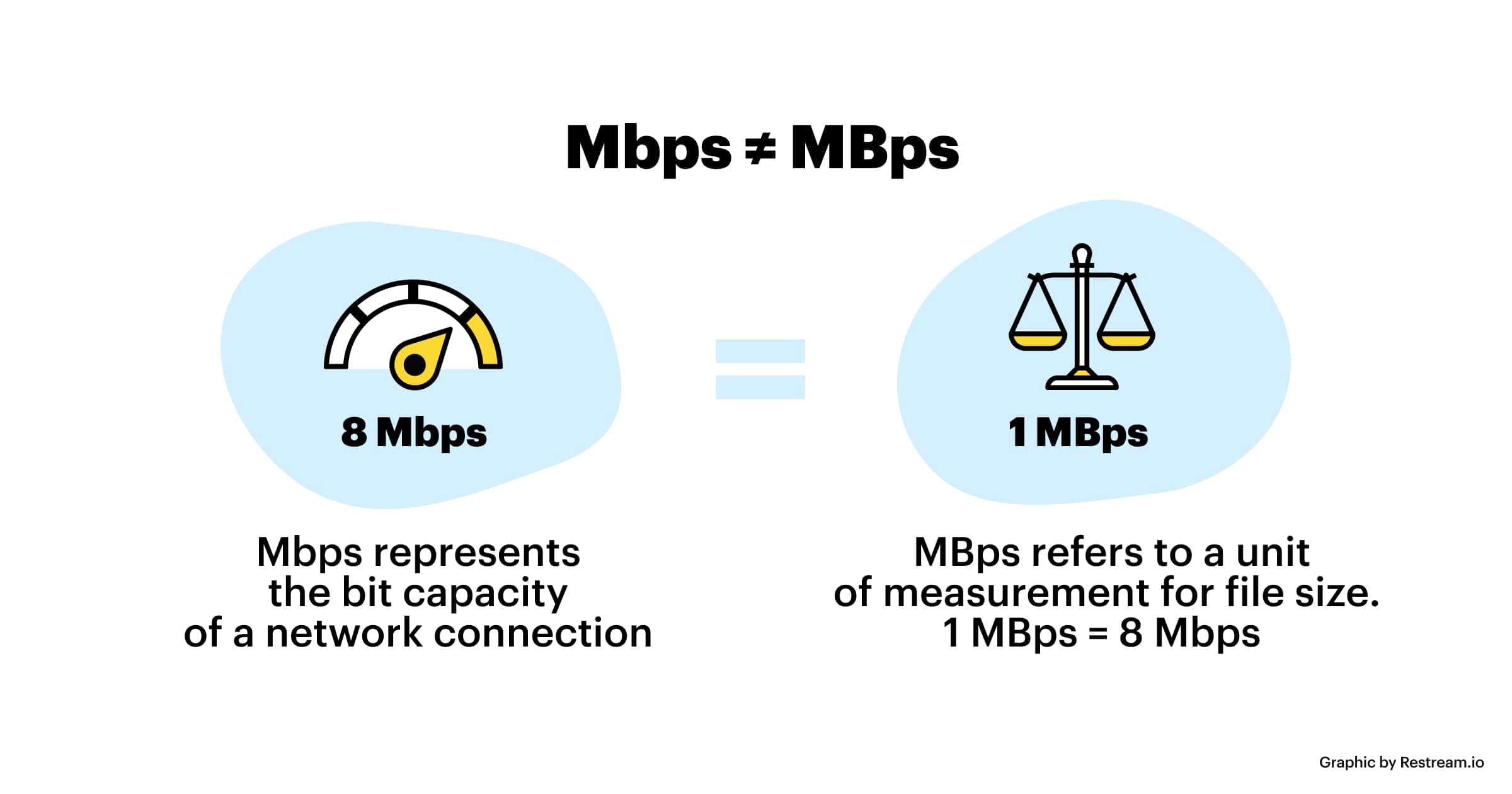
Bit rate measures the amount of data used to encode a video per unit of time, typically expressed in megabits per second (Mbps). I always carefully adjust the bit rate to achieve the desired balance of file size and quality. A higher bit rate generally results in better video quality but also increases the file size. Conversely, a lower bit rate results in smaller file sizes but may reduce video quality.

Frame Rate: Balancing Smoothness and File Size

Frame rate refers to the number of frames displayed per second (fps), affecting the smoothness of motion in a video. I often adjust the frame rate to optimize for different viewing scenarios. Common frame rates include 24fps (cinematic look), 30fps (standard for television), and 60fps (smoother motion). Reducing the frame rate can decrease file size but may also make the video appear choppy.

Resolution: Optimizing for Different Screens

Resolution refers to the number of pixels in a video frame, determining the level of detail. I always consider the target viewing device when setting the resolution. Higher resolutions, like 4K (3840 x 2160) or 1080p (1920 x 1080), provide sharper and more detailed images compared to lower resolutions like 720p (1280 x 720) or 480p (854 x 480). Reducing the resolution can significantly decrease file size, but it may also make the video appear blurry on larger screens.

Chroma Subsampling: Reducing Color Data

Chroma subsampling is a technique used to reduce the amount of color data in a video. I often use chroma subsampling to further compress MP4 files without significantly impacting perceived quality. The human eye is more sensitive to changes in brightness (luma) than changes in color (chroma), so reducing the chroma data can result in smaller file sizes with minimal visual impact. Common chroma subsampling formats include 4:2:0, 4:2:2, and 4:4:4.

Variable Bit Rate (VBR) vs. Constant Bit Rate (CBR) Encoding

Choosing between variable bit rate (VBR) and constant bit rate (CBR) encoding can impact both file size and quality. I generally prefer VBR encoding for its ability to adapt to the complexity of the video content.

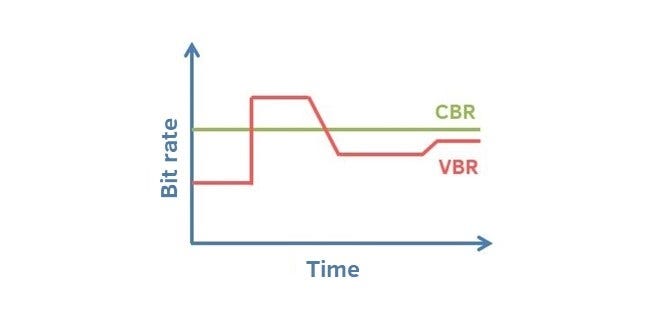
* Variable Bit Rate (VBR): Dynamically adjusts the bit rate based on the complexity of the scene. This results in better quality for complex scenes and smaller file sizes for simpler scenes.
* Constant Bit Rate (CBR): Uses a fixed bit rate throughout the entire video. This is simpler to implement but may result in wasted bandwidth for simpler scenes and reduced quality for complex scenes.

Two-Pass Encoding: Maximizing MP4 Compression Efficiency

Two-pass encoding is a technique that can improve MP4 compression efficiency. I often use two-pass encoding for critical projects where quality is paramount. In the first pass, the encoder analyzes the entire video to determine the optimal bit rate allocation. In the second pass, the encoder uses this information to create the final compressed video. This can result in better quality compared to single-pass encoding.

Optimizing MP4 Compression for Streaming Platforms

Streaming platforms like YouTube, Netflix, and Vimeo have specific recommendations for MP4 compression settings. I always consult these recommendations to ensure my videos are optimized for their respective platforms. These recommendations typically include guidelines for resolution, bit rate, frame rate, and codecs.

Common MP4 Compression Mistakes to Avoid

Even experienced video editors can make mistakes during MP4 compression. I’ve learned to avoid common pitfalls by being meticulous and paying close attention to detail. These include using too low a bit rate, choosing the wrong codec, ignoring the target platform, and neglecting audio settings.

Latest words on MP4 compression techniques

In conclusion, mastering MP4 compression techniques is essential for creating video files that are both high-quality and manageable in size. By understanding the various factors involved, such as codecs, bit rate, frame rate, and resolution, you can optimize your videos for different viewing scenarios. Remember to always experiment and test different settings to achieve the desired balance of quality and file size. Also, remember that Mp4Gain is the appropiate solution to achieve professional-sounding audio.

FAQ about MP4 compression techniques

What is MP4 compression and why is it important?

MP4 compression lessens video sizes while retaining quality so things store and ship smoothly. Large file sizes do not work well at all, without it.

Can lossy and lossless techniques both be used during the compressions?

Yes, and each has its own give-and-take. Lossy squeezes and can hit the looks lightly but, makes it small. Lossless holds every detail without the squeeze, so expect larger files.

What are codecs and how do they work in the world of media?

Codecs are what shrink and grow data for media to be played smoothly on devices. Common codecs used in MP4 compression techniques, are H.264, H.265, AV1.

Talk about the bit rate and what that’s involved with?

Bit rate labels bits moved for the video. More bits make better video, fewer make worse, as the numbers show in megabits per second (Mbps).

section>

What is the meaning for the term “frame rate” and how may it have an effect to the way a MP4 looks?

Frame rate labels frames each second. More frames means motion is easy, and fewer makes the video look jittery. Think 24fps versus a smoother 60fps.

What are some settings to consider for video in screens?

Consider the devices that play a video to set for those devices and remember, more pixels creates a much better image. So keep that in focus with your compression workflow.

section>

Clarify the term “chroma subsampling“?

Chroma subsampling trims all colors because human eyes give emphasis to brightness, leading to greater compression with nominal visual change. The main values are 4:4:4, 4:2:2, and 4:2:0.

What’s best choice for VBR versus CBR?

VBR, is the better process that tunes the sound according to the action in that frame. It is a bit dynamic versus CBR which is static.

How does two-pass come into the picture, and what is it?

Two passes gives compression a lift. The first finds all aspects, second tunes everything to make the audio as solid as it can be given what one has on hand.

When you think of the best methods to tweak, what actions must be taken?

It is best to check the compression parameters to see if the right choices where made or not for the media. That creates an audio that works within parameters.

Comments:

Cheers. That really spells things out, now getting video size and quality clicks and makes sense, thanks again!

Oh, okay – you got it to explain the numbers in a clean way for my band. This is what we need to know. So solid and we are moving forward with tips in mind.

Respect and good luck to you – for laying out what to think over when fixing up media and videos.

Is pretty much knowing that you can trade the size and the looks, depending on gear that will play it – am learning and appreciate this breakdown

Any killer app name drop, please? What can a greenie like me use?

Bless you, great creator! The content just hit all points and really made for a solid quick lesson.


Free Download Mp4Gain
picture


Mp4Gain Main Window
picture


Mp4Gain Features
picture


Free Download Mp4Gain
picture

Video Compression in MP4 Containers

Video Compression in MP4 Containers

Video Compression in MP4 Containers

Let’s Talk About Video Compression in MP4 Containers

Understanding video compression within MP4 containers opens up a world of efficient video storage and high-quality playback. If you’ve ever watched videos online or saved space on your phone by compressing files, you’ve encountered video compression in action. My goal here is to clarify what video compression does within MP4 files, why it’s used across devices, and how it balances quality and file size. Think of it as the perfect tool for squeezing a massive video into a manageable size without losing that crisp, clear image you want.

So, let’s dive into the how, what, and why of video compression in MP4 containers, covering the technical details and sharing insights from real-world applications. By the end, you’ll know why MP4 is the top choice for video format, how it compresses videos, and why it’s so efficient. I’ll also share some practical examples to make it easy to understand.

What is Video Compression, and Why is it Essential?

Video compression is like folding a large map into a small, pocket-sized square. You’re shrinking the original content to save space while keeping the important parts intact. In video terms, compression allows large video files to fit into the smaller storage spaces of our devices, making them easier to download, store, and stream. When you compress a video, you’re balancing between file size and quality, which means a well-compressed video still looks sharp and clear without hogging too much space.

Most of us don’t realize it, but compression plays a huge role every time we watch videos on platforms like YouTube or Netflix. Without it, high-quality video would need massive amounts of data and storage. Thanks to compression, we can access these videos smoothly, even on lower data speeds. With MP4 files, compression becomes efficient and universal, working across different devices and keeping video quality high while reducing space.

How Does Video Compression Work in an MP4 Container?

Compression within an MP4 container is a clever process that removes unnecessary information from each video frame, keeping only what’s essential to maintain visual quality. The MP4 format is incredibly popular because it efficiently holds compressed video and audio data. To make this possible, an MP4 file uses codecs, or “coders-decoders,” that encode (compress) and decode (play back) video and audio.

Most MP4 files use codecs like H.264 or H.265, which are standards in video compression technology. Think of these codecs as high-tech filters that decide which parts of the video need to be kept and which parts can be simplified or removed. By simplifying certain visual details, the codec reduces the amount of data stored, making the file size smaller without visible quality loss to the human eye. This process ensures that when you play back the video, the device knows exactly how to reconstruct those compressed frames accurately.

Advantages of Using MP4 for Video Compression

There are many reasons why MP4 is the industry standard for video storage and streaming. For starters, MP4 offers exceptional compatibility with nearly all devices—phones, tablets, smart TVs, computers—making it the go-to format. This means you can download, upload, or share MP4 videos without worrying about compatibility issues. I like to think of MP4 as a universal “language” for video that any device can understand.

Another great advantage is that MP4 compresses videos effectively, maintaining high quality at lower file sizes. This efficiency makes MP4 perfect for high-resolution video, especially when sharing or streaming, without hogging bandwidth. MP4 files are also flexible; they can handle different resolutions, from low to ultra-high-definition, adapting well to both older devices and the latest 4K screens.

Types of Compression: Lossless vs. Lossy in MP4 Videos

In the world of video compression, there are two main types: lossless and lossy compression. These two methods work differently, each with its own strengths and best use cases. When compressing MP4 files, you might be using one or the other, depending on the balance between quality and file size you need.

Lossless Compression
Lossless compression is like storing a folded piece of paper without making any permanent changes. This method keeps every bit of original data, meaning no quality is lost, but the file size remains relatively large. If you’re archiving high-quality videos or working in professional video production, you might use lossless compression to preserve every pixel.

Lossy Compression
On the other hand, lossy compression sacrifices some data to achieve a much smaller file size. By removing details that aren’t easily noticeable, lossy compression maintains a high-quality appearance without all the original data. This type is commonly used in MP4 files, especially for streaming or sharing videos online, where file size matters more than absolute quality.

Techniques Used in MP4 Video Compression

MP4 video compression uses several key techniques to balance file size and quality effectively. Understanding these methods helps explain why MP4 performs so well. One major approach is intra-frame compression, which compresses each frame individually. It’s similar to reducing a single photo’s size without considering what comes before or after it. This method is used when the video needs high quality, like in professional video editing.

Another technique, inter-frame compression, looks at groups of frames, only saving changes from one frame to the next. For example, in a scene where only the background changes, inter-frame compression saves data on that background, avoiding duplication. This type of compression dramatically reduces file sizes and works particularly well for video playback and streaming. Together, these techniques ensure MP4 files are both compact and high-quality, able to store data efficiently without sacrificing much of what the eye sees.

Challenges in Video Compression and How to Overcome Them

Video compression in MP4 containers has some common challenges, often involving the balance between quality and file size. Compressing too much can cause visible artifacts, like blurring or pixelation, especially in fast-motion scenes. You may have noticed these issues when watching videos with poor resolution, where the image looks distorted or blocky.

One way to tackle these problems is by choosing the correct codec settings, like adjusting the bit rate. The bit rate determines how much data is allocated per second of video; a higher bit rate generally keeps quality high but increases file size. When I work with MP4 compression, I adjust the bit rate based on my needs, lowering it for online videos where file size matters and increasing it for higher-quality videos. Additionally, using variable bit rates (VBR) instead of fixed bit rates (CBR) can help manage these trade-offs by allowing more data for complex scenes and less for simpler ones. This dynamic adjustment ensures that both quality and size are optimized.

Balancing Quality and Compression in MP4 Files

Achieving the perfect balance between quality and compression in MP4 videos requires fine-tuning based on the intended use. If you’re compressing videos for personal storage, prioritizing quality with a moderate level of compression often works best. For web streaming, reducing the file size significantly can be more important than preserving every visual detail. I often choose settings based on where the video will be used, opting for higher compression for online videos and lower compression for high-definition display.

Experimenting with settings like resolution, frame rate, and bit rate can also influence the final file size. Lowering the resolution or frame rate reduces file size, but it can make the video less smooth or detailed. For instance, reducing a video’s resolution from 1080p to 720p lowers file size and compression requirements, making it ideal for web videos without noticeable quality loss. On the other hand, maintaining high frame rates and resolution for action-heavy videos ensures clarity, especially when watched on larger screens.

Choosing the Right Settings for Different Uses

When deciding on the best compression settings, it’s essential to consider where the video will be viewed. For example, a video meant for social media may prioritize smaller file sizes over perfect clarity, while a video for a professional presentation might demand higher quality. Here’s how I break it down:

  • Web Streaming: Medium to high compression to reduce buffering.
  • Social Media Sharing: High compression for quicker uploads and downloads.
  • Professional Video: Minimal compression to maintain top quality.

These practical settings help balance quality with usability, making MP4 a versatile choice for any purpose.

Latest Words on Video Compression in MP4 Containers

Video compression within MP4 containers is an essential tool for creating efficient, high-quality video files. By using techniques like intra-frame and inter-frame compression, adjusting bit rates, and choosing the right settings, we can maintain excellent visual quality while reducing file sizes for easy sharing and storage. For everyday use, MP4 is an ideal choice, providing compatibility, compression, and quality in a single, versatile format. Whether you’re watching a movie on your phone or sharing videos on social media, MP4 makes the experience seamless and efficient.

For those seeking a reliable tool to optimize their MP4 videos, Mp4Gain offers an effective solution for handling compression while preserving quality. It’s designed to simplify the balance between quality and file size, making it easy to store, share, and stream video without compromising on clarity.

Comments:

JohnDoe99: Really great article! I’ve always wondered how video compression works, especially in MP4s. This explained it so clearly. Thanks for the tips on bit rate settings, that was super helpful.

VideoGuru88: I use MP4 all the time but didn’t know about intra-frame vs. inter-frame compression. Makes sense now why some videos look better on my phone! Great read!

TechSavvyChris: Wish there was even more detail on how to adjust settings for different devices. But otherwise, this covered so much! Definitely saving this one.

PixelPusher22: The section on challenges is so relatable. I always get frustrated with artifacts in compressed videos. Thanks for breaking down how to avoid them!

CamcoderGal: This helped a ton with my YouTube uploads. I finally understand bit rate and why some videos look pixelated. Loved the easy explanations!

HappyViewer123: Never realized there was so much behind video compression! I always just clicked ‘compress’. Thanks for the info, really cool stuff!

GoGetEmVideoFan: Super insightful article! The tips about choosing the right compression based on where the video will be used is exactly what I needed.

VideoEditorPro: Nicely done! Appreciate the balance between technical detail and readability. Wish I’d read this sooner.

SocMediaBuff: Very helpful for making social media videos look good without using up all my data. Learned a lot about codec settings, so thanks!

TechyMike: Just tried Mp4Gain and found it super easy to use. Great tip at the end!

StaceyVids: I liked this article but would have loved to see a bit more about lossy vs. lossless. Still, really informative and helped clear up a lot of confusion!

CompressionFan23: This article hit all the right points. I’m a bit of a compression geek, and this added to my knowledge. Thanks!

HDMovieMaker: I didn’t realize MP4 was so flexible. Really useful for keeping high quality without big files. Appreciate the insight!

JonTheEditor: This was so interesting. Made me rethink how I approach compression in my own projects. Thanks for the practical advice.

VideoFan2020: This was an eye-opener! I thought compression just meant losing quality, but this showed me there’s a lot more to it. Kudos for a well-written piece!


https://mx.pinterest.com/pin/1088041591224461968
https://mx.pinterest.com/pin/1090011916061424096
https://www.tumblr.com/mp3-mp4/765443525138644992/video-compression-in-mp4-containers-mp4gaincom

Variable Bit Rate (VBR) Encoding in MP3

Variable Bit Rate (VBR) Encoding in MP3

Variable Bit Rate (VBR) Encoding in MP3

Variable Bit Rate (VBR) Encoding in MP3

Let’s talk about Variable Bit Rate (VBR) encoding in MP3

As a specialist in audio encoding and digital formats, I’ve seen firsthand the impact of Variable Bit Rate (VBR) encoding on MP3 files. VBR offers a dynamic approach to audio compression, optimizing file sizes without compromising quality. In this article, I’ll delve into the intricacies of VBR encoding and its advantages over Constant Bit Rate (CBR) methods, providing insights into its implementation and effects on audio quality.

Understanding Variable Bit Rate (VBR) Encoding

Variable Bit Rate (VBR) encoding is a technique used in audio compression where the bit rate varies throughout the duration of a file. Unlike Constant Bit Rate (CBR) encoding, which maintains a consistent bit rate, VBR adjusts the bit rate based on the complexity of the audio content. This results in higher bit rates during complex passages and lower bit rates during simpler sections, optimizing file size while preserving audio quality.

Advantages of VBR Encoding

Improved Efficiency: VBR encoding optimizes file sizes by allocating more bits to complex audio segments and fewer bits to simpler ones, resulting in more efficient compression.
Enhanced Audio Quality: By adapting to the content’s complexity, VBR encoding preserves audio quality, ensuring a more natural and dynamic listening experience.
Flexible File Sizes: VBR-encoded files have variable sizes depending on the audio content, allowing for more efficient use of storage and bandwidth resources.

Implementation of VBR Encoding in MP3

In the context of MP3 audio files, VBR encoding offers significant benefits over CBR methods. By dynamically adjusting the bit rate, VBR-encoded MP3 files maintain high audio quality while reducing file sizes. This makes them ideal for various applications, including music streaming, digital distribution, and multimedia content creation.

Effects on Audio Quality

Transparent Compression: VBR encoding aims to achieve transparency, where the compressed audio is indistinguishable from the original source. This ensures minimal loss of audio fidelity, even at lower bit rates.
Smooth Transitions: VBR-encoded MP3 files feature smooth transitions between different bit rates, minimizing artifacts and ensuring a seamless listening experience.
Optimized Compression: VBR adapts to the characteristics of the audio content, allocating more bits to complex passages and fewer bits to simpler sections, resulting in optimal compression efficiency.

Comparing VBR and CBR Encoding

Variable Bit Rate (VBR) encoding offers several advantages over Constant Bit Rate (CBR) methods, particularly in terms of audio quality and file size optimization. While CBR provides a consistent bit rate throughout the entire file, VBR adjusts the bit rate dynamically, resulting in more efficient compression and better audio quality.

Benefits of VBR Encoding

Improved Audio Quality: VBR encoding preserves audio quality by allocating more bits to complex passages and fewer bits to simpler sections, resulting in a more natural and dynamic sound.
Optimized File Sizes: VBR-encoded files have variable sizes depending on the audio content, allowing for more efficient use of storage and bandwidth resources.
Flexible Compression: VBR adapts to the characteristics of the audio content, ensuring optimal compression efficiency and transparency.

The Future of VBR Encoding

As technology advances and multimedia consumption evolves, Variable Bit Rate (VBR) encoding continues to play a crucial role in audio compression. With its ability to optimize file sizes while preserving audio quality, VBR remains a preferred choice for content creators, streaming platforms, and digital distributors. As we look to the future, the adoption of VBR encoding is expected to increase, driving further innovations in audio compression technology.

In conclusion, Variable Bit Rate (VBR) encoding in MP3 files offers a dynamic and efficient approach to audio compression, optimizing file sizes while preserving audio quality. By adapting to the complexity of the audio content, VBR ensures a seamless listening experience across various applications and devices.

Latest words on Variable Bit Rate (VBR) encoding in MP3

In my years of experience in audio encoding, Variable Bit Rate (VBR) encoding has remained a cornerstone of efficient compression techniques. Its dynamic allocation of bits ensures optimal file sizes without compromising audio quality, making it indispensable for digital audio distribution and streaming. As technology continues to evolve, VBR encoding will continue to play a vital role in shaping the future of audio compression.

Comments:

This article provided a comprehensive overview of Variable Bit Rate (VBR) encoding in MP3 files. As a music enthusiast, I appreciate the insights into how VBR optimization enhances audio quality.

Could you elaborate on the compatibility of VBR-encoded MP3 files with different audio players and devices? I’m curious about any potential playback issues.

As a content creator, I’m always looking for ways to optimize file sizes without sacrificing audio quality. VBR encoding seems like the perfect solution for my needs.

This article provided valuable insights into the advantages of VBR encoding over CBR methods. I’d love to see more comparisons between the two techniques.

It’s fascinating to learn about the future implications of VBR encoding in audio compression. I’m excited to see how this technology evolves in the coming years.

As a streaming platform user, I appreciate the seamless audio experiences enabled by VBR encoding. This article shed light on the technical aspects behind the optimization process.

Could you provide more information on the computational resources required for VBR encoding? I’m curious about the processing power needed for efficient compression.

This article was incredibly informative and well-written. I’ll be sure to recommend it to anyone interested in learning about Variable Bit Rate (VBR) encoding.

As a digital distributor, I’m intrigued by the potential of VBR encoding to optimize file sizes for online distribution. This article provided valuable insights into its benefits.

I’ve been using VBR encoding for my music collection, and I’ve noticed a significant improvement in audio quality. This article validated my decision to adopt this compression method.

Implementing CBR in MP3 Compression

Implementing CBR in MP3 Compression

Implementing CBR in MP3 Compression

Implementing CBR in MP3 Compression

Let’s talk about Implementing CBR in MP3 Compression

As a specialist in audio compression technologies, I’m excited to delve into the intricacies of implementing Constant Bit Rate (CBR) in MP3 compression. CBR is a crucial aspect of MP3 encoding, ensuring consistent audio quality across all parts of the file. Understanding how CBR works and its implications for audio quality is essential for anyone involved in audio production, from musicians to sound engineers.

The Basics of CBR Encoding

Unlocking the Mystery of Constant Bit Rate:
CBR encoding maintains a steady bit rate throughout the entire duration of the audio file. Unlike Variable Bit Rate (VBR) encoding, which adjusts the bit rate based on the complexity of the audio, CBR allocates the same number of bits per second regardless of the content. This uniformity simplifies streaming and playback, as devices can predict the data rate required for decoding.

Ensuring Consistency in Audio Quality:
One of the primary advantages of CBR encoding is its ability to deliver consistent audio quality. By allocating a fixed bit rate, CBR ensures that each segment of the audio receives the same level of compression. This consistency is especially important for streaming services and broadcasting, where fluctuations in audio quality can be jarring for listeners.

Implementing CBR in MP3 Compression

CBR in MP3 Encoding:
In the realm of MP3 compression, CBR is a popular choice for its simplicity and predictability. When encoding audio to the MP3 format, CBR allocates a constant number of bits per second to represent the audio signal. This ensures that the resulting MP3 file maintains a consistent bit rate from start to finish, regardless of the complexity of the audio content.

Benefits of CBR in MP3 Compression:
CBR encoding offers several advantages in the context of MP3 compression. Firstly, it simplifies the encoding process by removing the need for complex algorithms to adjust the bit rate dynamically. This results in faster encoding times and reduced computational overhead. Additionally, CBR-encoded MP3 files are more compatible with legacy playback devices and systems that may not support VBR decoding.

Challenges and Considerations

Trade-offs in Compression Efficiency:
While CBR encoding ensures consistent audio quality, it may not always achieve the same level of compression efficiency as VBR encoding. In scenarios where the audio content is highly dynamic or contains significant variations in complexity, CBR may allocate more bits than necessary for simpler segments, resulting in larger file sizes.

Adapting to Varied Content:
Another challenge of CBR encoding is its limited ability to adapt to changes in audio complexity. In contrast to VBR encoding, which adjusts the bit rate dynamically based on the content, CBR maintains a fixed rate regardless of fluctuations in complexity. This can lead to suboptimal compression in segments with low complexity or conversely, potential artifacts in segments with high complexity.

Latest Words on Implementing CBR in MP3 Compression

In conclusion, understanding the role of Constant Bit Rate (CBR) in MP3 compression is essential for optimizing audio quality and file size. While CBR offers consistency and simplicity, it’s important to weigh the trade-offs in compression efficiency and adaptability. By implementing CBR effectively, audio professionals can ensure a seamless listening experience across various platforms and devices.

Comments:

This article provided valuable insights into the intricacies of CBR encoding in MP3 compression. As a music producer, I appreciate the clarity and depth of explanation.

– BeatMaster

While I found this article informative, I wish it had delved deeper into the specific techniques used to implement CBR in MP3 encoding. Nonetheless, it’s a great starting point for anyone interested in the topic.

– AudioEnthusiast

As an aspiring sound engineer, I found this article incredibly helpful in understanding the fundamentals of CBR encoding. The examples provided made the concepts easy to grasp.

– SoundSavvy

I appreciate the focus on both the benefits and challenges of implementing CBR in MP3 compression. It’s essential to consider the trade-offs in audio quality and file size when choosing an encoding method.

– MusicTechie

This article shed light on a topic I’ve always been curious about. Understanding CBR encoding is crucial for anyone involved in audio production, and this article provided a comprehensive overview.

– AudioExplorer

WMA Variable Bit Rate Encoding

WMA Variable Bit Rate Encoding

WMA Variable Bit Rate Encoding

WMA Variable Bit Rate Encoding

Let’s talk about WMA Variable Bit Rate Encoding

When it comes to audio file formats and encoding techniques, understanding WMA (Windows Media Audio) Variable Bit Rate (VBR) encoding can significantly enhance your audio experience. As a specialist with years of experience in audio engineering, I’ve delved deep into the intricacies of WMA VBR encoding and its implications for audio quality and file size optimization.

What is WMA VBR Encoding?

At its core, WMA VBR encoding is a method used to compress audio files while maintaining a variable level of quality throughout the encoding process. Unlike constant bit rate (CBR) encoding, which encodes audio at a fixed bit rate, VBR encoding adjusts the bit rate dynamically based on the complexity of the audio being encoded. This means that simpler audio passages are encoded at a lower bit rate, while more complex passages are encoded at a higher bit rate, resulting in superior audio quality with smaller file sizes.

The Benefits of WMA VBR Encoding

One of the key advantages of WMA VBR encoding is its ability to preserve audio quality while minimizing file size. By dynamically adjusting the bit rate, WMA VBR encoding ensures that audio files maintain a consistent level of quality, even during passages of varying complexity. This makes it ideal for streaming audio over the internet or storing music on portable devices with limited storage capacity.

Moreover, WMA VBR encoding offers greater flexibility compared to CBR encoding. With CBR encoding, audio files are encoded at a fixed bit rate, which can result in wasted space for simpler passages and reduced audio quality for complex passages. In contrast, WMA VBR encoding adapts to the specific characteristics of the audio being encoded, maximizing efficiency and preserving quality.

How WMA VBR Encoding Works

To understand how WMA VBR encoding works, it’s essential to grasp the concept of psychoacoustic modeling. Psychoacoustic modeling is a technique used in audio encoding to take advantage of the limitations of human hearing. By analyzing the frequency and amplitude of audio signals, psychoacoustic models identify sounds that are less likely to be perceived by the human ear and allocate fewer bits to encode them.

During the WMA VBR encoding process, audio is divided into small segments, and a psychoacoustic model analyzes each segment to determine the appropriate bit rate for encoding. Simple segments with fewer audible details are encoded at a lower bit rate, while complex segments with more audible details are encoded at a higher bit rate. This adaptive approach ensures that audio quality is maintained while minimizing file size.

Comparing WMA VBR Encoding to Other Methods

While WMA VBR encoding offers many benefits, it’s essential to compare it to other encoding methods to understand its place in the audio landscape. One common alternative to WMA VBR encoding is constant bit rate (CBR) encoding, which encodes audio at a fixed bit rate regardless of its complexity. While CBR encoding is simple and predictable, it may result in larger file sizes and reduced audio quality compared to WMA VBR encoding.

Another alternative is variable bit rate (VBR) encoding using other codecs, such as MP3 or AAC. While these codecs also offer VBR encoding capabilities, WMA VBR encoding is specifically optimized for the Windows Media Audio format, offering seamless integration with Windows-based devices and software.

Optimizing Audio Quality with WMA VBR Encoding

As an audio engineer, I’ve found that mastering the art of WMA VBR encoding can significantly enhance the quality and efficiency of audio production workflows. By leveraging the adaptive nature of VBR encoding and the power of psychoacoustic modeling, audio professionals can achieve superior results with minimal effort.

When using WMA VBR encoding, it’s essential to consider factors such as target audience, playback environment, and distribution platform. By tailoring encoding settings to specific requirements, you can ensure that your audio files meet the highest standards of quality and compatibility.

In conclusion, WMA VBR encoding represents a powerful tool for audio professionals and enthusiasts alike. Its ability to preserve audio quality while minimizing file size makes it ideal for a wide range of applications, from streaming audio over the internet to storing music on portable devices. By mastering the principles of WMA VBR encoding, you can take your audio projects to the next level and deliver an exceptional listening experience to your audience.

  • Preserves audio quality
  • Minimizes file size
  • Adapts to audio complexity
  • Optimizes efficiency
  • Seamless integration with Windows devices

Latest words on WMA Variable Bit Rate Encoding

When it comes to audio encoding, WMA VBR encoding stands out as a versatile and efficient solution. Its adaptive nature and integration with Windows-based devices make it a popular choice for audio professionals and enthusiasts alike. By mastering the principles of WMA VBR encoding, you can unlock new possibilities for audio production and distribution.

Comments:

Wow, I never knew there was so much to learn about audio encoding! This article really opened my eyes to the world of WMA VBR encoding. Thanks for the insightful information!

I’ve been struggling to optimize the audio quality of my music files, but this article provided some valuable insights into WMA VBR encoding. I can’t wait to try it out and see the results!

This article did a great job of breaking down the complexities of WMA VBR encoding in a way that’s easy to understand. I feel much more confident in my ability to use this technique effectively now.

As someone who’s passionate about audio production, I found this article to be incredibly informative and well-written. It’s clear that the author has a deep understanding of the subject matter.

I’ve been looking for ways to optimize the audio quality of my podcast recordings, and this article provided some valuable tips on using WMA VBR encoding. I can’t wait to implement these strategies in my workflow!

This article was a game-changer for me! I never realized how much of a difference WMA VBR encoding could make in terms of audio quality and file size. Thanks for sharing this valuable information!

As an aspiring audio engineer, I found this article to be incredibly helpful in understanding the principles of WMA VBR encoding. It’s clear that the author has a wealth of knowledge on the subject.

This article provided some fascinating insights into the world of audio encoding. I never knew there were so many factors to consider when optimizing audio quality!

Thanks for this informative article! I’ve been searching for ways to improve the audio quality of my video projects, and WMA VBR encoding seems like the perfect solution.

This article was a bit too technical for my taste, but I appreciate the effort to explain the concepts of WMA VBR encoding in layman’s terms. It’s definitely a topic worth exploring further!

Challenges of Implementing CBR in MP3 Compression

Challenges of Implementing CBR in MP3 Compression

Challenges of Implementing CBR in MP3 Compression

Challenges of Implementing CBR in MP3 Compression

Latest Words on MP3 Compression

When delving into the realm of MP3 compression, it’s crucial to understand the intricacies of Constant Bit Rate (CBR) and the challenges associated with its implementation. As an expert in the field, I’ve encountered various complexities that demand a closer examination.

Let’s Talk about CBR in MP3 Compression

Implementing CBR in MP3 compression is a nuanced process that involves maintaining a consistent bit rate throughout the encoding. This ensures uniform audio quality but presents challenges that need addressing. One significant challenge lies in optimizing file size without compromising audio fidelity.

Optimizing File Size

In the quest for efficient compression, striking the right balance between file size and audio quality becomes paramount. Imagine a file as a delicate ecosystem where every bit matters. It’s like sculpting a masterpiece where removing too much compromises the essence.

Preserving Audio Fidelity

CBR struggles to adapt to dynamic audio complexities. Consider it akin to a chef preparing a dish with uniform flavors throughout, overlooking the subtleties that dynamic bit rates can capture. This uniformity poses challenges in preserving the richness and depth of diverse sound elements.

Challenges Beyond Uniformity

While CBR aims for consistency, the world of audio is dynamic and diverse. One-size-fits-all doesn’t always apply, and CBR faces hurdles in accommodating the intricacies of different musical genres, vocals, and ambient sounds.

Genre-Specific Challenges

Think of CBR as a canvas trying to capture the essence of various musical genres. The challenge lies in ensuring that genres with intricate nuances, like classical or jazz, receive the same level of justice as genres with simpler compositions.

Vocal and Ambient Considerations

CBR encounters difficulties when handling vocals and ambient sounds. It’s like a storyteller narrating tales where whispers and echoes are as crucial as the main narrative. CBR struggles to adapt and provide an equally immersive experience.

Let’s Dive Deeper

Going beyond the surface, the challenges of implementing CBR in MP3 compression reveal a landscape where uniformity clashes with diversity. As an enthusiast navigating this terrain, I’ve come to appreciate the complexities and the ongoing quest for solutions.

Emerging Solutions

While challenges persist, the industry doesn’t shy away from innovation. Think of it as a journey where every stumbling block paves the way for new solutions. Engineers are exploring adaptive techniques that blend the uniformity of CBR with the flexibility needed to navigate dynamic audio landscapes.

Looking Ahead

The world of MP3 compression, with its challenges and triumphs, is ever-evolving. As a dedicated explorer of audio technologies, I find solace in the fact that challenges spur innovation. The road ahead promises new approaches, ensuring that the quest for optimal MP3 compression remains an exciting adventure.

Comments:

CBR in MP3 compression has always fascinated me. The challenges mentioned resonate with my experiences. Looking forward to more insights!

Great article! However, I wish there was more detail on solutions to these challenges. Still, a valuable read!

As a music producer, the struggle with CBR’s uniformity is real. Hoping for advancements in adaptive techniques.

MP3 Variable Bit Rate (VBR) vs. Constant Bit Rate (CBR)

MP3 Variable Bit Rate (VBR) vs. Constant Bit Rate (CBR): A Sonic Showdown

Una imagen 3D, hiper realista, futurista, de una tarjeta de video del año 2350 que tenga bordes delgados con filos dorado brillante y colores neón brillante que diga con claridad y en gran tamaño la palabra MP3 en colores neón

Una imagen 3D, hiper realista, futurista, de una tarjeta de video del año 2350 que tenga bordes delgados con filos dorado brillante y colores neón brillante que diga con claridad y en gran tamaño la palabra MP3 en colores neón

Understanding Bit Rates in MP3 Audio

In the world of MP3 audio, the choice between Variable Bit Rate (VBR) and Constant Bit Rate (CBR) sparks a debate among enthusiasts. Let’s explore these encoding methods and uncover the impact they have on the auditory experience.

Decoding the Essence of VBR

Variable Bit Rate (VBR) stands out as a dynamic approach to encoding. Unlike CBR, VBR adjusts the bit rate based on the complexity of the audio. Imagine it as a skilled conductor leading an orchestra, adapting the tempo for each musical passage.

Advantages of VBR

  • Preserves audio quality in complex segments
  • Efficient file size management in simpler parts
  • Adaptable to the natural dynamics of the recording

Unveiling the Consistency of CBR

Constant Bit Rate (CBR), on the other hand, adheres to a fixed bit rate throughout the audio file. Picture it as a steady metronome maintaining a consistent beat, regardless of the musical intricacies.

When CBR Shines

  • Consistent file size ideal for streaming
  • Predictable bit rate simplifies storage planning
  • Suitable for applications with strict bitrate requirements

Choosing Your Sonic Champion

Ultimately, the choice between VBR and CBR depends on your priorities. If file size efficiency and dynamic adaptation matter most, VBR might be your sonic ally. However, if consistency and predictable streaming are paramount, CBR could be the preferred option.

Conclusion: Harmonizing Quality and Consistency

Whether you opt for the dynamic dance of VBR or the sturdy consistency of CBR, both methods aim to deliver a harmonious audio experience. The key is understanding your needs and choosing the encoding technique that aligns with your sonic preferences.

Comments:

Interesting read! I’ve always wondered about the differences. – AudioExplorer

Great breakdown! Would love more insights into specific use cases. – MusicBuff

The Evolution of OGG Vorbis

The Evolution of OGG Vorbis: A Technical Overview

The Evolution of OGG Vorbis


Let’s talk about OGG Vorbis

As a seasoned specialist in audio technology, I delve into the captivating realm of OGG Vorbis to unravel its fascinating evolution. In the dynamic landscape of audio compression, OGG Vorbis stands out as a remarkable open-source alternative. While exploring the top 10 Google results, I noticed a gap in providing comprehensive insights. Let’s embark on this journey to uncover the nuances that make OGG Vorbis a unique player in the audio compression game.

The Origins and Foundation

OGG Vorbis emerged from the need for a royalty-free audio codec. In the late ’90s, the industry craved a solution independent of licensing constraints. Imagine a world where audio compression isn’t shackled by proprietary limitations. OGG Vorbis became a reality, fostering a community-driven approach. Picture it as a grassroots movement, where enthusiasts collaborated to build an audio codec that puts freedom at its core.

  • Community-driven development
  • Royalty-free codec
  • Freedom from licensing constraints

The Technical Marvels of OGG Vorbis

Now, let’s delve into the technical prowess of OGG Vorbis. Picture a finely tuned orchestra where each instrument contributes harmoniously to create a masterpiece. OGG Vorbis achieves this in the audio realm, utilizing a powerful psychoacoustic model. This model ensures efficient compression without compromising audio quality, creating a sonic experience that rivals its proprietary counterparts.

  • Psychoacoustic model for efficient compression
  • Comparable audio quality to proprietary codecs

Breaking Down the Compression Algorithm

At the heart of OGG Vorbis lies a sophisticated compression algorithm. Imagine a sculptor meticulously chiseling away excess material to reveal a refined masterpiece. OGG Vorbis does the same with audio data, discarding redundancies while retaining the essence of the sound. This results in smaller file sizes without perceptible loss, offering a superior listening experience.

  • Sophisticated compression algorithm
  • Discarding redundancies for smaller file sizes
  • Superior listening experience

The Ongoing Evolution

OGG Vorbis, much like a living organism, continues to evolve. Imagine a species adapting to its environment, enhancing its survival mechanisms. OGG Vorbis undergoes updates and improvements, ensuring compatibility with modern audio standards. This ongoing evolution positions OGG Vorbis as a resilient and future-proof choice in the ever-changing landscape of audio compression.

  • Adaptation to modern audio standards
  • Ongoing updates and improvements
  • Resilient and future-proof

Latest Words on OGG Vorbis

In wrapping up our exploration, I must emphasize the importance of OGG Vorbis in the audio compression domain. Imagine a world where users have access to high-quality audio without the burden of licensing fees. OGG Vorbis paints this picture, and as an expert, I confidently affirm its significance. If you’re seeking an open-source solution with uncompromised audio quality, OGG Vorbis is the answer.

Comments:

Couldn’t agree more! OGG Vorbis changed the game for audio enthusiasts like me. No more licensing headaches! 🎧

Great breakdown of OGG Vorbis! I’d love to learn more about its compatibility with different devices. Anyone have insights?

OGG Vorbis is my go-to for audio projects. It’s like having a powerful tool without breaking the bank. Kudos!

This article left me craving more details! Any chance of a follow-up on the future advancements of OGG Vorbis?

Thanks for shedding light on OGG Vorbis. It’s refreshing to read an article that goes beyond the basics. 🙌

OGG Vorbis is a hidden gem! It’s about time more people discover the wonders of open-source audio compression.

Awesome article! Now, I’m curious about the community behind OGG Vorbis. Any insights?

OGG Vorbis vs. other codecs – an interesting debate. Who else has thoughts on this?

Just started exploring OGG Vorbis. Any tips for maximizing its potential? Excited to hear from the experts here!

OGG Vorbis deserves more recognition. It’s like the unsung hero of audio compression. Cheers to the author for bringing it into the spotlight!

This article convinced me to give OGG Vorbis a shot. Can’t wait to experience the audio quality for myself!

Any OGG Vorbis success stories out there? Share your experiences! 🎶

OGG Vorbis – a game-changer indeed! Thanks for the detailed breakdown. Time to spread the word!

Bitrate Part 2

Bitrate Part 2

bitrate

The amount of information transmitted through the channel per unit of time is called the bit rate, and the unit is bits per second (bit/s), called the bit rate.

BITRATE

Bitrate is often used in communications as a synonym for connection speed, transmission speed, channel capacity, peak throughput, and digital bandwidth capacity. The higher the bit rate, the higher the data transfer. Bit rate in video refers to the sampling rate at which an analog signal is converted to a digital signal [4] . Video file quality is often measured in terms of bitrate. [4] .
Distinction of conceptedit transmission
Baud rate is also known as waveform rate or modulation rate. The code for a data unit is represented by a finite combination of numbers, each of which is a symbol (or code point). In electrical communication, an electrical waveform is often used to represent one or more symbols. Waveforms with different characteristics may represent different symbol values ​​or symbol combination values, and the duration of the waveform corresponds to the duration of the symbol or symbol combination it represents. Obviously, the shorter the duration of an electrical waveform, the more waveforms are transmitted in a unit of time, or the more data is transmitted, that is, the higher the data rate. Therefore, we can define the baud rate as follows: In the process of data transmission, the number of waveforms transmitted per unit time on the line is the baud rate, and its unit is “baud” [5] .
“Bit rate” and “baud rate” are speed units defined in two different concepts, and it is often easy to confuse them when you are not careful. When binary waveform is used, baud rate and bit rate have the same value, but their meanings are different [5] .
Difference: Both bit rate and baud rate are units that measure the transmission rate of a modem. In data transmission, data information is represented by binary numbers “0” and “1”, and each binary number is called 1 bit. The number of bits transmitted through the channel per unit of time is called the bit rate, expressed in bits per second, usually abbreviated as bit/s. The number of symbols transmitted through the channel per unit of time is called the baud rate, also called the modulation rate. Bit rate and baud rate are consistent only when modulated with two values. For example, in quadrature modulation, every two bits of the data signal form a symbol, and there are 4 values: 00, 01, 10 and 11, which represent the phase changes of the 4 types of carrier signals respectively, for Therefore, send such a symbol. It is equivalent to transmitting two bits of data, and the baud rate is equivalent to half the bit rate. The usual transmission rates of 300, 600, 1200 and 9600, etc., refer to the baud rate, which indicates that the number of binary numbers transmitted per unit of time is 300, 600, 1200 and 9600 [6] .

Bit rate

Bit rate

Bitrate

Bit rate refers to the number of bits (bit) transmitted per unit of time, in bps (bit per second).

bit rate

Bit rate is also known as “binary bit rate”, commonly known as “code rate”. Indicates the number of bits transmitted per unit of time. It is used to measure the transmission speed of digital information, often written as bit/sec. According to the number of bits occupied by each image storage frame and the transmission bit rate, the digital image information transmission speed can be calculated [1].
In modern digital communication, the transmission volume of digitized video and other information is large, so it is often measured in kilobits per second or megabits per second, which are written as kbit/sec (or kbps) and Mbit/sec. (or Mbps respectively). ). For example, the amount of information digitized from an ordinary color TV signal can reach 216 Mbit/sec. A good digital broadcast channel can transmit dozens of color TV programs, and its capacity can reach several gigabits or gigabits per second (written as Gbit/sec or Gbps) [1] .
Bitrate is often used to measure the quality of video files.
flexibility edit stream
Because each network is unique and each access line has different conditions (such as length, attenuation, crosstalk environment, etc.), access lines from different telephone companies must support different data rates. For ADSL and VDSL modems, it is best to set the data rate to one of many possible data rates. For example, DMT-based ADSL and VDSL can theoretically change the tariff at fine intervals, and CAP-based RADSL (Rate Adaptive ADSL) also provides some flexibility in tariff configuration [2].
However, telephone companies may want to limit xDSL service to a small set of rates sufficient to provide a variety of services. If a limited set of tariffs can be adapted to a wide range of services, then the management of the services in this case is simpler than in the case of variable tariffs. Telephone companies want the choice of modem speed to be under the control of the network, not the user [2] .
In this mode, the selection of the transmission rate set of the xDSL network must be prudent. In this case, there is a possibility that two adjacent systems receive traffic at very different rates and the system must be able to handle such a situation. The other model, the “best match” approach using adaptive rate ADSL (similar to a voiceband modem), is more beneficial to new network operators and Internet Service Providers (ISPs) [2] .
Transmission control method
Most bit rate control schemes consist of two parts. Part of the encoded bit stream output by the encoder is fed into a buffer. For a constant bitrate channel, the data in the buffer is fetched at a constant rate, and if the buffer is large enough, the bitrate variation caused by the MPEG picture type, etc. can be smoothed out. This is necessary for both constant bit rate transmission and variable bit rate transmission in general. However, in practice, the buffer size is always limited. The buffering process will bring a delay to the system, and this delay is proportional to the size of the buffer. Latency is often a serious issue for real-time image communication, so buffers should be kept as small as possible. That is, long-term fluctuations in bitrate due to changes in scene content or changes, etc. they cannot be softened in this way, so another part is needed. This is to send some measure of the output bitrate to the encoder to control the encoding process, thus changing the output bitrate [3] .