How WMA Adapts to Dynamic Range in Music Encoding


Free Download Mp4Gain
picture

How WMA Adapts to Dynamic Range in Music Encoding

How WMA Adapts to Dynamic Range in Music Encoding

Dynamic range in music encoding is a challenge that audio specialists like myself have been tackling for years. WMA (Windows Media Audio) adapting to dynamic range is crucial for delivering a satisfying listening experience. Different music genres and even different sections of a song often have vastly different loudness levels. Getting the encoding right can make or break the enjoyment of the music.

Let’s talk about How WMA Adapts to Dynamic Range in Music Encoding

The way WMA adapts to dynamic range during music encoding is what really sets it apart. WMA must strike a careful balance. If you’ve ever tried to listen to music in a noisy environment, you’ll understand why this matters. The quiet parts get drowned out, right? Similarly, if you’re listening through headphones, you don’t want the loud parts to blast your ears. That’s why this topic is crucial. I will share my insights on how WMA encoding manages these variations. My aim is to provide a clearer understanding of the technology and also guide you in achieving the best possible audio quality. I want to dive deep into the encoding techniques, audio quality, and practical considerations.

Understanding Dynamic Range in Music

Understanding dynamic range in music is important for quality music production. It refers to the difference between the quietest and loudest sounds in a piece of music. Imagine a roller coaster; the dynamic range is like the difference between the slow climb to the top and the exhilarating drop. Properly managing dynamic range is crucial for creating an engaging and emotionally impactful listening experience. I find that many people don’t fully appreciate the art and science behind it.

What is Dynamic Range?

  • The difference between the quietest and loudest sounds is dynamic range.
  • Measured in decibels (dB) is how it is typically measured.
  • High dynamic range means a greater difference between quiet and loud.
  • Low dynamic range means less difference between quiet and loud.

As an audio specialist, I’ve encountered many scenarios where mastering dynamic range made a big difference. I remember working on a project for a local symphony orchestra. Their live performances had an enormous dynamic range, from the delicate pianissimo of a single violin to the thunderous fortissimo of the entire orchestra. My challenge was to capture that dynamic range in a recording without clipping or sacrificing the clarity of the quieter passages. Careful attention to gain staging and compression allowed me to create a recording that truly reflected the power and beauty of their performance.

Introduction to Windows Media Audio (WMA)

Windows Media Audio, also known as WMA, is a proprietary audio codec developed by Microsoft. It’s one of the key formats that competed with MP3. WMA is like a Swiss Army knife for digital audio. It offers a good balance of features, but each tool has its own strengths and limitations.

Key Features of WMA

  • Good compression efficiency allows for smaller file sizes.
  • Support for various bitrates allows for quality control.
  • Digital Rights Management (DRM) capabilities are important for copyright.
  • Integration with Windows operating systems is also a plus.

WMA’s versatility has made it a useful tool in my audio toolkit. When I worked for a company creating audiobooks, WMA was an ideal choice for encoding the narration. I know that the format offers excellent compression, which allowed us to store more audiobooks on a single CD. The format also allows for DRM capabilities, which helped protect the copyrighted material. It’s all about finding the right tool for the job.

How WMA Handles Dynamic Range

WMA handles dynamic range through a combination of encoding techniques. One of them is compression. These techniques are designed to reduce the overall dynamic range of the audio signal, making it more suitable for playback on a variety of devices. It is similar to taming a wild horse; you want to harness its power but also make it manageable.

Compression Techniques

  • Dynamic range compression reduces the difference between loud and quiet.
  • Limiting prevents the audio signal from exceeding a certain level.
  • Normalization adjusts the overall loudness of the audio.

I’ve used compression techniques in countless projects to manage dynamic range. I recall working on a project for a podcast where the hosts had vastly different speaking volumes. Without compression, some parts of the podcast would be barely audible, while others would be deafening. By applying gentle compression, I was able to even out the volume levels and create a more consistent listening experience. It was like fine-tuning the volume knob on a radio to find the perfect balance.

Automatic Gain Control (AGC)

  • AGC automatically adjusts the volume levels in real-time.
  • Helps to maintain a consistent listening level.
  • Compensates for variations in recording levels.

AGC can be a lifesaver in situations where you have limited control over the recording environment. When I recorded interviews at a noisy trade show, the background noise and varying speaker volumes made it challenging to capture clear audio. Using AGC helped to boost the quieter passages and reduce the impact of sudden loud noises. It was like having an automatic volume control that constantly adjusted to the environment.

WMA Encoding Parameters and Dynamic Range

WMA encoding parameters play a crucial role in how the codec adapts to dynamic range. Bitrate selection is another one. Choosing the right parameters is like adjusting the settings on a camera. You need to balance quality, file size, and compatibility to achieve the best results.

Bitrate Selection

  • Higher bitrates generally result in better dynamic range preservation.
  • Lower bitrates can reduce dynamic range due to compression.
  • Choose the bitrate based on the source material and listening environment.

Bitrate is like the resolution of a photograph. The higher the resolution, the more detail you can capture. I’ve found that higher bitrates preserve more of the original dynamic range. When archiving recordings of classical music performances, I always use higher bitrates to capture the full richness and detail of the music.

Encoding Mode

  • Constant Bitrate (CBR) provides a consistent bitrate throughout the audio.
  • Variable Bitrate (VBR) adjusts the bitrate based on the complexity of the audio.
  • VBR can be more efficient for preserving dynamic range.

I like to think of VBR as a smart encoding mode. It adapts to the complexity of the audio, allocating more bits to the sections that need it most. When encoding music with a wide dynamic range, I generally prefer VBR because it can preserve the louder and quieter passages with greater accuracy.

Advantages of WMA Dynamic Range Adaptation

WMA’s dynamic range adaptation offers several advantages. One of them is improved listening experience. When you listen to music on the go, you want it to sound good regardless of the environment.

Improved Listening Experience

  • WMA makes audio more enjoyable in noisy environments.
  • Audio is consistent volume, which is also safer to listen to.
  • Suitable for portable devices and streaming services is a bonus.

I still believe that the most satisfying experiences are when I can fully immerse myself in the music, without having to constantly adjust the volume. WMA makes the experience even more seamless and enjoyable. I’ve found this especially valuable when listening to music in my car. The dynamic range is balanced. WMA has the best capabilities to ensure that the quieter passages are still audible without getting blown out by louder sections.

Reduced Distortion

  • Dynamic range adaptation minimizes distortion.
  • Prevents clipping is one way that it prevents distortion.
  • Results in cleaner and more accurate audio playback.

One time I was recording a live band. I knew there was a risk of clipping during the louder sections. WMA’s dynamic range adaptation helped to prevent the audio from exceeding the maximum level. This resulted in a cleaner recording without any unwanted artifacts.

Limitations of WMA Dynamic Range Adaptation

WMA’s dynamic range adaptation has certain limitations. Over-compression can be an issue. As with any compression technique, overdoing it can lead to undesirable results.

Over-Compression

  • Excessive compression reduces dynamic range too much.
  • Can make the audio sound flat and lifeless.
  • Reduces the impact and emotion of the music.

I always tread carefully when using compression. I’ve made the mistake of over-compressing audio, resulting in a track that sounded flat and uninspiring. It’s like squeezing a sponge too hard; you might get more water out, but you also ruin the sponge.

Artifacts and Distortion

  • Aggressive dynamic range adaptation can introduce artifacts.
  • May result in unwanted distortion or pumping effects.
  • Can degrade the overall audio quality.

Sometimes, pushing the limits of WMA’s dynamic range adaptation can lead to noticeable artifacts and distortion. It’s like pushing a car engine too hard; you might get a little extra power, but you also risk damaging the engine.

Best Practices for WMA Music Encoding

Following best practices is key for optimal WMA music encoding. It’s like baking a cake; you need to follow the recipe carefully to achieve the best results. The choice of audio bitrate is crucial.

Choosing the Right Bitrate

  • Select a bitrate that balances file size and audio quality.
  • Use higher bitrates for high-quality source material.
  • Consider the listening environment and playback devices.

Bitrate is like the amount of ingredients you use in a recipe. I tailor the bitrate to the source material and the intended listening environment. For archival purposes, the quality of the music has to be preserved.

Proper Gain Staging

  • Adjust the input levels to optimize the signal-to-noise ratio.
  • Avoid clipping or distortion by setting levels correctly.
  • Use metering tools to monitor levels accurately.

I always pay close attention to gain staging to ensure that the audio signal is properly optimized. It’s like adjusting the focus on a camera to get a sharp image.

Latest words on How WMA Adapts to Dynamic Range in Music Encoding

WMA adapting to dynamic range in music encoding requires a careful balance of compression, bitrate selection, and gain staging. It’s an ongoing process of trial and error. By understanding the underlying principles and following best practices, you can achieve excellent results. For more advanced solutions, programs like Mp4Gain offer various tools to help optimize and normalize audio levels, even when the initial WMA encoding has not fully addressed the dynamic range issues. Now go and fine-tune audio levels, dynamic range adaptation, noise control, and audio compression!

What exactly is dynamic range when considering how WMA adapts to it during music encoding?

Dynamic range refers to the difference between the quietest and loudest sounds in a piece of music, typically measured in decibels (dB). This range is what WMA attempts to manage during music encoding.

Why is managing dynamic range crucial during WMA music encoding?

Effectively managing dynamic range in WMA ensures a consistent and enjoyable listening experience. When you are encoding dynamic music, managing the music guarantees that quieter sections are audible while louder sections don’t distort.

What are the compression techniques used in WMA encoding to adapt to dynamic range?

Compression techniques that WMA uses include dynamic range compression, limiting, and normalization, reducing the difference between loud and quiet and adjusting the overall loudness of the audio.

How does Automatic Gain Control (AGC) help in WMA’s dynamic range adaptation?

Automatic Gain Control (AGC) automatically adjusts volume levels in real-time in WMA. AGC helps maintain a consistent listening level and compensates for variations in recording levels.

Does the bitrate selection affect the quality of dynamic range adaptation in WMA?

Yes, it does, because higher bitrates generally result in better dynamic range preservation, whereas lower bitrates can reduce dynamic range due to increased compression in WMA.

What is the difference between Constant Bitrate (CBR) and Variable Bitrate (VBR) in WMA encoding?

Constant Bitrate (CBR) provides a consistent bitrate throughout the audio, while Variable Bitrate (VBR) adjusts the bitrate based on the complexity of the audio, making VBR more efficient for preserving dynamic range.

What are some of the advantages of effective dynamic range adaptation in WMA files?

Advantages include an improved listening experience in noisy environments, minimized distortion, clipping prevention, and cleaner, more accurate audio playback in WMA.

What happens if dynamic range adaptation is overdone during WMA music encoding?

If dynamic range adaptation is overdone in WMA, over-compression reduces dynamic range too much, causing the audio to sound flat and lifeless and reducing the music’s impact.

Can aggressive dynamic range adaptation introduce unwanted effects in WMA audio?

Yes, aggressive dynamic range adaptation can introduce artifacts, such as unwanted distortion or pumping effects, potentially degrading the overall WMA audio quality.

Beyond WMA, are there tools that further optimize dynamic range after encoding?

Indeed, programs like Mp4Gain offer various tools to help optimize and normalize audio levels, even when the initial WMA encoding has not fully addressed the dynamic range issues.

Comments:

This article really nailed it! I’ve always wondered why some of my WMA files sounded so much better than others. The explanation of bitrate selection and VBR vs CBR made it all click. Thanks for the practical tips!

I’m new to this whole audio encoding thing, and I gotta say, some of this is still kinda over my head. But the examples you used helped a lot. Keep up the good work!

Dude, AGC is a lifesaver! I record a lot of live music, and it’s always a challenge to get a consistent level. I’ll definitely be experimenting with that more now that I understand it better.

I think this article is pretty spot on! I work in audio all the time, and the best advice I ever got was to be gentle with the compression. Overdoing it can really ruin a track. I will follow this article to see if it helps me to improve!

Good points on WMA’s limitations. I have experienced first-hand some of the problems in the audio. Great info!

As a total noob at audio stuff, this was really helpful! Gonna try messing with the bitrate settings now when I convert my old CDs. Thanks for making it easy to understand for a dunce like me lol.

Help me a lot to undestand and manage audio levels in my proyect, I needed info about what things affects in audio quality and this is a excelent starting point, thaks a lot !


Free Download Mp4Gain
picture


Mp4Gain Main Window
picture


Mp4Gain Features
picture


Free Download Mp4Gain
picture

Dynamic Range Adaptation in MP4 Audio Tracks

Dynamic Range Adaptation in MP4 Audio Tracks

Dynamic Range Adaptation in MP4 Audio Tracks

Dynamic Range Adaptation in MP4 Audio Tracks


As an expert in the field of audio engineering, I bring you a comprehensive exploration of dynamic range adaptation in MP4 audio tracks. Buckle up as we unravel the intricacies of this fascinating aspect, aiming to provide insights beyond the standard discourse.

Latest Words on Dynamic Range

In the ever-evolving landscape of audio technology, dynamic range plays a pivotal role. Unlike static range, dynamic range adapts to the varying intensity of audio signals, enriching the overall listening experience. Picture it as the ebb and flow of audio intensity, creating a nuanced sonic journey.

Let’s Talk about Adaptation

Adaptation is the heartbeat of dynamic range in MP4 audio. It ensures that softer sounds are audible while preventing distortion in louder passages. This adaptive quality mimics the way our ears naturally perceive sound, resulting in a more authentic and immersive auditory encounter.

Why Dynamic Range Matters

Dynamic range matters because it mimics the natural ebb and flow of sound in real-life situations. Imagine listening to a classical piece where the soft notes of a piano are as clear as the crescendo of a full orchestra. This fidelity, facilitated by dynamic range adaptation, creates an unparalleled listening experience.

Breaking Down the Technicalities

Behind the scenes, dynamic range adaptation involves complex algorithms that analyze and adjust audio signals on the fly. These algorithms ensure that every note, from the gentlest whisper to the loudest roar, maintains its integrity. This technical prowess contributes to the magic of MP4 audio.

My Personal Journey with Dynamic Range

Throughout my career, I’ve witnessed the transformative power of dynamic range adaptation. Whether in a studio setting or a live concert, the ability to preserve the integrity of each sound, irrespective of its intensity, is what sets exceptional audio experiences apart.

Let’s Talk MP4 and Dynamic Range

MP4, known for its versatility, incorporates dynamic range adaptation seamlessly. This format allows content creators to deliver audio that mirrors their artistic intent without compromise. It’s a testament to how technology can elevate our sensory experiences.

The Future Sounds Dynamic

As we peer into the future, the evolution of dynamic range adaptation promises even greater fidelity. Advancements in audio technology will likely refine these algorithms, bringing us closer to a sonic utopia where every nuance is captured and reproduced faithfully.

The Right Solution: MP4Gain

In the realm of dynamic range adaptation, choosing the right tools is paramount. Among the solutions available, MP4Gain stands out. Its sophisticated algorithms not only maintain dynamic range but enhance it, ensuring your auditory journey is nothing short of extraordinary.

Comments:

“This article opened my ears to the world of dynamic range in MP4. Fascinating insights!”

“I’ve always wondered why some audio sounds richer. Now I get it. Thanks!”

“Any chance we’ll see this technology in live performances soon? Exciting stuff!”

“Great article! I’d love to read more about the technical side of dynamic range adaptation.”

“MP4Gain really does make a difference. Tried it after reading this, and I’m impressed!”

“Could you delve into how dynamic range affects different music genres? Very curious!”

“Kudos for keeping it engaging and informative. Thumbs up from a music enthusiast!”

“I’m sold on MP4Gain. It’s like magic for my music library. More recommendations, please!”

“Informative read, but I wish it touched on the historical aspects of dynamic range in audio.”

“As a tech novice, I appreciate how you broke down the complexities. Well done!”

Challenges of Implementing CBR in MP3 Compression

Challenges of Implementing CBR in MP3 Compression

Challenges of Implementing CBR in MP3 Compression

Challenges of Implementing CBR in MP3 Compression

Latest Words on MP3 Compression

When delving into the realm of MP3 compression, it’s crucial to understand the intricacies of Constant Bit Rate (CBR) and the challenges associated with its implementation. As an expert in the field, I’ve encountered various complexities that demand a closer examination.

Let’s Talk about CBR in MP3 Compression

Implementing CBR in MP3 compression is a nuanced process that involves maintaining a consistent bit rate throughout the encoding. This ensures uniform audio quality but presents challenges that need addressing. One significant challenge lies in optimizing file size without compromising audio fidelity.

Optimizing File Size

In the quest for efficient compression, striking the right balance between file size and audio quality becomes paramount. Imagine a file as a delicate ecosystem where every bit matters. It’s like sculpting a masterpiece where removing too much compromises the essence.

Preserving Audio Fidelity

CBR struggles to adapt to dynamic audio complexities. Consider it akin to a chef preparing a dish with uniform flavors throughout, overlooking the subtleties that dynamic bit rates can capture. This uniformity poses challenges in preserving the richness and depth of diverse sound elements.

Challenges Beyond Uniformity

While CBR aims for consistency, the world of audio is dynamic and diverse. One-size-fits-all doesn’t always apply, and CBR faces hurdles in accommodating the intricacies of different musical genres, vocals, and ambient sounds.

Genre-Specific Challenges

Think of CBR as a canvas trying to capture the essence of various musical genres. The challenge lies in ensuring that genres with intricate nuances, like classical or jazz, receive the same level of justice as genres with simpler compositions.

Vocal and Ambient Considerations

CBR encounters difficulties when handling vocals and ambient sounds. It’s like a storyteller narrating tales where whispers and echoes are as crucial as the main narrative. CBR struggles to adapt and provide an equally immersive experience.

Let’s Dive Deeper

Going beyond the surface, the challenges of implementing CBR in MP3 compression reveal a landscape where uniformity clashes with diversity. As an enthusiast navigating this terrain, I’ve come to appreciate the complexities and the ongoing quest for solutions.

Emerging Solutions

While challenges persist, the industry doesn’t shy away from innovation. Think of it as a journey where every stumbling block paves the way for new solutions. Engineers are exploring adaptive techniques that blend the uniformity of CBR with the flexibility needed to navigate dynamic audio landscapes.

Looking Ahead

The world of MP3 compression, with its challenges and triumphs, is ever-evolving. As a dedicated explorer of audio technologies, I find solace in the fact that challenges spur innovation. The road ahead promises new approaches, ensuring that the quest for optimal MP3 compression remains an exciting adventure.

Comments:

CBR in MP3 compression has always fascinated me. The challenges mentioned resonate with my experiences. Looking forward to more insights!

Great article! However, I wish there was more detail on solutions to these challenges. Still, a valuable read!

As a music producer, the struggle with CBR’s uniformity is real. Hoping for advancements in adaptive techniques.

Analyzing the Impact of Bit Depth in MP3 Files

Analyzing the Impact of Bit Depth in MP3 Files

Analyzing the Impact of Bit Depth in MP3 Files

Analyzing the Impact of Bit Depth in MP3 Files

Let’s Talk About Bit Depth in MP3 Files

As a specialist with years of experience in audio technology, I understand the importance of delving into the intricacies of bit depth in MP3 files. When we discuss bit depth, we’re essentially exploring the level of detail in the digital representation of audio. Imagine it like a coloring book – the higher the bit depth, the more colors (details) we have to paint with.

Unveiling the Basics of Bit Depth

In the realm of digital audio, bit depth refers to the number of bits used to represent each sample of audio. Higher bit depth means more bits per sample, providing a finer resolution for representing the audio signal. To put it simply, it’s like having a high-definition image versus a standard one.

Why Bit Depth Matters in MP3 Files

When it comes to MP3 files, the compression process involves discarding some audio data to reduce file size. This is where the impact of bit depth becomes crucial. Higher bit depth before compression ensures that even after some data is discarded, the remaining information maintains a higher level of fidelity.

Navigating the Myths and Realities

There’s a common misconception that higher bit depth always results in better audio quality. While this holds true in the uncompressed domain, the story changes when we enter the realm of compressed formats like MP3. In reality, the improvements in audio quality might not be as noticeable to the average listener, especially in scenarios where storage space is a significant consideration.

Beyond the Numbers: Practical Implications

Let’s bring this discussion closer to real-life scenarios. Consider a scenario where you’re streaming your favorite music on a portable device with limited storage. The bit depth of the original audio file might not be as critical in this context because the compression algorithm of the MP3 format focuses on removing imperceptible details.

In my experience, users often prioritize the convenience of having more songs on their devices over the marginal gains in audio quality associated with higher bit depth in compressed formats.

Latest Words on Bit Depth in MP3 Files

As technology advances, discussions around bit depth continue to evolve. Recent studies indicate that, in practical scenarios, the human ear might not discern significant differences beyond a certain bit depth when dealing with MP3 files. This challenges the conventional wisdom and prompts us to question whether chasing higher bit depths in compressed formats is truly worth the effort.

The Art of Balancing Quality and Storage

In the quest for optimal audio quality, users often grapple with the dilemma of balancing quality and storage. Higher bit depths demand more storage space, and in an era where portable devices dominate, finding the sweet spot becomes crucial. It’s akin to choosing between a spacious but heavy backpack and a compact, lightweight one for a hiking trip.

Decoding the Technical Jargon

Before delving deeper into the technicalities, let’s decode some jargon often associated with bit depth – dynamic range. In simple terms, dynamic range represents the difference between the softest and loudest sounds in an audio recording. Higher bit depths theoretically offer a wider dynamic range, allowing for a more nuanced and detailed audio experience.

The Human Factor: Can We Perceive the Difference?

In the pursuit of technical excellence, we must consider the limitations of our own perception. The human ear, while remarkable, may not perceive the subtle nuances beyond a certain threshold. Imagine trying to distinguish between fifty shades of a color – at some point, the differences become indistinguishable to the naked eye.

Practical Tips for Audiophiles

For the audiophiles seeking the best of both worlds – quality and efficiency – here are some practical tips. Focus on higher bit depths for your original, uncompressed audio files. When it comes to storage-friendly formats like MP3, strike a balance by considering a moderate bit depth that suits your listening preferences.

    Considerations for Choosing Bit Depth:

  • Your preference for audio quality versus storage space.
  • The type of audio equipment you use – high-end systems may benefit more from higher bit depths.
  • The genres of music you most frequently listen to – intricate classical compositions may benefit more than simple, repetitive beats.

Let’s Talk Practical: My Personal Setup

In my own audio setup, I’ve found that a bit depth of 16 to 24 bits works seamlessly for my collection of diverse music genres. Whether I’m enjoying the subtle nuances of jazz or the energetic beats of rock, this range strikes a balance between preserving quality and optimizing storage.

The Future Horizon of Bit Depth in Audio

As we look to the future, technological advancements may bring new possibilities in the realm of bit depth. Researchers are exploring innovative approaches to audio compression that aim to deliver exceptional quality without the need for massive storage. It’s akin to the anticipation of a new generation of smartphones promising better features in a sleeker design.

Exploring Uncharted Territories: 32-Bit Depth and Beyond

While the current landscape primarily revolves around bit depths of 16 to 24 bits, there’s a whisper of excitement in the audio community about the potential of higher bit depths, such as 32-bit audio. This uncharted territory promises even more detailed and nuanced audio experiences, akin to transitioning from standard to 4K resolution in the visual realm.

The Unique Value Proposition of 32-Bit Audio

In my exploration of 32-bit audio, I’ve encountered a unique value proposition. The heightened bit depth allows for an unprecedented level of detail, especially in complex musical arrangements. It’s like upgrading from a blurry photograph to one with crystal-clear clarity, revealing nuances you didn’t know existed.

The Appropriate Bit Depth: A Personalized Choice

In the end, the appropriate bit depth becomes a deeply personalized choice. It’s about aligning technical considerations with your listening preferences, device capabilities, and the practicality of storage. It’s akin to selecting the right lens for a camera – a wide-angle for capturing expansive landscapes or a macro lens for intricate details.

Latest Words on Bit Depth in MP3 Files

As we navigate through the latest developments in the world of bit depth, it’s crucial to stay informed. Technological advancements may introduce new paradigms, and it’s essential for enthusiasts and casual listeners alike to adapt to these changes. The audio landscape, much like a melody, evolves, and our understanding of bit depth plays a pivotal role in this symphony.

Let’s Explore Your Bit Depth Journey

Before concluding our exploration of bit depth in MP3 files, let’s consider your journey. Reflect on your unique preferences, the genres that resonate with you, and the devices through which you experience the magic of sound. It’s not just about the numbers; it’s about the emotions that music evokes and the immersive experiences that technology facilitates.

Unlocking the Full Potential: A Brief Mention of Mp4Gain

In optimizing your audio experience, tools like Mp4Gain can play a role. While we’ve delved into the nuances of bit depth, Mp4Gain offers a comprehensive solution for managing audio files. From normalization to equalization, it ensures your audio retains its brilliance across different devices. Consider it as the final touch to your personalized audio journey.

Comments:

Great insights into bit depth! I never knew it could impact my music this much. – MusicEnthusiast

Would love more details on 32-bit audio and its compatibility. – TechCurious

Finally, someone explained bit depth in a way I can understand. Kudos! – CuriousListener

This article left me wanting more! Can we expect a follow-up on evolving audio technologies? – FutureListener

Thanks for the practical tips. Adjusting my bit depth preferences now! – AudioExplorer

Bit depth always confused me, but this article clarified it beautifully. – ConfusedListener

Could you address the impact of bit depth on streaming services? – StreamingEnthusiast

More real-life examples like the backpack analogy, please! – AnalogiesRule

Great job on simplifying a complex topic. Excited for what’s next! – TechSimplifier

My audio setup needed a bit depth upgrade! Thanks for the guidance. – AudioUpgradeSeeker

16-bit PCM WAV

16-bit PCM WAV: Unraveling the Depths of Digital Audio Precision

16-bit PCM WAV
16-bit PCM WAV
16-bit PCM WAV
16-bit PCM WAV

Let’s Talk about 16-bit PCM WAV4

16-bit PCM WAV
16-bit PCM WAV

In the realm of digital audio, the term “16-bit PCM WAV” holds a crucial role. As an expert in audio technology, I’ve navigated the intricacies of this format and witnessed its impact on sound quality. Today, let’s delve into the nuances of 16-bit PCM WAV and explore why it’s a cornerstone in the world of digital audio recording and playback.

The Essence of 16-bit Precision

Imagine a digital audio world where each sound is meticulously represented by 16 bits of data. These bits serve as the building blocks of audio precision, capturing the subtleties and dynamics of every note. Much like a painter using fine brushes to create detailed strokes, 16-bit PCM WAV ensures a rich canvas for sound reproduction.

The Bit Depth Dilemma: Why 16 Matters

Bit depth plays a pivotal role in determining the dynamic range of audio. In the case of 16-bit PCM WAV, the format provides a dynamic range wide enough to capture both the whisper of a breeze and the thunderous roar of a drum solo. This versatility makes it a go-to choice for recording and playback in various musical genres and audio applications.

Unveiling the WAV Format: A Digital Sound Odyssey

WAV, or Waveform Audio File Format, is the vessel that carries the precision of 16-bit PCM audio. Picture it as a sonic spaceship, transporting the listener into the heart of the artist’s creation. Unlike compressed formats, WAV preserves the full audio spectrum, making it an ideal choice for audiophiles and recording professionals.

Mastering the Art of Recording with 16-bit PCM

As a specialist who has spent countless hours in recording studios, I can attest to the significance of 16-bit PCM WAV in the mastering process. It acts as a trustworthy ally, faithfully capturing the nuances of a performance. Whether it’s the delicate pluck of a guitar string or the resonance of a singer’s voice, 16-bit PCM WAV preserves the essence of the recording.

The Science Behind Lossless Audio

Unlike lossy compression formats, 16-bit PCM WAV is synonymous with lossless audio. It retains every detail of the original recording, ensuring that what you hear is an authentic representation of the artist’s intent. It’s like looking at a high-definition photograph where every pixel contributes to the clarity of the image.

Latest Words on 16-bit PCM WAV

As we explore the evolving landscape of audio technology, 16-bit PCM WAV remains a stalwart companion for those who seek uncompromised sound quality. Its prevalence in professional audio production and its role in preserving the authenticity of music make it a format that stands the test of time.

Comments:

This article provided a clear understanding of why 16-bit PCM WAV is crucial in audio recording. Kudos!

– AudioExplorer

Would love to see a follow-up article on the impact of 16-bit on different genres. Great read!

– MusicDabbler

Can you delve deeper into the technical aspects of 16-bit PCM WAV? More details would be appreciated!

– TechAudioGeek

Finally, an article that breaks down the science behind lossless audio. Very informative!

– SoundAficionado

As a musician, I appreciate the emphasis on how 16-bit PCM WAV preserves the essence of a recording. Spot on!

– MusicalSoul

Audio Quantization Error

Audio Quantization Error

Audio Quantization Error

In the fascinating world of digital audio, the concept of “Audio Quantization Error” plays a pivotal role. Understanding this term is essential for anyone seeking high-quality audio reproduction. Allow me to share my expertise on this subject, starting with a broad overview.

Demystifying Audio Quantization Error

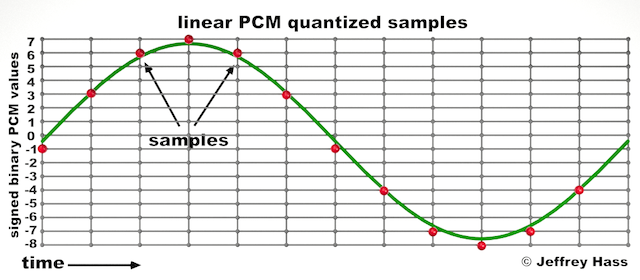
Audio quantization error is a fundamental aspect of digital audio processing. When analog sound waves are converted into digital signals, they undergo quantization. This means that the continuous analog signal is sampled and approximated in discrete steps. These steps are represented by binary values, typically in the form of bits (e.g., 16-bit, 24-bit). Now, what’s crucial to grasp here is that these discrete steps can lead to imperfections in audio reproduction.

Quantization error, often referred to as “quantization noise,” occurs when the actual analog signal deviates from the approximated digital representation. Imagine you have a beautiful painting, and you’re asked to replicate it using only a limited set of colors. The more restricted your color palette, the less accurate your reproduction will be. In the same way, the fewer bits you use for audio quantization, the more pronounced the quantization error becomes.

Quantization Levels and the Impact on Sound Quality

The number of quantization levels (related to bit depth) directly affects the precision of audio representation. For instance, a 16-bit audio recording has 65,536 possible levels, while a 24-bit recording provides a staggering 16,777,216 levels. This increased bit depth allows for a much finer representation of the original analog signal. Hence, a higher bit depth results in a reduction of quantization error, leading to superior sound quality.

To illustrate this, consider a grayscale image with only two colors: black and white. This is akin to an extremely low bit depth in audio, where the audio signal is either “on” or “off.” Now, imagine a high-resolution image with millions of colors, similar to the detail you get in a 24-bit audio recording. The difference in quality is apparent.

The Role of Dithering in Minimizing Quantization Error

One might wonder if there’s a way to mitigate quantization error in low-bit-depth audio recordings. Enter “dithering.” Dithering is a technique that introduces low-level noise to the audio signal, effectively spreading out the quantization error across a broader spectrum. Think of it as adding a sprinkle of fine grains of sand to a painting to blend the colors. This subtle noise masks the harshness of quantization error and makes it less noticeable to the human ear.

Now, as we’ve explored the fundamentals of audio quantization error, let’s delve into the questions that often arise:

How Does Quantization Error Affect Music Production?

In the realm of music production, quantization error can be a significant concern, particularly for professionals aiming to achieve top-tier sound quality. When producing music, especially in genres where subtle nuances are crucial, such as classical or jazz, quantization errors become more perceptible. To maintain audio fidelity, a higher bit depth is preferred during recording and production, ensuring minimal quantization noise.

Is There an Ideal Bit Depth for Audio Recording?

The ideal bit depth for audio recording is a subject of debate among audio enthusiasts. While 24-bit recording is commonly favored for its excellent dynamic range and low quantization error, it’s worth noting that the final audio format for most consumer applications, like CDs or streaming, is often 16-bit. The choice of bit depth should be based on the specific requirements of the project, keeping in mind the trade-off between audio quality and file size.

Can Quantization Error be Completely Eliminated?

Regrettably, quantization error cannot be entirely eliminated, as it’s an inherent part of the digital audio conversion process. However, it can be minimized to the point where it’s imperceptible to the human ear. Through techniques like dithering and the use of higher bit depths, the impact of quantization error can be significantly reduced, allowing for exceptional audio quality.

Last Words about Audio Quantization Error

In the ever-evolving world of audio technology, understanding audio quantization error is a fundamental step towards achieving superior sound quality. As an expert in the field, I’ve shared insights, experiences, and technical knowledge to demystify this concept. Remember, the bit depth you choose in audio recording significantly influences the extent of quantization error, and techniques like dithering play a pivotal role in mitigating its effects. The quest for pristine audio quality is an ongoing journey, but armed with this knowledge, you’re better equipped to make informed decisions in your audio endeavors.