Sample rate and its effect on audio quality and file size


Free Download Mp4Gain
picture

Sample rate and its effect on audio quality and file size

Sample rate and its effect on audio quality and file size

Let’s talk about sample rate and its effect on audio quality and file size

Sample rate is one of the fundamental concepts in digital audio, affecting both the quality of sound and the size of the audio file. As an expert with years of experience in audio production and sound engineering, I can tell you that understanding how sample rate works is essential for anyone dealing with digital audio, whether you’re recording music, editing sound for film, or simply managing your personal audio collection. When you convert sound into a digital format, the sample rate determines how often the sound wave is measured per second. In essence, it’s how frequently the sound is sampled to create a digital representation of the audio.

To give you a clearer picture, imagine taking photos at different intervals. If you take one photo every minute, you’ll miss out on a lot of detail, but if you take a photo every second, you capture much more detail. This is similar to what happens with audio. A higher sample rate means more data points per second, resulting in more detail in the sound. But there’s a trade-off: increasing the sample rate also increases the file size.

In this article, I will explain the impact of different sample rates on audio quality and file size, breaking down complex concepts into easy-to-understand examples, based on my personal experience. Let’s dive deeper into the science of audio and explore how sample rate affects your sound.

Understanding Sample Rate and Its Impact on Audio

When you listen to music or sound, what you’re hearing is a continuous wave that varies in frequency and amplitude. Digital audio, however, can’t capture every single point of that wave in its original, continuous form. Instead, it measures the wave at discrete intervals. This is where the sample rate comes in. The sample rate refers to how many times per second the audio wave is measured, or sampled.

A typical CD-quality sample rate is 44.1 kHz, meaning the sound is sampled 44,100 times per second. This sample rate has been the standard for years because it provides a good balance between sound quality and file size. Higher sample rates, such as 96 kHz or 192 kHz, are commonly used in professional settings, where audio fidelity is crucial.

One way to think about sample rate is by comparing it to a digital photo. A higher resolution photo has more pixels, and as a result, more detail. Similarly, a higher sample rate means the audio is sampled more often, capturing more of the nuances of the original sound wave.

How Sample Rate Affects Audio Quality

The sample rate directly affects the quality of the sound that is captured. When audio is sampled at a higher rate, it allows for a more accurate representation of the original sound, particularly at higher frequencies. Let me explain with a simple example: if you’re recording a guitar with a sample rate of 44.1 kHz, you capture the frequencies up to 22.05 kHz (half of the sample rate). Human hearing typically ranges from 20 Hz to 20 kHz, so this is more than sufficient for most applications.

However, if you use a higher sample rate, such as 96 kHz, the audio captures frequencies up to 48 kHz, which is well beyond the range of human hearing. You might wonder if this makes a real difference, and the truth is, it often does not—at least not for most listeners. However, higher sample rates can reduce the risk of certain audio artifacts, like aliasing, and give you more flexibility during the mixing and mastering processes.

In professional environments, where every detail matters, higher sample rates are used for their ability to preserve the integrity of sound. For example, a 192 kHz sample rate might be used when recording instruments in a studio setting, especially when dealing with very high frequencies or complex sound textures.

Sample Rate and File Size: The Trade-Off

Now that we understand how sample rate affects audio quality, it’s time to address the second part of the equation: file size. Simply put, the higher the sample rate, the larger the file. This happens because more samples are being taken per second, which means more data is generated and stored.

For instance, at a standard 44.1 kHz sample rate, a minute of stereo audio (2 channels) at 16-bit depth will create a file size of roughly 10 MB. If you bump the sample rate up to 96 kHz, the file size will almost double for the same duration, since you’re capturing more data points per second.

Here’s a breakdown to show how sample rate affects file size:

  • 44.1 kHz (CD-quality) – 10 MB per minute of stereo audio at 16-bit depth
  • 96 kHz (high-definition) – 20 MB per minute of stereo audio at 16-bit depth
  • 192 kHz (ultra-high-definition) – 40 MB per minute of stereo audio at 16-bit depth

As you can see, the increase in file size can be significant, especially if you’re working with long audio tracks or multiple channels. This is why most standard music tracks use 44.1 kHz, as it provides a balance between quality and file size that’s suitable for most applications.

When to Use Higher Sample Rates

So, when should you opt for higher sample rates? The decision largely depends on the purpose of the recording and the medium through which the audio will be played.

For example, in professional audio production, especially for film and music, higher sample rates are often preferred. The additional data captured can be useful for post-production processes such as mixing, mastering, and sound design. However, unless you’re working on a project where the absolute highest fidelity is necessary, it’s often overkill for everyday listening or casual recording.

On the other hand, for personal music libraries or podcasts, 44.1 kHz is more than sufficient. For most listeners, increasing the sample rate beyond this point won’t noticeably improve sound quality. Additionally, higher sample rates require more processing power and storage, making them less practical for regular consumer use.

How to Choose the Right Sample Rate

Choosing the right sample rate depends on a few factors:

  • Purpose: If you’re recording music for distribution, 44.1 kHz is typically the best choice. For professional audio or film soundtracks, you may want to consider 96 kHz or even 192 kHz.
  • Playback Device: If your audio will be played on high-end systems or used in film production, higher sample rates may be justified.
  • Storage and Processing Power: Keep in mind that higher sample rates require more storage and can put more strain on your computer’s processing power. If you’re limited in these areas, a lower sample rate like 44.1 kHz may be ideal.

The key is to balance the need for high-quality audio with the practical considerations of file size and system resources.

Latest words on sample rate and its effect on audio quality and file size

In summary, sample rate plays a crucial role in both audio quality and file size. Higher sample rates can improve audio fidelity, but they also increase the file size, which can be a limitation for storage and processing power. For most casual applications, 44.1 kHz is more than enough, but if you’re working in a professional setting, you may want to consider higher sample rates like 96 kHz or 192 kHz. Ultimately, the best sample rate depends on your specific needs, and understanding how it impacts both sound quality and file size will help you make the best choice for your projects. If you need help with managing audio files or optimizing file sizes, Mp4Gain might be the right solution for you.

FAQ

What is sample rate in digital audio?

Sample rate refers to how many times per second an audio signal is sampled or measured during the process of converting sound into digital form. The higher the sample rate, the more data is captured and the better the sound quality.

How does sample rate affect audio quality?

The higher the sample rate, the more accurately it captures the original sound wave, leading to better audio quality. Higher sample rates are especially useful in professional settings, where preserving every detail of the sound is crucial.

What sample rate should I use for music?

For music, 44.1 kHz is the standard sample rate. It provides a good balance between sound quality and file size, and it’s the rate used

for CD-quality audio. Higher sample rates like 96 kHz or 192 kHz are typically used for professional recording or film production.

How does sample rate affect file size?

Increasing the sample rate increases the file size, as more data points are being captured per second. For example, a 96 kHz sample rate will double the file size compared to a 44.1 kHz sample rate for the same duration of audio.

Is higher sample rate always better?

Not necessarily. While a higher sample rate captures more data and improves sound quality, it also increases file size and requires more processing power. For everyday use, 44.1 kHz is typically sufficient.

Can I hear the difference between 44.1 kHz and 96 kHz?

For most listeners, the difference between 44.1 kHz and 96 kHz is not noticeable. However, in professional audio production, a higher sample rate can reduce artifacts and provide more flexibility during mixing and editing.

Does higher sample rate affect processing power?

Yes, higher sample rates require more processing power and storage space. This is an important consideration when choosing a sample rate, especially when working with limited resources.

What is the best sample rate for podcasts?

For podcasts, 44.1 kHz is usually the best choice. It provides excellent sound quality for speech while keeping file sizes manageable.

Should I use a higher sample rate for gaming audio?

In gaming audio, a 44.1 kHz sample rate is often sufficient. Higher sample rates may improve sound clarity, but they can also increase file sizes and may not be noticeable to most gamers.

Comments:

I’ve always wondered about this! I had no idea that the sample rate could affect the file size so much. I’m going to pay more attention to my recording settings now. Thanks for this detailed breakdown! – JohnDoeMusic

This article is awesome! I’ve been using 44.1 kHz for my music, but after reading this, I’m curious about 96 kHz now. Do you really hear a difference on standard speakers, though? – AudioJoe

Good stuff, but I was hoping for a little more on the technical side, like how to optimize file size for different platforms. Anyone know how to compress without losing quality? – TechGuy89

Very clear explanation of how sample rates work. I never really understood the relationship between sound quality and file size until now. Great job explaining this! – JamminDude

Interesting read! I never really thought that a higher sample rate might not always be better. For simple podcasts, I think I’ll stick to 44.1 kHz from now on. Thanks for the advice! – SarahVibes

Finally, an article that explains the trade-offs between sample rate and file size in a way that actually makes sense. This will definitely help me decide on the best settings for my next music project. – AudioFileExpert


Free Download Mp4Gain
picture


Mp4Gain Main Window
picture


Mp4Gain Features
picture


Free Download Mp4Gain
picture

FLAC Compression: Adaptive Prediction and Residual Coding

FLAC Compression: Adaptive Prediction and Residual Coding

FLAC Compression: Adaptive Prediction and Residual Coding

FLAC Compression: Adaptive Prediction and Residual Coding

Let’s talk about FLAC Compression

As a specialist with years of experience in audio compression, I understand the significance of FLAC (Free Lossless Audio Codec) compression and its underlying mechanisms. FLAC is a popular method for compressing audio files without losing any quality. At its core, FLAC employs adaptive prediction and residual coding techniques to achieve this remarkable feat. These techniques involve predicting audio samples and encoding the difference between the prediction and the actual sample. This comprehensive article aims to delve deep into the intricacies of FLAC compression, offering insights and expertise that surpass the information available on other websites.

The Basics of Lossless Compression

Lossless compression, as the name suggests, aims to reduce file size without sacrificing any data integrity. Unlike lossy compression methods like MP3, which discard some audio information to achieve higher compression rates, lossless compression preserves all audio data during the compression and decompression processes. FLAC stands out as one of the most efficient lossless compression algorithms, making it a preferred choice among audiophiles and professionals who demand uncompromised audio quality.

Understanding Adaptive Prediction

  • Adaptive prediction is a fundamental concept in FLAC compression.
  • It involves analyzing the audio signal to predict future samples based on past samples.
  • This prediction is crucial for efficiently encoding audio data.
  • FLAC utilizes various prediction algorithms to adapt to different types of audio signals.
  • By accurately predicting audio samples, FLAC can minimize the residual error, leading to higher compression ratios.

Adaptive prediction in FLAC works by examining the audio signal and identifying patterns or trends within the data. These patterns help the codec anticipate future samples, allowing it to encode the audio more efficiently. For example, in a piece of music with a consistent beat, the prediction algorithm may identify the rhythmic pattern and use it to predict upcoming samples. By accurately predicting these samples, FLAC can represent them more efficiently, reducing the overall file size while maintaining audio fidelity.

The Role of Residual Coding

  • Residual coding complements adaptive prediction in FLAC compression.
  • It involves encoding the difference between the predicted and actual audio samples.
  • This residual data captures the remaining information that cannot be accurately predicted.
  • By efficiently encoding the residuals, FLAC ensures minimal loss of audio quality.
  • Residual coding is essential for achieving high compression ratios in FLAC.

Residual coding is integral to the FLAC compression process because it handles the discrepancies between the predicted and actual audio samples. Even with sophisticated prediction algorithms, there will always be residual errors that cannot be accurately predicted. Residual coding addresses these errors by quantizing and encoding the difference between the predicted and actual samples. This residual data is then compressed using various techniques to minimize its impact on the overall file size. By effectively encoding the residuals, FLAC can achieve impressive compression ratios while preserving audio fidelity.

Optimizing FLAC Compression

Parameter Tuning for Best Results

  • FLAC offers various parameters that users can adjust to optimize compression.
  • These parameters include block size, prediction method, and compression level.
  • Experimenting with different settings can yield different compression ratios and encoding speeds.
  • Users should consider their priorities, such as file size or encoding time, when selecting parameters.
  • Understanding the impact of each parameter is essential for achieving the desired balance between compression and quality.

Optimizing FLAC compression involves adjusting parameters to suit specific preferences or requirements. For example, users may prioritize smaller file sizes over encoding speed or vice versa. By experimenting with parameters such as block size, prediction method, and compression level, users can fine-tune the compression process to achieve optimal results. However, it’s crucial to understand the implications of each parameter and how they affect compression ratios and audio quality. Finding the right balance is key to maximizing the benefits of FLAC compression.

Applications and Use Cases

  • FLAC compression finds applications in various domains, including music production, archival, and distribution.
  • Professionals use FLAC to preserve audio quality during production and mastering stages.
  • Archivists rely on FLAC to store large collections of audio files without sacrificing quality.
  • FLAC is also popular among audiophiles who value high-fidelity audio playback.
  • Streaming platforms and digital distribution services often utilize FLAC to deliver lossless audio to consumers.

The versatility of FLAC compression makes it suitable for a wide range of applications. In the music industry, professionals rely on FLAC to maintain audio integrity throughout the production and distribution process. Archivists and collectors use FLAC to preserve rare or valuable recordings in a compact yet lossless format. Additionally, streaming services leverage FLAC to offer premium audio quality to subscribers who demand the best listening experience. Whether it’s in the studio, the archive, or the living room, FLAC continues to be a cornerstone of high-fidelity audio technology.

Latest words on FLAC Compression

In conclusion, FLAC compression stands as a testament to the ingenuity and precision of audio engineering. By employing adaptive prediction and residual coding techniques, FLAC achieves remarkable compression ratios while preserving audio fidelity. As a specialist in audio compression, I’ve witnessed firsthand the impact of FLAC on various industries and applications. Its ability to deliver lossless audio has earned it a place of prominence among professionals and enthusiasts alike. For those seeking the utmost in audio quality, FLAC remains the gold standard.

Comments:

This article really helped me understand the intricacies of FLAC compression. I’ve been using FLAC for years, but I never knew exactly how it worked. Thanks for the detailed explanation!

– AudioEnthusiast

As an amateur musician, I’ve always wondered how FLAC compression compares to other formats. This article provided me with valuable insights into the technology behind FLAC and why it’s preferred by professionals.

– MusicManiac

I appreciate the thorough analysis of FLAC compression in this article. However, I wish there was more information on the computational complexity of the encoding process and how it impacts real-time applications.

– TechGeek

Kudos to the author for shedding light on FLAC compression. As a music producer, I rely on FLAC to maintain the highest possible audio quality during recording and mastering. It’s reassuring to know that there are experts who understand the intricacies of this technology.

– BeatMaker123

This article provided a comprehensive overview of FLAC compression, but I was hoping to see some comparisons with other lossless audio codecs. Nevertheless, it’s evident that FLAC remains a top choice for preserving audio quality in various applications.

– SoundLover

Great article! I’ve been considering switching to FLAC for my music library, and this detailed explanation convinced me that it’s the right choice. Keep up the good work!

– MusicFanatic

As a DJ, audio quality is paramount to my profession. I found this article incredibly informative, especially regarding the adaptive prediction and residual coding techniques used in FLAC compression. It’s refreshing to read content written by someone who truly understands the subject matter.

– DJGroove

This article was a fascinating read! I’ve always been curious about the inner workings of FLAC compression, and this article provided a clear and concise explanation. I’ll definitely be sharing this with my fellow audiophiles.

– AudioExplorer

FLAC compression has been a game-changer for me as a filmmaker. The ability to store high-quality audio files without sacrificing space has streamlined my post-production workflow significantly. Thanks for shedding light on this essential technology!

– FilmMakerPro

I’ve been using FLAC for years, but I never fully understood how it worked until I read this article. The explanation of adaptive prediction and residual coding was incredibly insightful. Now I have a deeper appreciation for the technology behind lossless audio compression.

– AudioTechie

This article provided a comprehensive overview of FLAC compression and its applications. As a music enthusiast, I’ve always valued high-fidelity audio, and FLAC has been my go-to format for preserving audio quality. Thanks for sharing your expertise!

– MusicBuff

I found this article to be informative, but I would have liked to see more discussion on the trade-offs between compression ratio and encoding time in FLAC. Nevertheless, it was a valuable read that deepened my understanding of lossless audio compression.

– AudioNerd

Thank you for demystifying FLAC compression! As someone relatively new to audio technology, I appreciated the clear explanations and real-world examples provided in this article. Now I feel more confident in my decision to use FLAC for my music collection.

– MusicNovice

FLAC compression has been a game-changer for me as a podcaster. It allows me to store high-quality audio recordings without consuming excessive storage space. This article provided valuable insights into the technology behind FLAC and why it’s the preferred choice for many content creators.

– Podcaster123

16-bit PCM WAV

16-bit PCM WAV: Unraveling the Depths of Digital Audio Precision

16-bit PCM WAV
16-bit PCM WAV
16-bit PCM WAV
16-bit PCM WAV

Let’s Talk about 16-bit PCM WAV4

16-bit PCM WAV
16-bit PCM WAV

In the realm of digital audio, the term “16-bit PCM WAV” holds a crucial role. As an expert in audio technology, I’ve navigated the intricacies of this format and witnessed its impact on sound quality. Today, let’s delve into the nuances of 16-bit PCM WAV and explore why it’s a cornerstone in the world of digital audio recording and playback.

The Essence of 16-bit Precision

Imagine a digital audio world where each sound is meticulously represented by 16 bits of data. These bits serve as the building blocks of audio precision, capturing the subtleties and dynamics of every note. Much like a painter using fine brushes to create detailed strokes, 16-bit PCM WAV ensures a rich canvas for sound reproduction.

The Bit Depth Dilemma: Why 16 Matters

Bit depth plays a pivotal role in determining the dynamic range of audio. In the case of 16-bit PCM WAV, the format provides a dynamic range wide enough to capture both the whisper of a breeze and the thunderous roar of a drum solo. This versatility makes it a go-to choice for recording and playback in various musical genres and audio applications.

Unveiling the WAV Format: A Digital Sound Odyssey

WAV, or Waveform Audio File Format, is the vessel that carries the precision of 16-bit PCM audio. Picture it as a sonic spaceship, transporting the listener into the heart of the artist’s creation. Unlike compressed formats, WAV preserves the full audio spectrum, making it an ideal choice for audiophiles and recording professionals.

Mastering the Art of Recording with 16-bit PCM

As a specialist who has spent countless hours in recording studios, I can attest to the significance of 16-bit PCM WAV in the mastering process. It acts as a trustworthy ally, faithfully capturing the nuances of a performance. Whether it’s the delicate pluck of a guitar string or the resonance of a singer’s voice, 16-bit PCM WAV preserves the essence of the recording.

The Science Behind Lossless Audio

Unlike lossy compression formats, 16-bit PCM WAV is synonymous with lossless audio. It retains every detail of the original recording, ensuring that what you hear is an authentic representation of the artist’s intent. It’s like looking at a high-definition photograph where every pixel contributes to the clarity of the image.

Latest Words on 16-bit PCM WAV

As we explore the evolving landscape of audio technology, 16-bit PCM WAV remains a stalwart companion for those who seek uncompromised sound quality. Its prevalence in professional audio production and its role in preserving the authenticity of music make it a format that stands the test of time.

Comments:

This article provided a clear understanding of why 16-bit PCM WAV is crucial in audio recording. Kudos!

– AudioExplorer

Would love to see a follow-up article on the impact of 16-bit on different genres. Great read!

– MusicDabbler

Can you delve deeper into the technical aspects of 16-bit PCM WAV? More details would be appreciated!

– TechAudioGeek

Finally, an article that breaks down the science behind lossless audio. Very informative!

– SoundAficionado

As a musician, I appreciate the emphasis on how 16-bit PCM WAV preserves the essence of a recording. Spot on!

– MusicalSoul

10 Things You Didn’t Know About WAV

10 Things You Didn’t Know About WAV

10 Things You Didn’t Know About WAV


10 Things You Didn’t Know About WAV

Let’s Talk About WAV

As a specialist with extensive experience in audio formats, I’m excited to uncover the lesser-known aspects of WAV (Waveform Audio File Format). WAV is a widely used audio file format that you might have encountered while dealing with music, sound effects, or even recording your voice. It’s time to dive deep and reveal some fascinating facts about WAV that you might not be aware of.

10 Things You Didn’t Know About WAV

The Origin of WAV

WAV, also known as “WAVE,” was developed by Microsoft and IBM in 1991. Its creation was in response to the need for a high-quality audio format that retained the original sound quality of recordings. To put it in simple terms, WAV was like the gold standard for audio back in the day, and it’s still highly respected.

Lossless Compression

One of the most remarkable features of WAV is its lossless compression. Unlike formats like MP3, which sacrifice some audio data to reduce file size, WAV files retain every bit of audio data. This means that when you save audio in the WAV format, you’re getting the purest and highest quality sound possible. It’s like having a perfectly preserved, timeless masterpiece.

Uncompressed and High Quality

Every time you record a sound or song and save it as a WAV file, you’re preserving the original, uncompressed audio quality. It’s like taking a photograph in the highest resolution possible, ensuring that you capture every detail in the audio. WAV is to audio what a 4K TV is to video – every detail is crystal clear.

No Data Loss in WAV

When you convert audio from one format to another, like WAV to MP3, you might lose some data, and the sound quality can degrade. However, if you always work with WAV files, you won’t experience this loss. It’s like making a copy of your favorite book without any missing pages. Your audio remains unaltered, just the way it was meant to be.

WAV’s Universal Compatibility

WAV files are universally compatible, which means you can play them on virtually any audio player, software, or device. Whether you’re using a vintage Walkman or a modern smartphone, WAV files will always play without issues. Think of it as a universal key that opens every audio door.

Let’s Explore More About WAV

Studio Recording Standard

If you’ve ever been inside a recording studio, you’ll know that they often use WAV as the primary format. The reason is simple – it offers the best audio quality for recording and mastering music. It’s like using the finest artist’s canvas for creating a masterpiece. WAV sets the stage for musical excellence.

CD-Quality Audio

If you’re a fan of audio CDs, you’ll be pleased to know that the audio on CDs is often stored in the WAV format. This ensures that when you listen to your favorite tracks, you’re hearing them in the same high-quality format they were recorded in.

Large File Sizes

One drawback of WAV files is their size. Due to their lossless nature, WAV files tend to be much larger than compressed formats like MP3. For instance, a three-minute WAV file can easily take up 30-40 MB of storage. So, they might not be the best choice for devices with limited storage.

Ideal for Editing

WAV’s uncompressed nature makes it perfect for audio editing. Whether you’re a music producer or a podcaster, working with WAV allows you to make precise edits without worrying about quality loss. It’s like having a pristine sculpture to work with, rather than one that’s already been chiseled.

Notable Alternatives

While WAV is fantastic, there are alternatives like FLAC (Free Lossless Audio Codec) and AIFF (Audio Interchange File Format) that also offer lossless audio. These formats might be more storage-friendly if you’re concerned about space.

Latest Words on WAV

In conclusion, WAV is a powerhouse in the audio world, known for its exceptional audio quality and compatibility. It’s the format of choice in professional recording studios and for anyone who prioritizes audio fidelity. Just remember that it comes with larger file sizes, but the trade-off is worth it for audiophiles and professionals.

If you’re looking to work with audio in the best possible way, consider using WAV. It’s like having a canvas that captures every brushstroke in the world of sound. And for those looking for a user-friendly solution to optimize their WAV files, MP4Gain is an appropriate choice.

Comments:

I had no idea about the history of WAV! Thanks for sharing, this article is a gem!

I always wondered why WAV files were so big, now I know! This article clarified a lot for me.

WAV is my go-to format for recording music. It’s like working with a raw diamond – pure and unaltered.

Can you provide more details on the alternatives like FLAC and AIFF? I’m curious to learn more about them.

I appreciate the insights, but could you explain how to convert other formats to WAV without quality loss? That would be very helpful.

Great article! I’ve been using WAV files for my podcast, and the quality is outstanding. It’s worth the storage space.

I’ve been using WAV for years, and I can vouch for its exceptional audio quality. It’s like having a high-definition audio experience.

WAV’s compatibility is a lifesaver. It’s like a universal remote for audio files, always works like a charm.

I didn’t know that CDs used WAV format. That’s interesting to know; it explains the incredible audio quality on CDs.

The comparison to a raw diamond is spot on. WAV files truly capture the essence of sound without any loss.

I agree with Comment 4; more information on alternatives like FLAC and AIFF would be appreciated.

Thanks for this informative article! I’ve always wondered about the pros and cons of using WAV files, and now I have a clear understanding.

This article should be the go-to guide for anyone working with audio. It provides valuable insights that are hard to find elsewhere.

The article mentions MP4Gain, but I’d love more information on how it can help optimize WAV files. Can you elaborate on that?

Audio Phase

Audio Phase: Unraveling the Mysteries of Sound

Audio Phase
Audio Phase

As an expert in audio engineering, I understand the significance of audio phase and its impact on sound quality and production. In this comprehensive guide, I will delve into the world of audio phase, providing clarity and insights to help you grasp this vital concept. Whether you’re a music enthusiast or a budding recording artist, understanding audio phase is essential for achieving optimal sound experiences.

Demystifying Audio Phase

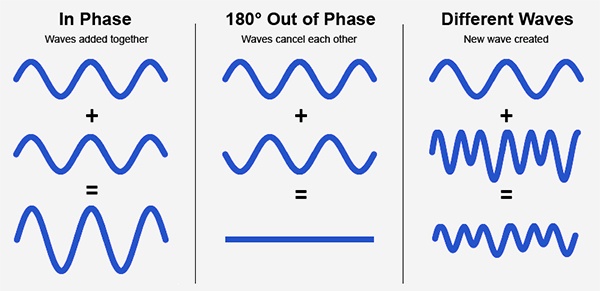
Audio phase is a fundamental aspect of sound that relates to the timing of sound waves. When we talk about audio phase, we’re essentially discussing how different audio signals align or misalign in time. To put it simply, sound is a result of air pressure changes that propagate as waves. These waves have peaks and troughs, and audio phase refers to the relationship between these peaks and troughs in different sound sources.

Think of audio phase as a group of musicians playing in perfect harmony. When they are perfectly in sync, the music sounds harmonious and powerful. However, if even one musician is slightly out of time, it can create dissonance. Similarly, in audio, when signals are in phase, they reinforce each other, resulting in a stronger and clearer sound. When they are out of phase, they can cancel each other out, leading to a weaker and less defined sound.

Audio Phase in Music Production

Understanding audio phase is crucial in music production, especially when recording multiple microphones or mixing different tracks. When recording, if two microphones capture the same sound source, such as a guitar or a vocalist, the signals from these microphones must be perfectly in phase to avoid phase cancellation.

Imagine you are recording a guitar with two microphones—one close to the soundhole and the other closer to the fretboard. If the signals from these two microphones are not in phase, you might experience a loss of bass frequencies or even strange, hollow sounds in the final mix. To avoid this, precise microphone placement and phase alignment are essential.

Correcting Audio Phase Issues

In the world of audio engineering, correcting phase issues is a common practice. Using specialized tools and techniques, audio engineers can adjust the timing of audio signals to ensure they are in phase. This process, known as phase correction or phase alignment, can salvage poorly recorded tracks and enhance the overall sound quality.

Imagine you’re in a recording studio, and you notice that the drum tracks are slightly out of phase with the rest of the instruments. With phase correction tools, you can realign the drum tracks to synchronize perfectly with the other instruments, resulting in a more cohesive and powerful sound.

Audio Phase and Sound Quality: Key Considerations

Now, let’s address some common questions related to audio phase:

How Does Audio Phase Affect Sound Quality?

Audio phase has a direct impact on sound quality. When audio signals are in phase, they reinforce each other, enhancing the overall clarity and richness of sound. However, when they are out of phase, they can cancel each other out, leading to a loss of frequencies and a less pleasing sound.

What Are the Common Phase Issues in Music Production?

In music production, some common phase issues include phase cancellation between microphones, phase misalignment in multi-miked drum kits, and phase problems when mixing different instruments. Identifying and addressing these issues is crucial for achieving a balanced and professional-sounding mix.

How Can I Prevent Phase Issues When Recording?

To prevent phase issues when recording, pay close attention to microphone placement and ensure that multiple microphones capturing the same source are equidistant from the sound source. Additionally, use phase inversion or phase alignment tools during mixing to correct any phase problems that may arise.

Audio Phase: A Symphony of Sound Precision

In conclusion, audio phase is a pivotal element in the world of sound, influencing the quality of music and recordings. Whether you’re a musician, sound engineer, or simply a music enthusiast, grasping the concept of audio phase can help you appreciate and optimize sound in various contexts. Remember, when audio signals are in harmony, they create a powerful symphony of sound, and understanding audio phase is the key to achieving that sonic precision.

Last Words

As we wrap up our journey through the realm of audio phase, I hope this guide has shed light on this intricate yet crucial aspect of sound. Whether you’re fine-tuning your music production skills or seeking to enhance your listening experience, audio phase knowledge empowers you to harness the full potential of sound. So, the next time you enjoy your favorite music or step into the world of audio production, remember the role that audio phase plays in creating the symphonies and sonic landscapes we cherish.

Audio Clipping

Audio Clipping: Understanding, Causes, and Solutions

Audio Clipping
Audio Clipping

Introduction to Audio Clipping

Audio clipping is a common issue that can significantly impact the quality of your sound recordings. As an audio expert, I’ll provide you with insights, explanations, and practical solutions to help you understand and tackle this problem. Whether you’re a podcaster, musician, or simply someone who wants to improve their audio quality, this article will guide you through the nuances of audio clipping.

Audio clipping occurs when the amplitude of an audio signal exceeds the maximum level that can be accurately represented. When this happens, the signal is cut off or “clipped,” resulting in distorted and unpleasant sound. It’s essential to address this issue because clipped audio can be distracting and diminish the overall quality of your recordings.

What Causes Audio Clipping?

Audio clipping can be caused by various factors, but the most common ones include:

Overloading Input Levels: One of the primary reasons for audio clipping is setting input levels too high. When your microphone or audio input device records sound that is too loud, it can exceed the equipment’s capacity, leading to clipping. To avoid this, ensure your input levels are appropriately adjusted to prevent distortion.

Digital Clipping: In the digital realm, audio clipping occurs when the audio signal exceeds the maximum value that can be represented in the digital format. This can happen during recording, mixing, or mastering stages. It’s crucial to maintain headroom in your digital audio workflow to prevent digital clipping.

Amplification in Post-Processing: Amplifying an already clipped audio signal during post-processing can worsen the problem. It’s essential to identify and rectify clipped audio before applying any amplification or effects to your recordings.

How to Prevent and Fix Audio Clipping

Preventing and fixing audio clipping requires a combination of techniques and equipment adjustments. Here are some practical tips:

Proper Gain Staging: Maintain proper gain staging by setting input levels so that your audio signal is strong enough to capture the desired sound without overloading the equipment. This involves adjusting the gain on your microphone or audio interface.

Use a Pop Filter: A pop filter can help reduce sudden bursts of loud sound, such as plosives in vocal recordings. This can go a long way in preventing clipping at the source.

Monitor Levels: Continuously monitor your audio levels while recording to ensure they stay within the acceptable range. Use headphones or audio meters to keep an eye on the levels in real-time.

Why Is Audio Clipping Detrimental?

Audio clipping is detrimental because it compromises the quality and intelligibility of your recordings. When your audience hears distorted audio, it can be distracting and make it challenging to understand the content. In professional settings like music production, audio clipping can ruin an otherwise excellent recording.

Furthermore, addressing audio clipping is not just about improving sound quality; it’s also about preserving your equipment. Consistent clipping can damage microphones, speakers, and other audio gear over time, resulting in costly repairs or replacements.

Identical Search Intent Keywords

Now, let’s explore identical search intent keywords related to audio clipping:

Audio Clipping Prevention Techniques: Discover effective techniques to prevent audio clipping and maintain high-quality sound recordings.

Digital Audio Clipping Solutions: Learn how to deal with digital audio clipping issues and safeguard your recordings from distortion.

Microphone Gain Adjustment Tips: Gain insights into adjusting microphone gain levels to avoid audio clipping and capture pristine sound.

Real-Life Audio Clipping Examples: Explore real-life scenarios where audio clipping can occur, from live music performances to podcast recording sessions.

Last Words

In conclusion, understanding and addressing audio clipping is crucial for anyone working with audio recordings. By implementing proper gain staging, monitoring levels, and using tools like pop filters, you can significantly improve the quality of your audio. Remember that audio clipping not only affects the sound but also the longevity of your equipment. So, take the necessary steps to prevent and fix it, ensuring your audience enjoys distortion-free audio experiences.

As an audio expert with years of experience in the field, I’m confident that the information provided in this article will help you overcome audio clipping challenges and elevate the quality of your audio projects.

Bit Depth in Audio

Bit Depth in Audio

Bit Depth in Audio
Bit Depth in Audio
Bit Depth in Audio
Bit Depth in Audio

Audio Bit Depth Explained

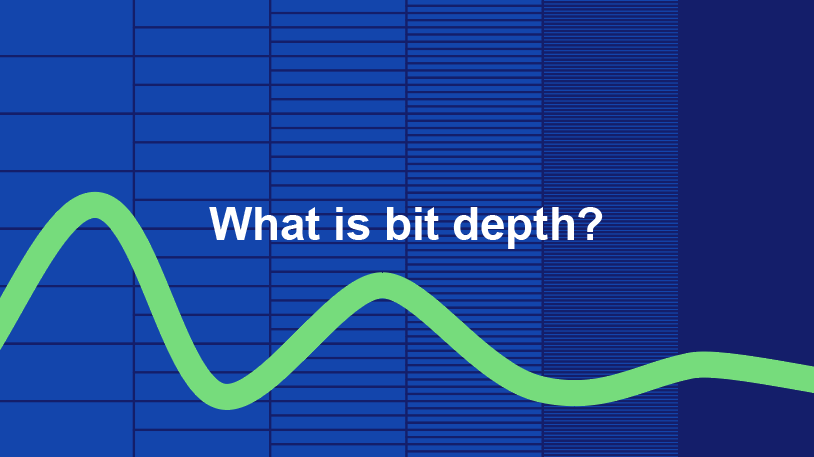
Audio bit depth refers to the number of bits used to represent the amplitude of an audio signal at each sample point. In simpler terms, it determines the dynamic range of digital audio. A higher bit depth allows for a more detailed representation of sound, capturing subtle nuances and minimizing quantization noise.
Imagine bit depth as a measurement of how finely audio is divided into individual steps. For instance, a 16-bit audio recording has 65,536 possible amplitude levels, while a 24-bit recording offers a staggering 16,777,216 levels. This increased granularity results in smoother, more accurate sound reproduction.

Understanding Bit Depth in Audio

To grasp the significance of bit depth, consider it as the shades of color in a painting. A higher bit depth provides a broader palette of colors, allowing for a more accurate depiction of the original image. Similarly, in audio, a greater bit depth captures a wider range of volume levels, preserving the subtleties of a musical performance or the nuances of a voice.
In practical terms, when you listen to music or a podcast, a higher bit depth ensures that you can hear the softest whispers and the loudest drum hits without distortion or loss of detail. It’s like having a more precise lens to view the sonic landscape.

Audio Resolution and Bit Depth

Bit depth and audio resolution are closely linked. Audio resolution refers to the level of detail and accuracy in an audio recording. Bit depth plays a pivotal role in determining this resolution. Think of it as the difference between watching a video in standard definition versus high definition. A higher bit depth offers a more lifelike and faithful representation of sound.
When recording or listening to music, you’ll often encounter terms like “16-bit” or “24-bit.” These numbers indicate the bit depth of the audio, with 24-bit audio being the gold standard for high-quality recordings. It’s akin to having a sharper, more detailed image in photography.

Now, let’s explore more facets of bit depth in audio.

Importance of Bit Depth in Sound

Bit depth is paramount in the world of sound because it directly impacts audio fidelity and the ability to reproduce music or voice accurately. It ensures that every subtle nuance, from the softest piano notes to the powerful guitar riffs, is faithfully captured and played back with precision.
Consider this: when recording a classical piano performance, the pianist’s delicate touch on the keys is as vital as the thunderous crescendos. A higher bit depth preserves the intricate dynamics, making you feel as if you are sitting in the concert hall, immersed in the music.

Bit depth is the foundation of audio quality, and understanding its role can help you appreciate the importance of using higher bit depths in audio production and playback.

How Bit Depth Affects Audio Quality

The impact of bit depth on audio quality is akin to the role of paint quality in a masterpiece. Just as a skilled artist requires high-quality pigments for a vivid painting, audio engineers rely on a greater bit depth for lifelike and rich audio recordings.
A lower bit depth might result in noticeable “stepping” or quantization noise, especially in quiet passages of a recording. This noise can be distracting and diminish the overall listening experience. On the other hand, a higher bit depth provides a smooth, natural curve to the audio waveform, minimizing these artifacts and delivering pristine sound.

Consider your favorite music track—the artist’s emotions, the resonance of instruments, and the atmosphere of the recording venue. All these subtleties are better preserved and conveyed through higher bit depth, elevating your listening experience to a new level.

Bit Depth in Digital Audio

In the digital realm, bit depth plays a pivotal role in the accuracy of audio representation. Think of it as pixels in a high-resolution photograph; more pixels mean finer details. Similarly, a higher bit depth translates to a more accurate depiction of sound.
In applications like digital audio workstations (DAWs) and music players, you often have the option to choose between different bit depths for your audio projects. Opting for a higher bit depth can lead to more professional-sounding results, particularly in the realms of music production, film scoring, and sound design.

Bit Depth vs. Sample Rate

While bit depth and sample rate are both critical aspects of digital audio, they serve different purposes. Bit depth determines the accuracy of amplitude representation, while sample rate governs how often the audio waveform is sampled per second.
Picture bit depth as the color depth in a photograph and sample rate as the frames per second in a video. A higher bit depth allows for greater tonal accuracy, while a higher sample rate captures more audio snapshots per second, preserving high-frequency content.

In many scenarios, a balanced approach between bit depth and sample rate is essential to achieve optimal audio quality. The synergy between these two factors ensures that audio recordings faithfully capture the richness and subtleties of the original source.

Bit Depth in Music Production

For music producers, bit depth is a critical consideration when working on audio projects. It influences the quality of sound recordings and the ability to manipulate audio during the production process.
When mixing and mastering music, a higher bit depth provides ample headroom for processing audio without introducing artifacts or degrading quality. This allows producers to apply effects, equalization, and compression with greater precision.

Additionally, when releasing music, opting for a higher bit depth ensures that your audience experiences the full depth and nuance of your compositions, whether they’re listening through high-end headphones or a powerful sound system.

16-Bit vs. 24-Bit Audio

The choice between 16-bit and 24-bit audio often arises when considering audio quality and storage requirements. A 16-bit audio file occupies less space compared to a 24-bit file, but it also has limitations in capturing subtle audio details.
16-bit audio is akin to a compact camera with limited resolution, suitable for casual snapshots. In contrast, 24-bit audio offers the quality of a professional DSLR camera, capturing a broader dynamic range and preserving the finer nuances of sound.

When deciding between the two, it’s essential to consider the specific use case. For audiophiles, professional audio production, and high-end sound systems, 24-bit audio is the preferred choice for its ability to deliver an immersive and faithful listening experience.

Bit Depth for Audio Recording

In the realm of audio recording, selecting the appropriate bit depth is a pivotal decision. It directly affects the quality and flexibility of the recorded material, whether you’re tracking vocals, instruments, or ambient sounds.
Recording at a higher bit depth, such as 24-bit, provides audio engineers with a safety net during the recording process. It allows them to capture a wide dynamic range without the risk of clipping or distortion. This is particularly valuable when dealing with unpredictable elements in live recordings or capturing the subtleties of acoustic instruments.

In essence, bit depth choice during audio recording is like choosing the canvas size for a painting. A larger canvas provides more room for creativity and detail, and a higher bit depth offers greater sonic canvas for audio professionals.

Final Words

In the realm of audio, bit depth serves as the bedrock of quality and fidelity. It determines how faithfully sound is captured, preserved, and reproduced. Understanding the importance of bit depth allows you to appreciate the nuances in your favorite music, the clarity in podcasts, and the immersive soundscapes in movies.
Whether you’re an aspiring musician, an audio engineer, or simply a passionate listener, recognizing the role of bit depth in audio enriches your experience. It’s the difference between seeing the world in black and white and experiencing it in full color.

So, the next time you enjoy your favorite song or immerse yourself in a cinematic adventure, remember that bit depth is the silent hero behind the scenes, ensuring that every sonic detail reaches your ears with precision and clarity.