Decoding MP4 File Structure: Understanding Atoms, Boxes, and Streams
Decoding MP4 File Structure: Understanding Atoms, Boxes, and Streams
Let’s talk about MP4 File Structure
When you hit play on a video, have you ever wondered what goes on behind the scenes? MP4 files, the common format for videos, hold a treasure trove of data. As an expert in digital media, I’ll guide you through the intricate world of MP4 file structure. Picture this: an MP4 file is like a treasure chest. It contains various components, each playing a crucial role in delivering your favorite videos seamlessly.
What are Atoms in MP4 Files?
Think of atoms as the building blocks of an MP4 file. Just like atoms make up matter, atoms in an MP4 file contain essential data. Each atom serves a specific purpose, holding metadata or media samples. For instance, the ‘ftyp’ atom declares the file type, ensuring compatibility with media players. Understanding these atoms is like deciphering the secret code to unlocking the file’s content.
Exploring Boxes in MP4 Files
Now, let’s dive deeper into the treasure chest and uncover the boxes within. In MP4 file structure, boxes encapsulate atoms, organizing them into manageable units. These boxes, also known as atoms, provide a hierarchical structure to the file. From the ‘moov’ box storing metadata to the ‘mdat’ box housing media samples, each box plays a vital role in ensuring smooth playback. Visualize these boxes as compartments in a storage unit, neatly arranging the file’s contents for easy access.
The ‘moov’ box: Holds metadata such as duration, tracks, and timestamps.
The ‘mdat’ box: Stores media samples like video frames and audio samples.
The ‘trak’ box: Defines individual tracks within the file, such as video, audio, or subtitles.
The ‘mvhd’ box: Contains metadata specific to the video track, like duration and frame rate.
Understanding Streams in MP4 Files
Now, let’s talk streams. Streams are the lifeblood of an MP4 file, carrying audio, video, and other multimedia data. Just like a river flows, streams deliver continuous data for playback. In an MP4 file, you’ll typically find separate streams for audio and video, each synchronized to ensure a seamless viewing experience. Imagine streams as lanes on a highway, with each lane dedicated to a specific type of data, ensuring smooth traffic flow.
Latest words on MP4 File Structure
As an expert in digital media, I’ve decoded the mysteries of MP4 file structure. Understanding atoms, boxes, and streams is like having a map to navigate the digital landscape. Whether you’re a content creator or a curious viewer, knowing how MP4 files work gives you a deeper appreciation for the magic of digital media.
Comments:
Wow, I never knew MP4 files were so complex! Thanks for breaking it down in a way I can understand. – VideoBuff123
This article opened my eyes to the inner workings of MP4 files. I’d love to learn more about how to edit them efficiently. – EditingWizard
MP4 files have always seemed like a black box to me, but now I feel more confident in understanding their structure. Great article! – TechEnthusiast22
Could you delve deeper into how MP4 files handle subtitles? I’m curious about the technical aspects behind it. – SubtitleFanatic
This article is a gem! I appreciate the clear explanations and real-life analogies used throughout. – DigitalNomad
As a budding filmmaker, understanding MP4 file structure is invaluable. Thanks for shedding light on this topic! – IndieDirector
Great breakdown! Now I feel equipped to troubleshoot any issues I encounter with MP4 files. – TechSupportGuru
This article deserves more recognition! It’s rare to find such comprehensive yet accessible explanations. – MediaGeek
Can you recommend any tools for analyzing MP4 file structure in more detail? – DataAnalyzer
As a content creator, understanding MP4 file structure is crucial for optimizing video production workflows. Thanks for the insights! – ContentCreatorPro
I’ve always been curious about the technical side of video files. This article satisfied my curiosity and then some! – CuriousMind
As an expert in digital audio formats, I’m excited to delve into the intricate world of MP3 frame structure and headers. Understanding these components is crucial for anyone involved in audio encoding, decoding, or manipulation. So, let’s break down the complexities and demystify the inner workings of MP3 files.
The Essence of MP3 Frames
To comprehend MP3 frame structure, we must first grasp the concept of frames. In the realm of digital audio, frames serve as the building blocks of encoded data. Each frame encapsulates a portion of audio information, making it possible for devices to decode and reproduce sound accurately.
Key Characteristics of MP3 Frames:
Fixed Length: MP3 frames typically have a fixed length, ensuring consistency in data processing.
Header Information: Every frame begins with a header containing vital details for decoding.
Audio Data: Following the header, the frame carries compressed audio data.
MP3 frames play a pivotal role in maintaining audio fidelity while minimizing file size, making them indispensable in the realm of digital audio.
Decoding MP3 Frame Headers
Now, let’s dissect the anatomy of MP3 frame headers, which hold crucial information for decoding audio streams accurately. Understanding these headers is akin to deciphering the DNA of an MP3 file, unlocking its contents for playback.
Components of MP3 Frame Headers:
Synchronization Bits: These sync bits mark the beginning of each frame, facilitating proper alignment during decoding.
Audio Parameters: Headers store essential details such as bitrate, sample rate, and stereo mode, guiding the decoding process.
Frame Length: Each header specifies the length of the frame, enabling efficient parsing of audio data.
By parsing the header information, audio players can accurately reconstruct the original audio waveform, ensuring faithful reproduction of the source material.
Optimizing MP3 Encoding Efficiency
In the quest for optimal audio quality and file size, understanding MP3 frame structure is paramount. By leveraging advanced encoding techniques and optimizing frame parameters, audio engineers can strike a balance between fidelity and compression.
Advanced Encoding Strategies:
Variable Bitrate (VBR): VBR encoding adjusts bitrate dynamically, allocating more resources to complex audio passages for enhanced quality.
Joint Stereo: Joint stereo encoding exploits spatial redundancy in audio streams, further reducing file size without sacrificing quality.
These advanced strategies empower audio professionals to create MP3 files that deliver exceptional quality while conserving storage space—a testament to the ingenuity of digital audio technology.
Exploring Future Trends in MP3 Technology
As we navigate the ever-evolving landscape of digital audio, it’s essential to stay abreast of emerging trends and technologies shaping the MP3 ecosystem. From immersive audio formats to advancements in compression algorithms, the future holds boundless possibilities for audio enthusiasts and professionals alike.
Future Directions:
Immersive Audio: With the rise of virtual reality and spatial audio, MP3 technology may evolve to support immersive soundscapes, enriching the listening experience.
AI-driven Compression: Machine learning algorithms could revolutionize MP3 encoding, enabling more efficient compression without compromising quality.
Streaming Optimization: As streaming platforms dominate the audio landscape, MP3 formats may undergo refinements to enhance streaming efficiency and quality.
By embracing these emerging trends and harnessing the power of innovation, the MP3 format is poised to remain a cornerstone of digital audio for years to come.
Latest words on MP3 Frame Structure and Headers
In conclusion, the intricacies of MP3 frame structure and headers underscore the remarkable ingenuity behind digital audio encoding. From the humble beginnings of the MP3 format to its ubiquitous presence in today’s digital landscape, understanding these fundamental concepts is essential for anyone involved in audio production, distribution, or consumption.
Comments:
Wow, this article really helped me understand the technical aspects of MP3 files! I had no idea about the complexities behind frame headers.
I’ve been searching for a comprehensive guide on MP3 encoding, and this article exceeded my expectations. Great job!
Could you please provide more details on the differences between MPEG-1 and MPEG-2 audio layers? I’d love to learn more about their impact on MP3 frame structure.
This article perfectly explained why some MP3 files sound better than others despite having the same bitrate. Understanding psychoacoustic modeling is a game-changer!
As a musician, I appreciate the insights into optimizing MP3 encoding efficiency. It’s fascinating how technology can enhance the audio production process.
Great article! I’m excited to see how AI-driven compression will shape the future of MP3 technology. The possibilities are endless!
Thanks for shedding light on the future trends in MP3 technology. As a streaming enthusiast, I’m curious to see how immersive audio formats will revolutionize the listening experience.
This article helped me troubleshoot some issues with my MP3 files. Now I understand why certain files were causing compatibility problems across devices.
As a podcast producer, I found this article incredibly informative. It’s essential to optimize MP3 encoding for seamless streaming and distribution.
Thank you for demystifying MP3 frame structure and headers! This article provided valuable insights that will enhance my audio production workflow.
As a specialist with extensive experience in audio and video codecs, let me delve into the intricacies of AC-3 audio codec in the AVI container format. AC-3, also known as Dolby Digital, is a widely used audio codec known for its efficiency in compressing audio without significant loss in quality. When combined with AVI, a popular multimedia container format, it becomes essential to understand how AC-3 works within this framework to ensure optimal audio quality and compatibility.
When it comes to multimedia playback and distribution, compatibility is key. AC-3 codec in AVI files ensures that audio content is efficiently compressed while maintaining high-quality playback. Understanding the nuances of this codec and its integration with the AVI format is crucial for anyone working with multimedia content, whether it’s for professional editing or casual playback.
Understanding AC-3 Audio Codec
The AC-3 audio codec, developed by Dolby Laboratories, is renowned for its ability to compress audio streams while preserving audio quality. It employs perceptual coding techniques to reduce the file size without compromising on fidelity, making it ideal for various applications, including DVDs, Blu-ray discs, streaming services, and digital broadcasts.
Perceptual Coding
Perceptual coding is a technique used by AC-3 to remove audio data that is less perceptible to the human ear. By analyzing the audio signal and removing redundant or less essential information, AC-3 achieves significant compression ratios while maintaining audio quality. This process is essential for minimizing file size without sacrificing the listening experience.
Channel Configuration
AC-3 supports various channel configurations, including mono, stereo, and surround sound setups. It allows content creators to deliver immersive audio experiences tailored to the capabilities of playback devices. Whether it’s a simple stereo setup or a sophisticated surround sound system, AC-3 ensures that the audio is optimized for the intended environment.
Bitrate Control
Bitrate control is crucial for balancing audio quality and file size. AC-3 provides flexible bitrate control options, allowing users to adjust the compression level according to their specific needs. Higher bitrates result in better audio quality but larger file sizes, while lower bitrates sacrifice some quality for reduced file size. Finding the right balance is essential for optimizing audio performance in AVI files.
Integration with AVI Container Format
AVI (Audio Video Interleave) is a multimedia container format developed by Microsoft, commonly used for storing audio and video content. It supports various audio and video codecs, including AC-3 for audio compression. When AC-3 is used in conjunction with AVI, it offers a versatile solution for storing multimedia content with efficient audio compression.
Compatibility
One of the key advantages of using AC-3 in AVI files is compatibility. Most media players and editing software support AVI files with AC-3 audio, ensuring seamless playback and editing workflows. Whether you’re creating multimedia presentations, editing home videos, or distributing digital content, AC-3 in AVI provides a reliable solution that works across different platforms and devices.
File Size Optimization
By utilizing AC-3 audio compression, AVI files can maintain high audio quality while keeping file sizes manageable. This is especially important for applications where storage space or bandwidth is limited, such as online streaming or portable media devices. AC-3’s efficient compression algorithms help reduce the overall footprint of AVI files without sacrificing audio fidelity.
Flexibility in Editing
When working with AVI files containing AC-3 audio, editing flexibility is crucial. AC-3’s compatibility with popular editing software allows users to manipulate audio tracks without compromising quality. Whether it’s adjusting volume levels, applying effects, or synchronizing audio with video, AC-3 ensures that editing workflows remain smooth and efficient.
Latest words on AC-3 Audio Codec in AVI
In conclusion, understanding the role of AC-3 audio codec in AVI is essential for anyone involved in multimedia production, distribution, or playback. By leveraging the capabilities of AC-3 within the AVI container format, users can ensure optimal audio quality, compatibility, and flexibility in various multimedia applications. Whether you’re a professional filmmaker, content creator, or casual enthusiast, AC-3 in AVI offers a reliable solution for delivering immersive audio experiences.
Remember, when it comes to multimedia, audio quality matters. By choosing AC-3 codec in AVI, you’re not just compressing audio – you’re preserving the essence of sound, ensuring that every listening experience is as immersive and enjoyable as possible.
Comments:
Wow, I never knew AC-3 audio codec could be so important for AVI files! Thanks for the detailed explanation!
Could you provide more information about the compatibility of AC-3 in different media players?
I’ve been struggling with audio quality in my AVI files. This article helped me understand how AC-3 can make a difference.
As a filmmaker, I appreciate articles like this that dive deep into technical aspects. Great job!
Does AC-3 work well with older AVI files, or is it better suited for newer formats?
This article convinced me to try using AC-3 in my next multimedia project. Excited to see the results!
Thanks for explaining the benefits of AC-3 in AVI. I’ll definitely keep this in mind for future projects.
Can you recommend any software for editing AVI files with AC-3 audio?
Great article! It’s refreshing to find such in-depth information on niche topics like this.
More articles like this, please! It’s hard to find reliable information on multimedia technologies.
I had no idea AC-3 had such a significant impact on audio quality. Thanks for enlightening me!
Exploring the WAV File Format for 3D Audio Applications
WAV File Format for 3D Audio Applications
Let’s talk about WAV Files
When it comes to 3D audio applications, the WAV file format emerges as a cornerstone. As a specialist in audio technology, I’ve witnessed the profound impact of WAV files in creating immersive audio experiences. From gaming to virtual reality (VR) simulations, WAV files serve as the backbone for delivering spatially accurate soundscapes.
The Basics of WAV Files
Understanding WAV Format: WAV, short for Waveform Audio File Format, is a widely-used audio file format developed by Microsoft and IBM. It’s known for its uncompressed, lossless audio quality, making it ideal for preserving the fidelity of audio recordings.
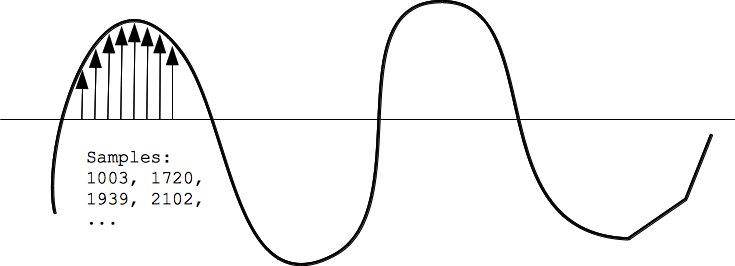
Audio Data Representation: WAV files store audio data in a linear PCM (Pulse Code Modulation) format, which means that each sample is represented as a numerical value. This representation allows for precise reproduction of the original audio waveform.
Metadata and Header Information: In addition to audio data, WAV files contain metadata and header information, including sample rate, bit depth, and number of channels. This metadata ensures compatibility and proper playback across different audio devices and software platforms.
Optimizing WAV Files for 3D Audio
Spatial Audio Encoding: One of the key advantages of WAV files in 3D audio applications is their support for multi-channel audio. By encoding audio data for each channel separately, WAV files enable the creation of immersive sound environments with spatial depth and directionality.
High-Fidelity Audio: Unlike compressed audio formats like MP3, which sacrifice some audio quality for smaller file sizes, WAV files retain the original audio data without any loss in quality. This makes WAV an ideal choice for 3D audio applications where audio fidelity is paramount.
Integration with 3D Audio Engines: WAV files seamlessly integrate with 3D audio engines and rendering algorithms, allowing developers to accurately position and manipulate sound sources within a three-dimensional space. This capability is essential for creating realistic audio environments in VR games, augmented reality (AR) experiences, and architectural simulations.
Advanced Techniques for 3D Audio Rendering
Binaural Audio Rendering: WAV files can be encoded with binaural audio recordings, capturing the subtle cues that our ears use to localize sound in space. When played back through headphones, binaural WAV files create an immersive listening experience, simulating the sensation of sound coming from different directions.
Ambisonic Audio Support: WAV files also support Ambisonic audio, a spatial audio format that captures sound from all directions using a spherical microphone array. By encoding Ambisonic audio in WAV format, content creators can deliver fully immersive audio experiences with precise spatial positioning and orientation.
Real-Time Processing: In live performances and interactive applications, WAV files offer low latency and real-time processing capabilities, allowing for dynamic manipulation of audio parameters such as volume, pitch, and spatialization. This real-time flexibility is essential for creating interactive 3D audio experiences that respond to user input and environmental changes.
Latest Words on WAV Files and 3D Audio
In conclusion, WAV files are indispensable tools for creating immersive 3D audio experiences. Their uncompressed, lossless format ensures pristine audio quality, while their support for multi-channel audio and spatial encoding makes them ideal for spatial audio applications. As a specialist in audio technology, I believe that WAV files will continue to play a crucial role in shaping the future of 3D audio, offering content creators unparalleled flexibility and fidelity in audio production.
Comments:
This article provided a comprehensive overview of WAV files and their application in 3D audio. As a sound designer, I appreciate the emphasis on spatial audio encoding techniques and real-time processing capabilities.
– AudioEnthusiast22
Could you elaborate on how WAV files compare to other uncompressed audio formats like AIFF? I’m curious to know if there are any significant differences in their support for 3D audio applications.
– SoundTechPro
This article shed light on the importance of WAV files in 3D audio applications. As a gamer, I’ve noticed a significant difference in immersion when games use WAV files for spatial audio rendering.
– GamingGuru99
WAV files have been my go-to format for 3D audio projects, and this article reaffirmed their importance in preserving audio fidelity and spatial accuracy. Thanks for the insightful analysis!
– AudioProducer123
I was hoping for more technical details on how WAV files are encoded and decoded for 3D audio applications. Nonetheless, this article provided a solid overview of their significance in immersive audio experiences.
– TechNerd456
As a VR enthusiast, I’m always looking for ways to enhance the realism of virtual environments. WAV files seem to be a crucial piece of the puzzle in achieving lifelike 3D audio simulations.
– VRAdventurer
This article offered valuable insights into the role of WAV files in 3D audio applications. I appreciated the focus on advanced techniques such as binaural audio rendering and Ambisonic support.
– AudioTechFanatic
It’s refreshing to see an article that explores the technical aspects of WAV files and their relevance in modern audio production. I’m looking forward to experimenting with WAV files in my upcoming 3D audio projects.
– MusicProducer2023
This article provided a clear explanation of how WAV files are utilized in 3D audio applications. As a student studying sound design, I found the section on real-time processing particularly insightful.
– SoundDesignStudent
As an audio engineer, I can attest to the importance of WAV files in delivering high-quality, spatially accurate audio experiences. This article provided a comprehensive overview of their role in 3D audio production.
Error Detection and Correction in AAC Audio Encoding
Error Detection and Correction in AAC Audio Encoding
Exploring the Importance of Error Detection and Correction
As an authority in audio encoding technologies, delving into the intricate mechanisms of error detection and correction in AAC (Advanced Audio Coding) encoding is paramount. AAC stands as a cornerstone in modern audio compression, offering exceptional sound quality and efficiency. However, even the most advanced encoding algorithms are susceptible to errors that can degrade audio quality. Hence, understanding how error detection and correction mechanisms function within AAC encoding is crucial for ensuring pristine audio reproduction across various platforms and devices.
Understanding AAC Audio Encoding
AAC, a successor to the popular MP3 format, revolutionized audio compression with its ability to deliver superior sound quality at lower bitrates. Utilizing sophisticated algorithms such as psychoacoustic modeling and transform coding, AAC achieves remarkable compression efficiency without significant loss of audio fidelity. This makes it the preferred choice for a wide range of applications, including digital music streaming, video conferencing, and multimedia content distribution.
Psychoacoustic Modeling and Transform Coding
Psychoacoustic Modeling: AAC analyzes the human auditory system’s characteristics to identify sounds that are perceptually irrelevant. By discarding such information, AAC minimizes data redundancy without compromising perceived audio quality.
Transform Coding: AAC employs mathematical transformations, such as the Modified Discrete Cosine Transform (MDCT), to convert audio signals into frequency-domain representations. This enables efficient compression by removing redundant information and quantizing the remaining data for storage or transmission.
The Role of Error Detection and Correction
In the realm of AAC encoding, error detection and correction mechanisms serve as safeguards against data corruption during transmission or storage. These mechanisms aim to identify erroneous bits or packets and either rectify them or mitigate their impact on audio playback. By ensuring data integrity, error detection and correction techniques contribute to a seamless and immersive audio experience for listeners.
Types of Errors in AAC Encoding
Bit Errors: Occur when individual bits within an AAC stream are altered or lost due to transmission errors or storage degradation.
Packet Loss: Refers to the loss of entire AAC packets during transmission, typically caused by network congestion or packet collisions.
Interference: External electromagnetic interference or signal degradation can introduce errors into the AAC audio stream, affecting playback quality.
Error Detection Techniques
Cyclic Redundancy Check (CRC)
CRC is a widely used error detection technique in AAC encoding, where a checksum is calculated for each data packet. Upon receiving the packet, the checksum is recalculated, and any discrepancies indicate data corruption. While CRC can detect errors, it lacks the capability to correct them.
Parity Checking
Parity checking involves adding an additional parity bit to each byte of data, ensuring that the total number of set bits (either 0 or 1) is always even or odd. Discrepancies in parity indicate errors, allowing for their detection. However, parity checking is limited in its ability to correct errors.
Forward Error Correction (FEC)
FEC techniques, such as Reed-Solomon codes, introduce redundant information into the AAC stream, enabling the receiver to reconstruct missing or erroneous data. By leveraging redundancy, FEC can correct errors without the need for retransmission, making it particularly effective in error-prone environments.
Error Correction Strategies
Interpolation
Interpolation involves estimating missing or erroneous audio samples based on neighboring samples. While interpolation can mitigate minor errors, it may introduce artifacts or distortions in the audio signal, impacting overall quality.
Concealment
Concealment techniques aim to mask errors by replacing corrupted audio segments with synthesized or redundant data. Advanced concealment algorithms analyze surrounding audio frames to generate seamless replacements, minimizing perceptible artifacts.
Retransmission
In cases of severe packet loss or data corruption, retransmission protocols can request the retransmission of lost AAC packets from the sender. While effective, retransmission mechanisms may introduce latency and overhead, particularly in real-time streaming applications.
Enhancing AAC Error Resilience
As AAC continues to evolve, advancements in error resilience techniques play a vital role in enhancing audio quality and reliability. By combining robust error detection mechanisms with adaptive error correction strategies, AAC encoding can withstand varying transmission conditions and deliver unparalleled audio fidelity.
Latest words on Error Detection and Correction in AAC Audio Encoding
In conclusion, error detection and correction are integral components of AAC audio encoding, ensuring data integrity and preserving audio quality in diverse playback scenarios. By leveraging sophisticated error detection techniques such as CRC, parity checking, and FEC, alongside adaptive error correction strategies like interpolation, concealment, and retransmission, AAC encoding can deliver a seamless and immersive audio experience for listeners worldwide.
Comments:
This article provided a comprehensive overview of error detection and correction in AAC audio encoding. As an audio engineer, I found the insights into FEC and interpolation particularly valuable for optimizing audio quality.
Great article! However, I would have liked to see more discussion on real-world applications of error correction strategies in AAC encoding, especially in the context of streaming platforms and mobile devices.
As someone new to AAC encoding, I found this article incredibly informative. The explanations were clear, and the examples provided made complex concepts easy to understand. Looking forward to more content like this!
This article highlighted the importance of error detection and correction in ensuring audio quality in AAC encoding. The discussion on CRC, parity checking, and FEC techniques was insightful and helped deepen my understanding of the topic.
While the article provided a solid overview of error detection and correction in AAC encoding, I was hoping for more insights into emerging technologies and trends shaping the future of audio compression. Nonetheless, it was a valuable read.
As an avid music enthusiast, I appreciate articles like this that shed light on the intricate processes behind audio encoding. The explanations were thorough, and the examples provided helped illustrate key concepts effectively.
Thank you for this informative article! I’ve always been curious about how error detection and correction work in AAC encoding, and this article provided the clarity I was seeking. Keep up the great work!
This article was a great introduction to error detection and correction in AAC encoding. As a software developer working with audio applications, I found the insights into FEC and retransmission protocols particularly valuable for optimizing error resilience.
While I enjoyed reading this article, I wish there was more discussion on the trade-offs associated with different error correction strategies in AAC encoding. Nonetheless, it provided a solid foundation for understanding the topic.
When it comes to audio file formats and encoding techniques, understanding WMA (Windows Media Audio) Variable Bit Rate (VBR) encoding can significantly enhance your audio experience. As a specialist with years of experience in audio engineering, I’ve delved deep into the intricacies of WMA VBR encoding and its implications for audio quality and file size optimization.
What is WMA VBR Encoding?
At its core, WMA VBR encoding is a method used to compress audio files while maintaining a variable level of quality throughout the encoding process. Unlike constant bit rate (CBR) encoding, which encodes audio at a fixed bit rate, VBR encoding adjusts the bit rate dynamically based on the complexity of the audio being encoded. This means that simpler audio passages are encoded at a lower bit rate, while more complex passages are encoded at a higher bit rate, resulting in superior audio quality with smaller file sizes.
The Benefits of WMA VBR Encoding
One of the key advantages of WMA VBR encoding is its ability to preserve audio quality while minimizing file size. By dynamically adjusting the bit rate, WMA VBR encoding ensures that audio files maintain a consistent level of quality, even during passages of varying complexity. This makes it ideal for streaming audio over the internet or storing music on portable devices with limited storage capacity.
Moreover, WMA VBR encoding offers greater flexibility compared to CBR encoding. With CBR encoding, audio files are encoded at a fixed bit rate, which can result in wasted space for simpler passages and reduced audio quality for complex passages. In contrast, WMA VBR encoding adapts to the specific characteristics of the audio being encoded, maximizing efficiency and preserving quality.
How WMA VBR Encoding Works
To understand how WMA VBR encoding works, it’s essential to grasp the concept of psychoacoustic modeling. Psychoacoustic modeling is a technique used in audio encoding to take advantage of the limitations of human hearing. By analyzing the frequency and amplitude of audio signals, psychoacoustic models identify sounds that are less likely to be perceived by the human ear and allocate fewer bits to encode them.
During the WMA VBR encoding process, audio is divided into small segments, and a psychoacoustic model analyzes each segment to determine the appropriate bit rate for encoding. Simple segments with fewer audible details are encoded at a lower bit rate, while complex segments with more audible details are encoded at a higher bit rate. This adaptive approach ensures that audio quality is maintained while minimizing file size.
Comparing WMA VBR Encoding to Other Methods
While WMA VBR encoding offers many benefits, it’s essential to compare it to other encoding methods to understand its place in the audio landscape. One common alternative to WMA VBR encoding is constant bit rate (CBR) encoding, which encodes audio at a fixed bit rate regardless of its complexity. While CBR encoding is simple and predictable, it may result in larger file sizes and reduced audio quality compared to WMA VBR encoding.
Another alternative is variable bit rate (VBR) encoding using other codecs, such as MP3 or AAC. While these codecs also offer VBR encoding capabilities, WMA VBR encoding is specifically optimized for the Windows Media Audio format, offering seamless integration with Windows-based devices and software.
Optimizing Audio Quality with WMA VBR Encoding
As an audio engineer, I’ve found that mastering the art of WMA VBR encoding can significantly enhance the quality and efficiency of audio production workflows. By leveraging the adaptive nature of VBR encoding and the power of psychoacoustic modeling, audio professionals can achieve superior results with minimal effort.
When using WMA VBR encoding, it’s essential to consider factors such as target audience, playback environment, and distribution platform. By tailoring encoding settings to specific requirements, you can ensure that your audio files meet the highest standards of quality and compatibility.
In conclusion, WMA VBR encoding represents a powerful tool for audio professionals and enthusiasts alike. Its ability to preserve audio quality while minimizing file size makes it ideal for a wide range of applications, from streaming audio over the internet to storing music on portable devices. By mastering the principles of WMA VBR encoding, you can take your audio projects to the next level and deliver an exceptional listening experience to your audience.
Preserves audio quality
Minimizes file size
Adapts to audio complexity
Optimizes efficiency
Seamless integration with Windows devices
Latest words on WMA Variable Bit Rate Encoding
When it comes to audio encoding, WMA VBR encoding stands out as a versatile and efficient solution. Its adaptive nature and integration with Windows-based devices make it a popular choice for audio professionals and enthusiasts alike. By mastering the principles of WMA VBR encoding, you can unlock new possibilities for audio production and distribution.
Comments:
Wow, I never knew there was so much to learn about audio encoding! This article really opened my eyes to the world of WMA VBR encoding. Thanks for the insightful information!
I’ve been struggling to optimize the audio quality of my music files, but this article provided some valuable insights into WMA VBR encoding. I can’t wait to try it out and see the results!
This article did a great job of breaking down the complexities of WMA VBR encoding in a way that’s easy to understand. I feel much more confident in my ability to use this technique effectively now.
As someone who’s passionate about audio production, I found this article to be incredibly informative and well-written. It’s clear that the author has a deep understanding of the subject matter.
I’ve been looking for ways to optimize the audio quality of my podcast recordings, and this article provided some valuable tips on using WMA VBR encoding. I can’t wait to implement these strategies in my workflow!
This article was a game-changer for me! I never realized how much of a difference WMA VBR encoding could make in terms of audio quality and file size. Thanks for sharing this valuable information!
As an aspiring audio engineer, I found this article to be incredibly helpful in understanding the principles of WMA VBR encoding. It’s clear that the author has a wealth of knowledge on the subject.
This article provided some fascinating insights into the world of audio encoding. I never knew there were so many factors to consider when optimizing audio quality!
Thanks for this informative article! I’ve been searching for ways to improve the audio quality of my video projects, and WMA VBR encoding seems like the perfect solution.
This article was a bit too technical for my taste, but I appreciate the effort to explain the concepts of WMA VBR encoding in layman’s terms. It’s definitely a topic worth exploring further!
WAV File Compression: Lossless vs. Lossy Approaches
WAV File Compression: Lossless vs. Lossy Approaches
Let’s talk about WAV File Compression
Hey there, fellow music enthusiast! Are you wondering about the best ways to compress your WAV files without sacrificing quality? Well, you’ve come to the right place. As a seasoned audio engineer with years of experience in the industry, I’m here to guide you through the intricacies of WAV file compression, specifically exploring the differences between lossless and lossy approaches. By the end of this article, you’ll have a solid understanding of the various compression methods available and how to choose the right one for your needs.
Understanding WAV Files
Before diving into compression techniques, let’s quickly revisit what WAV files are. WAV (Waveform Audio File Format) is a widely used audio file format known for its uncompressed, high-quality sound. Unlike formats like MP3 or AAC, which use lossy compression to reduce file size, WAV files retain all the original audio data captured during recording. As a result, they offer pristine audio fidelity but tend to have larger file sizes.
Lossless Compression
Lossless compression preserves all the original audio data while reducing file size.
Techniques such as FLAC (Free Lossless Audio Codec) and ALAC (Apple Lossless Audio Codec) are commonly used for WAV file compression.
These methods achieve compression by identifying and eliminating redundant or unnecessary data without compromising audio quality.
Lossless compression is like packing a suitcase efficiently – you’re maximizing space without leaving anything behind. It’s perfect for situations where maintaining audio integrity is paramount, such as professional music production or archival purposes. Plus, with lossless compression, you can always unpack your files without any loss of quality.
Lossy Compression
Lossy compression sacrifices some audio quality to achieve greater file size reduction.
Popular formats like MP3 and AAC use lossy compression algorithms.
During compression, non-essential audio data is discarded based on psychoacoustic principles, resulting in smaller file sizes.
Think of lossy compression as decluttering your room – you’re getting rid of unnecessary items to free up space. While this approach may lead to some loss of audio detail, it’s often imperceptible to the average listener, making it ideal for streaming, portable devices, and online distribution.
Choosing the Right Compression Method
Now that you understand the differences between lossless and lossy compression, how do you decide which method to use? It ultimately depends on your specific needs and priorities.
Considerations for Lossless Compression
If you require the highest possible audio quality without compromise, lossless compression is the way to go.
Lossless formats are well-suited for professional audio production, mastering, and archival purposes.
They’re also ideal for situations where storage space isn’t a significant concern.
For audiophiles and professionals who demand pristine sound reproduction, lossless compression offers the best of both worlds – reduced file sizes without sacrificing audio fidelity.
Considerations for Lossy Compression
Lossy compression is more suitable for scenarios where file size is a primary consideration.
If you’re distributing music online, streaming content, or using portable devices with limited storage capacity, lossy formats are a practical choice.
Most listeners won’t notice the slight loss in quality introduced by lossy compression, especially when listening through typical consumer audio equipment.
While purists may prefer the uncompromising quality of lossless formats, the convenience and efficiency of lossy compression make it a practical solution for everyday audio needs.
Conclusion
In the realm of WAV file compression, choosing between lossless and lossy approaches boils down to finding the right balance between audio quality and file size. Whether you prioritize pristine fidelity or efficient storage, there’s a compression method suited to your needs. By understanding the differences between these approaches, you can make informed decisions when managing your audio library or preparing content for distribution. So go ahead, experiment with different compression techniques, and enjoy the best of what WAV files have to offer!
Comments:
This article is so helpful! I’ve been struggling to understand the difference between lossless and lossy compression, but now it’s crystal clear. Thanks a bunch!
As a musician, I appreciate the detailed explanation of WAV file compression. It’s essential to strike the right balance between quality and file size, and this article nails it!
Could you dive deeper into the technical aspects of lossless compression algorithms? I’m intrigued by the science behind it and would love to learn more.
I’ve been using MP3 files for years without realizing there was a difference between lossy and lossless compression. This article opened my eyes to a whole new world of audio quality!
As a DJ, file size is always a concern when managing my music library. Learning about the pros and cons of lossless and lossy compression helps me make smarter choices when selecting formats for my tracks.
Great article! I appreciate the practical examples and real-world comparisons. Understanding WAV file compression is crucial for anyone working with audio, and this article delivers the information in an accessible way.
Could you provide some recommendations for software or tools that support lossless compression? I’m eager to try it out for myself!
This article does an excellent job of demystifying WAV file compression. I feel much more confident navigating the world of audio formats now. Keep up the fantastic work!
I never knew there was so much to consider when it comes to compressing WAV files. This article sheds light on the complexities of audio compression and offers valuable insights for both beginners and experienced users.
As a music producer, I’m always looking for ways to optimize my workflow. Understanding the nuances of WAV file compression helps me deliver high-quality tracks while conserving storage space. Thanks for sharing your expertise!
As a specialist in audio compression technologies, I understand the importance of finding the most efficient ways to store and transmit audio files without sacrificing quality. M4A audio compression is a popular method used to reduce the file size of audio recordings while maintaining high fidelity. Whether you’re a music enthusiast, a podcaster, or a professional audio engineer, understanding the ins and outs of M4A compression can significantly impact your workflow and the quality of your audio content.
Understanding M4A Audio Compression
When we talk about M4A audio compression, we’re primarily referring to the Advanced Audio Coding (AAC) format, which is the default codec for M4A files. AAC is a lossy compression algorithm, meaning that it achieves smaller file sizes by removing some audio data that is deemed less essential to human perception. Unlike its predecessor, MP3, AAC offers better sound quality at similar bitrates, making it a preferred choice for many audio professionals and enthusiasts.
Benefits of M4A Compression:
Superior sound quality compared to MP3 at similar bitrates
Smaller file sizes without significant loss of fidelity
Support for advanced audio features like multi-channel encoding
Compatibility with a wide range of devices and software
AAC compression achieves its impressive results through a combination of techniques, including perceptual coding, psychoacoustic modeling, and efficient data encoding. By leveraging our understanding of human auditory perception, AAC can selectively discard audio data that is less likely to be noticed by the listener, focusing instead on preserving critical aspects of the sound.
Key Features and Technical Specifications
M4A files encoded with AAC offer several key features and technical specifications that make them well-suited for various applications. Understanding these features can help you make informed decisions when choosing audio formats for your projects.
Variable Bitrate Encoding
One of the significant advantages of AAC is its support for variable bitrate (VBR) encoding. Unlike constant bitrate (CBR) encoding, which allocates the same amount of data to each audio segment regardless of its complexity, VBR allows the encoder to adjust the bitrate dynamically based on the complexity of the audio content. This results in higher efficiency and better sound quality for the same file size.
Multi-Channel Audio Support
AAC supports multi-channel audio encoding, making it suitable for applications that require surround sound or immersive audio experiences. Whether you’re creating cinematic soundtracks or immersive gaming audio, AAC can deliver high-quality multi-channel audio with optimal compression efficiency.
Advanced Encoding Profiles
AAC offers a range of encoding profiles optimized for different use cases and requirements. From high-efficiency AAC (HE-AAC) for streaming and mobile applications to the lossless AAC (Apple Lossless) format for audiophiles and professional audio production, there’s an AAC profile to suit every need.
Applications and Use Cases
The versatility and efficiency of M4A audio compression make it a preferred choice for a wide range of applications and use cases. Whether you’re streaming music online, creating podcasts, or producing professional audio content, AAC offers several advantages that can enhance your workflow and improve the listening experience for your audience.
Music Streaming and Distribution
With the rise of digital music platforms and streaming services, the demand for high-quality audio with efficient compression has never been higher. M4A files encoded with AAC allow music streaming services to deliver a superior listening experience to their subscribers while minimizing bandwidth and storage costs.
Podcasting and Audio Production
Podcasters and audio producers rely on efficient compression formats like M4A to distribute their content to a wide audience without sacrificing quality. By encoding their podcasts in AAC format, creators can reach listeners across different devices and platforms while maintaining the integrity of their audio recordings.
Mobile Applications and Gaming
Mobile applications and gaming platforms often require efficient audio compression solutions to deliver immersive sound experiences without draining battery life or consuming excessive bandwidth. M4A files encoded with AAC provide an ideal solution for mobile developers and game designers looking to optimize audio performance on smartphones, tablets, and gaming consoles.
Leveraging M4A Compression in Your Projects
As an audio professional or enthusiast, understanding the principles of M4A compression and how to leverage its benefits can significantly impact the quality and efficiency of your projects. Whether you’re producing music, podcasts, or multimedia content, AAC offers a versatile and efficient solution for compressing audio without compromising on quality.
Optimizing Compression Settings
When encoding audio in M4A format, it’s essential to consider your target audience, delivery platform, and desired balance between file size and sound quality. Experimenting with different compression settings and profiles can help you find the optimal balance for your specific needs, whether you’re prioritizing streaming efficiency or archival preservation.
Testing and Quality Assurance
Before finalizing your audio compression settings, it’s crucial to perform thorough testing and quality assurance to ensure that the resulting files meet your expectations. Listening tests, bitrate analysis, and compatibility checks can help you identify any potential issues or artifacts introduced by the compression process and make necessary adjustments to optimize the quality of your audio content.
Latest words on M4A Audio Compression
In conclusion, M4A audio compression offers a powerful combination of efficiency and quality that makes it an ideal choice for a wide range of applications. Whether you’re a music producer, podcaster, or mobile developer, understanding how to leverage AAC compression can help you deliver high-quality audio experiences to your audience while minimizing storage and bandwidth requirements. By exploring the features, benefits, and best practices of M4A compression, you can unlock new possibilities for your audio projects and elevate the overall quality of your content.
Comments:
This article really helped me understand the benefits of using M4A compression for my podcasting projects. Thanks for the valuable insights!
– AudioEnthusiast23
As a music producer, I’ve been using AAC compression for years, and it never fails to impress me with its quality and efficiency. Great article!
– BeatsMaster
Could you provide more information on the compatibility of M4A files with different devices and software? I’d like to know if AAC is supported on older playback devices.
– TechSavvyUser
This article is a lifesaver! I’ve been struggling to find the right audio compression format for my mobile game, and AAC seems like the perfect solution. Thanks for the detailed explanation!
– GameDevPro
Do you have any tips for optimizing AAC compression settings for streaming platforms like Spotify or Apple Music? I want to ensure that my music sounds great across all devices.
– MusicMaker123
I appreciate the straightforward explanations and practical advice in this article. It’s refreshing to find such useful content on audio compression without getting lost in technical jargon.
– SoundSavant
Can you recommend any software tools or applications for encoding audio in M4A format? I’m new to audio production and looking for user-friendly solutions.
– NewbieProducer
This article provided a comprehensive overview of M4A compression and its applications. I feel more confident in choosing AAC for my upcoming audio projects. Thanks!
– CreativeMind
It’s impressive how AAC compression can deliver such high-quality audio while reducing file sizes. I’ll definitely be using M4A for my music distribution from now on.
– MusicFanatic
Great article! I’ve been looking for a reliable source of information on M4A compression, and this exceeded my expectations. Keep up the excellent work!
Impact of Bit Depth in WAV FilesImpact of Bit Depth in WAV Files
Let’s talk about Bit Depth
Impact of Bit Depth in WAV Files
As a seasoned specialist in audio technology, I’m here to unravel the complexities of Bit Depth in WAV files. Imagine the Bit Depth as the palette of colors available to an artist. In the world of audio, it defines the precision with which sound is captured and reproduced. Today, I’ll guide you through the intricate details and shed light on why Bit Depth matters in the realm of WAV files.
Decoding the Basics: What is Bit Depth?
Let’s kick things off by demystifying the term “Bit Depth.” Picture it as the resolution of a photograph. Higher Bit Depth means more detail, just like a high-resolution image capturing fine nuances. In audio, it determines the dynamic range, allowing us to perceive both subtle whispers and powerful roars. Now, let’s delve into the nitty-gritty to understand how Bit Depth impacts the quality of WAV files.
Resolution analogy: photograph vs. audio
Dynamic range and perception
The Impact of Bit Depth on Audio Quality
Imagine a painting where every brushstroke is captured with precision. Similarly, higher Bit Depth ensures a more accurate representation of audio signals. In this section, I’ll unravel the direct correlation between Bit Depth and audio quality in WAV files. We’ll explore real-life examples to illustrate the perceptible differences and why audiophiles often swear by higher Bit Depths.
Brushstroke analogy: precision in audio signals
Perceptible differences in audio quality
Audiophile preferences
Unveiling the Bit Depths: 16-bit vs. 24-bit
Let’s dive deeper into the two most common Bit Depths for WAV files – 16-bit and 24-bit. Picture it as choosing between a regular and an HD version of a video. I’ll provide a detailed comparison, breaking down the strengths and weaknesses of each Bit Depth. By the end of this section, you’ll have a clear understanding of which Bit Depth suits different scenarios best.
Comparison to video quality choices
Detailed breakdown of 16-bit vs. 24-bit
Best use cases for each Bit Depth
The Technical Landscape: Bit Depth in Audio Production
Now, let’s shift our focus to the professional realm of audio production. Imagine Bit Depth as the precision tools in a surgeon’s hands. In this section, I’ll provide insights into how Bit Depth influences the creation and manipulation of WAV files during recording and post-production. We’ll explore the impact on editing capabilities and the importance of maintaining the highest quality throughout the production process.
Precision tools analogy: surgeon vs. audio production
Impact on recording and post-production
Editing capabilities and considerations
Latest Words on Bit Depth
In concluding our journey into the intricate world of Bit Depth in WAV files, I want to emphasize its fundamental role in shaping our audio experiences. Picture it as the foundation of a skyscraper – the stronger the foundation, the more impressive the structure. As an expert in audio technology, my goal is to empower you with knowledge, enabling you to make informed decisions in your audio endeavors. Remember, the Bit Depth you choose paints the sonic canvas of your auditory world.
Comments:
This article blew my mind! Finally, a clear explanation of Bit Depth. Can’t wait to apply this to my music production. 🎶
Great breakdown! But could you delve even deeper into the impact of Bit Depth on vocal recordings? I’m hungry for more details!
Bit Depth, the unsung hero of audio quality. Thanks for bringing it into the spotlight. Who knew it could make such a difference?
As a podcast producer, this article was a game-changer. It clarified so many doubts. Kudos to the expert behind this!
Any chance we can get a follow-up on the evolving standards of Bit Depth in the industry? Excited to stay updated!
This article made me appreciate the nuances of audio quality. Bit Depth is like the secret sauce for a perfect sound recipe.
Expert-level breakdown without the jargon. This is the kind of content we need more of. Cheers!
Bit Depth 101! Finally, a resource that explains it without making my head spin. Time to share this gem!
Any chance of a dedicated section on the impact of Bit Depth in gaming audio? It’s a crucial aspect for gamers like me!
After reading this, I can’t imagine compromising on Bit Depth anymore. It’s the key to unlocking true audio fidelity!
Who knew Bit Depth had such a profound impact? This article opened my eyes to the science behind audio quality. Well done!
Bit Depth is like the superhero of audio. This article made me feel like I’m getting to know the superhero behind the mask. Awesome stuff!
Such a comprehensive guide! Now, I’m curious about the impact of Bit Depth on live concert recordings. Anyone else wondering?
Digital Bit Depth in AudioDigital Bit Depth in Audio
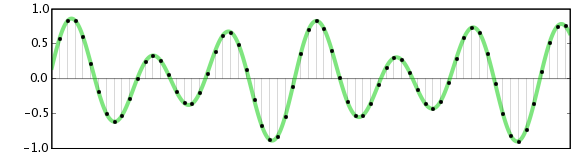
Digital bit depth in audio is a fundamental concept that impacts the quality and fidelity of digital sound. Bit depth, also known as audio resolution, refers to the number of bits used to represent the amplitude of an audio signal at a specific point in time. It essentially quantifies how finely audio samples are taken in the digital domain.
To put it simply, the bit depth determines the precision with which sound is captured and stored digitally. Common bit depths in digital audio are 16-bit, 24-bit, and 32-bit, with higher numbers providing greater precision.
Audio Bit Depth Explained
Understanding audio bit depth is essential for anyone seeking to grasp the intricacies of digital audio recording and playback. At its core, audio bit depth is a measure of how accurately an analog sound wave’s amplitude is captured and converted into a digital signal.
In practical terms, a higher bit depth signifies that the digital representation of an audio waveform closely mirrors the original analog signal, resulting in reduced quantization error or “noise.” Quantization error occurs when an analog value is approximated to the nearest digital value, and lower bit depths can make this error more noticeable, especially in quieter sections of audio.
Bit Depth and Audio Quality
Bit depth plays a pivotal role in determining the quality and precision of digital audio. The relationship between bit depth and audio quality is akin to an artist’s palette of colors. A higher bit depth provides a broader spectrum of shades and nuances, making the digital representation of sound more faithful to the original analog source.
For example, a 16-bit system offers 65,536 discrete amplitude levels, whereas a 24-bit system provides an astonishing 16,777,216 levels. This heightened precision results in smoother and more detailed audio representation, particularly in the subtle and quiet passages of a recording.
Digital Audio Resolution
Digital audio resolution, closely linked to bit depth, is a critical factor in capturing and reproducing sound accurately. It refers to the level of detail and clarity in digital audio. The greater the bit depth, the higher the resolution, and the finer the nuances that can be captured.
In the realm of audio production, higher digital audio resolution means that the subtle nuances, such as the intricacies of a singer’s voice or the delicate harmonics of a musical instrument, are preserved with remarkable fidelity.
Bit Depth in Music Recording
In the world of music recording, selecting the appropriate bit depth is a crucial decision that profoundly affects the final audio quality. Musicians and producers carefully consider bit depth when recording to ensure that the nuances and dynamics of their performances are accurately captured.
In practice, 24-bit recording is a popular choice among music professionals. This bit depth provides an ideal balance between precision and file size, allowing for the capture of subtle details while minimizing the risk of bit-depth noise in quieter sections of the recording.
Audio Signal Precision
Audio signal precision, often measured by bit depth, is a key consideration in professional audio production. It relates to how faithfully an audio system can reproduce the original sound. The higher the bit depth, the greater the precision in representing the analog signal, resulting in cleaner and more accurate audio playback.
For audio engineers and producers, achieving optimal audio signal precision is paramount. It ensures that the music they create is heard as intended, with all the intricacies and subtleties faithfully reproduced.
Bit Depth in Analog-to-Digital Conversion
Understanding how bit depth influences analog-to-digital conversion is essential for maintaining audio fidelity. Analog-to-digital conversion is the process of transforming continuous analog signals into discrete digital values. Bit depth determines the number of discrete values that can represent the amplitude of the analog signal during this conversion.
In essence, higher bit depth means that the analog-to-digital conversion process captures more precise details from the analog signal. This is particularly critical when working with high-quality audio sources where preserving every nuance is paramount.
Sound Fidelity and Bit Depth
Sound fidelity, the faithfulness with which audio is reproduced, is intricately linked to bit depth. A higher bit depth generally results in better audio fidelity, as it allows for the accurate representation of both subtle nuances and powerful crescendos in music.
Consider classical music or jazz, where dynamics play a significant role. With a higher bit depth, the audio system can faithfully reproduce the full range of soft and loud passages, ensuring that the listener experiences the music as intended by the performers and composers.
Impact of Bit Depth on Audio Playback
The impact of bit depth on audio playback is a critical factor in delivering a high-quality listening experience. When you listen to digital audio, the bit depth of the source file significantly affects what you hear.
In simple terms, higher bit depth in the source audio file results in a more faithful and detailed listening experience. This becomes especially noticeable in acoustic instruments, where the subtle nuances of a violin’s bowing or a pianist’s touch can be lost in lower bit depth recordings.
How Does Bit Depth Affect the Quality of Digital Audio?
Exploring how bit depth affects the quality of digital audio is crucial for audiophiles and audio professionals alike. It’s the bit depth that determines how accurately the audio signal is captured and reproduced, ultimately influencing the overall audio quality.
A higher bit depth translates to a more faithful representation of the original sound, with fewer imperfections or noise introduced during the recording and playback processes. This improvement in audio quality is particularly noticeable in genres that require a wide dynamic range and high levels of detail.
What Is the Role of Bit Depth in Recording Music Digitally?
The role of bit depth in recording music digitally is a multifaceted aspect of audio production. When musicians and engineers step into the studio, they must make critical decisions about bit depth to ensure that their recordings capture the essence of the music.
Choosing the appropriate bit depth is a balancing act. While higher bit depths provide greater precision and fidelity, they also result in larger file sizes. Musicians often opt for 24-bit recordings as they strike a harmonious balance between capturing subtle details and managing storage requirements.
How Is Audio Fidelity Influenced by Digital Bit Depth?
Understanding how digital bit depth influences audio fidelity is key to achieving top-tier sound quality. Audio fidelity, often described as the faithfulness of audio reproduction to the original source, is a critical consideration for audio professionals and enthusiasts.
With a higher bit depth, audio fidelity is enhanced because the digital representation of the sound is more detailed and accurate. This is especially crucial in professional audio production, where maintaining the highest possible fidelity is paramount.
Can You Explain the Importance of Bit Depth in Analog-to-Digital Conversion for Audio?
Explaining the importance of bit depth in analog-to-digital conversion sheds light on the intricacies of audio processing. Analog-to-digital conversion is the bridge that allows analog sound to be translated into a digital format that can be manipulated and stored. Bit depth plays a pivotal role in this process.
Higher bit depths ensure that the analog-to-digital conversion process captures more fine-grained details from the original analog signal. This is essential for preserving the richness and subtleties of audio, whether it’s a soaring vocal performance, the resonance of a musical instrument, or the ambiance of a recording environment.
What Is the Relationship Between Bit Depth and Dynamic Range in Digital Audio?
The relationship between bit depth and dynamic range in digital audio is a crucial one to understand. Dynamic range refers to the difference between the softest and loudest sounds that an audio system can reproduce. Bit depth plays a pivotal role in defining this dynamic range.
Higher bit depths translate to a wider dynamic range, allowing for the faithful reproduction of both subtle nuances and powerful crescendos in music. This is essential for maintaining audio fidelity, especially in genres with a wide range of dynamics, such as classical music and jazz.
How Does Bit Depth Impact the Accuracy of Audio Playback?
The impact of bit depth on the accuracy of audio playback cannot be overstated. When you listen to music or any digital audio content, the bit depth of the source file has a profound influence on what you hear.
Higher bit depth in the source audio file means that the playback faithfully represents the original recording. It allows for the subtlest details and nuances to shine through, creating a more immersive and engaging listening experience. In essence, higher bit depth contributes to the accuracy and realism of audio playback.
Are There Industry Standards for Bit Depth in Digital Audio Recording?
In the world of professional audio recording, industry standards play a vital role in guiding the use of bit depth. While there’s flexibility in choosing bit depths based on specific requirements, certain standards are commonly followed.
For instance, most audio CDs use 16-bit resolution, which offers high-quality playback suitable for the majority of consumers. However, in the realm of studio recording and mastering, 24-bit and even 32-bit formats are commonly employed to ensure the highest level of fidelity.
What Are the Advantages of Using Higher Bit Depth in Audio Processing?
Using higher bit depth in audio processing offers several distinct advantages. These advantages extend to both recording and post-production stages, and they significantly impact the overall quality of audio content.
Enhanced Audio Fidelity
One of the primary advantages is enhanced audio fidelity. Higher bit depths provide more precision in capturing and reproducing audio, resulting in recordings that faithfully preserve the original sound. This is particularly important in professional music production and critical listening environments.
Greater Dynamic Range
Higher bit depths also grant a greater dynamic range, allowing for the faithful representation of a wide range of sound intensities. This is particularly beneficial in genres of music or audio content with stark differences in volume, as it ensures that both delicate subtleties and powerful peaks are accurately reproduced.
How Can I Optimize Bit Depth for Better Audio Resolution?
For those involved in audio production or seeking the best listening experience, optimizing bit depth is crucial. It’s not just about using the highest available bit depth but also considering the entire audio workflow and ensuring that bit depth aligns with specific needs.
Matching Bit Depth to Audio Source
When recording audio, it’s essential to match the bit depth to the dynamic range of the audio source. For instance, a live jazz performance with wide dynamic swings benefits from 24-bit recording, while a podcast with a more consistent volume may suffice with 16-bit. This approach minimizes bit-depth noise while preserving audio quality.
Post-Production Considerations
During post-production, maintaining a high bit depth throughout the editing and mixing process is advisable. Only when preparing the final distribution format, such as a CD or streaming file, should the audio be converted to a lower bit depth to match the destination format.
The Benefits of Greater Bit Depth in Digital Audio Systems
As technology advances, digital audio systems are offering higher bit depths as an option. But what are the practical advantages of embracing these extended bit depths?
Future-Proofing Audio
One significant advantage is future-proofing your audio recordings. With higher bit depths, your recordings are better equipped to stand the test of time. As playback systems and formats improve, your high-bit-depth recordings will continue to sound exceptional, ensuring that your music or audio content remains relevant for years to come.
Editing Flexibility
Greater bit depths also provide increased editing flexibility. Audio engineers can apply effects and processing without worrying as much about introducing quantization errors or compromising audio quality. This freedom allows for more creative experimentation during the mixing and mastering stages, ultimately leading to more polished and refined audio content.
In conclusion, digital bit depth is a critical factor in the world of audio, influencing both recording and playback quality. Understanding its importance, selecting the appropriate bit depth for various scenarios, and embracing higher bit depths when possible can lead to an audio experience that is richer, more immersive, and of the highest fidelity. Whether you’re a musician, audio engineer, or simply a music enthusiast, appreciating the role of bit depth can elevate your audio journey to new heights.











Comments:
Wow, I never knew MP4 files were so complex! Thanks for breaking it down in a way I can understand. – VideoBuff123
This article opened my eyes to the inner workings of MP4 files. I’d love to learn more about how to edit them efficiently. – EditingWizard
MP4 files have always seemed like a black box to me, but now I feel more confident in understanding their structure. Great article! – TechEnthusiast22
Could you delve deeper into how MP4 files handle subtitles? I’m curious about the technical aspects behind it. – SubtitleFanatic
This article is a gem! I appreciate the clear explanations and real-life analogies used throughout. – DigitalNomad
As a budding filmmaker, understanding MP4 file structure is invaluable. Thanks for shedding light on this topic! – IndieDirector
Great breakdown! Now I feel equipped to troubleshoot any issues I encounter with MP4 files. – TechSupportGuru
This article deserves more recognition! It’s rare to find such comprehensive yet accessible explanations. – MediaGeek
Can you recommend any tools for analyzing MP4 file structure in more detail? – DataAnalyzer
As a content creator, understanding MP4 file structure is crucial for optimizing video production workflows. Thanks for the insights! – ContentCreatorPro
I’ve always been curious about the technical side of video files. This article satisfied my curiosity and then some! – CuriousMind