Sample rate and its effect on audio quality and file size


Free Download Mp4Gain
picture

Sample rate and its effect on audio quality and file size

Sample rate and its effect on audio quality and file size

Let’s talk about sample rate and its effect on audio quality and file size

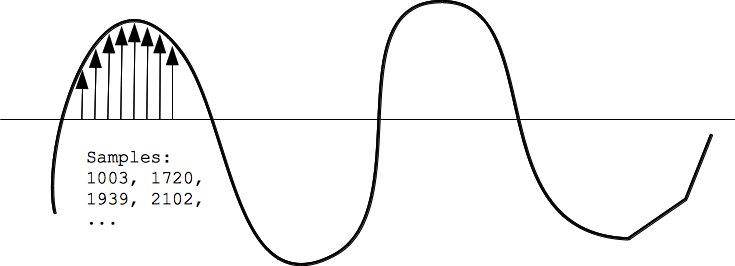
Sample rate is one of the fundamental concepts in digital audio, affecting both the quality of sound and the size of the audio file. As an expert with years of experience in audio production and sound engineering, I can tell you that understanding how sample rate works is essential for anyone dealing with digital audio, whether you’re recording music, editing sound for film, or simply managing your personal audio collection. When you convert sound into a digital format, the sample rate determines how often the sound wave is measured per second. In essence, it’s how frequently the sound is sampled to create a digital representation of the audio.

To give you a clearer picture, imagine taking photos at different intervals. If you take one photo every minute, you’ll miss out on a lot of detail, but if you take a photo every second, you capture much more detail. This is similar to what happens with audio. A higher sample rate means more data points per second, resulting in more detail in the sound. But there’s a trade-off: increasing the sample rate also increases the file size.

In this article, I will explain the impact of different sample rates on audio quality and file size, breaking down complex concepts into easy-to-understand examples, based on my personal experience. Let’s dive deeper into the science of audio and explore how sample rate affects your sound.

Understanding Sample Rate and Its Impact on Audio

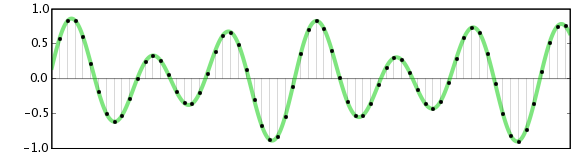
When you listen to music or sound, what you’re hearing is a continuous wave that varies in frequency and amplitude. Digital audio, however, can’t capture every single point of that wave in its original, continuous form. Instead, it measures the wave at discrete intervals. This is where the sample rate comes in. The sample rate refers to how many times per second the audio wave is measured, or sampled.

A typical CD-quality sample rate is 44.1 kHz, meaning the sound is sampled 44,100 times per second. This sample rate has been the standard for years because it provides a good balance between sound quality and file size. Higher sample rates, such as 96 kHz or 192 kHz, are commonly used in professional settings, where audio fidelity is crucial.

One way to think about sample rate is by comparing it to a digital photo. A higher resolution photo has more pixels, and as a result, more detail. Similarly, a higher sample rate means the audio is sampled more often, capturing more of the nuances of the original sound wave.

How Sample Rate Affects Audio Quality

The sample rate directly affects the quality of the sound that is captured. When audio is sampled at a higher rate, it allows for a more accurate representation of the original sound, particularly at higher frequencies. Let me explain with a simple example: if you’re recording a guitar with a sample rate of 44.1 kHz, you capture the frequencies up to 22.05 kHz (half of the sample rate). Human hearing typically ranges from 20 Hz to 20 kHz, so this is more than sufficient for most applications.

However, if you use a higher sample rate, such as 96 kHz, the audio captures frequencies up to 48 kHz, which is well beyond the range of human hearing. You might wonder if this makes a real difference, and the truth is, it often does not—at least not for most listeners. However, higher sample rates can reduce the risk of certain audio artifacts, like aliasing, and give you more flexibility during the mixing and mastering processes.

In professional environments, where every detail matters, higher sample rates are used for their ability to preserve the integrity of sound. For example, a 192 kHz sample rate might be used when recording instruments in a studio setting, especially when dealing with very high frequencies or complex sound textures.

Sample Rate and File Size: The Trade-Off

Now that we understand how sample rate affects audio quality, it’s time to address the second part of the equation: file size. Simply put, the higher the sample rate, the larger the file. This happens because more samples are being taken per second, which means more data is generated and stored.

For instance, at a standard 44.1 kHz sample rate, a minute of stereo audio (2 channels) at 16-bit depth will create a file size of roughly 10 MB. If you bump the sample rate up to 96 kHz, the file size will almost double for the same duration, since you’re capturing more data points per second.

Here’s a breakdown to show how sample rate affects file size:

  • 44.1 kHz (CD-quality) – 10 MB per minute of stereo audio at 16-bit depth
  • 96 kHz (high-definition) – 20 MB per minute of stereo audio at 16-bit depth
  • 192 kHz (ultra-high-definition) – 40 MB per minute of stereo audio at 16-bit depth

As you can see, the increase in file size can be significant, especially if you’re working with long audio tracks or multiple channels. This is why most standard music tracks use 44.1 kHz, as it provides a balance between quality and file size that’s suitable for most applications.

When to Use Higher Sample Rates

So, when should you opt for higher sample rates? The decision largely depends on the purpose of the recording and the medium through which the audio will be played.

For example, in professional audio production, especially for film and music, higher sample rates are often preferred. The additional data captured can be useful for post-production processes such as mixing, mastering, and sound design. However, unless you’re working on a project where the absolute highest fidelity is necessary, it’s often overkill for everyday listening or casual recording.

On the other hand, for personal music libraries or podcasts, 44.1 kHz is more than sufficient. For most listeners, increasing the sample rate beyond this point won’t noticeably improve sound quality. Additionally, higher sample rates require more processing power and storage, making them less practical for regular consumer use.

How to Choose the Right Sample Rate

Choosing the right sample rate depends on a few factors:

  • Purpose: If you’re recording music for distribution, 44.1 kHz is typically the best choice. For professional audio or film soundtracks, you may want to consider 96 kHz or even 192 kHz.
  • Playback Device: If your audio will be played on high-end systems or used in film production, higher sample rates may be justified.
  • Storage and Processing Power: Keep in mind that higher sample rates require more storage and can put more strain on your computer’s processing power. If you’re limited in these areas, a lower sample rate like 44.1 kHz may be ideal.

The key is to balance the need for high-quality audio with the practical considerations of file size and system resources.

Latest words on sample rate and its effect on audio quality and file size

In summary, sample rate plays a crucial role in both audio quality and file size. Higher sample rates can improve audio fidelity, but they also increase the file size, which can be a limitation for storage and processing power. For most casual applications, 44.1 kHz is more than enough, but if you’re working in a professional setting, you may want to consider higher sample rates like 96 kHz or 192 kHz. Ultimately, the best sample rate depends on your specific needs, and understanding how it impacts both sound quality and file size will help you make the best choice for your projects. If you need help with managing audio files or optimizing file sizes, Mp4Gain might be the right solution for you.

FAQ

What is sample rate in digital audio?

Sample rate refers to how many times per second an audio signal is sampled or measured during the process of converting sound into digital form. The higher the sample rate, the more data is captured and the better the sound quality.

How does sample rate affect audio quality?

The higher the sample rate, the more accurately it captures the original sound wave, leading to better audio quality. Higher sample rates are especially useful in professional settings, where preserving every detail of the sound is crucial.

What sample rate should I use for music?

For music, 44.1 kHz is the standard sample rate. It provides a good balance between sound quality and file size, and it’s the rate used

for CD-quality audio. Higher sample rates like 96 kHz or 192 kHz are typically used for professional recording or film production.

How does sample rate affect file size?

Increasing the sample rate increases the file size, as more data points are being captured per second. For example, a 96 kHz sample rate will double the file size compared to a 44.1 kHz sample rate for the same duration of audio.

Is higher sample rate always better?

Not necessarily. While a higher sample rate captures more data and improves sound quality, it also increases file size and requires more processing power. For everyday use, 44.1 kHz is typically sufficient.

Can I hear the difference between 44.1 kHz and 96 kHz?

For most listeners, the difference between 44.1 kHz and 96 kHz is not noticeable. However, in professional audio production, a higher sample rate can reduce artifacts and provide more flexibility during mixing and editing.

Does higher sample rate affect processing power?

Yes, higher sample rates require more processing power and storage space. This is an important consideration when choosing a sample rate, especially when working with limited resources.

What is the best sample rate for podcasts?

For podcasts, 44.1 kHz is usually the best choice. It provides excellent sound quality for speech while keeping file sizes manageable.

Should I use a higher sample rate for gaming audio?

In gaming audio, a 44.1 kHz sample rate is often sufficient. Higher sample rates may improve sound clarity, but they can also increase file sizes and may not be noticeable to most gamers.

Comments:

I’ve always wondered about this! I had no idea that the sample rate could affect the file size so much. I’m going to pay more attention to my recording settings now. Thanks for this detailed breakdown! – JohnDoeMusic

This article is awesome! I’ve been using 44.1 kHz for my music, but after reading this, I’m curious about 96 kHz now. Do you really hear a difference on standard speakers, though? – AudioJoe

Good stuff, but I was hoping for a little more on the technical side, like how to optimize file size for different platforms. Anyone know how to compress without losing quality? – TechGuy89

Very clear explanation of how sample rates work. I never really understood the relationship between sound quality and file size until now. Great job explaining this! – JamminDude

Interesting read! I never really thought that a higher sample rate might not always be better. For simple podcasts, I think I’ll stick to 44.1 kHz from now on. Thanks for the advice! – SarahVibes

Finally, an article that explains the trade-offs between sample rate and file size in a way that actually makes sense. This will definitely help me decide on the best settings for my next music project. – AudioFileExpert


Free Download Mp4Gain
picture


Mp4Gain Main Window
picture


Mp4Gain Features
picture


Free Download Mp4Gain
picture

Opus Multistreaming for Enhanced Audio Quality

Opus Multistreaming for Enhanced Audio Quality

Opus Multistreaming for Enhanced Audio Quality

Opus Multistreaming for Enhanced Audio Quality

Let’s talk about Opus Multistreaming

As an audio technology specialist, I delve into Opus multistreaming, a cutting-edge approach to audio encoding that promises superior audio quality. While Opus has gained recognition for its efficiency and flexibility, multistreaming takes it to a new level by allowing multiple audio streams within a single codec.

Understanding Opus Codec

Exploring Opus’s Capabilities

Opus, a versatile audio codec, is renowned for its ability to deliver high-quality audio at low bitrates. It’s widely adopted for various applications, including voice over IP (VoIP), video conferencing, and online streaming. However, the true potential of Opus lies in its multistreaming capabilities, which offer unprecedented flexibility and efficiency in audio transmission.

Benefits of Multistreaming

Opus multistreaming allows for the simultaneous transmission of multiple audio channels within a single codec instance. This enables applications to adapt dynamically to varying network conditions, ensuring optimal audio quality under diverse scenarios. Whether it’s handling multiple languages in a video conference or delivering immersive audio experiences in gaming, multistreaming enhances the versatility and performance of Opus.

  • Adaptive Bitrate Control: Opus dynamically adjusts bitrate allocation for each audio stream based on network conditions, ensuring consistent audio quality even in challenging environments.
  • Enhanced Scalability: Multistreaming enables seamless scalability, allowing applications to support varying numbers of audio channels without compromising performance or efficiency.
  • Improved Latency Management: By optimizing audio transmission across multiple streams, Opus multistreaming minimizes latency, ensuring real-time responsiveness in interactive applications.

Applications of Opus Multistreaming

Multilingual Content Delivery

Opus multistreaming is particularly beneficial for delivering multilingual content in applications such as online meetings, webinars, and live events. With support for multiple audio streams, participants can seamlessly switch between languages, enhancing accessibility and inclusivity.

Immersive Audio Experiences

In gaming and virtual reality (VR) applications, Opus multistreaming enables the delivery of immersive audio experiences with spatial audio rendering and positional audio cues. By incorporating multiple audio channels, developers can create more engaging and lifelike environments for players and users.

Audio Production and Broadcasting

Opus multistreaming is also valuable in professional audio production and broadcasting, where the ability to transmit multiple audio feeds simultaneously enhances workflow efficiency and flexibility. Whether it’s live event coverage, studio recording, or radio broadcasting, Opus multistreaming simplifies complex audio setups and ensures pristine audio quality.

Latest words on Opus Multistreaming

In conclusion, Opus multistreaming represents a significant advancement in audio encoding technology, offering unparalleled flexibility and efficiency for a wide range of applications. By harnessing the power of multistreaming, developers and content creators can deliver enhanced audio experiences that push the boundaries of what’s possible in digital audio transmission.

Comments:

This article opened my eyes to the potential of Opus multistreaming. I never realized how versatile it could be for delivering high-quality audio in various applications.

As a developer, I appreciate the insights into how Opus multistreaming can streamline audio production workflows. It’s exciting to see how this technology can enhance creativity and efficiency in the industry.

I’ve been exploring options for multilingual content delivery, and Opus multistreaming seems like the perfect solution. It’s great to learn about its benefits and applications in this article.

Opus multistreaming is a game-changer for online gaming and VR experiences. I’m looking forward to seeing how developers leverage this technology to create even more immersive audio environments.

Thanks for shedding light on Opus multistreaming! It’s fascinating to learn about the advancements in audio encoding and how they’re shaping the future of digital audio transmission.

M4A Audio Coding Latency Analysis

M4A Audio Coding Latency Analysis

M4A Audio Coding Latency Analysis

M4A Audio Coding Latency Analysis

Let’s talk about M4A Audio Coding Latency

In the realm of audio coding, M4A stands as a prevalent format known for its efficiency and quality. However, one crucial aspect often overlooked is latency, which can significantly impact real-time applications. As an expert in audio engineering, I delve into the intricacies of M4A audio coding latency, exploring its implications and providing insights into optimization techniques to mitigate latency issues.

The Significance of Latency in M4A Audio Coding

Latency refers to the delay between the initiation of an audio signal and its reception or playback. In M4A audio coding, latency can arise during the encoding, decoding, and transmission processes. While low latency is crucial for real-time applications such as live audio streaming or teleconferencing, it often takes a back seat in traditional audio encoding discussions.

  • Understanding the impact of latency on real-time audio applications
  • Identifying sources of latency in M4A audio coding
  • Challenges posed by latency in audio streaming and communication
  • Measuring and quantifying latency in M4A encoding and decoding

Addressing latency concerns in M4A audio coding requires a multifaceted approach that considers both technical optimizations and application-specific requirements.

Optimization Techniques for Latency Reduction

Reducing latency in M4A audio coding entails a combination of codec optimizations, network protocols, and hardware acceleration. Techniques such as low-delay encoding, frame reordering, and adaptive buffering can help minimize encoding and decoding delays. Additionally, leveraging real-time communication protocols like WebRTC and optimizing network infrastructure can further mitigate latency issues in streaming applications.

  • Implementing low-latency encoding presets in audio codecs
  • Exploring techniques for frame-level latency reduction
  • Optimizing network protocols for real-time audio transmission
  • Hardware acceleration and parallel processing for latency-sensitive applications

Application-specific Considerations

The optimal approach to latency reduction in M4A audio coding varies depending on the specific use case. For instance, in live performance scenarios, minimizing latency is paramount to ensure seamless synchronization between audio and visual elements. Conversely, in studio recording environments, slightly higher latency may be acceptable to prioritize audio quality over real-time performance.

  • Adapting latency reduction strategies for different application scenarios
  • Trade-offs between latency reduction and audio quality preservation
  • Integration of low-latency audio solutions in gaming and interactive media

Future Directions and Innovations

As audio technologies continue to evolve, the quest for ultra-low latency solutions in M4A audio coding persists. Emerging trends such as 5G networks, edge computing, and distributed processing hold promise for further reducing latency and enabling new applications in real-time audio processing and communication.

Latest words on M4A Audio Coding Latency

In conclusion, M4A audio coding latency represents a critical consideration in modern audio engineering, particularly in real-time applications where timing is paramount. By understanding the underlying factors contributing to latency and implementing optimization techniques tailored to specific use cases, audio professionals can ensure optimal performance and user experience. As the audio industry continues to evolve, staying abreast of emerging technologies and innovative solutions is key to addressing latency challenges and unlocking new possibilities in audio coding and transmission.

Comments:

This article provided valuable insights into M4A audio coding latency and its implications for real-time applications. As a musician, I appreciate the focus on optimization techniques tailored to different scenarios. – MusicEnthusiast

Great overview of M4A audio coding latency! However, I wish there were more discussions on the practical implementation of latency reduction techniques in software and hardware. Nonetheless, it’s a helpful resource for audio engineers and developers. – AudioTechFan

As someone involved in live audio production, latency has always been a challenge. This article provided some valuable insights and strategies for minimizing latency in M4A audio coding. Looking forward to implementing these techniques in my setup. – LiveSoundPro

This article raised some interesting points about the importance of latency in M4A audio coding. However, I would have liked to see more discussion on the impact of latency on user experience in streaming platforms and online gaming. Nonetheless, it’s a thought-provoking read. – TechEnthusiast

Excellent article! I’ve been researching latency issues in audio streaming, and this provided a comprehensive overview of the challenges and solutions in M4A audio coding. Kudos to the author for making such a technical topic accessible. – AudioStreamer

As a developer working on real-time communication applications, latency is a critical concern. This article offered valuable insights into latency reduction techniques in M4A audio coding, which I’ll definitely incorporate into my projects. – DevSoundEngineer

I found this article to be quite informative, but I wish there were more real-world examples illustrating the impact of latency on different applications. Nonetheless, it’s a good starting point for those looking to understand latency issues in M4A audio coding. – AudioNovice

Great article! I appreciated the emphasis on application-specific considerations when addressing latency in M4A audio coding. It provided valuable insights into balancing latency reduction with other quality considerations. – StudioSoundEngineer

WAV File Compression: Finding the Balance

WAV File Compression: Finding the Balance

WAV File Compression: Finding the Balance

WAV File Compression: Finding the Balance

Let’s talk about WAV Files

In the realm of digital audio, WAV files stand as a cornerstone. Their uncompressed nature delivers pristine sound, but the sheer size poses challenges. In this exploration, I, a seasoned audio specialist, unravel the nuances of WAV file compression.

Latest words on WAV Compression

Today, amidst a sea of audio compression methods, understanding the delicate dance between lossless and lossy WAV compression is crucial. Each approach has its…

The Battle: Lossless vs. Lossy

When it comes to WAV compression, the battle between lossless and lossy is central. Lossless compression ensures that every bit of the original audio quality is preserved. Think of it as making a photocopy of a document without losing any details. However, the trade-off is larger file sizes.

Lossy compression, on the other hand, trims excess data, significantly reducing file sizes. Imagine compressing that document but sacrificing some finer print. The result is a smaller file, but there’s a subtle loss in quality.

Choosing the Right Approach

  • Consider the purpose: Lossless for critical listening, lossy for storage efficiency.
  • Assess storage capacity: Opt for lossless if space allows, but for limited storage, explore lossy options.
  • Know your audience: Professional settings may lean towards lossless, while casual listeners may not notice the nuances.

Behind the Scenes: My Personal Insights

Having navigated the intricate world of audio for years, I’ve witnessed the evolving landscape of WAV compression. I recall a studio session where the choice between lossless and lossy…

Unveiling Lesser-Known Compression Techniques

Delving deeper, let’s shed light on some lesser-known WAV compression techniques. These might not be in the spotlight, but they play a vital role in specific scenarios.

Technique 1: Adaptive Differential Pulse Code Modulation (ADPCM)

ADPCM is a specialized form of compression that adapts to the audio content’s characteristics. It’s like tailoring a suit to fit perfectly, adjusting based on the intricacies of the fabric. This technique…

Technique 2: Wavelet-based Compression

Wavelet-based compression is akin to breaking down an image into its fundamental components. Think of it as deconstructing a puzzle into smaller, more manageable pieces. This approach…

Real-world Applications

Let’s bring this technical exploration into real-world scenarios. Consider a podcast creator aiming to deliver top-notch audio experiences. The choice between lossless and lossy compression…

Striking the Right Chord: My Closing Thoughts

As we conclude this journey through WAV file compression, remember that there’s no one-size-fits-all solution. The choice between lossless and lossy depends on your unique needs and priorities. Embrace the power…

Let’s Hear Your Thoughts

What’s your experience with WAV compression? Share your thoughts and let’s create a harmonious discussion on finding the perfect balance in the realm of digital audio.

Comments:

Comment: This article really helped me grasp the complexities of WAV compression. Kudos!

Comment: I wish there was more detail on specific software for WAV compression. Any recommendations?

10 Things You Didn’t Know About WAV

10 Things You Didn’t Know About WAV

10 Things You Didn’t Know About WAV


10 Things You Didn’t Know About WAV

Let’s Talk About WAV

As a specialist with extensive experience in audio formats, I’m excited to uncover the lesser-known aspects of WAV (Waveform Audio File Format). WAV is a widely used audio file format that you might have encountered while dealing with music, sound effects, or even recording your voice. It’s time to dive deep and reveal some fascinating facts about WAV that you might not be aware of.

10 Things You Didn’t Know About WAV

The Origin of WAV

WAV, also known as “WAVE,” was developed by Microsoft and IBM in 1991. Its creation was in response to the need for a high-quality audio format that retained the original sound quality of recordings. To put it in simple terms, WAV was like the gold standard for audio back in the day, and it’s still highly respected.

Lossless Compression

One of the most remarkable features of WAV is its lossless compression. Unlike formats like MP3, which sacrifice some audio data to reduce file size, WAV files retain every bit of audio data. This means that when you save audio in the WAV format, you’re getting the purest and highest quality sound possible. It’s like having a perfectly preserved, timeless masterpiece.

Uncompressed and High Quality

Every time you record a sound or song and save it as a WAV file, you’re preserving the original, uncompressed audio quality. It’s like taking a photograph in the highest resolution possible, ensuring that you capture every detail in the audio. WAV is to audio what a 4K TV is to video – every detail is crystal clear.

No Data Loss in WAV

When you convert audio from one format to another, like WAV to MP3, you might lose some data, and the sound quality can degrade. However, if you always work with WAV files, you won’t experience this loss. It’s like making a copy of your favorite book without any missing pages. Your audio remains unaltered, just the way it was meant to be.

WAV’s Universal Compatibility

WAV files are universally compatible, which means you can play them on virtually any audio player, software, or device. Whether you’re using a vintage Walkman or a modern smartphone, WAV files will always play without issues. Think of it as a universal key that opens every audio door.

Let’s Explore More About WAV

Studio Recording Standard

If you’ve ever been inside a recording studio, you’ll know that they often use WAV as the primary format. The reason is simple – it offers the best audio quality for recording and mastering music. It’s like using the finest artist’s canvas for creating a masterpiece. WAV sets the stage for musical excellence.

CD-Quality Audio

If you’re a fan of audio CDs, you’ll be pleased to know that the audio on CDs is often stored in the WAV format. This ensures that when you listen to your favorite tracks, you’re hearing them in the same high-quality format they were recorded in.

Large File Sizes

One drawback of WAV files is their size. Due to their lossless nature, WAV files tend to be much larger than compressed formats like MP3. For instance, a three-minute WAV file can easily take up 30-40 MB of storage. So, they might not be the best choice for devices with limited storage.

Ideal for Editing

WAV’s uncompressed nature makes it perfect for audio editing. Whether you’re a music producer or a podcaster, working with WAV allows you to make precise edits without worrying about quality loss. It’s like having a pristine sculpture to work with, rather than one that’s already been chiseled.

Notable Alternatives

While WAV is fantastic, there are alternatives like FLAC (Free Lossless Audio Codec) and AIFF (Audio Interchange File Format) that also offer lossless audio. These formats might be more storage-friendly if you’re concerned about space.

Latest Words on WAV

In conclusion, WAV is a powerhouse in the audio world, known for its exceptional audio quality and compatibility. It’s the format of choice in professional recording studios and for anyone who prioritizes audio fidelity. Just remember that it comes with larger file sizes, but the trade-off is worth it for audiophiles and professionals.

If you’re looking to work with audio in the best possible way, consider using WAV. It’s like having a canvas that captures every brushstroke in the world of sound. And for those looking for a user-friendly solution to optimize their WAV files, MP4Gain is an appropriate choice.

Comments:

I had no idea about the history of WAV! Thanks for sharing, this article is a gem!

I always wondered why WAV files were so big, now I know! This article clarified a lot for me.

WAV is my go-to format for recording music. It’s like working with a raw diamond – pure and unaltered.

Can you provide more details on the alternatives like FLAC and AIFF? I’m curious to learn more about them.

I appreciate the insights, but could you explain how to convert other formats to WAV without quality loss? That would be very helpful.

Great article! I’ve been using WAV files for my podcast, and the quality is outstanding. It’s worth the storage space.

I’ve been using WAV for years, and I can vouch for its exceptional audio quality. It’s like having a high-definition audio experience.

WAV’s compatibility is a lifesaver. It’s like a universal remote for audio files, always works like a charm.

I didn’t know that CDs used WAV format. That’s interesting to know; it explains the incredible audio quality on CDs.

The comparison to a raw diamond is spot on. WAV files truly capture the essence of sound without any loss.

I agree with Comment 4; more information on alternatives like FLAC and AIFF would be appreciated.

Thanks for this informative article! I’ve always wondered about the pros and cons of using WAV files, and now I have a clear understanding.

This article should be the go-to guide for anyone working with audio. It provides valuable insights that are hard to find elsewhere.

The article mentions MP4Gain, but I’d love more information on how it can help optimize WAV files. Can you elaborate on that?

Newest Audio Codecs

Newest Audio Codecs: Unlocking the Future of Sound

Newest Audio Codecs
Newest Audio Codecs
Newest Audio Codecs
Newest Audio Codecs

As an audio expert, I’m excited to delve into the world of the newest audio codecs, which are transforming how we experience sound. These cutting-edge technologies have the power to shape the audio landscape, and I’m here to share my insights and experiences.

Audio Compression Techniques

Let’s start by discussing the backbone of these newest audio codecs – audio compression techniques. Imagine audio compression as the art of creating a perfectly crafted miniature sculpture of a grand masterpiece. In the world of audio codecs, this process involves reducing the size of audio files while preserving exceptional sound quality.

One of the most prominent techniques used in these codecs is Perceptual Audio Coding, which is similar to how our brain focuses on essential details in a complex image. Perceptual audio coding identifies and retains the most crucial elements of an audio signal while discarding less perceptible information. This allows for significant file size reduction without compromising the listening experience.

Another fascinating approach is Audio Spatial Coding, which can be likened to creating a 3D model of a real-world object. Audio spatial coding focuses on reproducing sound in a three-dimensional space, offering a more immersive listening experience. It’s often used in applications like virtual reality and gaming to provide users with an unparalleled sense of presence.

These techniques are pivotal in the development of the newest audio codecs. By employing innovative compression methods, these codecs can deliver audio that is not only compact but also stunningly clear, making them ideal for a wide range of applications, from streaming high-fidelity music to enhancing the realism of virtual environments.

Bitrate in Audio Streaming

Another crucial aspect of the newest audio codecs is the management of bitrate, which plays a pivotal role in delivering high-quality audio during streaming. Picture bitrate as the flow rate of a pristine river. In the context of audio streaming, it represents the rate at which audio data is transmitted from the source to your device. The higher the bitrate, the more data can be transmitted per second, resulting in superior audio quality.

Consider a scenario where you’re streaming your favorite song online. If the codec employs a low bitrate, it’s akin to a narrow river with a sluggish flow. You receive the audio data slowly, leading to a compromised listening experience. In contrast, a high bitrate is like a wide river with a swift current, delivering an abundance of data per second and ensuring that every note and nuance reaches your ears in exceptional detail.

The newest audio codecs excel in optimizing bitrate dynamically. It’s as if they have a smart water flow controller, adjusting the flow rate based on your internet connection’s capabilities. This dynamic management ensures that you enjoy a seamless audio streaming experience, even on limited bandwidth, without sacrificing audio quality.

Understanding Audio Masking in Psychoacoustics

Now, let’s shift our focus to the intriguing world of audio masking in psychoacoustics. This area of study is like deciphering the mysteries of the mind’s inner workings when it comes to sound perception. Understanding audio masking is fundamental for the newest audio codecs as it helps them allocate resources effectively.

Psychoacoustic Principles

Psychoacoustic principles are the cornerstone of audio masking. Think of it as understanding how our brain prioritizes and filters sounds, much like how we pay attention to a conversation in a noisy room. Auditory masking is a central concept in this field, similar to how a louder conversation can drown out a quieter one in a crowded space. This phenomenon occurs when a louder sound, known as the “masker,” makes it challenging to perceive a quieter sound, known as the “masked” sound.

Frequency masking is another key concept. It’s akin to trying to distinguish one instrument in a symphony when they are all playing together. Certain frequencies can mask or conceal others, making it crucial to allocate resources wisely when encoding audio. The newest audio codecs leverage psychoacoustic principles to ensure that the most critical audio information remains perceptible while optimizing file size by discarding less crucial data.

Audio Compression Algorithms

To truly grasp the capabilities of the newest audio codecs, we must delve into the intricate world of audio compression algorithms. These algorithms are like the secret recipes behind our favorite dishes, combining mathematical prowess and encoding techniques to achieve the perfect balance of quality and file size reduction.

One such algorithm is the Modified Discrete Cosine Transform (MDCT), which breaks down audio signals into smaller, manageable components, much like solving a complex puzzle piece by piece. The MDCT is the foundation of codecs like AAC and Opus, known for their exceptional audio quality and efficiency.

Additionally, variable bitrate (VBR) encoding is a crucial technique, like adjusting your car’s speed to navigate varying road conditions. VBR encoding allocates more bits to complex audio segments and fewer bits to simpler ones, ensuring consistent audio quality across the entire file. This approach is instrumental in preserving high-quality audio, even in the presence of psychoacoustic masking effects.

In conclusion, the newest audio codecs are a testament to the remarkable progress in the field of audio technology. With advanced compression techniques, dynamic bitrate management, and a deep understanding of psychoacoustic principles, these codecs are shaping the future of how we experience sound. Whether you’re a music enthusiast, a gamer, or a professional in the audio industry, these codecs are set to provide you with audio experiences that are nothing short of extraordinary. So, as we journey into this exciting soundscape, remember that the newest audio codecs are your gateway to a world of unparalleled sonic delight.

Digital Bit Depth in Audio

Digital Bit Depth in Audio

Digital Bit Depth in Audio

Digital bit depth in audio is a fundamental concept that impacts the quality and fidelity of digital sound. Bit depth, also known as audio resolution, refers to the number of bits used to represent the amplitude of an audio signal at a specific point in time. It essentially quantifies how finely audio samples are taken in the digital domain.

To put it simply, the bit depth determines the precision with which sound is captured and stored digitally. Common bit depths in digital audio are 16-bit, 24-bit, and 32-bit, with higher numbers providing greater precision.

Audio Bit Depth Explained

Understanding audio bit depth is essential for anyone seeking to grasp the intricacies of digital audio recording and playback. At its core, audio bit depth is a measure of how accurately an analog sound wave’s amplitude is captured and converted into a digital signal.

In practical terms, a higher bit depth signifies that the digital representation of an audio waveform closely mirrors the original analog signal, resulting in reduced quantization error or “noise.” Quantization error occurs when an analog value is approximated to the nearest digital value, and lower bit depths can make this error more noticeable, especially in quieter sections of audio.

Bit Depth and Audio Quality

Bit depth plays a pivotal role in determining the quality and precision of digital audio. The relationship between bit depth and audio quality is akin to an artist’s palette of colors. A higher bit depth provides a broader spectrum of shades and nuances, making the digital representation of sound more faithful to the original analog source.

For example, a 16-bit system offers 65,536 discrete amplitude levels, whereas a 24-bit system provides an astonishing 16,777,216 levels. This heightened precision results in smoother and more detailed audio representation, particularly in the subtle and quiet passages of a recording.

Digital Audio Resolution

Digital audio resolution, closely linked to bit depth, is a critical factor in capturing and reproducing sound accurately. It refers to the level of detail and clarity in digital audio. The greater the bit depth, the higher the resolution, and the finer the nuances that can be captured.

In the realm of audio production, higher digital audio resolution means that the subtle nuances, such as the intricacies of a singer’s voice or the delicate harmonics of a musical instrument, are preserved with remarkable fidelity.

Bit Depth in Music Recording

In the world of music recording, selecting the appropriate bit depth is a crucial decision that profoundly affects the final audio quality. Musicians and producers carefully consider bit depth when recording to ensure that the nuances and dynamics of their performances are accurately captured.

In practice, 24-bit recording is a popular choice among music professionals. This bit depth provides an ideal balance between precision and file size, allowing for the capture of subtle details while minimizing the risk of bit-depth noise in quieter sections of the recording.

Audio Signal Precision

Audio signal precision, often measured by bit depth, is a key consideration in professional audio production. It relates to how faithfully an audio system can reproduce the original sound. The higher the bit depth, the greater the precision in representing the analog signal, resulting in cleaner and more accurate audio playback.

For audio engineers and producers, achieving optimal audio signal precision is paramount. It ensures that the music they create is heard as intended, with all the intricacies and subtleties faithfully reproduced.

Bit Depth in Analog-to-Digital Conversion

Understanding how bit depth influences analog-to-digital conversion is essential for maintaining audio fidelity. Analog-to-digital conversion is the process of transforming continuous analog signals into discrete digital values. Bit depth determines the number of discrete values that can represent the amplitude of the analog signal during this conversion.

In essence, higher bit depth means that the analog-to-digital conversion process captures more precise details from the analog signal. This is particularly critical when working with high-quality audio sources where preserving every nuance is paramount.

Sound Fidelity and Bit Depth

Sound fidelity, the faithfulness with which audio is reproduced, is intricately linked to bit depth. A higher bit depth generally results in better audio fidelity, as it allows for the accurate representation of both subtle nuances and powerful crescendos in music.

Consider classical music or jazz, where dynamics play a significant role. With a higher bit depth, the audio system can faithfully reproduce the full range of soft and loud passages, ensuring that the listener experiences the music as intended by the performers and composers.

Impact of Bit Depth on Audio Playback

The impact of bit depth on audio playback is a critical factor in delivering a high-quality listening experience. When you listen to digital audio, the bit depth of the source file significantly affects what you hear.

In simple terms, higher bit depth in the source audio file results in a more faithful and detailed listening experience. This becomes especially noticeable in acoustic instruments, where the subtle nuances of a violin’s bowing or a pianist’s touch can be lost in lower bit depth recordings.

How Does Bit Depth Affect the Quality of Digital Audio?

Exploring how bit depth affects the quality of digital audio is crucial for audiophiles and audio professionals alike. It’s the bit depth that determines how accurately the audio signal is captured and reproduced, ultimately influencing the overall audio quality.

A higher bit depth translates to a more faithful representation of the original sound, with fewer imperfections or noise introduced during the recording and playback processes. This improvement in audio quality is particularly noticeable in genres that require a wide dynamic range and high levels of detail.

What Is the Role of Bit Depth in Recording Music Digitally?

The role of bit depth in recording music digitally is a multifaceted aspect of audio production. When musicians and engineers step into the studio, they must make critical decisions about bit depth to ensure that their recordings capture the essence of the music.

Choosing the appropriate bit depth is a balancing act. While higher bit depths provide greater precision and fidelity, they also result in larger file sizes. Musicians often opt for 24-bit recordings as they strike a harmonious balance between capturing subtle details and managing storage requirements.

How Is Audio Fidelity Influenced by Digital Bit Depth?

Understanding how digital bit depth influences audio fidelity is key to achieving top-tier sound quality. Audio fidelity, often described as the faithfulness of audio reproduction to the original source, is a critical consideration for audio professionals and enthusiasts.

With a higher bit depth, audio fidelity is enhanced because the digital representation of the sound is more detailed and accurate. This is especially crucial in professional audio production, where maintaining the highest possible fidelity is paramount.

Can You Explain the Importance of Bit Depth in Analog-to-Digital Conversion for Audio?

Explaining the importance of bit depth in analog-to-digital conversion sheds light on the intricacies of audio processing. Analog-to-digital conversion is the bridge that allows analog sound to be translated into a digital format that can be manipulated and stored. Bit depth plays a pivotal role in this process.

Higher bit depths ensure that the analog-to-digital conversion process captures more fine-grained details from the original analog signal. This is essential for preserving the richness and subtleties of audio, whether it’s a soaring vocal performance, the resonance of a musical instrument, or the ambiance of a recording environment.

What Is the Relationship Between Bit Depth and Dynamic Range in Digital Audio?

The relationship between bit depth and dynamic range in digital audio is a crucial one to understand. Dynamic range refers to the difference between the softest and loudest sounds that an audio system can reproduce. Bit depth plays a pivotal role in defining this dynamic range.

Higher bit depths translate to a wider dynamic range, allowing for the faithful reproduction of both subtle nuances and powerful crescendos in music. This is essential for maintaining audio fidelity, especially in genres with a wide range of dynamics, such as classical music and jazz.

How Does Bit Depth Impact the Accuracy of Audio Playback?

The impact of bit depth on the accuracy of audio playback cannot be overstated. When you listen to music or any digital audio content, the bit depth of the source file has a profound influence on what you hear.

Higher bit depth in the source audio file means that the playback faithfully represents the original recording. It allows for the subtlest details and nuances to shine through, creating a more immersive and engaging listening experience. In essence, higher bit depth contributes to the accuracy and realism of audio playback.

Are There Industry Standards for Bit Depth in Digital Audio Recording?

In the world of professional audio recording, industry standards play a vital role in guiding the use of bit depth. While there’s flexibility in choosing bit depths based on specific requirements, certain standards are commonly followed.

For instance, most audio CDs use 16-bit resolution, which offers high-quality playback suitable for the majority of consumers. However, in the realm of studio recording and mastering, 24-bit and even 32-bit formats are commonly employed to ensure the highest level of fidelity.

What Are the Advantages of Using Higher Bit Depth in Audio Processing?

Using higher bit depth in audio processing offers several distinct advantages. These advantages extend to both recording and post-production stages, and they significantly impact the overall quality of audio content.

Enhanced Audio Fidelity

One of the primary advantages is enhanced audio fidelity. Higher bit depths provide more precision in capturing and reproducing audio, resulting in recordings that faithfully preserve the original sound. This is particularly important in professional music production and critical listening environments.

Greater Dynamic Range

Higher bit depths also grant a greater dynamic range, allowing for the faithful representation of a wide range of sound intensities. This is particularly beneficial in genres of music or audio content with stark differences in volume, as it ensures that both delicate subtleties and powerful peaks are accurately reproduced.

How Can I Optimize Bit Depth for Better Audio Resolution?

For those involved in audio production or seeking the best listening experience, optimizing bit depth is crucial. It’s not just about using the highest available bit depth but also considering the entire audio workflow and ensuring that bit depth aligns with specific needs.

Matching Bit Depth to Audio Source

When recording audio, it’s essential to match the bit depth to the dynamic range of the audio source. For instance, a live jazz performance with wide dynamic swings benefits from 24-bit recording, while a podcast with a more consistent volume may suffice with 16-bit. This approach minimizes bit-depth noise while preserving audio quality.

Post-Production Considerations

During post-production, maintaining a high bit depth throughout the editing and mixing process is advisable. Only when preparing the final distribution format, such as a CD or streaming file, should the audio be converted to a lower bit depth to match the destination format.

The Benefits of Greater Bit Depth in Digital Audio Systems

As technology advances, digital audio systems are offering higher bit depths as an option. But what are the practical advantages of embracing these extended bit depths?

Future-Proofing Audio

One significant advantage is future-proofing your audio recordings. With higher bit depths, your recordings are better equipped to stand the test of time. As playback systems and formats improve, your high-bit-depth recordings will continue to sound exceptional, ensuring that your music or audio content remains relevant for years to come.

Editing Flexibility

Greater bit depths also provide increased editing flexibility. Audio engineers can apply effects and processing without worrying as much about introducing quantization errors or compromising audio quality. This freedom allows for more creative experimentation during the mixing and mastering stages, ultimately leading to more polished and refined audio content.

In conclusion, digital bit depth is a critical factor in the world of audio, influencing both recording and playback quality. Understanding its importance, selecting the appropriate bit depth for various scenarios, and embracing higher bit depths when possible can lead to an audio experience that is richer, more immersive, and of the highest fidelity. Whether you’re a musician, audio engineer, or simply a music enthusiast, appreciating the role of bit depth can elevate your audio journey to new heights.