Resampling Effects on M4A Audio Quality


Free Download Mp4Gain
picture

Resampling Effects on M4A Audio Quality
Resampling Effects on M4A Audio Quality

Resampling audio files has been a key aspect of my experience as an audio specialist for years. Resampling effects on M4A audio quality are a concern for audiophiles and professionals. M4A, being a popular audio format, is often subject to resampling. But how resampling affects M4A requires understanding. Preserving the integrity of audio during these conversions is essential for optimal music pleasure.

Let’s talk about Resampling Effects on M4A Audio Quality

How resampling affects M4A audio quality depends on several factors. Think of it as taking a picture and changing its size; the quality suffers if you aren’t careful. One of the most important tasks is to convert a digital music or file into a good M4A. I will break down what those factors are and how to fix any audio problem to keep your MP4 in high quality. My intention is to help you understand the effects of it. That way your music can always be at its best. I hope to make your M4A’s sound great no matter the platform that they are played on.

Understanding M4A Audio Format

Understanding M4A audio format is essential before diving into the effects of resampling. M4A is a popular audio coding format known for its good compression and quality. This format does many things, and you want them all. Here, I’ll give an explanation of the format and its importance to audio.

M4A Basics

  • M4A is a file extension for audio-only MPEG-4 files.
  • It typically uses AAC (Advanced Audio Coding) or ALAC (Apple Lossless Audio Codec).
  • It’s used by Apple’s iTunes and is commonly found on iOS devices.

As an audio specialist, I’ve seen M4A become the format of choice for many. Its versatility and quality make it suitable for multiple uses. The versatility is very important because it helps to configure the music depending on its style and the requirements of its listeners. I have found it to be very easy to use and change.

Lossy vs. Lossless M4A

  • AAC (Advanced Audio Coding) M4A is lossy.
  • ALAC (Apple Lossless Audio Codec) M4A is lossless.
  • Lossy compression reduces file size by discarding some audio data.
  • Lossless compression retains all audio data.

The distinction between lossy and lossless is significant. If I must choose a good format. Those music production companies always try to use lossless. It will all depend on different factors and hardware, as it could change everything.

What is Resampling?

Resampling, also known as sample rate conversion, involves changing the sample rate of an audio file. It’s like resizing a picture; you’re changing the number of pixels that make up the image. Here are some common scenarios for resampling.

Why Resample?

  • To match the sample rate of different audio devices.
  • To reduce file size.
  • To convert audio for specific playback requirements.

I’ve encountered many scenarios where resampling was necessary to achieve the desired outcome. I worked with an audio project. To have the best chance at it, I had to use all my skills, which all had to do with resampling. For these actions to take place, they require knowing the in and outs of audio, M4A, and resampling.

Common Scenarios

  • Converting 48kHz audio to 44.1kHz for CD burning.
  • Reducing sample rate to decrease file size for online streaming.
  • Matching sample rates for audio editing software.

I’ve seen this process be used many times with several formats, and the impact is always different. It can become something good or really bad, depending on the expertise of the operator, and how familiar they are with audio. I’ve encountered it in many formats, not just M4A. That is why having a large variety is important. Learning about MP3 or M4A can lead to a better understanding. It opens doors for better audio outcomes in a broader scope.

How Resampling Affects M4A Audio Quality

Resampling affects M4A audio quality. Quality can improve or diminish with this process. Resampling could help improve or hurt the audio, but there are some considerations.

Aliasing

  • Downsampling can introduce aliasing.
  • Aliasing creates unwanted frequencies in the audio signal.
  • These frequencies can sound like distortion or artifacts.

I always have aliasing in the back of my mind. They are common, and with a trained ear, very easy to hear. But I remember in the beginning, not knowing what to hear. After years of listening, I could hear artifacts everywhere.

Loss of High Frequencies

  • Resampling can result in the loss of high frequencies.
  • This can make the audio sound dull or muffled.
  • High frequencies add “sparkle” and clarity to the sound.

I’ve often used the analogy of a photograph to explain the loss of high frequencies. All of it has to do with a high-quality lens. With a photograph you want to capture all things. Without such ability, the audio quality is lost.

Phase Distortion

  • Resampling can introduce phase distortion.
  • Phase distortion alters the timing relationships between different frequencies.
  • This can affect the stereo imaging and overall sound quality.

Phase distortion is a subtle but important factor. When something has phase distortion, it might cause it to sound off or strange. As if something is missing. I think of phase distortion as similar to distortion in the mind. You think you have the right idea, but it is distorted. After doing my experiments, all of it comes together so that you can understand the full picture.

Best Practices for Resampling M4A Files

Resampling M4A files requires careful consideration. The sample rate and aliasing are important. This also makes it hard to master. I’ve identified key practices for optimum results.

Use High-Quality Resampling Algorithms

  • Use professional-grade audio editing software.
  • Look for algorithms with linear or minimum phase response.
  • Avoid simple, low-quality resampling methods.

I always insist on using high-quality resampling algorithms. This has to do with the right algorithm, such as the better the software. In this scenario, there are no exceptions, such as use great software. With these algorithms I have gotten great results.

Avoid Multiple Resampling Steps

  • Each resampling step can introduce additional artifacts.
  • Try to perform resampling only once.
  • If multiple steps are necessary, use the highest quality settings.

I’ve learned that minimizing the number of resampling steps can help preserve audio quality. It’s also key to keeping good sounds.

Does Sample Rate Affect Audio Quality??

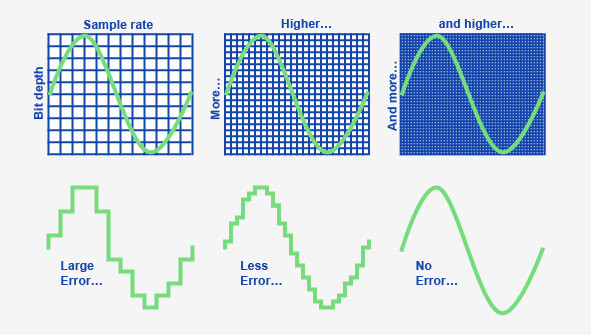
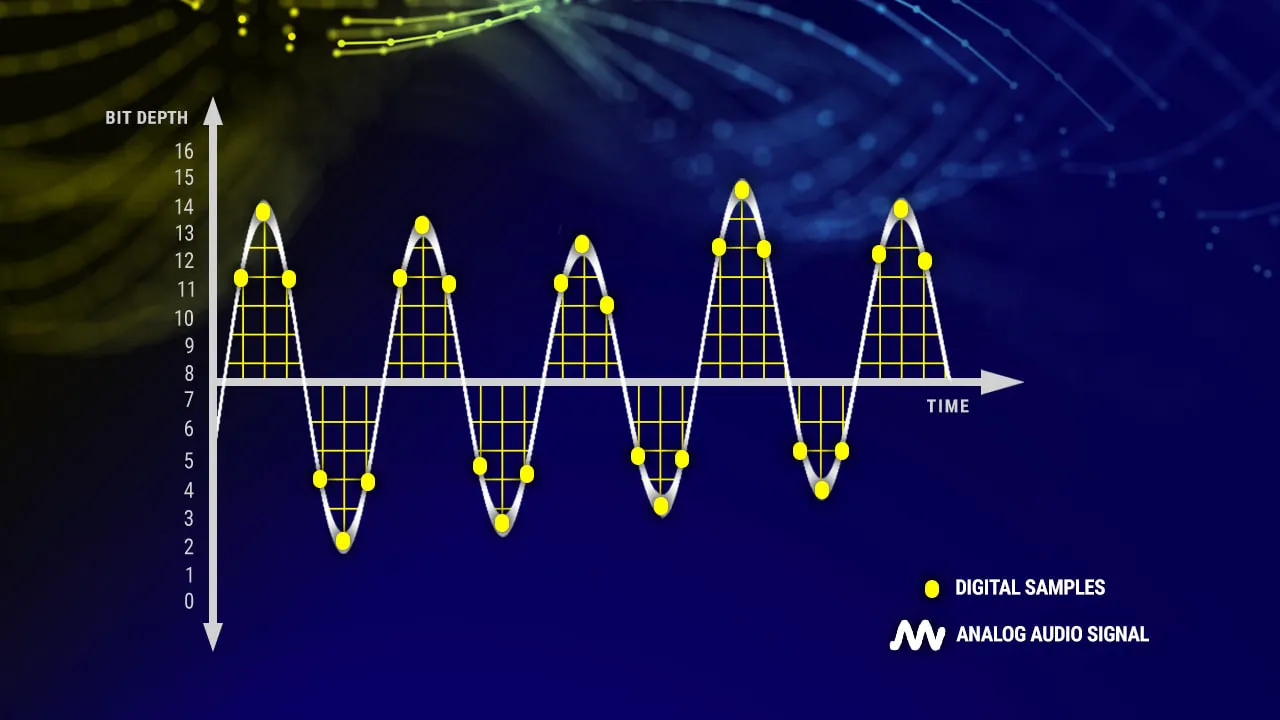
Does sample rate affect audio quality? Yes. This aspect is fundamental. The sample rate is like the resolution of a photograph. A higher rate is much better to enjoy the audio and listen to the music.

What is Sample Rate?

  • Sample rate measures the number of samples taken per second.
  • It’s measured in Hertz (Hz).
  • Common sample rates include 44.1kHz, 48kHz, 96kHz, and 192kHz.

I’ve always emphasized the importance of selecting the appropriate sample rate. You have to configure and balance the rate with the storage available. That will determine what type of experience is possible for your audio.

Nyquist Theorem

  • The Nyquist Theorem states that the sample rate must be at least twice the highest frequency you wish to capture.
  • For audio, this means a sample rate of at least 40kHz is needed to capture frequencies up to 20kHz.
  • Human hearing range is typically 20Hz to 20kHz.

The Nyquist Theorem provides a theoretical foundation. It can give you an awesome experience in M4A files to enjoy music. For all these factors it has become an important theory to achieve great audio performance.

Latest words on Resampling Effects on M4A Audio Quality

Resampling M4A audio quality is a challenge for the music industry. You need some MP4 tools to be able to perform an optimal resampling task. It can also reduce the chances of damaging audio. To fix the settings Mp4Gain is recommended. It’s used to improve the whole result. It also helps in making the necessary corrections. MP4 configuration is also necessary to get great audios. Keep in mind that good configuration, results in great audio enjoyment.


FAQ about Resampling Effects on M4A Audio Quality

What is the effect of resampling on M4A files in plain language?

Resampling M4A files is like resizing a picture. Making them fit different screens or platforms. Sometimes, you will lose some quality. But is also a good way to reduce the file size.

How can resampling degrade M4A audio quality?

Resampling can degrade M4A audio quality through aliasing, loss of high frequencies, and phase distortion. With these effects, your MP4 sound will not be as crisp or clear as it used to be. It can impact the music negatively and ruin your experience.

How does resampling affect file size in M4A audio?

Resampling reduces file size by lowering the sample rate. However, this also reduces some of its important information. To avoid any of these issues, be sure to take care when resampling.

Why is it important to resample audio files when you are in the music production industry?

Resampling is most common to fit multiple devices or formats. When you are in the music production industry, you want as many devices as possible to stream your music. Be sure to test your MP4 configurations to see which devices are worth being released in.

What is aliasing, and how can it be minimized when resampling M4A audio?

When resampling M4A audios, aliasing causes unwanted tones in the audio signal. To reduce this problems, you need to make great configurations. Also consider that it can cause other problems in your computer, so be sure to check that everything works as intended to ensure all the factors for good audio.

What is the impact that has aliasing on the sample rate of a M4A file?

If you are resampling a M4A audio and the sample rate is poorly configured, the aliasing can make the generated file sound like distortion or just bad frequencies are coming out of the system. The impact of this wrong configurations will be clear and easy to listen.

Is always better to resample and convert an audio to a lower frequency when dealing with M4A?

When you downsample the audio to fit in other hardware you will loose overall audio quality. Is always recommended to downsample audio files to use less capacity, but never upsample a M4A file due its quality wouldn’t be improved, as the data lost in the transformation will never be restored, so the file quality wont improve.

What kind of tools or software do you advise to use for this M4A resapling processes?

It’s very important to select software or tools that are recognized to have high quality, to have the best results, its important to follow some steps like making one single convertion (avoid making iterative resamplings), making the right configurations in the audio (to find good results for the hardware is being used) and avoid problems in the future.

In which way the Nyquist Theorem is used for generating new files with good configurations for great M4A audio??

The Nyquist Theorem its a theoretical foundation for configuring M4A files, you could use a configuration that matches a minimum of 40khz so the audios have good results. This tool has been used to improve M4A since its creation.

Are there third party tools I can use to make my M4A audio more dinamic?

Yes, Tools such as Mp4Gain can be used to improve the MP4, helping in making the necessary corrections by improving the whole result by also generating configurations. Remember always that the main objective is to enhance audios and make the best files.

Comments:

Great article! I always wanted to know more about audio and this really makes the topic clear. Thank you so much!

OK, Can you make a tutorial on how to use M4A with an audio editor to start making my own audio songs to publish on the cloud?? Will read it for sure

It was very helpful to know that this technique has great impact in all types of industry. It´s a very nice thing to start knowing, thanks again!.

I am going to try this with my audio software, never thought it would make a significant change. Thanks for the advise, I am all in for new information.

Great article ! thanks. I am sharing this with my friends.

All the tools and explanations are awesome, this really has to be well understood by more people!. It´s gonna be a must for my future projects!

I will definetly use MP4Gain to make my configurations and test them over and over!! Thansk!


Free Download Mp4Gain
picture


Mp4Gain Main Window
picture


Mp4Gain Features
picture


Free Download Mp4Gain
picture

WAV File Compression: Finding the Balance

WAV File Compression: Finding the Balance

WAV File Compression: Finding the Balance

WAV File Compression: Finding the Balance

Let’s talk about WAV Files

In the realm of digital audio, WAV files stand as a cornerstone. Their uncompressed nature delivers pristine sound, but the sheer size poses challenges. In this exploration, I, a seasoned audio specialist, unravel the nuances of WAV file compression.

Latest words on WAV Compression

Today, amidst a sea of audio compression methods, understanding the delicate dance between lossless and lossy WAV compression is crucial. Each approach has its…

The Battle: Lossless vs. Lossy

When it comes to WAV compression, the battle between lossless and lossy is central. Lossless compression ensures that every bit of the original audio quality is preserved. Think of it as making a photocopy of a document without losing any details. However, the trade-off is larger file sizes.

Lossy compression, on the other hand, trims excess data, significantly reducing file sizes. Imagine compressing that document but sacrificing some finer print. The result is a smaller file, but there’s a subtle loss in quality.

Choosing the Right Approach

  • Consider the purpose: Lossless for critical listening, lossy for storage efficiency.
  • Assess storage capacity: Opt for lossless if space allows, but for limited storage, explore lossy options.
  • Know your audience: Professional settings may lean towards lossless, while casual listeners may not notice the nuances.

Behind the Scenes: My Personal Insights

Having navigated the intricate world of audio for years, I’ve witnessed the evolving landscape of WAV compression. I recall a studio session where the choice between lossless and lossy…

Unveiling Lesser-Known Compression Techniques

Delving deeper, let’s shed light on some lesser-known WAV compression techniques. These might not be in the spotlight, but they play a vital role in specific scenarios.

Technique 1: Adaptive Differential Pulse Code Modulation (ADPCM)

ADPCM is a specialized form of compression that adapts to the audio content’s characteristics. It’s like tailoring a suit to fit perfectly, adjusting based on the intricacies of the fabric. This technique…

Technique 2: Wavelet-based Compression

Wavelet-based compression is akin to breaking down an image into its fundamental components. Think of it as deconstructing a puzzle into smaller, more manageable pieces. This approach…

Real-world Applications

Let’s bring this technical exploration into real-world scenarios. Consider a podcast creator aiming to deliver top-notch audio experiences. The choice between lossless and lossy compression…

Striking the Right Chord: My Closing Thoughts

As we conclude this journey through WAV file compression, remember that there’s no one-size-fits-all solution. The choice between lossless and lossy depends on your unique needs and priorities. Embrace the power…

Let’s Hear Your Thoughts

What’s your experience with WAV compression? Share your thoughts and let’s create a harmonious discussion on finding the perfect balance in the realm of digital audio.

Comments:

Comment: This article really helped me grasp the complexities of WAV compression. Kudos!

Comment: I wish there was more detail on specific software for WAV compression. Any recommendations?

Why is important bitrate in audio quality?

Why is important bitrate in audio quality?

Why is important bitrate in audio quality?

Bitrate

Bitrate is a crucial factor when it comes to audio quality. It refers to the amount of data processed per unit of time in an audio file.

Audio Quality

Audio quality is directly influenced by the bitrate of an audio file. Higher bitrates result in better sound reproduction and a more accurate representation of the original sound.

Sound Reproduction

The level of detail and accuracy in sound reproduction is determined by the bitrate of an audio file. A higher bitrate allows for more information to be captured and preserved, resulting in a clearer and more immersive listening experience.

Data Compression

Bitrate and data compression go hand in hand. Lower bitrates often involve more aggressive compression techniques, which can lead to a loss of audio data and a reduction in audio quality.

File Size

The bitrate of an audio file directly affects its file size. Higher bitrates require more data to be stored, resulting in larger file sizes. It’s important to strike a balance between audio quality and file size, especially when considering storage limitations or bandwidth constraints.

Streaming Services

Streaming services rely on efficient compression techniques to deliver audio files over the internet. Bitrate plays a crucial role in determining the streaming quality. Higher bitrates result in better audio fidelity but require more bandwidth.

Internet Bandwidth

The choice of bitrate for streaming or downloading audio files depends on the available internet bandwidth. Higher bitrates require more bandwidth to ensure a smooth streaming experience without interruptions or buffering.

Audio Formats

Different audio formats support varying levels of bitrate and, consequently, audio quality. Lossless formats like FLAC and WAV offer the highest audio fidelity as they preserve all the original data. Lossy formats like MP3 and AAC sacrifice some audio data to reduce file size.

Lossless

Lossless audio formats preserve all the original data, resulting in the highest audio fidelity. They are ideal for audiophiles and professionals who require the utmost accuracy in sound reproduction.

Lossy

Lossy audio formats use compression algorithms to reduce file size by sacrificing some audio data. They offer a good balance between audio quality and file size, making them suitable for everyday listening and storage purposes.

Listening Environment

The listening environment can significantly impact the perception of audio quality. Factors such as background noise, acoustics, and speaker quality can affect our ability to discern subtle differences in bitrate.

Background Noise

In a noisy environment, a lower bitrate may be sufficient as the background noise masks some of the audio details. However, in a quiet and controlled environment, a higher bitrate becomes more noticeable, providing a more immersive and enjoyable listening experience.

Acoustics

The acoustics of a room or space can influence the way audio is perceived. Proper acoustic treatment can enhance the overall audio quality, allowing for better sound reproduction and minimizing unwanted reflections or distortions.

Speaker Quality

The quality of speakers or headphones used for audio playback also plays a significant role in the overall audio experience. Higher quality speakers can better reproduce the nuances and details captured in high-bitrate audio files.

Music

Bitrate is particularly important when it comes to music. Higher bitrates allow for a more accurate representation of the original recording, resulting in a richer and more immersive musical experience.

Podcasts

Podcasts, like music, can greatly benefit from higher bitrates. Clearer and more detailed audio reproduction enhances the listening experience, making it easier to follow conversations and understand the content being discussed.

Audio Content

Whether it’s music, podcasts, audiobooks, or other forms of audio content, bitrate plays a crucial role in delivering a high-quality listening experience. Choosing the right bitrate ensures that the audio is faithfully reproduced and enjoyed to its fullest potential.