Importance of LUFS in Video or Audio Normalization


Free Download Mp4Gain
picture

Importance of LUFS in Video or Audio Normalization

Importance of LUFS in Video or Audio Normalization

Let’s talk about the Importance of LUFS in Video or Audio Normalization

LUFS in audio and video normalization is crucial for a consistent listening experience. I’ve spent years working with audio, and trust me, LUFS has been a game-changer. Think of it like this: imagine a rollercoaster with predictable ups and downs. That’s what LUFS helps us achieve with sound. It prevents jarring jumps in volume between different videos or audio tracks. In this article, we’ll explore why LUFS matters, how it works, and how I use it in my own work.

Understanding LUFS and Its Role in Normalization

LUFS, or Loudness Units Full Scale, measures perceived loudness. I like to think of it as a more sophisticated volume knob. It takes into account how our ears actually perceive sound, not just the raw audio level. Normalization, then, uses LUFS to level out the overall loudness.

Why LUFS Matters for Consistent Audio Levels

Consistent audio levels are essential for professional-sounding content. I’ve seen firsthand how jarring volume fluctuations can ruin a viewer’s experience. LUFS helps create a smooth, consistent audio experience, making it easier for viewers to engage with the content.

Benefits of Using LUFS for Normalization

LUFS-based normalization offers several benefits. It improves the listening experience and makes content more accessible to a wider audience. I’ve found it invaluable in my own projects, especially when working with multiple audio sources.

  • Improved viewer experience

    No more annoying volume jumps between scenes or videos. It’s a smoother ride for the ears.

  • Better accessibility

    Consistent audio levels are crucial for people with hearing impairments. LUFS normalization makes content more inclusive.

  • Professional sound quality

    LUFS helps achieve a polished, professional sound. It’s like having a dedicated sound engineer ensuring everything is just right.

How LUFS Works in Practice

LUFS measures the average loudness of audio over time. It’s like taking the temperature of a room, not just a single spot. This gives a more accurate representation of how we perceive loudness.

Implementing LUFS in Your Workflow

Integrating LUFS into your workflow is easier than you might think. Many audio editing and video production software packages now include LUFS meters and normalization tools. I use them all the time.

LUFS vs. Peak Normalization: Understanding the Difference

Peak normalization simply adjusts the highest peak to a target level. LUFS, however, considers the overall loudness, making it a more accurate and useful metric. Think of it as looking at the whole forest, not just the tallest tree.

Common LUFS Standards and Target Levels

Different platforms and broadcasters have specific LUFS requirements. Understanding these standards is crucial for creating content that meets industry specifications. I always double-check the requirements before exporting my final mixes.

Addressing Challenges and Misconceptions about LUFS

Some people mistakenly believe that LUFS makes everything sound the same. That’s not true. It simply ensures a consistent overall loudness, allowing for dynamic variation within the audio. I’ve found this to be a major advantage in my work.

Advanced Techniques with LUFS

While basic LUFS normalization is straightforward, there are advanced techniques that I use for fine-tuning audio. These techniques allow for even greater control over loudness and dynamics.

FAQ about Importance of LUFS in Video or Audio Normalization

What is LUFS in simple terms?

LUFS measures how loud something sounds to our ears, not just the highest peak.

Why is LUFS important for video and audio normalization?

LUFS ensures consistent loudness, preventing jarring volume changes.

What’s the difference between LUFS and peak normalization?

Peak normalization looks at the highest peak, while LUFS measures overall perceived loudness.

How do I measure LUFS in my audio?

Most audio editing software includes LUFS meters.

What are common LUFS targets for different platforms?

Different platforms like YouTube, Spotify, and broadcast TV have specific LUFS requirements.

Does LUFS normalization make everything sound the same?

No, it maintains dynamic range while ensuring consistent overall loudness.

How can I implement LUFS in my workflow?

Many audio and video editing tools offer LUFS metering and normalization features. Mp4Gain is a great tool.

What are some advanced techniques for using LUFS?

Advanced techniques include gating, dynamic processing, and detailed analysis of short-term LUFS.

Why are different LUFS standards necessary?

Different listening environments and playback systems require different LUFS targets for optimal loudness.

What are the benefits of using LUFS for podcasts?

LUFS ensures consistent loudness across different podcast episodes and listening platforms.

Latest words on Importance of LUFS in Video or Audio Normalization

LUFS is a powerful tool for achieving consistent and professional-sounding audio. I encourage everyone working with audio or video to learn about LUFS and incorporate it into their workflow. Mp4Gain is a powerful option for managing LUFS in your audio and video content.

Comments:

This article totally cleared up my confusion about LUFS. Thanks for the simple explanations! – AudioNewbie

I’ve been meaning to learn more about LUFS. This was super helpful! – VideoEditorPro

Great article! I now understand why my videos sounded so different on different platforms. – YouTubeCreator

Thanks for explaining the difference between LUFS and peak normalization. I always wondered about that. – SoundGuy

This article was just what I needed. Now I can make sure my podcasts have consistent loudness. – PodcastProducer

Super informative! I’m going to start using LUFS in all my audio projects. – MusicMaker

I didn’t understand anything about LUFS before reading this article. Now, I can consider myself a LUFS expert. – LUFSLover

Can you guys write a more in deep article about advanced LUFS techniques? This was helpful, but I need more. – AdvancedUser

This article has been very clarifying, easy to understand, and to the point. – John

Amazing article! Great resource for anyone working with audio. – Audiophile

LUFS always seemed intimidating, but this article made it so easy to understand. Thanks! – AspiringSoundEngineer


Free Download Mp4Gain
picture


Mp4Gain Main Window
picture


Mp4Gain Features
picture


Free Download Mp4Gain
picture

WMA File Format Specifications

WMA File Format Specifications

WMA File Format Specifications

WMA File Format Specifications

Let’s talk about WMA file format specifications

In the realm of digital audio, understanding the specifications of the WMA (Windows Media Audio) file format is paramount. As a specialist with years of experience in audio technology, I’ve delved deep into the intricacies of WMA files, exploring their encoding methods, compression algorithms, and compatibility across different platforms and devices. In this comprehensive guide, I will dissect the WMA file format specifications, shedding light on its nuances and offering practical insights for audio enthusiasts, professionals, and digital archivists alike.

The significance of WMA files in digital audio

WMA files occupy a significant place in the landscape of digital audio, particularly in the realm of Windows-based systems and media players. Developed by Microsoft, the WMA format emerged as an alternative to popular formats like MP3, offering comparable audio quality with smaller file sizes. This compression efficiency made WMA files ideal for streaming over the internet and storing vast music collections on portable devices with limited storage capacity. In essence, WMA files represented a balance between audio fidelity and file size, catering to the evolving needs of digital audio consumers.

Compression efficiency: The hallmark of WMA files

  • Comparable audio quality to MP3
  • Smaller file sizes for efficient storage and streaming
  • Ideal for portable devices with limited storage
  • Compatible with Windows-based systems and media players

Understanding the encoding methods of WMA files

WMA files employ sophisticated encoding methods to achieve their compression efficiency while maintaining audio quality. Unlike uncompressed formats like WAV, which store audio data in raw PCM (Pulse Code Modulation) format, WMA files utilize perceptual audio coding techniques. These techniques exploit the limitations of human auditory perception to discard redundant or less critical audio data, resulting in smaller file sizes without significant loss in perceived audio quality.

Perceptual audio coding: The science behind WMA compression

  • Discarding redundant audio data based on human auditory perception
  • Psychoacoustic principles inform encoding decisions
  • Variable bit rate (VBR) encoding for optimal compression efficiency
  • Advanced algorithms for artifact reduction and error resilience

Compatibility and interoperability of WMA files

While WMA files offer compelling advantages in terms of compression efficiency, their compatibility with non-Windows platforms and devices has been a subject of contention. Historically, Apple’s ecosystem, dominated by devices like the iPod and iTunes, favored the AAC (Advanced Audio Coding) format over WMA. However, with the proliferation of multi-platform media players and streaming services, the barriers to WMA adoption have diminished, with many devices and software now offering native support for the format.

Bridging the compatibility gap: WMA in a multi-platform world

  • Native support on Windows-based systems and media players
  • Third-party plugins and software for playback on non-Windows platforms
  • Conversion tools for transcoding WMA to more widely supported formats
  • Integration with online streaming platforms and digital music stores

Latest words on WMA file format specifications

In conclusion, understanding the specifications of WMA files is essential for anyone working with digital audio, whether for personal enjoyment, professional production, or archival purposes. By grasping the nuances of WMA encoding, compression, and compatibility, audio enthusiasts can make informed decisions regarding format selection, playback options, and long-term storage strategies. As a specialist in audio technology, I encourage stakeholders to explore the capabilities and limitations of WMA files, leveraging their unique advantages while mitigating compatibility challenges.

Comments:

This article provides a comprehensive overview of WMA file format specifications, covering everything from compression methods to compatibility considerations. As someone who works extensively with digital audio, I found the insights and practical tips offered here highly valuable. Kudos to the author for shedding light on this important topic!

– AudioPro86

While this article offers valuable information on WMA file specifications, I would have liked to see more discussion on the evolution of the format over time and its relevance in today’s digital audio landscape. Nonetheless, a well-written and informative piece!

– DigitalAudioFan

As a newcomer to digital audio production, I found this article incredibly insightful in demystifying the complexities of WMA file format specifications. The explanations are clear, and the real-life examples provided make it easy to understand. Thank you for this informative guide!

– NewbieSoundEngineer

This article does a great job of breaking down the technical aspects of WMA files while keeping it accessible to readers of all levels of expertise. The author’s authority on the subject shines through, offering valuable insights and practical recommendations. Highly recommended!

– TechEnthusiast123

Excellent article! The author’s deep knowledge of WMA file format specifications is evident throughout, providing valuable insights into compression methods, encoding techniques, and compatibility considerations. A must-read for anyone working with digital audio!

– AudioAficionado

Thank you for this informative article on WMA file format specifications. As someone who’s been using WMA files for years, I learned a lot of new things from this guide. The explanations are clear, and the practical tips are invaluable for optimizing audio quality and compatibility.

– MusicLover456

This article provides a thorough examination of WMA file format specifications, covering everything from encoding methods to compatibility considerations. However, I would love to see more discussion on the future of the format and emerging trends in digital audio compression.

– FutureTechTrends

WMA Audio Signal Correlation

WMA Audio Signal Correlation

Let’s talk about WMA Audio Signal Correlation

As a specialist in audio engineering, I understand the importance of WMA (Windows Media Audio) format and its correlation with audio signals. When we delve into the realm of digital audio, understanding how WMA audio signals correlate becomes crucial for optimizing sound quality, compression, and compatibility across various platforms. WMA, developed by Microsoft, offers efficient compression without significant loss of audio quality, making it a popular choice for digital audio storage and streaming. In this comprehensive guide, I’ll explore the intricacies of WMA audio signal correlation, shedding light on its significance, technical aspects, and practical applications.

The Fundamentals of WMA Audio Format

Starting with the basics, let’s dissect the WMA audio format. Windows Media Audio is a proprietary format developed by Microsoft to compete with other popular audio formats like MP3 and AAC. WMA utilizes various codecs to compress audio data, allowing for smaller file sizes while maintaining reasonable audio quality. Unlike uncompressed formats like WAV, WMA employs lossy compression techniques, meaning some audio data is permanently discarded during encoding. However, the goal of WMA is to achieve a balance between file size and audio fidelity, making it suitable for a wide range of applications, from digital music distribution to streaming services.

Lossy Compression in WMA

  • Understanding the trade-offs: WMA’s approach to compression.
  • How lossy compression affects audio quality.
  • Bitrate selection and its impact on WMA audio files.

When discussing WMA audio signal correlation, it’s essential to grasp the concept of lossy compression. Unlike lossless formats that preserve all original audio data, lossy compression selectively discards information deemed less critical to human perception. In the context of WMA, this means analyzing audio signals, identifying redundancies or imperceptible details, and removing them to reduce file size. While this process inevitably results in some loss of audio quality, modern WMA codecs employ sophisticated algorithms to minimize perceptible artifacts, ensuring satisfactory listening experiences for most users.

Compatibility and Encoding

  • Platform compatibility: Where can you use WMA files?
  • Choosing the right encoding settings for optimal results.
  • Conversion tools and techniques for WMA audio files.

One of the critical aspects of WMA audio signal correlation is understanding its compatibility and encoding options. While WMA offers efficient compression, its adoption across different platforms and devices varies. Compatibility issues may arise when attempting to play WMA files on non-Windows devices or older hardware. Therefore, selecting appropriate encoding settings becomes paramount to ensure broad compatibility without sacrificing too much audio quality. Additionally, familiarity with conversion tools and techniques allows users to transcode WMA files into other formats when necessary, further enhancing flexibility and accessibility.

Advanced Techniques in WMA Signal Processing

Moving beyond the basics, let’s explore some advanced techniques in WMA signal processing. While standard encoding methods suffice for general use cases, specialized applications may require additional considerations to achieve optimal results. From audio mastering to broadcast engineering, understanding these advanced techniques empowers audio professionals to leverage WMA’s capabilities effectively.

Dynamic Range Compression

  • Enhancing perceived loudness and consistency.
  • Applying dynamic range compression in WMA encoding.
  • Trade-offs between dynamic range and audio fidelity.

Dynamic range compression is a common technique used in audio production to reduce the dynamic range of audio signals, making quieter sounds louder and louder sounds quieter. In the context of WMA encoding, dynamic range compression can help enhance perceived loudness and consistency, particularly useful in scenarios where audio needs to compete with ambient noise or maintain a consistent volume level across tracks. However, it’s essential to strike a balance between dynamic range compression and preserving natural audio dynamics to avoid unwanted side effects such as pumping or distortion.

Multi-Channel Audio Encoding

  • Supporting surround sound and immersive audio formats.
  • Encoding multi-channel audio in WMA.
  • Considerations for bitrate allocation and channel mapping.

With the proliferation of surround sound systems and immersive audio formats, multi-channel audio encoding has become increasingly important. WMA supports multi-channel configurations, allowing for the encoding of audio streams with multiple channels, such as 5.1 or 7.1 surround sound. When encoding multi-channel audio in WMA, considerations include bitrate allocation, ensuring sufficient data for each channel while maintaining overall file size efficiency, and channel mapping, specifying the spatial placement of audio channels for accurate playback.

Practical Applications and Use Cases

Now that we’ve covered the fundamentals and advanced techniques in WMA audio signal correlation, let’s explore some practical applications and use cases where this knowledge proves invaluable. Whether you’re a music enthusiast, audio engineer, or content creator, understanding how to leverage WMA effectively opens up a world of possibilities in digital audio production and distribution.

Music Streaming and Distribution

  • Optimizing audio quality and file size for streaming platforms.
  • Maximizing reach and accessibility with WMA-encoded music.
  • Ensuring compatibility across different streaming services and devices.

In the realm of music streaming and distribution, WMA plays a significant role in delivering high-quality audio to listeners worldwide. By encoding music in WMA format, artists and record labels can strike a balance between audio quality and streaming efficiency, ensuring smooth playback even under varying network conditions. Moreover, WMA’s broad compatibility ensures that music encoded in this format can reach a wide audience across different streaming platforms and devices, from smartphones to smart speakers.

Audio Broadcasting and Podcasting

  • Optimizing audio files for radio broadcasting and podcast distribution.
  • Reducing file size without compromising audio fidelity.
  • Delivering consistent audio quality across various listening environments.

For broadcasters and podcasters, WMA offers an efficient solution for encoding and distributing audio content. By leveraging WMA’s compression capabilities, broadcasters can reduce file sizes without significant loss of audio quality, facilitating faster uploads and downloads for listeners. Additionally, WMA’s compatibility with broadcasting software and hardware ensures seamless integration into existing workflows, allowing broadcasters to focus on creating engaging content without worrying about technical limitations.

Latest words on WMA Audio Signal Correlation

In conclusion, understanding WMA audio signal correlation is essential for anyone involved in digital audio production, distribution, or consumption. By grasping the fundamentals of WMA format, exploring advanced signal processing techniques, and identifying practical applications, audio professionals can harness the full potential of WMA to deliver high-quality audio experiences across various platforms and devices. Whether you’re streaming music online, broadcasting a radio show, or producing a podcast, WMA remains a versatile and reliable choice for encoding audio content.

Comments:

This article is very informative! I’ve always wondered how WMA compression works and its impact on audio quality. Thanks for breaking it down in such a clear and concise manner. – MusicLover123

Great article! As a podcast producer, I found the section on optimizing audio files for broadcasting and podcasting particularly useful. I’ll definitely be implementing some of these techniques in my workflow. – PodcastPro

I appreciate the depth of information provided in this article. However, I’d love to see more discussion on the history and evolution of WMA format. Overall, though, it’s a valuable resource for anyone interested in audio engineering. – SoundEnthusiast

This article helped me understand the technical aspects of WMA compression better. I’ve been struggling with audio file sizes for my streaming platform, and now I have some practical solutions to explore. – StreamMaster

As someone new to audio engineering, I found this article incredibly insightful. It’s refreshing to see complex topics explained in a way that’s easy to understand. Looking forward to more content like this! – NoviceEngineer

Wow, I didn’t realize there were so many factors to consider when encoding audio in WMA format. This article opened my eyes to the intricacies of digital audio processing. Kudos to the author for such comprehensive coverage! – AudioExplorer

This article provided some valuable insights into the world of WMA audio compression. However, I wish there were more examples illustrating the practical applications of dynamic range compression and multi-channel encoding. – TechSavvyListener

As a radio broadcaster, I found the section on optimizing audio files for broadcasting extremely helpful. It’s always a challenge to balance audio quality and file size, but this article offered some great tips for achieving the perfect mix. – RadioHost

Excellent article! I’ve been looking for a comprehensive guide to WMA audio signal correlation, and this exceeded my expectations. The explanations are clear, and the practical examples make it easy to apply this knowledge in real-world scenarios. – AudioTechJunkie

This article provides a solid overview of WMA audio signal correlation, but I’d love to see a deeper dive into the technical specifications and limitations of the format. Nonetheless, it’s a great starting point for anyone interested in learning more about digital audio compression. – TechEnthusiast

Audio Dynamic Range Compression: Limiting and Expansion

Audio Dynamic Range Compression: Limiting and Expansion

Audio Dynamic Range Compression

Audio Compression: What It Is and How It Works

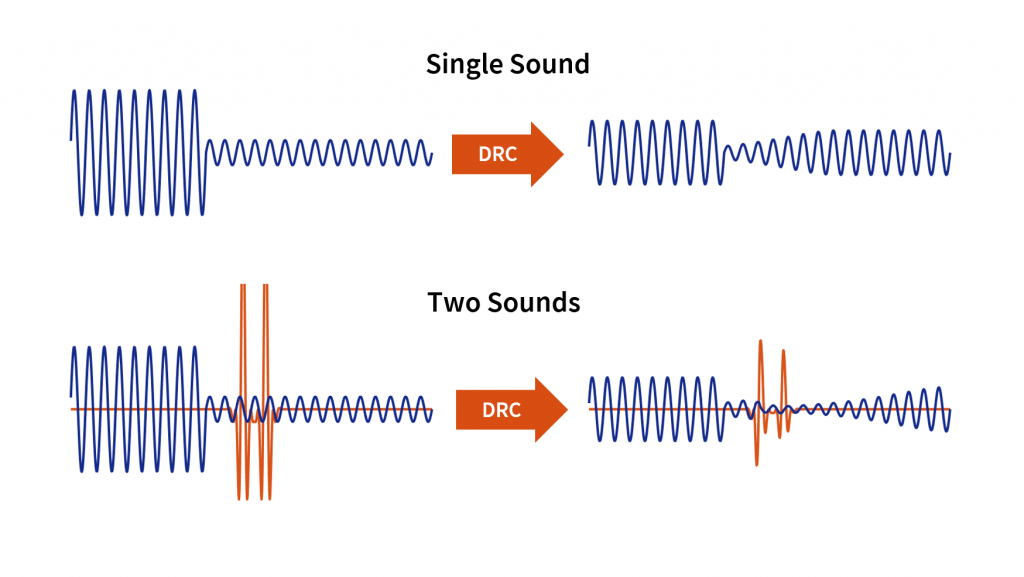
As an audio engineer, I’ve spent countless hours working with dynamic range compression. At its core, compression is a tool used to control the dynamic range of an audio signal. This means that it can be used to make quiet sounds louder and loud sounds quieter, resulting in a more consistent overall volume. Compression is an essential tool in the world of audio production, and it’s used in everything from music to film and television.
One of my favorite quotes about compression comes from the legendary producer Quincy Jones. He once said, “Compression is like a good pair of eyeglasses. You don’t notice them, but they make things look better.” And it’s true. When used correctly, compression can make an audio signal sound more polished and professional.

Dynamic Range Compression vs. Limiting

While compression and limiting are often used interchangeably, they are actually two different processes. Compression is used to control the dynamic range of an audio signal, while limiting is used to prevent the signal from exceeding a certain level. In other words, limiting is a more extreme form of compression.
One of the most common uses of limiting is in mastering, which is the final step in the audio production process. During mastering, the goal is to make sure that the audio sounds consistent across different playback systems. Limiting is used to prevent the audio from distorting or clipping when played back on a variety of systems.

Audio Expansion: The Other Side of the Coin

While compression and limiting are used to control the dynamic range of an audio signal, expansion is used to increase it. Expansion is the opposite of compression, and it’s used to make quiet sounds even quieter. This can be useful in situations where you want to bring out the details in a recording.
One of my favorite examples of the use of expansion comes from the film “No Country for Old Men.” In the film, there’s a scene where the main character is walking through a hotel room. As he walks, you can hear the sound of his footsteps echoing off the walls. The sound of the footsteps is very quiet, but it’s still audible. This is a great example of the use of expansion to bring out the details in a recording.
Final Words:
In conclusion, dynamic range compression, limiting, and expansion are all essential tools in the world of audio production. Whether you’re working on music, film, or television, understanding how to use these tools can make a huge difference in the final product. And while there are many different techniques and approaches to using compression, limiting, and expansion, the most important thing is to use your ears and trust your instincts.
audio compression, dynamic range, audio engineering, audio processing, audio mixing, audio production, audio mastering, audio software, audio plugins, audio effects, audio equipment, audio gear, audio technology, audio science, audio theory, audio education, audio tutorials, audio tips, audio tricks, audio hacks, audio workflow, audio techniques, audio aesthetics, audio quality, audio fidelity, audio perception, audio psychology, audio philosophy, audio history, audio culture, audio art, audio creativity, audio innovation, audio trends, audio industry, audio business, audio marketing, audio branding, audio advertising, audio monetization, audio revenue, audio distribution, audio streaming, audio downloads, audio formats, audio codecs, audio standards, audio compatibility, audio hardware, audio drivers, audio firmware, audio troubleshooting, audio repair, audio maintenance, audio optimization, audio performance, audio testing, audio measurement, audio analysis, audio visualization, audio synthesis, audio sampling, audio recording, audio editing, audio mixing, audio mastering, audio post-production, audio restoration, audio enhancement, audio noise reduction, audio equalization, audio filters, audio modulation, audio synthesis, audio synthesis

What is a De-Esser?

What is a De-Esser?

De-Esser
De-Esser
De-Esser
De-Esser

As a music producer and audio engineer, I’ve encountered my fair share of challenging vocal recordings. One common issue is sibilance, which occurs when the “s” and “sh” sounds are overly pronounced, causing harsh and piercing frequencies in the mix. This is where a de-esser comes in handy.

De-Esser Plugin

A de-esser is a specialized audio plugin that reduces or eliminates sibilance from vocal recordings. It works by detecting the offending frequencies and applying gain reduction to them, effectively taming the harshness and allowing the vocals to sit better in the mix.

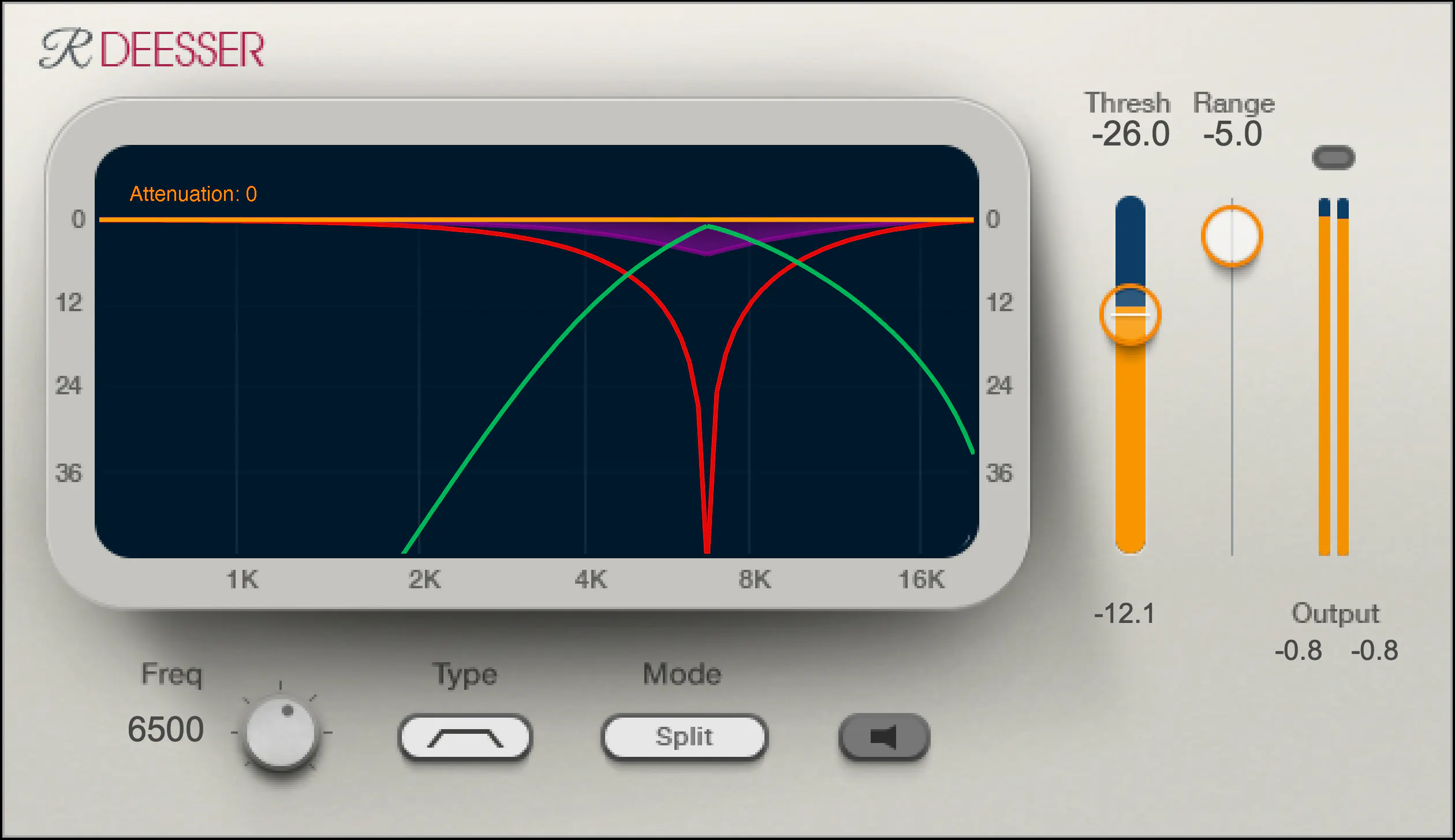
One of my go-to de-esser plugins is Waves Renaissance DeEsser, which offers precise control over the detection frequency, threshold, and reduction amount. Another popular option is FabFilter Pro-DS, which includes a natural-sounding “single vocal” mode for easy and effective de-essing.

De-Essing Vocals

De-essing can be a delicate process, as overuse can result in a dull and lifeless vocal sound. It’s important to strike a balance between reducing sibilance and maintaining the natural tone and character of the vocal recording.

When de-essing vocals, I typically start by soloing the vocal track and listening for the most pronounced sibilant sounds. I then apply the de-esser plugin with a gentle reduction amount, gradually increasing until the sibilance is under control but the vocal still sounds natural.

Best De-Esser for Vocals

In my experience, the best de-esser for vocals is one that offers precise control over the detection and reduction parameters, while still maintaining a natural sound. As mentioned earlier, Waves Renaissance DeEsser and FabFilter Pro-DS are both excellent options in this regard.

It’s also worth considering the de-esser included in your DAW of choice. For example, Logic Pro’s built-in de-esser is simple yet effective, with a straightforward interface that allows for quick and easy de-essing.

De-Esser Settings

When using a de-esser, it’s important to understand the various settings and how they affect the sound. The most important parameters to adjust are the detection frequency, threshold, and reduction amount.

The detection frequency determines which frequencies the de-esser will target, while the threshold sets the level at which the gain reduction will be applied. The reduction amount controls how much gain reduction is applied to the offending frequencies.

It’s worth experimenting with these settings to find the sweet spot for each individual vocal recording.

Tips for Using a De-Esser

Here are a few tips for getting the most out of your de-esser:

Use the de-esser sparingly, as overuse can result in a dull and lifeless vocal sound.
Always listen for sibilance in solo mode before applying the de-esser to the full mix.
Experiment with different de-esser plugins and settings to find the best sound for each individual recording.
If you’re unsure about how much de-essing to apply, start with a small reduction amount and gradually increase until the sibilance is under control but the vocal still sounds natural.
As the legendary producer Quincy Jones once said, “The most important thing in the studio is your ears.” And this is especially true when it comes to managing sibilance in vocal recordings. A de-esser is a tool that helps to control sibilance, or the harsh “s” and “t” sounds that can be distracting or unpleasant in a recording.

What is a de-esser?

Simply put, a de-esser is a type of audio processor that is designed to reduce or remove sibilance from a recording. It works by detecting and attenuating the specific frequency range where sibilance occurs in a vocal recording. This can help to smooth out the sound of the recording and make it more pleasing to the ear.

How does a de-esser work?

A de-esser typically uses a narrow-band compressor to reduce the level of the sibilant frequencies. The compressor is set to activate only when the sibilant frequencies exceed a certain threshold level. This allows the de-esser to reduce sibilance without affecting other parts of the recording. Some de-essers also use dynamic equalization to selectively attenuate sibilant frequencies, which can provide a more natural-sounding result.

Why is a de-esser important?

Sibilance can be a major distraction in vocal recordings, and can make a recording sound amateurish or unprofessional. A de-esser can help to smooth out the sound of a recording and make it more pleasant to listen to. This can be especially important in situations where the recording will be played over a large sound system or in a professional setting.

As the legendary producer Quincy Jones once said, “The most important thing in the studio is your ears.” And this is especially true when it comes to managing sibilance in vocal recordings. One personal experience I’ve had with sibilance was during a recording session with a vocalist who had a very pronounced lisp. Despite the fact that the vocal performance was excellent, the lisp made the recording almost unlistenable. However, with the use of a de-esser, we were able to remove the harsh sibilant sounds and salvage the recording.

Another personal experience was with a different vocalist who had a lot of sibilance in her recordings. Initially, we tried to use EQ to reduce the sibilance, but found that this also affected other parts of the recording and made it sound unnatural. However, once we introduced a de-esser into the signal chain, we were able to achieve a more natural-sounding result that still effectively reduced the sibilance.

In conclusion, a de-esser is a powerful tool for managing sibilance in vocal recordings. By detecting and attenuating specific frequency ranges where sibilance occurs, a de-esser can help to smooth out the sound of a recording and make it more pleasing to the ear. Whether you’re a professional audio engineer or a hobbyist recording at home, a de-esser is an important tool to have in your audio processing toolkit.

sibilance reduction, vocal processing, audio engineering, dynamic equalization, narrow-band compressor, vocal recording, audio processor, professional recording, recording studio, audio production, sound quality, sound engineering, audio post-production, de-essing, audio editing, audio restoration, sound treatment, audio technology, audio software, mixing and mastering, audio mastering, audio plugins, music production, audio effects, sound design, audio signal processing, audio post-processing, audio filtering, audio frequency, audio dynamics, audio post-production techniques, vocal performance, audio compression, audio enhancement, audio editing software, audio hardware, audio mixer, audio signal chain, audio equipment, audio tools, sound recording, audio clean-up, audio post, audio mastering software, audio workflow, audio clarity