Variable Bit Rate (VBR) Encoding in MP3

Variable Bit Rate (VBR) Encoding in MP3

Variable Bit Rate (VBR) Encoding in MP3

Variable Bit Rate (VBR) Encoding in MP3

Let’s talk about Variable Bit Rate (VBR) encoding in MP3

As a specialist in audio encoding and digital formats, I’ve seen firsthand the impact of Variable Bit Rate (VBR) encoding on MP3 files. VBR offers a dynamic approach to audio compression, optimizing file sizes without compromising quality. In this article, I’ll delve into the intricacies of VBR encoding and its advantages over Constant Bit Rate (CBR) methods, providing insights into its implementation and effects on audio quality.

Understanding Variable Bit Rate (VBR) Encoding

Variable Bit Rate (VBR) encoding is a technique used in audio compression where the bit rate varies throughout the duration of a file. Unlike Constant Bit Rate (CBR) encoding, which maintains a consistent bit rate, VBR adjusts the bit rate based on the complexity of the audio content. This results in higher bit rates during complex passages and lower bit rates during simpler sections, optimizing file size while preserving audio quality.

Advantages of VBR Encoding

Improved Efficiency: VBR encoding optimizes file sizes by allocating more bits to complex audio segments and fewer bits to simpler ones, resulting in more efficient compression.
Enhanced Audio Quality: By adapting to the content’s complexity, VBR encoding preserves audio quality, ensuring a more natural and dynamic listening experience.
Flexible File Sizes: VBR-encoded files have variable sizes depending on the audio content, allowing for more efficient use of storage and bandwidth resources.

Implementation of VBR Encoding in MP3

In the context of MP3 audio files, VBR encoding offers significant benefits over CBR methods. By dynamically adjusting the bit rate, VBR-encoded MP3 files maintain high audio quality while reducing file sizes. This makes them ideal for various applications, including music streaming, digital distribution, and multimedia content creation.

Effects on Audio Quality

Transparent Compression: VBR encoding aims to achieve transparency, where the compressed audio is indistinguishable from the original source. This ensures minimal loss of audio fidelity, even at lower bit rates.
Smooth Transitions: VBR-encoded MP3 files feature smooth transitions between different bit rates, minimizing artifacts and ensuring a seamless listening experience.
Optimized Compression: VBR adapts to the characteristics of the audio content, allocating more bits to complex passages and fewer bits to simpler sections, resulting in optimal compression efficiency.

Comparing VBR and CBR Encoding

Variable Bit Rate (VBR) encoding offers several advantages over Constant Bit Rate (CBR) methods, particularly in terms of audio quality and file size optimization. While CBR provides a consistent bit rate throughout the entire file, VBR adjusts the bit rate dynamically, resulting in more efficient compression and better audio quality.

Benefits of VBR Encoding

Improved Audio Quality: VBR encoding preserves audio quality by allocating more bits to complex passages and fewer bits to simpler sections, resulting in a more natural and dynamic sound.
Optimized File Sizes: VBR-encoded files have variable sizes depending on the audio content, allowing for more efficient use of storage and bandwidth resources.
Flexible Compression: VBR adapts to the characteristics of the audio content, ensuring optimal compression efficiency and transparency.

The Future of VBR Encoding

As technology advances and multimedia consumption evolves, Variable Bit Rate (VBR) encoding continues to play a crucial role in audio compression. With its ability to optimize file sizes while preserving audio quality, VBR remains a preferred choice for content creators, streaming platforms, and digital distributors. As we look to the future, the adoption of VBR encoding is expected to increase, driving further innovations in audio compression technology.

In conclusion, Variable Bit Rate (VBR) encoding in MP3 files offers a dynamic and efficient approach to audio compression, optimizing file sizes while preserving audio quality. By adapting to the complexity of the audio content, VBR ensures a seamless listening experience across various applications and devices.

Latest words on Variable Bit Rate (VBR) encoding in MP3

In my years of experience in audio encoding, Variable Bit Rate (VBR) encoding has remained a cornerstone of efficient compression techniques. Its dynamic allocation of bits ensures optimal file sizes without compromising audio quality, making it indispensable for digital audio distribution and streaming. As technology continues to evolve, VBR encoding will continue to play a vital role in shaping the future of audio compression.

Comments:

This article provided a comprehensive overview of Variable Bit Rate (VBR) encoding in MP3 files. As a music enthusiast, I appreciate the insights into how VBR optimization enhances audio quality.

Could you elaborate on the compatibility of VBR-encoded MP3 files with different audio players and devices? I’m curious about any potential playback issues.

As a content creator, I’m always looking for ways to optimize file sizes without sacrificing audio quality. VBR encoding seems like the perfect solution for my needs.

This article provided valuable insights into the advantages of VBR encoding over CBR methods. I’d love to see more comparisons between the two techniques.

It’s fascinating to learn about the future implications of VBR encoding in audio compression. I’m excited to see how this technology evolves in the coming years.

As a streaming platform user, I appreciate the seamless audio experiences enabled by VBR encoding. This article shed light on the technical aspects behind the optimization process.

Could you provide more information on the computational resources required for VBR encoding? I’m curious about the processing power needed for efficient compression.

This article was incredibly informative and well-written. I’ll be sure to recommend it to anyone interested in learning about Variable Bit Rate (VBR) encoding.

As a digital distributor, I’m intrigued by the potential of VBR encoding to optimize file sizes for online distribution. This article provided valuable insights into its benefits.

I’ve been using VBR encoding for my music collection, and I’ve noticed a significant improvement in audio quality. This article validated my decision to adopt this compression method.

Unique and Distinctive Characteristics of the FLAC Format

Unique and Distinctive Characteristics of the FLAC Format

FLAC Format
FLAC Format

Let’s Talk About FLAC:

FLAC Format
FLAC Format

Embarking on a journey into the realm of high-fidelity audio, let’s explore the unique and distinctive characteristics that set FLAC (Free Lossless Audio Codec) apart. As a seasoned specialist in audio technology, I’ll unravel the complexities and unveil the unparalleled features that make FLAC a standout format.

FLAC Format
FLAC Format

The FLAC Advantage: Lossless Audio Compression:

At the core of FLAC’s brilliance is its commitment to maintaining audio quality without compromising file size. Unlike lossy compression formats, FLAC preserves every nuance of the original recording, offering a pristine listening experience. Imagine it as a musical time capsule, encapsulating the full richness of the artist’s creation.

Preserving the Musical Essence:

  • FLAC’s lossless compression ensures that every instrument, vocal nuance, and subtle detail is faithfully retained.
  • Picture a painting, where each brushstroke is vital; FLAC encapsulates the artist’s intent in every sonic detail.
  • It’s like having a concert hall in your pocket, with the complete authenticity of the live performance.

FLAC and the Audiophile’s Paradise:

For audiophiles seeking the pinnacle of audio quality, FLAC emerges as a sanctuary. Its ability to reproduce studio-quality sound makes it the preferred choice for those with discerning ears. The journey from the recording studio to your headphones remains untainted, offering an audio escapade like no other.

Immersive Audio Bliss:

  • FLAC transforms your listening space into a sonic sanctuary, where the music envelops you with unparalleled clarity.
  • It’s akin to stepping into the artist’s world, feeling the music as if you were present during its creation.
  • Imagine savoring the delicate strumming of a guitar or the subtle whispers of a singer with uncompromised fidelity.

Compatibility without Compromise:

FLAC’s universality across various platforms and devices further enhances its appeal. Whether you’re on a desktop, smartphone, or dedicated audio player, FLAC seamlessly integrates into your audio ecosystem. It’s the bridge that connects audiophiles and casual listeners alike, fostering a shared appreciation for exceptional sound.

FLAC Everywhere You Go:

  • FLAC’s adaptability ensures that your entire music library remains at your fingertips, transcending device boundaries.
  • It’s like having a personal concert hall that fits in your pocket, offering a symphony of choice without compromise.
  • Imagine the convenience of enjoying studio-quality sound no matter where life takes you.

The Future of Audio: FLAC’s Enduring Legacy:

As an authority in the field, I foresee FLAC continuing to shape the future of audio consumption. Its ability to strike a balance between uncompromised quality and widespread compatibility positions it as a timeless player in the evolving audio landscape. The legacy of FLAC is not just about the present; it’s about paving the way for future sonic experiences.

Latest Words on FLAC:

As we conclude our exploration of FLAC’s distinctive features, it’s evident that this format transcends the boundaries of audio compression. In a world where quality often meets compromise, FLAC stands as a testament to the unwavering pursuit of audio excellence. Whether you’re a seasoned audiophile or a casual music lover, FLAC offers an immersive journey into the heart of sound.

Comments:

FLAC truly elevates the listening experience! Feeling the music like never before.

Any insights on how FLAC compares to other lossless formats? Looking for the best for my audio setup!

Kudos for shedding light on FLAC’s compatibility. Finally, a format that plays well with all my devices!

Curious about the impact of FLAC on battery life for portable devices. Any thoughts on optimizing for longer playtime?

FLAC has redefined how I experience music. It’s like being transported to the heart of the recording studio!

Do you see FLAC maintaining its dominance, or will newer formats eventually take the spotlight? Exciting times ahead!

Thanks for the detailed breakdown! Exploring FLAC’s compatibility brought a whole new level of convenience to my music setup.

FLAC’s lossless compression is a game-changer. Any advice on converting my existing library to FLAC without quality loss?

Great article! The section on FLAC and audiophiles resonated with my passion for high-fidelity sound. Keep it up!

How does FLAC handle larger music libraries? I’m intrigued by its quality but concerned about storage space.

FLAC’s immersive audio bliss is truly unparalleled. Excited to dive deeper into this world of sonic perfection!

As a music enthusiast, I appreciate your insights into FLAC’s enduring legacy. Looking forward to more articles on audio technology!

FLAC’s impact on preserving studio-quality sound is fascinating. Any recommendations for budget-friendly audio equipment to complement FLAC’s capabilities?

FLAC has become my go-to format for an authentic listening experience. Your article encapsulates its essence beautifully!

Huffman Decoding Algorithm

MP3 Decoding: Huffman Decoding Algorithm

Huffman Decoding Algorithm

MP3 Decoding

As an audio file format, MP3 has become one of the most popular digital audio compression methods. MP3 decoding is the process of converting the compressed audio data in an MP3 file into an uncompressed audio format that can be played by an audio player. Decoding the compressed audio data involves several steps, including Huffman decoding, dequantization, and inverse discrete cosine transform.
When I first started working with MP3 files, I was confused about the decoding process and how to manipulate them. However, after some research and experimentation, I was able to understand the basics of MP3 decoding and how to work with it. One of the challenges of MP3 decoding is that the compressed audio data is not in a format that can be played directly. Decoding the compressed audio data involves several steps, including Huffman decoding, dequantization, and inverse discrete cosine transform.
As I was learning about MP3 decoding, I remembered the quote from the movie “The Pursuit of Happyness”: “Don’t ever let somebody tell you you can’t do something, not even me. Alright? You dream, you gotta protect it. People can’t do something themselves, they wanna tell you you can’t do it. If you want something, go get it. Period.”

Huffman Decoding Algorithm

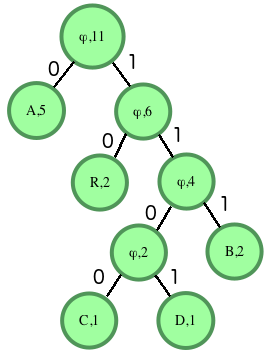
Huffman decoding is a key step in MP3 decoding. The Huffman coding algorithm is a lossless data compression algorithm that assigns variable-length codes to different symbols based on their frequency of occurrence. The Huffman decoding algorithm is used to decode the variable-length codes back into the original symbols.
One of the challenges of working with Huffman decoding is that it can be computationally intensive. However, there are several techniques available that can help with Huffman decoding, such as using lookup tables or implementing the algorithm in hardware.
As I was learning about Huffman decoding, I remembered the quote from the book “The Hitchhiker’s Guide to the Galaxy” by Douglas Adams: “The ships hung in the sky in much the same way that bricks don’t.” Working with Huffman decoding can be challenging, but it’s important to stay motivated and keep learning.

Final Words

Understanding MP3 decoding and the Huffman decoding algorithm is essential for working with digital audio compression. Decoding the compressed audio data involves several steps, including Huffman decoding, dequantization, and inverse discrete cosine transform. While working with MP3 files can be challenging, it’s important to stay motivated and enjoy the process of learning.
At MP4Gain, we understand the importance of audio quality and file size. Our software is designed to normalize and convert audio files to the most popular formats, with an integrated equalizer for fine-tuning the audio. If you’re looking for a solution to your audio needs, give MP4Gain a try.
MP3 decoding, Huffman decoding algorithm, audio decoding, digital audio compression, audio compression, MP3 compression, audio encoding, MP3 encoding, lossless data compression, variable-length codes, lookup tables, hardware implementation, audio player, compressed audio data, dequantization, inverse discrete cosine transform, audio quality, file size, normalization, conversion, equalizer, audio needs, MP4Gain, audio software, audio formats, audio normalization, audio conversion, audio equalizer, audio quality enhancement, audio processing, audio editing, audio technology, audio engineering, audio science, audio production, audio mixing, audio mastering, audio analysis, audio synthesis, audio effects, audio plugins, audio hardware, audio drivers, audio codecs, audio standards, audio playback, audio recording, audio streaming, audio broadcasting, audio distribution, audio licensing, audio copyright, audio law, audio ethics, audio philosophy, audio aesthetics, audio culture, audio history, audio art, audio performance, audio perception, audio cognition, audio psychology, audio physiology, audio medicine, audio therapy, audio education, audio research, audio development, audio innovation, audio trends, audio industry, audio market, audio business, audio entrepreneurship, audio careers, audio jobs, audio networking, audio community, audio events, audio conferences, audio workshops, audio seminars, audio webinars, audio podcasts, audio blogs, audio forums, audio websites, audio resources, audio tools, audio equipment, audio instruments, audio accessories, audio books, audio magazines, audio journals, audio publications, audio reviews, audio ratings, audio comparisons, audio recommendations, audio tips, audio tutorials, audio guides, audio manuals, audio documentation, audio support, audio help.

What is digital audio and video?

What is digital audio and video?

Digital Audio and Video

Digital audio and video are types of data that we can store on a computer or other electronic device. They are made up of a series of numbers that represent the sound or image we want to save. This means that instead of using physical materials like film or tape to record sound or video, we can use a computer to store and manipulate digital versions of that data.

Digital Audio and Video

How is sound digitized?

Sound is a type of wave that travels through the air. When we want to digitize sound, we need to find a way to measure that wave and turn it into a series of numbers. We do this by using a device called a microphone, which converts sound waves into electrical signals that can be processed by a computer.

Here’s an example: imagine you’re at a concert and you want to record a song using your phone. You turn on the voice memo app and hold your phone up to the speakers. The microphone in your phone converts the sound waves from the speakers into electrical signals that are then turned into a digital audio file that you can listen to later.

How are multiple sounds combined into a single file?

When we record sound using a microphone, we’re not just capturing one sound at a time. We’re also picking up any other sounds that might be happening in the background, like people talking or the sound of a car driving by. So how do we store all of these different sounds in a single file?

The answer is that each sound is given its own “channel” in the digital audio file. Imagine that you have a stereo system with two speakers – one on the left and one on the right. When you record a song using your phone, the sound that’s coming out of the left speaker is saved in one channel of the audio file, while the sound that’s coming out of the right speaker is saved in another channel.

How are different instruments and voices saved in a single channel?

So now we know how to store multiple sounds in a digital audio file using different channels. But what if we want to save a song that has lots of different instruments and voices playing at the same time? How can we separate out all of those different sounds and make sure they’re saved correctly in the file?

The answer is that each sound is given its own “frequency” in the digital audio file. Think of it like a rainbow: just like how a rainbow has lots of different colors, sound has lots of different frequencies. When we record a song, we’re capturing all of those different frequencies at the same time.

So let’s say we’re recording a song that has a guitar, a bass, a drum set, and a singer. Each of those instruments and the singer’s voice has a different set of frequencies that make up its sound. The guitar might have a lot of high frequencies, while the bass might have a lot of low frequencies. When we record the song, we capture all of those frequencies at the same time and save them in the digital audio file.

How are timbres saved in a digital audio file?

The “timbre” of a sound refers to its unique quality or tone. For example, if you hear a trumpet and a violin playing the same note, you can still tell the difference between the two because they have different timbres. So how do we save the timbre of each instrument or voice in a digital audio file?

To save the timbre of each sound, we use a process called “sampling”. Sampling involves taking tiny snapshots of the sound wave at regular intervals and saving those snapshots as numbers in the digital audio file. The more snapshots we take, the more accurately we can capture the unique timbre of each sound.

Here’s an example: let’s say we’re recording a piano playing a single note. We take 44,100 snapshots of the sound wave per second and save each snapshot as a number in the digital audio file. When we play back the file, the computer reads those numbers and uses them to recreate the sound of the piano note. Because we took so many snapshots per second, we’re able to capture all of the nuances of the piano’s timbre and make it sound like a real piano.

How are noises and other sounds saved in a digital audio file?

When we record sound using a microphone, we’re not just capturing the sounds we want to hear – we’re also capturing any background noise that might be happening. This can include things like people talking, cars driving by, or birds chirping. So how do we deal with all of that extra noise when we save the sound as a digital file?

One way to deal with background noise is to use a process called “noise reduction”. This involves analyzing the digital audio file and looking for parts of the sound that are consistent over time – like the sound of a fan running or the hum of a fluorescent light. The computer can then remove those consistent sounds from the file, leaving behind just the sounds we want to hear.

Another way to deal with background noise is to use a process called “EQ” (short for “equalization”). EQ allows us to boost or cut certain frequencies in the sound to make it sound better. For example, if there’s a lot of low-frequency rumble in a recording, we can use EQ to cut out some of those frequencies and make the sound clearer.

What is digital video?

Digital video is similar to digital audio, but instead of capturing sound waves, we’re capturing images. When we record a video, we’re capturing a series of still images (or frames) at regular intervals and saving them as a digital file.

How are videos saved in digital format?

To save a video in digital format, we need to capture a series of still images (or frames) and save them as a digital file. We do this using a device called a camera, which captures light from the scene we’re filming and turns it into an electrical signal that can be processed by a computer.

Here’s an example: imagine you’re filming a video of your dog playing in the park. You hold up your phone and hit the record button. The camera in your phone captures a series of still images (or frames) of your dog playing and saves them as a digital video file that you can watch later.

How are multiple images combined into a single video file?

When we capture a video, we’re capturing a series of still images (or frames) at regular intervals. To create a smooth video, we need to combine all of those frames into a single file. This is done using a process called “video compression”.

Video compression works by looking for parts of the image that are similar from frame to frame and only saving the parts that are different. For example, if you’re filming a video of a person sitting in a chair, the background behind them might not change much from frame to frame, so the computer can save that part of the image just once and only save the parts that are changing (like the person’s movements).

By only saving the parts of the image that are changing, we’re able to save space and create smaller video files that are easier to store and share. However, too much compression can make the video look blurry or pixelated. So, it’s important to find a balance between file size and video quality when compressing videos.

How do we add sound to a digital video file?

To add sound to a digital video file, we use a process called “audio syncing”. Audio syncing involves combining the digital audio file (which we learned about earlier) with the digital video file so that the sound matches up with the images.

Here’s an example: let’s say you’re filming a concert and you want to create a video of one of the songs. You record the video using your camera and the audio using a separate recording device. When you go to edit the video, you import both the digital audio file and the digital video file into your editing software. Then, you use audio syncing to line up the audio with the video so that the sound matches up with the images.

Conclusion

In conclusion, digital audio and video are complex subjects, but they can be explained in a way that a 6-year-old can understand. Digital audio involves converting sound waves into numbers that can be saved in a digital file. We use sampling to capture the unique timbre of each sound, and we use noise reduction and EQ to deal with background noise. Digital video involves capturing a series of still images (or frames) and saving them as a digital file. We use video compression to combine those frames into a single file and audio syncing to add sound to the video. By understanding these concepts, we can appreciate the technology behind the digital media that we enjoy every day.