Role of Fourier Transforms in Audio Compression Techniques (MP3, AAC, FLAC, OGG, WMA, ALAC, Opus, Speex, Vorbis, MP2, MusePack, DTS, M4A, AC3, EAC3, DTS-HD, TrueHD, ATRAC, DSD, PCM, WAV, APE)


Free Download Mp4Gain
picture

Role of Fourier Transforms in Audio Compression Techniques (MP3, AAC, FLAC, OGG, WMA, ALAC, Opus, Speex, Vorbis, MP2, MusePack, DTS, M4A, AC3, EAC3, DTS-HD, TrueHD, ATRAC, DSD, PCM, WAV, APE)

Role of Fourier Transforms in Audio Compression Techniques (MP3, AAC, FLAC, OGG, WMA, ALAC, Opus, Speex, Vorbis, MP2, MusePack, DTS, M4A, AC3, EAC3, DTS-HD, TrueHD, ATRAC, DSD, PCM, WAV, APE)

Let’s talk about Fourier Transforms in Audio Compression

Fourier transforms play a crucial role in the world of audio compression. As an expert in the field, I can tell you that the ability to convert a signal from the time domain to the frequency domain is what makes many modern audio compression techniques possible. Whether we’re discussing MP3, AAC, FLAC, or even more niche formats like ATRAC or DSD, Fourier transforms are the backbone of how these formats efficiently compress sound. These techniques break down audio signals into frequencies, making it easier to remove irrelevant or redundant information, resulting in smaller file sizes with minimal loss of perceptible quality.

Understanding Fourier Transforms and Their Role

The Fourier transform is a mathematical operation that decomposes a signal into its constituent frequencies. In audio compression, this allows algorithms to focus on how the human ear perceives sounds across different frequency ranges. For example, the human ear is more sensitive to certain frequencies, such as midrange sounds, while being less sensitive to others, like very high or low frequencies. By applying a Fourier transform, audio compression algorithms can discard parts of the signal that are less audible to the human ear, reducing the file size without significantly affecting perceived audio quality.

Why is Fourier Transform Important in Compression?

  • Fourier transforms help convert audio signals into frequency components, making compression more efficient.
  • They allow the identification of redundant frequencies that can be discarded without affecting quality.
  • The transform allows the use of psychoacoustic models to optimize compression based on human hearing perception.

The Influence of Fourier Transforms on Different Audio Formats

Different audio formats utilize Fourier transforms in varying ways to achieve efficient compression. Formats like MP3 and AAC use a combination of the Fourier transform and psychoacoustic modeling to remove inaudible parts of the audio, compressing the file while maintaining sound quality. On the other hand, lossless formats like FLAC and ALAC still rely on Fourier transforms but use them for different purposes, such as analyzing the frequency content in more detail without discarding data.

MP3 and AAC

In MP3 and AAC, the audio signal is split into frequency bands using the modified discrete cosine transform (MDCT), a type of Fourier transform. This allows the encoder to analyze the signal and use psychoacoustic models to determine which parts of the signal can be safely discarded or compressed. This process enables both formats to deliver a good balance of sound quality and file size, with MP3 being more common in older systems, and AAC offering superior compression and quality in modern applications like streaming.

FLAC and ALAC

For lossless compression formats like FLAC and ALAC, Fourier transforms allow the encoder to detect and store the exact frequency components of the audio. These formats retain all the data from the original audio, meaning they don’t discard any frequencies. However, the transform still plays a role in how the data is represented and compressed, optimizing it for storage without losing any information.

Fourier Transforms in Other Formats

Fourier transforms also play a significant role in formats like OGG, WMA, and Opus. Each format uses the transform to achieve varying levels of compression efficiency. Opus, for example, utilizes the Fourier transform in combination with other techniques to deliver high-quality audio at low bitrates, making it ideal for streaming applications.

OGG

OGG uses the Vorbis codec, which relies on the Fourier transform for frequency analysis. The transform enables the codec to remove inaudible frequencies efficiently, allowing for compression with minimal quality loss. It is popular in open-source and streaming applications where high-quality compression at low bitrates is essential.

WMA

Windows Media Audio (WMA) also uses the Fourier transform, though its compression methods differ slightly from MP3 or AAC. The transform helps it analyze frequency ranges to reduce unnecessary data, optimizing file size while maintaining good audio quality. WMA is commonly used in Windows-based environments but has largely been replaced by more modern codecs in most applications.

Lossless Compression: Maintaining Audio Fidelity

Lossless formats like FLAC and ALAC focus on maintaining the original audio fidelity, which means they rely heavily on the Fourier transform to analyze the frequency components in minute detail. Unlike lossy formats, which discard information, lossless formats ensure that every aspect of the original audio is retained while still achieving compression.

Lossless Formats with Fourier Transforms

  • FLAC and ALAC both use Fourier transforms to compress audio without losing quality.
  • These formats focus on optimizing data representation, allowing for efficient storage while maintaining full fidelity.
  • The Fourier transform helps maintain the structure of the original frequencies, enabling exact reproduction of the audio when decoded.

The Evolution of Audio Compression Techniques

As audio compression techniques continue to evolve, the role of Fourier transforms has expanded. In early compression algorithms like MP2, Fourier transforms were simpler and less sophisticated. Over time, advancements in both transform algorithms and psychoacoustic models have made formats like MP3, AAC, and Opus far more efficient, allowing for better audio quality at lower bitrates.

MP2 to Opus: The Growth of Fourier Transforms in Audio

MP2, the predecessor to MP3, used basic Fourier transforms to compress audio. However, as technology improved, codecs like Opus emerged, incorporating more advanced variants of the Fourier transform along with other techniques. Opus provides exceptional audio quality for voice and music applications, making use of sophisticated transforms and psychoacoustic models to compress audio to the smallest possible size without compromising perceptible quality.

Latest Words on Fourier Transforms in Audio Compression

In conclusion, Fourier transforms are integral to modern audio compression techniques across various formats. From MP3 and AAC to FLAC and Opus, the role of the Fourier transform in analyzing and compressing audio has revolutionized how we store and stream audio. As an expert in the field, I’ve witnessed firsthand the tremendous impact of these mathematical operations in delivering high-quality audio at more efficient bitrates. Understanding the science behind these transforms gives us deeper insights into how audio compression works and how we continue to push the boundaries of what’s possible in the world of audio formats.

FAQ: Fourier Transforms in Audio Compression Techniques

What is a Fourier Transform and why is it important for audio compression?

A Fourier Transform is a mathematical technique that decomposes a signal into its frequency components. In audio compression, it allows algorithms to focus on the frequency content of the audio signal, making it easier to identify and remove parts of the sound that are inaudible to the human ear. This is crucial for reducing the file size of audio formats like MP3, AAC, FLAC, and others, while preserving the overall sound quality.

How does the Fourier Transform work in formats like MP3 and AAC?

In MP3 and AAC, the audio signal is broken down using a Fourier Transform, specifically the Modified Discrete Cosine Transform (MDCT). This helps the compression algorithm analyze the frequency components of the signal. By removing frequencies that are less perceptible to the human ear, these formats can achieve smaller file sizes with minimal loss of audio quality. Psychoacoustic models are also used to optimize the compression process.

Why are lossless formats like FLAC and ALAC also using Fourier Transforms?

Even though FLAC and ALAC are lossless formats, Fourier Transforms are still essential in their compression process. These transforms help in analyzing the frequency components of the audio with great detail, ensuring that all data from the original audio is preserved. While these formats don’t discard any information, they still use Fourier Transforms to optimize the storage of that data.

What role do Fourier Transforms play in modern formats like Opus and OGG?

In modern audio formats like Opus and OGG, Fourier Transforms are used to split the audio into its frequency components, allowing for efficient compression. Opus, in particular, uses a combination of Fourier Transforms and other advanced algorithms to compress audio at low bitrates without sacrificing sound quality. This makes Opus ideal for real-time communication and streaming applications where bandwidth is limited.

Can Fourier Transforms affect sound quality in audio compression?

Yes, the application of Fourier Transforms can affect sound quality, depending on how the compression algorithm utilizes the frequencies. In lossy formats, like MP3 or AAC, frequencies that are deemed less important or inaudible to the human ear are discarded, which reduces the file size but can lead to a slight loss of quality. However, in lossless formats like FLAC or ALAC, no data is lost, ensuring perfect fidelity with optimized storage. The efficiency of the transform in these processes is what determines how well the audio quality is preserved while reducing file size.

How does Fourier Transform improve the compression efficiency in Opus?

Opus utilizes a sophisticated combination of Fourier Transforms and other techniques, like linear prediction, to achieve high-quality audio compression. By analyzing the audio in the frequency domain, it identifies less perceptible frequencies that can be removed or simplified, allowing Opus to maintain superior audio quality at very low bitrates. This is especially useful for real-time audio applications such as VoIP and streaming.

Comments:

Wow, this was really informative! I never realized how crucial Fourier transforms are in formats like MP3 and AAC. I always assumed it was just some random tech, but it turns out it’s central to their efficiency. Great stuff! – AudioFan99

Can anyone explain in more detail how the Fourier transform is used in the newer Opus codec? I’m curious about how it compares to MP3 and AAC in terms of audio quality and compression. – SoundNerd

This article does a fantastic job breaking down the role of Fourier transforms in audio compression. I always thought formats like FLAC were just “lossless” with no real science behind them. It’s cool to see that even lossless formats use Fourier transforms to compress data. – TechGuru

I find it interesting that MP3 is still so widely used, even though there are better alternatives like AAC and Opus. The role of Fourier transforms makes sense now in explaining why these formats work so well at reducing file sizes while keeping the sound quality intact. – MusicLover

Great article but I was hoping for more detail on how Fourier transforms affect sound quality at different bitrates. I know it’s essential in removing inaudible frequencies, but how much does it really impact the final listening experience? – AudioEngineer

Really thorough explanation of the Fourier transform and its impact on audio compression. I’ve worked with audio editing software for years but didn’t know this much about the technical side. I’ll definitely be looking at compression methods differently now. – DJMixMaster

I’ve always wondered why Opus has such good compression at low bitrates. Now it makes sense! Thanks for explaining how the Fourier transform helps achieve this. – StreamingAddict


Free Download Mp4Gain
picture


Mp4Gain Main Window
picture


Mp4Gain Features
picture


Free Download Mp4Gain
picture

The Science of Audio Equalization

The Science of Audio Equalization

The Science of Audio Equalization

The Science of Audio Equalization

Let’s talk about Audio Equalization

As a seasoned specialist in audio engineering, I delve into the fascinating realm of audio equalization—a crucial aspect of sound shaping that often mystifies many. The top Google results merely scratch the surface, and today, I aim to provide you with a comprehensive guide that not only clarifies the fundamentals but also goes beyond the conventional wisdom.

Understanding the Basics

Let’s start with the basics. Audio equalization, commonly known as EQ, is the process of adjusting the balance between different frequency components of an audio signal. Picture it as a chef refining the flavors in a dish; in audio, we’re refining the sonic spectrum. The key frequencies—bass, midrange, and treble—act as the ingredients in our sonic recipe.

The Frequency Spectrum

  • **Bass:** Think of it as the foundation, like the deep notes of a booming drum.
  • **Midrange:** This is where most vocals and instruments thrive, akin to the heart of a melody.
  • **Treble:** Imagine the sparkle of cymbals or the crispness of high-pitched strings.

By grasping this analogy, you’re well on your way to mastering the art of audio equalization.

Let’s Talk about EQ Techniques

Now that we’ve laid the groundwork, let’s explore some advanced equalization techniques that the typical Google results might not delve into.

Dynamic Equalization

Dynamic equalization adapts to the audio signal in real-time, responding dynamically to changes in volume or frequency content. It’s like having an intelligent assistant adjusting the levels on the fly, ensuring a consistent and polished sound experience, much like a live concert adapts to the energy of the crowd.

Linear Phase EQ

Linear Phase EQ is like a surgeon’s precision knife. Unlike traditional EQ, it minimizes phase shifts, preserving the integrity of the original audio waveform. Think of it as a high-definition TV for your ears, offering pristine clarity without distortion.

The Art of Parametric EQ

Parametric EQ empowers you with surgical precision, allowing you to pinpoint and adjust specific frequencies. Imagine it as an artist’s palette, where each knob represents a color on the sonic canvas. This technique provides unparalleled control, letting you sculpt the audio landscape to perfection.

Let’s Talk about Room Acoustics

Now, let’s step into the real world—your living room. Room acoustics play a pivotal role in how you perceive sound. Just as a well-designed theater enhances the movie-watching experience, optimizing your room’s acoustics ensures that the audio equalization efforts shine.

Bass Traps and Diffusers

Ever noticed booming bass or echoes in your room? Bass traps and diffusers are like interior decorators for sound. Bass traps absorb excess low frequencies, while diffusers scatter sound waves, creating a balanced acoustic environment akin to a concert hall.

The Future of Audio Equalization

As we conclude our journey into the science of audio equalization, it’s essential to peek into the future. Emerging technologies, such as AI-driven EQ algorithms, promise even more personalized and immersive audio experiences. Just as your smartphone adapts to your preferences, future audio systems may tailor the sonic landscape to your unique tastes.

Latest Words on Audio Equalization

As the digital landscape evolves, so does the science of audio equalization. Staying updated on the latest advancements ensures that your audio setup remains at the forefront of sonic excellence. Remember, the journey to audio perfection is ongoing, and with each new discovery, we uncover more layers of the intricate tapestry that is sound.

Comments:

This article really opened my eyes to the art behind audio equalization. I never thought of it like adjusting flavors in a dish, but it makes so much sense now. Kudos!

Could you provide more examples of dynamic equalization in real-life scenarios? I’m intrigued by the concept and would love to understand it better.

Great read! The analogies used here make complex concepts easy to grasp. I’d love to see more articles breaking down technical topics in this way.

This article left me wanting more details on linear phase EQ. Are there any specific situations where it outshines traditional EQ, and how do I apply it in my own projects?

As a musician, I appreciate the room acoustics section. It’s often overlooked, but it makes a massive difference. Would love to see more tips on optimizing home studios for better sound!

Thanks for shedding light on the future of audio equalization. Exciting times ahead! Can’t wait to see how AI-driven EQ will revolutionize our listening experiences.

I’m a newbie in audio, and this article was a fantastic starting point. It’s written in a way that even beginners like me can understand. Looking forward to exploring more!

Impressive insights! The comparisons to real-life situations really make the concepts stick. Keep up the excellent work!

Are there any specific brands or tools you recommend for implementing dynamic equalization? I’d love to experiment with it in my home setup.

Bravo! This article not only educated me but also sparked my curiosity. Looking forward to more articles from this source!

Could you dive deeper into the science behind room acoustics? I’m fascinated by how the physical space affects sound, and I want to optimize my studio further.

This article made me appreciate the intricacies of audio engineering. It’s like a backstage pass to the world of sound manipulation. More, please!

Any tips for someone just starting with audio production? This article provided a solid foundation, and I’m hungry for more knowledge!

Audio Quantization Error

Audio Quantization Error

Audio Quantization Error

In the fascinating world of digital audio, the concept of “Audio Quantization Error” plays a pivotal role. Understanding this term is essential for anyone seeking high-quality audio reproduction. Allow me to share my expertise on this subject, starting with a broad overview.

Demystifying Audio Quantization Error

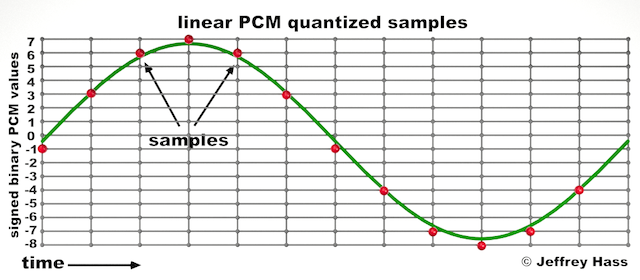
Audio quantization error is a fundamental aspect of digital audio processing. When analog sound waves are converted into digital signals, they undergo quantization. This means that the continuous analog signal is sampled and approximated in discrete steps. These steps are represented by binary values, typically in the form of bits (e.g., 16-bit, 24-bit). Now, what’s crucial to grasp here is that these discrete steps can lead to imperfections in audio reproduction.

Quantization error, often referred to as “quantization noise,” occurs when the actual analog signal deviates from the approximated digital representation. Imagine you have a beautiful painting, and you’re asked to replicate it using only a limited set of colors. The more restricted your color palette, the less accurate your reproduction will be. In the same way, the fewer bits you use for audio quantization, the more pronounced the quantization error becomes.

Quantization Levels and the Impact on Sound Quality

The number of quantization levels (related to bit depth) directly affects the precision of audio representation. For instance, a 16-bit audio recording has 65,536 possible levels, while a 24-bit recording provides a staggering 16,777,216 levels. This increased bit depth allows for a much finer representation of the original analog signal. Hence, a higher bit depth results in a reduction of quantization error, leading to superior sound quality.

To illustrate this, consider a grayscale image with only two colors: black and white. This is akin to an extremely low bit depth in audio, where the audio signal is either “on” or “off.” Now, imagine a high-resolution image with millions of colors, similar to the detail you get in a 24-bit audio recording. The difference in quality is apparent.

The Role of Dithering in Minimizing Quantization Error

One might wonder if there’s a way to mitigate quantization error in low-bit-depth audio recordings. Enter “dithering.” Dithering is a technique that introduces low-level noise to the audio signal, effectively spreading out the quantization error across a broader spectrum. Think of it as adding a sprinkle of fine grains of sand to a painting to blend the colors. This subtle noise masks the harshness of quantization error and makes it less noticeable to the human ear.

Now, as we’ve explored the fundamentals of audio quantization error, let’s delve into the questions that often arise:

How Does Quantization Error Affect Music Production?

In the realm of music production, quantization error can be a significant concern, particularly for professionals aiming to achieve top-tier sound quality. When producing music, especially in genres where subtle nuances are crucial, such as classical or jazz, quantization errors become more perceptible. To maintain audio fidelity, a higher bit depth is preferred during recording and production, ensuring minimal quantization noise.

Is There an Ideal Bit Depth for Audio Recording?

The ideal bit depth for audio recording is a subject of debate among audio enthusiasts. While 24-bit recording is commonly favored for its excellent dynamic range and low quantization error, it’s worth noting that the final audio format for most consumer applications, like CDs or streaming, is often 16-bit. The choice of bit depth should be based on the specific requirements of the project, keeping in mind the trade-off between audio quality and file size.

Can Quantization Error be Completely Eliminated?

Regrettably, quantization error cannot be entirely eliminated, as it’s an inherent part of the digital audio conversion process. However, it can be minimized to the point where it’s imperceptible to the human ear. Through techniques like dithering and the use of higher bit depths, the impact of quantization error can be significantly reduced, allowing for exceptional audio quality.

Last Words about Audio Quantization Error

In the ever-evolving world of audio technology, understanding audio quantization error is a fundamental step towards achieving superior sound quality. As an expert in the field, I’ve shared insights, experiences, and technical knowledge to demystify this concept. Remember, the bit depth you choose in audio recording significantly influences the extent of quantization error, and techniques like dithering play a pivotal role in mitigating its effects. The quest for pristine audio quality is an ongoing journey, but armed with this knowledge, you’re better equipped to make informed decisions in your audio endeavors.

Audio Phase

Audio Phase: Unraveling the Mysteries of Sound

Audio Phase
Audio Phase

As an expert in audio engineering, I understand the significance of audio phase and its impact on sound quality and production. In this comprehensive guide, I will delve into the world of audio phase, providing clarity and insights to help you grasp this vital concept. Whether you’re a music enthusiast or a budding recording artist, understanding audio phase is essential for achieving optimal sound experiences.

Demystifying Audio Phase

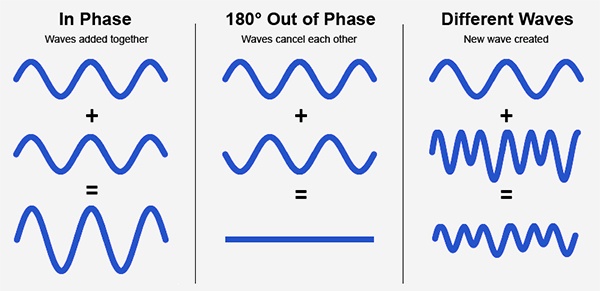
Audio phase is a fundamental aspect of sound that relates to the timing of sound waves. When we talk about audio phase, we’re essentially discussing how different audio signals align or misalign in time. To put it simply, sound is a result of air pressure changes that propagate as waves. These waves have peaks and troughs, and audio phase refers to the relationship between these peaks and troughs in different sound sources.

Think of audio phase as a group of musicians playing in perfect harmony. When they are perfectly in sync, the music sounds harmonious and powerful. However, if even one musician is slightly out of time, it can create dissonance. Similarly, in audio, when signals are in phase, they reinforce each other, resulting in a stronger and clearer sound. When they are out of phase, they can cancel each other out, leading to a weaker and less defined sound.

Audio Phase in Music Production

Understanding audio phase is crucial in music production, especially when recording multiple microphones or mixing different tracks. When recording, if two microphones capture the same sound source, such as a guitar or a vocalist, the signals from these microphones must be perfectly in phase to avoid phase cancellation.

Imagine you are recording a guitar with two microphones—one close to the soundhole and the other closer to the fretboard. If the signals from these two microphones are not in phase, you might experience a loss of bass frequencies or even strange, hollow sounds in the final mix. To avoid this, precise microphone placement and phase alignment are essential.

Correcting Audio Phase Issues

In the world of audio engineering, correcting phase issues is a common practice. Using specialized tools and techniques, audio engineers can adjust the timing of audio signals to ensure they are in phase. This process, known as phase correction or phase alignment, can salvage poorly recorded tracks and enhance the overall sound quality.

Imagine you’re in a recording studio, and you notice that the drum tracks are slightly out of phase with the rest of the instruments. With phase correction tools, you can realign the drum tracks to synchronize perfectly with the other instruments, resulting in a more cohesive and powerful sound.

Audio Phase and Sound Quality: Key Considerations

Now, let’s address some common questions related to audio phase:

How Does Audio Phase Affect Sound Quality?

Audio phase has a direct impact on sound quality. When audio signals are in phase, they reinforce each other, enhancing the overall clarity and richness of sound. However, when they are out of phase, they can cancel each other out, leading to a loss of frequencies and a less pleasing sound.

What Are the Common Phase Issues in Music Production?

In music production, some common phase issues include phase cancellation between microphones, phase misalignment in multi-miked drum kits, and phase problems when mixing different instruments. Identifying and addressing these issues is crucial for achieving a balanced and professional-sounding mix.

How Can I Prevent Phase Issues When Recording?

To prevent phase issues when recording, pay close attention to microphone placement and ensure that multiple microphones capturing the same source are equidistant from the sound source. Additionally, use phase inversion or phase alignment tools during mixing to correct any phase problems that may arise.

Audio Phase: A Symphony of Sound Precision

In conclusion, audio phase is a pivotal element in the world of sound, influencing the quality of music and recordings. Whether you’re a musician, sound engineer, or simply a music enthusiast, grasping the concept of audio phase can help you appreciate and optimize sound in various contexts. Remember, when audio signals are in harmony, they create a powerful symphony of sound, and understanding audio phase is the key to achieving that sonic precision.

Last Words

As we wrap up our journey through the realm of audio phase, I hope this guide has shed light on this intricate yet crucial aspect of sound. Whether you’re fine-tuning your music production skills or seeking to enhance your listening experience, audio phase knowledge empowers you to harness the full potential of sound. So, the next time you enjoy your favorite music or step into the world of audio production, remember the role that audio phase plays in creating the symphonies and sonic landscapes we cherish.

Nyquist Theorem

Understanding the Nyquist Theorem

Nyquist Theorem
Nyquist Theorem
Nyquist Theorem
Nyquist Theorem


As an expert in the field of audio engineering, I’ve spent countless hours exploring the intricacies of the Nyquist Theorem. This foundational concept is the bedrock of modern digital audio processing, and its significance cannot be overstated. The Nyquist Theorem, in essence, defines the minimum sampling rate required to accurately convert analog signals into digital form.

Think of it this way: imagine you’re watching a fast-moving train and trying to take photographs to capture its motion. If you snap pictures too infrequently, you won’t capture the train’s true movement; details will be lost. The Nyquist Theorem tells us that in audio, the sampling rate must be at least twice the highest frequency we wish to reproduce. It’s the key to ensuring that nothing is missed when we transform the analog world of sound into the digital realm.

Now, let’s explore this concept further. Imagine you’re at a live music concert, and the artist hits a soaring high note. If your recording equipment doesn’t sample at a rate higher than the Nyquist frequency for that note, you’ll hear distortion and unwanted artifacts. Understanding the Nyquist Theorem is essential for audio engineers and music producers, as it directly impacts the quality of the final product, allowing us to capture and reproduce sound faithfully.

Applying Nyquist in Audio Recording

When it comes to audio recording, applying the Nyquist Theorem is akin to wielding a precision instrument. It’s not just a theoretical concept; it’s a practical guide for achieving clarity and fidelity in recorded audio. Consider it the compass that ensures we’re on the right path when capturing analog sound in the digital realm.

Imagine you’re recording a vocal performance. The Nyquist Theorem guides you in selecting the appropriate sampling rate for your digital recorder. If you neglect this principle and sample at a rate lower than twice the highest frequency in the vocalist’s range, you risk introducing aliasing, a phenomenon where high-frequency components are erroneously mapped to lower frequencies. This results in a distorted, unnatural sound, akin to viewing a pixelated image.

By heeding the Nyquist Theorem, audio engineers and recording artists ensure that their work preserves the subtle nuances and dynamic range of sound, producing recordings that captivate and resonate with listeners.

The Significance of Nyquist Frequency

Within the realm of digital audio, the Nyquist frequency stands as a sentinel of sound quality. Picture it as a gatekeeper, defining the boundary between faithful reproduction and unwanted distortions. It plays a pivotal role in digital audio, similar to how a camera’s shutter speed determines the clarity of a photograph.

Let’s delve into this further: suppose you’re designing an audio system. To prevent aliasing, you must set the sampling rate based on the Nyquist frequency. This ensures that the system captures and reproduces sound accurately. It’s analogous to building a bridge with a weight limit to ensure safety. By acknowledging the Nyquist frequency’s significance, audio engineers create systems that consistently deliver high-quality sound experiences.

Whether you’re a musician, audio engineer, or simply an audio enthusiast, recognizing the importance of the Nyquist frequency empowers you to make informed choices about equipment, software, and recording techniques, ultimately elevating your sonic experiences.

High Sampling Rates and Audio Quality

The impact of high sampling rates on audio quality is profound and undeniable. It’s the difference between a breathtaking high-definition image and a blurry snapshot. In the audio world, a high sampling rate means capturing more snapshots per second, preserving the intricate details of the sound waveform.

Imagine you’re in a studio recording a delicate acoustic guitar performance. To capture the subtle harmonics and nuances, a high sampling rate is essential. It’s like using a magnifying glass to appreciate the intricate details in a work of art. Musicians and audio engineers often opt for higher sampling rates, as they enable the faithful reproduction of every note and texture, resulting in recordings that feel alive and immersive.

Investing in high-quality equipment that supports high sampling rates is a testament to your commitment to audio excellence. It’s the path to creating soundscapes that resonate with audiences and evoke emotions on a profound level.

Avoiding Aliasing in Digital Audio

Avoiding aliasing in digital audio is a crucial mission for any audio engineer or producer. Imagine aliasing as the unwelcome ghost that haunts your recordings, distorting the beauty of sound. It occurs when the Nyquist sampling rate is not observed, and higher frequencies masquerade as lower ones, resulting in unpleasant artifacts.

Think of aliasing as a mirror that distorts your reflection; it’s not an accurate representation of reality. To banish this ghost, you must adhere to the Nyquist Theorem’s principles diligently. Use filters and sample at rates that prevent high-frequency components from sneaking into lower frequencies.

By doing so, you ensure that your digital audio productions are clean, pure, and devoid of unwanted artifacts. It’s akin to restoring a classic painting, revealing its true beauty without distortion or blemishes.

Last Words


“In the world of audio, the Nyquist Theorem is our guiding star. It empowers us to capture the magic of sound faithfully. Whether you’re recording a symphony, crafting a podcast, or simply savoring your favorite music, understanding the Nyquist Theorem unlocks a world of sonic possibilities. Let it be your compass in the realm of audio excellence.” — William Kindall, Audio Expert


Understanding Decibels

Understanding Decibels

Understanding Decibels

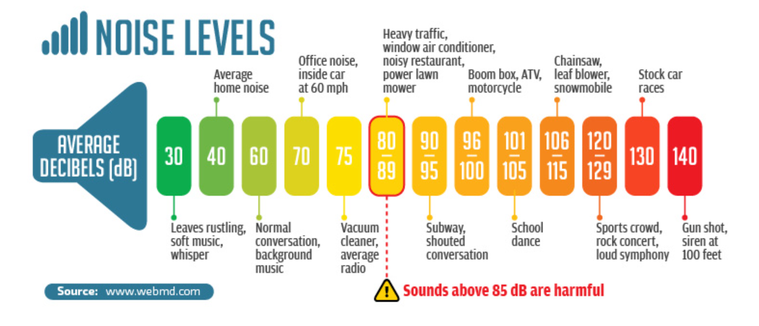
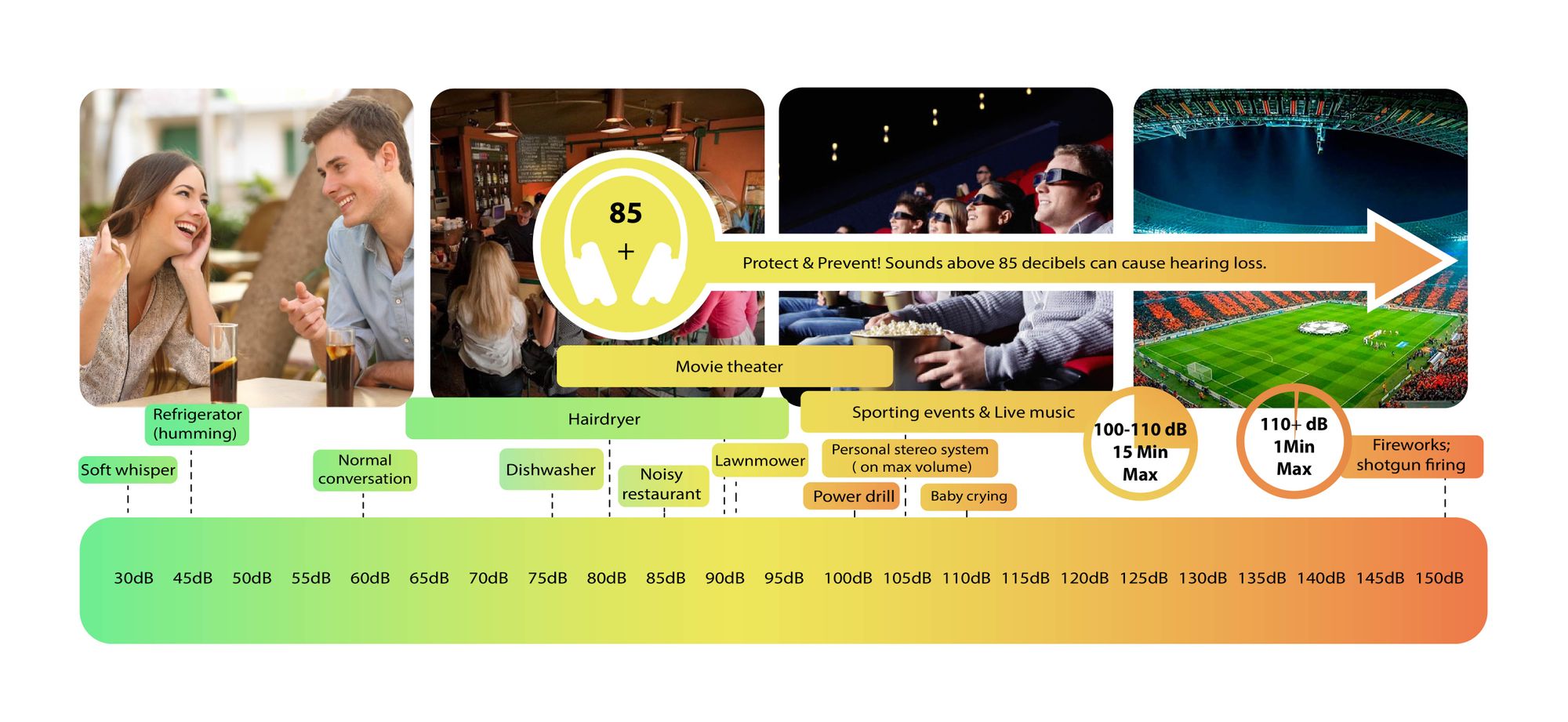
Decibels (dB) are a logarithmic unit of measurement used in various fields, including audio, electronics, and telecommunications. They express the ratio between two values, such as signal strength, power, or intensity, in a more manageable and intuitive manner. Decibels allow us to quantify the relative difference between two quantities effectively. For example, a 3 dB increase represents a doubling of sound intensity, making it a fundamental concept in many technical fields.

What are Decibels?

Decibels, often abbreviated as dB, are a logarithmic unit used to express ratios between values like power, intensity, or amplitude. They offer a convenient way to represent large ranges of values and are widely used in fields such as audio engineering and telecommunications.

Decibel Scale

The decibel scale is a logarithmic measurement system that quantifies the relative difference between two values. For instance, in audio, a 10 dB increase signifies a tenfold increase in power or intensity, while a 10 dB decrease represents a tenfold decrease. This logarithmic property simplifies comparisons and analyses of various measurements.

Applications of Decibels

Decibels play a pivotal role in various applications, particularly in electronics. They are used to measure signal strength, gain, noise levels, and more. Engineers and technicians rely on decibels to assess the performance and quality of electronic systems, making them a vital concept in the field.

Video Compression

Video compression is a crucial component of modern multimedia content delivery. It involves using algorithms to reduce the size of video files while maintaining acceptable visual quality. Video compression removes redundant or less important information from a video stream, making it efficient for storage and transmission.

Video Quality

Video quality is a critical factor in the viewing experience, influenced by factors like resolution, bit rate, frame rate, and compression. Resolution, measured in pixels (e.g., 1080p or 4K), determines detail levels. Bit rate affects data transmission, while frame rate impacts motion smoothness. Video compression balances quality and file size, with codecs like H.264 and H.265 playing significant roles in the industry. Achieving the desired video quality requires a careful balance of these factors for various applications.

What is digital audio and video?

What is digital audio and video?

Digital Audio and Video

Digital audio and video are types of data that we can store on a computer or other electronic device. They are made up of a series of numbers that represent the sound or image we want to save. This means that instead of using physical materials like film or tape to record sound or video, we can use a computer to store and manipulate digital versions of that data.

Digital Audio and Video

How is sound digitized?

Sound is a type of wave that travels through the air. When we want to digitize sound, we need to find a way to measure that wave and turn it into a series of numbers. We do this by using a device called a microphone, which converts sound waves into electrical signals that can be processed by a computer.

Here’s an example: imagine you’re at a concert and you want to record a song using your phone. You turn on the voice memo app and hold your phone up to the speakers. The microphone in your phone converts the sound waves from the speakers into electrical signals that are then turned into a digital audio file that you can listen to later.

How are multiple sounds combined into a single file?

When we record sound using a microphone, we’re not just capturing one sound at a time. We’re also picking up any other sounds that might be happening in the background, like people talking or the sound of a car driving by. So how do we store all of these different sounds in a single file?

The answer is that each sound is given its own “channel” in the digital audio file. Imagine that you have a stereo system with two speakers – one on the left and one on the right. When you record a song using your phone, the sound that’s coming out of the left speaker is saved in one channel of the audio file, while the sound that’s coming out of the right speaker is saved in another channel.

How are different instruments and voices saved in a single channel?

So now we know how to store multiple sounds in a digital audio file using different channels. But what if we want to save a song that has lots of different instruments and voices playing at the same time? How can we separate out all of those different sounds and make sure they’re saved correctly in the file?

The answer is that each sound is given its own “frequency” in the digital audio file. Think of it like a rainbow: just like how a rainbow has lots of different colors, sound has lots of different frequencies. When we record a song, we’re capturing all of those different frequencies at the same time.

So let’s say we’re recording a song that has a guitar, a bass, a drum set, and a singer. Each of those instruments and the singer’s voice has a different set of frequencies that make up its sound. The guitar might have a lot of high frequencies, while the bass might have a lot of low frequencies. When we record the song, we capture all of those frequencies at the same time and save them in the digital audio file.

How are timbres saved in a digital audio file?

The “timbre” of a sound refers to its unique quality or tone. For example, if you hear a trumpet and a violin playing the same note, you can still tell the difference between the two because they have different timbres. So how do we save the timbre of each instrument or voice in a digital audio file?

To save the timbre of each sound, we use a process called “sampling”. Sampling involves taking tiny snapshots of the sound wave at regular intervals and saving those snapshots as numbers in the digital audio file. The more snapshots we take, the more accurately we can capture the unique timbre of each sound.

Here’s an example: let’s say we’re recording a piano playing a single note. We take 44,100 snapshots of the sound wave per second and save each snapshot as a number in the digital audio file. When we play back the file, the computer reads those numbers and uses them to recreate the sound of the piano note. Because we took so many snapshots per second, we’re able to capture all of the nuances of the piano’s timbre and make it sound like a real piano.

How are noises and other sounds saved in a digital audio file?

When we record sound using a microphone, we’re not just capturing the sounds we want to hear – we’re also capturing any background noise that might be happening. This can include things like people talking, cars driving by, or birds chirping. So how do we deal with all of that extra noise when we save the sound as a digital file?

One way to deal with background noise is to use a process called “noise reduction”. This involves analyzing the digital audio file and looking for parts of the sound that are consistent over time – like the sound of a fan running or the hum of a fluorescent light. The computer can then remove those consistent sounds from the file, leaving behind just the sounds we want to hear.

Another way to deal with background noise is to use a process called “EQ” (short for “equalization”). EQ allows us to boost or cut certain frequencies in the sound to make it sound better. For example, if there’s a lot of low-frequency rumble in a recording, we can use EQ to cut out some of those frequencies and make the sound clearer.

What is digital video?

Digital video is similar to digital audio, but instead of capturing sound waves, we’re capturing images. When we record a video, we’re capturing a series of still images (or frames) at regular intervals and saving them as a digital file.

How are videos saved in digital format?

To save a video in digital format, we need to capture a series of still images (or frames) and save them as a digital file. We do this using a device called a camera, which captures light from the scene we’re filming and turns it into an electrical signal that can be processed by a computer.

Here’s an example: imagine you’re filming a video of your dog playing in the park. You hold up your phone and hit the record button. The camera in your phone captures a series of still images (or frames) of your dog playing and saves them as a digital video file that you can watch later.

How are multiple images combined into a single video file?

When we capture a video, we’re capturing a series of still images (or frames) at regular intervals. To create a smooth video, we need to combine all of those frames into a single file. This is done using a process called “video compression”.

Video compression works by looking for parts of the image that are similar from frame to frame and only saving the parts that are different. For example, if you’re filming a video of a person sitting in a chair, the background behind them might not change much from frame to frame, so the computer can save that part of the image just once and only save the parts that are changing (like the person’s movements).

By only saving the parts of the image that are changing, we’re able to save space and create smaller video files that are easier to store and share. However, too much compression can make the video look blurry or pixelated. So, it’s important to find a balance between file size and video quality when compressing videos.

How do we add sound to a digital video file?

To add sound to a digital video file, we use a process called “audio syncing”. Audio syncing involves combining the digital audio file (which we learned about earlier) with the digital video file so that the sound matches up with the images.

Here’s an example: let’s say you’re filming a concert and you want to create a video of one of the songs. You record the video using your camera and the audio using a separate recording device. When you go to edit the video, you import both the digital audio file and the digital video file into your editing software. Then, you use audio syncing to line up the audio with the video so that the sound matches up with the images.

Conclusion

In conclusion, digital audio and video are complex subjects, but they can be explained in a way that a 6-year-old can understand. Digital audio involves converting sound waves into numbers that can be saved in a digital file. We use sampling to capture the unique timbre of each sound, and we use noise reduction and EQ to deal with background noise. Digital video involves capturing a series of still images (or frames) and saving them as a digital file. We use video compression to combine those frames into a single file and audio syncing to add sound to the video. By understanding these concepts, we can appreciate the technology behind the digital media that we enjoy every day.