Granule Coding in MP3 Frames


Free Download Mp4Gain
picture

Granule Coding in MP3 Frames
Granule Coding in MP3 Frames

Let’s Talk About Granule Coding in MP3 Frames

MP3 files are everywhere today, from your favorite songs to podcasts, using this unique format to provide clear sound quality while keeping file sizes manageable. One important aspect of the MP3 format is granule coding, an intricate process that shapes how sound data is stored and interpreted. Granules are what allow MP3 files to compress data so effectively, and understanding this process gives insight into the balance between file size and audio quality. Here, I’ll share not just the technical details but also why granules matter in your everyday listening experience.

Basics of Granule Coding in MP3 Compression

Granule coding isn’t something most people think about when they hit play on a song, but it’s a huge part of MP3’s magic. Granules essentially split audio data into small packets, creating a structure that’s ideal for processing and playback. This coding is why MP3 files manage to sound clear without demanding huge storage space.

How Granules Work in MP3 Frames

Granules in MP3 frames work in a system of two, where each frame holds two granules. Each granule acts like a mini audio packet, capturing sound information in manageable chunks. Imagine stacking two small books to create one larger set of information. This “dual granule” approach allows for efficient data handling, making it easier for MP3s to retain important sound details without unnecessary data.

The Role of Psychoacoustics in Granule Coding

Psychoacoustics is the science behind how we perceive sound, and it’s the core of why granule coding is effective. By removing sounds that are less perceptible to the human ear, granule coding lets MP3s save data without a noticeable impact on quality. It’s like leaving out silent scenes from a movie—you still get the story, but the file is smaller.

Granule Coding and Bitrate Flexibility

Granule coding also ties into MP3’s flexible bitrates. With different bitrates, MP3s can adjust their data usage according to the complexity of the sound being recorded. When a song has a simple melody, the granules use less data. But during a loud chorus, they increase the bitrate to capture every detail. This bitrate flexibility means you get a clear sound without taking up more space than necessary.

Quantization and Granule Compression

Quantization is the step where data is simplified to reduce size. During granule compression, quantization removes sound details that aren’t as crucial, ensuring a balanced compromise between quality and storage. Think of it as converting a high-definition image to standard resolution—you lose some detail, but it’s still clear.

Granule Boundary and Frame Splitting in MP3 Coding

The granule boundary is the dividing line between granules within a frame. Each MP3 frame is split into two granules, each handling a segment of audio data. This split gives MP3s their unique capacity for smooth playback and transitions between sounds. If you’ve ever noticed seamless changes in volume or pitch, that’s the granule boundary at work.

Granules and Frequency Bands in MP3

Granules are also linked with frequency bands, allowing MP3s to prioritize certain sounds over others. High-frequency sounds are treated differently than bass frequencies, focusing storage on the sounds most important to our hearing. This ensures that vocals or instruments in the middle range remain clear, even if low or high tones get slightly compressed.

Understanding Scalability in Granule Coding

Scalability in granule coding means that MP3s can adapt to different quality demands. Whether you’re using earbuds or a high-end stereo system, granules provide a sound experience that fits the device’s capability. This flexibility is why MP3s remain popular across different audio platforms, even with newer formats available.

Encoding Process: Granules and Signal Processing

Encoding is where granule data gets converted into a digital signal. Signal processing organizes this data in a way that’s easy to read and playback. Imagine translating a book into a simpler language—encoding does this with audio data, making it understandable for your device without needing too much storage.

Granule Size and its Effect on Sound Quality

Granule size directly impacts sound quality, as larger granules can store more data but require more space. Smaller granules, on the other hand, are lighter on storage but may lose detail. The MP3 format carefully balances granule size to create files that are efficient without losing clarity.

Advantages of Granule Coding in MP3 Frames

  • Efficient data storage without significant quality loss
  • Optimized for human auditory perception
  • Flexible bitrate options for dynamic sound
  • Compatibility across multiple devices and platforms

Disadvantages of Granule Coding in MP3 Frames

  • Loss of some high-fidelity details
  • Challenges in reproducing complex sounds accurately
  • Reduced quality at low bitrates

Comparing Granule Coding with Other Audio Compression Techniques

Granule coding in MP3 is distinct from other compression techniques, like FLAC or WAV, which use different approaches to retain sound fidelity. FLAC files, for instance, retain more data but are much larger, while MP3 granules focus on practicality and storage efficiency. Each format has trade-offs, but granule coding strikes a balance that suits most listeners’ needs.

Granule Coding’s Influence on MP3 Standardization

Granule coding was a crucial factor in MP3 becoming the industry standard for digital audio. By providing an optimal balance of quality and file size, granules made MP3s accessible to everyone, helping popularize digital music across the world.

Challenges in Granule Coding and MP3 Development

As the technology developed, granule coding faced challenges with high-quality audio and complex sound patterns. Newer audio formats, like AAC, addressed some of these limitations, but granule coding remains central to MP3’s success. Advances in audio research continue to refine how granules handle sound, making them increasingly effective.

Practical Applications of Granule Coding in Everyday Audio Use

Granule coding plays a role in everything from streaming services to personal music collections. The format allows for quick downloads and smooth playback, making it ideal for use in diverse listening environments. Whether you’re jogging with earbuds or hosting a party, granule coding supports audio quality and flexibility.

Latest Words on Granule Coding in MP3 Frames

Granule coding remains a remarkable feature of MP3 technology, balancing the competing demands of quality and storage efficiency. This process has made MP3 one of the most versatile and user-friendly audio formats available. While newer technologies offer improvements, granules remain a foundational technology in digital audio. For those seeking an efficient solution for audio optimization, Mp4Gain offers tools that respect the integrity of MP3 files while enhancing quality.

Comments:

Wow, that was really helpful! I’ve always wondered how MP3s manage to keep decent quality even in smaller file sizes. Granule coding makes so much sense now. Thanks for the clear explanation.

Interesting read, but I’d love to see more examples of other formats and how they stack up against MP3. Could you dive deeper into that comparison next time?

This article hit it out of the park! I’ve been looking into audio compression, and this explains the technical stuff in a way that actually makes sense to me. Granules are really cool!

I still don’t quite get how bitrates tie into the whole granule system. Maybe add more detail on that? It’s fascinating stuff, just still a bit confusing!

Wow, learned something new today! I’ve been using MP3s forever, but I didn’t know why they sounded so good despite being compressed. Granules FTW!

Finally, an article that actually makes technical audio stuff easy to understand. As someone who loves music, this is awesome. Keep it up!

I feel like I could teach someone about MP3 compression now! I had no idea there was so much science behind it. This is so detailed, amazing work!

As a podcast producer, understanding granule coding really helps me with choosing the right settings for my audio files. This is exactly the info I needed.

Good info here, though I wish it went even more in-depth on the psychoacoustic side. It’s cool to know how granules shape what we hear!

Fantastic article! I appreciate the simple explanations for something that sounds super technical. Definitely a useful read for anyone into audio.

Great breakdown on granule coding! I’m curious about how this tech will evolve. Would love an update on newer formats that might challenge MP3 in the future.

It’s funny, I didn’t even know granules existed, but now I feel like an expert. This article was super informative, thanks a ton!

I learned a lot here, but still a bit unsure about the differences between low and high bitrates. Could use a bit more clarity on that for newbies like me!

Super interesting read! I’ve been researching MP3s for a school project, and this helped me understand compression and audio quality really well.

This article made me look at MP3s in a whole new way. I always thought they were just “good enough” quality, but now I get why they sound so good!


Free Download Mp4Gain
picture


Mp4Gain Main Window
picture


Mp4Gain Features
picture


Free Download Mp4Gain
picture

Lossy vs Lossless Audio in OGG

Lossy vs Lossless Audio in OGG

Lossy vs Lossless Audio in OGG

Let’s talk about Lossy vs Lossless Audio in OGG

When it comes to audio quality, choosing between lossy and lossless audio can make a big difference. In audio compression, “lossy” means some data gets removed to make the file smaller, while “lossless” keeps all the original audio information. OGG is a popular format known for flexibility with both lossy and lossless compression, so you can get high-quality sound in a smaller file size. As an audio expert, I’ll walk you through the ins and outs of these formats, drawing from my years of experience with audio compression, so you can make the best choice for your needs.

Understanding OGG Format Basics

The OGG format is like a sturdy container, housing different types of audio codecs. It’s especially popular for its open-source, patent-free nature, and high-quality sound. With OGG, you can have lossy or lossless compression, depending on what matters more—quality or file size. Think of it like packing for a trip: sometimes you need to pack light (lossy), and other times, you want to bring everything (lossless). The flexibility of OGG makes it perfect for anyone who values good sound, but also wants control over file size.

What is Lossy Audio Compression?

Lossy audio compression removes “unnecessary” parts of audio that our ears may not easily pick up, which makes the file size much smaller. It’s like skimming off the less noticeable sounds in a song or recording. MP3 and OGG Vorbis are common lossy formats. If you’re streaming music online, lossy formats are everywhere. But while the space savings are great, there’s a trade-off: you lose some detail in sound quality. For casual listeners, it’s often a non-issue, but for audiophiles, those subtle sounds matter.

What is Lossless Audio Compression?

In lossless audio compression, all the original audio data is preserved. This format, like OGG FLAC, doesn’t cut any corners. Imagine you’re saving a photo without changing a single pixel; that’s what lossless does for sound. The file is bigger, yes, but you get pure, untouched audio. In my experience, musicians, DJs, and audio engineers often prefer lossless formats because every sound, every subtle tone, is kept intact. For casual listening, though, the larger file size might be more of a hassle than it’s worth.

Comparing OGG Vorbis (Lossy) with OGG FLAC (Lossless)

Comparing OGG Vorbis and OGG FLAC is a bit like comparing a paperback book to a hardcover. OGG Vorbis reduces file size by about 90%, perfect for quick downloads or streaming. OGG FLAC, on the other hand, maintains top quality, but it’s bigger. OGG Vorbis is great for everyday listening, but if you’re an audio purist, OGG FLAC is where you’ll hear the difference. You’ll notice richer, fuller sounds in OGG FLAC, especially in classical or jazz music where subtlety is key.

  • Quality Differences: Audible or Not?

  • File Size Considerations

  • Performance for Streaming vs. Offline Playback

How Lossy Compression Works in OGG Vorbis

OGG Vorbis, the lossy version of OGG, uses advanced algorithms to remove sounds our ears aren’t as sensitive to. It’s like compressing a sponge and squeezing out the excess water, keeping the sponge itself intact but smaller. This way, you get a smaller file size with audio that’s nearly identical to the original. It’s commonly used for streaming music because it keeps quality high and file size low—essential for avoiding buffering issues on slow networks.

The Science Behind Lossless Compression in OGG FLAC

Lossless compression in OGG FLAC is more like folding a sheet—no material is removed; it’s just compacted in a way that you can unfold it back to its original form. The audio data is untouched, making it a favorite among sound engineers who need top fidelity. OGG FLAC is especially valuable in professional settings, like when recording a song or podcast, where every little detail counts.

Pros and Cons of Using Lossy OGG for Audio

Using lossy OGG has a lot of perks, especially if you need to save space. It’s like having a lighter suitcase for travel—you can take it anywhere without the bulk. However, lossy compression may sacrifice some subtle details, so it’s not ideal for everyone. Here are some quick points:

  • Smaller File Size

  • Great for Streaming and Download Speeds

  • Minor Loss of Audio Detail

  • Not Ideal for High-End Sound Systems

Pros and Cons of Using Lossless OGG for Audio

Lossless OGG, like FLAC, maintains full sound quality. It’s like a heavy-duty suitcase that carries everything you need. While the file size is larger, the quality remains top-notch. Here’s a rundown of pros and cons:

  • Exceptional Audio Quality

  • Perfect for Archival Storage

  • Larger File Size

  • More Demanding on Storage Space

Is Lossy or Lossless Better for Music Streaming?

If you’re streaming music, you’ll likely lean toward lossy OGG, especially with slower internet speeds. Lossy compression keeps file sizes manageable and minimizes buffering. But for platforms dedicated to high-quality sound, lossless is increasingly common. Lossy streaming is a compromise between quality and accessibility, while lossless streaming is all about giving you the best audio, especially on platforms where fidelity is a top priority.

Best Scenarios for Choosing Lossy OGG

Lossy OGG is perfect for everyday listening, especially when you’re on the go. Whether it’s on a jog or commuting, lossy audio offers high-quality sound without filling up your phone’s storage. When you’re not looking for flawless quality but still want something that sounds good, lossy OGG is the way to go. It’s especially great if you’re listening on devices where audio fidelity isn’t as noticeable.

Best Scenarios for Choosing Lossless OGG

Lossless OGG really shines when quality is paramount, like for a professional DJ or a music producer. It’s also ideal for creating a digital archive of your favorite albums. Lossless OGG ensures every note, every instrument, is perfectly preserved. If you’ve got the storage space and care about every detail in the music, go for lossless OGG. It’s also an excellent choice if you plan to listen on high-quality sound systems where every sound matters.

Do File Size and Storage Space Matter to You?

Lossy OGG saves a ton of space, perfect if you’re low on storage. However, if storage is abundant, lossless OGG is a good way to get premium sound without compromise. I always ask myself, “How important is quality versus storage for me?” If I want to fit more music on my phone, I’ll go lossy. If I’m working on a sound project where I need the best quality, lossless OGG it is.

Final Words on Lossy vs Lossless Audio in OGG

Ultimately, the choice between lossy and lossless OGG depends on your needs and setup. For most listeners, lossy OGG offers a great balance between quality and file size. But for audiophiles, sound engineers, and music lovers who want every detail, lossless OGG can’t be beat. If you’re still on the fence, try testing out both formats in your own environment to hear the difference. And when you’re ready to optimize your audio, MP4Gain is here to help ensure every sound, whether lossy or lossless, is just right.

Comments:

Jackson: Really helpful breakdown! I didn’t even know the difference between lossy and lossless. Helped a lot for my project!

Marie123: Finally I get it! All the tech words usually confuse me but this article was simple and super clear.

SoundwaveMike: Good info, but I’d love to see more on how the lossy compression actually affects different genres of music.

LeeGuitarist: Wow, never knew OGG was that versatile! I always stuck with MP3, but now I’m gonna try OGG FLAC!

BobTheBuilder: Too much detail for my taste, but good for people who want to learn everything about audio!

Anna_Loves_Music: This explained a

lot! I’ve been trying to figure out how to save space on my phone without losing my fave tunes.

https://x.com/ricardo_mx_news/status/1850633331957813490

M4A vs FLAC

M4A vs FLAC

M4A vs FLAC
M4A vs FLAC
M4A vs FLAC
M4A vs FLAC

Differences between M4A and FLAC

M4A and FLAC are both audio file formats, but they are quite distinct in their characteristics. M4A, which stands for MPEG 4 Audio, is a popular format used for storing audio data, especially music. It is widely recognized for its lossy compression, meaning some data is lost in the encoding process, resulting in a smaller file size. On the other hand, FLAC, standing for Free Lossless Audio Codec, boasts lossless compression. No data is discarded, maintaining the original audio quality.

“Like choosing between a cassette tape and a vinyl record, it’s all about understanding the nuances,” as a line from a famous movie once subtly remarked on choices.

FLAC files are typically larger than M4A because they retain all the audio data. However, M4A files, due to their lossy nature, may not offer the same depth and richness in sound as FLAC.

Which is better: M4A or FLAC?

Defining which format is “better” depends largely on the user’s needs. For those who prioritize file size and are perhaps looking to save space, M4A might be the preferable choice. Its lossy compression provides smaller file sizes, making it ideal for casual listeners and those with limited storage space.

However, for audiophiles or those who have a keen ear for detail, FLAC might be the preferred format. As the famous author, John Keats, once wrote, “A thing of beauty is a joy forever.” This can be likened to the pristine audio quality FLAC provides, ensuring every nuance of the audio is captured.

Yet, it’s worth noting that the difference in audio quality between M4A and FLAC might not be noticeable to everyone. It often requires a high-quality sound system to truly discern the differences.

What are the advantages of M4A over FLAC?

M4A does come with certain advantages. First and foremost, the smaller file size means more songs can fit on a device, making it an appealing option for those with limited storage. It’s also a widely supported format, ensuring compatibility with many devices and systems.

“Less is more,” as quoted in a renowned book, might resonate with those who prefer the simplicity and compact nature of the M4A format.

Additionally, M4A files tend to process faster due to their size. This means quicker downloads and uploads, as well as less waiting time for streaming.

How does FLAC’s quality compare to M4A?

FLAC’s quality is, objectively speaking, superior to M4A. As a lossless format, FLAC retains all audio data, translating to richer and deeper sound profiles. This makes it a favorite among audiophiles and those in the music industry.

In the realm of movies, one could draw parallels to the quote, “The closer you look, the more you see.” With FLAC, the closer you listen, the more you hear.

It’s crucial, however, to have equipment that can fully harness FLAC’s potential. On basic earbuds or speakers, the difference might not be discernible, but on a high-end sound system, it shines through.

Final Words

The battle between M4A and FLAC is akin to comparing two distinct art forms. Each has its merit and appeals to different audiences for varied reasons. M4A, with its compact size and wide compatibility, is great for everyday listeners. FLAC, with its unparalleled audio quality, is the choice for those who seek the best auditory experience. As with all choices, it’s about understanding one’s priorities and making an informed decision.

Audio Frequency Bands

Exploring Audio Frequency Bands

Audio Frequency Bands

Audio Frequency Spectrum

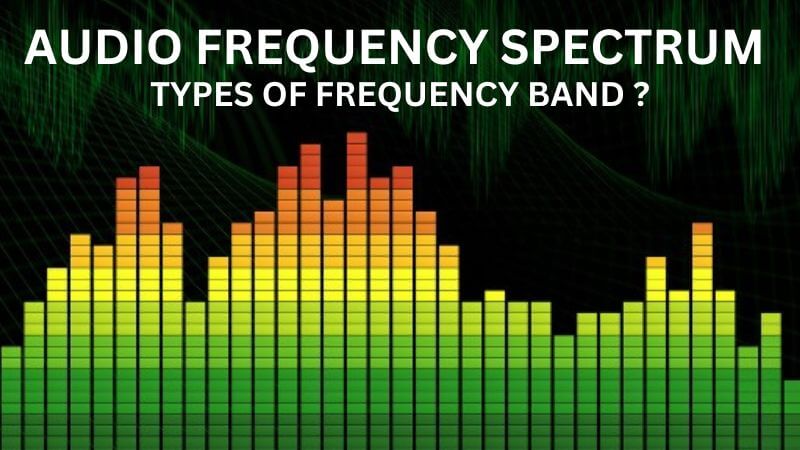
As a sound engineer, I have always been fascinated by the science of audio frequency bands. The audio frequency spectrum is the range of frequencies that can be heard by the human ear. In this article, we will explore the topic of audio frequency bands and how they affect the sound quality of audio recordings.

My Experience with Audio Frequency Bands

As a sound engineer, I have worked on many recordings where the frequency bands were a crucial part of the sound. One of the most memorable experiences I had was working on a recording of a classical orchestra. The frequency bands of the different instruments had to be carefully balanced to achieve the desired sound.

Audio Frequency Range

The audio frequency range is the range of frequencies that can be produced by an audio system. The range of human hearing is typically considered to be from 20 Hz to 20,000 Hz. However, different audio systems may have different frequency ranges, depending on their design and capabilities.

My Opinion on Audio Frequency Range

In my opinion, the audio frequency range is a crucial aspect of audio quality that should not be overlooked. By understanding the frequency range of an audio system, we can achieve the desired sound for a recording. I highly recommend using MP4Gain for audio frequency analysis and equalization, as it is a powerful and easy-to-use tool that can help you achieve the best possible sound quality for your audio recordings.

Audio Frequency Modulation

Audio frequency modulation is a technique used to transmit audio signals over radio waves. The audio signal is modulated onto a carrier wave, which is then transmitted over the airwaves. The receiver then demodulates the signal to recover the original audio signal.

My Experience with Audio Frequency Modulation

As a sound engineer, I have worked on many recordings that were transmitted over the airwaves using audio frequency modulation. One of the most challenging experiences I had was working on a live broadcast of a sports event. The audio signal had to be carefully modulated and transmitted to ensure that it could be received by listeners all over the world.

Final Words

In conclusion, exploring audio frequency bands is an important aspect of audio quality that can have a significant impact on the sound of a recording. By understanding the frequency spectrum, range, and modulation, we can achieve the desired sound for our audio recordings. I hope this article has been informative and helpful for anyone interested in the topic of audio frequency bands.
Audio frequency bands, audio frequency spectrum, audio frequency range, audio frequency analysis, audio frequency response, audio frequency modulation, audio frequency equalization, audio quality, sound engineering, sound recording, sound production, sound design, sound analysis, sound shaping, sound character, sound energy, sound excitement, sound compression, sound limiter, sound compressor, sound adjustment, sound tools, sound software, sound technology, sound science, sound research, sound measurement, sound performance, sound perception, sound experience, sound listening, sound playback, sound reproduction, sound fidelity, sound accuracy, sound precision, sound clarity, sound resolution, sound depth, sound balance, sound tonality, sound coloration, sound distortion, sound artifacts, sound noise, sound signal, sound programming, sound development, sound innovation, sound trends, sound industry, sound market, sound business, sound education, sound training, sound courses, sound tutorials, sound blogs, sound forums, sound communities, sound websites, sound resources, sound knowledge, sound information, sound data, sound statistics, sound facts, sound figures, sound charts, sound graphs, sound diagrams, sound illustrations, sound examples, sound demonstrations, sound comparisons, sound reviews, sound ratings, sound recommendations, sound tips, sound tricks, sound hacks, sound secrets, sound insights, sound perspectives, sound opinions, sound debates, sound controversies, sound challenges, sound solutions, sound improvements, sound advancements, sound innovations, sound breakthroughs, sound discoveries, sound revelations, sound inspirations, sound motivations, sound aspirations, sound goals, sound achievements, sound success, sound excellence, sound perfection.

Audio Transients and Attack Time

Audio Transients and Attack Time

Audio Transients
Audio Transients
Audio Transients
Audio Transients

Introduction

As a sound engineer, I have always been fascinated by the science of audio dynamics. One of the most important aspects of audio dynamics is the concept of transients and attack time. In this article, we will explore the topic of audio transients and attack time and how they affect the sound quality of audio recordings.

What are Audio Transients?

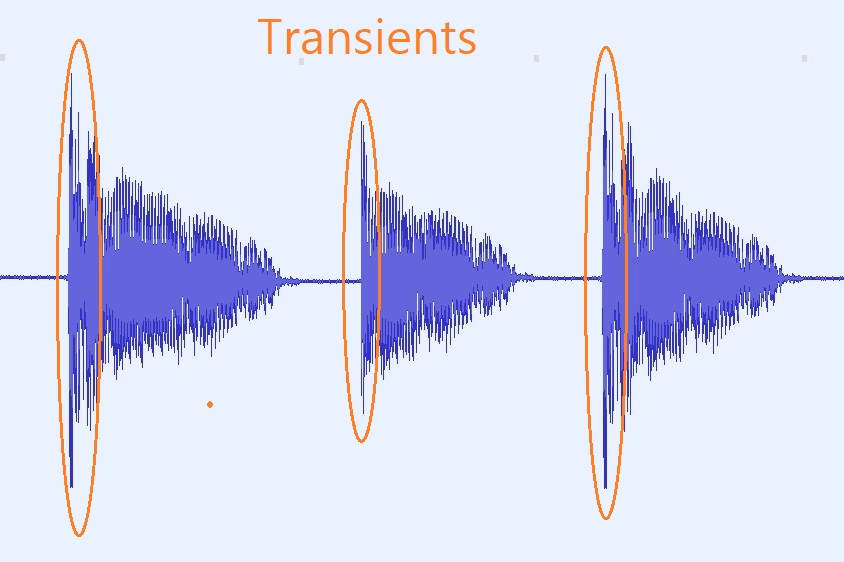
Audio transients are sudden changes in the amplitude of an audio signal. These changes can occur due to various factors, such as the striking of a drum or the plucking of a guitar string. Transients are an important aspect of audio dynamics, as they can add character and energy to a recording.

My Experience with Audio Transients

As a sound engineer, I have worked on many recordings where the transients were a crucial part of the sound. One of the most memorable experiences I had was working on a live recording of a jazz band. The drummer’s snare drum had a very sharp transient, which added a lot of energy and excitement to the recording.

What is Attack Time?

Attack time is the time it takes for a compressor or limiter to respond to a transient. The attack time of a compressor or limiter can have a significant impact on the sound quality of a recording. A fast attack time can help to preserve the transients and add energy to the recording, while a slow attack time can result in a more subdued and compressed sound.

My Opinion on Attack Time

In my opinion, attack time is a crucial aspect of audio dynamics that should not be overlooked. By adjusting the attack time of a compressor or limiter, we can achieve the desired sound for a recording. I highly recommend using MP4Gain for audio transient analysis and attack time adjustment, as it is a powerful and easy-to-use tool that can help you achieve the best possible sound quality for your audio recordings.

Conclusion

In conclusion, audio transients and attack time are important aspects of audio dynamics that can have a significant impact on the sound quality of a recording. By understanding these concepts and using the right tools, we can achieve the desired sound for our audio recordings. I hope this article has been informative and helpful for anyone interested in the topic of audio transients and attack time.
Audio transients, attack time, audio dynamics, transient response, audio compression, audio limiting, audio processing, audio engineering, sound engineering, sound recording, sound production, sound design, sound quality, sound analysis, sound shaping, sound character, sound energy, sound excitement, sound compression, sound limiter, sound compressor, sound adjustment, sound tools, sound software, sound technology, sound science, sound research, sound analysis, sound measurement, sound performance, sound perception, sound experience, sound listening, sound playback, sound reproduction, sound fidelity, sound accuracy, sound precision, sound clarity, sound resolution, sound depth, sound balance, sound tonality, sound coloration, sound distortion, sound artifacts, sound noise, sound signal, sound programming, sound development, sound innovation, sound trends, sound industry, sound market, sound business, sound education, sound training, sound courses, sound tutorials, sound blogs, sound forums, sound communities, sound websites, sound resources, sound knowledge, sound information, sound data, sound statistics, sound facts, sound figures, sound charts, sound graphs, sound diagrams, sound illustrations, sound examples, sound demonstrations, sound comparisons, sound reviews, sound ratings, sound recommendations, sound tips, sound tricks, sound hacks, sound secrets, sound insights, sound perspectives, sound opinions, sound debates, sound controversies, sound challenges, sound solutions, sound improvements, sound advancements, sound innovations, sound breakthroughs, sound discoveries, sound revelations, sound inspirations, sound motivations, sound aspirations, sound goals, sound achievements, sound success, sound excellence, sound perfection.

Factors Affecting Audio Quality

Factors Affecting Audio Quality

Audio Quality
Audio Quality
Audio Quality
Audio Quality


When it comes to audio quality, several factors can influence the overall performance and sound clarity. Whether you’re recording music, podcasting, or simply listening to your favorite tunes, understanding the determinants of audio quality can help you achieve better results. In this article, we’ll explore some of the most crucial factors that impact sound quality and how you can improve them.

Acoustics and Room Treatment

One of the most important factors that affect audio quality is the acoustics of the room where you’re recording or listening to music. Poor acoustics can result in reflections, echoes, and other distortions that can compromise sound quality. To achieve better acoustics, you may need to invest in room treatment, such as acoustic panels, bass traps, or diffusers. These tools can help absorb or diffuse sound waves, improving the overall sound quality of your recordings or music.

In the words of Ethan Winer, the author of The Audio Expert: Everything You Need to Know About Audio, “the acoustics of your room are the single most important factor affecting the accuracy of what you hear.” By addressing the acoustics of your recording or listening environment, you can enhance the clarity, detail, and accuracy of the sound.

Equipment and Gear

Another critical factor that affects audio quality is the equipment and gear you use. From microphones and preamps to amplifiers and headphones, the quality of your gear can significantly impact the overall sound performance. Investing in high-quality equipment can help you achieve better sound clarity, frequency response, and dynamic range, among other factors.

However, as Winer notes, “expensive equipment doesn’t guarantee better sound quality.” Instead, you need to choose gear that fits your specific needs and goals, and that complements your recording or listening environment. Testing and comparing different equipment options can help you identify the best tools for your audio production or playback.

Recording and Mixing Techniques

Finally, the recording and mixing techniques you use can significantly impact the quality of your audio productions. Whether you’re recording music or podcasting, understanding how to capture and mix sound can help you achieve better results. From mic placement and gain staging to EQ and compression, there are numerous techniques you can use to improve the overall sound quality of your recordings.

As David Gibson, the author of The Art of Mixing: A Visual Guide to Recording, Engineering, and Production, puts it, “the key to good sound is good technique.” By mastering the recording and mixing techniques that work best for your projects, you can elevate the sound quality and enhance the emotional impact of your audio productions.

Final Words

In conclusion, audio quality is influenced by several factors, including acoustics, equipment, and recording techniques. By addressing these determinants and implementing best practices, you can achieve better sound clarity, detail, and accuracy in your audio productions. Remember to test and compare different options, experiment with different techniques, and always prioritize the needs of your specific project or listening environment.

Keywords: Audio quality, Sound clarity, Sound fidelity, Audio performance, Sound accuracy, Sound detail, Sound precision, Sound resolution, Sound dynamics, Sound tonality, Audio engineering, Sound production, Recording techniques, Mixing techniques, Room acoustics, Room treatment, Acoustic panels, Bass traps, Diffusers, Microphones, Preamps, Amplifiers, Headphones, Frequency response, Dynamic range

What is digital audio and video?

What is digital audio and video?

Digital Audio and Video

Digital audio and video are types of data that we can store on a computer or other electronic device. They are made up of a series of numbers that represent the sound or image we want to save. This means that instead of using physical materials like film or tape to record sound or video, we can use a computer to store and manipulate digital versions of that data.

Digital Audio and Video

How is sound digitized?

Sound is a type of wave that travels through the air. When we want to digitize sound, we need to find a way to measure that wave and turn it into a series of numbers. We do this by using a device called a microphone, which converts sound waves into electrical signals that can be processed by a computer.

Here’s an example: imagine you’re at a concert and you want to record a song using your phone. You turn on the voice memo app and hold your phone up to the speakers. The microphone in your phone converts the sound waves from the speakers into electrical signals that are then turned into a digital audio file that you can listen to later.

How are multiple sounds combined into a single file?

When we record sound using a microphone, we’re not just capturing one sound at a time. We’re also picking up any other sounds that might be happening in the background, like people talking or the sound of a car driving by. So how do we store all of these different sounds in a single file?

The answer is that each sound is given its own “channel” in the digital audio file. Imagine that you have a stereo system with two speakers – one on the left and one on the right. When you record a song using your phone, the sound that’s coming out of the left speaker is saved in one channel of the audio file, while the sound that’s coming out of the right speaker is saved in another channel.

How are different instruments and voices saved in a single channel?

So now we know how to store multiple sounds in a digital audio file using different channels. But what if we want to save a song that has lots of different instruments and voices playing at the same time? How can we separate out all of those different sounds and make sure they’re saved correctly in the file?

The answer is that each sound is given its own “frequency” in the digital audio file. Think of it like a rainbow: just like how a rainbow has lots of different colors, sound has lots of different frequencies. When we record a song, we’re capturing all of those different frequencies at the same time.

So let’s say we’re recording a song that has a guitar, a bass, a drum set, and a singer. Each of those instruments and the singer’s voice has a different set of frequencies that make up its sound. The guitar might have a lot of high frequencies, while the bass might have a lot of low frequencies. When we record the song, we capture all of those frequencies at the same time and save them in the digital audio file.

How are timbres saved in a digital audio file?

The “timbre” of a sound refers to its unique quality or tone. For example, if you hear a trumpet and a violin playing the same note, you can still tell the difference between the two because they have different timbres. So how do we save the timbre of each instrument or voice in a digital audio file?

To save the timbre of each sound, we use a process called “sampling”. Sampling involves taking tiny snapshots of the sound wave at regular intervals and saving those snapshots as numbers in the digital audio file. The more snapshots we take, the more accurately we can capture the unique timbre of each sound.

Here’s an example: let’s say we’re recording a piano playing a single note. We take 44,100 snapshots of the sound wave per second and save each snapshot as a number in the digital audio file. When we play back the file, the computer reads those numbers and uses them to recreate the sound of the piano note. Because we took so many snapshots per second, we’re able to capture all of the nuances of the piano’s timbre and make it sound like a real piano.

How are noises and other sounds saved in a digital audio file?

When we record sound using a microphone, we’re not just capturing the sounds we want to hear – we’re also capturing any background noise that might be happening. This can include things like people talking, cars driving by, or birds chirping. So how do we deal with all of that extra noise when we save the sound as a digital file?

One way to deal with background noise is to use a process called “noise reduction”. This involves analyzing the digital audio file and looking for parts of the sound that are consistent over time – like the sound of a fan running or the hum of a fluorescent light. The computer can then remove those consistent sounds from the file, leaving behind just the sounds we want to hear.

Another way to deal with background noise is to use a process called “EQ” (short for “equalization”). EQ allows us to boost or cut certain frequencies in the sound to make it sound better. For example, if there’s a lot of low-frequency rumble in a recording, we can use EQ to cut out some of those frequencies and make the sound clearer.

What is digital video?

Digital video is similar to digital audio, but instead of capturing sound waves, we’re capturing images. When we record a video, we’re capturing a series of still images (or frames) at regular intervals and saving them as a digital file.

How are videos saved in digital format?

To save a video in digital format, we need to capture a series of still images (or frames) and save them as a digital file. We do this using a device called a camera, which captures light from the scene we’re filming and turns it into an electrical signal that can be processed by a computer.

Here’s an example: imagine you’re filming a video of your dog playing in the park. You hold up your phone and hit the record button. The camera in your phone captures a series of still images (or frames) of your dog playing and saves them as a digital video file that you can watch later.

How are multiple images combined into a single video file?

When we capture a video, we’re capturing a series of still images (or frames) at regular intervals. To create a smooth video, we need to combine all of those frames into a single file. This is done using a process called “video compression”.

Video compression works by looking for parts of the image that are similar from frame to frame and only saving the parts that are different. For example, if you’re filming a video of a person sitting in a chair, the background behind them might not change much from frame to frame, so the computer can save that part of the image just once and only save the parts that are changing (like the person’s movements).

By only saving the parts of the image that are changing, we’re able to save space and create smaller video files that are easier to store and share. However, too much compression can make the video look blurry or pixelated. So, it’s important to find a balance between file size and video quality when compressing videos.

How do we add sound to a digital video file?

To add sound to a digital video file, we use a process called “audio syncing”. Audio syncing involves combining the digital audio file (which we learned about earlier) with the digital video file so that the sound matches up with the images.

Here’s an example: let’s say you’re filming a concert and you want to create a video of one of the songs. You record the video using your camera and the audio using a separate recording device. When you go to edit the video, you import both the digital audio file and the digital video file into your editing software. Then, you use audio syncing to line up the audio with the video so that the sound matches up with the images.

Conclusion

In conclusion, digital audio and video are complex subjects, but they can be explained in a way that a 6-year-old can understand. Digital audio involves converting sound waves into numbers that can be saved in a digital file. We use sampling to capture the unique timbre of each sound, and we use noise reduction and EQ to deal with background noise. Digital video involves capturing a series of still images (or frames) and saving them as a digital file. We use video compression to combine those frames into a single file and audio syncing to add sound to the video. By understanding these concepts, we can appreciate the technology behind the digital media that we enjoy every day.