Interframe prediction in MP4 videos


Free Download Mp4Gain
picture

Interframe prediction in MP4 videos

Interframe prediction in MP4 videos

Let’s talk about interframe prediction in MP4 videos

Interframe prediction is the backbone of efficient MP4 video compression. This method predicts frames by analyzing differences between consecutive images, drastically reducing the data needed. When I explain it, I like to compare it to flipping through a photo album. Imagine that each page only changes slightly from the last—why reprint the whole picture when you can just update the changes? That’s essentially what interframe prediction does.

In MP4 videos, this technique leverages patterns and redundancies between frames, cutting down file sizes while maintaining quality. It’s a game-changer for streaming, especially on platforms where bandwidth efficiency is critical. Without it, watching your favorite series online would require massive data usage.

How interframe prediction works

At its core, interframe prediction relies on creating reference frames, often called keyframes, and deriving subsequent frames from them. Picture it like painting a mural: the keyframe is your blank canvas with the main outline, and each predicted frame is like adding details to the painting without starting from scratch.

This process involves two main types of frames:

  • Intra-coded frames (I-frames): These contain complete image data and serve as reference points.
  • Predicted frames (P-frames) and bi-predicted frames (B-frames): These only store changes relative to other frames.

What’s fascinating is how these frames interact. B-frames, for example, can predict changes both backward and forward in time, enabling smoother transitions. This creates highly efficient compression but requires complex calculations.

The role of motion vectors in interframe prediction

Motion vectors play a crucial role in interframe prediction by tracking object movement between frames. Think of it like following the path of a ball in a sports game. Instead of capturing the ball’s position in every frame, motion vectors only record its trajectory.

Motion vectors allow video encoders to estimate where pixels should move from one frame to the next. This reduces the need for redundant pixel storage and improves compression. It’s a brilliant way to balance quality and efficiency.

Challenges in interframe prediction

While interframe prediction is powerful, it comes with challenges. One common issue is the “prediction drift” caused by errors accumulating over time. Imagine building a tower with slightly misaligned blocks; the higher you go, the worse the misalignment.

This drift can degrade video quality, especially in low-bandwidth scenarios. To counter this, periodic keyframes (I-frames) are introduced to reset predictions and maintain consistency. However, more I-frames mean larger file sizes, so it’s a delicate balancing act.

Applications of interframe prediction

Interframe prediction isn’t just theoretical; it’s widely used in real-world applications. For instance:

  • Streaming platforms rely on it to deliver high-quality videos without overloading networks.
  • Video conferencing benefits from reduced bandwidth usage, ensuring smooth communication.
  • Surveillance systems use it to store long durations of footage efficiently.

These examples highlight its versatility and importance. From YouTube to Zoom, interframe prediction is behind the scenes making it all work.

Improving interframe prediction techniques

With advancements in technology, researchers are constantly improving interframe prediction algorithms. New approaches, like machine learning-based prediction, are being developed. These methods analyze vast datasets to predict motion patterns more accurately.

For example, AI algorithms can detect complex motions, such as swirling smoke or water ripples, which traditional methods struggle with. This improves video quality in dynamic scenes while maintaining compression efficiency.

Why interframe prediction matters for MP4 videos

Interframe prediction is crucial for MP4 videos because it strikes a balance between quality and file size. Whether you’re streaming a movie or uploading a video, this technology ensures fast loading times without compromising visual fidelity. For me, the most impressive aspect is how seamless it feels. You don’t notice the compression—it just works.

Without interframe prediction, we’d face larger files, slower downloads, and reduced accessibility. It’s a cornerstone of modern digital media, making high-quality content available to everyone.

Latest words on interframe prediction in MP4 videos

Interframe prediction is a fascinating blend of science and art. It captures the essence of motion while keeping file sizes manageable. From the intricate calculations of motion vectors to the clever use of reference frames, it’s a marvel of modern engineering.

If you’re working with MP4 files or just curious about video compression, understanding interframe prediction is essential. It’s a technique that impacts our daily lives more than we realize. Tools like Mp4Gain can further optimize videos, ensuring the best possible quality and performance.

What is interframe prediction in MP4 videos?

Interframe prediction is a technique that compresses MP4 videos by predicting changes between frames, reducing redundancy and file sizes.

How do motion vectors work in interframe prediction?

Motion vectors track pixel movements between frames, enabling encoders to predict changes efficiently without storing redundant data.

Why are I-frames important in MP4 videos?

I-frames provide complete image data, serving as reference points for interframe prediction to maintain video quality and consistency.

What challenges exist in interframe prediction?

Challenges include prediction drift and balancing file size with quality, requiring careful optimization of I-frames and prediction algorithms.

How does interframe prediction benefit streaming platforms?

It reduces bandwidth usage while maintaining quality, enabling smooth playback even on low-speed connections.

Can interframe prediction handle complex motions?

Traditional methods struggle with complex motions, but newer AI-driven algorithms are improving accuracy in such scenarios.

What are the types of frames in interframe prediction?

Frames include I-frames (complete data), P-frames (predicted from a prior frame), and B-frames (predicted both forward and backward).

How does interframe prediction optimize MP4 video storage?

It reduces redundant information by predicting changes between frames, allowing for smaller file sizes without losing quality.

Is interframe prediction used outside of MP4 videos?

Yes, it’s widely used in other video formats and applications, such as surveillance systems and real-time streaming services.

How does Mp4Gain enhance MP4 videos?

Mp4Gain optimizes MP4 videos, improving quality and performance by applying advanced techniques like interframe prediction adjustments.

Comments:

I’ve always wondered how streaming services compress videos so well. This article gave me so much insight. Great stuff!

Interesting read, but I wish there was a deeper dive into how

AI is changing interframe prediction. Could you add more about that?

Thanks for explaining it in such simple terms. The analogy with a photo album really made it clear for me.

I didn’t know motion vectors were such a big deal. This is fascinating!

Wow, this explains why my old videos take up so much space compared to newer ones. Technology really has advanced!

Good article, but you skipped over how prediction errors are fixed in real-time applications like video conferencing.

This was super informative. I’ve been curious about video compression ever since I started editing my own MP4 files. Thanks!

Can’t believe how much I learned here! I had no idea B-frames were so crucial to compression.

I think this explained it better than some video tutorials I’ve seen. Nice job breaking it down!

This is gold! The section about challenges was spot-on and helped me understand why some videos lag.


Free Download Mp4Gain
picture


Mp4Gain Main Window
picture


Mp4Gain Features
picture


Free Download Mp4Gain
picture

H.265 Coding Unit Size Considerations

H.265 Coding Unit Size Considerations

H.265 Coding Unit Size Considerations

H.265 Coding Unit Size Considerations

Let’s talk about H.265 Coding Unit Size

When delving into the intricacies of video compression, understanding the significance of coding unit size, particularly within the H.265 standard, becomes paramount. As someone deeply immersed in video encoding technologies, I’ve come to appreciate the nuanced impact that coding unit size has on compression efficiency and video quality. Essentially, the coding unit size refers to the block size used for encoding and decoding video frames. It plays a critical role in determining the trade-off between compression efficiency and computational complexity. Let me guide you through this complex yet fascinating realm.

The Basics of H.265 Coding Unit Size

In the realm of video compression, H.265, also known as High Efficiency Video Coding (HEVC), stands as a significant advancement over its predecessor, H.264. At the core of H.265 lies the concept of coding units, which represent the fundamental building blocks for compressing video frames. Unlike H.264, which primarily utilizes fixed macroblock sizes, H.265 introduces the flexibility of variable-sized coding units. This flexibility allows H.265 to adapt more effectively to the complexities of different video content, resulting in higher compression efficiency and improved video quality.

Optimizing Compression Efficiency

One of the primary objectives in video compression is to achieve the highest possible compression efficiency without sacrificing perceptual quality. The choice of coding unit size plays a pivotal role in this endeavor. Smaller coding units enable more precise representation of image details, especially in regions with intricate textures or rapid motion. However, smaller coding units also entail higher computational overhead during encoding and decoding processes. On the other hand, larger coding units offer computational advantages but may lead to loss of fine-grained details, particularly in high-motion scenes.

  • Understanding the trade-offs between smaller and larger coding units
  • Impact of coding unit size on compression ratio and bitrate
  • Examining computational complexity in encoding and decoding
  • Strategies for adaptive coding unit size selection

In practical scenarios, finding the optimal coding unit size involves striking a delicate balance between compression efficiency and computational complexity. It requires careful consideration of various factors, including the characteristics of the video content, target bitrate constraints, and available hardware resources.

Application-specific Considerations

The choice of coding unit size isn’t a one-size-fits-all solution; rather, it’s highly dependent on the specific requirements of the application or use case. For instance, in real-time video streaming applications, where computational resources are often limited, adopting larger coding units may be more pragmatic to ensure smooth playback and low latency. Conversely, in professional video production settings, where quality is paramount, finer coding units may be preferred to preserve the fidelity of the original content.

  • Impact of coding unit size on different video resolutions
  • Considerations for live streaming versus offline encoding
  • Adapting coding unit size for virtual reality (VR) and augmented reality (AR) content

Advanced Techniques and Innovations

As video encoding technologies continue to evolve, researchers and industry practitioners are exploring advanced techniques to further enhance compression efficiency and video quality within the H.265 framework. These innovations encompass a diverse range of approaches, including hierarchical coding structures, adaptive block partitioning, and machine learning-driven optimization. By harnessing these cutting-edge methodologies, the video encoding community strives to push the boundaries of what’s achievable in terms of compression performance and visual fidelity.

Latest words on H.265 Coding Unit Size

In the ever-evolving landscape of video compression, the significance of coding unit size within the H.265 standard remains a topic of ongoing research and innovation. As a seasoned specialist in the field, I continually explore new avenues to maximize compression efficiency while maintaining optimal video quality. By staying abreast of the latest developments and leveraging advanced techniques, we can unlock new possibilities in video encoding and pave the way for immersive multimedia experiences.

Comments:

This article is really informative! I’ve always wondered about the impact of coding unit size on video quality. Thanks for breaking it down in such an understandable way. – VideoGeek24

Great article! However, I wish there was more discussion on the computational complexity aspect and how it affects real-time applications like gaming. Overall, though, very insightful. – TechEnthusiast

I’ve been experimenting with H.265 encoding for my video production projects, and understanding coding unit size has been crucial for optimizing quality. This article provided some valuable insights that I hadn’t considered before. – CreativeVisionary

Awesome breakdown of H.265 coding unit size considerations! As someone relatively new to video compression, I found this article incredibly helpful in understanding the nuances of video encoding. Looking forward to more content like this. – FilmBuff101

This article gave me a newfound appreciation for the complexities involved in video compression. The discussion on adaptive coding unit size selection was particularly enlightening. Kudos to the author for making such a technical topic accessible. – DigitalNomad

Really insightful article! I’ve been struggling to grasp the concept of coding unit size, but your explanations cleared up a lot of confusion. Keep up the great work! – TechNovice

I found this article to be a bit basic. It would have been nice to see more in-depth analysis, especially on the practical implications of coding unit size in different scenarios. Nonetheless, it’s a good starting point for those new to the topic. – CuriousCoder

This article provided a comprehensive overview of H.265 coding unit size considerations. However, I wish there were more real-world examples to illustrate the concepts discussed. Overall, though, it’s a valuable resource for anyone interested in video encoding. – MediaEnthusiast

Informative article! I’ve been using H.265 for my video streaming platform, and understanding the impact of coding unit size on compression efficiency has been crucial for optimizing bandwidth usage. Thanks for shedding light on this topic. – StreamMaster

As a video production hobbyist, I appreciate articles like this that delve into the technical aspects of video encoding. The section on application-specific considerations was particularly insightful and provided valuable guidance for optimizing video quality in different scenarios. – AmateurDirector

This article was a great read! I’ve always been curious about the advancements in video compression technologies, and your discussion on advanced techniques and innovations within the H.265 framework was fascinating. Can’t wait to see what the future holds in this field. – TechExplorer

Very interesting article! However, I felt that some of the technical jargon might be overwhelming for beginners. It would be helpful to include more simplified explanations for complex terms. Nonetheless, it’s a valuable resource for those looking to deepen their understanding of video encoding. – LearningEnthusiast

Great article! I’ve been following developments in video compression technologies, and your insights into the significance of coding unit size within the H.265 standard were spot on. Keep up the excellent work! – TechFanatic

This article provided a comprehensive overview of H.265 coding unit size considerations. However, I wish there were more real-world examples to illustrate the concepts discussed. Overall, though, it’s a valuable resource for anyone interested in video encoding. – MediaEnthusiast

H.265 Intra Prediction Algorithms

H.265 Intra Prediction Algorithms

H.265 Intra Prediction Algorithms

H.265 Intra Prediction Algorithms

Let’s talk about H.265 Intra Prediction Algorithms

In the realm of video compression, H.265, also known as High-Efficiency Video Coding (HEVC), revolutionized the landscape by introducing advanced intra prediction algorithms. As a specialist in multimedia technology, I’ve delved deep into the intricacies of H.265 to uncover the nuances of its intra prediction techniques. Let’s embark on a journey to explore the fundamentals of H.265 intra prediction algorithms and their significance in video compression.

Deciphering H.265 Intra Prediction

At the heart of H.265 lies its intra prediction mechanism, a sophisticated algorithm designed to predict pixel values within a video frame based on neighboring samples. Unlike traditional compression methods, which rely solely on inter-frame prediction, H.265 leverages intra prediction to achieve higher compression efficiency. By exploiting spatial redundancies within a frame, H.265 reduces data redundancy, resulting in significantly smaller file sizes without sacrificing quality.

Key Components of H.265 Intra Prediction

  • Directional Prediction Modes: H.265 supports various directional prediction modes, allowing for accurate estimation of pixel values along different spatial orientations.
  • Angular Prediction: Introduces angular prediction modes to capture complex patterns and textures within video frames, enhancing compression efficiency.
  • Adaptive Filtering: Incorporates adaptive filtering techniques to refine prediction residuals, minimizing artifacts and improving visual quality.
  • Transform Coding: Utilizes transform coding to further reduce residual errors, facilitating efficient representation of pixel values.
  • Context Modeling: Employs context modeling to adaptively encode prediction residuals, enhancing compression performance across diverse video content.

Navigating through these components requires a deep understanding of H.265 specifications and video coding principles. As an expert in multimedia technology, I’ve explored the intricacies of H.265 intra prediction, uncovering its role in reshaping the landscape of video compression.

Significance in Video Compression

The adoption of H.265 intra prediction algorithms has profound implications for video compression standards and applications. By harnessing the power of intra prediction, H.265 achieves unparalleled compression efficiency, making it ideal for various use cases ranging from streaming to broadcasting. Furthermore, the advanced prediction modes and adaptive techniques employed in H.265 pave the way for higher-quality video delivery across bandwidth-constrained environments.

Optimizing Video Compression

  • Efficient Bandwidth Utilization: H.265’s intra prediction minimizes data redundancy, allowing for more efficient bandwidth utilization in streaming and broadcasting applications.
  • Enhanced Visual Quality: Advanced prediction modes and adaptive filtering techniques result in superior visual quality, ensuring an immersive viewing experience for audiences.
  • Reduced Storage Costs: Smaller file sizes resulting from H.265 compression lead to reduced storage costs, making it an attractive solution for content creators and distributors.

As multimedia technologies continue to evolve, the role of H.265 intra prediction algorithms remains paramount in driving innovation and efficiency in video compression.

Advanced Techniques and Best Practices

Delving deeper into H.265 intra prediction unveils advanced techniques and best practices that further enhance compression efficiency and visual quality. From optimizing prediction modes to fine-tuning adaptive filtering parameters, mastering these nuances empowers video compression engineers to push the boundaries of quality and efficiency.

Custom Prediction Modes

  • User-Defined Prediction Patterns: Introduce custom prediction modes tailored to specific video content characteristics, maximizing compression performance.
  • Adaptive Rate Control: Dynamically adjust prediction parameters based on video complexity and available bandwidth, optimizing compression efficiency in real-time.

By leveraging these advanced techniques and best practices, developers can unlock the full potential of H.265 intra prediction algorithms, paving the way for next-generation video compression solutions.

Latest words on H.265 Intra Prediction Algorithms

In conclusion, the exploration of H.265 intra prediction algorithms sheds light on the intricate mechanisms driving modern video compression standards. From its foundational principles to advanced optimization techniques, H.265 revolutionizes the landscape of video encoding, offering unprecedented compression efficiency and visual quality. As a seasoned specialist in multimedia technology, I continue to delve into the depths of H.265, uncovering new insights and pushing the boundaries of video compression innovation.

Comments:

Whoa, this article provided a comprehensive overview of H.265 intra prediction algorithms! As a video enthusiast, I’m excited to delve deeper into the world of video compression.

-VideoBuff

This article offered valuable insights into the significance of H.265 intra prediction in video compression. However, I would have loved to see more practical examples illustrating its application in real-world scenarios.

-TechEnthusiast123

As a multimedia developer, understanding H.265 intra prediction is crucial for optimizing video encoding workflows. This article provided valuable insights and best practices that I’ll definitely incorporate into my projects.

-MultimediaDev

Informative article! I appreciated the clear explanations and practical implications of H.265 intra prediction algorithms. Looking forward to more content from this author.

-KnowledgeSeeker

What is Motion Estimation in Video Compression?

What is Motion Estimation in Video Compression?

Motion Estimation in Video


Motion Estimation and Compensation

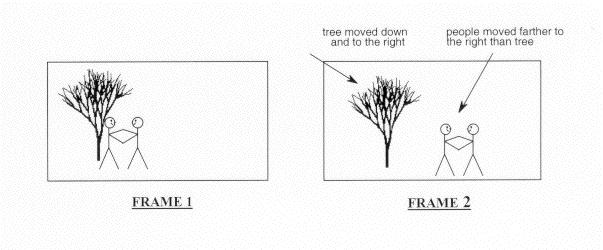
Motion estimation and compensation are fundamental techniques used in video compression. Motion estimation refers to the process of analyzing consecutive video frames to identify the motion vectors between them. Motion compensation, on the other hand, involves using these motion vectors to predict the pixel values of the current frame based on the previous frame. By utilizing motion estimation and compensation, video compression algorithms can efficiently remove temporal redundancies, resulting in smaller file sizes without significant quality loss.
I first encountered the concept of motion estimation during my undergraduate studies in computer science. We were tasked with implementing a simple video compression algorithm, and I quickly learned that motion estimation was a crucial component. As I delved deeper into the topic, I came across the book “Video Coding for Mobile Communications: Efficiency, Complexity, and Resilience” by K.R. Rao et al., which provided a comprehensive overview of motion estimation algorithms and their applications.

Motion Estimation Algorithms

There are several motion estimation algorithms used in video compression, each with its strengths and weaknesses. One of the most popular methods is block matching, which divides the frame into small blocks and compares them with corresponding blocks in the previous frame to find the best match. Another commonly used technique is optical flow, which estimates the motion vectors by analyzing the brightness patterns between frames.
In my experience with video compression software, I have found that the choice of motion estimation algorithm can significantly impact the compression efficiency and visual quality of the output. For example, block matching algorithms tend to perform well on videos with simple, uniform motion, while optical flow methods excel in more complex scenes with dynamic motion.

Video Coding Standards

Video compression standards are crucial for ensuring interoperability and compatibility between different devices and software. Some of the most widely used standards include H.264/AVC, HEVC, and MPEG-4. These standards define the encoding process, including the motion estimation and compensation techniques used, and specify the parameters required for decoding.
As someone who has worked extensively with video coding standards, I can attest to the importance of following these guidelines to ensure compatibility and optimal performance. However, it is worth noting that some proprietary codecs, such as Apple’s ProRes and Google’s VP9, may offer superior performance in certain scenarios.

In conclusion, motion estimation is a critical component of video compression, allowing for efficient removal of temporal redundancies. By utilizing motion estimation and compensation techniques, video compression algorithms can significantly reduce file sizes without compromising quality. As I have learned through my experiences with video compression, the choice of motion estimation algorithm and adherence to video coding standards are crucial factors in achieving optimal compression efficiency and visual quality.

video compression, motion estimation, motion compensation, block matching, optical flow, video coding standards, H.264/AVC, HEVC, MPEG-4, video coding research, video compression techniques, video compression software, video quality, compression efficiency, temporal redundancies, compatibility, proprietary codecs, ProRes, VP9, K.R. Rao, video coding for mobile communications, file size reduction, video frames, motion vectors, pixel values, previous frame, brightness patterns.

What is digital audio and video?

What is digital audio and video?

Digital Audio and Video

Digital audio and video are types of data that we can store on a computer or other electronic device. They are made up of a series of numbers that represent the sound or image we want to save. This means that instead of using physical materials like film or tape to record sound or video, we can use a computer to store and manipulate digital versions of that data.

Digital Audio and Video

How is sound digitized?

Sound is a type of wave that travels through the air. When we want to digitize sound, we need to find a way to measure that wave and turn it into a series of numbers. We do this by using a device called a microphone, which converts sound waves into electrical signals that can be processed by a computer.

Here’s an example: imagine you’re at a concert and you want to record a song using your phone. You turn on the voice memo app and hold your phone up to the speakers. The microphone in your phone converts the sound waves from the speakers into electrical signals that are then turned into a digital audio file that you can listen to later.

How are multiple sounds combined into a single file?

When we record sound using a microphone, we’re not just capturing one sound at a time. We’re also picking up any other sounds that might be happening in the background, like people talking or the sound of a car driving by. So how do we store all of these different sounds in a single file?

The answer is that each sound is given its own “channel” in the digital audio file. Imagine that you have a stereo system with two speakers – one on the left and one on the right. When you record a song using your phone, the sound that’s coming out of the left speaker is saved in one channel of the audio file, while the sound that’s coming out of the right speaker is saved in another channel.

How are different instruments and voices saved in a single channel?

So now we know how to store multiple sounds in a digital audio file using different channels. But what if we want to save a song that has lots of different instruments and voices playing at the same time? How can we separate out all of those different sounds and make sure they’re saved correctly in the file?

The answer is that each sound is given its own “frequency” in the digital audio file. Think of it like a rainbow: just like how a rainbow has lots of different colors, sound has lots of different frequencies. When we record a song, we’re capturing all of those different frequencies at the same time.

So let’s say we’re recording a song that has a guitar, a bass, a drum set, and a singer. Each of those instruments and the singer’s voice has a different set of frequencies that make up its sound. The guitar might have a lot of high frequencies, while the bass might have a lot of low frequencies. When we record the song, we capture all of those frequencies at the same time and save them in the digital audio file.

How are timbres saved in a digital audio file?

The “timbre” of a sound refers to its unique quality or tone. For example, if you hear a trumpet and a violin playing the same note, you can still tell the difference between the two because they have different timbres. So how do we save the timbre of each instrument or voice in a digital audio file?

To save the timbre of each sound, we use a process called “sampling”. Sampling involves taking tiny snapshots of the sound wave at regular intervals and saving those snapshots as numbers in the digital audio file. The more snapshots we take, the more accurately we can capture the unique timbre of each sound.

Here’s an example: let’s say we’re recording a piano playing a single note. We take 44,100 snapshots of the sound wave per second and save each snapshot as a number in the digital audio file. When we play back the file, the computer reads those numbers and uses them to recreate the sound of the piano note. Because we took so many snapshots per second, we’re able to capture all of the nuances of the piano’s timbre and make it sound like a real piano.

How are noises and other sounds saved in a digital audio file?

When we record sound using a microphone, we’re not just capturing the sounds we want to hear – we’re also capturing any background noise that might be happening. This can include things like people talking, cars driving by, or birds chirping. So how do we deal with all of that extra noise when we save the sound as a digital file?

One way to deal with background noise is to use a process called “noise reduction”. This involves analyzing the digital audio file and looking for parts of the sound that are consistent over time – like the sound of a fan running or the hum of a fluorescent light. The computer can then remove those consistent sounds from the file, leaving behind just the sounds we want to hear.

Another way to deal with background noise is to use a process called “EQ” (short for “equalization”). EQ allows us to boost or cut certain frequencies in the sound to make it sound better. For example, if there’s a lot of low-frequency rumble in a recording, we can use EQ to cut out some of those frequencies and make the sound clearer.

What is digital video?

Digital video is similar to digital audio, but instead of capturing sound waves, we’re capturing images. When we record a video, we’re capturing a series of still images (or frames) at regular intervals and saving them as a digital file.

How are videos saved in digital format?

To save a video in digital format, we need to capture a series of still images (or frames) and save them as a digital file. We do this using a device called a camera, which captures light from the scene we’re filming and turns it into an electrical signal that can be processed by a computer.

Here’s an example: imagine you’re filming a video of your dog playing in the park. You hold up your phone and hit the record button. The camera in your phone captures a series of still images (or frames) of your dog playing and saves them as a digital video file that you can watch later.

How are multiple images combined into a single video file?

When we capture a video, we’re capturing a series of still images (or frames) at regular intervals. To create a smooth video, we need to combine all of those frames into a single file. This is done using a process called “video compression”.

Video compression works by looking for parts of the image that are similar from frame to frame and only saving the parts that are different. For example, if you’re filming a video of a person sitting in a chair, the background behind them might not change much from frame to frame, so the computer can save that part of the image just once and only save the parts that are changing (like the person’s movements).

By only saving the parts of the image that are changing, we’re able to save space and create smaller video files that are easier to store and share. However, too much compression can make the video look blurry or pixelated. So, it’s important to find a balance between file size and video quality when compressing videos.

How do we add sound to a digital video file?

To add sound to a digital video file, we use a process called “audio syncing”. Audio syncing involves combining the digital audio file (which we learned about earlier) with the digital video file so that the sound matches up with the images.

Here’s an example: let’s say you’re filming a concert and you want to create a video of one of the songs. You record the video using your camera and the audio using a separate recording device. When you go to edit the video, you import both the digital audio file and the digital video file into your editing software. Then, you use audio syncing to line up the audio with the video so that the sound matches up with the images.

Conclusion

In conclusion, digital audio and video are complex subjects, but they can be explained in a way that a 6-year-old can understand. Digital audio involves converting sound waves into numbers that can be saved in a digital file. We use sampling to capture the unique timbre of each sound, and we use noise reduction and EQ to deal with background noise. Digital video involves capturing a series of still images (or frames) and saving them as a digital file. We use video compression to combine those frames into a single file and audio syncing to add sound to the video. By understanding these concepts, we can appreciate the technology behind the digital media that we enjoy every day.