The Effect of Multi-Channel Encoding on WMA Audio Files


Free Download Mp4Gain
picture

The Effect of Multi-Channel Encoding on WMA Audio Files
The Effect of Multi-Channel Encoding on WMA Audio Files

Let’s talk about the effect of multi-channel encoding on WMA audio files

When we discuss the effect of multi-channel encoding on WMA audio files, we’re exploring how using multiple audio channels transforms your listening experience. As someone who’s worked extensively with audio formats, I can tell you that this isn’t just about making the sound louder. It’s about creating a more immersive and realistic soundscape, mimicking how we hear sounds in real life. Think of it like watching a movie, with the sound coming from all around you instead of just from the front. The way sound is encoded can change drastically the experience. I’ve personally witnessed how multi-channel encoding turns a simple audio file into an engaging and enveloping sonic experience, especially when it comes to music or movies.

Understanding Multi-Channel Audio

Multi-channel audio goes far beyond simple stereo and opens up a whole new world of sound. My experience with different types of audio tells me that the number of audio channels impacts your overall experience with a recording. Stereo audio, which is commonly used, has two channels, one for the left ear and one for the right ear. This gives us a sense of left and right placement. Multi-channel audio, however, uses more than two channels, enabling sound to come from different directions creating a 3D-like sound field. It’s like being surrounded by a band while you’re in the middle of the concert hall, rather than just hearing it from two points. This greatly affects how we perceive sound, and how realistic it feels.

Common Multi-Channel Configurations

  • 5.1 Surround Sound: Includes five channels (left, center, right, left surround, right surround) and one subwoofer channel for low-frequency effects.
  • 7.1 Surround Sound: Adds two additional surround channels (left rear and right rear) to the 5.1 setup, enhancing the envelopment even more.
  • Dolby Atmos and DTS:X: Object-based audio, which allows sound to be placed anywhere in the sound field, not just specific channels.

WMA Codec and Multi-Channel Encoding

The WMA (Windows Media Audio) codec has its own unique way of handling multi-channel audio. In my experience, WMA is very capable of handling multi-channel sound, particularly versions like WMA Pro. WMA Pro supports high-resolution audio and multiple channels, allowing for high-fidelity surround sound. This means the codec can efficiently compress multi-channel audio without losing too much quality, which is crucial for delivering an immersive experience. It is important to say that not all WMA files are created equal. Some may be encoded with simple stereo or even mono sound, which does not use the capabilities of this codec. The codec capabilities can be used to create a much richer and detailed sound.

Key Features of WMA in Multi-Channel Encoding

  • Support for multiple channels, including 5.1 and 7.1 surround sound, providing a wide soundstage.
  • Efficient compression algorithms, reducing file sizes while preserving good sound quality.
  • WMA Pro supports lossless compression as well, an option for the best quality available.

The Impact of Bitrate on Multi-Channel WMA Files

Bitrate, usually measured in kilobits per second (kbps), is an important factor in multi-channel WMA files. In my experience with audio, the higher the bitrate, the more data is stored for each audio channel, resulting in a higher quality sound. When dealing with multi-channel audio, a higher bitrate becomes even more critical because you need to store much more information compared to simple stereo. Lower bitrates can lead to audio compression artifacts, such as a loss of clarity and detail, especially in complex soundscapes with many instruments or sounds. Think about having a bucket full of sand. If you have a small bucket you can only take a little sand at a time. A large bucket will allow you to have more sand at once, and the same happens with bitrates.

Recommended Bitrates for Multi-Channel WMA

  • 384 kbps to 512 kbps: Considered good for 5.1 surround sound, providing a good balance between quality and file size.
  • 512 kbps and above: Recommended for 7.1 surround sound or for when the best audio quality is required.
  • Lower bitrates: Only to be used when file size is a priority, and the quality is not very important.

Spatial Accuracy and Multi-Channel Encoding

Spatial accuracy is a very important characteristic in multi-channel audio files. The placement of sounds in the soundstage directly impacts the realism and immersiveness of the audio. Multi-channel encoding, when done correctly, can create a very precise sound field, allowing you to pinpoint where sounds are coming from. This is particularly important in movies and games, where the position of sounds can greatly improve the overall experience. It’s like having the sounds happening all around you. Good multi-channel encoding makes this possible, and a poor one will make the experience less immersive and more artificial.

How Spatial Accuracy is Achieved

  • Precise Channel Placement: Each channel is responsible for a specific part of the soundstage, and accurate positioning of each sound is essential.
  • Panning and Mixing: These techniques make sounds move between channels to create the perception of motion.
  • Object-Based Audio: This lets sounds be placed at any position, offering a very detailed sound field.

Multi-Channel WMA for Home Theaters and Gaming

Multi-channel WMA is very useful in home theater systems, which are very common nowadays. In my personal experience, the most common use for multi-channel WMA files is for home theaters and gaming because it allows for a truly immersive experience. With proper encoding and speaker setups, multi-channel audio from WMA files can make you feel like you’re right in the middle of the action. It enhances the emotion of movies, the excitement of games, and the sound of music. I have many times experienced this effect when listening to music in a multi channel setup, and it can be very impressive. The way the sound moves from different speakers makes the experience much more realistic.

Advantages in Home Theaters and Gaming

  • Enhanced immersion: Multi-channel audio surrounds the listener, making the experience more engaging.
  • Directional sound: Sounds can be placed precisely, making the experience much more realistic.
  • Better emotion: Movies and games become more emotional and exciting.

Potential Issues with Multi-Channel Encoding

Multi-channel encoding can be complex, and issues can arise if done improperly. I’ve personally seen how bad multi-channel encoding can ruin an experience. Common problems include incorrect channel mapping, where sounds appear in the wrong place, and also inconsistencies in loudness between channels, causing some sounds to be louder than others. Bad encoding can also lead to compression artifacts, where the sound is distorted or muffled. It is important that all parameters are correct during the encoding process to avoid these issues.

Common Multi-Channel Encoding Problems

  • Incorrect Channel Mapping: Where sounds are played in the wrong speakers.
  • Volume Imbalances: When one channel is much louder than others.
  • Compression Artifacts: Distorted and muffled sounds due to bad encoding.

Optimizing Multi-Channel WMA Files

Optimizing multi-channel WMA files is about making sure that all the parameters are correct. In my experience, starting with the highest quality audio source is the most important thing to do, so the result has the best possible quality. Encoding at an appropriate bitrate, according to the number of channels, and selecting the correct channel mapping also helps. Always use good monitoring speakers or headphones to check the quality, as a regular pair of speakers wont give you an accurate representation of the sound. I would suggest you also do testing with different configurations and different files to see if something can be improved for your particular setup and requirements.

Steps to Optimize Multi-Channel WMA Files

  • Start with the highest quality audio source.
  • Use an appropriate bitrate for your system.
  • Verify the correct channel mapping.
  • Check the sound using good quality speakers or headphones.
  • Do some tests to see if everything is correct.

Latest words on the effect of multi-channel encoding on WMA files

Multi-channel encoding has a very significant impact on WMA audio files, transforming a simple audio file into an immersive experience. In my experience, it’s not just about adding more speakers, but about how the sound is created, where the sound comes from and how it makes the experience feel more realistic. Understanding the different factors, like bitrates, channels, and codecs, helps you optimize your audio files for the best possible sound. If you have low-quality files that you want to improve, an appropriate software like Mp4Gain can help you to enhance your files.

What is multi-channel audio, and how does it differ from stereo?

Multi-channel audio uses more than two audio channels, offering a three-dimensional sound experience, while stereo uses only two channels (left and right). Multi-channel audio allows sounds to be positioned in different parts of the soundstage, making the experience more immersive.

How does the WMA codec handle multi-channel audio encoding?

The WMA (Windows Media Audio) codec, especially WMA Pro, is capable of handling multi-channel audio with good compression efficiency. It supports various multi-channel configurations, including 5.1 and 7.1 surround sound, providing a good balance between file size and quality.

What is the importance of bitrate when encoding multi-channel WMA files?

Bitrate directly affects the quality of multi-channel WMA files. Higher bitrates preserve more audio data, resulting in better sound quality, particularly in complex soundscapes. Lower bitrates may lead to a loss of clarity and detail, so an appropriate bitrate should be selected depending on the intended quality.

What is spatial accuracy in the context of multi-channel WMA files?

Spatial accuracy refers to how precisely sounds are placed in the soundstage. Good multi-channel encoding makes sounds to be placed exactly where they need to be. This accurate placement creates a more realistic and immersive experience, particularly in movies, music and games.

How are multi-channel WMA files used in home theaters and gaming?

Multi-channel WMA files are excellent for home theaters and gaming because they provide an immersive experience with sounds surrounding the listener. With proper speaker setups, this configuration makes games, music and movies more realistic and engaging.

What are some common problems with multi-channel encoding of WMA files?

Some common problems include incorrect channel mapping, where sounds are played from the wrong speakers, volume imbalances between channels, or compression artifacts that can distort the sound. These are caused by incorrect parameter settings when encoding the audio.

How can I optimize my multi-channel WMA files for the best sound quality?

To optimize multi-channel WMA files, always start with the highest quality audio source, use a proper bitrate according to your channel configuration, and make sure that all the speakers are correctly mapped. Always verify your sound with good headphones and speakers. Also, do tests to see if you can get better results adjusting some settings.

Are there any specific bitrate recommendations for 5.1 and 7.1 surround sound in WMA files?

For 5.1 surround sound, using a bitrate between 384 kbps to 512 kbps is generally recommended. For 7.1 surround sound, you should choose a bitrate of 512 kbps or higher for the best sound quality. Remember that lower bitrates should only be used when file size is a top priority.

Can multi-channel encoding cause any issues with playback on different devices?

Some older or less capable devices might have problems with multi-channel audio playback. Some devices may downmix the audio to stereo, losing the benefits of the multi-channel encoding. It’s important to verify that your playback device supports the type of encoding being used to enjoy the full immersive experience.

What are some key differences between WMA and other audio codecs when using multi-channel audio?

WMA is known for its good compression efficiency and is very capable of handling multi-channel sound, especially WMA Pro. Other codecs, like AAC, also have good capabilities for multi-channel audio, but they differ in the way they handle compression. The choice of codec will depend on many factors, such as compatibility, desired quality, and file size requirements.

Comments:

This article really helped me understand what all those numbers mean when I see a file with 5.1 or 7.1, now I know this are related to the audio channels, thanks!

User: AudioNewbie

I never really understood what multi-channel was about, this article did a great job of explaining it simply and without too much tech talk, now I know why my sound system has so many speakers. Good article!

User: HomeTheaterGuy

This was super useful, I’ve been having some issues with my multi channel files sound quality and now I have a better understanding on what is going on, and how to fix it. Thanks for all the info.

User: GamerDude

I am a total noob in audio, and this article was very easy to understand, you make complex things seem very simple. If you could elaborate more about how the different codecs like AAC compare to WMA would be nice.

User: AudiophileBeginner

I like the way you explained how important the bitrate is, especially for multichannel audio, I always though that the more channels, the better. Now I know that the bitrate also plays a big role. Thanks, great article.

User: MultiChannelUser

I been searching the web for a while to find good info about WMA and multichannel, this article covered all my questions and more, it was a good read, thank you for the effort.

User: AudioGeek

I have used Mp4Gain a lot, and its my go to software for when I have audio quality issues. I agree that its very important to pay attention to the channels. Thanks for all the information.

User: AudioExpert


Free Download Mp4Gain
picture


Mp4Gain Main Window
picture


Mp4Gain Features
picture


Free Download Mp4Gain
picture

M4A Channel Configuration Insights

M4A Channel Configuration Insights

M4A Channel Configuration Insights

M4A Channel Configuration Insights

Unlocking the Mysteries of M4A Channel Configuration

In this comprehensive guide, we delve deep into the intricacies of M4A channel configuration, providing invaluable insights into its importance, optimization techniques, and practical applications. Let’s unravel the mysteries together and unlock the full potential of M4A audio files.

Understanding M4A Channels

Embark on a journey to understand the fundamentals of M4A channel configuration. From mono to stereo and beyond, explore how channels influence audio perception and playback experience. Discover the significance of channel mapping and its impact on audio spatialization.

Exploring Mono vs. Stereo

Delve into the differences between mono and stereo configurations, uncovering their unique characteristics and suitability for various audio scenarios. Learn how mono channels consolidate audio signals, while stereo channels create immersive soundscapes.

  • Definition and characteristics of mono and stereo channels
  • Advantages and limitations of mono and stereo configurations
  • Real-life examples illustrating the use of mono and stereo channels

Optimizing Surround Sound Configurations

Take your audio experience to the next level with surround sound configurations. Explore the intricacies of multi-channel setups, including 5.1 and 7.1 surround sound, and their applications in home theaters, gaming, and immersive audio experiences.

  • Overview of surround sound configurations
  • Installation and setup tips for optimal surround sound performance
  • Real-world examples showcasing the immersive capabilities of surround sound

Practical Applications of M4A Channel Configuration

Uncover the practical implications of M4A channel configuration across various industries and domains. From music production to multimedia entertainment, explore how channel mapping influences audio quality, compatibility, and user experience.

Enhancing Audio Production Workflows

Gain insights into how M4A channel configuration enhances audio production workflows. Discover how audio engineers leverage channel mapping to achieve spatial depth, clarity, and realism in their recordings.

  • Best practices for channel configuration in music production
  • Tools and techniques for efficient channel mapping
  • Case studies highlighting successful audio production projects

Delivering Immersive Multimedia Experiences

Explore the role of M4A channel configuration in delivering immersive multimedia experiences. From cinematic soundtracks to virtual reality applications, understand how optimized channel mapping enhances audio immersion and engagement.

  • Integration of M4A channel configuration in multimedia content creation
  • Impact of channel mapping on user engagement and satisfaction
  • Case studies demonstrating the effectiveness of immersive audio experiences

Latest Words on M4A Channel Configuration

In conclusion, M4A channel configuration is a critical aspect of audio engineering and multimedia content creation. By understanding its nuances and optimizing channel mapping techniques, professionals can elevate audio quality and deliver immersive experiences across various platforms and industries.

Comments:

This article provided invaluable insights into M4A channel configuration, shedding light on its importance and practical applications. I’m excited to apply these techniques to my audio projects!

– AudioEnthusiast123

As someone new to audio production, I found this guide to be incredibly informative and easy to understand. The explanations were clear, and the examples helped clarify complex concepts. Thank you!

– MusicNovice456

I appreciated the focus on practical applications and real-world examples throughout the article. It made the information more relatable and actionable. Looking forward to more content like this!

– SoundPro789

While the article provided a good overview, I wish it had delved deeper into specific audio editing software and techniques for optimizing channel configuration. Overall, a helpful resource!

– AudioEditor2022

Dynamic Bit Allocation in Opus Voice Coding

Dynamic Bit Allocation in Opus Voice Coding

Dynamic Bit Allocation in Opus Voice Coding

Dynamic Bit Allocation in Opus Voice Coding


Dynamic Bit Allocation in Opus Voice Coding

Let’s Talk About Dynamic Bit Allocation in Opus Voice Coding

Dynamic Bit Allocation in Opus Voice Coding

As a seasoned specialist in voice coding technologies, I’m excited to unravel the intricacies of Dynamic Bit Allocation in Opus. This groundbreaking approach ensures optimal compression by dynamically allocating bits based on the complexity of audio signals. Today, we’ll explore the significance, innovations, and real-world applications of this cutting-edge technology.

The Evolution of Dynamic Bit Allocation

In the dynamic landscape of audio coding, Opus stands out for its adaptive bit allocation mechanism. Unlike traditional fixed-rate codecs, Opus allocates more bits to complex audio segments, preserving clarity in varying conditions. Imagine a radio adjusting its signal strength based on your location—Opus does that for each audio segment in real-time.

Breaking Down Opus’s Adaptive Approach

Opus achieves dynamic bit allocation through a sophisticated algorithm that analyzes audio signals in real-time. Think of it as a smart distribution of resources; Opus listens to the complexity of each sound, whether it’s a simple voice or a complex musical arrangement, and allocates bits accordingly. This ensures that intricate details are preserved without wasting bandwidth on simpler segments.

Real-World Applications of Opus’s Dynamic Bit Allocation

Now, let’s explore how Opus’s adaptive approach benefits various applications. Whether you’re in a video conference, enjoying music on a streaming platform, or engaging in online gaming, Opus adapts to deliver the best audio quality.

1. Crystal Clear VoIP Calls

Opus shines in Voice over Internet Protocol (VoIP) communication. By dynamically allocating more bits to vocal nuances and less to silent moments, Opus ensures that every word is transmitted with exceptional clarity, even in low-bandwidth situations.

2. Immersive Gaming Audio

Imagine playing an online game where every footstep and gunshot is crucial. Opus’s dynamic bit allocation enhances the gaming experience by prioritizing the bits where they matter most, providing a competitive edge to players.

3. High-Fidelity Music Streaming

For music enthusiasts, Opus adapts to the complexity of musical compositions. Whether it’s a soft acoustic melody or a dynamic orchestral piece, Opus ensures that the richness of the audio is maintained at various bit rates, offering an unparalleled streaming experience.

The Future: Advancements in Dynamic Bit Allocation

As technology evolves, Opus continues to lead the way in audio coding. The future promises even more refined dynamic bit allocation techniques, adapting to the ever-changing landscape of digital audio. Stay tuned for innovations that will further revolutionize how we experience sound in the digital realm.

Comments:

This article provided a fantastic overview! I appreciate the real-world applications breakdown.

Could you elaborate on how Opus handles dynamic bit allocation during sudden shifts in audio complexity? Intriguing stuff!

Great insights! Opus seems like the future of audio coding, especially in gaming.

Audio Delay Compensation

Understanding Audio Delay Compensation: A Comprehensive Guide

Audio Delay Compensation

In the world of audio production and playback, timing is everything. Ensuring that sound reaches your ears in perfect sync can be a challenging task, and that’s where audio delay compensation comes into play. In this article, we will delve into the intricacies of audio delay compensation, addressing common questions and shedding light on its importance.

The Basics of Audio Delay Compensation

Audio delay compensation, also known as latency correction or audio synchronization, is a crucial aspect of audio technology. It refers to the process of aligning audio signals so that they reach the listener’s ears without any noticeable delay or misalignment. This synchronization is essential in various applications, from live performances to video editing and gaming.

Why is Audio Delay Compensation Necessary?

Imagine watching a movie where the dialogue doesn’t match the actors’ lip movements, or playing a video game where the sound effects lag behind the action on the screen. Such experiences can be frustrating and immersion-breaking. Audio delay compensation ensures that sound and visuals remain perfectly synchronized, creating a seamless and enjoyable audiovisual experience.

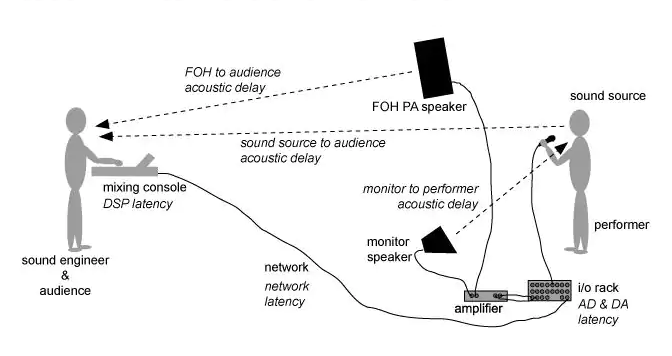
To achieve this synchronization, audio delay compensation systems measure the delay introduced by various components in the audio chain, such as microphones, audio interfaces, and speakers. These delays can vary depending on the equipment used and the processing involved. By carefully adjusting the timing of audio signals, delay compensation systems eliminate discrepancies and deliver a harmonious audio experience.

Real-Life Examples of Audio Delay Compensation

Let’s consider a practical example: a live concert. In such a setting, sound travels at a finite speed, and the distance between the stage and the audience can result in a noticeable delay between what the audience sees and hears. To address this, audio engineers use delay compensation to ensure that the sound from the speakers aligns perfectly with the visual performance on stage.

Similarly, in the realm of online communication, think about video conferencing. Without audio delay compensation, conversations would be riddled with awkward pauses, making it difficult for participants to engage naturally. Thanks to this technology, the voices of speakers are synchronized, facilitating smooth and natural interactions.

FAQ Audio Delay Compensation

How Does Audio Delay Compensation Work in Music Production?

In music production, audio delay compensation plays a critical role in achieving a polished final mix. When multiple tracks are recorded and processed, each may introduce its own delay. Audio delay compensation software analyzes these delays and automatically adjusts the timing of each track so that they align perfectly. This ensures that instruments and vocals harmonize as intended, creating a cohesive and professional sound.

What Are the Different Types of Audio Delays?

Audio delays can occur for various reasons, including signal processing, digital-to-analog conversion, and transmission. Some common types of audio delays include:

Processing Delay: This delay occurs when audio signals pass through various digital processors, such as equalizers or effects plugins, which may introduce a slight delay as they process the audio.

Conversion Delay: Analog audio signals must be converted to digital format for processing, and vice versa. This conversion process can introduce a delay, which must be compensated for to maintain synchronization.

Transmission Delay: When audio is transmitted over long distances, such as in live broadcasting or online streaming, there can be a delay in signal transmission. Audio delay compensation helps mitigate these delays to ensure real-time audio.

Is Audio Delay Compensation Important for Gamers?

Absolutely! Gamers rely on split-second reactions and immersive experiences. In online multiplayer games, audio cues are often crucial for situational awareness and gameplay. Without audio delay compensation, players might experience disorienting delays between in-game actions and corresponding sound effects. This technology ensures that audio feedback is instantaneous, enhancing the gaming experience.

Identical Search Intent Keywords

Audio Latency Reduction Techniques

Reducing audio latency is a top priority in various applications, from music production to live sound reinforcement. To achieve this, techniques such as buffer size optimization, low-latency audio interfaces, and real-time monitoring are employed. These methods minimize the time it takes for audio signals to traverse the entire chain, resulting in near-instantaneous playback.

Zero-Latency Monitoring in Audio Recording

Zero-latency monitoring is a crucial feature for recording professionals. It allows musicians to hear their performances in real-time while recording, eliminating distracting delays that can affect their timing and creativity. This is achieved by routing the audio input directly to the output, bypassing any processing that could introduce latency.

Audio Delay Compensation in Home Theater Systems

Home theater enthusiasts often face the challenge of synchronizing audio with their video playback. Audio delay compensation systems in modern home theater equipment, such as AV receivers, ensure that sound aligns perfectly with on-screen action. This enhances the cinematic experience in the comfort of one’s own home.

Last Words

In the world of audio, timing is paramount. Whether you’re a musician striving for that perfect mix, a gamer seeking an immersive experience, or a home theater enthusiast enjoying a movie night, audio delay compensation is the unsung hero that ensures synchronization. By understanding its significance and the techniques involved, you can elevate your audio experiences to a whole new level.

Audio Routing

Understanding Audio Routing: Navigating the Sonic Highway

Audio Routing
Audio Routing
Audio Routing
Audio Routing

Audio routing is the invisible highway that allows sound to flow seamlessly from one source to another. It’s the backbone of our modern audio experience, whether we’re listening to music on our headphones, watching a movie, or attending a live concert. In this article, we’ll explore the intricacies of audio routing, diving deep into the technical aspects while keeping things relatable with real-life examples.

Demystifying Audio Routing: The Basics

At its core, audio routing is about directing audio signals from their source to their destination. Think of it as the GPS for sound, guiding it through various paths and devices to reach our ears. This process involves numerous components, including mixers, cables, software, and hardware, all working together harmoniously.

One of the fundamental concepts in audio routing is the “signal chain.” Just like a relay race, audio signals pass through a sequence of devices, each contributing its unique flavor or function. For instance, in a home audio setup, your music might start with a streaming service on your smartphone. From there, it travels through Bluetooth or a wired connection to your speakers or headphones, possibly passing through an amplifier or equalizer along the way. Each step in this chain can shape the sound, adjusting volume, tone, or effects.

Answering Your Curiosities

Now, let’s address some of the common questions people have about audio routing:

How Does Audio Routing Impact Sound Quality?

The impact of audio routing on sound quality is substantial. Imagine you’re at a concert, and the sound system isn’t properly routed. The result? Muffled vocals, distorted instruments, and a less-than-enjoyable experience. On the other hand, precise routing ensures that sound retains its clarity and fidelity as it travels from source to destination.

To put it in everyday terms, think of audio routing as a relay race. If each runner (audio device) passes the baton (sound signal) smoothly, the final sprint (your ears) benefits from the efficiency.

What Are the Key Components of an Audio Routing System?

Audio routing systems can be complex, comprising various components. These include mixers, audio interfaces, digital audio workstations (DAWs), and even physical cables. Mixers act as traffic controllers, directing audio to the right destination, while DAWs provide digital pathways for editing and manipulation.

Picture it like a traffic network in a city. Mixers are the traffic lights, cables are the roads, and DAWs are the control center that can reroute traffic or apply special effects.

Is Audio Routing Only Important in Professional Settings?

While audio routing is crucial in professional studios and live performances, it’s equally significant in everyday scenarios. Consider your home entertainment setup. If your TV’s audio isn’t correctly routed to your soundbar or speakers, you miss out on the immersive experience of your favorite movie or video game.

Think of audio routing as the delivery route for a pizza. Even if you’re not a professional pizza chef, ensuring the right route ensures the pizza arrives hot and delicious.

Audio Signal Routing Techniques: A Deep Dive

Delving into advanced audio signal routing techniques, we uncover methods like parallel processing, sidechain compression, and audio bussing. These techniques offer precision and creativity in shaping soundscapes.

To illustrate, think of audio bussing as a split highway. You can send specific sounds down different lanes, processing them uniquely before merging them back into the main road.

Audio Routing in Home Theater Systems

Home theater enthusiasts often seek guidance on optimizing audio routing for the best cinematic experience. Topics may include setting up surround sound, calibrating audio systems, and integrating streaming devices.

Imagine your home theater as a cinema complex. Proper audio routing ensures each seat in your living room gets the full blockbuster experience.

Audio Routing in Virtual Reality (VR) Environments

VR audio takes immersion to the next level. Here, audio routing is crucial for creating realistic 3D soundscapes, tracking head movements, and ensuring sound matches the visual experience.

Picture wearing VR goggles in a virtual forest. Audio routing directs bird songs to your left when you turn your head, enhancing the illusion of a real forest.

Last Words

Audio routing is the unsung hero of our audio experiences, working tirelessly behind the scenes to deliver clear and captivating sound. Whether you’re a music producer, a home theater enthusiast, or simply someone who enjoys quality audio, understanding the nuances of audio routing can elevate your sonic journey. So, the next time you enjoy your favorite tunes or immerse yourself in a movie, remember the intricate web of audio routing that makes it all possible.

Audio Output Resolution

Audio Output Resolution

Audio Output Resolution

Understanding Audio Output Resolution

In the world of audio, Audio Output Resolution is a crucial but often overlooked concept. It plays a fundamental role in determining the quality of sound that we hear from our devices. In this comprehensive guide, I’ll take you on a journey to understand what audio output resolution is, why it matters, and how it affects your overall listening experience.

Explaining Audio Output Resolution

Let’s begin by unraveling the term “Audio Output Resolution.” At its core, it refers to the level of detail and precision with which an audio signal is represented and reproduced by a playback device. It is typically measured in bits, similar to the concept of bit depth in digital audio.

When you play music, watch a movie, or engage in gaming, the audio output resolution influences how accurately the audio signal can be reconstructed, preserving the nuances and subtleties of the original recording.

How Does Audio Output Resolution Affect Sound Quality?

The impact of Audio Output Resolution on sound quality is significant. Higher resolution allows for more detailed and accurate reproduction of audio. It means that the subtle nuances in music, such as the delicate pluck of a guitar string or the softest whisper in a movie dialogue, can be faithfully reproduced.

Choosing the Right Audio Output Resolution

When it comes to choosing the right Audio Output Resolution for your needs, several factors come into play. Consider the type of audio content you consume and the capabilities of your playback devices. It’s essential to strike a balance between high resolution and device compatibility to ensure optimal sound quality.

Audio Output Resolution vs. Bit Depth

Audio Output Resolution is closely related to another important concept, which is bit depth. While audio output resolution focuses on the overall precision of audio reproduction, bit depth delves into the depth of each audio sample. Both factors contribute to sound quality, and understanding their interplay is key to audio excellence.

Audio Output Resolution and Sampling Rate

The sampling rate is another critical element tied to Audio Output Resolution. Together, they determine the accuracy of audio playback. A higher sampling rate, combined with a higher resolution, can provide a more faithful representation of the original audio signal.

Does Audio Output Resolution Impact File Size?

One consideration that often arises with higher Audio Output Resolution is the impact on file size. It’s true that audio files with greater resolution can be larger in size. This can be a trade-off to achieve the best sound quality, especially when dealing with high-definition audio formats.

Audio Output Resolution in High-Definition Audio

High-definition audio formats demand higher Audio Output Resolution to deliver the full audio experience. Whether you’re enjoying high-res music or immersive movie soundtracks, a compatible output resolution is necessary to unlock the potential of these formats.

Audio Output Resolution for Home Theater Systems

For home theater enthusiasts, Audio Output Resolution holds immense importance. It’s a key factor in recreating cinematic audio experiences at home. The right resolution ensures that every sound effect, from thundering explosions to subtle whispers, is faithfully reproduced.

The Role of Audio Output Resolution in Gaming

Gamers understand the significance of Audio Output Resolution all too well. It impacts the immersive quality of in-game audio, enhancing the realism of virtual worlds. Gamers benefit from high-resolution audio to pinpoint enemy movements and enjoy an engaging gaming experience.

Audio Output Resolution for Audiophiles

For audiophiles, the pursuit of audio perfection is a lifelong journey. Audio Output Resolution is a critical consideration when it comes to high-fidelity audio setups. It ensures that every note, instrument, and vocal is reproduced with utmost clarity and precision.

Benefits of Upgrading Audio Output Resolution

Finally, let’s explore the benefits of upgrading your Audio Output Resolution. Upgrading can lead to a more immersive, lifelike audio experience. Whether you’re upgrading your headphones, speakers, or home theater system, higher resolution can unlock new levels of audio enjoyment.

What is digital audio and video?

What is digital audio and video?

Digital Audio and Video

Digital audio and video are types of data that we can store on a computer or other electronic device. They are made up of a series of numbers that represent the sound or image we want to save. This means that instead of using physical materials like film or tape to record sound or video, we can use a computer to store and manipulate digital versions of that data.

Digital Audio and Video

How is sound digitized?

Sound is a type of wave that travels through the air. When we want to digitize sound, we need to find a way to measure that wave and turn it into a series of numbers. We do this by using a device called a microphone, which converts sound waves into electrical signals that can be processed by a computer.

Here’s an example: imagine you’re at a concert and you want to record a song using your phone. You turn on the voice memo app and hold your phone up to the speakers. The microphone in your phone converts the sound waves from the speakers into electrical signals that are then turned into a digital audio file that you can listen to later.

How are multiple sounds combined into a single file?

When we record sound using a microphone, we’re not just capturing one sound at a time. We’re also picking up any other sounds that might be happening in the background, like people talking or the sound of a car driving by. So how do we store all of these different sounds in a single file?

The answer is that each sound is given its own “channel” in the digital audio file. Imagine that you have a stereo system with two speakers – one on the left and one on the right. When you record a song using your phone, the sound that’s coming out of the left speaker is saved in one channel of the audio file, while the sound that’s coming out of the right speaker is saved in another channel.

How are different instruments and voices saved in a single channel?

So now we know how to store multiple sounds in a digital audio file using different channels. But what if we want to save a song that has lots of different instruments and voices playing at the same time? How can we separate out all of those different sounds and make sure they’re saved correctly in the file?

The answer is that each sound is given its own “frequency” in the digital audio file. Think of it like a rainbow: just like how a rainbow has lots of different colors, sound has lots of different frequencies. When we record a song, we’re capturing all of those different frequencies at the same time.

So let’s say we’re recording a song that has a guitar, a bass, a drum set, and a singer. Each of those instruments and the singer’s voice has a different set of frequencies that make up its sound. The guitar might have a lot of high frequencies, while the bass might have a lot of low frequencies. When we record the song, we capture all of those frequencies at the same time and save them in the digital audio file.

How are timbres saved in a digital audio file?

The “timbre” of a sound refers to its unique quality or tone. For example, if you hear a trumpet and a violin playing the same note, you can still tell the difference between the two because they have different timbres. So how do we save the timbre of each instrument or voice in a digital audio file?

To save the timbre of each sound, we use a process called “sampling”. Sampling involves taking tiny snapshots of the sound wave at regular intervals and saving those snapshots as numbers in the digital audio file. The more snapshots we take, the more accurately we can capture the unique timbre of each sound.

Here’s an example: let’s say we’re recording a piano playing a single note. We take 44,100 snapshots of the sound wave per second and save each snapshot as a number in the digital audio file. When we play back the file, the computer reads those numbers and uses them to recreate the sound of the piano note. Because we took so many snapshots per second, we’re able to capture all of the nuances of the piano’s timbre and make it sound like a real piano.

How are noises and other sounds saved in a digital audio file?

When we record sound using a microphone, we’re not just capturing the sounds we want to hear – we’re also capturing any background noise that might be happening. This can include things like people talking, cars driving by, or birds chirping. So how do we deal with all of that extra noise when we save the sound as a digital file?

One way to deal with background noise is to use a process called “noise reduction”. This involves analyzing the digital audio file and looking for parts of the sound that are consistent over time – like the sound of a fan running or the hum of a fluorescent light. The computer can then remove those consistent sounds from the file, leaving behind just the sounds we want to hear.

Another way to deal with background noise is to use a process called “EQ” (short for “equalization”). EQ allows us to boost or cut certain frequencies in the sound to make it sound better. For example, if there’s a lot of low-frequency rumble in a recording, we can use EQ to cut out some of those frequencies and make the sound clearer.

What is digital video?

Digital video is similar to digital audio, but instead of capturing sound waves, we’re capturing images. When we record a video, we’re capturing a series of still images (or frames) at regular intervals and saving them as a digital file.

How are videos saved in digital format?

To save a video in digital format, we need to capture a series of still images (or frames) and save them as a digital file. We do this using a device called a camera, which captures light from the scene we’re filming and turns it into an electrical signal that can be processed by a computer.

Here’s an example: imagine you’re filming a video of your dog playing in the park. You hold up your phone and hit the record button. The camera in your phone captures a series of still images (or frames) of your dog playing and saves them as a digital video file that you can watch later.

How are multiple images combined into a single video file?

When we capture a video, we’re capturing a series of still images (or frames) at regular intervals. To create a smooth video, we need to combine all of those frames into a single file. This is done using a process called “video compression”.

Video compression works by looking for parts of the image that are similar from frame to frame and only saving the parts that are different. For example, if you’re filming a video of a person sitting in a chair, the background behind them might not change much from frame to frame, so the computer can save that part of the image just once and only save the parts that are changing (like the person’s movements).

By only saving the parts of the image that are changing, we’re able to save space and create smaller video files that are easier to store and share. However, too much compression can make the video look blurry or pixelated. So, it’s important to find a balance between file size and video quality when compressing videos.

How do we add sound to a digital video file?

To add sound to a digital video file, we use a process called “audio syncing”. Audio syncing involves combining the digital audio file (which we learned about earlier) with the digital video file so that the sound matches up with the images.

Here’s an example: let’s say you’re filming a concert and you want to create a video of one of the songs. You record the video using your camera and the audio using a separate recording device. When you go to edit the video, you import both the digital audio file and the digital video file into your editing software. Then, you use audio syncing to line up the audio with the video so that the sound matches up with the images.

Conclusion

In conclusion, digital audio and video are complex subjects, but they can be explained in a way that a 6-year-old can understand. Digital audio involves converting sound waves into numbers that can be saved in a digital file. We use sampling to capture the unique timbre of each sound, and we use noise reduction and EQ to deal with background noise. Digital video involves capturing a series of still images (or frames) and saving them as a digital file. We use video compression to combine those frames into a single file and audio syncing to add sound to the video. By understanding these concepts, we can appreciate the technology behind the digital media that we enjoy every day.